AWS Big Data Blog
Amazon OpenSearch Serverless introduces collection groups to optimize cost for multi-tenant workloads
Today, we’re excited to announce the general availability of the collection groups feature for Amazon OpenSearch Serverless. With this feature you can reduce compute costs for multi-tenant workloads while creating secure tenant boundaries through per-tenant encryption, giving you the flexibility to balance cost efficiency with the exact level of isolation and security your applications requires.
Amazon OpenSearch Serverless is a serverless deployment option for Amazon OpenSearch Service, that eliminates the complexity of infrastructure management for running search and analytics workloads at scale. It automatically provisions and scales resources to deliver fast data ingestion rates and millisecond response times, even as usage patterns change. For organizations that are managing multi-tenant environments, data isolation, where the tenant’s data must be encrypted and protected (often with their own encryption keys), is a compliance requirement.
Previously, OpenSearch Serverless provided maximum security through physical isolation: each AWS Key Management Service key (KMS key) required dedicated OpenSearch Compute Units (OCUs) to maintain complete physical data separation. While this architecture provided the highest level of protection, it created challenges for multi-tenant deployments at scale. For customers managing multiple tenants with shared encryption keys, OCU resources are efficiently pooled, making the economics favorable. However, customers managing large numbers of smaller tenants, each requiring their own KMS key for data isolation, faced a challenge with higher cost. With dedicated OCU resources needed per unique key, the infrastructure costs could become prohibitive when individual tenants required only a fraction of an OCU’s capacity. This particularly impacted service providers wanting to offer bring your own key (BYOK) capabilities to their customers, forcing them to either absorb unsustainable costs or limit their service offerings.
OpenSearch Serverless has always provided flexible capacity management with maximum OCU settings to help you control costs. For most workloads, this model works seamlessly capacity scales up and down in response to demand, so you only pay for what you use. However, some workload patterns are simply better served by having a guaranteed baseline of compute ready to go from the start. Workloads with sudden traffic spikes, high-speed data ingestion pipelines, or load testing scenarios benefit from having capacity pre-allocated, so that the first requests are handled with the same responsiveness as any other. Similarly, multi-tenant architectures and time-sensitive operations often require predictable, consistent performance from the moment a collection becomes active.
Flexible controls with collection groups
Collection groups give you flexible control over security boundaries and resource allocation. Instead of forcing a one-size-fits-all approach, you can now tailor your architecture to match your specific security and cost requirements. Here’s how it works:
- Define your security boundary that matches your need: Collection groups is a logical security construct for related collections. Each collection groups maintains strong isolation with physically separated memory, CPU and disk from other collection groups, ensuring robust security boundaries between different security constructs.
- Share resources across encryption keys: Allocate collections to your collection groups regardless of whether they share KMS keys or use separate ones. Collections with different encryption keys can now share OCU resources within the same security boundary, dramatically reducing costs while maintaining full encryption protection and logical separation for each tenant.
- Deploy with flexible network access: Collection groups support collections with different network access types, allowing you to combine collections with public endpoints and VPC endpoints within the same group. This flexibility lets you match your security and connectivity requirements while benefiting from shared resource management across all collections in the group.
- Control cost and performance: Set maximum OCUs to cap spending and minimum OCUs to guarantee baseline performance. This dual control gives you a defined resource envelope for each collection groups, eliminating cost surprises while ensuring consistent performance.
- Optimize with insights: Access detailed CloudWatch metrics showing resource consumption, relative usage patterns, and latency across collection groups. These insights help you right-size allocations, identify optimization opportunities, and tune performance based on actual workload behavior.
With collection groups, you now have full control over resource allocation through both minimum and maximum OCU settings
Maximum OCUs: Cost control
Set an upper limit on resources to prevent runaway scaling and control costs per collection groups. This helps ensure you never exceed your budget, even during unexpected traffic spikes. Collection groups capacity limits operate independently from account-level limits. Account-level maximum OCU settings apply only to collections not associated with any collection groups, while collection groups maximum OCU settings apply to collections within that specific group. The sum of (Max OCUs across all your collection groups + Max OCU setting at the account level) should be less than your Service Quota Max OCUs allowed for your account. This separation gives you granular cost control across different security contexts.
Minimum OCUs: Performance guarantees
Define the baseline compute resources that will always be allocated to your collection groups, for consistent performance and resource availability. These OCUs are reserved exclusively for your collection groups and provide:
- Instant availability with no cold starts: Your collections benefit from instant availability without scaling delays. Resources are always warm and ready, eliminating scaling delays when traffic arrives.
- Guaranteed capacity: Resources are always available, even during periods of low activity or when competing with other collection groups, ensuring predictable performance even during low-traffic periods.
- Predictable costs: Minimum OCUs are charged continuously, providing you with reserved capacity in exchange for predictable billing giving you cost certainty in exchange for guaranteed performance. This reserved baseline serves as the foundation for auto-scaling, which expands capacity up to your maximum limit as demand increases.
This combination gives you the flexibility to balance cost optimization with performance guarantees based on your specific requirements.
Multi-tenant cost economics with collection groups
Managing costs in multi-tenant architectures has always required balancing isolation, performance, and efficiency often at the expense of one another. Collection groups change that equation by enabling shared capacity across collections without sacrificing security boundaries. The following details how this plays out when you work with collection groups or without.
Before collection groups: Consider a customer with 10 tenants, each requiring their own KMS key for data isolation. Most of these tenants have modest data requirements typically 10-100GB, with the majority on the smaller end of that range. Managing dedicated resources for each tenant’s encryption key, regardless of their actual capacity needs, created operational complexity and cost challenges at scale.
With collection groups: The same customer can now group their tenants with similar security requirements into the collection groups, sharing OCU resources across collections. Tenants requiring only a small portion of OCU capacity no longer force the allocation of dedicated resources, reducing costs by up to 90% for large number of smaller tenant workloads.
With minimum OCU configuration: Premium tenants can be placed in collection groups with minimum OCUs set to guarantee performance, while standard tenants use collection groups with lower minimum thresholds for cost efficiency.
The following table illustrates how these cost savings play out across different tenant configurations, comparing infrastructure costs with and without collection groups across varying data sizes and query loads.
|
Number of tenants with unique KMS keys |
Data size and query parameters |
Cost with complete data isolation (without collection groups) |
Cost with collection groups |
Additional comments |
| 10 |
Data size: 60GB or less Query: Not needing more than base OCU (1 for redundant collection) compute |
$3,500 | $350 | 10x Savings in cost. |
| 10 |
Data size: 60GB or less Query: More than base OCU (1 for redundant collection) compute during peak times (For example – 5 additional OCUs per tenant without collection groups & 40 OCUs across all tenants based with collection groups due to benefit of shared infra). |
$3500 + Peak time scale out per tenant ($8650) | $350+ Peak time scale out ($6912). | The system will scale up when there is additional query load, additional OCUs are deployed during this time. However when the load scales back, the system will scale-in to base OCU’s. |
| 10 | Data size: Sample data size in GB per tenant [3, 5, 7, 8, 10, 15, 18, 25, 28, 150]
Query: Can handle queries upto certain level with minimum OCU for the data size and then scales out on load. |
For the sample data sizes, minimum OCU requirement will be [2, 2, 2, 2, 2, 2, 2, 2, 2, 8] = 26 OCUs [$4492] + Peak time scale out per tenant | Minimum cost is determine by the number of OCUs required to hold the data across all tenants (120GB per OCU *2) + Peak time scale out.For the sample data sizes, 8 OCUs [$1382] + Peak time scale out per tenant | The system will scale up when there is additional query load, additional OCUs are deployed during this time. However when the load scales back, the system will scale-in to minimum number of OCU required to hold the data. |
Note: Above calculations are made with assumption for redundant enabled collections. For non-redundant mode it will be half the above calculations.
Getting started with collection groups
Collection groups and minimum OCU configuration are available in all AWS Regions where OpenSearch Serverless is offered, at no additional charge. Collection groups offers a new organizational feature to create collection groups and add new collections directly to these groups for enhanced management capabilities. While your existing collections will continue to operate unchanged and remain independent of any collection groups, you can immediately start using collection groups for new collections to benefit from improved organization and workflow management.
Currently, only newly created collections can be associated with collection groups, and all collections within a group must be of the same type (search, time series, or vector search). Existing collections continue to operate independently with their current capacity management settings, and you cannot mix different collection types within a single collection groups. You can use the AWS Management Console, AWS CLI, AWS CloudFormation, or AWS CDK to create the collection groups. In the following section we will show you how you can create the collection groups using the OpenSearch Service console.
To create your first collection groups:
- Open the OpenSearch Service console.
- In the left navigation pane, choose Serverless, then choose Collection groups.
- Choose Create collection groups.
- For collection groups name, enter a name for your collection groups. The name must be 3-32 characters long, start with a lowercase letter, and contain only lowercase letters, numbers, and hyphens.
- (Optional) For Description, enter a description for your collection groups.
- In the Capacity management section, configure the OCU limits:
- Maximum indexing capacity – The maximum number of indexing OCUs that collections in this group can scale up to.
- Maximum search capacity – The maximum number of search OCUs that collections in this group can scale up to.
- Minimum indexing capacity – The minimum number of indexing OCUs to maintain for consistent performance.
- Minimum search capacity – The minimum number of search OCUs to maintain for consistent performance.
- (Optional) In the Tags section, add tags to help organize and identify your collection groups.
- Choose Create collection groups.
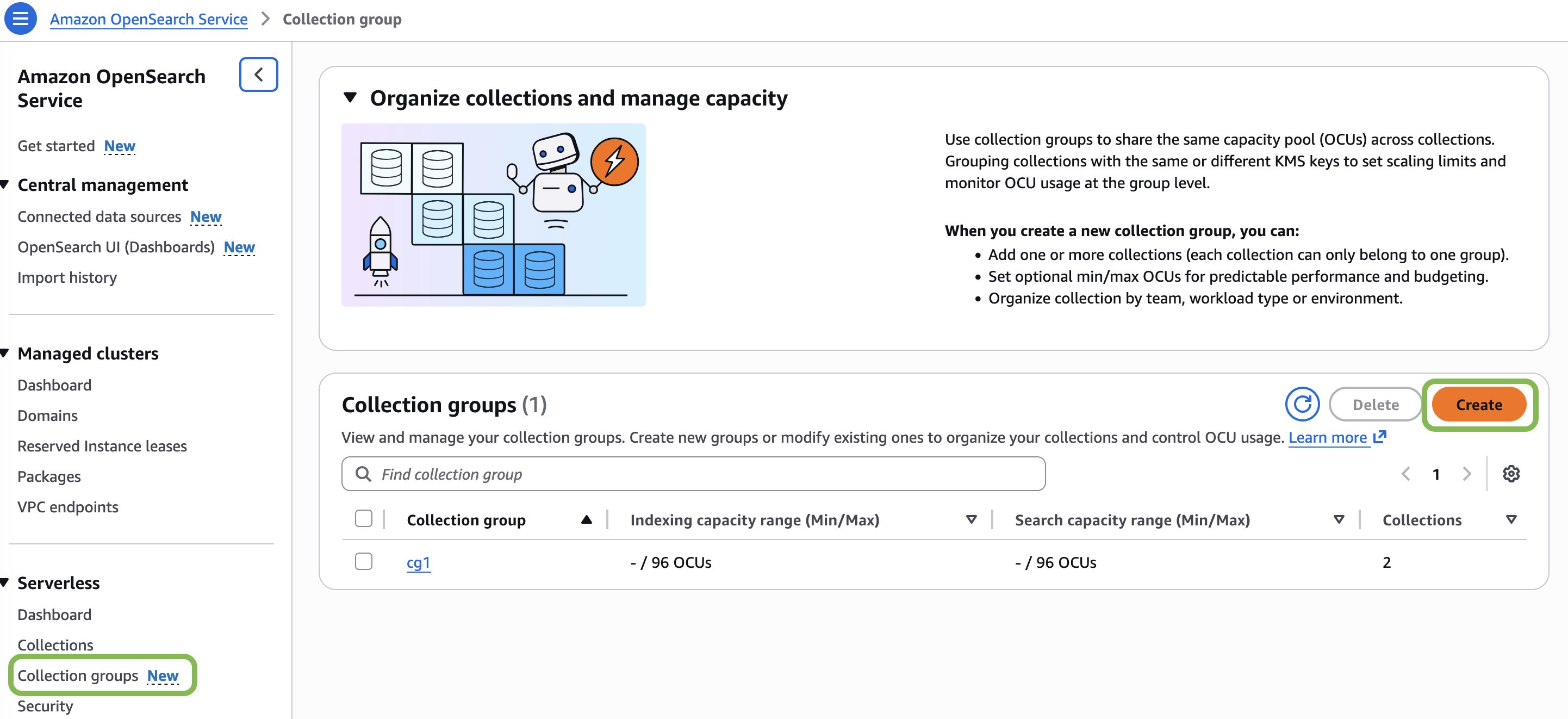
To assign collection to the collection groups
- Open the Amazon OpenSearch Service console.
- In the left navigation pane, choose Serverless, then choose Collections.
- Choose Create collection.
- For Collection name, enter a name for your collection. The name must be 3-28 characters long, start with a lowercase letter, and contain only lowercase letters, numbers, and hyphens.
- (Optional) For Description, enter a description for your collection.
- In the Collection groups section, select the collection groups you want the collection to be assigned to. A collection can only belong to one collection groups at a time.
(Optional) You can also choose to Create a new group. This will navigate you to the Create collection groups workflow. After you finish creating the collection groups, return to the step 1 of this procedure to begin creating your new collection. - Continue through the workflow to create the collection.
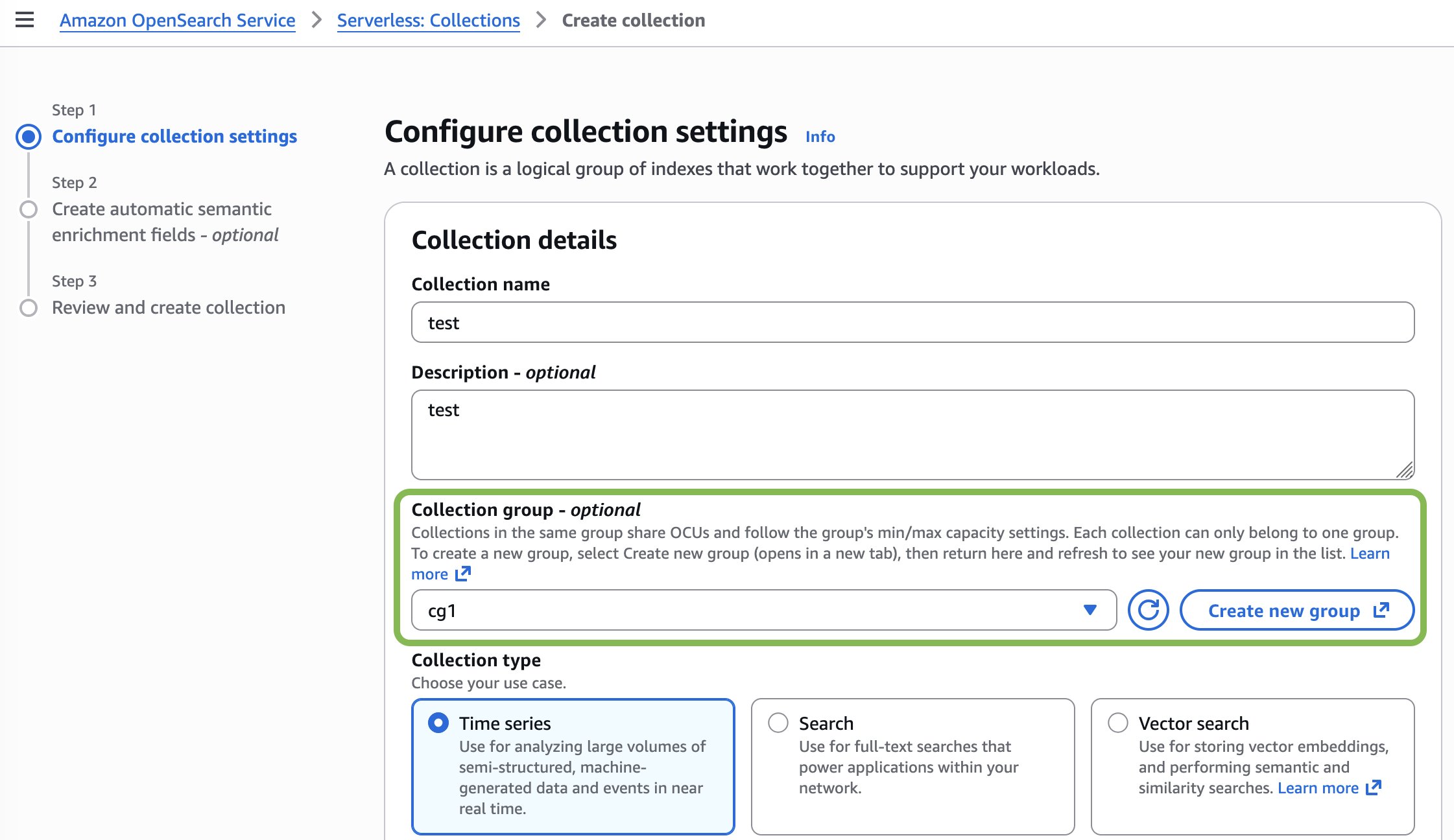
Managing collection groups
Once you’ve created your collection groups, you can update their settings as your architecture evolves. The Amazon OpenSearch Serverless documentation provides step-by-step guidance on how to edit and delete collection groups, including updating OCU limits and modifying group configurations using the AWS Management Console, CLI, and CloudFormation.
Conclusion
OpenSearch Serverless collection groups transform how you can architect multi-tenant deployments by offering flexible deployment modes that balance security requirements with operational efficiency. You can now choose the collection groups where you define logical security boundaries that allow collections, regardless of whether they share the same KMS key or use different KMS keys to share OCU resources.
This flexibility directly addresses the cost challenges that previously made multi-tenant deployments prohibitive. By consolidating collections within collection groups, you can reduce infrastructure costs while maintaining robust encryption and tenant isolation. Configuring both minimum and maximum OCUs for each collection groups solves the cold-start and capacity guarantee challenges: minimum OCUs ensure your collections maintain ready compute resources to handle high-speed ingestion, sudden traffic spikes, and load testing without performance degradation. Maximum OCUs provide cost predictability and spending controls. This dual configuration gives you a defined resource envelope that eliminates both the uncertainty of cold starts and the risk of runaway costs.
To dive deeper into the collection groups and minimum OCU configuration, visit the Amazon OpenSearch Serverless documentation.