AWS Big Data Blog
Build a trusted foundation for data and AI using Alation and Amazon SageMaker Unified Studio
This post was co-written with Anthony Lempelius and James Mesney from Alation.
When a team wants to reuse a dataset, whether it is to build a new pipeline, launch a dashboard, run an analysis, or power an AI application, the first challenge is rarely the code. Data engineers need to understand lineage, transformations, and operational expectations. Data analysts and BI engineers need consistent definitions, metrics, and trusted sources. Data scientists and AI engineers need to know provenance, quality, access constraints, and how data or features were derived. In many organizations, that context is captured in different places by different teams, often across solutions like Alation and SageMaker Unified Studio, both of which can serve as a system of record for business context depending on who is doing the work and where they operate day to day. When those perspectives are not connected, people revalidate the same information, debate definitions, and duplicate documentation across tools. A unified metadata foundation brings these role specific views together so business context, technical metadata, and governance stay aligned across platforms, making data easier to trust, easier to find, and easier to use across analytics and AI.
The new Alation integration with Amazon SageMaker Unified Studio addresses these challenges by synchronizing catalog metadata between both systems. This synchronization creates a unified metadata experience where technical teams working in SageMaker Unified Studio and business teams working in Alation collaborate on top of the same metadata. You can verify how ML and analytics assets are created, understand dependencies, and maintain traceability across your data lifecycle regardless of which system your teams prefer to use.
In this post, we demonstrate who benefits from this integration, how it works, the specific metadata it synchronizes, and provide a complete deployment guide for your environment.
The value of unified metadata governance
Organizations managing large-scale analytics and ML workloads face critical challenges when metadata is fragmented across multiple systems. When metadata exists in silos, data scientists spend valuable time searching for the right datasets. Teams duplicate metadata management efforts, creating inconsistent definitions and conflicting metrics across the organization.
Regulatory requirements demand clear provenance. Without unified metadata governance, organizations struggle to demonstrate compliance, trace data origins, and maintain audit trails across their ML and analytics pipelines. Data discovery becomes a bottleneck when teams can’t quickly find, understand, and trust the data they need, delaying model development and reducing the overall business value of data investments.
Applying consistent governance policies across disparate systems is nearly impossible without a unified metadata layer. This creates security vulnerabilities, data quality issues, and compliance blind spots. A unified metadata governance approach alleviates these challenges by providing a single source of truth for metadata across ML and analytics systems, enabling faster data discovery, consistent governance, and confident compliance while reducing the operational burden on data and ML teams.
Solution overview
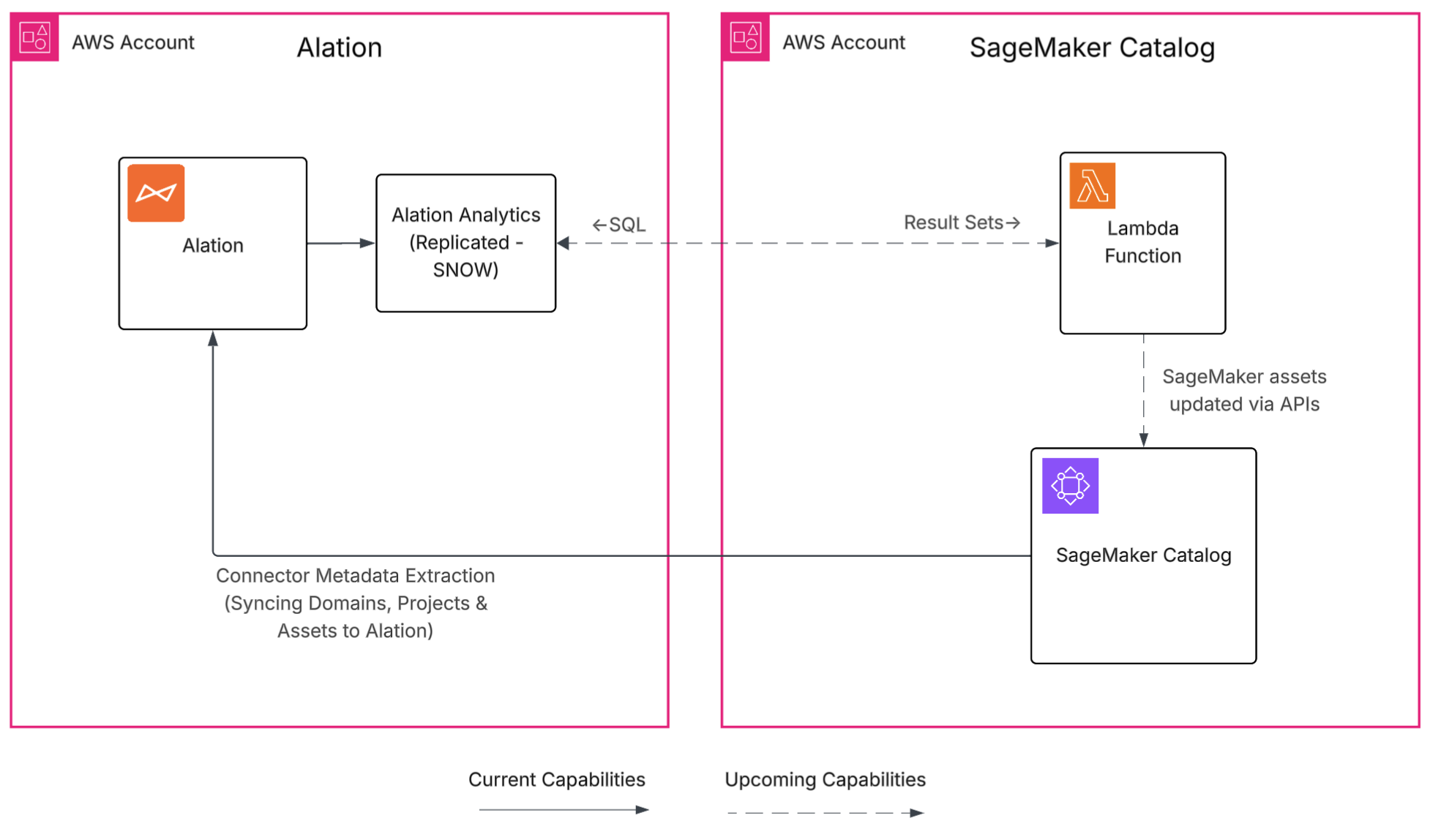
The Alation and SageMaker Unified Studio integration unifies the user experience, synchronizing metadata from cataloged assets between both systems.
This Phase 1 integration extracts metadata from Amazon SageMaker Catalog into Alation, giving you one place to discover assets.
The integration connects through AWS Identity and Access Management (IAM) authentication and synchronizes key metadata elements, including domains, projects, asset names, descriptions, owners, glossary terms, and custom metadata fields. Every metadata update includes provenance information: the originating service, the person who made the change, and the timestamp, creating comprehensive audit trails for compliance.
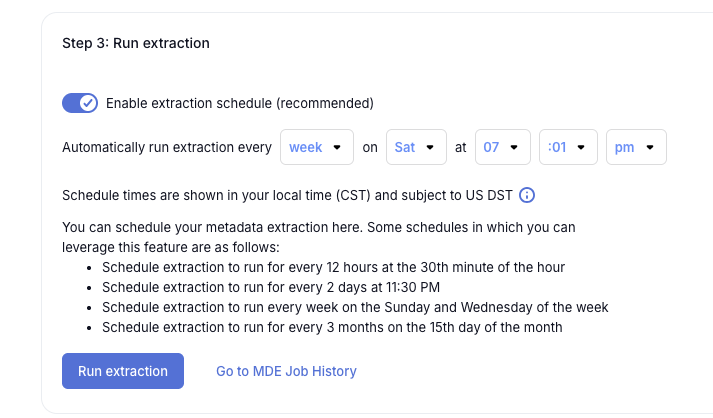
You can run metadata extractions on demand or schedule them to run automatically. The system performs an initial bulk extraction of your selected domains and projects, then keeps it up-to-date through incremental updates using either event-driven triggers or scheduled polling. Communication uses encrypted APIs with scoped IAM permissions following least-privilege principles.
This integration helps organizations in financial services, telecommunications, retail, manufacturing, and transportation that manage large numbers of analytics and ML workloads across many systems and teams. You can reduce metadata duplication, accelerate data discovery, and enable your data scientists, analysts, and engineers to find trusted data faster so they can focus on building insights rather than validating data quality.
The following diagram illustrates the solution architecture.
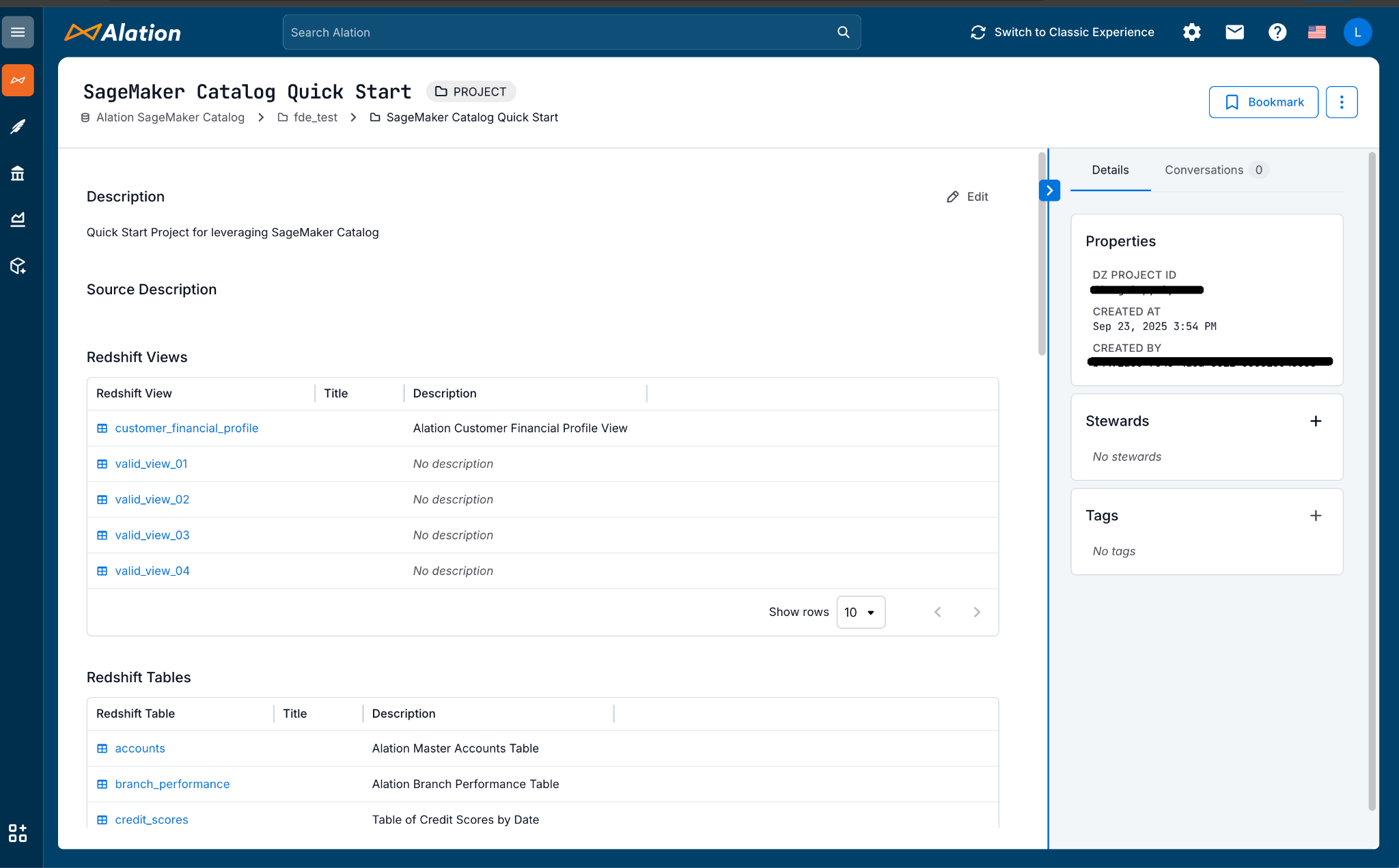
The following screenshot showcases the Alation catalog displaying the SageMaker Unified Studio project and its synchronized assets.
Metadata synchronization
This integration automatically synchronizes essential metadata between SageMaker Unified Studio and Alation, facilitating consistent information across both systems. The synchronization brings together the types of metadata you need for discovery, governance, and audit workflows, giving you clearer insight into how datasets, features, and models relate across your services.
The integration synchronizes catalog metadata, including domains, projects, asset names, descriptions, owners, glossary terms, and metadata forms. Additionally, the integration synchronizes provenance metadata, which includes information about the originating service, the actor who made the change, and the timestamp, to support traceability and audit workflows.
Integration mechanics
The integration connects SageMaker Unified Studio and Alation through a scoped IAM role that provides secure, encrypted communication. After you configure this connection within Alation, the system performs an initial extraction of your selected domains and projects, then keeps information current through incremental updates using either event-driven triggers or scheduled polling.
The integration synchronizes metadata forms from SageMaker Unified Studio into Alation through automated field mapping between both systems’ schemas. Metadata forms can capture various asset specific details like feature store references, training run identifiers, model versions, and evaluation metrics.
Every metadata update includes provenance information: the originating service, the person who made the change, and when it occurred. This supports audit and stewardship workflows. Access controls follow least-privilege principles through IAM while applying Alation’s role-based permissions, letting you limit synchronization by project, namespace, or tag as needed.
Security and compliance
Security and compliance are critical when synchronizing metadata across systems. This integration follows enterprise security practices to facilitate safe, controlled metadata synchronization. The connector uses least-privilege access, encrypted transport, and clear separation between metadata and data, so you can maintain governance without disrupting existing workflows.
You configure a scoped IAM role to define which accounts, projects, and namespaces the connector can access, making sure access follows your organization’s security policies. Metadata moves over TLS-protected APIs, and you control which domains and projects to include in Alation. By default, the integration synchronizes only metadata; your data files and artifacts remain in their original AWS locations unless you explicitly choose to export them.
Alation maintains a complete audit trail by recording extraction events, mapping changes, and stewardship activities. These security controls support compliant metadata governance while preserving your existing operational practices.
Prerequisites
Before setting up this integration, ensure you have the following:
- An Alation Cloud Service (ACS) instance
- Alation server admin access
- An AWS account
- A SageMaker Unified Studio domain and project with existing metadata
Configure authentication
Before configuring the Alation connector, you must set up the required AWS resources and permissions. The first step is to configure authentication. The Alation connector supports two authentication methods to access SageMaker Unified Studio. Choose the method that best fits your security requirements.
Option 1: IAM role (Recommended)
Create an IAM role that the Alation connector will assume to access SageMaker Unified Studio. For detailed instructions on creating IAM roles, see IAM role creation.
The following is an example IAM permission policy for SageMaker Catalog access:
The following is an example trust policy for the IAM role:
Option 2: IAM user with access keys
Create an IAM user with programmatic access and attach the necessary permissions. For detailed instructions on creating IAM users, see Create an IAM user in your AWS account.
Create an IAM user with programmatic access enabled, attach the following policy, and generate access keys for use in Alation configuration:
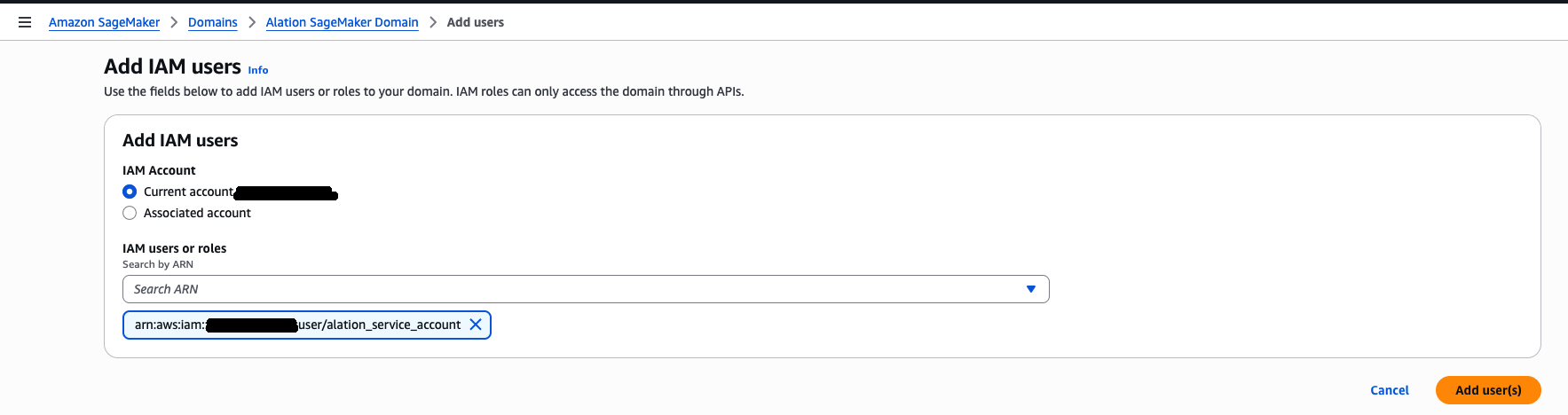
Add IAM role or user to SageMaker Unified Studio domain
Add the IAM role or user you created to the SageMaker Unified Studio domain. For detailed instructions on adding users to a domain, see User management in Amazon SageMaker Unified Studio. The following screenshot shows an example of adding IAM users on the SageMaker dashboard.
Add IAM role or user to SageMaker Unified Studio projects
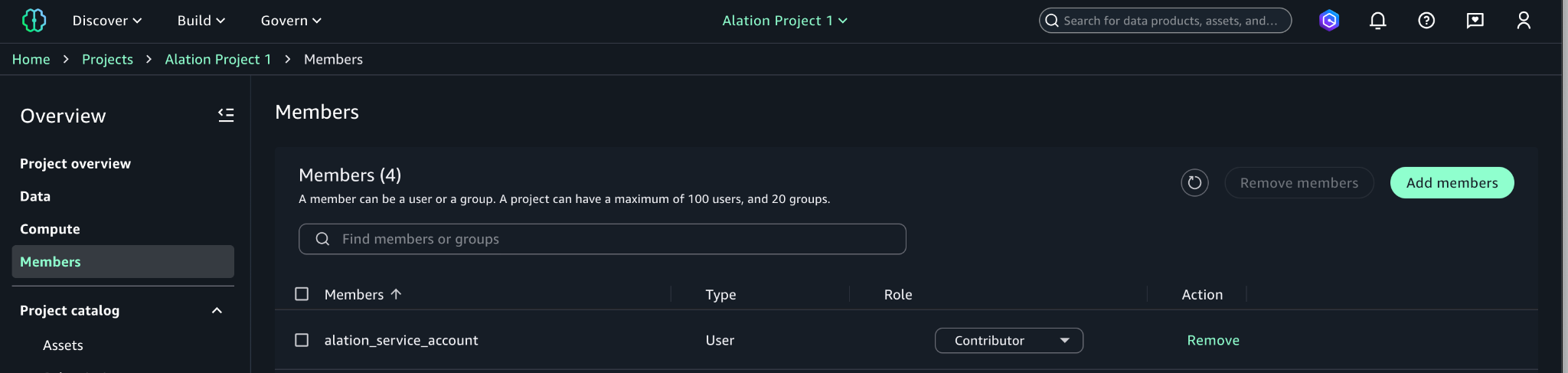
The IAM role or user must be added as a member to all SageMaker Unified Studio projects that contain metadata you want to synchronize with Alation. Projects without this member will not be included in the synchronization process.
Add the IAM role or user as a project member with Contributor or Owner permissions for each project you want to include in the sync, as illustrated in the following screenshot. For detailed instructions on adding project members, see Add project members.
Install SageMaker enhanced connector
After completing the AWS setup, you can configure the Alation connector to establish the integration. The connector is distributed as a .zip package for upload and installation in the Alation application. To obtain the connector, contact the Forward Deployed Engineering team or your Alation Account Manager.
When you have the .zip package, follow the installation procedures to add the connector.

Create and configure Alation’s data source
Navigate to the Data Sources section in Alation, create a new data source, and select SageMaker Catalog as the source type. Configure the connection settings with the authentication method chosen in the AWS setup.
For IAM role authentication, use the following configuration:
- Connection Type: IAM Role
- Role ARN: ARN of the IAM role created in AWS setup
- External ID: External ID configured in the trust policy
- AWS Region: Region where your SageMaker Unified Studio domain is located
For IAM user authentication, use the following configuration:
- Connection Type: Access Keys
- Access Key ID: Access key from AWS setup
- Secret Access Key: Secret key from AWS setup
- AWS Region: Region where your SageMaker Unified Studio domain is located
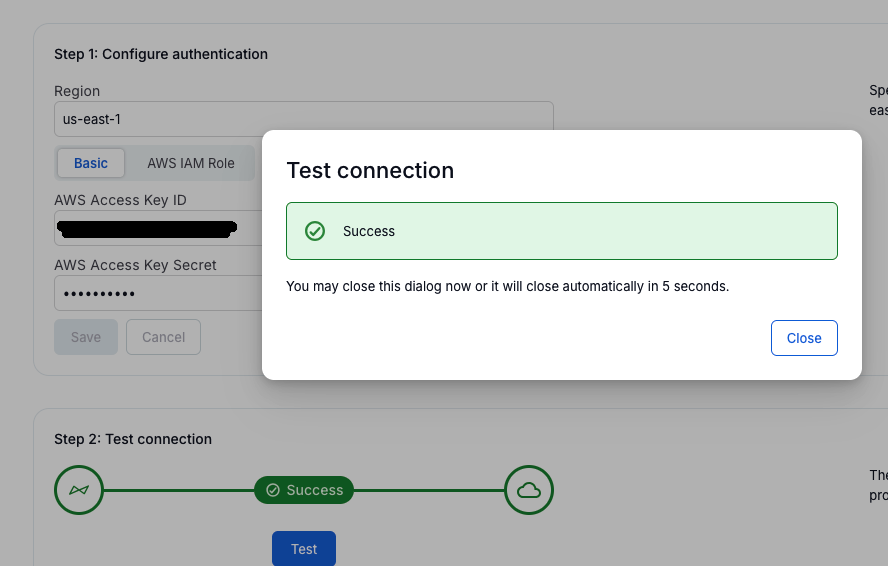
Test the connection to verify authentication and network connectivity, as shown in the following screenshot.
Configure metadata extraction settings
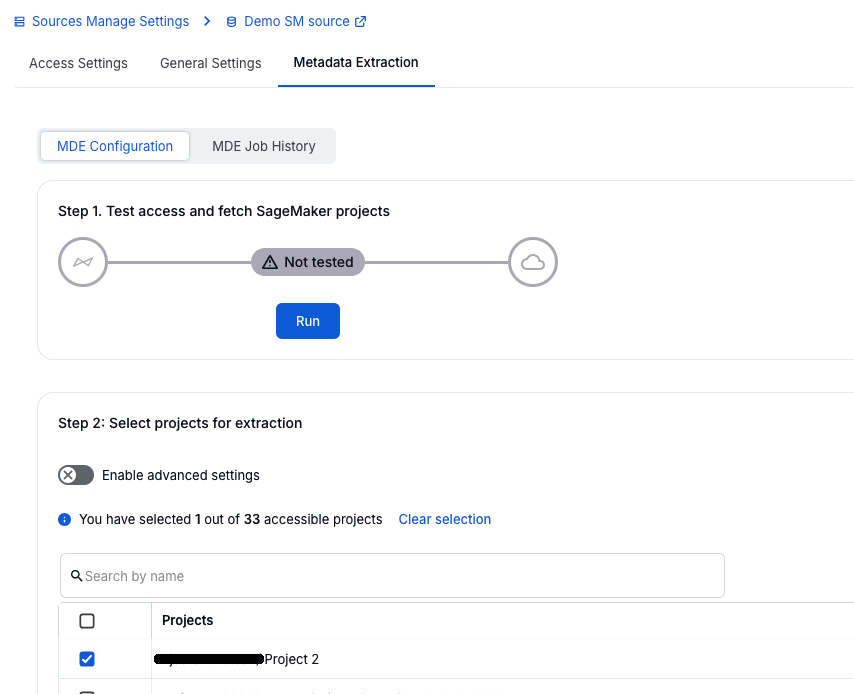
Configure the extraction scope by selecting the SageMaker domains and projects to synchronize, as shown in the following screenshot. Only projects where the IAM role or user is a member will be available for synchronization.
Run initial extraction
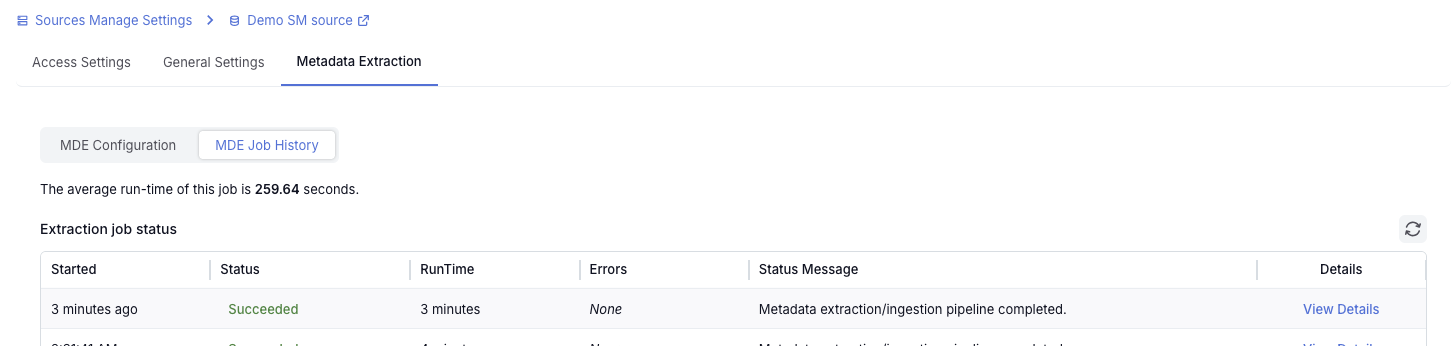
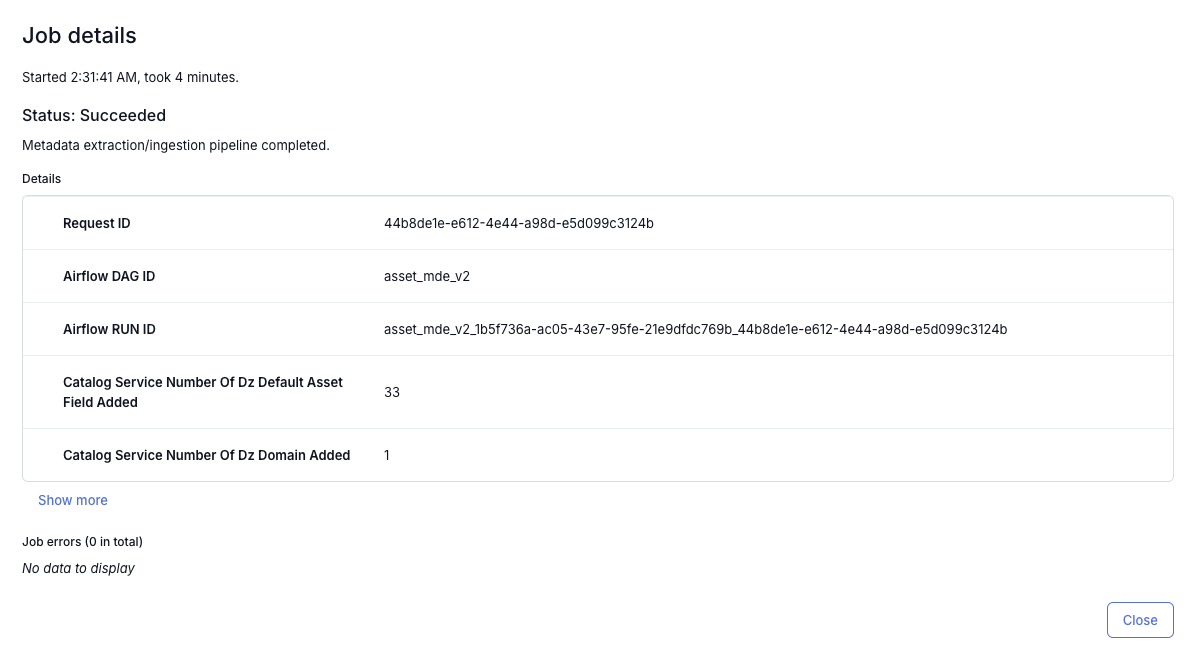
Execute the first metadata synchronization to import existing metadata from SageMaker Unified Studio into Alation. Monitor the extraction progress through Alation’s status indicators and validate that SageMaker assets appear correctly in the catalog.
The following screenshot shows the job history page with job status Running.

The following screenshot shows the job history page with job status Succeeded.
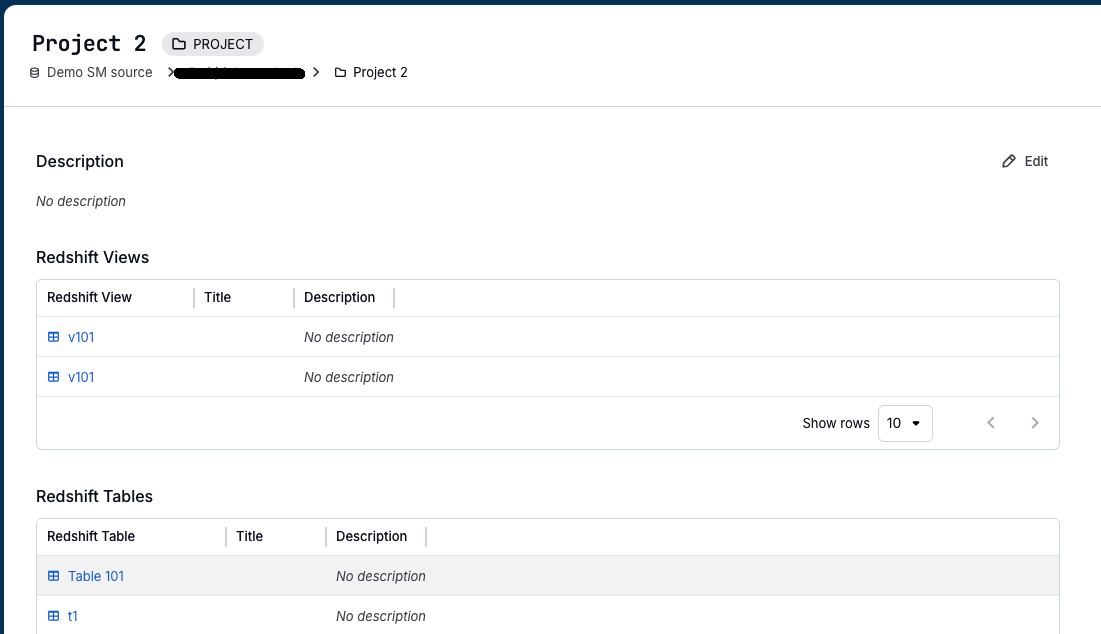
The following screenshot shows the Alation catalog displaying the SageMaker Unified Studio project and its synchronized assets.
Operate and tune
Configure ongoing operations by setting extraction cadence, configuring reconciliation alerts, and monitoring logs regularly. Add data stewards to synchronized assets, and consider enabling AI-generated descriptions or working with Alation Professional Services for advanced governance design.
Enhanced capabilities
The next phase of the integration introduces three key capabilities: bi-directional metadata synchronization, lineage replication, and data quality metadata replication. The bi-directional capability gives you the flexibility to control where metadata updates originate, either in Alation or in SageMaker Unified Studio, so you can manage metadata changes in the service that best aligns with your organizational workflows and governance processes.
The feature set is rolling out in phases. Phase 1 is available at the time of writing this post and provides extraction from SageMaker Unified Studio into Alation, including initial and incremental updates and audit logging. Phase 2 is coming soon and will offer configurable principal catalogs, advanced scoped syncs, and reconciliation workflows for Alation Cloud Service customers.
These enhancements will support governed, scalable ML operations with increasing depth and automation.
Conclusion
The Alation and SageMaker Unified Studio integration helps organizations bridge the gap between fast analytics and ML development and the governance requirements most enterprises face. By cataloging metadata from SageMaker Unified Studio in Alation, you gain a governed, discoverable view of how assets are created and used. This supports leaders, stewards, compliance teams, and ML practitioners who depend on accurate, well-documented data to scale analytics and AI responsibly.
To learn more about this integration and explore additional resources, refer to the Amazon SageMaker Unified Studio User Guide and Alation Documentation.