AWS Big Data Blog
Configure a custom domain name for your Amazon MSK cluster enabled with IAM authentication
Most Amazon Managed Streaming for Apache Kafka (Amazon MSK) customers are simplifying and standardizing access control to Kafka resources using AWS Identity and Access Management (IAM) authentication. This adoption is also accelerated as Amazon MSK now supports IAM authentication in popular languages including Java, Python, Go, JavaScript, and .NET.
In the first part of Configure a custom domain name for your Amazon MSK cluster, we discussed about why custom domain names are important and provided details on how to configure a custom domain name in Amazon MSK when using SASL_SCRAM authentication. In this post, we discuss how to configure a custom domain name in Amazon MSK when using IAM authentication. We recommend you read the first part of this blog as it captures solution details implementation steps.
Solution overview
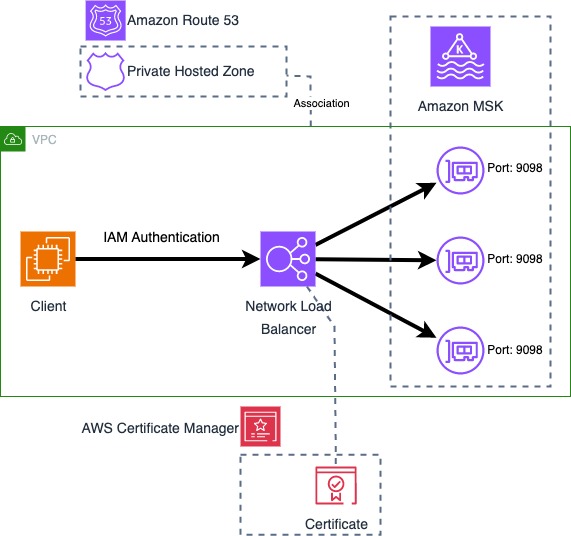
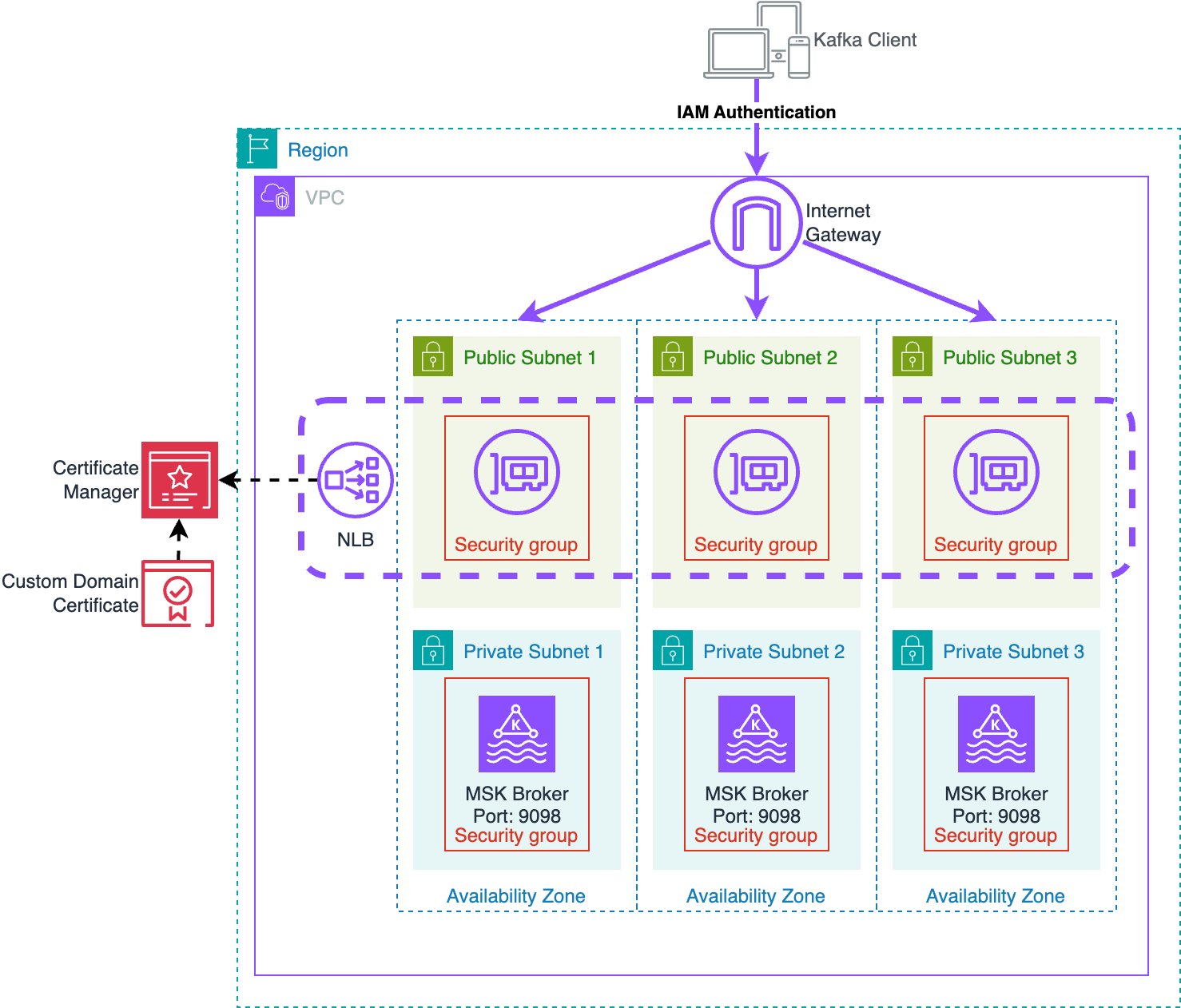
IAM authentication for Amazon MSK uses TLS to encrypt the Kafka protocol traffic between the client and Kafka broker. To use a custom domain name, the Kafka broker needs to present a server certificate that matches the custom domain name. To achieve this, this solution uses an Network Load Balancers (NLBs) with Amazon Certificate Manager to provide a custom certificate on behalf of the MSK brokers, and a Route 53 Private Hosted Zone to provide DNS for the custom domain name.
The following diagram shows all components used by the solution.
Certificate management
For clients to perform TLS communication with the MSK cluster the cluster needs to provide a certificate with hostnames matching the custom domain name. This solution uses a certificate in AWS Certificate Manager (ACM) signed with a Private Certificate Authority (PCA) for TLS with the custom domain name. This solution uses a certificate with bootstrap.example.com as the Common Name (CN) so that the certificate is valid for the bootstrap address, and Subject Alternative Names (SANs) are set for all broker DNS names (such as b-1.example.com). Since this solution uses a private certificate authority, the CA chain must be imported into the client trust stores.
This solution works with any server certificate, whether certificates are signed by a public or private Certificate Authority (CA). You can import existing certificates into ACM to be used with this solution. Certificates must provide a common name and/or subject alternative names that match the bootstrap DNS address as well as the individual broker DNS addresses. If the certificate is issued by a private CA, clients need to import the root and intermediate CA certificates to the client trust store. If the certificate is issued by a public CA, the root and intermediate CA certificates will be in the default trust store.
Network Load Balancer
The NLB provides the ability to use a TLS listener. The ACM certificate is associated with the listeners and enables TLS negotiation between the client and the NLB. The NLB performs a separate TLS negotiation between itself and the MSK brokers. In addition to the above architecture, this solution also allows using AWS Private Link to connect the cluster to external VPCs. This allows secure access to MSK between VPCs while using a custom domain name.
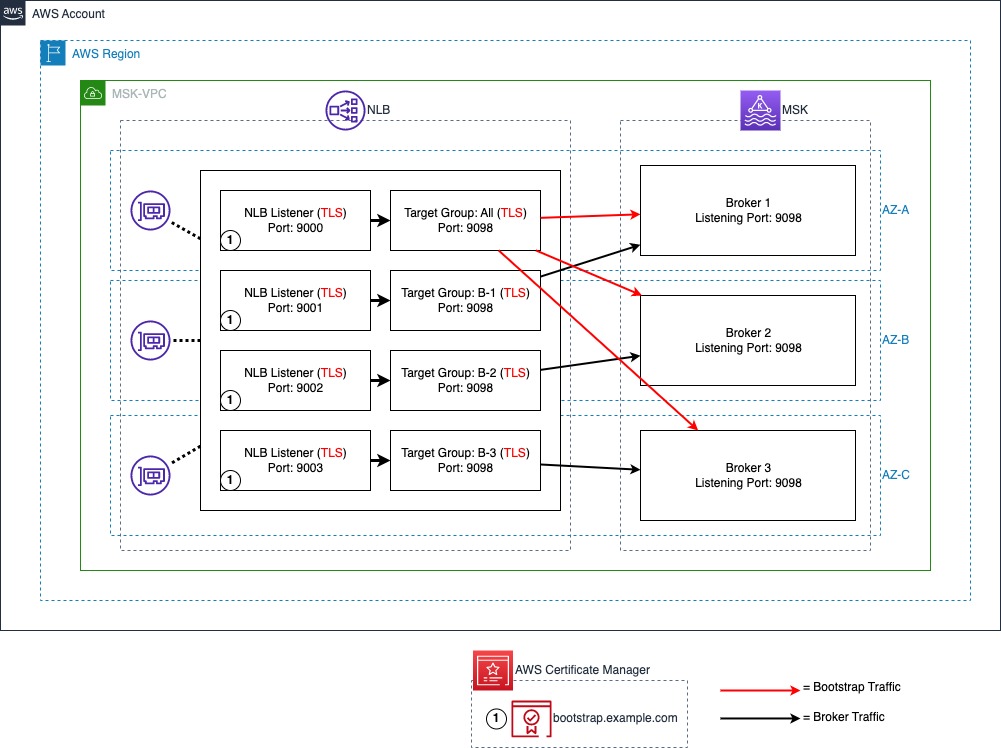
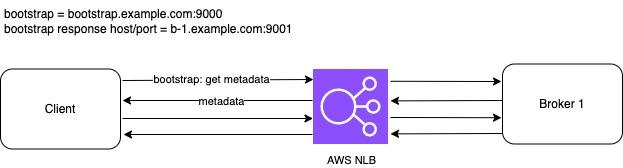
The following diagram illustrates the NLB port and target configuration. A TLS listener with port 9000 is used for bootstrap connections with all MSK brokers set as targets. IAM authentication is configured to run on port 9098 of the MSK brokers using a TLS target type. A TLS listener port is used to represent each broker in the MSK cluster. In this post, there are three brokers in the MSK cluster starting with port 9001, representing broker 1 and up to port 9003, representing broker 3.
Domain Name System (DNS)
For the client to resolve DNS queries for the custom domain, we use an Amazon Route 53 private hosted zone to host the DNS records, and associate it with the client’s VPC to enable DNS resolution from the Route 53 VPC resolver. This solution uses a private MSK cluster and private DNS. For publicly accessible MSK clusters a public NLB and DNS provider such as a Route53 public hosted zone can be used.
Amazon MSK
Finally, each broker needs to have its advertised listeners configuration (advertised.listeners) updated to match the custom domain name and NLB ports. Advertised listeners is a configuration option used by Kafka clients to connect to the brokers. By default, an advertised listener is not set. Once set, Kafka clients use the advertised listener instead of listeners to obtain the connection information for brokers. MSK brokers use the listener configuration to tell clients the DNS names and ports to use to connect to the individual brokers for each authentication type enabled. Advertised listeners are unique to each broker; and the cluster won’t start if multiple brokers have the same advertised listener address. For this reason, this solution uses a unique custom DNS name for each broker (such as, b-1.example.com).
Solution Deployment
To deploy the solution, use the CloudFormation template from the GitHub repository.
This template deploys a VPC, NLB, PCA, ACM certificate, MSK cluster, and an Amazon EC2 instance for cluster connectivity. The EC2 instance includes a script to handle updating the broker advertised.listeners settings to match the custom domain name. For more information on deploying a CloudFormation template, refer to Create a stack from the CloudFormation console.
After deploying the CloudFormation template, run the script to update advertised listeners as follows:
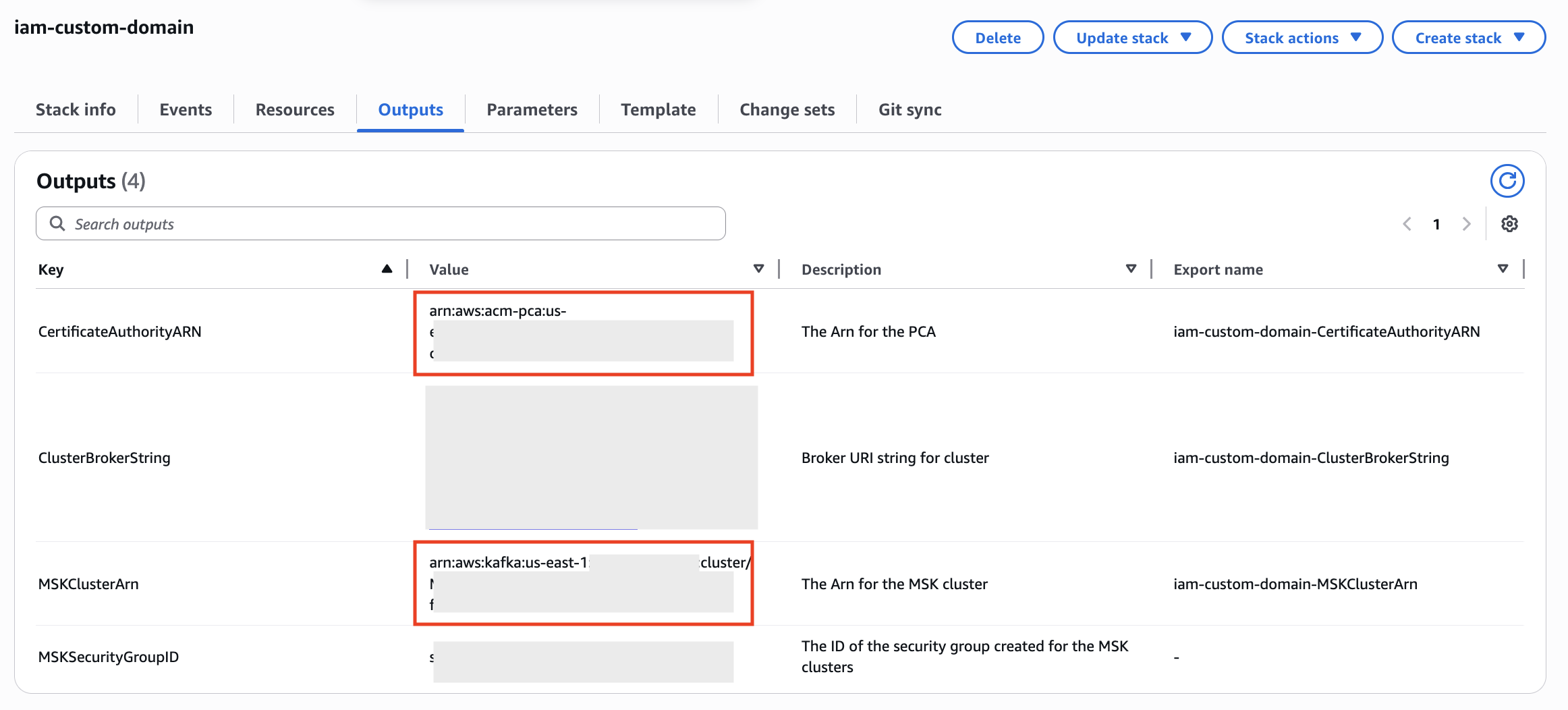
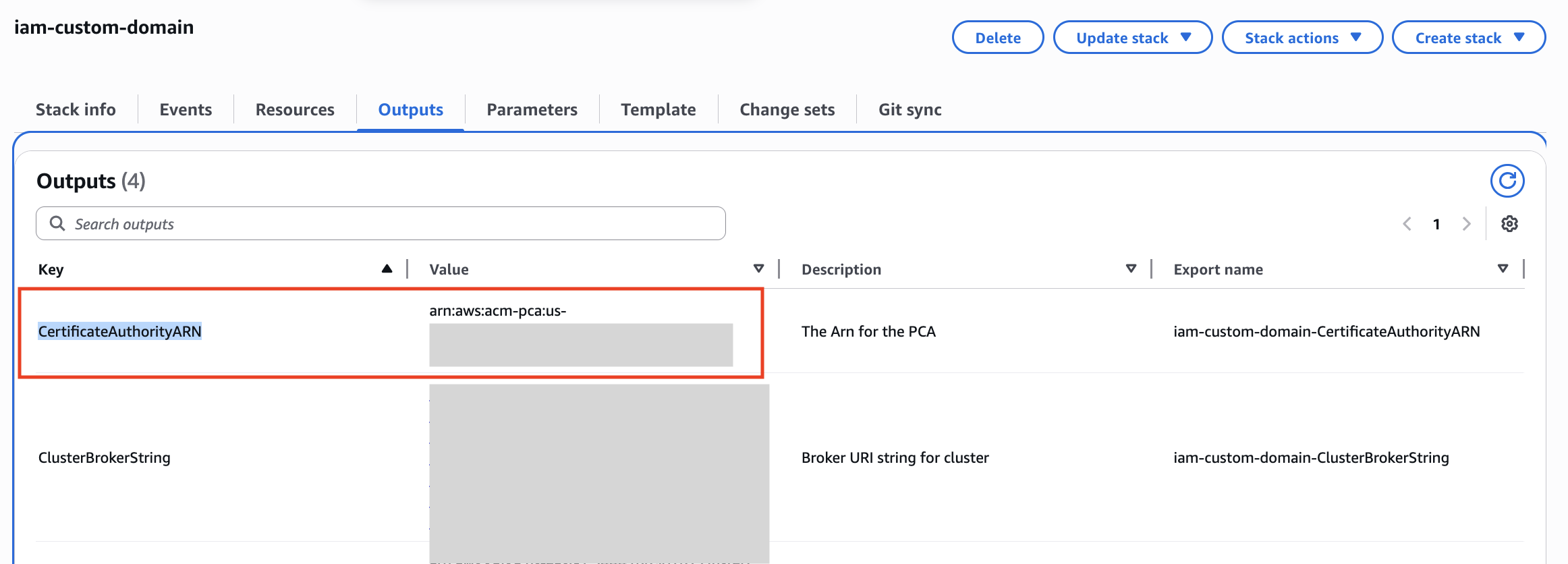
- Retrieve the MSKClusterARN and CertificateAuthorityARN from the CloudFormation outputs for your stack as they will be used in subsequent steps.
- Navigate to the EC2 console and identify the KafkaClientInstance. Choose Connect to connect to the instance using AWS Systems Manager Session Manager.
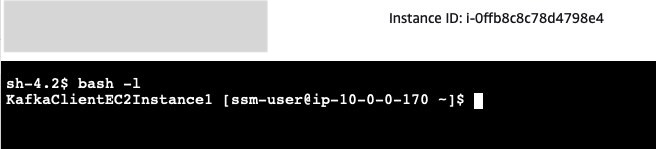
- Session Manager starts a session in shell. Start a bash session with the command:
- The Kafka client SDKs have already been installed in the EC2 instance. You can update the
advertised.listenersconfiguration as follows, replacing CLUSTER_ARN with the ARN of your MSK cluster retrieved from CloudFormation in step 1:Note that once this script completes, the brokers will have new advertised listeners configurations. Connections using the standard IAM address for the MSK service will not work until we complete the next steps, as the brokers will redirect connections over this address back to the custom domain name and TLS will fail.
- Next, we need to create a truststore with the certificate for our AWS Private Certificate Authority (PCA) to allow TLS with the NLB. In the following command, replace PCA_ARN with the ARN of the PCA retrieved from CloudFormation in step 1:
 We’re using the default Java truststore which uses the password
 changeit.When asked “Trust this certificate?” enter “yes”. - Create a new properties file to allow IAM authentication with our custom truststore:
- Verify you can connect to the cluster using IAM authentication using our new custom domain name, replacing bootstrap.example.com with your own custom domain name if you used a different one in CloudFormation:

Cleanup
To stop incurring costs navigate to CloudFormation and delete the CloudFormation stack to remove all resources provisioned by CloudFormation.
Frequently Asked Question about Custom Domain Name
Customers have asked a few questions about implementing custom domain names with MSK. You can find answers to some of the most popular questions here.
Are there any limitations for this solution on MSK?
The advertised.listeners setting was removed as a dynamic broker in KRaft-based Kafka clusters. Therefore, this solution is only supported in Zookeeper-based MSK clusters. Additionally, this solution is only applicable to SASL/SCRAM and IAM-authentication based MSK clusters.
How the custom domain name solution scales when we add new brokers?
When using the NLB for broker connectivity (option 2 in the configure a custom domain name for your Amazon MSK cluster blog post), you will need to add an additional listener for each additional broker created.
For TLS, if using Subject Alternative Name (SAN) to list individual broker DNS hostnames, you will need to create a new certificate that includes the names of the additional brokers. One option is to create a certificate with SANs for more brokers than needed to allow for growth.If a wildcard certificate is used, you do not need to modify certificates when adding brokers.
What changes are required when we remove brokers?
Amazon MSK supports scale-in by removing brokers from the cluster. Brokers are removed from each availability zones (AZ). So a 6 broker Amazon MSK cluster deployed in 3 AZ can be reduced to 3 broker cluster deployed in 3 AZ. When brokers are removed, you can remove the NLB listeners for the removed broker along with the Route53 DNS endpoints. However, you can also leave them as is, or just remove the target IP from the broker numbers target group. The NLB will mark the targets as unhealthy and stop directing traffic to them. If you ever plan to scale-out the number of brokers, you can re-use the existing NLB listeners and Route 53 DNS entries and would only need to update the target IPs used in the broker numbers target group.
Is there any change in configuration required if there is any broker failure?
No. When a broker fails, Amazon MSK replaces the failed broker with a new broker instance keeping the configuration of the broker exactly the same. So, there would be no change in the advertised listener of the broker. Once the broker is healthy, the broker can accept new connections and read/write traffic.
Can you use Amazon MSK Replicator between MSK clusters in multiple AWS Regions when using the custom domain name solution?
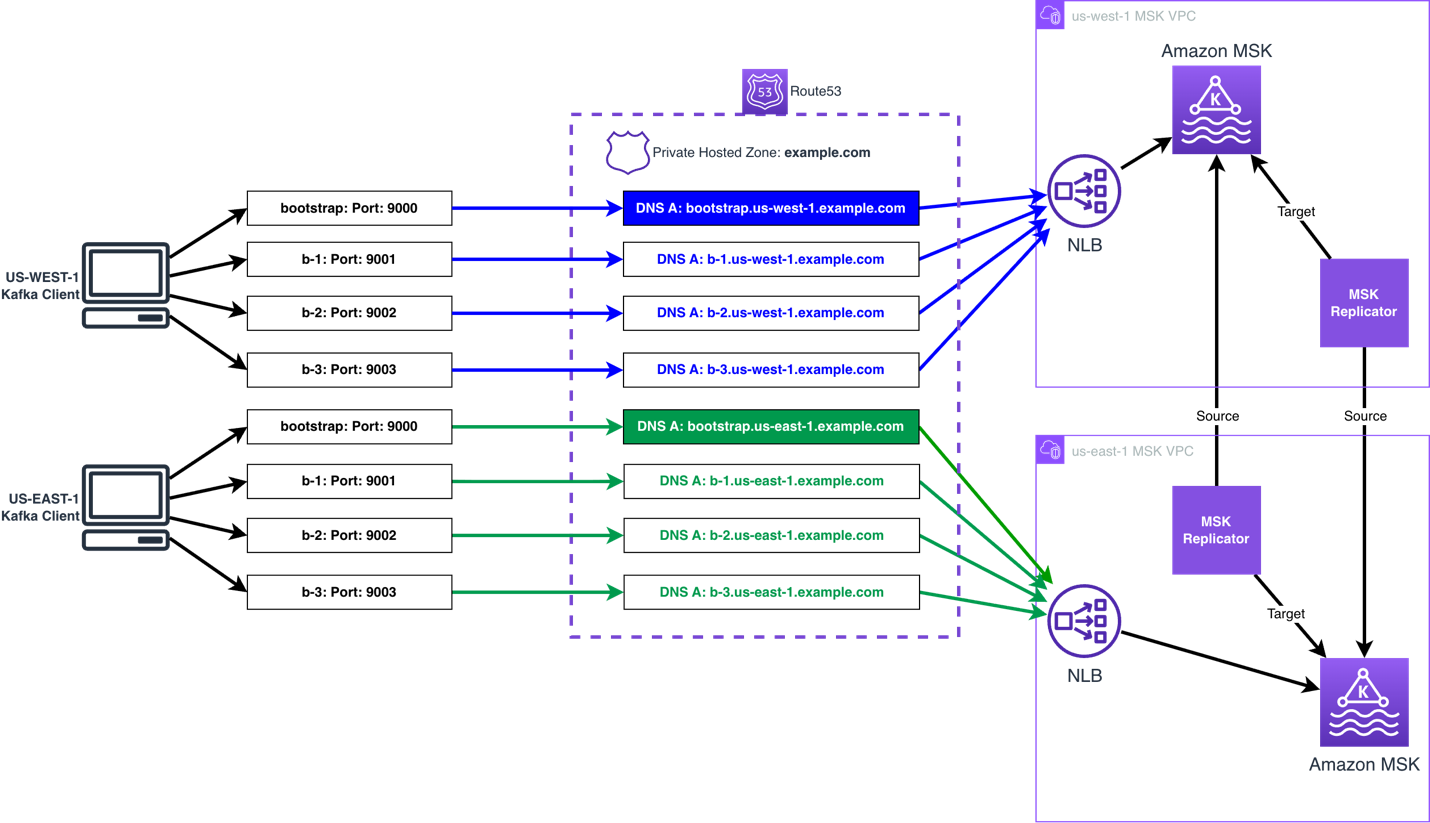
The Amazon MSK Replicator can be used when using the custom domain name solution, either in an active-passive or active-active setup. The same process can be followed to set the custom domain name.
You then follow build multi-Region resilient Apache Kafka applications with identical topic names using Amazon MSK and Amazon MSK Replicator post to configure MSK Replicator.
The following diagram shows an active-active AWS multi-Region MSK setup using the custom domain name solution:
Can I use a global bootstrap DNS name to connect to Amazon MSK clusters deployed across multiple AWS regions when IAM authentication is enabled?
No, it is not possible to use a global bootstrap reference to represent MSK clusters deployed in multiple AWS Regions, unless the client is aware of the cluster’s region when connecting. To use IAM authentication, the correct AWS Region must be included in the IAM authentication request for a given cluster. This is because the AWS Region is a part of the Sigv4 authentication protocol used by IAM. This scope prevents the IAM authorization being used to talk to a resource in another AWS Region. You can provide the AWS Region in one of two ways– with region-specific bootstrap URLs or by explicitly configuring the region.
For example, if the bootstrap string is bootstrap.us-east-1.example.com, then msk-iam-auth library will to extract the AWS Region from the broker connection string and use us-east-1 in its IAM requests. If the bootstrap string is simply bootstrap.example.com, then the client must explicitly configure AWS_REGION=us-east-1 to connect to the cluster if it is in us-east-1, or us-west-2 if it is in us-west-2.
Note that this is a limitation for IAM authentication, but not for SASL/SCRAM authentication. With SASL/SCRAM authentication, if the client’s credentials are applied to both clusters the global endpoint can point to either cluster and the client will be able to connect. The AWS Region is not used in SASL/SCRAM authentication, so it does not restrict the authentication scope.
How to allow public access to a private MSK cluster using the custom domain name solution?
To provide public access to a MSK cluster using the custom domain solution, you will need to do the following:
- Create an Internet-facing NLB, and associate public subnets (subnets that have a route to the Internet Gateway attached to the VPC).
- Create ingress rules in both the NLB and MSK security groups permitting the required public addresses. Note: the port will be 9098 for the MSK security group, and the ports you are using on the NLB listeners.
- Provide public DNS resolution for the Kafka clients, by using a Route 53 public zone, or an alternative public DNS resolver.
- The client needs have IAM credentials, with permission, to talk to the MSK brokers, using an IAM role, IAM access keys, IAM Roles Anywhere, or another mechanism that uses the AWS Security Token Service (AWS STS) to create and provide trusted users with temporary security credentials.
In the first part of the blog, two patterns have been highlighted. How to decide which pattern to use and why?
Option 1: Only bootstrap connection through NLB
If the Kafka clients have direct access to the broker, then you can use custom domain name for the bootstrap connection while the clients can still connect to the MSK Brokers with broker DNS. This is the simplest option, as it does not require custom TLS certificates or TLS listeners.Note that this option is not necessary when using MSK Express brokers, as MSK Express brokers already manages bootstrapping via a broker-agnostic connection string. For MSK Express, this option does not add value other than configuring a custom domain name for appearances / simplicity of client configuration. For MSK Standard brokers, this can improve client connectivity by making connection strings broker agnostic.

Option 2: All connections through NLB
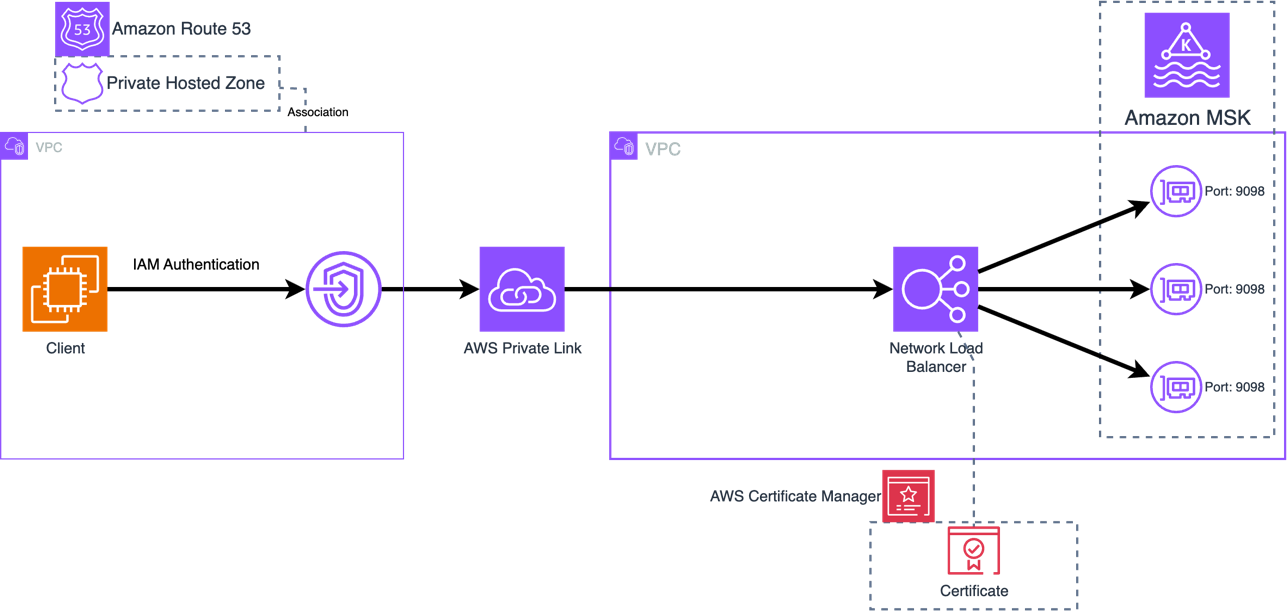
When Kafka clients don’t have direct access to Amazon MSK Brokers, routing all connections through the NLB can be preferred. This can occur when a client is deployed in a different VPC than Amazon MSK VPC or the client is external, and when Amazon MSK Multi VPC Connectivity is not an option. In general, Amazon MSK Multi VPC Connectivity is preferred as this is a simpler pattern for most organizations to manage MSK Connectivity across accounts and VPCs.When Multi VPC Connectivity is not an option, NLB can be used to provide connectivity with Transit Gateway or PrivateLink, and the solution mentioned in the blog should be used.
Here is an example architecture how Kafka client and Amazon MSK cluster deployed in two separate VPCs but connected via AWS Private Link.
Is Amazon Route 53 required to use a custom domain name with Amazon MSK?
You can use an alternative DNS resolver service, and do not require Amazon Route 53 to use a custom domain name with Amazon MSK. The only requirement is that your clients can resolve against your DNS resolver service. The only change required, is to use a CNAME for the DNS records, referencing the NLBs DNS record, in place of the Alias records, as this is record type is only available in Amazon Route 53.
We don’t use Amazon Certificate Manager (ACM), can NLB integrate with other 3rd party certificate managers?
NLB only supports ACM to bind a certificate to a TLS listener. You can import a certificate created using your 3rd party certificate manager into ACM, and do not need to create a certificate using ACM.
Getting connection to node terminated during authentication after setting advertised.listeners , what could be the issue?
As the issue started to occur after changing the advertised.listeners configuration, the issue is unlikely to be related to permissions. The following can cause this issue:
- The NLB and/or client’s Security Group does not permit access to the listener ports on the NLB from the client.
- A firewall appliance between the NLB and client does not permit the client to talk to the NLB using the listener ports.
- The
advertised.listenersconfiguration has an error causing the client to receive invalid details, such as a typo in the name. If this is the case, use a client in the same VPC as the MSK broker that has IAM permissions to talk to the MSK broker, and Security Group rules permitting connectivity, you then use the following command to delete theadvertised.listenersconfiguration.
BROKERS_AMAZON_DNS_NAME such as b-1.clustername.xxxxxx.yy.kafka.region.amazonaws.com:9098.
Getting “unexpected broker id, expected 2 or empty string, but received 1”, what is causing this error?
This error is typically presented when the advertised.listeners configuration for one of the brokers has the port used by another broker set. For example broker 2 has port 9001 set for IAM, but this port is used to connect to broker 1, so broker 1 is responding with an error to say you presented broker id 2, but I am broker 1.
To correct this, you will need to update the broker with the incorrect advertised.listeners configuration to use the correct port. To gain access to the broker to make the change, you will need to use the following command to delete the incorrect configuration:
BROKERS_AMAZON_DNS_NAME such as b-2.clustername.xxxxxx.yy.kafka.region.amazonaws.com:9098.
You then need to use the following command to set the advertised.listeners configuration for that broker:
Note: The advertised.listeners configuration in the below assumes only IAM is used for authentication. If you are using additional authentication options, you will need to include them.
Summary
In this post, we explained how you can use an NLB, Route 53, and the advertised listener configuration option in Amazon MSK to support custom domain names with MSK clusters when using IAM authentication. You can use this solution to keep your existing Kafka bootstrap DNS name and reduce or remove the need to change client applications because of a migration, recovery process, or to use a DNS name in line with your organization’s naming convention (for example, msk.prod.example.com).
Try the solution out for yourself, and leave your questions and feedback in the comments section.