AWS Big Data Blog
Implementing Kerberos authentication for Apache Spark jobs on Amazon EMR on EKS to access a Kerberos-enabled Hive Metastore
Many organizations run their Apache Spark analytics platforms on Amazon EMR on Amazon Elastic Compute Cloud (Amazon EC2), using Kerberos authentication to secure connectivity between Spark jobs and a centralized shared Apache Hive Metastore (HMS). With Amazon EMR on Amazon EKS, they gained a new option for running Spark jobs with the benefits of Kubernetes-based container orchestration, improved resource utilization, and faster job startup times. However, an HMS deployment supports only one authentication mechanism at a time. This means that they must configure Kerberos authentication for their Spark jobs on Amazon EMR on EKS to connect to the existing Kerberos-enabled HMS.
In this post, we show how to configure Kerberos authentication for Spark jobs on Amazon EMR on EKS, authenticating against a Kerberos-enabled HMS so you can run both Amazon EMR on EC2 and Amazon EMR on EKS workloads against a single, secure HMS deployment.
Overview of solution
Consider an enterprise data platform team that’s been running Spark jobs on Amazon EMR on EC2 for several years. Their architecture includes a Kerberos-enabled standalone HMS that serves as the centralized data catalog, with Microsoft Active Directory functioning as the Key Distribution Center (KDC). As the team evaluates Amazon EMR on EKS for new workloads, their existing HMS must continue serving Amazon EMR on EC2, with both authenticating through the same Kerberos infrastructure. To address this, the platform team must configure their Spark jobs running on Amazon EMR on EKS to authenticate with the same KDC. This is so they can obtain valid Kerberos tickets and establish authenticated connections to the HMS while maintaining a unified security posture across their data platform.
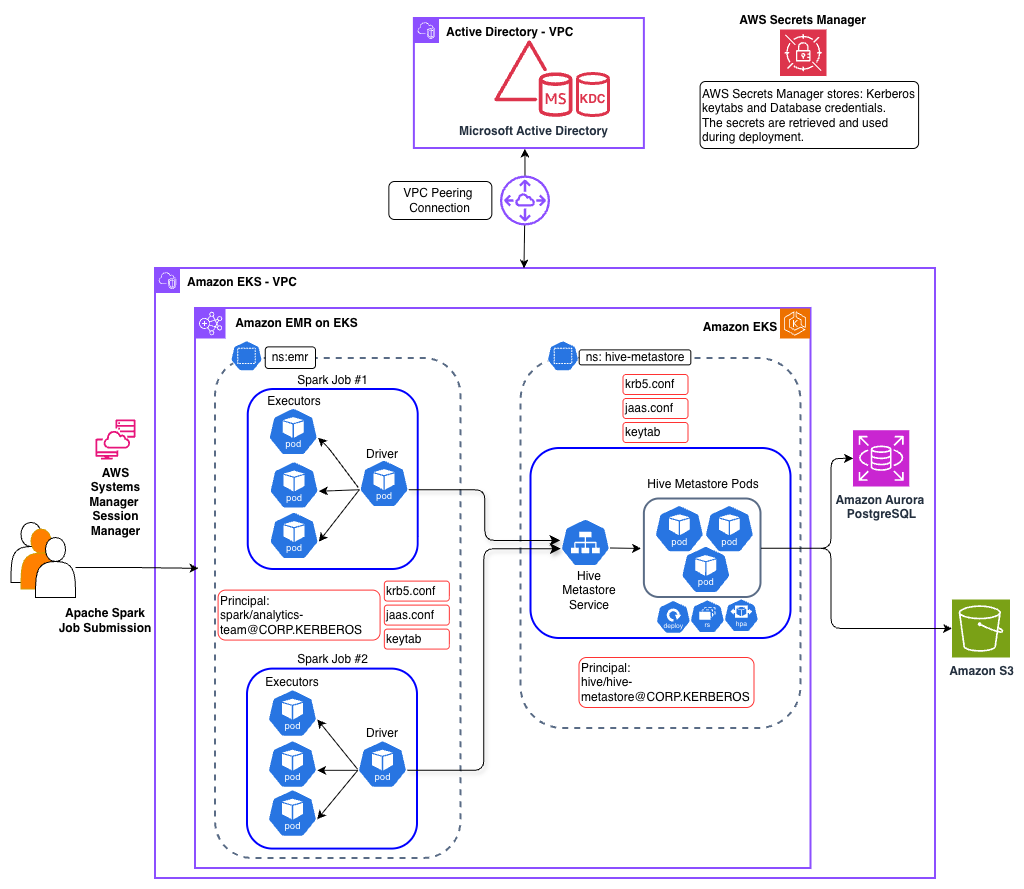
Scope of Kerberos in this solution
Kerberos authentication in this solution secures the connection between Spark jobs and the HMS. Other components in the architecture use AWS and Kubernetes security mechanisms instead.
Solution architecture
Our solution implements Kerberos authentication to secure the connection between Spark jobs and the HMS. The architecture spans two Amazon Virtual Private Clouds (Amazon VPCs) connected using VPC peering, with distinct components handling identity management, compute, and metadata services.
Identity and Authentication layer
A self-managed Microsoft Active Directory Domain Controller is deployed in a dedicated VPC and serves as the KDC for Kerberos authentication. The Active Directory server hosts service principals for both the HMS service and Spark jobs. This separate VPC deployment mirrors real-world enterprise architectures where Active Directory is typically managed by identity teams in their own network boundary, whether on-premises or in AWS.
Data Platform layer
The data platform components reside in a separate VPC and includes an EKS cluster that hosts both the HMS service and Amazon EMR on EKS based Spark jobs persisting data in an Amazon Simple Storage Service (Amazon S3) bucket.
Hive Metastore service
The HMS is deployed in the EKS hive-metastore namespace and simulates a pre-existing, standalone Kerberos-enabled HMS, a common enterprise pattern where HMS is managed independently of any data processing platform. You can learn more about other enterprise design patterns in the post Design patterns for implementing Hive Metastore for Amazon EMR or EKS. The HMS service authenticates with the KDC using its service principal and keytab mounted from a Kubernetes secret.
Apache Spark Execution layer
Apache Spark jobs are deployed using the Spark Operator on EKS. The Spark driver and executor pods are configured with Kerberos credentials through mounted ConfigMaps containing krb5.conf and jaas.conf, along with keytab files from Kubernetes secrets. When a Spark job must access Hive tables, the driver authenticates with the KDC and establishes a secure Simple Authentication and Security Layer (SASL) connection to the HMS.
Authentication flow
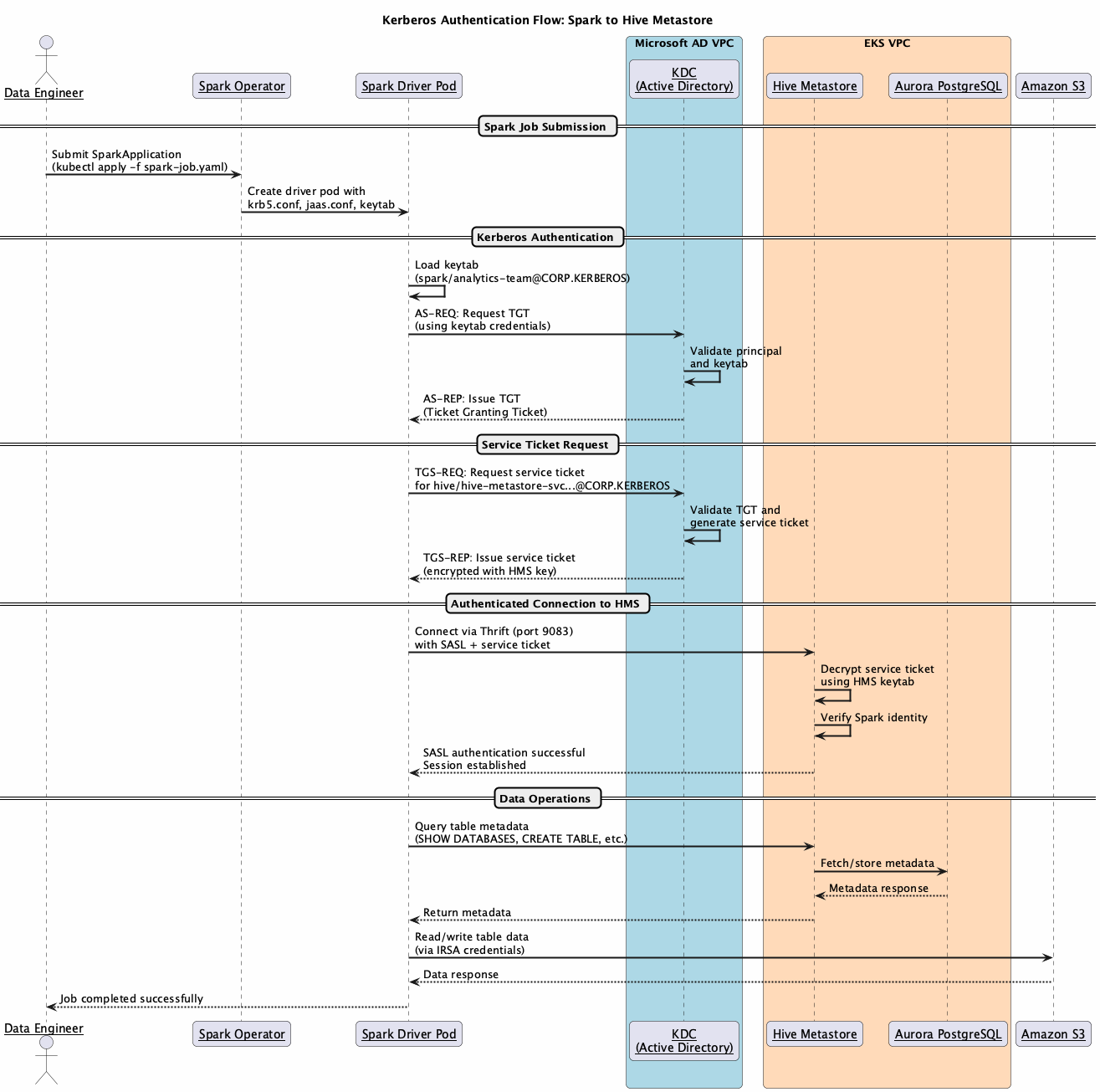
The HMS runs as a long-running Kubernetes service that must be deployed and authenticated before Spark jobs can connect.
During HMS deployment:
- HMS pod validates its Kerberos configuration.
krb5.confandjaas.confare mounted fromConfigMaps - Service authenticates with KDC using its principal
hive/hive-metastore-svc.hive-metastore.svc.cluster.local@CORP.KERBEROS keytabis mounted from Kubernetes secret for credential access- Secure Thrift endpoint is established on
port 9083with SASL authentication enabled
When a Spark job must interact with the HMS:
- Spark job submission:
- User submits Spark job through Spark Operator
- Driver and executor pods are created with Kerberos configuration mounted as volumes
krb5.confConfigMap provides KDC connection details including realm and server addressesjaas.confConfigMap specifies a login module configuration withkeytabpath and principalKeytabsecret contains encrypted credentials for Spark service principalspark/analytics-team@CORP.KERBEROS
- Authentication and connection:
- Spark driver authenticates with KDC using its principal and
keytabto obtain a Ticket Granting Ticket (TGT) - When connecting to HMS, Spark requests a service ticket from the KDC for the HMS principal
hive/hive-metastore-svc.hive-metastore.svc.cluster.local@CORP.KERBEROS - KDC issues a service ticket encrypted with HMS’s secret key
- Spark presents this service TGT to HMS over the Thrift connection on
port 9083 - HMS decrypts the ticket using its
keytab, verifies Spark’s identity, and establishes the authenticated SASL session - Executor pods use the same configuration for authenticated operations
- Spark driver authenticates with KDC using its principal and
- Data access:
- Authenticated Spark job queries HMS for table metadata
- HMS validates Kerberos tickets before serving metadata requests
- Spark accesses underlying data in Amazon S3 using IRSA
Implementation workflow
The implementation involves three key stakeholders working together to establish the Kerberos-enabled communication:
Microsoft Active Directory Administrator
The Active Directory Administrator creates service accounts that are used for HMS and Spark jobs. This involves setting up the service principal names using the setspn utility and generating keytab files using ktpass for secure credential storage. The administrator configures the appropriate Active Directory permissions and Kerberos AES256 encryption type. Finally, the keytab files are uploaded to AWS Secrets Manager for secure distribution to Kubernetes workloads.
Data Platform Team
The platform team handles the Amazon EMR on EKS and Kubernetes configurations. They retrieve keytabs from Secrets Manager and create Kubernetes secrets for the workloads. They configure Helm charts for HMS deployment with Kerberos settings and set up ConfigMaps for krb5.conf, jaas.conf, and core-site.xml.
Data Engineering Operations
Data engineers submit jobs using the configured service account with Kerberos authentication. They monitor job execution and verify authenticated access to HMS.
Deploy the solution
In the remainder of this post, you will explore the implementation details for this solution. You can find the sample code in the AWS Samples GitHub repository. For additional details, including verification steps for each deployment stage, refer to the README in the repository.
Prerequisites
Before you deploy this solution, make sure that the following prerequisites are in place:
- Access to a valid AWS account and permission to create AWS resources.
- The AWS Command Line Interface (AWS CLI) is installed on your local machine.
- Git, Docker, eksctl, kubectl, Helm, envsubst, jq, and yq utilities are installed on your local machine.
- Familiarity with Kerberos, Apache Hive Metastore (HMS), Apache Spark, Kubernetes, Amazon EKS, and Amazon EMR on Amazon EKS.
Clone the repository and set up environment variables
Clone the repository to your local machine and set the two environment variables. Replace <AWS_REGION> with the AWS Region where you want to deploy these resources.
Setup Microsoft Active Directory infrastructure
In this section, we deploy a self-managed Microsoft Active Directory with KDC on a Windows Server EC2 instance into a dedicated VPC. This is an intentionally minimal implementation highlighting only the key components required for this blog post.
Setup EKS infrastructure
This section provisions the Amazon EMR on EKS infrastructure stack, including VPC, EKS cluster, Amazon Aurora PostgreSQL database, Amazon Elastic Container Registry (Amazon ECR), Amazon S3, Amazon EMR on EKS virtual clusters and the Spark Operator. Run the following script.
Set up VPC peering
This section establishes network connectivity between the Active Directory VPC and EKS VPC for Kerberos authentication. Run the following script:
Deploy Hive Metastore with Kerberos authentication
This section deploys a Kerberos-enabled HMS service on the EKS cluster. Complete the following steps:
- Create Kerberos Service Principal for HMS service
- Deploy HMS service with Kerberos authentication
Set up Amazon EMR on Amazon EKS with Kerberos authentication
This section configures Spark jobs to authenticate with Kerberos-enabled HMS. This involves creating service principles for Spark jobs and generating the necessary configuration files. Complete the following steps:
- Create Service Principal for Spark jobs
- Generate Kerberos configurations for Spark jobs
Submit Spark jobs
This section verifies Kerberos authentication by running a Spark job that connects to the Kerberized HMS. Complete the following steps:
- Submit the test Spark job
- Monitor job execution
- Verify Kerberos authentication and HMS connection
The logs should confirm successful authentication, along with a listing of sample databases and tables.
Understanding Kerberos configuration
The HMS requires specific configuration parameters to enable Kerberos authentication, applied through the previously mentioned steps. The key configurations are outlined in the following section.
HMS configuration (metastore-site.xml)
The following configurations are added to metastore-site.xml file.
| Setting | Value | Purpose |
hive.metastore.sasl.enabled |
true | Enable SASL authentication |
hive.metastore.kerberos.principal |
hive/hive-metastore-svc.hive-metastore.svc.cluster.local@CORP.KERBEROS |
HMS service principal |
hive.metastore.kerberos.keytab.file |
/etc/security/keytab/hive.keytab |
Keytab path |
Hadoop security (core-site.xml)
The following configurations are added to the core-site.xml file.
| Setting | Value |
hadoop.security.authentication |
kerberos |
hadoop.security.authorization |
true |
Spark configuration
| Setting | Value | Purpose |
spark.security.credentials.kerberos.enabled |
true | Enable Kerberos for Spark |
spark.hadoop.hive.metastore.sasl.enabled |
true | SASL for HMS connection |
spark.kerberos.principal |
spark/analytics-team@CORP.KERBEROS |
Spark service principal |
spark.kerberos.keytab |
local:///etc/security/keytab/analytics-team.keytab |
Keytab path |
Shared Kerberos files
Both HMS and Spark pods mount two common Kerberos configuration files: krb5.conf and jaas.conf, using ConfigMaps and Kubernetes secrets. The krb5.conf file is identical across both services and defines how each component connects to the KDC. The jaas.conf file follows the same structure but differs in the principal and keytab path for each service.
krb5Configuration
For more information, see the online documentation for krb5.conf.
- JAAS configuration
Additional security considerations
This post focuses on core Kerberos authentication mechanics between Spark and HMS. We recommend two additional security hardening steps based on your organization’s security posture and compliance requirements.
Protecting Keytabs at Rest with AWS KMS Envelope Encryption
Keytabs stored as Kubernetes Secrets are only base64-encoded by default, not encrypted at rest. We recommend enabling EKS envelope encryption using an AWS Key Management Service (AWS KMS) customer managed key. With envelope encryption, secret data is encrypted with a Data Encryption Key (DEK), which is encrypted by your customer managed key. This protects keytab content even if the etcd datastore is compromised. To enable this on an existing EKS cluster:
Refer to the Amazon EKS documentation on envelope encryption for full setup guidance.
Encrypting the Thrift Data Channel with TLS
SASL with Kerberos provides mutual authentication but doesn’t automatically encrypt data over the Thrift connection. Many deployments default to auth QoP, leaving the data channel unencrypted. We recommend either:
- Set SASL QoP to auth-conf — enables SASL-layer encryption using Kerberos session keys
- Layer TLS over Thrift (preferred) — enables transport-level encryption using modern cipher suites
Enabling TLS on HiveServer2 / Hive Metastore Thrift:
Refer to the Hive SSL/TLS configuration documentation for full details.
Cleaning up
To avoid incurring future charges, clean up all provisioned resources during this setup by executing the following cleanup script.
Conclusion
In this post, we demonstrated how to implement Kerberos authentication for Amazon EMR on EKS to securely connect to a Kerberos-enabled HMS. This solution addresses a common challenge faced by organizations with existing Kerberos-enabled HMS deployments who want to adopt Amazon EMR on EKS while maintaining their Kerberos-enabled security posture.
This pattern applies whether you’re migrating from on-premises Hadoop, running hybrid Amazon EMR on EC2 or Amazon EMR on EKS environments, or building a new cloud-native platform. Any scenario where Spark jobs on Kerberos must authenticate with a shared, Kerberos-enabled HMS.
You can use this post as a starting point to implement this pattern and extend it further to suit your organization’s data platform needs.