AWS Big Data Blog
Migrate an OAuth 2.0 authenticated Apache Kafka cluster to Amazon MSK with MSK Replicator
In an earlier post, we walked through how Amazon Managed Streaming for Apache Kafka (Amazon MSK) Replicator migrates external and self-managed Apache Kafka clusters to Amazon MSK. It replicates your topics and their configurations, keeps topic and consumer-group names intact, and synchronizes consumer-group offsets, so your producers and consumers can cut over on their own schedule instead of all at once. MSK Replicator now supports OAuth 2.0 (SASL/OAUTHBEARER) authentication to the external cluster, and that is what this post covers.
If your external Kafka cluster authenticates clients with OAuth, MSK Replicator can connect to it, but “OAuth” isn’t a single thing you switch on. It’s a family of grant types, and each one comes with its own trust model, its own set of inputs you need to supply, and its own configuration on both the Replicator side and your identity provider (IdP) side.
In this post, we walk you through the grant types one by one, show you how to configure Replicator for each, call out the network and TLS prerequisites that are commonly missed, and finish with how to handle IdPs that sit behind an additional identity layer. This mechanism works with any OAuth 2.0 (OIDC) identity provider, including Keycloak, Okta, Microsoft Entra ID, PingFederate, and Auth0. OAuth here governs only how Replicator authenticates to your external cluster, so the target can be either Amazon MSK Standard or Express brokers, which always use IAM.
How OAuth authentication works
Before you configure Replicator, it helps to be precise about how the OAuth Kafka handshake works.
The components
- The Identity Provider (IdP) – Issues access tokens and publishes the public keys. Brokers use these keys to verify the tokens. Examples: Keycloak, Okta, Microsoft Entra ID, PingFederate, Auth0, or a custom OIDC server.
- The client – In our case, MSK Replicator, acting as a Kafka consumer/producer against your external cluster.
- The resource server – Your self-managed Kafka broker, which must decide whether to admit a connection.
- The access token – A JWT (JSON Web Token): a base64url-encoded, three-part string
header.payload.signaturethat the IdP cryptographically signs.
The SASL/OAUTHBEARER handshake, step by step
The following sequence diagram shows the full exchange, from Replicator requesting a token to the broker accepting the connection:
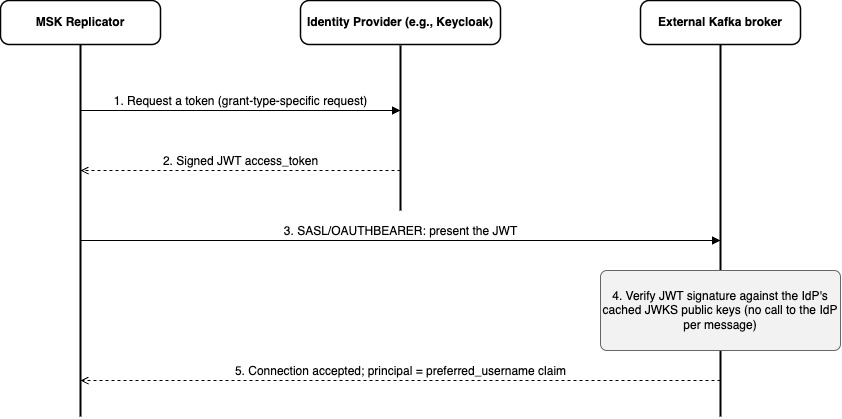
Figure 1: The SASL/OAUTHBEARER handshake. Replicator gets a signed JWT from the IdP and presents it to the broker, which verifies it against cached JWKS keys before accepting the connection.
Walking through it:
- Request a token – Replicator asks the IdP for an access token. The exact request depends on the grant type (covered in the next section).
- Receive a signed JWT – The IdP returns a signed JWT access token.
- Present the token – Replicator opens a SASL/OAUTHBEARER connection to the external Kafka brokers and presents the JWT.
- Verify locally – The broker verifies the JWT signature against the IdP’s cached JWKS public keys, without calling the IdP per message.
- Connection accepted – The broker admits the connection and derives the Kafka principal from the
preferred_usernameclaim.
Step 4 is worth dwelling on: the broker validates the token locally. It fetches the IdP’s JWKS (JSON Web Key Set, the public half of the IdP’s signing keys, RFC 7517) from an endpoint like https://idp.example.com/realms/kafka/protocol/openid-connect/certs and caches it, refreshing on a configurable interval (and re-fetching if it sees a key ID it doesn’t recognize). Incoming JWT signatures are then verified against those cached keys. The IdP is not in the hot path of message traffic. It is contacted only to (a) issue tokens to clients, and (b) serve its public keys for the periodic JWKS refresh.
What the Kafka broker checks
When Replicator presents a JWT, the broker validates:
- Signature – Proves the IdP issued the token and no one tampered with it (verified against JWKS).
iss(issuer) – Must match the broker’s configuredoauth.valid.issuer.uri, byte-for-byte, including scheme, host, port, and path. A mismatch is a common configuration error.exp(expiry) – Expired tokens are rejected. Strimzi’s client callback handler proactively refreshes before expiry, so you shouldn’t see mid-stream failures.- The principal claim – Typically
preferred_username. The broker uses this as the Kafka principal in ACLs (for example,User:service-account-msk-replicator). This matters: the identity Replicator authenticates as on the external cluster must have ACLs that you configure to grant it the read/describe permissions it needs.
Mapping your IdP to a Replicator grant type
A grant type is the protocol by which the client proves its identity to the IdP and obtains a token. This is the front half of the preceding handshake (steps 1 and 2). MSK Replicator supports three of them. You already know how your Kafka clients authenticate to your IdP today, so start from that.
Which grant to use?
Find the row that matches how your clients get tokens today:
| How your Kafka clients get tokens from the IdP today | Grant type | Long-lived secret? | What you trust/register on the IdP |
A client_id / client_secret (confidential client) |
CLIENT_CREDENTIALS | Yes (stored on AWS Secrets Manager) | Nothing new: reuse the existing client, or create one for Replicator |
| You want secretless, and your IdP can trust an external token issuer | IAM_JWT_BEARER | No | AWS STS as an external token (OIDC) issuer. Trust its JWKS |
| You want secretless, and your IdP models workloads as signed-JWT clients | CLIENT_CREDENTIALS_ASSERTION | No | AWS STS as the client’s signing authority (private_key_jwt). Trust its JWKS |
The simplest mapping is like-for-like: if your clients use a client_id/client_secret, point Replicator at the same client with CLIENT_CREDENTIALS. If you’d rather not give Replicator a long-lived secret, the two secretless grants let it authenticate with its AWS identity instead. Choose between them based on how your IdP prefers to trust an external party.
The rest of this section explains why the three grants differ, using an analogy. If your row is clear and you only want the configuration, skip ahead to Configuring and creating the replicator.
A scenario: checking in at a secure office building
A visitor needs to get into a secure office building. They can’t walk straight in. First they stop at the reception desk to prove who they are and collect a temporary access pass. Only then can they use that pass at the building’s turnstile to get inside. In OAuth terms: the building is your external Kafka cluster, the reception desk is the IdP, the temporary access pass is the access token (JWT), and the visitor is MSK Replicator. Presenting the pass at the turnstile is the SASL/OAUTHBEARER step, and it works the same way for every grant type. What differs is how the visitor proves who they are at the reception desk before it prints a pass.
Scenario 1: CLIENT_CREDENTIALS (the shared PIN)
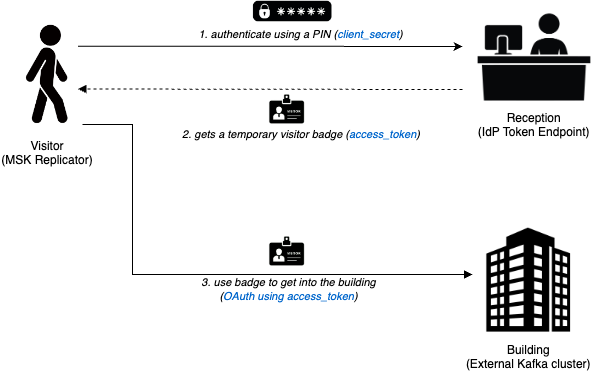
Figure 2: CLIENT_CREDENTIALS. The visitor authenticates at reception with a PIN (the client_secret), gets a temporary badge (the access token), and uses it to enter the building (the Kafka cluster).
At the reception desk the visitor keys in a PIN the desk already have on file (the client_secret), collects a temporary access pass in return (the access token), and uses that pass to get into the building. Both sides hold the same secret. In practice (RFC 6749 §4.4), Replicator authenticates to the IdP with a client_id/client_secret stored on AWS Secrets Manager, receives the access token, and presents it to the external Kafka brokers over SASL/OAUTHBEARER. Use it when your IdP already issues client secrets for machine clients. This is usually a like-for-like move that reuses the client your existing producers and consumers use, or a new one created for Replicator.
Scenario 2: IAM_JWT_BEARER (the badge is the request)
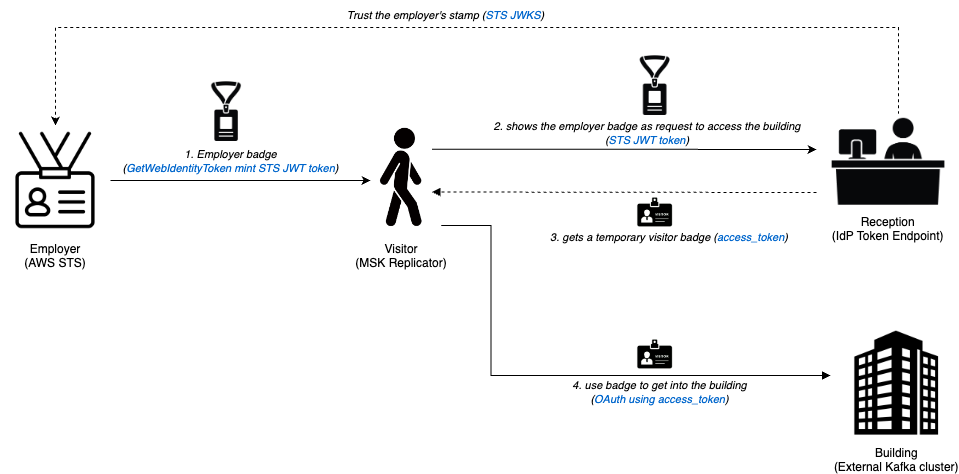
Figure 3: IAM_JWT_BEARER. The visitor shows an employer-signed badge (an STS JWT) to reception as the request itself and gets an access token. Reception accepts it because it trusts the employer’s stamp (the STS JWKS).
First, the visitor collects an employer-signed badge: Replicator calls STS GetWebIdentityToken to mint an STS JWT. At the reception desk the badge itself is the request. The visitor shows it to ask for a pass. Reception trusts the employer’s tamper-proof stamp (STS JWKS), so it accepts the badge and prints a temporary access pass. In practice (RFC 7523 §2.1), the STS JWT is sent as the authorization grant (assertion), and the IdP trusts AWS STS as an external token issuer. Use it when you want secretless authentication, and your IdP can trust an external issuer’s JWTs.
Scenario 3: CLIENT_CREDENTIALS_ASSERTION (the same badge, used as ID on the form)
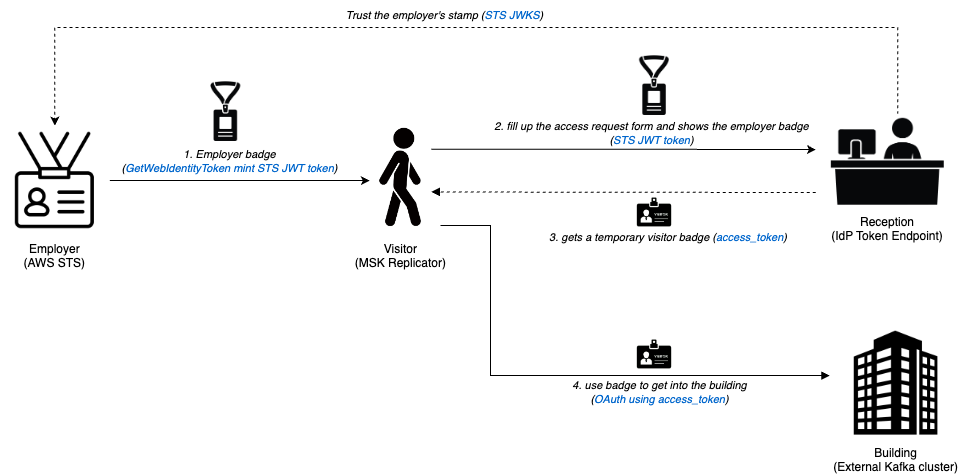
Figure 4: CLIENT_CREDENTIALS_ASSERTION. The visitor fills out reception’s standard request form and attaches the same STS JWT as ID, getting an access token. Reception trusts the employer’s stamp (the STS JWKS).
The visitor again collects the same employer-signed badge (STS JWT). This time they fill out the reception desk’s standard access request form (the client_credentials grant) and attach the badge to it as identification, all in one submission. Reception trusts the same employer stamp (STS JWKS) and prints a temporary access pass. In practice (RFC 7521/RFC 7523 §2.2), the same STS JWT is sent as the client_assertion on the client_credentials grant, with the IdP trusting STS as the client’s signing authority (private_key_jwt). Use it when you want secretless authentication and your IdP models external workloads as signed-JWT clients.
Scenarios 2 and 3 in one sentence. Both mint the same STS JWT and share the same benefit: nothing shared can leak, because there is no secret. They differ only in where the STS JWT sits in the token request. IAM_JWT_BEARER sends it as the assertion (the badge is the request), while CLIENT_CREDENTIALS_ASSERTION sends it as the client_assertion on a standard client_credentials request (the badge is ID on the form). That single difference is what you register on the IdP: AWS STS as an external token issuer, or as the client’s signing authority.
Solution overview
Now that you can map your setup to a grant type, the next question is where these pieces actually run. MSK Replicator runs on AWS managed infrastructure but attaches elastic network interfaces (ENIs) into the subnets of the target Amazon MSK cluster’s virtual private cloud (VPC) and initiates every connection from there under a Service Execution Role (SER). Those ENIs sit in private subnets that typically have no NAT or internet gateway, so each external dependency needs an explicit network path. The following diagram shows the full topology for an OAuth migration, including the two pieces that are commonly missed: STS Outbound Web Identity Federation (for the secretless grants) and the interface VPC endpoints for STS and Secrets Manager.
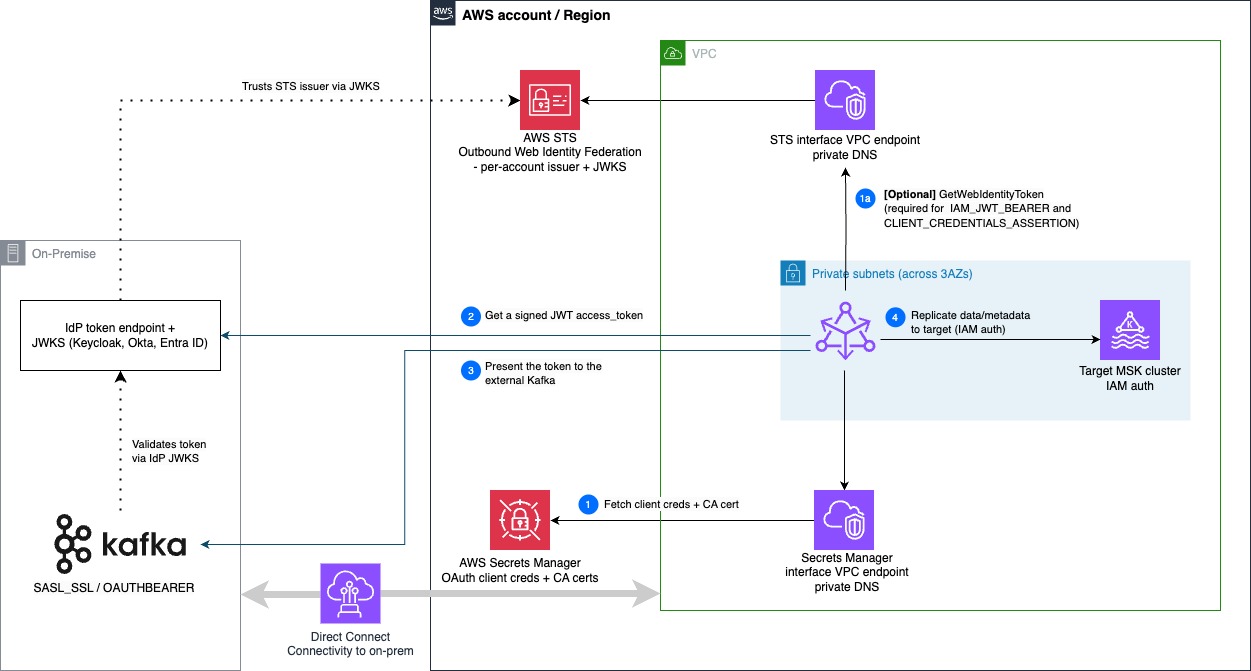
Figure 5: Deployment architecture. The source environment holds the IdP and Kafka brokers. The AWS account holds STS, Secrets Manager, and the Amazon MSK VPC, whose private subnets contain the Replicator ENIs and target cluster, reached through interface VPC endpoints.
The source environment (on the left, shown as on-premises here, but it can equally be another cloud or a self-managed cluster on AWS) holds two components: the IdP token endpoint and JWKS (Keycloak, Okta, Entra ID) and the external Kafka brokers on a SASL_SSL / OAUTHBEARER listener. Everything else runs in your AWS account.
The two dotted lines are trust relationships you configure ahead of time, not runtime calls:
- External Kafka validates token by using IdP JWKS – The broker checks every presented access token against the IdP’s published public keys. This applies to all grants.
- IdP trusts STS issuer through JWKS – For the secretless grants only, the IdP is configured to trust your account’s STS issuer and validate the STS-signed JWT against STS’s JWKS. When STS Outbound Web Identity Federation is enabled, AWS provisions a per-account issuer URL (
https://<id>.tokens.sts.global.api.aws) whose JWKS the IdP trusts. This trust is not used by CLIENT_CREDENTIALS.
The numbered arrows are the runtime flow, all originating from the Replicator ENIs:
- Step 1: Fetch client credentials and the CA certificate from AWS Secrets Manager, through its VPC endpoint. For CLIENT_CREDENTIALS this includes the
client_id/client_secret. For the secretless grants it is only the CA certificate(s). - Step 1a (optional): Call GetWebIdentityToken on AWS STS, through the STS VPC endpoint, to mint a JWT of Replicator’s AWS identity. Required only for IAM_JWT_BEARER and CLIENT_CREDENTIALS_ASSERTION.
- Step 2: Get a signed JWT access token from the IdP token endpoint, exchanging either the client secret or the STS JWT depending on the grant.
- Step 3: Present the token to the external Kafka brokers over SASL/OAUTHBEARER.
- Step 4: Replicate to the target Amazon MSK cluster using IAM authentication.
The two supporting pieces inside the VPC, the Secrets Manager and STS interface VPC endpoints, are commonly overlooked precisely because the private subnets have no NAT or internet gateway. We cover exactly why they’re needed, and when, in the following section, Cross-cutting requirements.
Configuring and creating the replicator
With the architecture in mind, you can now configure Replicator itself. MSK Replicator models OAuth through a saslOAuthBearer structure on the external cluster’s clientAuthentication. Exactly one of three mechanism members must be present: clientCredentials, iamJwtBearer, or clientCredentialsAssertion. The control plane enforces this mutual exclusivity. Fields shared across all three (tokenEndpointUrl, scope, tokenEndpointAuthenticationMethod, tokenEndpointTlsCertificateArn, and saslExtensions) live at the saslOAuthBearer level.
Before the per-grant details, here are the requirements that apply to every OAuth migration, whichever grant you choose. Most OAuth setup failures trace back to one of these, so review them first.
Cross-cutting requirements
Here are the five items that apply to every grant: TLS trust, secret format, network reachability, the Service Execution Role, and STS federation.
a) TLS everywhere, and two separate trust settings
Replicator connects to two TLS endpoints, and they are configured independently:
encryptionInTransit.rootCaCertificate: the CA that signed your Kafka brokers’ TLS certificates (the SASL_SSL listener –:9096).tokenEndpointTlsCertificateArn: the CA that signed your IdP’s token endpoint TLS certificate (for example – Keycloak on:8443).
If your broker and IdP are signed by the same private CA, you still must supply the CA in both fields. Omitting tokenEndpointTlsCertificateArn when the IdP uses a private or self-signed cert produces a PKIX path building failed error during token acquisition. Because that fails before workers stabilize, you’ll see a generic failure with no worker logs. If your IdP uses a publicly-trusted certificate (for example, it sits behind a public endpoint), you can omit tokenEndpointTlsCertificateArn entirely.
b) Secret format: store key/value pairs, not raw values
Every secret Replicator reads (client credentials, CA certificate) is parsed by the config provider as a set of key/value pairs. Use the Secrets Manager console’s Key/value editor rather than pasting raw text, and it will serialize and escape the values for you.
The keys the provider expects:
| Key | Value | Used for |
certificate |
the CA in PEM (newlines escaped as \n) |
CA-certificate secrets (rootCaCertificate, tokenEndpointTlsCertificateArn) |
client_id, client_secret |
your OAuth client credentials | the CLIENT_CREDENTIALS token-request secret |
Custom parameters, headers, and SASL extensions. Some IdPs require extra data on the token request, and some brokers require SASL/OAUTHBEARER extensions. The config provider supports both through reserved key prefixes in the same secret:
| Prefix | Effect | Example key | Example value |
custom_param. |
adds a parameter to the token request sent to the IdP | custom_param.tenant_token |
myTenantToken |
custom_header. |
adds an HTTP header to the IdP token request | custom_header.X-Tenant-Id |
acme |
extension. |
adds a SASL/OAUTHBEARER extension presented to the broker (for example, Confluent Cloud’s logicalCluster) |
extension.logicalCluster |
myLogicalClusterId |
For example, an IdP that expects a tenant token as a request parameter and a Confluent Cloud broker that requires a logical-cluster extension would add custom_param.tenant_token and extension.logicalCluster as extra key/value pairs alongside client_id/client_secret in the same secret.
c) Network reachability from Replicator’s ENIs
Replicator attaches ENIs into the subnets you specify (through the target amazonMskCluster cluster’s vpcConfig) and initiates all connections from there. Those ENIs must be able to reach:
- Your external brokers, over VPC peering, AWS Transit Gateway, AWS Direct Connect, or VPN, with security groups permitting the SASL_SSL port.
- Your IdP’s token endpoint, over the same networking. The endpoint hostname must resolve from those subnets.
- AWS Secrets Manager, to fetch credentials/CA. If the subnets have no NAT/internet gateway, add an interface VPC endpoint for
com.amazonaws.<region>.secretsmanagerwith private DNS. - AWS STS (only for
IAM_JWT_BEARERandCLIENT_CREDENTIALS_ASSERTION), to callGetWebIdentityToken. In no-egress subnets this will time out (STS GetWebIdentityToken call failed: Connect timed out) unless you add an interface VPC endpoint forcom.amazonaws.<region>.stswith private DNS. This is the most common oversight for the secretless grants.
Both endpoints use private DNS, so the standard secretsmanager.<region>.amazonaws.com and sts.<region>.amazonaws.com hostnames resolve to the endpoint inside the VPC, with no client change needed.
A note on
vpcConfigplacement. For an external Apache Kafka cluster,vpcConfigis specified on the targetamazonMskClusterentry, not the externalapacheKafkaClusterentry. The API rejects avpcConfigon the external cluster. The ENIs it creates are what reach both clusters and all AWS endpoints.
d) The Service Execution Role (SER)
Replicator assumes an IAM role to do its work. Two parts matter:
- Trust policy – Must allow the Replicator service to assume it.
kafka.amazonaws.comneeds to be trusted. A trust policy that is too narrow fails withAccessDenied.ServiceExecutionRoleUnassumable. - Permissions – The replication permissions are extensive and depend on which features you enable, so follow the service execution role permissions reference to build a least-privilege policy.
e) Enabling STS Outbound Web Identity Federation (secretless grants only)
For IAM_JWT_BEARER and CLIENT_CREDENTIALS_ASSERTION, sts:GetWebIdentityToken must be enabled for your account/role. When enabled, AWS provisions a dedicated issuer URL of the form https://<uuid>.tokens.sts.global.api.aws. Every JWT STS mints for your account carries this as its iss claim, and its public keys are published under this issuer’s JWKS. You configure your IdP to trust this issuer. Granting the sts:GetWebIdentityToken IAM action is necessary but not sufficient. The account-level federation feature must also be turned on.
Create the replicator
A repeatable way to create the replicator is with a request file and --cli-input-json, so you can keep the full configuration under version control. The following example is a complete CLIENT_CREDENTIALS request. The two secretless variants change only the saslOAuthBearer block (shown after).
create-replicator.json:
Field names and exact nesting follow the create-replicator API reference. Check it for the full schema and any Region-specific values.
The example above uses CLIENT_CREDENTIALS. For the full schema, any Region-specific values, and detailed examples for the other grant types, check the MSK documentation.
Recommended order of operations
With the requirements and configuration in hand, here is the order to put them in:
- Pick your grant type using the preceding decision table.
CLIENT_CREDENTIALSis the fastest path if you already manage a client secret. Otherwise choose a secretless grant based on how your IdP models external workloads. For a multi-hop internal chain, useIAM_JWT_BEARERagainst the proxy pattern described in the next section. - Prepare the IdP: create the client (or the STS-trust configuration), and note the exact token endpoint URL and issuer.
- Stage secrets in Secrets Manager, as JSON (requirement b): client credentials (if any) and the CA certificate(s).
- Wire the network (requirement c): connectivity from Replicator’s subnets to your brokers and IdP, plus interface VPC endpoints for Secrets Manager and (secretless grants only) STS, both with private DNS.
- [Optional but recommended]: Smoke-test the path from inside the VPC – IdP setup is often the part that takes the most iterations, and Replicator provisioning is a slow way to discover a misconfigured token endpoint or a missing TLS trust. Spin up a small EC2 instance in Replicator’s subnets, install a Kafka client, and run an end-to-end produce/consume against the external brokers using SASL/OAUTHBEARER (a
client_credentialsflow is simplest). This validates the three things most likely to be wrong (network reachability to the IdP and brokers, both TLS trusts for the broker CA and IdP CA, and token vending) while you can still fix them in seconds. Tear the instance down once the round trip works. - Enable STS Outbound Web Identity Federation (requirement e. Secretless grants only) and configure your IdP to trust the resulting issuer.
- Build the SER (requirement d) with a trust policy the Replicator service can assume and the required permissions.
- Create the replicator with the create-replicator request for your grant. Remember both TLS trust fields for a private-CA IdP (requirement a), and
vpcConfigon the target entry only. - Verify – Produce to a topic on the external cluster and confirm the records land on the target (consume with IAM auth on the Amazon MSK side). Then watch the health signals:
- In the Amazon MSK console, the replicator should reach the
RUNNINGstate. - In Amazon CloudWatch, under the AWS/Kafka namespace, watch the replicator’s ReplicationLatency and MessageLag metrics. Both should be low and stable, and MessageLag should trend toward zero as it catches up.
- A healthy replicator commits offsets continuously. A steady “1 message per batch” with no producer activity is only the internal heartbeat topic, not a stall.
- In the Amazon MSK console, the replicator should reach the
Handling an additional identity layer: the federation-proxy pattern
Who owns what – Before the details, the ownership line is simple and worth stating up front:
- What Replicator guarantees: it calls the configured
tokenEndpointUrlwith the configured grant, includes the STS JWT, expects a standard{access_token, token_type, expires_in}response, and refreshes before expiry. - What you own: everything at and behind the proxy, including validating the STS JWT, the downstream token exchanges, claim mapping, and the availability and latency of the endpoint. The proxy runs in your VPC and is owned entirely by you.
So far we have assumed you can point Replicator at a single token endpoint. Some organizations can’t. Instead, they have an internal identity chain: several hops of token exchange and federation that a workload must traverse before it holds a token the Kafka brokers accept.
A representative example is a large financial institution whose chain has several hops: an AWS workload’s identity (a signed GetCallerIdentity request) is exchanged at an internal Token Exchange service for an intermediate JWT, which an internal IdP then consumes as a client_assertion to issue the final Bearer token the Kafka brokers accept.
Replicator connects to a single HTTPS token endpoint using one of the three grant types and expects a standard token response. When the identity flow spans multiple hops like this, you place a proxy in front of that chain so Replicator still sees a single endpoint.
The solution: a customer-owned proxy
You deploy a small proxy in your own VPC that collapses the chain behind a single endpoint. From Replicator’s perspective, this is an ordinary OAuth flow against one token endpoint. Everything behind that endpoint is opaque to Replicator and owned entirely by you.
The grant Replicator uses to reach the proxy is a separate choice from the exchanges happening behind it. We recommend a secretless grant (IAM_JWT_BEARER or CLIENT_CREDENTIALS_ASSERTION) so there is no long-lived secret between Replicator and the proxy. CLIENT_CREDENTIALS is also valid if you would rather the proxy authenticate Replicator with a client secret. The following walkthrough uses IAM_JWT_BEARER, where the proxy validates the STS JWT that Replicator presents.
How it works, end to end. The following sequence diagram traces the full token exchange, from Replicator’s request to the Bearer it finally presents to the external Kafka brokers.
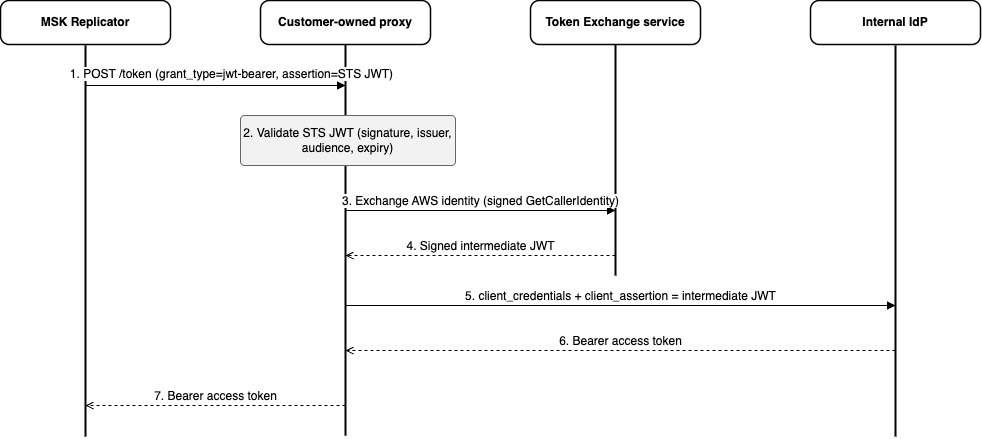
Figure 6: Federation-proxy token flow. The proxy validates Replicator’s STS JWT, exchanges its own AWS identity at the Token Exchange service for an intermediate JWT, presents that to the internal IdP, and returns the resulting Bearer to Replicator.
- Replicator to proxy – Replicator POSTs its STS JWT as
assertionto the proxy’s token endpoint, a plainIAM_JWT_BEARERrequest (grant_type=jwt-bearer). Because the endpoint is private, Replicator reaches it through anexecute-apiinterface VPC endpoint, the same private-connectivity approach used for Secrets Manager and STS. (Replicator first obtains the STS JWT by calling STSGetWebIdentityTokenthrough the STS VPC endpoint.) - Proxy validates the STS JWT (signature against STS’s JWKS, plus
iss/aud/exp/subchecks. Thesubis the caller’s AWS ARN). - Proxy to Token Exchange service – The proxy exchanges its own AWS identity, presented as a signed
GetCallerIdentityrequest, at the internal Token Exchange service. - Token Exchange service → proxy – It returns a signed intermediate JWT.
- Proxy to internal IdP – The proxy makes a
client_credentialsrequest that carries the intermediate JWT as theclient_assertion. - Internal IdP to proxy – The IdP issues the final Bearer access token.
- Proxy to Replicator – The proxy returns the Bearer, and Replicator presents it to the external brokers over SASL/OAUTHBEARER. The brokers validate it against the final IdP’s JWKS, a completely ordinary OAuth handshake from their point of view.
Reference architecture
Here is the reference architecture for the end-to-end solution.
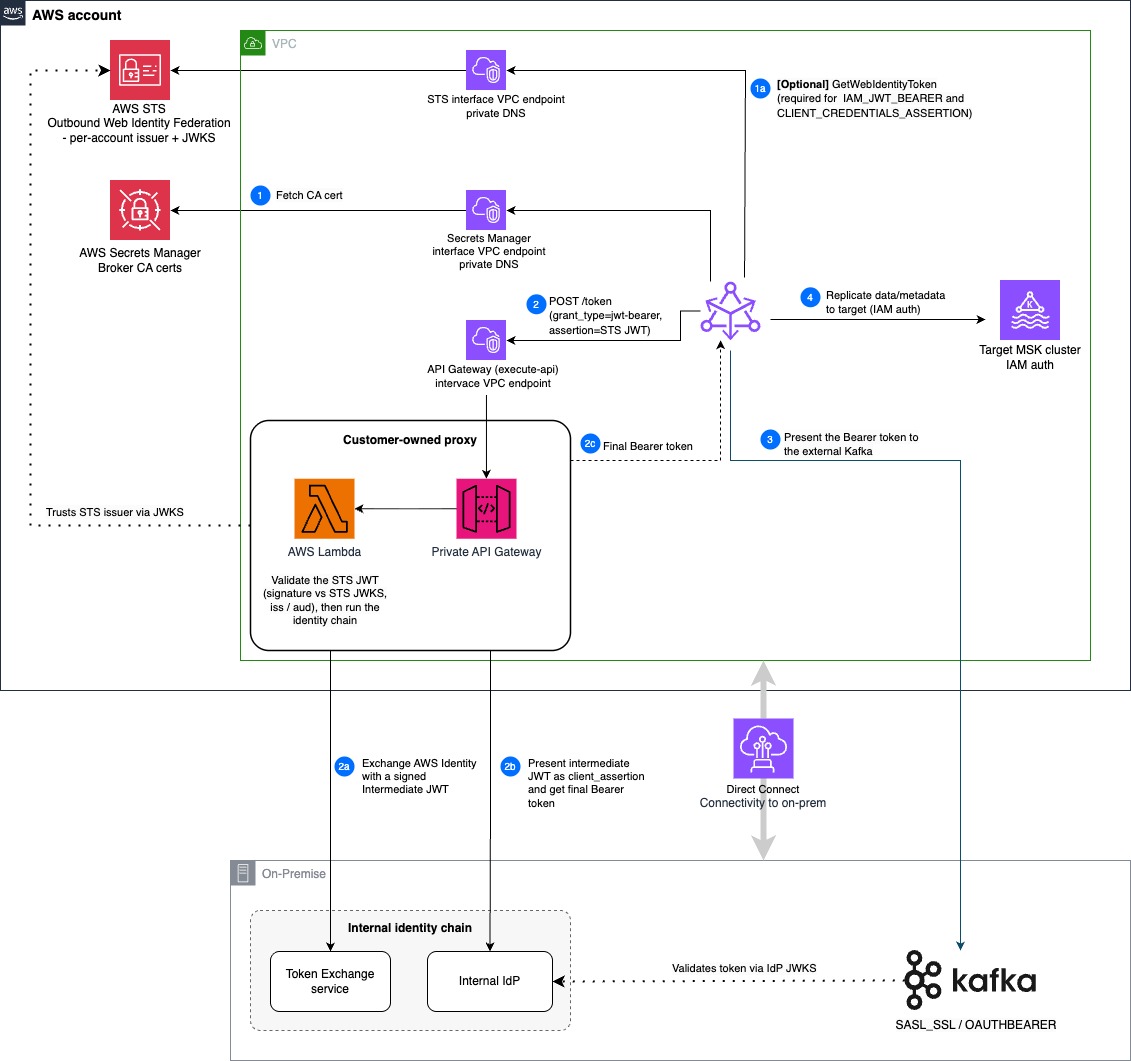
Figure 7: Federation-proxy reference architecture. Replicator ENIs in a private subnet call a customer-owned proxy (a Lambda behind a private API Gateway), which runs the on-premises identity chain over Direct Connect before Replicator replicates into the target Amazon MSK cluster.
Everything on the Replicator side runs in your VPC’s private subnets: the Replicator ENIs, the customer-owned proxy, and the target Amazon MSK cluster. The proxy here is an AWS Lambda function behind a private Amazon API Gateway, but it can run on any compute you prefer (EC2, ECS, or EKS) as long as it exposes a single private HTTPS token endpoint. Connectivity to the on-premises Token Exchange service, internal IdP, and Kafka brokers runs over AWS Direct Connect (a VPN or VPC peering works too).
The outer legs of this flow are exactly the base migration from Solution overview: step 1 (fetch the broker CA from Secrets Manager), step 1a (mint the STS JWT through STS), step 3 (present the Bearer to the brokers), and step 4 (replicate to the target with IAM). What’s new here is the proxy hop in the middle, which replaces the single “step 2” call to a token endpoint:
- 2. POST /token – Replicator sends the STS JWT as the
assertionto the proxy’s private token endpoint, reached through theexecute-apiinterface VPC endpoint. The proxy validates it against STS’s JWKS. - 2a. Exchange AWS identity – The proxy presents its own AWS identity (a signed
GetCallerIdentityrequest) to the internal Token Exchange service and gets back a signed intermediate JWT. - 2b. Present as
client_assertion– The proxy sends aclient_credentialsrequest to the internal IdP with the intermediate JWT as theclient_assertion, and receives the final Bearer. - 2c. Final Bearer token – The proxy returns the Bearer to Replicator, which then continues at step 3.
As in the base architecture, the dotted lines are prerequisite trust relationships, not runtime calls: the proxy trusts AWS STS as an issuer (validating the STS JWT against STS’s JWKS), and the Kafka brokers validate the final Bearer against the internal IdP’s JWKS.
One subtlety worth calling out is the split of TLS trust. Replicator connects directly only to the private API Gateway (which uses a publicly trusted certificate) and to the Kafka brokers, so the only certificate it fetches from Secrets Manager is the broker CA. The internal IdP’s CA is the proxy’s concern: the proxy terminates TLS to the Token Exchange service and internal IdP, so it carries their CA material, not Replicator.
The same single-endpoint pattern handles other “extra layer” scenarios without any Replicator change: claim enrichment (the proxy intercepts and augments), rate-limited IdPs (the proxy caches tokens), IdPs requiring mTLS (the proxy terminates Replicator’s HTTPS and initiates mTLS onward), and IdP migrations (swap the proxy’s target without touching Replicator config).
A working reference implementation of this customer-owned proxy is available at GitHub.
Conclusion
In this post, we walked through how to migrate a self-managed, OAuth-authenticated Apache Kafka cluster to Amazon MSK using MSK Replicator: how the SASL/OAUTHBEARER handshake works, how to map your identity provider to one of the three supported grant types, the deployment architecture and prerequisites that the connection depends on, and how to handle identity providers that sit behind an additional federation layer. To get started, see the Amazon MSK Developer Guide and the Amazon MSK Replicator documentation. For the federation-proxy example, see the sample implementation on GitHub.