AWS Big Data Blog
Securely connect Kafka client applications to your Amazon MSK Serverless cluster from different VPCs and AWS accounts
Amazon MSK Serverless is a cluster type for Amazon MSK that you can use to run Apache Kafka without having to manage and scale cluster capacity. It automatically provisions and scales capacity while managing the partitions in your topics, so you can stream data without thinking about right-sizing or scaling clusters. MSK Serverless is fully compatible with Apache Kafka, so you can use any compatible client applications to produce and consume data.
MSK Serverless uses AWS PrivateLink to provide private connectivity up to five virtual private clouds (VPCs) within the same AWS account. However, if you need cross-VPC connectivity beyond five VPCs or cross-account connectivity, you typically need VPC peering or AWS Transit Gateway, as explained in Secure connectivity patterns for Amazon MSK Serverless cross-account access.
Aklivity Zilla Plus for Amazon MSK is a stateless Kafka-native edge proxy that enables authorized Kafka clients deployed across VPCs (even cross-account) to securely connect, publish messages, and subscribe to topics in your MSK Serverless cluster using a custom domain name.
For more details on supporting SASL/SCRAM authentication with a custom domain, see Configure a custom domain name for your Amazon MSK cluster.
In this post, we show you how Kafka clients can use Zilla Plus to securely access your MSK Serverless clusters through Identity and Access Management (IAM) authentication over PrivateLink, from as many different AWS accounts or VPCs as needed. We also show you how the solution provides a way to support a custom domain name for your MSK Serverless cluster.
Secure private access to one MSK Serverless cluster
Network Load Balancers (NLBs) provide a convenient way to define remote connectivity to MSK Serverless clusters from other VPCs. In the following architecture diagram, Zilla Plus is deployed in an auto scaling group, reachable as a target group behind an NLB. Zilla Plus connects to an MSK Serverless cluster through the (rightmost) VPC endpoint associated directly with the MSK Serverless cluster. Zilla Plus is configured to use an AWS Certificate Manager (ACM) wildcard certificate for your custom domain. By creating a Zilla Plus VPC Endpoint Service, you make the MSK Serverless cluster reachable from other VPCs through Zilla Plus.
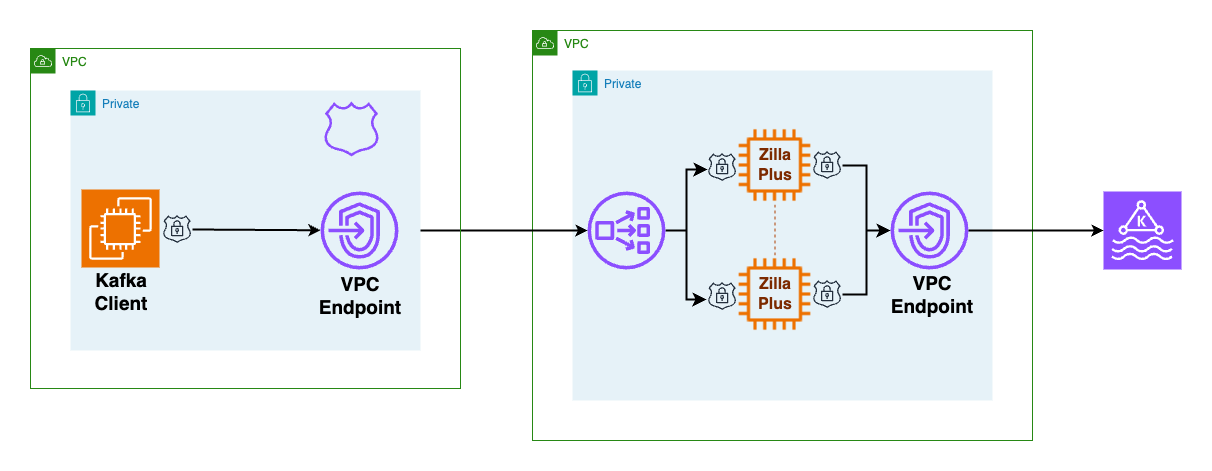
As shown in the preceding figure, the client VPC has minimal configuration, consisting of a Zilla Plus VPC endpoint to reach the Zilla Plus VPC Endpoint Service, and an Amazon Route 53 local zone mapping your custom domain name to the Zilla Plus VPC endpoint.
How the custom domain works across VPCs for MSK Serverless
When an MSK Serverless cluster is created, it is associated with a bootstrap broker address like this:boot-xxxxxxxx.yy.kafka-serverless.region.amazonaws.com:9098. However, this address is only resolvable within the originating VPC.
To access the cluster from another VPC or account, Kafka clients connect to a custom domain exposed by Zilla Plus, such as boot.my.custom.domain:9098. The Route 53 DNS in the client VPC maps this custom domain to a VPC endpoint (NLB), while the NLB forwards traffic to Zilla Plus, which presents the appropriate ACM wildcard certificate. When a Kafka client needs to bootstrap connectivity to a Kafka cluster (such as an MSK Serverless cluster), the client must follow a two-step discovery process to learn the specific addresses of the brokers in the cluster, so it can then connect to each broker directly as needed.
For example, if the client needs to produce messages to a specific Kafka topic such as my-messages, then the client first uses a bootstrap server address to connect to any broker in the Kafka cluster, requesting topic metadata that includes the address of each broker responsible for storage of messages in the my-messages topic. In the second step, the client connects directly to the corresponding brokers for the my-messages topic to produce messages. The sequence of connection flow between Kafka client and broker is shown below.
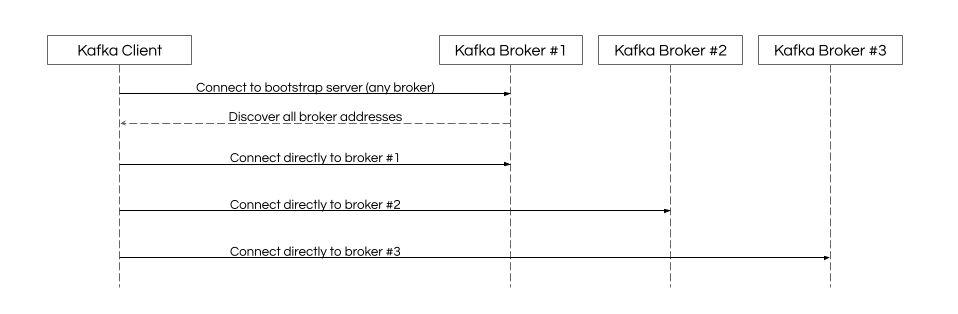
When the Kafka client connection for the custom domain bootstrap server arrives at the Zilla Plus VPC NLB, it’s routed to any of the Zilla Plus instances in the target group. Zilla Plus presents the wildcard TLS certificate for the custom domain and completes the TLS handshake before establishing connectivity to the MSK Serverless bootstrap server. Kafka protocol requests flow from the client through Zilla Plus to the MSK Serverless bootstrap server. When the metadata request is made by the Kafka client, Zilla Plus intercepts the metadata response and rewrites the discovered broker addresses advertised to the client, mapping them to the custom domain.
When the Kafka client connections for each individual broker address arrive at Zilla Plus, the broker-specific custom domain address is mapped to the broker-specific MSK Serverless address so that the client connects to the requested broker in the cluster. Even though the MSK Serverless cluster can have any number of advertised broker addresses, the number of instances in the Zilla Plus target group isn’t required to match. Each Zilla Plus instance can relay broker-specific custom domain connectivity for any broker in the MSK Serverless cluster. Because no configuration changes are required at the MSK Serverless cluster to enable the Zilla Plus custom domain mapping, there’s no impact on other Kafka clients already connecting directly to the MSK Serverless cluster using the AWS-generated bootstrap server.
Follow the guided steps in the Aklivity Zilla Plus documentation to deploy this solution using the AWS Cloud Development Kit (AWS CDK). This automates the setup for you, including the client VPC configuration to create the VPC endpoint and Route 53 DNS entries.
After the secure private access and secure private access client scenarios have been deployed successfully, you can verify remote access to the MSK Serverless cluster from any Kafka client using your custom domain bootstrap server.
Secure private access to multiple MSK Serverless clusters
When a Kafka client needs to bootstrap to multiple different custom domain MSK Serverless clusters, the approach described previously keeps the client VPC configuration relatively straightforward.
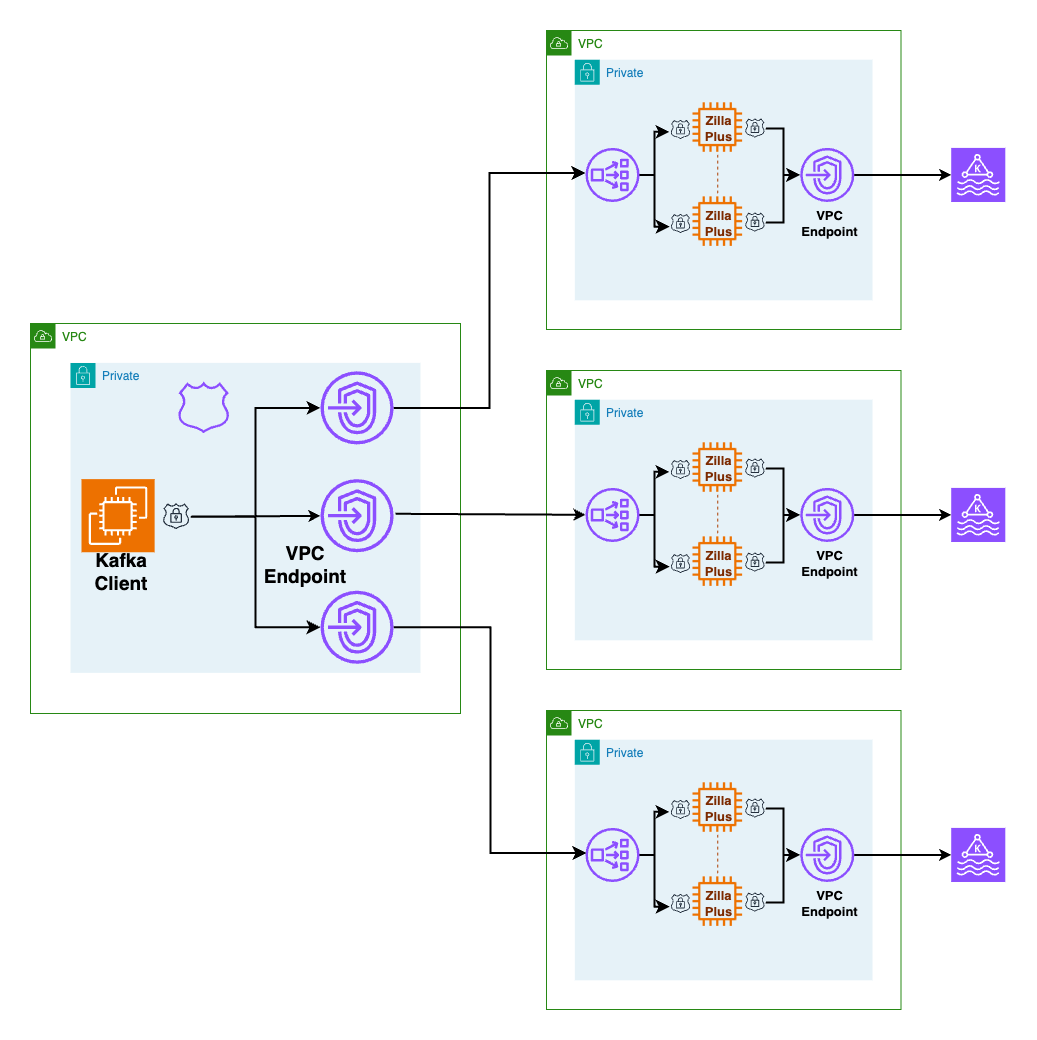
As shown in the preceding figure, each custom domain has a single Route53-hosted zone wildcard DNS record aliased to the corresponding local VPC endpoint for the corresponding remote MSK Serverless cluster. When the Kafka client performs bootstrap, local DNS resolution for the custom domain bootstrap server hostname routes connectivity to the correct VPC endpoint and the TLS certificate presented validates trust for the custom domain hostname too. Connectivity to individual broker addresses in the same custom domain are routed and trusted in the same way.
Secure private to MSK Serverless clusters through AWS Client VPN
When on-premises Kafka clients need to access an MSK Serverless cluster, the client VPC can be associated with an AWS Client VPN endpoint to connect through AWS Client VPN, as shown in the following figure.
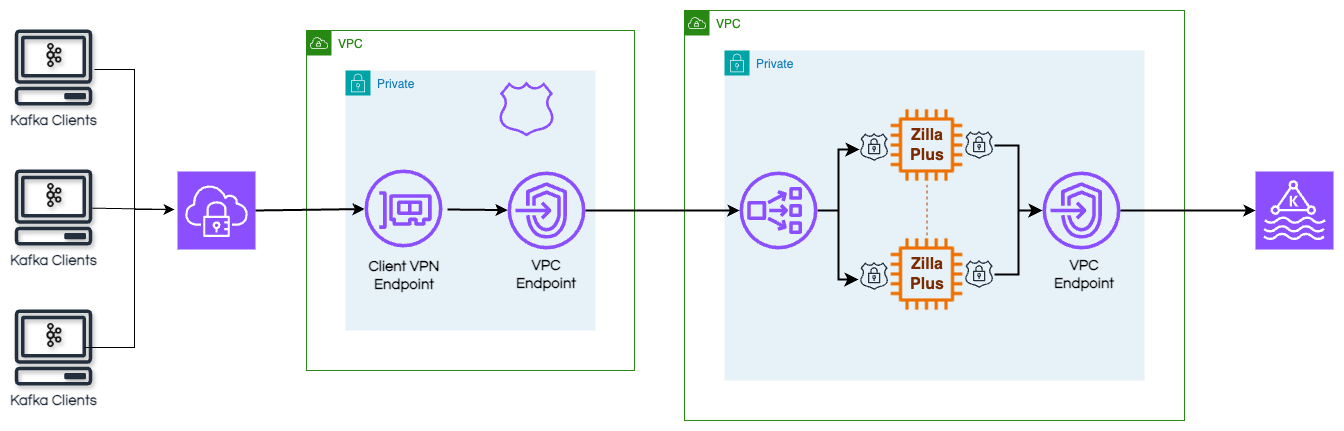
By configuring the AWS Client VPN endpoint to use the client VPC DNS server, the AWS Client VPN connections will automatically resolve the custom domain bootstrap server hostname and connect through Zilla Plus to MSK Serverless.
Conclusion
You can use Amazon MSK Serverless clusters to run Apache Kafka without having to manage and scale cluster capacity. With Zilla Plus for Amazon MSK, you can access one or more of your Amazon MSK Serverless clusters from one or more remote client VPCs using a custom domain for each MSK Serverless cluster. The remote client VPCs can also belong to different AWS accounts, while still enforcing fine-grained AWS Identity and Access Management (IAM) authorization for topics and consumer groups. On-premises clients can also use this approach to connect to an MSK Serverless cluster through AWS Client VPN from a different AWS account.
Zilla Plus requires no configuration changes to your MSK Serverless cluster, so adding a custom domain for remote Kafka clients has no impact on existing Kafka clients—including MSK Connect, MSK Replicator, or other MSK Integrations—that connect directly to your MSK Serverless cluster.
Learn more about Zilla Plus for Amazon MSK on AWS Marketplace and the Aklivity Zilla Plus documentation.