AWS Big Data Blog
Streamline Apache Kafka topic management with Amazon MSK
If you manage Apache Kafka today, you know the effort required to manage topics. Whether you use infrastructure as code (IaC) solutions or perform operations with admin clients, setting up topic management takes valuable time that could be spent on building streaming applications.
Amazon Managed Streaming for Apache Kafka (Amazon MSK) now streamlines topic management by supporting new topic APIs and console integration. You can programmatically create, update, and delete Apache Kafka topics using familiar interfaces including AWS Command Line Interface (AWS CLI), AWS SDKs, and AWS CloudFormation. With these APIs, you can define topic properties such as replication factor and partition count and configuration settings like retention and cleanup policies. The Amazon MSK console integrates these APIs, bringing all topic operations to one place. You can now create or update topics with a few selections using guided defaults while gaining comprehensive visibility into topic configurations, partition-level information, and metrics. You can browse for topics within a cluster, review replication settings and partition counts, and go into individual topics to examine detailed configuration, partition-level information, and metrics. A unified dashboard consolidates partition topics and metrics in one view.
In this post, we show you how to use the new topic management capabilities of Amazon MSK to streamline your Apache Kafka operations. We demonstrate how to manage topics through the console, control access with AWS Identity and Access Management (IAM), and bring topic provisioning into your continuous integration and continuous delivery (CI/CD) pipelines.
Prerequisites
To get started with topic management, you need:
- An active AWS account with appropriate IAM permissions for Amazon MSK.
- An existing Amazon MSK Express or Standard cluster using Apache Kafka version 3.6 and above.
- Basic familiarity with Apache Kafka concepts like topics, partitions, and replication.
- AWS CLI installed and configured (for command line examples).
Creating topics
The MSK console provides a guided experience with sensible defaults while still offering advanced configuration options when you need them.
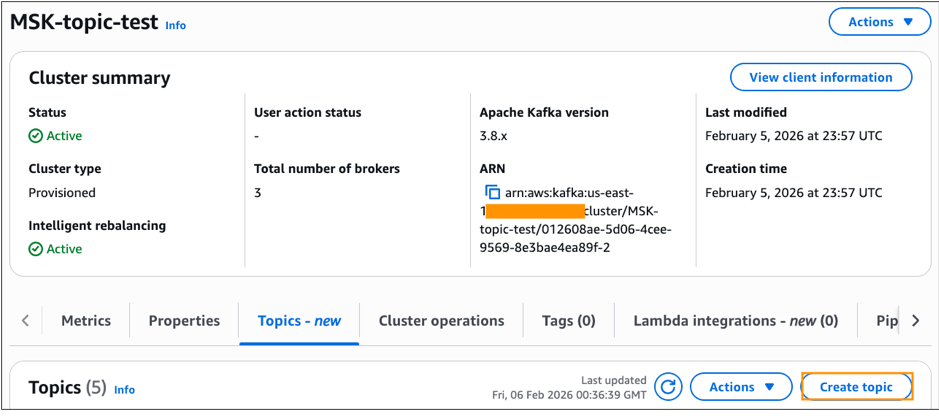
- Navigate to the Amazon MSK console and select your cluster.
- Choose the Topics tab, then choose Create topic.
- Enter a topic name (for example,
customer-orders). - Specify the number of partitions (use the guided defaults or customize based on your needs).
- Set the replication factor. Note that Express brokers improve the availability and durability of your Amazon MSK clusters by setting values for critical configurations and protecting them from common misconfiguration. If you try to create a topic with a replication factor value other than 3, Amazon MSK Express will create the topic with a replication factor of 3 by default.
- (Optional) Configure advanced settings like retention period or message size limits.
- Choose Create topic.
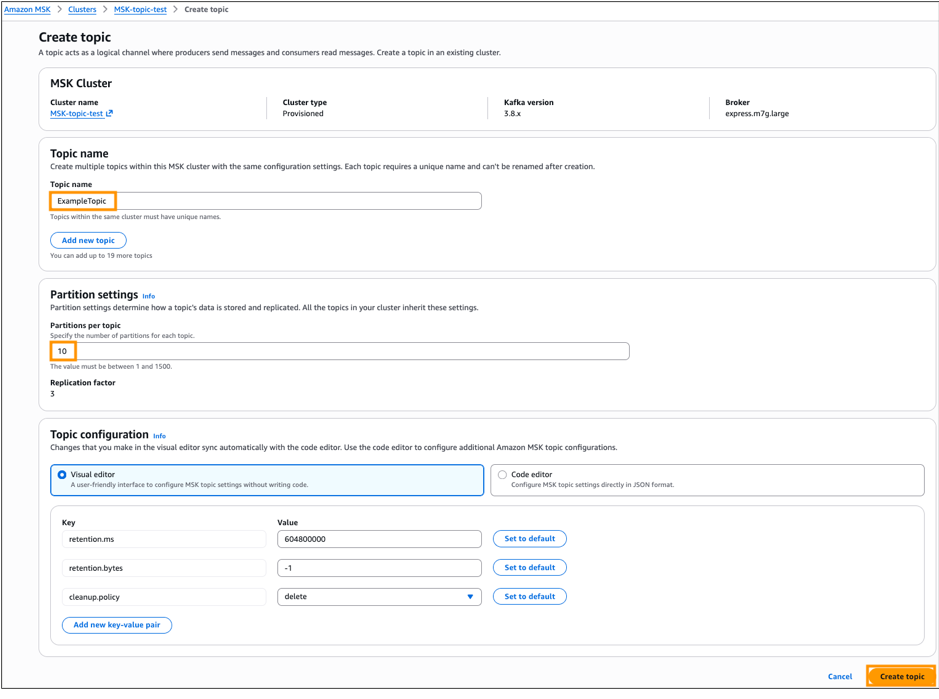
The console validates your configuration and creates the topic. You can create multiple topics simultaneously with the same configuration settings. These topic API responses reflect data that updates approximately every minute. For the most current topic state after making changes, wait approximately one minute before querying.
Configuration considerations
When choosing configuration options, consider your workload requirements:
- You can configure more partitions to achieve higher throughput but this requires more broker resources. Refer to Best practices for Standard brokers and Amazon MSK Express broker quota for more information on partition limits.
- With Standard brokers you can improve durability by configuring higher replication factors, though this will increase your storage costs. Refer to “Build highly available clusters” in Best practices for Standard brokers for more information on replication factors.
- Standard brokers support the full range of Apache Kafka topic configurations.
- Express brokers offer a curated set of the most important settings. Refer to Topic-level configurations on Express Brokers for more information.
Viewing and monitoring topics
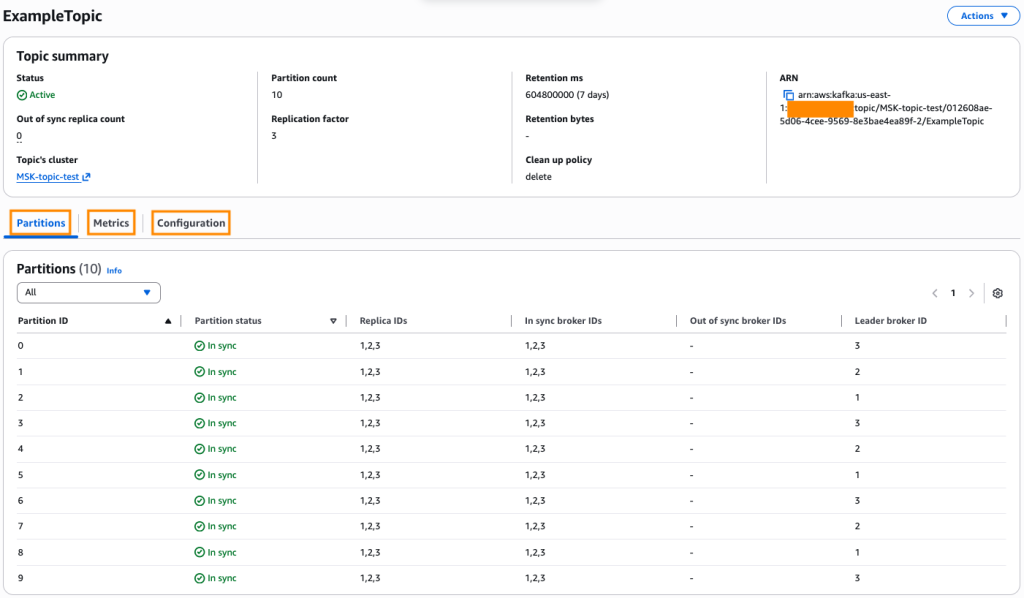
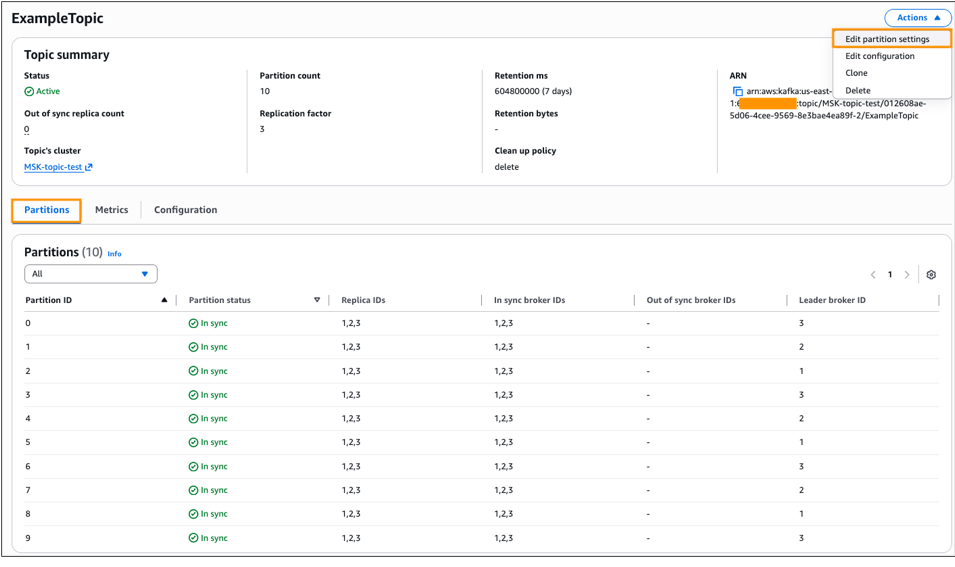
After you create topics, the MSK console provides comprehensive visibility into their configuration. When you select a specific topic, you will see detailed information:
- Partitions tab: Shows the distribution of partitions across brokers, including leader assignments and in-sync replica status showcasing Broker IDs for leader and replicas.
- Configuration tab: Displays all topic-level configuration settings.
- Monitoring tab: Integrates with Amazon CloudWatch to show metrics like bytes in/out, message rates, and consumer lag.
Updating topic configurations
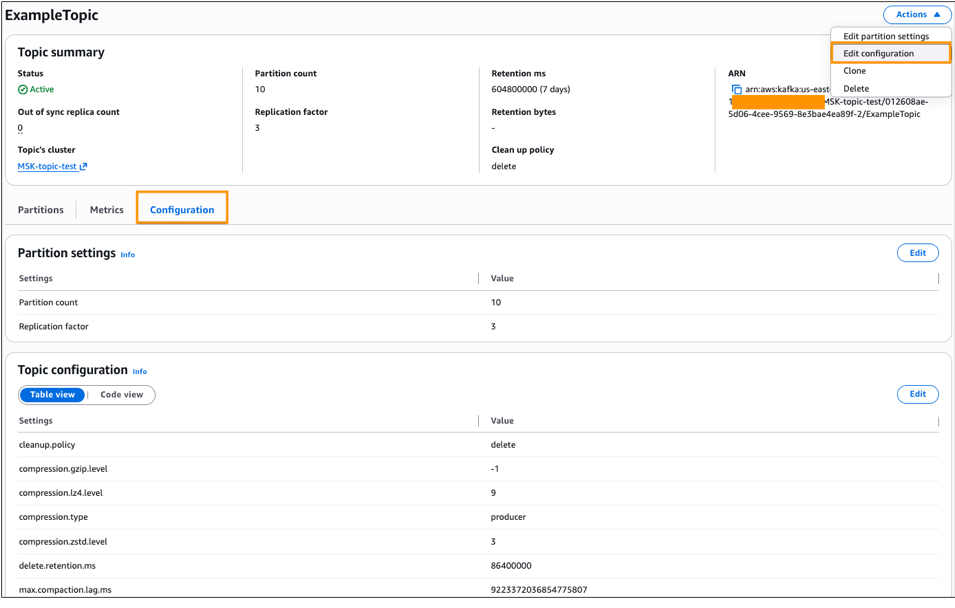
As your workload requirements evolve, you might need to adjust topic configurations. You can modify various topic settings depending on your cluster type. For example:
- Retention settings: Adjust
retention.ms(time-based) orretention.bytes(size-based) to control how long messages are retained. - Message size limits: Modify
max.message.bytesto accommodate larger or smaller messages. - Compression: Change
compression.typeto optimize storage and network usage.
Configuration changes take effect immediately for new messages. Existing messages remain subject to the previous configuration until they age out or are consumed.
Deleting topics
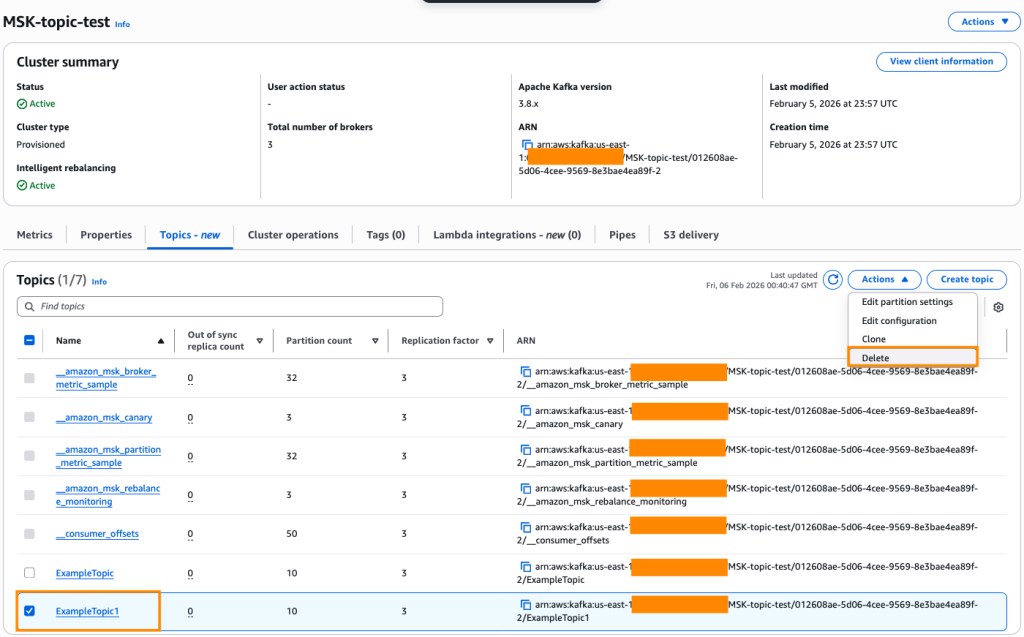
Amazon MSK also provides APIs for deleting topics that are no longer in use. Before deleting a topic, verify that:
- No active producers are writing to the topic
- All consumers have finished processing messages
- You have backups if you need to retain the data
- Downstream applications won’t be impacted
Important: Topic deletion permanently removes all messages in the topic.
Control access with IAM
Beyond streamlining topic operations, you also need appropriate access controls. Access control uses IAM, so you define permissions using the same model that you apply to other AWS resources. Amazon MSK uses a two-level permission model:
- Resource-level permissions: An IAM policy that enforces which operations the cluster will allow
- Principal-level permissions: IAM policies attached to Roles or Users that enforce which operations a principal is allowed to perform on a cluster
With this separation, you can control access depending on your organizational needs and access patterns for your cluster. Refer to the IAM permissions documentation for IAM permissions required for topic management for the Amazon MSK cluster.
You can grant your operations team broad access to manage all topics and restrict application teams to manage only their own topics. The permission granularity that you need is available through standard IAM policies. If you’ve already configured IAM permissions for Apache Kafka topics, they work immediately with the new functionality without any migration or reconfiguration.
Here is a sample IAM policy definition that allows Describe Topic API
This IAM policy grants the necessary permissions to describe Kafka topics in your Amazon MSK cluster. The policy includes three key permissions:
kafka-cluster:Connect– Allows connection to the specified MSK clusterkafka-cluster:DescribeTopic– Enables viewing topic detailskafka-cluster:DescribeTopicDynamicConfiguration– Enables viewing topic dynamic configuration
The policy is scoped to a specific cluster ARN and applies to all topics within that cluster using the wildcard pattern /*. Replace the placeholder Amazon MSK cluster ARN with your MSK cluster ARN.
Infrastructure as Code
If you manage infrastructure as code (IaC), you can now define topics alongside clusters in your CloudFormation templates:
This approach brings topic provisioning into your CI/CD pipelines.
Availability and pricing
The new Amazon MSK topic management experience is available today for Standard and Express Amazon MSK clusters using Apache Kafka version 3.6 and above in all AWS Regions where Amazon MSK is offered, at no additional cost.
Cleanup
To avoid incurring additional charges to your AWS account, ensure you delete all resources created during this tutorial, including:
- Amazon MSK cluster
- Any Kafka topics created
- Associated AWS resources (security groups, VPCs, etc., if created specifically for this blog)
Remember to verify that all resources have been successfully removed to prevent ongoing costs.
Conclusion
Topic management has been a persistent pain point for Apache Kafka operations. The new integrated experience in Amazon MSK now reduces operational friction by bringing topic operations into the AWS tools that you use every day. You now have a consistent, streamlined way to handle these operations for all Apache Kafka topics across multiple MSK clusters. This capability reflects our commitment to reducing operational complexity in Apache Kafka. You get the reliability and performance of Apache Kafka without the operational overhead that traditionally comes with it. Your team spends less time on infrastructure maintenance and more time building streaming applications that drive your business forward.
Ready to start streamlining your topic management? Start managing your topics today through the Amazon MSK console or by visiting the Amazon MSK documentation.