AWS Big Data Blog
Unlock granular resource control with queue-based QMR in Amazon Redshift Serverless
Amazon Redshift Serverless removes infrastructure management and manual scaling requirements from data warehousing operations. Amazon Redshift Serverless queue-based query resource management, helps you protect critical workloads and control costs by isolating queries into dedicated queues with automated rules that prevent runaway queries from impacting other users. You can create dedicated query queues with customized monitoring rules for different workloads, providing granular control over resource usage. Queues let you define metrics-based predicates and automated responses, such as automatically aborting queries that exceed time limits or consume excessive resources.
Different analytical workloads have distinct requirements. Marketing dashboards need consistent, fast response times. Data science workloads might run complex, resource-intensive queries. Extract, transform, and load (ETL) processes might execute lengthy transformations during off-hours.
As organizations scale analytics usage across more users, teams, and workloads, ensuring consistent performance and cost control becomes increasingly challenging in a shared environment. A single poorly optimized query can consume disproportionate resources, degrading performance for business-critical dashboards, ETL jobs, and executive reporting. With Amazon Redshift Serverless queue-based Query Monitoring Rules (QMR), administrators can define workload-aware thresholds and automated actions at the queue level—a significant improvement over previous workgroup-level monitoring. You can create dedicated queues for distinct workloads such as BI reporting, ad hoc analysis, or data engineering, then apply queue-specific rules to automatically abort, log, or restrict queries that exceed execution-time or resource-consumption limits. By isolating workloads and enforcing targeted controls, this approach protects mission-critical queries, improves performance predictability, and prevents resource monopolization—all while maintaining the flexibility of a serverless experience.
In this post, we discuss how you can implement your workloads with query queues in Redshift Serverless.
Queue-based vs. workgroup-level monitoring
Before query queues, Redshift Serverless offered query monitoring rules (QMRs) only at the workgroup level. This meant the queries, regardless of purpose or user, were subject to the same monitoring rules.
Queue-based monitoring represents a significant advancement:
- Granular control – You can create dedicated queues for different workload types
- Role-based assignment – You can direct queries to specific queues based on user roles and query groups
- Independent operation – Each queue maintains its own monitoring rules
Solution overview
In the following sections, we examine how a typical organization might implement query queues in Redshift Serverless.
Architecture Components
Workgroup Configuration
- The foundational unit where query queues are defined
- Contains the queue definitions, user role mappings, and monitoring rules
Queue Structure
- Multiple independent queues operating within a single workgroup
- Each queue has its own resource allocation parameters and monitoring rules
User/Role Mapping
- Directs queries to appropriate queues based on:
- User roles (e.g., analyst, etl_role, admin)
- Query groups (e.g., reporting, group_etl_inbound)
- Query group wildcards for flexible matching
Query Monitoring Rules (QMRs)
- Define thresholds for metrics like execution time and resource usage
- Specify automated actions (abort, log) when thresholds are exceeded
Prerequisites
To implement query queues in Amazon Redshift Serverless, you need to have the following prerequisites:
Redshift Serverless environment:
- Active Amazon Redshift Serverless workgroup
- Associated namespace
Access requirements:
- AWS Management Console access with Redshift Serverless permissions
- AWS CLI access (optional for command-line implementation)
- Administrative database credentials for your workgroup
Required permissions:
- IAM permissions for Redshift Serverless operations (CreateWorkgroup, UpdateWorkgroup)
- Ability to create and manage database users and roles
Identify workload types
Begin by categorizing your workloads. Common patterns include:
- Interactive analytics – Dashboards and reports requiring fast response times
- Data science – Complex, resource-intensive exploratory analysis
- ETL/ELT – Batch processing with longer runtimes
- Administrative – Maintenance operations requiring special privileges
Define queue configuration
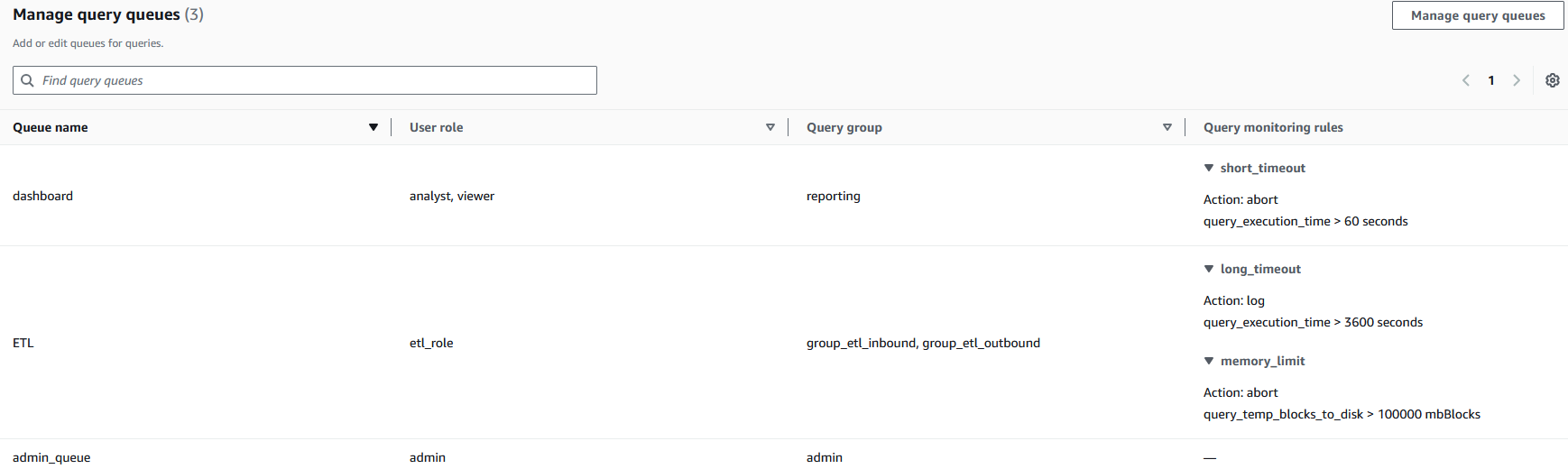
For each workload type, define appropriate parameters and rules. For a practical example, let’s assume we want to implement three queues:
- Dashboard queue – Used by analyst and viewer user roles, with a strict runtime limit set to stop queries longer than 60 seconds
- ETL queue – Used by etl_role user roles, with a limit of 100,000 blocks on disk spilling (
query_temp_blocks_to_disk) to control resource usage during data processing operations - Admin queue – Used by admin user roles, without a query monitoring limit enforced
To implement this using the AWS Management Console, complete the following steps:
- On the Redshift Serverless console, go to your workgroup.
- On the Limits tab, under Query queues, choose Enable queues.
- Configure each queue with appropriate parameters, as shown in the following screenshot.
Each queue (dashboard, ETL, admin_queue) is mapped to specific user roles and query groups, creating clear boundaries between query rules. The query monitoring rules implement automated resource governance—for example, the dashboard queue automatically stops queries exceeding 60 seconds (short_timeout) while allowing ETL processes longer runtimes with different thresholds. This configuration helps prevent resource monopolization by establishing separate processing lanes with appropriate guardrails, so critical business processes can maintain necessary computational resources while limiting the impact of resource-intensive operations.
Alternatively, you can implement the solution using the AWS Command Line Interface (AWS CLI).
In the following example, we create a new workgroup named test-workgroup within an existing namespace called test-namespace. This makes it possible to create queues and establish associated monitoring rules for each queue using the following command:
You can also modify an existing workgroup using update-workgroup using the following command:
Best practices for queue management
Consider the following best practices:
- Start simple – Begin with a minimal set of queues and rules
- Align with business priorities – Configure queues to reflect critical business processes
- Monitor and adjust – Regularly review queue performance and adjust thresholds
- Test before production – Validate query metrics behavior in a test environment before applying to production
Clean up
To clean up your resources, delete the Amazon Redshift Serverless workgroups and namespaces. For instructions, see Deleting a workgroup.
Conclusion
Query queues in Amazon Redshift Serverless bridge the gap between serverless simplicity and fine-grained workload control by enabling queue-specific Query Monitoring Rules tailored to different analytical workloads. By isolating workloads and enforcing targeted resource thresholds, you can protect business-critical queries, improve performance predictability, and limit runaway queries, helping minimize unexpected resource consumption and better control costs, while still benefiting from the automatic scaling and operational simplicity of Redshift Serverless.
Get started with Amazon Redshift Serverless today.