AWS Big Data Blog
Upgrade PySpark from Spark 3.5 to Spark 4.0 with AWS Spark Upgrade Agent
Upgrading Apache Spark applications across major versions means tracking down breaking changes, manually debugging failures from log files, and running repeated test cycles. This process can stretch across weeks for complex code bases.
In this post, we walk through a hands-on PySpark migration from Spark 3.5 to Spark 4.0 on Amazon EMR Serverless, using the AWS Spark Upgrade Agent. You’ll see how the agent iteratively validates your application on a live Amazon EMR Serverless application, automatically diagnosing and resolving failures from Amazon CloudWatch logs until the job succeeds. By the end, you have a multi-pipeline PySpark application running on Spark 4.0 with four distinct breaking changes resolved. The fixes include configuration key removals, codec renames, and stricter charset validation, all driven through natural language interaction in the Integrated Development Environment (IDE).
This is part 2 of a three-part series on how the AWS Spark Upgrade Agent can automate and simplify Spark upgrades.
In Part 1, we introduced the agent’s architecture and capabilities. This post walks through a complete PySpark migration from Spark 3.5 to Spark 4.0 on Amazon EMR Serverless.
In the sections that follow, you will set up the prerequisites and infrastructure, explore the sample application, run the iterative validation workflow on EMR Serverless, review data quality results, and generate a comprehensive upgrade summary.
Note: Because this upgrade is performed using the AWS Spark Upgrade Agent Model Context Protocol (MCP) server, an agentic artificial intelligence (AI) system, the agent might take different paths to reach the same successful outcome. The workflow demonstrated here represents one successful upgrade path. The key takeaway is the end-to-end workflow: generating an upgrade plan, iteratively validating on Amazon EMR Serverless, and producing a comprehensive upgrade summary.
1. Prerequisites and setup
This section covers the tools, infrastructure, and IDE configuration you need before starting the upgrade. To follow along, you need an AWS account with an AWS Identity and Access Management (AWS IAM) user or role that has permissions to deploy AWS CloudFormation stacks, create AWS IAM roles and policies, and create Amazon EMR Serverless applications. Intermediate knowledge of AWS Command Line Interface (AWS CLI), AWS CloudFormation, and Python is helpful.
1.1 Install Kiro CLI and local tools
In this post, we use Kiro CLI to demonstrate the upgrade workflow. You can use an MCP-compatible IDE or framework. Examples include VS Code with Cline, Cursor, Windsurf, and Claude Desktop, among others. To follow along with Kiro CLI, install it on your workstation. For more details on the installation and setup, refer to Setup for Upgrade Agent:
Run the following command and use your builder ID to log in:
With the Kiro CLI installed and logged in, rather than installing the remaining tools manually, use Kiro CLI to set up and verify your prerequisites with the following prompt:
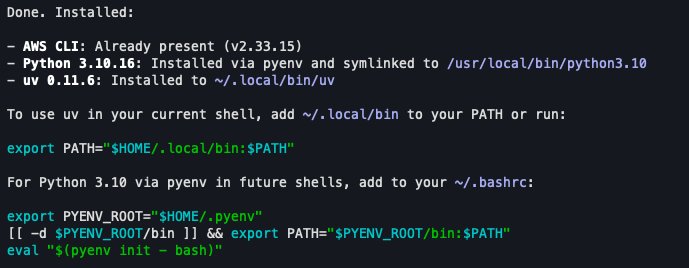
Output of AWS CLI and local tools install step.
These tools are needed for the upgrade workflow:
- AWS CLI: Configured with a profile that has permissions to assume the AWS Identity and Access Management (AWS IAM) role created following.
- Python 3.10+: Required to match the EMR 8.0 runtime.
- uv package manager: Required by the MCP Proxy for AWS.
1.2 Infrastructure setup (AWS CloudFormation)
Two AWS CloudFormation stacks create the required resources: an AWS IAM role, an Amazon Simple Storage Service (Amazon S3) staging bucket, an Amazon EMR Serverless application (Spark 4.0.1), and its execution role.
Stack 1 – AWS IAM role and Amazon S3 staging bucket:
The spark-upgrade-mcp-setup template creates the AWS IAM role and Amazon S3 staging bucket required by the upgrade agent. For additional Regions, see the full region list.
After deployment, open the AWS CloudFormation Outputs tab, copy the ExportCommand value, and run it in your terminal. This sets SMUS_MCP_REGION, IAM_ROLE, and STAGING_BUCKET_PATH automatically.
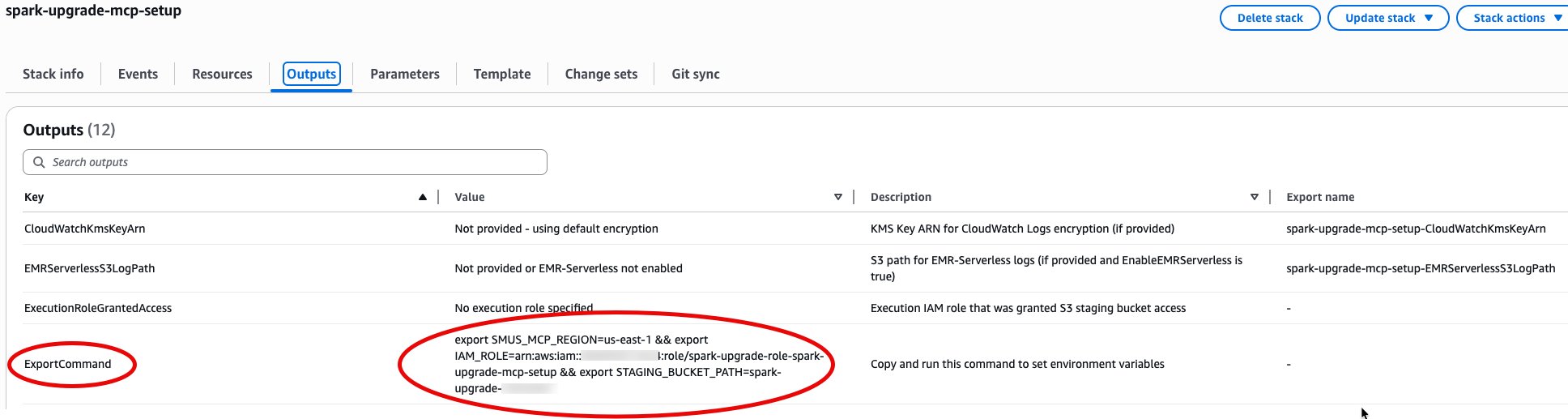
Outputs tab of the CloudFormation stack.
Then configure the AWS CLI profile:
Stack 2 – Amazon EMR Serverless target application and execution role:
The PySpark sample lives at resources/global_logistics_platform/. The AWS CloudFormation template lives at resources/cloudformation/.
Deploy the AWS CloudFormation template to create the source and target Amazon EMR Serverless applications and a shared execution role:
This creates two Amazon EMR Serverless applications: a source (Spark 3.5.0) for data quality baseline and a target (Spark 4.0.1) for upgrade validation, with a shared execution role. Both applications auto-stop after 15 minutes of idle time, so there is no cost when not in use. To upgrade between different Spark versions, override SourceReleaseLabel and TargetReleaseLabel with your target Amazon EMR release labels.
After the stack completes deployment, note the outputs:
This gives you the SourceApplicationId, TargetApplicationId, and ExecutionRoleArn needed for the upgrade prompt. Make a note of them.
1.3 IDE and MCP server configuration
Configure the spark-upgrade MCP server. For Kiro CLI:
For other MCP clients, refer to your IDE’s MCP configuration documentation and use the same server parameters shown previously.
Verify the connection: Start Kiro CLI and confirm the spark-upgrade tools are loaded:
Tip: After Kiro CLI and the MCP server are configured, you can ask the agent to verify your setup. For example: “Check if I have AWS CLI, Python 3.10+, and uv installed, and confirm the spark-upgrade MCP server is connected.”
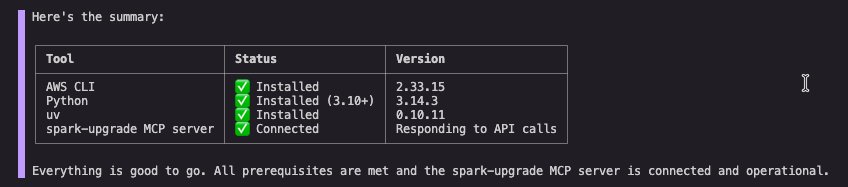
Output showing the status of each tool, AWS CLI, and MCP server.
Tip: Trust mode vs. confirm mode: When running the upgrade agent in Kiro CLI, you have two options:
Trust mode: Type t when prompted to approve a tool. The agent auto-approves subsequent uses of that tool without asking for confirmation. You can also use /tools trust-all to trust every tool at once for a fully autonomous experience.
Confirm mode: Type y for each individual tool invocation. This lets you review, verify, and approve every action before the agent runs it. If this is your first time using the agent, use confirm mode for full visibility.
2. Hands-on PySpark upgrade from Spark 3.5 to Spark 4.0
This section walks through the complete migration of a representative PySpark application from Amazon EMR Serverless 7.0.0 (Spark 3.5.0) to EMR Serverless with the emr-spark-8.0-preview release label (Spark 4.0.1), using the global_logistics_platform sample.
2.1 Sample project: global logistics platform
The sample application is a multi-domain PySpark data processing application with three pipelines:
- Fleet management: Processes vehicle telemetry data (GPS tracking, fuel consumption, driver behavior scoring) using window functions, lag/lead operations, and statistical aggregations. Writes Parquet with
lz4rawcompression. - International shipping: Handles cross-border shipment documents with multi-language address standardization using character encoding functions (
encode/decodewith charsets likeShift_JIS,GB2312,EUC-KR), and processes carrier manifests withISO-8859-1encoding. - Historical compliance: Processes regulatory audit records spanning centuries (including pre-1582 Julian calendar dates), requiring legacy datetime rebasing for Parquet writes.
Project structure:
2.2 The four Spark 4.0 incompatibilities
Before diving into the upgrade, here are the four specific breaking changes present in this code base that the agent discovers and resolves entirely through runtime validation:
| # | Incompatibility | File(s) |
| 1 | Legacy Parquet configuration key removed: spark.sql.legacy.parquet.datetimeRebaseModeInWrite removed in Spark 4.0. Must use spark.sql.parquet.datetimeRebaseModeInWrite. |
spark_config.py |
| 2 | Parquet compression codec rename: lz4raw codec renamed to lz4_raw in Spark 4.0. |
telemetry_processor.py |
| 3 | Stricter charset encoding validation: Spark 4.0 tightened encode() behavior. Encoding CJK (Chinese, Japanese, Korean) characters to ISO-8859-1 now throws MALFORMED_CHARACTER_CODING. In Spark 3.x this silently replaced unmappable chars with ?. Restored via spark.sql.legacy.codingErrorAction. |
spark_config.py |
| 4 | Character encoding restrictions: encode()/decode() in Spark 4.0 supports US-ASCII, ISO-8859-1, UTF-8, UTF-16BE, UTF-16LE, UTF-16, and UTF-32. Code uses Shift_JIS, GB2312, EUC-KR. |
shipment_processor.py |
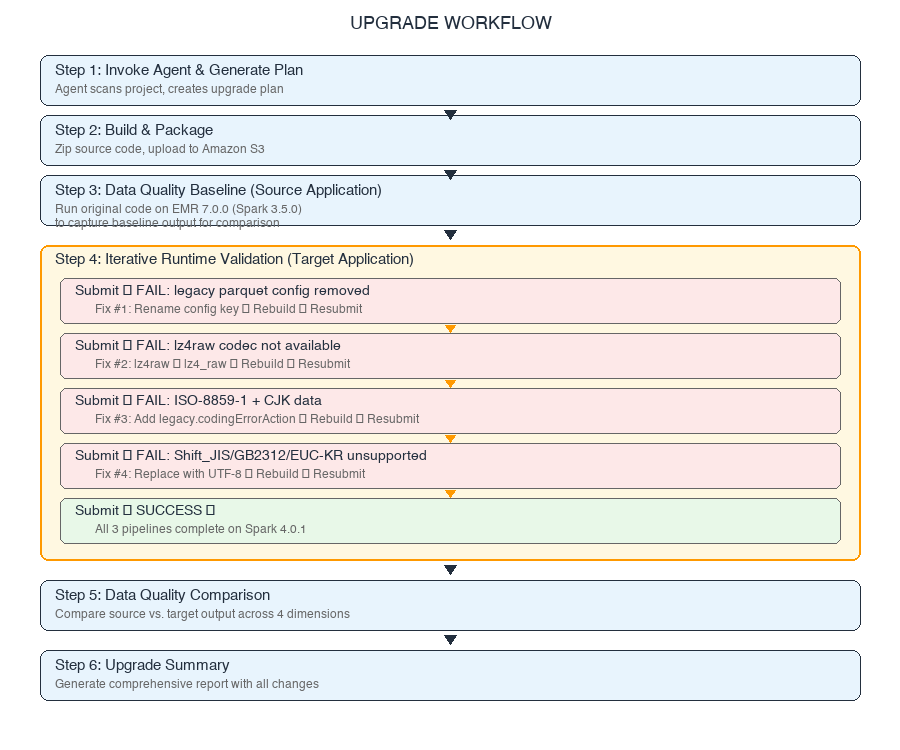
The agent resolves each of these through iterative runtime validation on EMR Serverless: submitting the job, diagnosing failures from Amazon CloudWatch logs, applying fixes, and resubmitting until the job succeeds.
2.3 Step 1: Invoke the upgrade agent
Open the project in Kiro CLI and enter the following prompt:
Tip: The SourceApplicationId, TargetApplicationId, and ExecutionRoleArn are in the Outputs of the spark-emr-serverless-upgrade AWS CloudFormation stack you deployed in Section 1.2.
The agent invokes generate_spark_upgrade_plan, scans the project structure, identifies the Spark version mapping (EMR 7.0.0 → Spark 3.5.0, EMR 8.0.0 → Spark 4.0.1), and produces a structured upgrade plan with an Analysis ID for traceability.
The agent presents the plan and asks for confirmation. Type y to approve the tool invocation, or t to trust that tool for the rest of the session.
You have an option to save the plan as a local JSON file for future reference or to resume the upgrade at a later point, so go ahead and ask Kiro to save it locally. Provide the AWS CLI profile that you have configured on your system. Use the following prompt to provide these inputs:
2.4 Step 2: Build and package
The agent validates the Python project compiles successfully, then packages it for Amazon EMR Serverless deployment:
- Runs
py_compileon each.pyfile to verify syntax. - Creates
src.zipcontaining thesrc/directory (preserving the import structure used byfrom src.utils import ...). - Uploads
src.zip,main.py, and sample input data to the Amazon S3 staging path.
No external dependencies (no requirements.txt), so no virtual environment is needed. If your project has external dependencies in a requirements.txt, the agent will package them into a virtual environment archive and include it in the EMR Serverless submission parameters.
2.5 Step 3: Data quality baseline on source application
Before migrating the code, the agent establishes a data quality baseline by running the original (pre-upgrade) code on the source Amazon EMR Serverless application (Spark 3.5.0 / EMR 7.0.0). This captures the expected output that the upgraded application must match.
The agent submits the job to the source application with data quality check enabled:
The agent monitors the source run via check_job_status until it completes successfully. This baseline output is stored for comparison after the target validation succeeds.
2.6 Step 4: Iterative runtime validation on target application
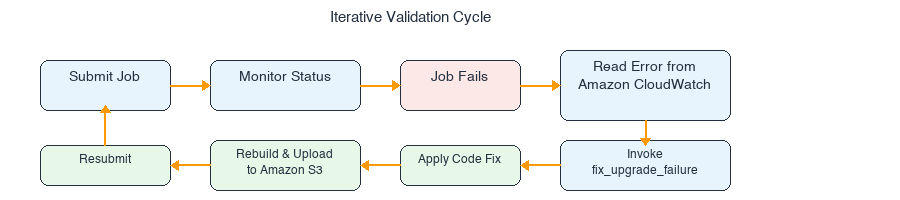
This is the core of the upgrade. The agent submits the unmodified application to the target Amazon EMR Serverless application (Spark 4.0.1), and every incompatibility is discovered, diagnosed, and fixed through runtime failures. The agent drives the entire fix cycle by submitting to EMR, reading errors from Amazon CloudWatch logs, applying fixes, rebuilding, and resubmitting.
The agent presents the proposed Amazon EMR Serverless job configuration for your review before each submission. Type y to approve.
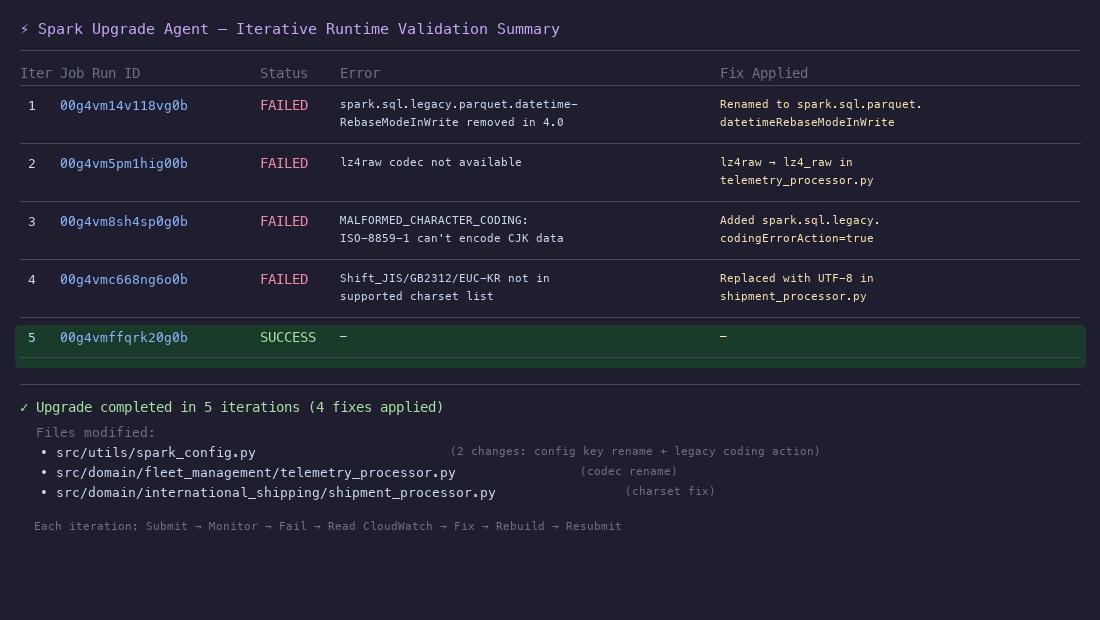
2.6.1 Fix 1: Legacy Parquet configuration key removed (iteration 1)
The first submission fails immediately at SparkSession initialization:
The Historical Compliance pipeline configures spark.sql.legacy.parquet.datetimeRebaseModeInWrite for handling pre-1582 Julian calendar dates. Spark 4.0 removed the legacy. prefix from this configuration key.
The agent calls fix_upgrade_failure, which identifies the migration rule and recommends the fix:
File: src/utils/spark_config.py
After applying the fix, the agent rebuilds src.zip, re-uploads to Amazon S3, and resubmits the job.
2.6.2 Fix 2: Parquet compression codec rename (iteration 2)
The resubmitted job fails with a new error, which confirms progress:
The Fleet Management pipeline’s telemetry_processor.py uses lz4raw as the Parquet compression codec. Spark 4.0 renamed this to lz4_raw (with an underscore).
The recommended fix:
File: src/domain/fleet_management/telemetry_processor.py
The agent applies the change, rebuilds, and resubmits.
2.6.3 Fix 3: Stricter charset encoding validation (iteration 3)
The next submission surfaces a different failure:
The International Shipping pipeline’s process_carrier_manifests() method uses encode(..., 'ISO-8859-1') on data containing CJK (Chinese, Japanese, Korean) characters. Although ISO-8859-1 is in Spark 4.0’s supported charset list, it is a single-byte encoding that cannot represent CJK characters. In Spark 3.x, the Java charset encoder silently replaced unmappable characters with ?. Spark 4.0 tightened this behavior to throw MALFORMED_CHARACTER_CODING for unmappable characters.
The agent identifies the migration rule and adds a legacy compatibility configuration:
File: src/utils/spark_config.py
This restores the Spark 3.x behavior where unmappable characters are silently replaced instead of throwing errors.
With the configuration added, the agent rebuilds and resubmits.
2.6.4 Fix 4: Character encoding restrictions (iteration 4)
The fourth submission fails with yet another encoding error:
The International Shipping pipeline’s standardize_addresses_with_charset() method uses Shift_JIS, GB2312, and EUC-KR charsets in encode()/decode() calls. Spark 4.0 restricts these functions to seven standard charsets. These regional charsets are not in the supported list.
The agent replaces the unsupported charsets with UTF-8:
File: src/domain/international_shipping/shipment_processor.py
Before (Spark 3.5.0):
After (Spark 4.0.1):
The same transformation is applied to consignee_address_normalized.
The agent rebuilds and resubmits one final time.
2.6.5 Final submission: success
The fifth submission completes successfully:
The three pipelines (Fleet Management, International Shipping, and Historical Compliance) complete on EMR Serverless with the emr-spark-8.0-preview release label (Spark 4.0.1).
2.7 Summary of the iterative runtime validation
The runtime validation loop is the core value of the upgrade agent. Here’s the complete iteration history:
Each iteration follows the same cycle:
Failures that would normally require manual log analysis, root cause investigation, and code patching are resolved automatically by the agent in this workflow.
3. Data quality validation
With both the source baseline (Section 2.5) and the upgraded target run (Section 2.6) completed successfully, the agent performs data quality validation to verify the migration hasn’t changed your application’s output. This is the key advantage of including the source application in your upgrade prompt: the agent can compare outputs from both Spark versions side by side.
3.1 Data quality comparison
The agent invokes get_data_quality_summary to compare the outputs across four dimensions:
- Schema validation: Confirms column names, data types, and column ordering match between source and target outputs.
- Row count validation: Verifies no data loss or duplication during migration.
- Nullability validation: Detects changes in null handling.
- Statistical summary validation: Compares numeric and string column distributions (
min,max,mean,count, distinct values).
The agent presents the comparison results:
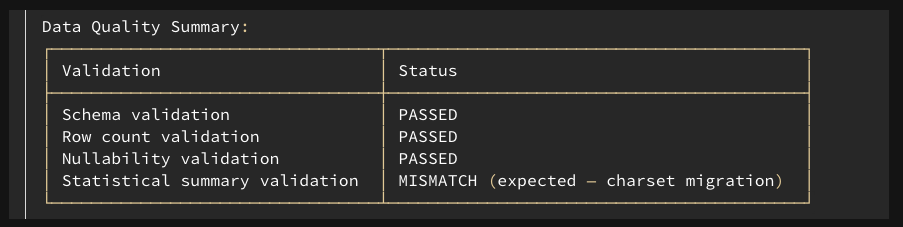
The preceding image shows the data quality summary.
Three of four checks pass cleanly. The statistical summary validation detects a mismatch in the shipper_address column of the customs_declarations output: the max and min summary values differ between source and target.
3.2 Understanding and resolving the mismatch
This mismatch is a direct consequence of Fix 4 (Section 2.6.4). The original code ran addresses through a Shift_JIS/GB2312/EUC-KR → UTF-8 roundtrip that produced garbled text, because the intermediate regional charset corrupted multi-byte UTF-8 characters. The upgraded code uses UTF-8 → UTF-8, preserving addresses faithfully. The mismatch reflects improved data quality, not a regression.
Schema, row counts, and nullability matched exactly: the difference is limited to string values that were previously garbled. No further action is needed. The upgraded application is production-ready.
Expected behavior: Character encoding migrations might change string values, although they preserve semantic meaning. When data quality validation reports mismatches, trace each one back to a specific code change. If the mismatch is explained by a required migration fix (as here), verify the new behavior is correct and document it. If a mismatch cannot be explained, investigate before promoting to production.
4. Upgrade summary
After the agent completes the entire upgrade workflow, it produces a comprehensive upgrade summary following a structured template. This summary lets you review the job configuration updates, code modifications with diffs and file references, relevant migration rules applied, and data quality validation status.
Here is the summary the agent produced for this upgrade:
Upgrade plan
- Compile and build project with current Spark 3.5.0: validated that Python files compile successfully.
- Run baseline validation on source EMR Serverless (00g4vhvt1lhtrs09) with Spark 3.5.0: established data quality baseline.
- Run target validation on target EMR Serverless (00g4vhvt3np1bj09) with Spark 4.0.1: fixed 4 issues iteratively across 4 validation attempts.
- Compare data quality between source and target runs: detected expected mismatch in
shipper_address. - Generate and persist upgrade summary.
Upgrade result
Upgrade completed with data validation enabled. Data validation detected an expected mismatch in the shipper_address column because of the charset encoding migration from unsupported charsets (Shift_JIS, GB2312, EUC-KR) to UTF-8.
Dependency changes
No external dependencies were changed in this project (no requirements.txt).
Job configuration changes
- Parquet datetime rebase configuration key renamed.
- Change:
spark.sql.legacy.parquet.datetimeRebaseModeInWrite→spark.sql.parquet.datetimeRebaseModeInWrite. - Migration rule: In Spark 4.0, the legacy datetime rebasing SQL configurations with the prefix
spark.sql.legacyare removed. The SQL configurationspark.sql.legacy.parquet.datetimeRebaseModeInWritewas removed in the version 4.0.0. Usespark.sql.parquet.datetimeRebaseModeInWriteinstead.
- Change:
- Legacy coding error action enabled.
- Change: Added
spark.sql.legacy.codingErrorActionset totrue. - Migration rule: In Spark 4.0, the
encode()anddecode()functions raiseMALFORMED_CHARACTER_CODINGerror when handling unmappable characters. In Spark 3.5 and earlier versions, these characters are replaced with garbled text. To restore the previous behavior, setspark.sql.legacy.codingErrorActiontotrue.
- Change: Added
Code changes
- Validation attempt 1: Legacy Parquet configuration key.
- Validation run: EMR-Serverless
job_run_id00g4vm14v118vg0b. - Error: The SQL config
'spark.sql.legacy.parquet.datetimeRebaseModeInWrite'was removed in the version 4.0.0. - Applied changes:
src/utils/spark_config.py: Changed.config("spark.sql.legacy.parquet.datetimeRebaseModeInWrite", "LEGACY")to.config("spark.sql.parquet.datetimeRebaseModeInWrite", "LEGACY").
- Validation run: EMR-Serverless
- Validation attempt 2: Parquet compression codec.
- Validation run: EMR-Serverless
job_run_id00g4vm5pm1hig00b. - Error:
[CODEC_NOT_AVAILABLE.WITH_AVAILABLE_CODECS_SUGGESTION]The codeclz4rawis not available. - Applied changes:
src/domain/fleet_management/telemetry_processor.py: Changed.option("compression", "lz4raw")to.option("compression", "lz4_raw").
- Validation run: EMR-Serverless
- Validation attempt 3: Stricter charset encoding.
- Validation run: EMR-Serverless
job_run_id00g4vm8sh4sp0g0b. - Error:
[MALFORMED_CHARACTER_CODING]Invalid value found when performingencodewithISO-8859-1. - Applied changes:
src/utils/spark_config.py: Added.config("spark.sql.legacy.codingErrorAction", "true")to the SparkSession builder.
- Validation run: EMR-Serverless
- Validation attempt 4: Unsupported charsets.
- Validation run: EMR-Serverless
job_run_id00g4vmc668ng6o0b. - Error:
[INVALID_PARAMETER_VALUE.CHARSET]charset inencodeis invalid: expects one ofiso-8859-1,us-ascii,utf-16,utf-16be,utf-16le,utf-32,utf-8, but gotShift_JIS. - Applied changes:
src/domain/international_shipping/shipment_processor.py: ReplacedShift_JIS,GB2312,EUC-KRwithUTF-8for shipper and consignee address encoding.
- Validation run: EMR-Serverless
Data validation result
| # | Validation | Status |
| 1 | Schema validation (column names, types, ordering) | Passed (no difference) |
| 2 | Row count validation (no data loss) | Passed (no difference) |
| 3 | Nullability validation (null handling changes) | Passed (no difference) |
| 4 | Statistical summary validation (numeric/string distributions) | Failed (with difference) |
Data mismatch: 1. The shipper_address column max summary value changed in customs_declarations output. This is expected because of the charset encoding migration from Shift_JIS/GB2312/EUC-KR to UTF-8. 2. The shipper_address column min summary value changed in customs_declarations output for the same expected cause.
5. Conclusion
The AWS Spark Upgrade Agent turns a traditionally time-consuming PySpark migration into an automated, iterative workflow. For the Global Logistics Platform sample, the agent identified and resolved four distinct Spark 4.0 breaking changes: legacy Parquet configuration key removal, compression codec renames, stricter charset encoding validation, and character encoding restrictions. Each fix was applied across three domain processors, through natural language interaction in the IDE.
Every incompatibility was discovered through runtime validation on Amazon EMR Serverless. The agent submitted the unmodified application to the target application, and each failure revealed the next breaking change:
- The
spark.sql.legacy.parquet.datetimeRebaseModeInWriteconfiguration removal, which crashes SparkSession initialization. - The
lz4raw→lz4_rawcodec rename, which fails when Parquet writes run. ISO-8859-1encoding of CJK characters:ISO-8859-1is a valid Spark 4.0 charset, so the failure surfaces only when the code runs against real multi-language data, because Spark 4.0 tightened charset encoding validation to reject unmappable characters.Shift_JIS/GB2312/EUC-KRcharsets removed from Spark 4.0’s supported charset list entirely.
The agent diagnosed each error from Amazon CloudWatch logs, applied the fix, rebuilt, and resubmitted without manual intervention beyond approving each step. The data quality validation then confirmed that the upgraded application produces equivalent output on Spark 4.0.1: schema, row counts, and nullability matched exactly. The one difference, in the shipper_address column, resulted from the charset migration from regional encodings to UTF-8, which actually improved data quality by eliminating garbled text from incorrect encoding roundtrips. With each mismatch traced back to a specific, understood code change, the upgraded application is production-ready.
| # | Category | Spark 3.x behavior | Spark 4.0 change | Agent fix |
| 1 | Parquet datetime configuration | spark.sql.legacy.parquet.datetimeRebaseModeInWrite |
legacy. prefix removed from key name |
Update configuration key |
| 2 | Parquet compression | lz4raw codec name |
Renamed to lz4_raw (with underscore) |
Update codec name |
| 3 | Charset + CJK data | ISO-8859-1 silently replaced unmappable CJK chars with ? |
Stricter charset validation throws MALFORMED_CHARACTER_CODING for unmappable characters |
Add spark.sql.legacy.codingErrorAction=true |
| 4 | Character encoding | encode()/decode() supported Java charsets |
Restricted to 7 standard charsets | Replace unsupported charsets with UTF-8 |
Next steps after your first upgrade:
- Apply the agent to your production PySpark code base.
- Integrate the upgrade workflow into your CI/CD pipeline.
- Explore Scala application upgrades (see Part 3 of this series).
To get started with your own PySpark migration:
- Deploy the AWS CloudFormation templates from Section 1.2 for one-time AWS IAM, Amazon S3, and Amazon EMR Serverless setup.
- Configure the
spark-upgradeMCP server in your MCP-compatible IDE. - Point the agent at your PySpark project and let it handle the rest.
For more information, see the Amazon EMR Serverless documentation, the Apache Spark 4.0 migration guide, and the AWS Spark Upgrade Agent setup guide.
6. Clean up resources
To avoid ongoing costs, delete the resources you created:
- Delete the Amazon EMR Serverless stack:
- Delete the AWS IAM and Amazon S3 staging stack:
- If the Amazon S3 staging bucket contains objects, empty it before deleting the stack: