AWS Contact Center
Agentic voices in Amazon Connect Customer: one voice from start to finish
Introduction
The architecture behind agentic voices rests on three things happening in sequence. The system must hear what the caller said, decide how to respond, and speak the answer back. The same sequence applies to an insurance claim or a flight rebooking.
It sounds simple. But for most customer-facing applications, these three components have never worked together. They’ve been separate engines, from separate vendors, with separate voice identities. They were stitched together in ways that callers can feel, even if they can’t name what’s wrong.
Consider a scenario that plays out in contact centers every day: a customer calls their insurance company to report an accident. The greeting sounds warm and professional. Then the AI responds, and it’s a different voice entirely. It’s the same call, and the same conversation, but it sounds like a different person. The effect is subtle but corrosive: the caller’s trust drops, the experience feels robotic, and the “AI” feels like three systems in a trench coat pretending to be one.
Voice AI works best when its architecture mirrors a person: the ears, brain, and mouth share a single identity and work as a coordinated whole.
Agentic voices in Amazon Connect Customer, Amazon’s purpose-built agentic AI solution for customer experience, are built this way. This post walks through the framework, how to use it to diagnose problems, and how to configure each component so your voice experiences sound human from the first word to the last.
The ears, brain, and mouth framework
Most voice interactions have three components. Knowing which one is responsible for what helps you build voice experiences and diagnose problems in production. Figure 1 shows how a caller’s words pass through each one.
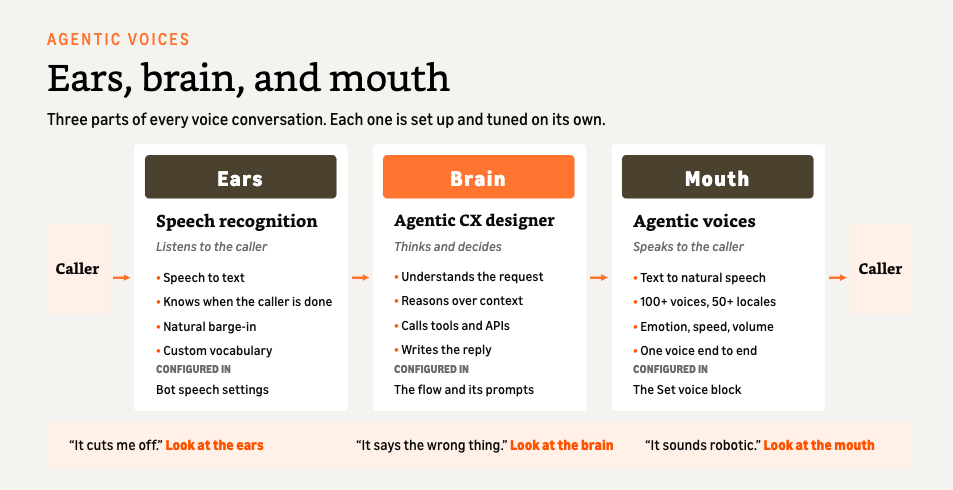
Figure 1: The ears, brain, and mouth framework
Ears: Speech recognition
The ears are how your AI listens. They convert the caller’s spoken words into text that the brain can process. But modern ears do more than transcription. They determine when the caller is done speaking, which is one of the most important decisions in any voice interaction.
Poor ears create two failure modes:
- Premature cutoff: the system decides the caller is finished and starts responding while they’re still talking (“My account number is… let me che…” and the AI is already replying)
- Awkward silence: the system waits too long after the caller finishes, creating dead air before responding
Both destroy the feeling of a natural conversation.
What to look for: Model-native turn detection, where the speech model predicts when the caller has finished based on conversational signals, not silence duration alone.
Configured in: Agentic CX block > Speech recognition engine > “Amazon Connect agentic voice”
Brain: AI reasoning
The brain is how your AI thinks. It processes the transcribed text, reasons over context, decides what to do (invoke tools, look up knowledge, escalate to a human), and generates a response.
Teams tend to focus on the brain, but its quality is bounded by the ears and mouth around it. A response composed by the most advanced model still fails if the ears don’t hear the caller correctly or the mouth delivers it robotically.
For voice specifically, the brain has one critical additional responsibility: generating text that is optimized for speech. Markdown, bullet points, and formatting characters that work in chat are read aloud literally in voice. (“Asterisk asterisk Your balance is asterisk asterisk…”)
What to look for: A system prompt that explicitly tells the brain its output will be spoken aloud, plus formatting guidance that produces clean, speech-ready text.
Configured in: agentic CX designer > generative journey prompt
Mouth: Voice generation
The mouth is how your AI speaks. It converts the brain’s text response into audible speech that the caller hears.
When different touchpoints in the same call use different speech engines, the caller hears different voices: the greeting in one, the AI in another, the hold message in a third.
What to look for: A single voice engine that handles playback across the call (greetings, bot responses, prompts, outbound messages) with one consistent voice identity, along with expressive capabilities (emotion, speed, volume) and broad language coverage. Agentic voices in Amazon Connect Customer support over 50 locales, with multilingual voices that speak from a single voice identity.
Configured in: Set Voice block > “Amazon Connect agentic voice”
Why the framework matters: A diagnostic tool
The ears, brain, and mouth model also works as a diagnostic tool for production. When something doesn’t sound right, Table 1 shows where to look.
| Symptom | Component | Fix |
|---|---|---|
| “The AI keeps cutting me off” | Ears | Give the caller more time before the turn ends (voice end timeout or end-of-turn threshold) |
| “It waits too long before responding” | Ears | Shorten the end-of-turn wait for short answers |
| “It gave me the wrong answer” | Brain | Refine the system prompt or knowledge sources |
| “It speaks markdown or bullets aloud” | Brain | Add speech output formatting rules to the prompt |
| “It sounds robotic” | Mouth | Switch to agentic voice in the Set Voice block |
| “Response is slow” | Brain (and all three) | Check tool call latency, enable audio filler, reduce prompt complexity |
| “The greeting sounds different from the AI” | Mouth | Set every flow touchpoint to the same voice provider |
| “It can’t handle my language” | Mouth | Select a locale or multilingual voice that covers the caller’s language |
Table 1: Common symptoms, the component responsible, and the fix
This separation of concerns is important because it prevents misdiagnosis. A team that hears “it sounds bad” and immediately blames the LLM is missing that the problem might be entirely in the mouth configuration. A team frustrated by “the AI keeps interrupting” doesn’t need a better model. They need better ears.
The architecture in action: An insurance FNOL call
Let’s trace a first notice of loss (FNOL) interaction through all three components to see how they work together when properly unified.
The caller dials in. The greeting plays:
“Hi, thanks for calling AnyCompany Insurance. How can I help you today?”
This is the mouth: agentic voice rendering the play prompt. It is the same voice engine and voice identity that will handle the entire conversation.
The caller speaks:
“Yeah, I was in an accident this morning on Highway 101. The other driver ran a red light and hit my passenger side.”
The ears stream this in real time. The caller pauses briefly after “Highway 101,” but the model-native turn detection understands this is a mid-thought pause, not a completed statement. It waits. The caller continues. Only when the conversational signal indicates completion do the ears hand the full transcription to the brain. Figure 2 compares this with a silence-based system on the same audio.
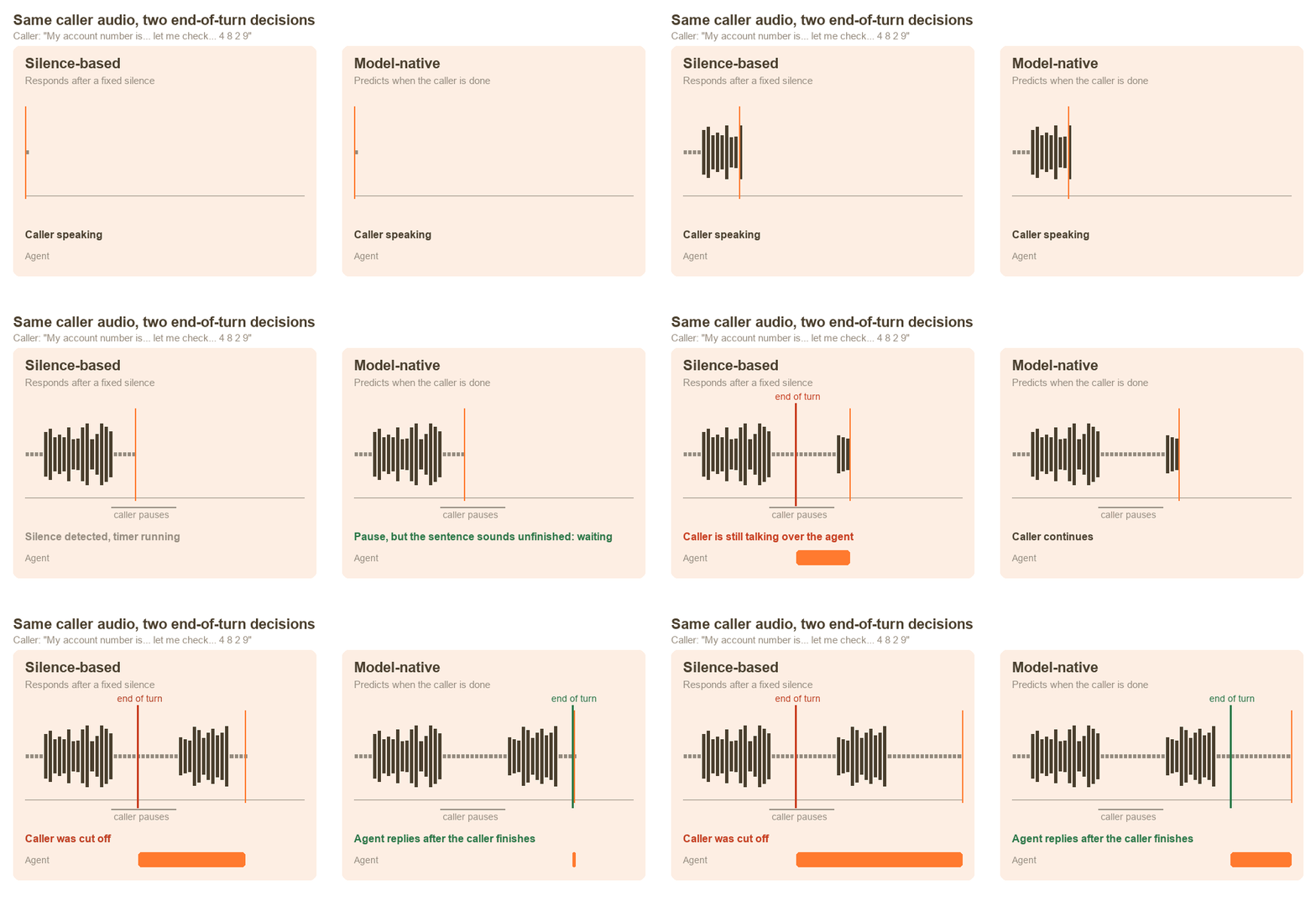
Figure 2: Silence-based and model-native end-of-turn detection on the same audio
The agent reasons (the brain): It identifies this as a new claim, determines it needs date, location, parties, and vehicle details. It generates a response, formatted as clean spoken text with no markdown:
“I’m sorry to hear that. Let me help you file a claim. Can you confirm the date and approximate time of the accident?”
The response is spoken (the mouth): The same voice that delivered the greeting now delivers this response, with a slightly empathetic tone because the content signals a difficult situation. No configuration change is needed. The engine infers the tone from the content.
The conversation continues. When the caller provides their policy number, the brain includes a <spell> tag in its output:
“Let me confirm, your policy number is <spell>POL8294XB</spell>. Is that correct?”
The mouth renders each character clearly with natural pacing. The brain knows to spell this out because the system prompt instructs it to wrap codes and IDs in <spell> tags. That one-line addition changes how every identifier is delivered. The caller confirms, the claim is filed, and the closing message, still in the same voice, wraps up:
“Your claim has been submitted. You’ll receive a confirmation text shortly. Is there anything else I can help with?”
Configuring each component
The FNOL scenario took two dropdown changes and a system prompt update. Here’s what those look like in practice.
Configuring the ears: Advanced ASR
In agentic CX designer flows, set Speech recognition engine on the Agentic CX block to Amazon Connect agentic voice (recommended), as shown in Figure 3. For bot-based flows, set Speech model preference to Advanced in the bot’s speech configuration.
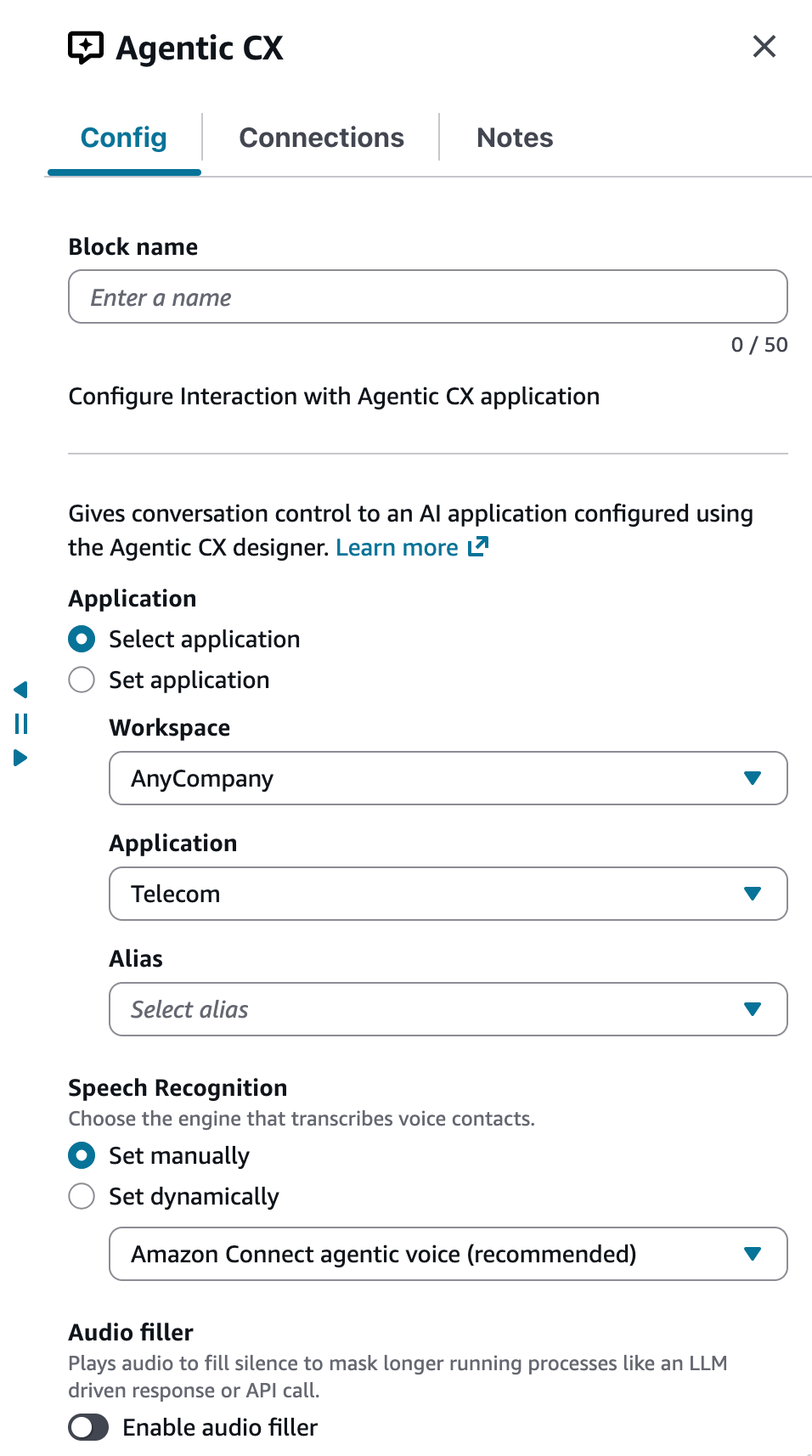
Figure 3: Agentic CX block speech recognition engine
Both use model-native turn detection, which predicts when the caller has finished instead of waiting for a fixed silence, and both let callers interrupt by default. The defaults are a good starting point. When a step needs different timing, you can adjust it where that step lives:
- Agentic CX designer: each node’s Speech settings control Allow interruption, Voice start timeout (how long to wait for the caller to start talking), and Voice end timeout (how long a pause ends the turn). For example, turn off interruption for a disclosure the caller must hear in full, or raise the voice end timeout while the caller reads a number off a card.
- Bot-based flows: session attributes set the end-of-turn confidence threshold, silence timeout, and barge-in for individual steps.
Figure 4 shows the Speech settings on an agentic CX designer node.
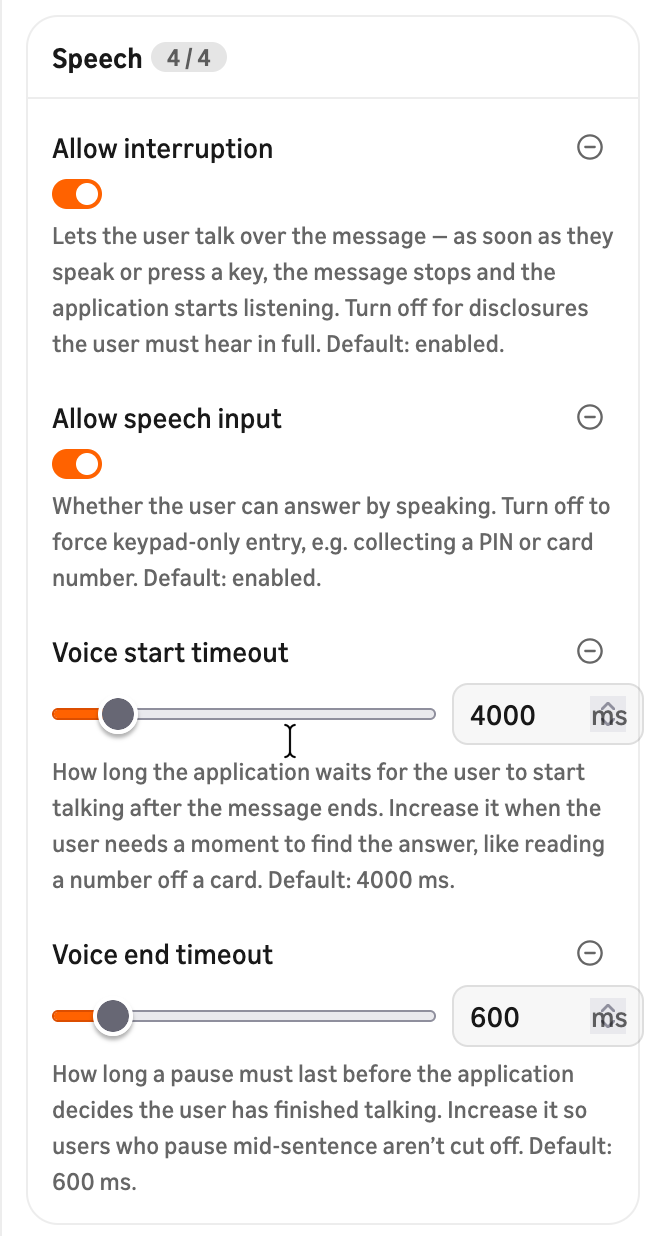
Figure 4: Speech settings on an agentic CX designer node
In either case, turn on audio filler to cover processing gaps.
Configuring the brain: Speech-ready prompts
Add this block to your agent’s system prompt. In agentic CX designer, that is the generative journey prompt:
Speech Output Formatting
Everything you output will be spoken aloud by text-to-speech.
Follow these rules:
1. Use full sentences with normal capitalization and punctuation.
2. Use conventional written forms for numbers, dates, and acronyms.
3. Do NOT use markdown, bullet points, headers, bold, raw JSON, emoji, or special characters.
4. For codes or IDs that must be read character by character, except phone numbers, wrap in <spell> tags: <spell>TKT4829XB</spell>
5. Respond concisely. Callers cannot scroll back.
6. Do not use parentheses, brackets, curly braces, or quotation marks.
This addition helps the brain generate text suited to how the mouth delivers it.
Configuring the mouth: Agentic voice
In your contact flow, open the Set Voice block:
- Select Amazon Connect agentic voice as the voice provider.
- Choose a language. This filters the available voices.
- Select a voice and choose Listen to voice sample to preview it.
- Save and publish.
Figure 5 shows a configured Set Voice block.
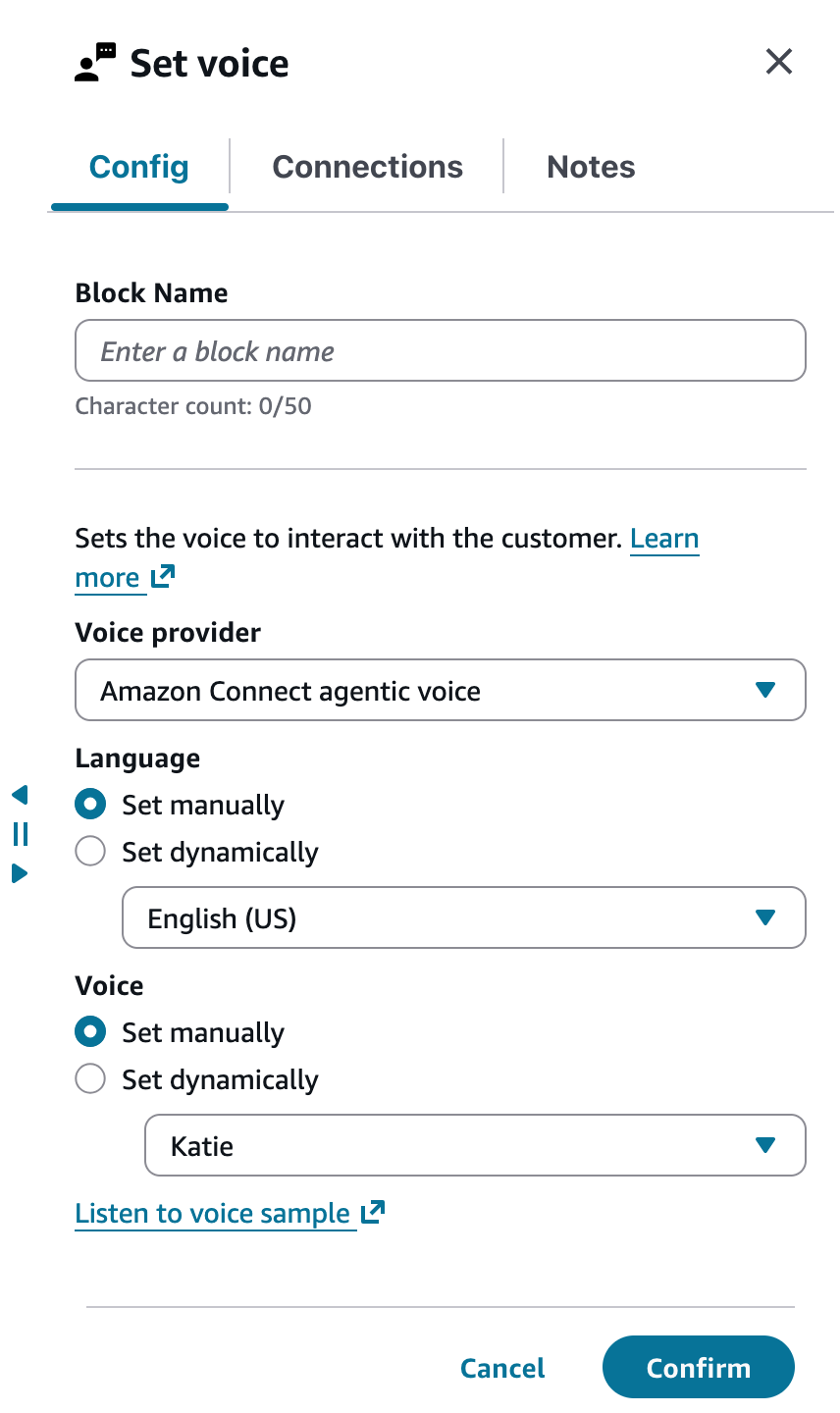
Figure 5: Set Voice block with Amazon Connect agentic voice
For multilingual scenarios, use a multilingual voice: Katie, Blake, Brooke, Ronald, or Gemma. These speak multiple languages from a single voice identity and follow the caller without flow changes. Add language-handling rules to the agent’s system prompt so it responds in the caller’s language.
Speech control tags give you fine-grained control when the defaults don’t fit. Table 2 lists the most useful ones.
| Tag | Effect | Example use |
|---|---|---|
<speed ratio="0.85"/> |
Slow down | Legal disclaimers |
<break time="500ms"/> |
Pause | Between menu options |
<spell>ABC123</spell> |
Spell character by character | Confirmation codes |
<emotion value="sympathetic"/> |
Set tone | Claims, complaints |
[laughter] |
Natural laugh | Rapport building |
Table 2: Speech control tags
For a full reference on these tags and their effects, see the agentic voice best practices guide.
Building durable voice experiences
In Amazon Connect Customer, you can change each layer without disrupting the others. Because one voice carries the whole call, callers don’t notice when you swap a model, rework a prompt, or retune turn detection behind it. The experience stays consistent while the architecture behind it changes.
To improve how callers are understood, tune the ears by adjusting end-of-turn settings. The brain and mouth don’t change.
Response quality comes from the brain. Update your system prompt, add knowledge sources, and improve tool selection, and the ears and mouth stay as they are.
If the problem is how the agent sounds, change the mouth by switching voices, adding speech controls, or enabling audio filler for processing gaps. The ears and brain are unaffected.
This independence lets you iterate on each layer at its own pace and measure the impact in isolation, without the caller noticing a change.
Conclusion
Voice AI quality depends on how well the ears, brain, and mouth work together, as they do in a person, with one voice identity throughout every interaction.
Agentic voices in Amazon Connect Customer bring that unity to production. One voice greets the caller, converses, confirms, and closes. The speech recognition that transcribes the caller also detects when they’re done talking, and the brain’s output is delivered as composed, expressively and naturally, in over 50 supported locales.
To get started, follow the agentic voice configuration guide to configure Advanced ASR and select a voice for your flows.
Resources
- Agentic voice configuration guide: Step-by-step setup for ASR and voice
- Agentic voice best practices: Speech control tags, system prompt templates, and common mistakes
About the author
 Alex Schrameyer (he/him) is a Worldwide Applied AI Solutions Architect Lead for Agentic Experience at Amazon Web Services (AWS) based in the Chicago area. He believes that exceptional agentic experiences are the cornerstone of outstanding customer service, and focuses on architecting solutions that empower both human agents and AI agents to deliver seamless customer experiences. Alex enjoys traveling around the world, and you might find him at your local baseball stadium or theme park. |