AWS Contact Center
Connect Flows Now Support Nested Modules and Cross-Flow Compatibility
What you will learn:
How Amazon Connect’s enhanced module nesting (up to five levels deep) and universal cross-flow compatibility enable you to build maintainable, reusable contact center workflows, illustrated through a real-world travel booking reservation use case.
Introduction
In November 2025, we announced three powerful new capabilities for Amazon Connect flow modules: custom blocks with JSON schema support for precise input/output control, versioning and aliasing for confident deployments, and the ability to invoke modules as callable tools for AI agents. These enhancements, detailed in Amazon Connect enhances flow modules with 3 powerful new capabilities, established the foundation for a new generation of modular contact center design.
Today, we are diving into two major enhancements that expand on that foundation and address the next frontier of scalable contact center architecture:
- Nested modules up to five levels deep – enabling hierarchical, enterprise-grade contact flow architectures with clear separation of concerns.
- Universal cross-flow type compatibility – you can now invoke the same module from all Amazon Connect flow types: inbound, outbound, customer queue, agent/customer whisper, agent/customer hold, and transfer flows.
Together, these capabilities solve the fundamental challenge of building maintainable, scalable, and efficient contact center workflows while dramatically reducing the time and effort required to develop, test, and update customer experiences.
What Was Holding Contact Center Teams Back
Before these enhancements, administrators faced significant architectural constraints:
| Challenge | Business Impact |
|---|---|
| Limited module nesting | Forced flat, monolithic flows that were difficult to maintain as contact centers scaled |
| No cross-flow type support | Administrators had to duplicate module logic for outbound, queue, whisper, and transfer flows separately |
| Scalability constraints | Complex enterprise workflows became unwieldy without hierarchical decomposition tools |
| Reduced agility | New features and business requirement changes took weeks instead of hours to propagate across all channels |
What Is New
- Nested modules up to 5 levels deep: A parent module can invoke a child module, which invokes a grandchild module, and so on, up to five levels of hierarchical depth.
- Universal flow type compatibility: You can now call modules from all Amazon Connect flow types.
Prerequisites
Before following along with the examples in this post, verify you have:
- Amazon Connect instance with administrative access
- Familiarity with Amazon Connect Flows and Modules — see the Amazon Connect Administrator Guide and Flow Modules documentation
- Basic JSON schema familiarity (recommended, for configuring custom block inputs and outputs using the JSON schema editor)
⚠️ Note: The code examples and architecture illustrations in this post are for demonstration purposes. They show partial flows as starting points. Customize them to meet your specific use cases and test thoroughly before deploying to production.
Real-World Example: Travel Booking Reservation Architecture
In our previous blog post, we demonstrated a single booking module that handled new, modify, and cancel reservation operations within one inbound flow. With nested modules and universal cross-flow compatibility, you can now architect a far more powerful and maintainable reservation management system.
Imagine running a travel company where customers need to book, cancel, confirm, or modify hotel reservations across multiple touchpoints: voice calls, callbacks, automated outbound reminders, and agent-assisted transfers. Rather than building separate logic for each channel, you establish a unified, hierarchical reservation management architecture using three interconnected modules.
Sample Reservation Architecture: Three-Module Hierarchy
| Level | Module | Responsibility |
|---|---|---|
| Level 1 | Reservation (Master Module) | Entry point for all reservation operations; routes to specialized submodules based on booking intent |
| Level 2a | ➕ New Booking Module | Handles new reservation creation using Amazon Lex and AWS Lambda; called by the master module |
| Level 2b | ⚙️ Booking Operations Module | Handles cancel, confirm, and modify operations in a single combined module; called by the master module |
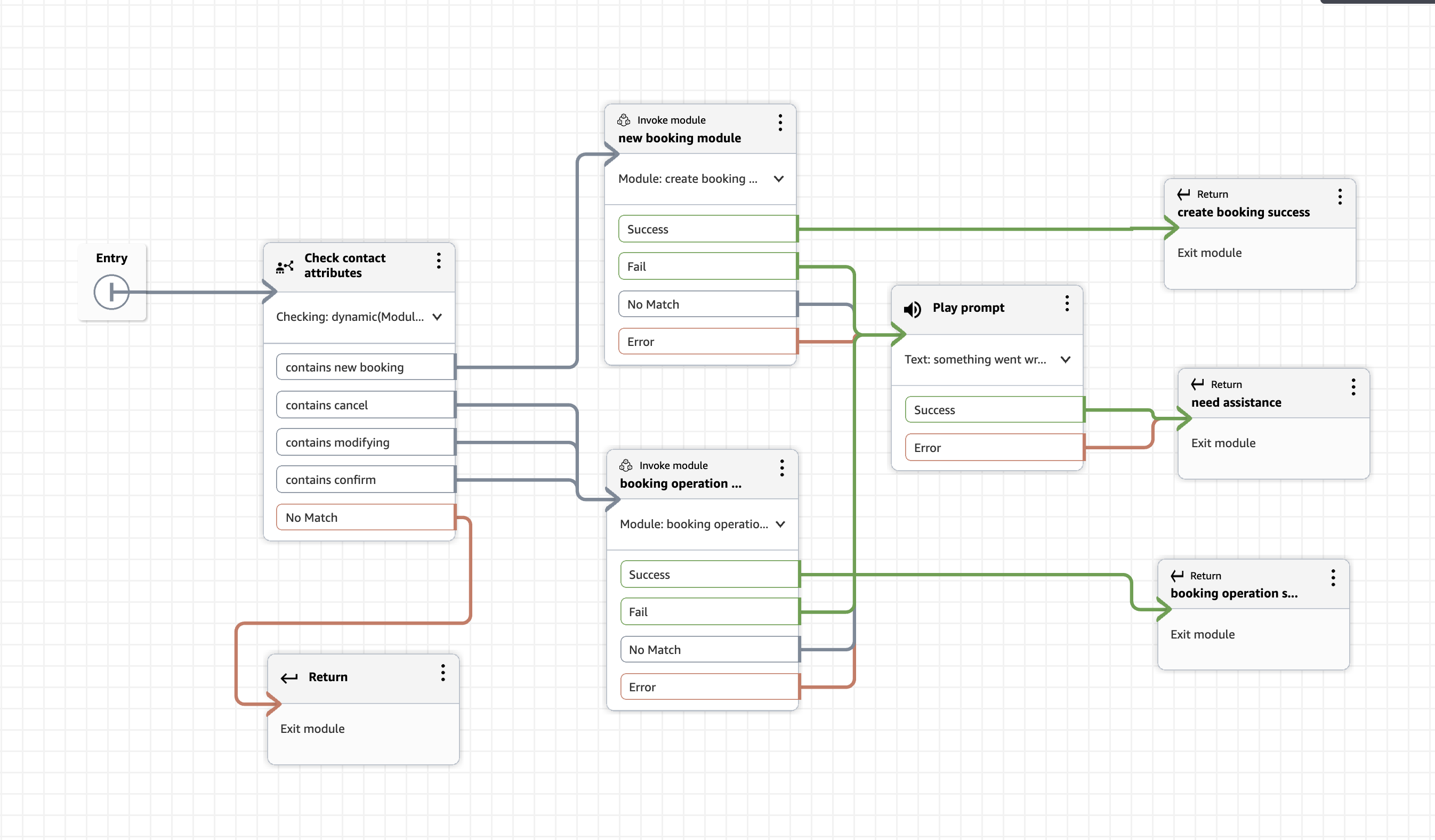
Nested Architecture Diagram
The following illustrates the full nesting hierarchy. This example uses 2 levels, with 3 additional levels available for future expansion:
Module 1: The Master Reservation Module (Level 1)
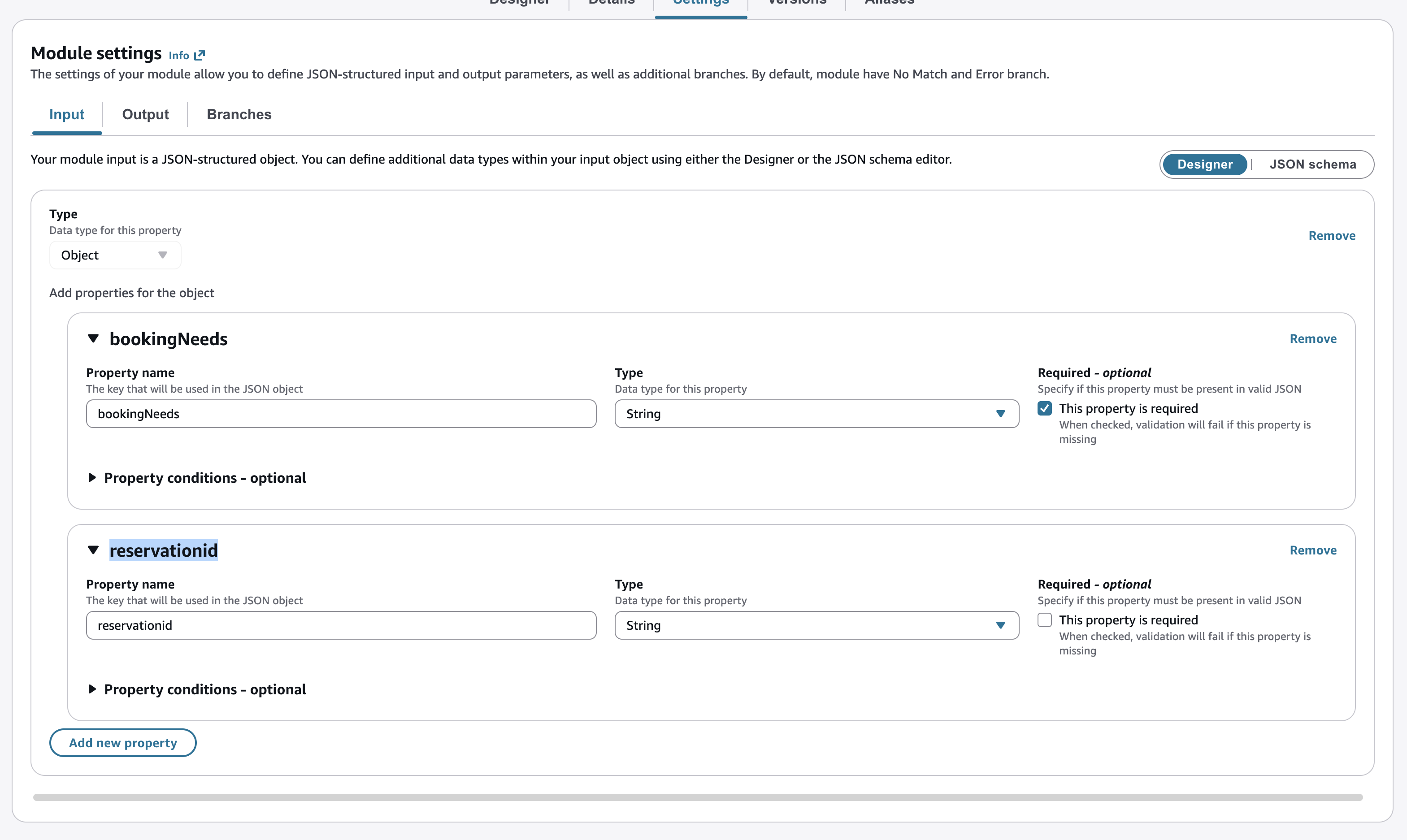
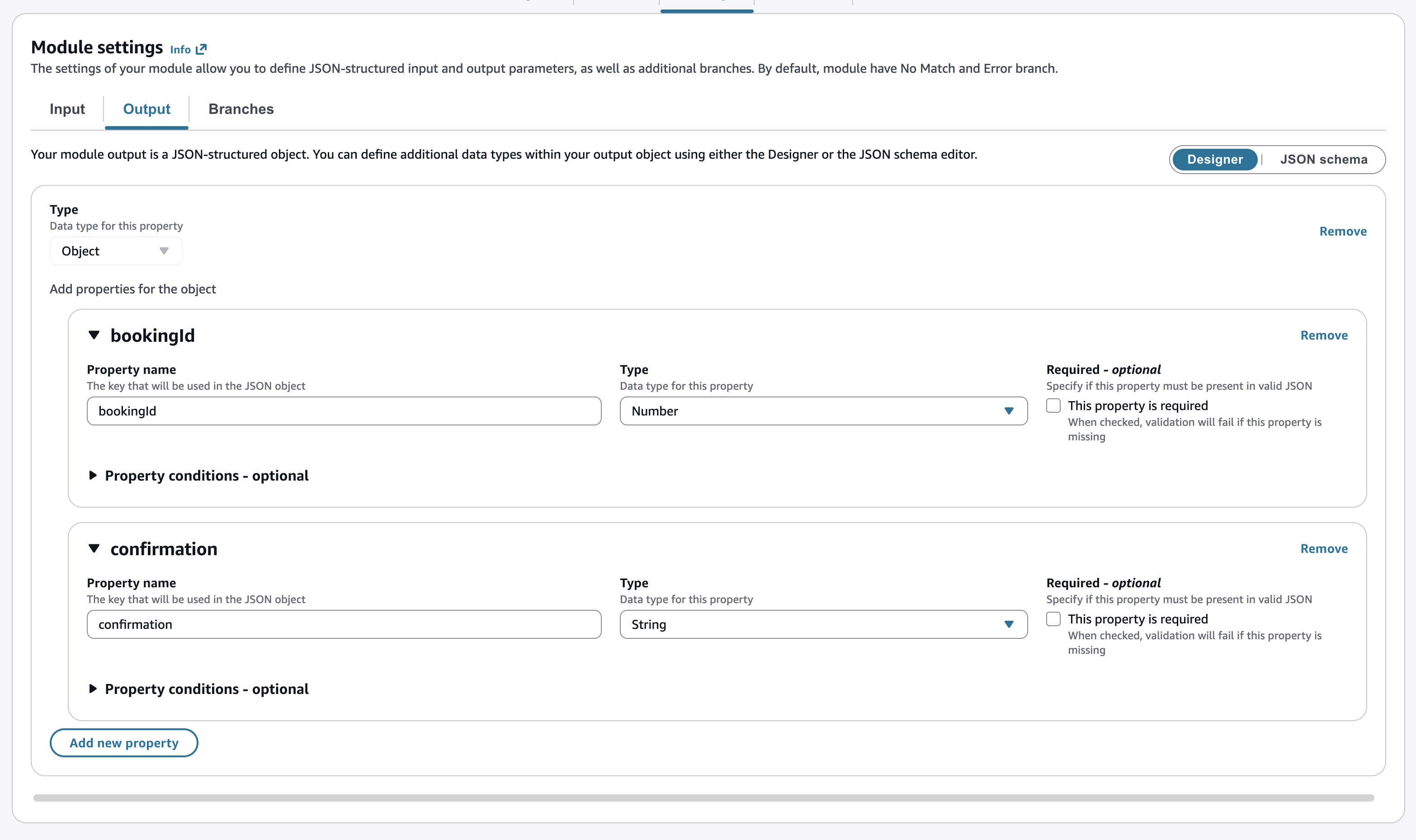
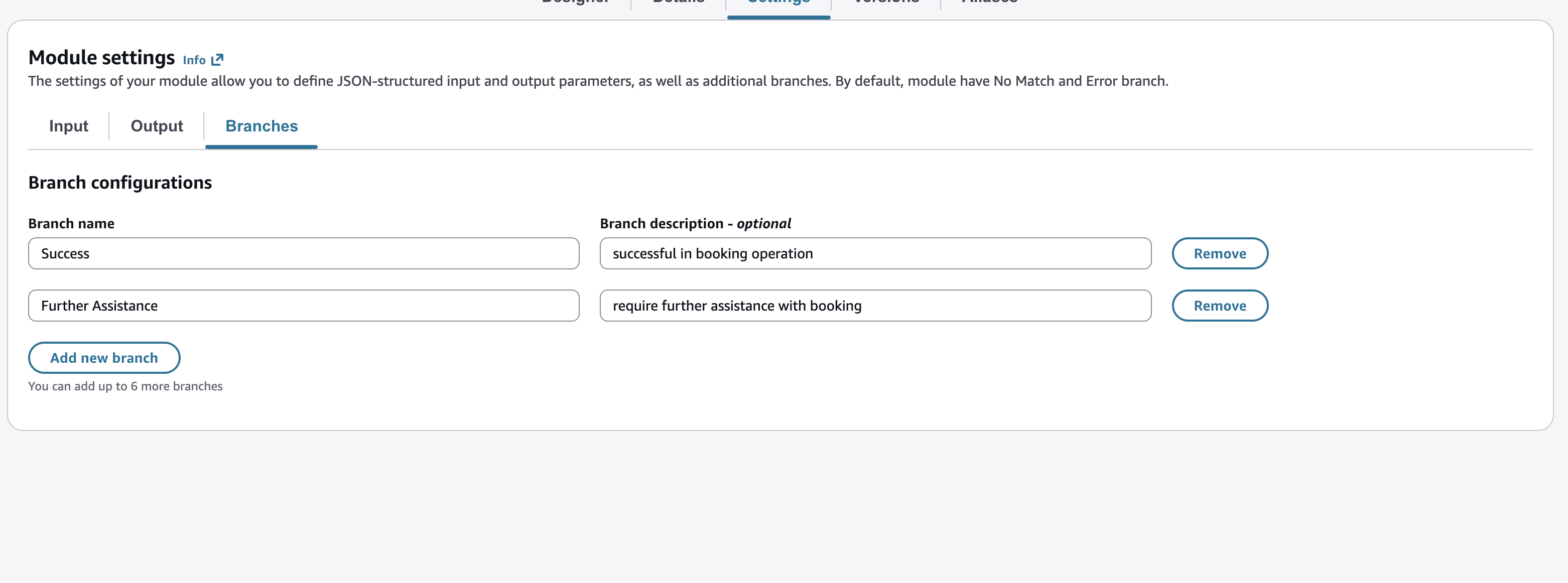
The master Reservation module is the single entry point for all reservation related interactions across every channel and flow type. It accepts a bookingNeeds input parameter and routes to the appropriate submodule. Its custom branches Success and Further Assistance propagate results back to the calling flow with structured output data.
Input Schema (Settings > Input tab)
Output Schema (Settings > Output tab)
Accessing Module Input with Check Contact Attributes
Inside the master module designer, use the Check contact attributes block to read the bookingNeeds input and branch accordingly:
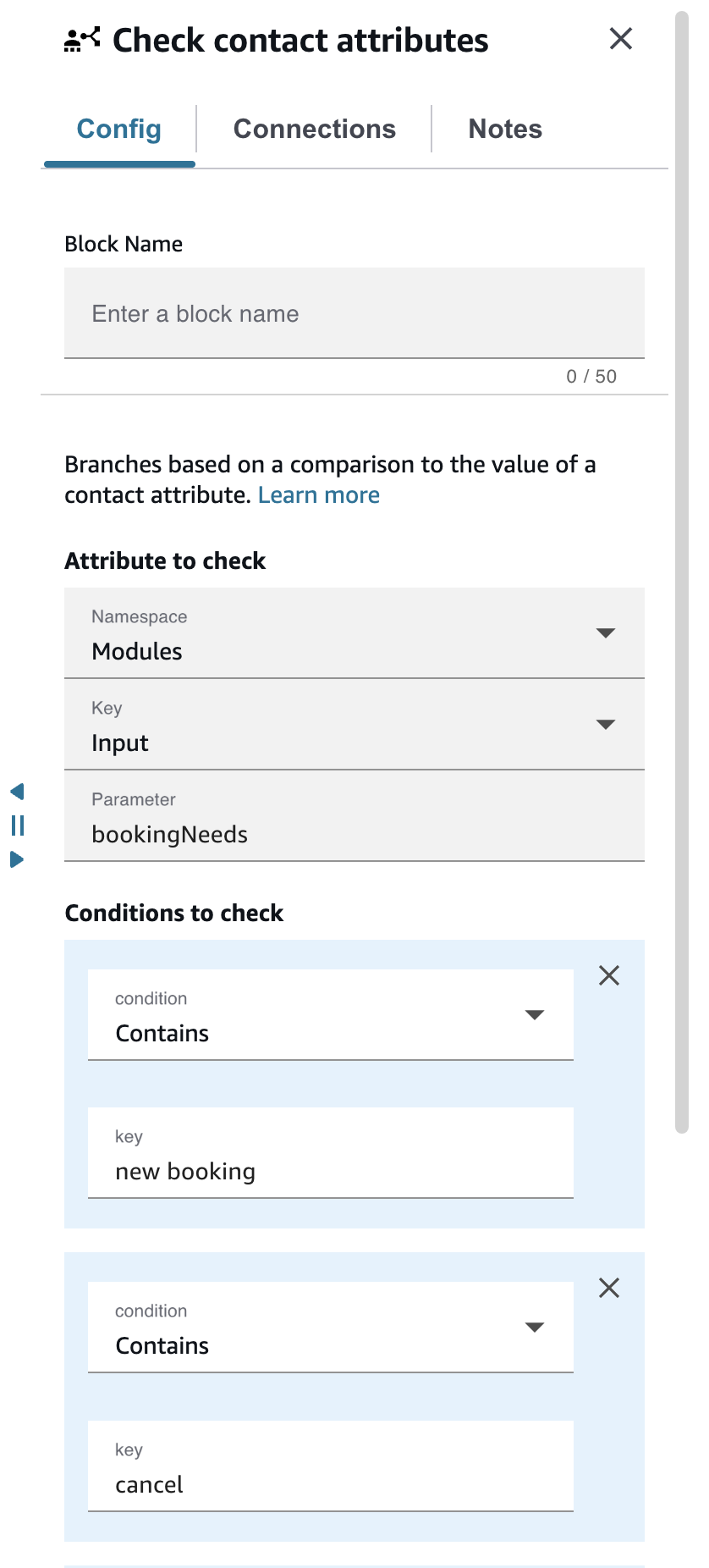
Namespace: Modules
Key: Input
Parameter: bookingNeeds

Condition 1: Contains "new booking" --> Invoke NewBookingModule
Condition 2: Contains "cancel" --> Invoke BookingOperationsModule
Condition 3: Contains "confirm" --> Invoke BookingOperationsModule
Condition 4: Contains "modify" --> Invoke BookingOperationsModule
No Match: Route to Further Assistance return block
Custom Branch Configuration (Settings > Branches tab)
| Branch Name | Description |
|---|---|
| Success | Reservation operation completed successfully; returns bookingId and confirmation to calling flow |
| Further Assistance | Customer requires agent escalation; passes full context to transfer/queue flow |
Module 2: The New Booking Submodule (Level 2a)
The New Booking submodule handles all new reservation creation workflows. The master module invokes it when bookingNeeds contains “new booking”. This module engages an Amazon Lex bot to collect reservation details, calls a Lambda function to create the booking, and returns a structured response via its output schema.
- Engages HotelBooking Lex bot to capture destination, check-in/check-out dates, and room preferences
- Invokes createReservation Lambda to persist the booking and returns bookingId and confirmation
- Returns via Success branch on completion or Further Assistance when escalation is needed
- Is fully self-contained: its only contract is its input and output schema, making it independently reusable
Design Principle: Submodules should have no knowledge of the parent flow or sibling modules. Input/output schemas and branch names manage coupling exclusively.
Module 3: The Booking Operations Submodule (Level 2b)
The Booking Operations submodule consolidates cancel, confirm, and modify operations into a single reusable component. Because all three operations share the same input contract (reservationId) and the same output structure, combining them minimizes duplication while centralizing business rule management.
- Accepts bookingNeeds (“cancel” | “confirm” | “modify”) and reservationId as inputs
- Routes to Cancel Booking bot, Confirm Booking bot, or Modify Booking bot (Amazon Lex) based on bookingNeeds
- Calls updateReservation Lambda to execute the operation and returns standardized output
- Any future update to cancellation policy or confirmation logic requires changing only this one module
Publishing, Versioning, and Alias Management
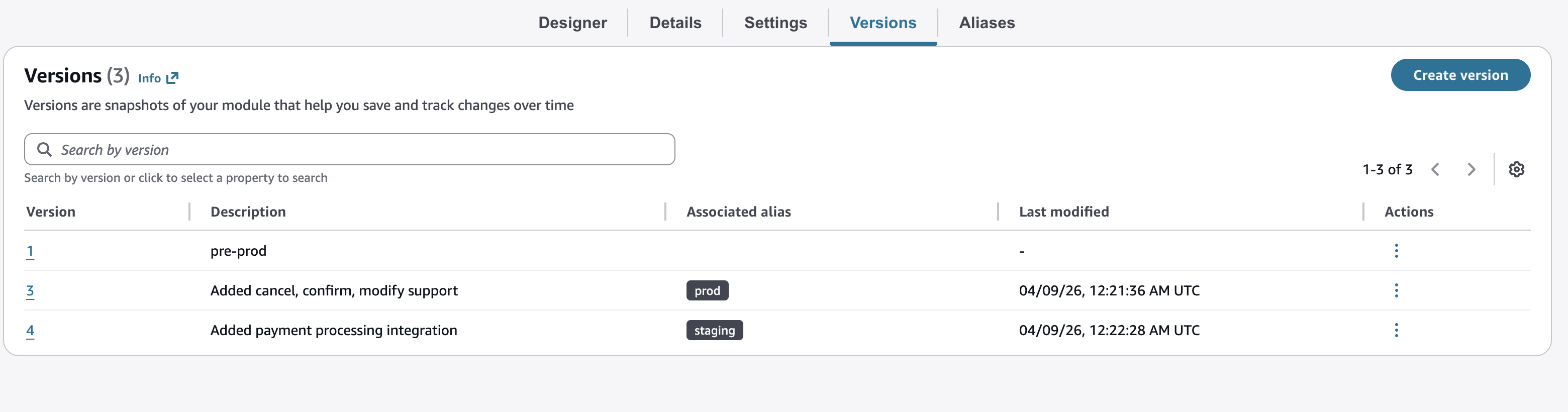
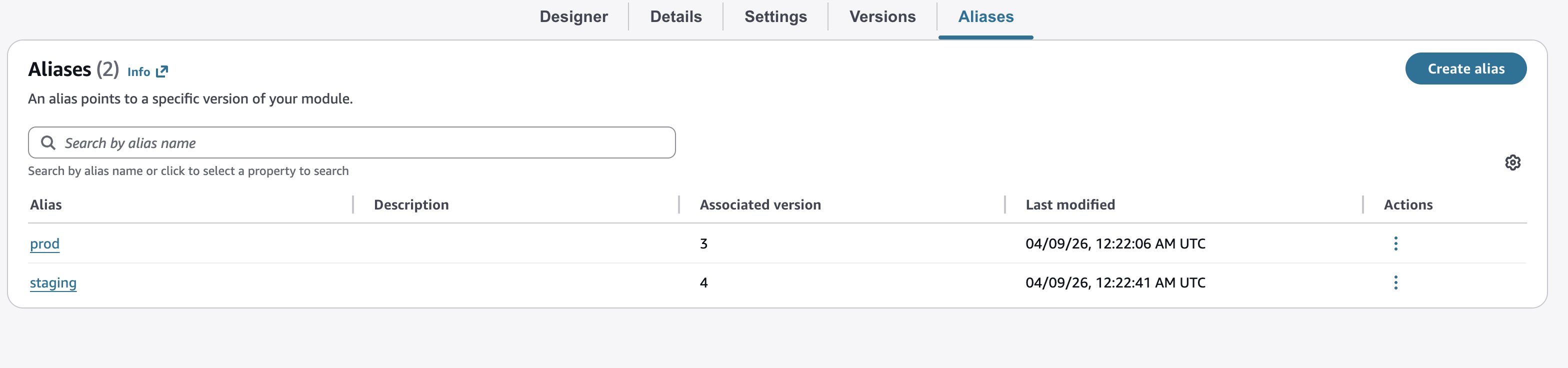
After building each module, publish it and create a named alias. The alias is what your contact flows reference, enabling zero-downtime updates to every flow simultaneously.
Universal Availability Across Flow Types: Build Once, Deploy Everywhere
With universal cross-flow type compatibility, you can now invoke the same ReservationMaster module (and its nested submodules) from any Amazon Connect flow type. This is a fundamental architectural shift from channel-specific implementations to a single source of truth.
| Flow Type | Use Case | Example Scenario |
|---|---|---|
| Inbound Flow | Voice-driven bookings | Customer calls to create or modify a hotel reservation via IVR or AI agent |
| Outbound Flow | Automated confirmations | System sends automated reminder calls 24 hours before check-in via the Confirm branch |
| Customer Queue Flow | Callback management | Customers confirm or cancel their reservation through self-service options while waiting |
| Agent Whisper Flow | Real-time agent guidance | Agent receives booking context and suggested actions before the customer call connects |
| Customer Whisper / Hold Flow | Hold experience | Customer hears personalized messages referencing their specific reservation details during hold |
| Transfer Flow | Seamless handoffs | Full reservation context is preserved and passed when transferring between departments |
✅ Key Benefit: The same ReservationMaster module handles booking, cancel, confirm, or modify operations whether invoked during an inbound call, an outbound campaign, an agent whisper flow, a queue flow, or a transfer — with zero code duplication.
Configuring the Invoke Module Block
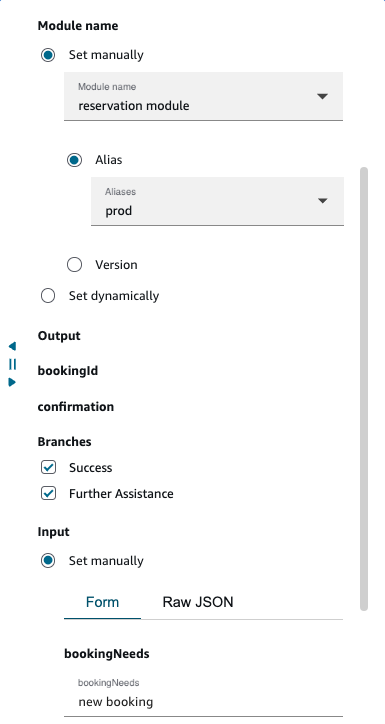
The Invoke module block configuration is identical across all flow types:
- Module name: Select ReservationMaster
- Reference method: Choose Alias and select production to enable automatic version propagation on updates
- Enable branches: Check both Success and Further Assistance
- Set input: Specify bookingNeeds (e.g., “new booking” for an inbound booking flow, or “confirm” for an outbound confirmation campaign)
After execution, access module output data using JSON path notation in downstream blocks:
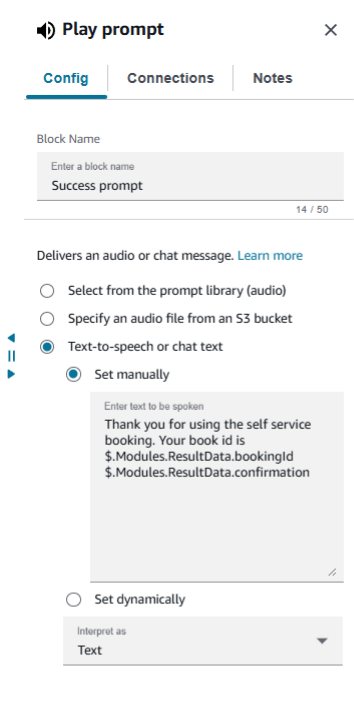
// Access booking ID from module output:
$.Modules.ResultData.bookingId

// Access confirmation message from module output:
$.Modules.ResultData.confirmation

// Example usage in a Play prompt block:
"Thank you for your reservation. Your booking ID is
$.Modules.ResultData.bookingId.
$.Modules.ResultData.confirmation"
Update and Propagation: Expanding the Architecture with Two New Modules
To demonstrate the power of nested modules combined with versioning, let us expand the architecture by adding two new Level-3 modules: a Payment Processing Module and a Travel Insurance Module. Both nest inside the New Booking Module (Level 2a), forming a 3-level hierarchy.
Step 1: Create the New Level-3 Modules
| Module | Inputs | Outputs |
|---|---|---|
| PaymentProcessing | bookingId, paymentMethod | transactionId, paymentStatus |
| TravelInsurance | bookingId, tripValue | policyId, coverageDetails |
Step 2: Update the New Booking Submodule to Version 2
Modify the NewBookingModule to invoke both new Level-3 modules in sequence after a reservation is successfully created. If any step fails, the flow falls back to a Further Assistance branch. The chart below shows the complete execution path for Version 2.
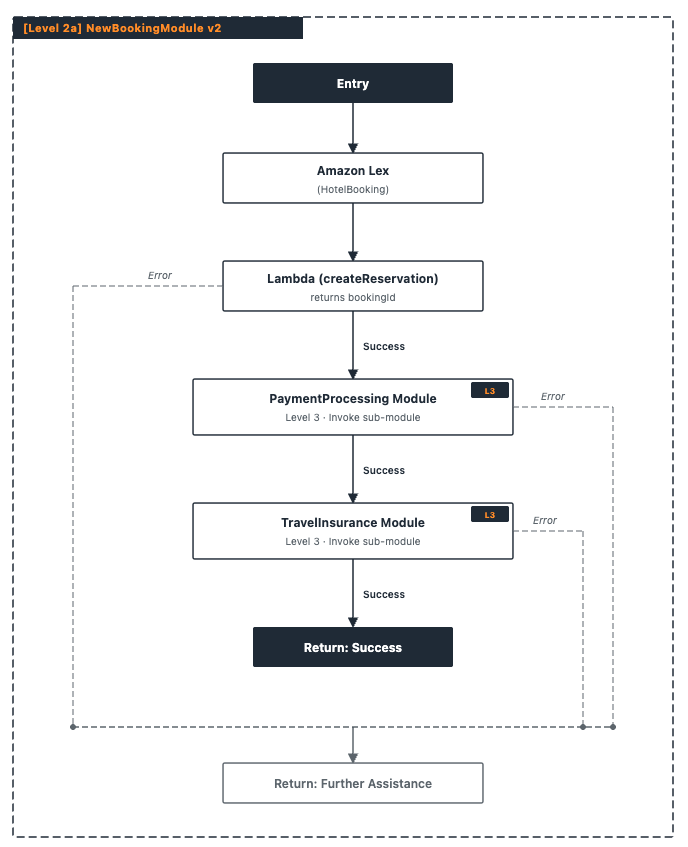
The two Level-3 modules execute in sequence: payment is processed first, then travel insurance is applied. Errors at any stage, including in the Lambda reservation step, route the contact to the Further Assistance branch, ensuring a consistent fallback regardless of where the failure occurs.
Step 3: Publish Version 2 and Update the Alias
Once you test Version 2 and confirm it is ready, publishing it and updating the production alias is all it takes to roll out the changes instantly, across every flow type that references this module. No parent flow changes required.
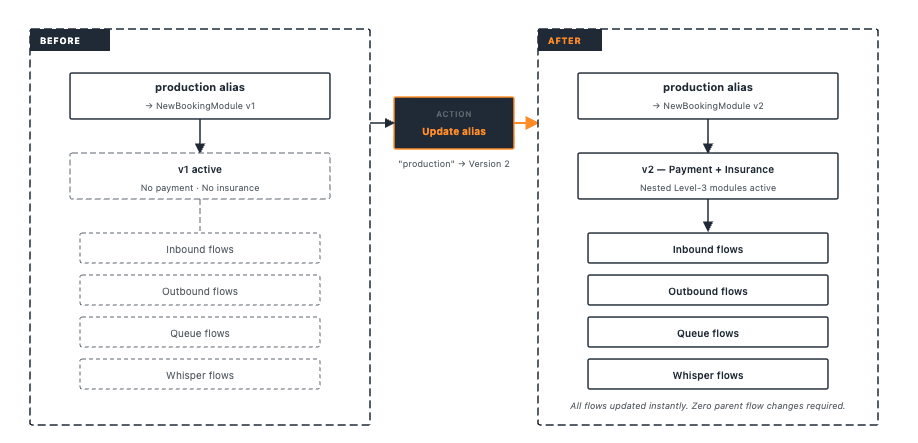
Single-update propagation: One alias update to NewBookingModule v2 propagates through ReservationMaster to every contact flow across every flow type instantly and consistently. This is the core value proposition of nested modules combined with aliasing.
Modules as AI Agent Tools
With the modules-as-tools capability introduced in our November 2025 blog, the ReservationMaster module and its nested submodules can also serve as callable tools for Amazon Connect AI agents. An AI agent can invoke ReservationMaster directly outside of any flow, with bookingNeeds and reservationId as parameters, to execute booking operations on behalf of customers during an AI-driven conversation. To enable this, use Save > Save as tool from the Designer tab.
Conclusion: Business Impact and Next Steps
Nested modules up to five levels deep and universal cross-flow compatibility represent a fundamental shift in how contact center architects think about workflow design. Rather than building contact flows as monolithic, duplicated channel implementations, you now have the tools to build a true modular contact center platform — reusable, maintainable, and instantly updatable across every customer touchpoint.
Measured Time Savings: Before vs. After
| Activity | Traditional Approach | New Approach |
|---|---|---|
| Initial build (5 flow types) | 40+ hours building separate implementations per flow type | 8–10 hours: build once, deploy to all flow types |
| Single logic update | Hours: update each flow implementation individually and retest | Minutes: update one module alias, changes propagate everywhere |
| Maintenance over 12 months | 5x the burden due to duplication across all flow types | 75% reduction: single module maintained once for all channels |
| Feature testing | Test each flow type implementation separately | Test module once, validate via staging alias, then promote |
| Architecture expansion | Major refactoring across all flow implementations | Add a new nested submodule; all parent flows unaffected |
Administrator Benefits Summary
- Simplified workflow management: Modular architecture gives each team clear ownership without risking breakage in the larger system
- Reduced cognitive load: Clear separation of concerns — each module has a single, well-defined responsibility with explicit input/output contracts
- Faster feature deployment: Compose new experiences by assembling existing modules rather than building from scratch
- Consistent customer experience: The same business logic executes identically across voice, callback, transfer, and automated outbound — no drift, no channel-specific inconsistencies
- Programmatic management at scale: Leverage Amazon Connect APIs to create, version, alias, and manage modules programmatically across large or multi-instance deployments
- AI-ready architecture: Modules-as-tools enable AI agents to invoke your business logic directly, opening possibilities for fully automated intelligent reservation management
Try It Today
These capabilities are available now in all AWS Regions where Amazon Connect is available. We encourage you to use the travel booking use case architecture as a starting template and adapt it for your industry, your workflows, and your customers.
Get started in three steps:
- Identify a business process you currently duplicate across multiple flow types.
- Build a module for that process. Configure custom inputs, outputs, and branches. Publish it with versioning. Create a production alias.
- Invoke it from every applicable flow type using the Invoke module block. Update the alias when you need to change logic — all flows update automatically.
Helpful Resources
| Resource | Description |
|---|---|
| Amazon Connect Administrator Guide | Complete reference for flows, modules, and configuration options |
| Contact Flow Modules documentation | Detailed guide to creating and managing flow modules, versioning, and aliasing |
| Previous blog post (Nov 2025) | Amazon Connect enhances flow modules with 3 powerful new capabilities: custom blocks, versioning, modules as tools |
| Amazon Connect API Reference | Programmatic management of flows, modules, versions, and aliases at scale |
| Amazon Connect What’s New | Latest feature announcements and release notes |
| Amazon Connect User Guide (GitHub) | Open-source documentation: github.com/awsdocs/amazon-connect-user-guide |
Share your results with the community!
Built something with nested modules or cross-flow compatibility? Share your architecture patterns and lessons learned with the Amazon Connect community on AWS re:Post.