AWS Contact Center
Zero-touch onboarding for Amazon Connect Customer with Identity Center
Onboarding agents into Amazon Connect Customer becomes a manual task when organizations standardize on AWS IAM Identity Center as the federation hub for their AWS environment, synchronizing their corporate identity provider (IdP) into a central Identity Store and using it for single sign-on across AWS applications. If you run Amazon Connect Customer this way, and especially if you run more than one Connect instance across multiple AWS accounts, a common challenge emerges: how to automatically provision and deprovision agents in Amazon Connect Customer when identity changes happen in the central Identity Store. This post is written for those teams. If you do not use IAM Identity Center for Connect federation, the pattern here will not apply directly, though the event-driven approach is still instructive.
Amazon Connect Customer supports SAML 2.0 single sign-on (SSO) through IAM Identity Center, allowing agents to authenticate without interruption. However, Connect is not an application managed through System for Cross-domain Identity Management (SCIM). Amazon Connect Customer does not automatically create user records when a new identity appears in the Identity Store. An agent’s first SSO login fails unless a matching Connect user already exists with the correct security and routing profiles assigned.
This post describes an event-driven, multi-account architecture pattern that addresses this challenge using native AWS services. It is a design reference: it focuses on the architecture and the reasoning behind each decision rather than a deployable package. When a user is added to or removed from an IAM Identity Center group, the pattern automatically creates or deletes the corresponding Amazon Connect Customer user in the appropriate account. It does so with no manual intervention and no polling.
Routing federation through IAM Identity Center (rather than connecting the IdP directly to each Connect Customer instance) is what makes this automation possible. IAM Identity Center group membership changes emit AWS CloudTrail events, which are the native AWS signal the pattern is built on. Direct IdP-to-Connect federation produces no such signal, and would force reliance on IdP-specific webhooks with cross-cloud dependencies and external endpoints.
Inside a multi-account contact center
Consider a financial services company that runs its customer support on Amazon Connect Customer. The business has grown through acquisition, so it operates several Connect instances: a shared development and testing instance, a production instance for its retail banking line, and a second production instance for its insurance division, each in its own AWS account. The corporate workforce directory lives in Microsoft Entra ID, which synchronizes into a single AWS IAM Identity Center instance in a central identity account. Agents sign in to Connect with their corporate credentials through SSO.
The contact center runs seasonal hiring surges. Ahead of open enrollment, the insurance division might onboard 150 temporary agents in a week, then offboard them a few weeks later. Today, each of those agents has to be created by hand in the correct Connect Customer instance, with the correct security profile and routing profile, before their first shift. When the season ends, each account has to be cleaned up by hand as well.
This manual process is slow, error-prone, and risky. An agent who is added to the directory but not yet created in Connect Customer gets a failed login on day one. An agent who leaves the company but is not promptly removed from Connect keeps an active seat, and possibly the ability to sign in, long after their access should have ended. As the number of instances and the pace of hiring grow, the manual approach does not scale, and it widens the window in which access and reality are out of sync.
The pattern in this post closes that gap. Membership in an IAM Identity Center group becomes the single control that provisions or deprovisions an agent in the right Connect Customer instance, automatically.
Solution overview
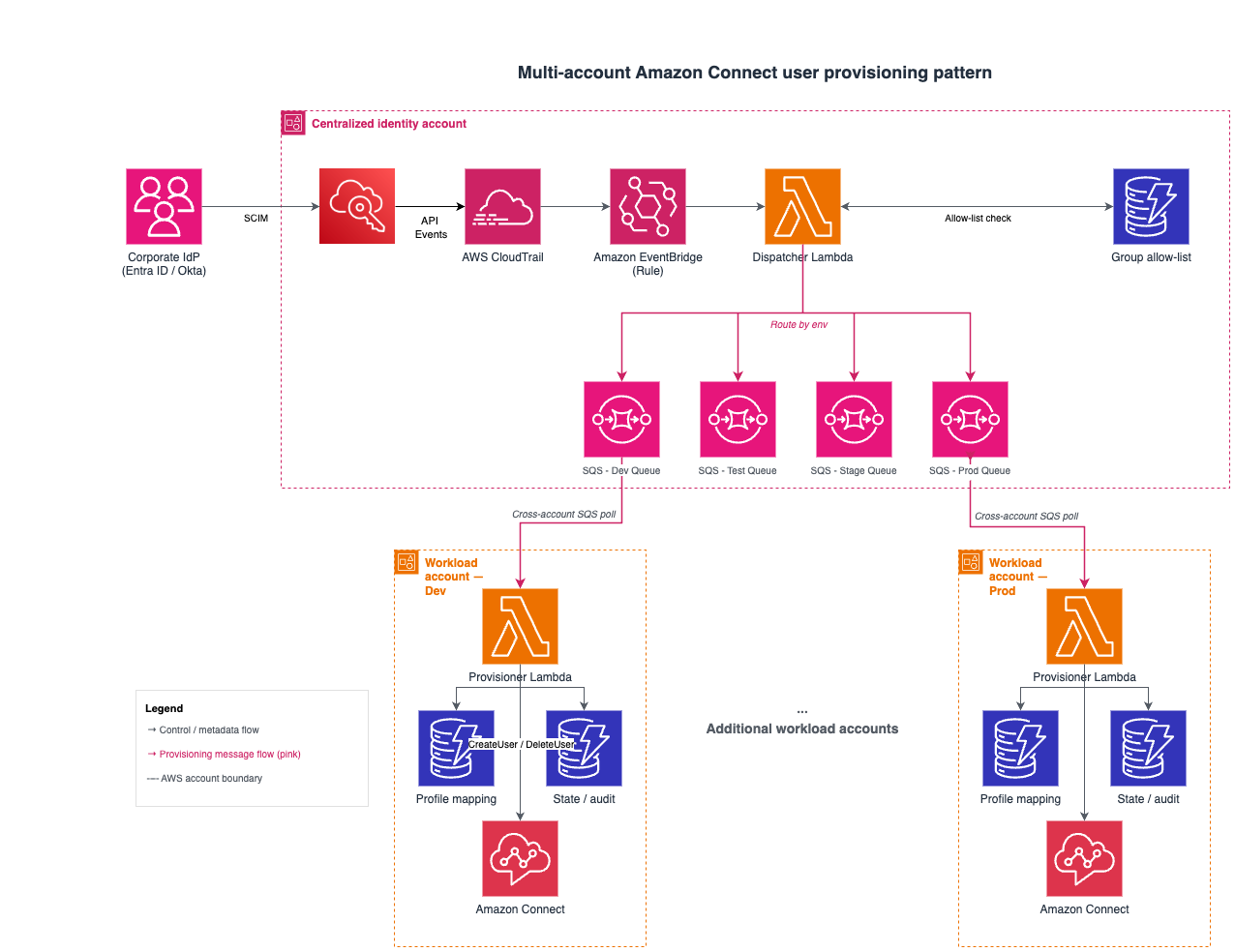
The following architecture shows the two-tier layout that closes this gap: a centralized identity account that captures and dispatches identity events, and one or more workload accounts that consume those events and manage their local Amazon Connect Customer users.
How it works
The end-to-end flow, from an identity change in the IdP to a provisioned Amazon Connect Customer user, follows these steps:
- Event capture: When a group membership changes in IAM Identity Center (through SCIM sync from the IdP, a direct API call, or a console action), AWS CloudTrail logs the event.
- Event filtering: An Amazon EventBridge rule in the centralized account matches Identity Store group membership change events across all three possible CloudTrail sources (SCIM sync, direct API, and console).
- Filter, enrich, and route: A dispatcher AWS Lambda function validates the event against an Amazon DynamoDB allow-list, enriches it with user details from the Identity Store
DescribeUserandDescribeGroupAPIs (necessary because SCIM CloudTrail events redact user attributes), and sends a normalized message to the Amazon Simple Queue Service (Amazon SQS) queue for the target environment. - Cross-account provisioning: A provisioning Lambda function in each workload account polls its Amazon SQS queue cross-account, looks up the correct Connect security profile IDs and routing profile IDs from a local DynamoDB mapping table, calls the Amazon Connect Customer
CreateUserorDeleteUserAPI, and records the outcome in a state table.
The following sequence diagram shows the same flow ordered by time, with the DynamoDB allow-list check, Identity Store enrichment, and cross-account Amazon SQS delivery called out explicitly.
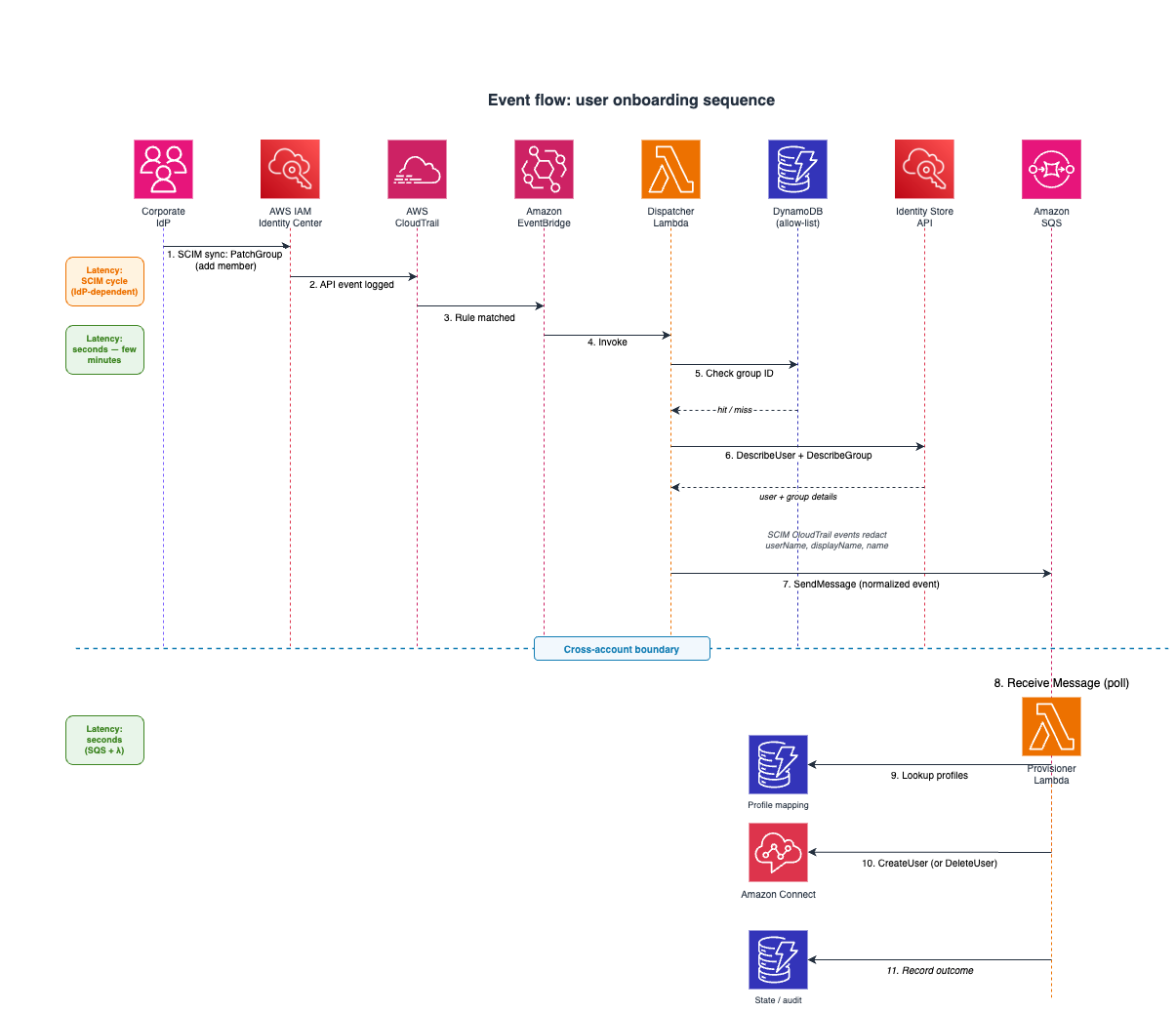
Returning to the financial services example: when HR adds a seasonal insurance agent to the Connect-Agents-Insurance group in Entra ID, that change syncs into IAM Identity Center, the dispatcher enriches and routes it to the insurance production account’s queue, and the agent is created in the insurance Connect Customer instance with the right profiles, all before their first shift. When the season ends and the agent is removed from the group, the same pipeline deletes the Connect user automatically.
Pattern architecture
The pattern separates cleanly into two tiers: a centralized identity account that captures and routes events, and workload accounts that own their Connect Customer instances and act on those events. This separation is deliberate. It keeps identity governance central while letting each contact center team manage its own provisioning rules independently.
Tier 1: Centralized identity account
The centralized account houses the IAM Identity Center instance and is responsible for capturing, filtering, and routing identity events.
Amazon EventBridge rule: IAM Identity Center does not emit native EventBridge events. All identity events reach EventBridge through the CloudTrail integration (source: aws.cloudtrail, detail-type: "AWS API Call via CloudTrail"). The rule filters on three CloudTrail event sources depending on how the change was made:
| CloudTrail eventSource | When it fires | Relevant event names |
|---|---|---|
| identitystore-scim.amazonaws.com | IdP-driven SCIM sync (the primary trigger) | PatchGroup (the operative event for group membership changes; SCIM CreateUser and DeleteUser carry no group context and are filtered out by the allow-list) |
| identitystore.amazonaws.com | Direct Identity Store API or SDK calls | CreateGroupMembership, DeleteGroupMembership |
| sso-directory.amazonaws.com | Identity Center console actions | AddMemberToGroup, RemoveMemberFromGroup |
Covering all three sources ensures that the pipeline reacts to changes regardless of origin. A single PatchGroup event can contain multiple member additions or removals in its Operations array. The dispatcher iterates over each operation and emits one enriched message per member. Events are delivered to EventBridge in the Region where IAM Identity Center is deployed, so the rule must run in that Region. Co-locating the dispatcher Lambda function in the same Region keeps the design simplest.
Dispatcher Lambda function: Performs three functions:
- Filter: Checks the group ID against a DynamoDB allow-list. Only registered groups trigger downstream processing, which prevents unrelated group changes from creating noise.
- Enrich: Calls
DescribeUserandDescribeGroupon the Identity Store API to resolve full user details (name, email, and username) and the group’s display name. This step is required rather than optional. For the reasoning, see the Why the dispatcher enriches events section later in this post. - Route: Sends a normalized, enriched message to the Amazon SQS queue that corresponds to the target environment (determined by the group-to-environment mapping in DynamoDB).
DynamoDB groups table: The allow-list and routing configuration. Each item maps a group ID to a display name, target environment, and destination queue. Administrators maintain this table to control which groups are eligible for Connect Customer provisioning.
Amazon SQS queues (one for each environment): One queue for each target environment, all hosted in the centralized identity account. Messages are retained until the provisioning Lambda function in the corresponding workload account (which reads the queue cross-account) processes them. A dead-letter queue (DLQ) captures failures after retries. Keeping the queues in the identity account keeps the dispatcher’s write path local, and the workload accounts pull cross-account.
Tier 2: Workload accounts
Each workload account owns its Amazon Connect Customer instance and provisioning logic.
Provisioning Lambda function: Triggered by its Amazon SQS event source mapping. For each message, the function:
- Reads the action (
addordelete) and group name - Looks up the profile mapping in a local DynamoDB table to resolve the security profile and routing profile IDs
- Calls
CreateUser(onboarding) orDeleteUser(offboarding) on the Connect Customer API - Records the outcome in a state table for idempotency and audit
DynamoDB profile mapping table: Maps group display names to Connect Customer profile IDs. Each account maintains its own mapping independently, which allows different environments to assign different profiles for the same logical group.
DynamoDB state table: Tracks provisioned users with their Identity Store ID, Connect username, provisioning timestamp, and status. The table supports idempotency (preventing duplicate creates), an audit trail (who was provisioned when, and by which event), and reconciliation (comparing expected state against actual Connect Customer users).
Implementation model
The pattern maps naturally onto two deployable components that mirror the two tiers. This separation is what keeps the design modular, and you can express each component in the infrastructure-as-code tool of your choice.
The identity-account component owns the following resources:
- The groups and allow-list table
- The EventBridge rule
- The dispatcher Lambda function
- The per-environment queues
The workload-account component owns the following resources:
- The profile-mapping and state tables
- The provisioning Lambda function with its queue event source mapping
- The operational alarms
Adding a new Connect Customer environment is a repeatable, low-friction operation. You create a queue in the identity account, add a groups-table entry that routes the target group to it, and deploy the workload component into the new account. No change to the dispatcher logic is required.
The normalized message contract
The dispatcher publishes a consistent, enriched message regardless of how the upstream event originated (SCIM sync, API, or console). This decouples the provisioning Lambda function from the specifics of CloudTrail event formats, so each workload account only has to understand one payload shape:
{
  "action": "add",
  "group_name": "Connect-Agents-Insurance",
  "user_id": "<identity-store-user-id>",
  "username": "agent@example.com",
  "first_name": "Jane",
  "last_name": "Doe",
  "email": "agent@example.com",
  "source_event_id": "<cloudtrail-event-id>"
}
The action field (add or delete) tells the provisioner whether to onboard or offboard, group_name is the key it uses to look up the target Connect Customer profiles, and the remaining identity fields carry the attributes that CreateUser requires. The source_event_id carries the originating CloudTrail event ID through to the audit record, giving end-to-end traceability. The username value is significant: it must exactly match the value IAM Identity Center places in the SAML assertion, as described in the next section.
Design considerations
The following sections cover the decisions that most affect whether the pattern works reliably in production, from why the dispatcher re-fetches identity data to how it keeps SAML usernames aligned and handles retries, latency, and cleanup.
Why the dispatcher enriches events
The dispatcher does not forward the raw CloudTrail event to the provisioning Lambda function. Instead, it re-fetches the full user and group records from the Identity Store API and publishes a normalized message. This extra step exists for three reasons, each of which would independently break the pipeline if the dispatcher forwarded the CloudTrail payload directly:
- SCIM events redact the attributes Connect needs. For events from identitystore-scim.amazonaws.com, IAM Identity Center replaces userName, displayName, and name with
HIDDEN_DUE_TO_SECURITY_REASONS. The user ID is not redacted, so the dispatcher callsDescribeUserto resolve the plaintext name, username, and email thatCreateUserrequires. For a sample redacted payload, see Logging IAM Identity Center SCIM API calls with AWS CloudTrail. - Group membership events carry only IDs. The event contains a group ID but not the group’s display name, which the pattern uses as the profile-mapping key. The dispatcher calls
DescribeGroupto resolve the human-readable name so administrators can maintain mappings in readable terms rather than opaque UUIDs. - It gives one canonical source for the SAML username. Reading UserName from
DescribeUser, rather than from an IdP-driven event payload that might be normalized differently, eliminates a class of case-sensitivity and attribute-mapping issues.
The enrichment is inexpensive: one DescribeUser and one DescribeGroup call for each event, both against the local Identity Store in the same account.
Username and SAML alignment
For SAML-integrated Connect instances, the Username in CreateUser must exactly match (case-sensitive) the RoleSessionName value in the SAML assertion. IAM Identity Center derives RoleSessionName from the SAML attribute mapping configured on the Amazon Connect Customer application. The default is ${user:subject}, which resolves to the IAM Identity Center username (typically the IdP user principal name). If the mapping has been customized (for example, to a custom email attribute), the dispatcher must resolve the same field. A mismatch causes silent SSO login failures, so pulling the canonical username from DescribeUser is what keeps the created user and the assertion in agreement.
Idempotency
Amazon SQS provides at-least-once delivery, so the provisioning Lambda function must tolerate redelivery. The provisioner calls CreateUser directly and treats DuplicateResourceException as a successful no-op; for deletes, it treats ResourceNotFoundException the same way. Calling the API directly and handling these responses avoids a check-then-act race. Combined with the allow-list check in the dispatcher and the state table’s record of prior actions, the pipeline can safely reprocess any message without creating duplicates or failing on already-completed work.
Event latency
The end-to-end latency from an IdP group change to a provisioned Connect Customer user depends on the following stages:
| Stage | Typical latency |
|---|---|
| IdP to Identity Center (SCIM sync) | Provider-dependent. Entra ID runs incremental cycles roughly every 40 minutes; Okta in push mode is near real-time; on-demand provisioning is available in both. |
| CloudTrail to EventBridge delivery | Typically a few minutes, occasionally up to 15 minutes (not guaranteed). |
| Amazon SQS enqueue to consumer Lambda function | Seconds |
| Total (typical, Entra ID SCIM) | Approximately 10–45 minutes |
Latency is dominated by the SCIM sync cycle, not by the AWS-side pipeline. This is well within acceptable bounds for user provisioning, because agents are typically onboarded hours or days before their first shift. For faster onboarding of an individual, an administrator can trigger an on-demand SCIM provisioning cycle in the IdP. Because CloudTrail-to-EventBridge delivery does not carry a guaranteed-delivery SLA, deployments that cannot tolerate a missed event should add the reconciliation flow described in Next steps and enhancements.
Profile mapping strategy
The pattern uses group-based mapping: different IAM Identity Center groups map to different Connect profile combinations. Consider the following example:
| Identity Center group | Security profile | Routing profile |
|---|---|---|
| Connect-Agents-Retail | Basic Agent | Retail Queues |
| Connect-Agents-Insurance | Basic Agent | Insurance Queues |
| Connect-Supervisors | Supervisor | All Queues |
This approach is extensible. To add a new tier or line of business, create a new IAM Identity Center group and add a mapping entry to DynamoDB. No code changes are required, which is what lets the contact center team adjust to organizational change without involving the platform team.
User deletion considerations
The Amazon Connect Customer DeleteUser API performs a hard delete: the agent’s settings, quick connects, and hierarchy assignments are permanently removed. Contact records, recordings, and historical data are preserved. After deleting a user, any quick connects that referenced that agent become orphaned and can break call transfers, so the provisioning Lambda function should clean up associated quick connects as part of the off-boarding flow. To do this, the provisioner lists quick connects with ListQuickConnects (filtered on QuickConnectTypes=[USER]), then checks each quick connect’s QuickConnectConfig.UserConfig.UserId against the removed agent and deletes the matches.
Cross-account access
Because the environment queues live in the centralized identity account and are consumed by Lambda functions in different workload accounts, the pattern relies on standard Amazon SQS cross-account access. A resource-based policy on each queue grants the specific workload account’s Lambda role permission to receive and delete messages, and the Lambda role carries a matching identity-based grant scoped to that queue ARN. All grants follow least privilege and are scoped to specific queue ARNs rather than wildcards. If you encrypt queues with a customer managed key, share decrypt permissions with the consuming role, because the default alias/aws/sqs key cannot be used cross-account. For a step-by-step walkthrough, see Basic examples of Amazon SQS policies.
Anti-patterns
Part of choosing this pattern is understanding the alternatives it replaces and why they fall short at scale.
- Manual provisioning: Creating and deleting Connect Customer users by hand is a common starting point, and it works well for a single instance with low turnover. As agent volume and instance count grow, it asks more of administrators: onboarding depends on someone acting before an agent’s first shift, and off-boarding depends on prompt removal after a departure. This pattern automates both paths so that they keep pace with directory changes.
- Federating the IdP directly to each Connect Customer instance: Bypassing IAM Identity Center might seem simpler, but it removes the CloudTrail signal this automation depends on, forces you to manage a separate SAML trust for every instance in every environment, and complicates username mapping. It also gives up IAM Identity Center’s centralized governance across your other AWS applications.
- Polling the Identity Store on a schedule: A scheduled job that lists directory users and reconciles them against Connect Customer is a straightforward approach that trades some timeliness for simplicity: it runs on a fixed cadence and issues API calls whether or not anything changed, and that steady load scales with directory size. Polling is a good fit as a periodic safety net (see Next steps and enhancements). As the primary mechanism, an event-driven approach responds sooner because it acts only when a change occurs.
- Reacting to IdP webhooks instead of AWS events: Microsoft Graph change notifications or Okta event hooks can trigger provisioning, but they introduce a cross-cloud dependency, require a secured internet-facing endpoint, and react to a source outside the AWS boundary you are ultimately provisioning into. Using the IAM Identity Center CloudTrail signal keeps the whole pipeline inside AWS. For examples of the webhook-based approach, see Automate agent onboarding with Amazon Connect Customer using Okta and Automate agent onboarding with Amazon Connect Customer using PingOne.
Operational observability
Because provisioning is asynchronous and event-driven, observability matters. Monitor the following with Amazon CloudWatch:
| Component | Metric | Alert threshold |
|---|---|---|
| Dispatcher Lambda function | Error count | More than 0 errors in 24 hours |
| EventBridge rule | Invocation count | 0 triggers in 24 hours (possible misconfiguration) |
| Amazon SQS queues | Message age | Oldest message more than 1 hour (consumer not processing) |
| Amazon SQS DLQ | Message count | More than 0 messages (provisioning failures) |
| Provisioning Lambda function | Throttle count | More than 0 (Connect Customer API rate limiting) |
Each layer has its own failure handling. The dispatcher uses a Lambda on-failure destination that points to a centralized Amazon SQS dead-letter queue for events that fail after asynchronous-invocation retries. On the provisioner side, messages that fail after the configured retries move to a per-account DLQ, which triggers a CloudWatch alarm and an Amazon SNS notification. The provisioning function also implements exponential backoff with jitter on ThrottlingException, because the Connect user-management APIs are governed by service quotas; steady-state volumes rarely throttle, but bulk backfills (such as the seasonal surge in our example) might need pacing.
Security
- Least-privilege IAM: Each Lambda function has narrowly scoped permissions. The dispatcher reads the Identity Store and writes to Amazon SQS; the provisioner manages Connect Customer users and accesses its own DynamoDB tables.
- Allow-list by design: Only explicitly registered groups trigger provisioning, which prevents unintended user creation.
- Encryption: Amazon SQS queues and DynamoDB tables use AWS KMS encryption at rest. Amazon SQS endpoints require TLS, and an
aws:SecureTransportcondition on each queue’s resource policy enforces this at the queue level. - Audit trail: Every provisioning action is recorded with the originating CloudTrail event ID, providing end-to-end traceability from IdP change to Connect Customer user creation.
- Stronger offboarding posture: Because removal from a group deprovisions the agent automatically, the window between a departure and the loss of Connect Customer access shrinks from days to minutes.
- No additional external endpoints: Beyond the SCIM endpoint that IAM Identity Center already exposes to the IdP, the pattern introduces no new internet-facing surface.
When this pattern applies
This pattern is a good fit when all of the following are true:
- Your workforce identities already flow into AWS IAM Identity Center through SCIM from a corporate IdP.
- Amazon Connect Customer is federated to IAM Identity Center for SAML SSO.
- You operate more than one Connect Customer environment (development, testing, production, or business-unit-specific instances) and want a single, centrally governed provisioning path.
- Onboarding latency governed by your IdP’s SCIM cycle (tens of minutes for Entra ID; near real-time for Okta push mode) is acceptable (see Event latency).
If you have a single Connect Customer instance, low agent turnover, and no multi-account requirement, direct manual provisioning or a simple scheduled reconciler might be sufficient and lower-effort.
The running cost is modest. For typical enterprise volumes (hundreds to low thousands of provisioning events per month), the Lambda functions, queues, and small DynamoDB tables generally amount to low tens of dollars per month across a multi-account deployment, a small fraction of the labor the pattern replaces.
Prerequisites
Before you implement this pattern, make sure that you have the following:
- Familiarity with AWS Lambda, Amazon DynamoDB, Amazon SQS, and Amazon EventBridge
- AWS IAM Identity Center configured with SCIM synchronization from your corporate IdP
- AWS CloudTrail enabled in the IAM Identity Center account (an organization trail is recommended)
- SCIM access tokens created after September 2024 (required for CloudTrail logging of SCIM events; rotate older tokens)
- Amazon Connect Customer instances in target accounts configured for SAML SSO through IAM Identity Center (for setup guidance, see Setting up federation with AWS Single Sign-On (now AWS IAM Identity Center) and Amazon Connect Customer)
Next steps and enhancements
The core pattern is intentionally minimal. The following are optional additions worth considering after the primary flow is in production:
- Reconciliation safety net: Because CloudTrail-to-EventBridge delivery does not carry a guaranteed-delivery SLA, add a scheduled job in each workload account that compares the state table against the actual Connect Customer user list (from
SearchUsersorListUsers) and corrects any drift using the sameCreateUserandDeleteUserpaths. Keeping the reconciler inside the workload account avoids granting the identity account any direct access to Connect. - Attribute updates: React to
PatchUserandPatchGroupevents so that Connect Customer user attributes stay in sync when a user’s role or group membership changes, not only when they are added or removed. - Onboarding notifications: Publish to Amazon SNS when a new agent is provisioned, so supervisors can complete downstream setup such as coaching schedules.
- Multi-Region Connect: For Amazon Connect Customer Global Resiliency deployments, extend the provisioning function to fan out to both the primary and replica instances.
- Centralized reporting: Aggregate the per-workload state tables into a single view (for example, with Amazon QuickSight) for organization-wide visibility of provisioning activity.
Cleaning up
If you deployed this pattern as a proof of concept and no longer need the resources, delete the following to avoid ongoing charges.
Workload accounts (repeat for each):
- Delete the provisioning Lambda function and its IAM role
- Delete the DynamoDB profile-mapping and state tables
- Delete the CloudWatch alarms and Amazon SNS topics
Identity account:
- Delete the dispatcher Lambda function and its IAM role
- Delete the Amazon SQS queues and dead-letter queues
- Delete the DynamoDB groups table
- Delete the Amazon EventBridge rule
- Remove any customer managed AWS KMS keys created for queue or table encryption (if no longer needed)
If you used infrastructure-as-code tooling to deploy, tear down each stack in reverse order: workload-account stacks first, then the identity-account stack.
Conclusion
This post described how native AWS event-driven services can eliminate the operational burden of manual user provisioning in Amazon Connect Customer across multiple accounts. The pattern captures IAM Identity Center CloudTrail events with Amazon EventBridge, enriches and routes them through a centralized dispatcher, and runs provisioning locally in each workload account. It delivers zero-touch agent onboarding and offboarding driven by IdP group membership, a clean separation between centralized identity routing and decentralized Connect administration, and a stronger security posture that shortens the offboarding window. It does all of this with no code changes required to add a new environment, and no internet-facing surface beyond the SCIM channel that already exists.
For our financial services example, the payoff is direct: the seasonal surge that once consumed days of manual setup and teardown across multiple accounts becomes a matter of managing group membership in the corporate directory, exactly where the rest of the workforce’s access already lives.
To explore the building blocks, visit the Amazon Connect Customer console and the Amazon Connect Customer product page. Share how you adapt this pattern — particularly if you extend it with reconciliation, attribute sync, or multi-Region support — in the comments section.
About the authors
Bhaskar Rao is a Senior Consultant for Amazon Connect Customer at AWS, where he helps enterprise customers design, build and scale Amazon Connect Customer and broader AWS ecosystem. He specializes in architecting solutions that deliver measurable operational improvements across enterprise environments and simplify customer experiences.
Related resources
- Amazon Connect Customer Administrator Guide: Manage users
- AWS IAM Identity Center: Automatic provisioning (SCIM)
- Amazon EventBridge: Creating rules for CloudTrail events
- Amazon Connect Customer API Reference: CreateUser
- Enabling federation with AWS Single Sign-On and Amazon Connect Customer
- Multiple SAML identity providers for a single Amazon Connect Customer instance
- Automate agent onboarding with Amazon Connect Customer using Okta
- Automate agent onboarding with Amazon Connect Customer using PingOne
- AWS Prescriptive Guidance: Multi-account strategy