Containers
Automating secure container registry management for air-gapped AWS workloads
Organizations in regulated industries such as financial services, healthcare, government, and defense often manage their container registries in air-gapped AWS environments. These are Amazon Virtual Private Cloud (VPC) environments with no internet gateway and no NAT gateway, which organizations isolate to meet strict regulatory and security requirements. The isolation is the point: it helps organizations shrink their attack surface and keep sensitive workloads away from the public internet.
That isolation also creates a practical problem. Before a single application can run, infrastructure teams need to bring every dependency inside the boundary. For a typical Kubernetes environment, that means migrating dozens to hundreds of Helm charts and container images from public and private source registries into a private Amazon Elastic Container Registry (Amazon ECR). And it isn’t enough to copy the artifacts across. Teams need to configure each repository to enforce the same security controls: encryption with customer-managed keys, immutable image tags, enhanced scanning, and lifecycle rules.
We saw this firsthand on an engagement with a European financial services institution operating under strict regulatory requirements. The hard part wasn’t any single repository. It was doing this consistently, across a large and growing set of repositories, without the security posture drifting from one to the next. That’s a design problem, not a scripting problem, and it is the problem this post is about.
In this post, we walk through an approach that uses Amazon ECR repository creation templates, infrastructure as code with Terraform, and a migration tool to make secure-by-default the path of least resistance. Although this post is structured as a technical how-to, it focuses on architectural decisions and trade-offs rather than step-by-step deployment. The sample repository linked at the end provides the full implementation. We assume familiarity with Amazon ECR, Terraform, and container orchestration with Kubernetes.
Why manual approaches fall short
The instinct when facing a one-time migration is to script it: pull each image, push it to a repository you created by hand, and move on. That works for a handful of repositories. It breaks down well before you reach a hundred, and it breaks down in ways that matter most in regulated environments.
Security drift. When each repository is configured by hand or by an ad hoc script, small inconsistencies creep in. One repository ends up with mutable tags, another misses a lifecycle policy, a third uses the wrong encryption key. None of these is obviously wrong at the time, and these inconsistencies are hard to find later. In an environment where you must demonstrate a consistent control posture to an auditor, inconsistency is itself the risk.
Encryption defaults. Amazon ECR encrypts images at rest by default, but the default uses an AWS managed key. Many regulated organizations need customer-managed keys in AWS Key Management Service (AWS KMS) so they can control the key policy, rotation, and access. This matters more than it first appears, because the encryption configuration of a repository can’t be changed after the repository is created. If you get it wrong, the fix is to create a new repository and migrate the images again.
Multi-architecture collapse. A naive pull-and-push collapses a multi-architecture manifest list down to a single platform, usually whichever one the migration host happens to run. Everything looks fine until an arm64 node tries to pull an image that now only contains an amd64 variant, and a workload fails to schedule days or weeks later.
Private registry authentication. Real environments don’t pull only from Docker Hub. They pull from Harbor, JFrog Artifactory, and other private ECR registries, each with its own credentials. Handling those credentials securely and repeatably, without hardcoding them into scripts or config files, is fiddly to get right and likely to go wrong.
None of these problems is exotic. Together they explain why manual migration doesn’t scale: the cost isn’t only the hours of toil, it’s the inconsistency, and inconsistency in a regulated environment is a compliance and reliability liability.
An automated approach with ECR repository creation templates
The mechanism that changes the economics here is the Amazon ECR repository creation template. A repository creation template lets you define repository settings once, and Amazon ECR applies them automatically whenever a new repository is created that matches a given prefix. Combined with the CREATE_ON_PUSH capability, a repository is created, with the correct settings already applied, the first time an image is pushed to a matching path. You don’t need to pre-provision hundreds of repositories or configure them individually.
The following diagram shows the end-to-end flow from source registries through to the air-gapped cluster.
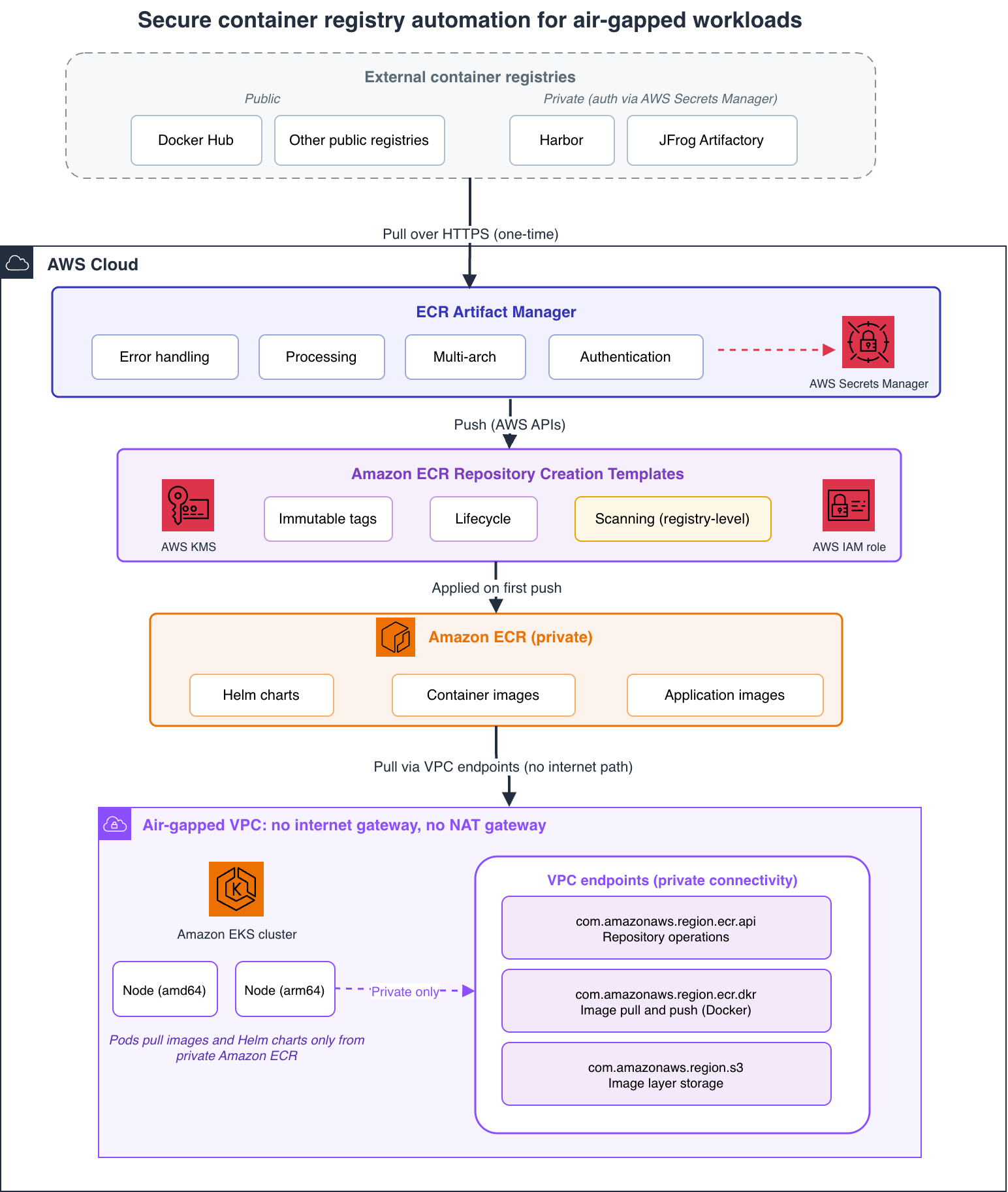
Figure 1: End-to-end flow: artifacts are migrated once from public and private source registries into private Amazon ECR, where repository creation templates enforce security controls, and an air-gapped Amazon Elastic Kubernetes Service (Amazon EKS) cluster pulls exclusively through VPC endpoints
At a high level, the flow works in three steps:
- Source registries. Helm charts and container images start in public registries (such as Docker Hub) and private registries (such as Harbor and JFrog Artifactory).
- Migration tool. The migration tool copies each artifact into the account, preserving multi-architecture manifests and authenticating to private sources through AWS Secrets Manager.
- Repository creation templates. As each artifact is pushed, Amazon ECR creates the target repository from a matching template, applying customer-managed encryption, immutable tags, and lifecycle rules automatically. The air-gapped Amazon EKS cluster then pulls exclusively through VPC endpoints.
The important shift is that repository creation templates apply your security settings automatically, which helps reduce configuration drift. You remain responsible for your overall security posture, including key management and lifecycle policies. The template encodes your standard: customer-managed AWS KMS encryption, immutable tags, and a lifecycle policy to expire untagged images. Repositories created through it inherit that standard identically.
Here’s the core of the template, expressed with Terraform. This single resource definition encapsulates the security-by-default posture (encryption, immutability, and lifecycle) that every auto-created repository will inherit:
The full Terraform module, including the KMS key with rotation, the IAM role Amazon ECR assumes, variable definitions, and provider configuration, lives in the sample repository. This snippet shows only the template resource itself, which is where the security-by-default decisions are encoded.
A few things are worth calling out. The template is driven by a list, so you can define as many repository categories as your platform needs, for example one prefix for Helm charts, one for the images those charts reference, and others for application or model images. Early on it is tempting to assume two categories are enough. In practice teams almost always want more, so it pays to make this list-driven from the start. The custom_role_arn is required whenever a template uses customer-managed AWS KMS encryption or applies resource tags, because Amazon ECR assumes that role to create the repository on your behalf.
Enhanced scanning is deliberately absent from the template, and that isn’t an oversight. Scanning in Amazon ECR is configured at the registry level rather than per repository. You set enhanced scanning once, with scan-on-push and continuous scanning, and it applies to every repository in the registry, including the ones the templates create later. Keeping scanning at the registry level and everything else in the template is the cleaner design, and it avoids the mistake of assuming a repository is being scanned because its template looked secure.
You provision all of this with Terraform: the templates, the AWS KMS key with rotation enabled, the AWS Identity and Access Management (IAM) role Amazon ECR assumes, and the registry scanning configuration. Because it’s infrastructure as code, the security posture is reviewable in a pull request, repeatable across accounts and AWS Regions, and idempotent to reapply.
Handling Helm charts and multi-architecture images
Templates solve repository configuration. They don’t solve the migration itself, and the migration has its own set of non-obvious problems. This is where a purpose-built migration tool earns its place, and where much of the practical value lives. The sample repository includes a migration tool called ecr-artifact-manager that handles the end-to-end artifact migration workflow described in the following section.
Multi-architecture preservation is the first. Rather than pulling and re-pushing an image, the tool copies the full manifest list so that every platform variant, such as amd64 and arm64, survives the move intact. It inspects the source manifest before copying and verifies the platforms afterward, which catches the silent single-platform collapse before it reaches a cluster.
Helm charts add another layer, because a chart isn’t self-contained. It references container images, and it may depend on other charts. Migrating a chart correctly means resolving those references and rewriting them to point at the private Amazon ECR locations. The tool then repackages the chart so that a cluster inside the air-gapped boundary can install it without reaching back out to the internet. In practice, the tool parses each chart’s values.yaml and sub-chart dependencies, replaces source registry URLs with the target ECR prefix (matching the repository creation template prefixes), and repackages the modified chart as an OCI artifact. The tool then pushes the chart itself to Amazon ECR as an OCI artifact, in exactly the same secure repositories the templates produce.
Authentication to private source registries is handled through AWS Secrets Manager, which centrally manages and rotates secrets and credentials. Credentials for a source registry, such as Harbor or Artifactory, live in a secret rather than in a config file, and the tool retrieves them at runtime. This keeps credentials out of source control and lets you rotate them centrally. One detail worth planning for: when the source is another Amazon ECR registry, its authorization token is short-lived and expires after 12 hours, so long-running migrations need to account for token refresh.
The result is a single workflow that pulls from a mix of public registries, such as Docker Hub, and private ones, and lands everything in private Amazon ECR with consistent security applied by the templates.
After artifacts are in Amazon ECR, the air-gapped cluster pulls them exclusively through VPC endpoints, using private connectivity that doesn’t traverse the public internet. These VPC endpoints are part of the air-gapped VPC’s network foundation. You provision them separately from this pattern, and you must have them in place before you deploy workloads. Figure 1 shows the specific endpoints involved.
Design considerations and trade-offs
The mechanics described earlier become clear after you see them in context. The decisions around them are where an infrastructure team should spend its attention, because most of them are hard to reverse.
Templates apply to new repositories only. A repository creation template affects repositories created after it exists, through CREATE_ON_PUSH. It doesn’t retroactively change repositories that already exist. For a greenfield air-gapped environment this is a non-issue, because all repositories in scope are new. For a brownfield migration into an existing registry, you need a deliberate strategy for the repositories that predate the template, because they won’t inherit its settings.
Some settings are immutable at creation. The encryption configuration in particular can’t be changed after a repository is created. This raises the cost of getting your AWS KMS strategy right up front, including whether you need multi-Region keys for disaster recovery. It is far cheaper to decide this before the first push than to migrate images into new repositories later.
Immutable tags change how teams work. Immutable tags are a strong control. They prevent an image tag from being overwritten, which protects the integrity of what you deployed and gives you a trustworthy audit trail. The trade-off is that teams accustomed to overwriting a floating tag, such as latest, must adopt versioned tags and a promotion workflow instead. In a regulated context the control is usually well worth the change in habit, but it is a real change and worth naming for your teams rather than letting them discover it.
Scale brings rate limits into play. At a hundred repositories and beyond, the constraints are no longer about correctness but about throughput. Public registries such as Docker Hub enforce pull rate limits, and AWS APIs throttle. The practical answers are to authenticate to source registries to raise their limits, to process artifacts in batches, to run independent batches in parallel where it helps, and to rely on retry with exponential backoff so transient throttling doesn’t fail the run. The sample migration tool implements this retry logic internally. For Docker Hub pull rate limits specifically, running multiple tool instances with separate authenticated credentials is a practical workaround. A migration that skips already-completed work on restart turns a multi-hour job into something you can safely interrupt and resume.
Credentials expire. Beyond the 12-hour Amazon ECR token lifetime mentioned earlier, source registry credentials in AWS Secrets Manager should be on a rotation schedule. Building rotation into the design from the start is more efficient than retrofitting it.
When this pattern is not the right fit
If you have fewer than ten repositories, or you are not operating under regulatory or air-gapped constraints, the overhead of templates, Terraform modules, and a dedicated migration tool may be more than you need.
The pattern pays off when consistency across many repositories is a requirement rather than a nicety. It’s particularly valuable when you need to demonstrate that consistency to auditors, and when the cost of getting encryption or tag mutability wrong on a single repository is high. Those settings can’t be changed after creation. If those conditions describe your environment, the upfront investment in automation repays itself quickly.
Getting started
The pattern uses Terraform and requires an AWS account with permissions to create Amazon ECR, AWS KMS, and IAM resources. It works in any AWS Region that supports Amazon ECR enhanced scanning. See the sample repository for tested tool versions. For more on Amazon ECR capabilities, see the Amazon ECR service page. For a related walkthrough on container security, see the Amazon ECR documentation. The complete, deployable code is available as a sample on GitHub: sample-ecr-automation-for-air-gapped-environments. It includes the Terraform modules, the migration tool, example configurations, and documentation covering deployment, architecture, security, and scaling. This is sample code intended to demonstrate the pattern. You must review and test it against your own security and compliance requirements before production use. As with any AWS workload, security is a shared responsibility.
To go deeper on the AWS capabilities involved, see the Amazon ECR documentation on repository creation templates, encryption at rest, image scanning, and interface VPC endpoints.
Conclusion
We opened this post with an observation: the hard part of running containers in an air-gapped environment isn’t any single repository. It’s maintaining a consistent security posture across all of them without drift. That’s a design problem, and it deserves a design solution. Repository creation templates, infrastructure as code, and a migration tool that respects the complexity of Helm charts and multi-architecture images together make secure-by-default the path of least resistance, so the correct configuration is applied automatically rather than left to human diligence.
We encourage you to try the sample repository, adapt the templates to your organization’s compliance requirements, and share what you learn by opening an issue or pull request.