AWS Database Blog
Accelerate your database migration journey with AI
Database migrations are significant undertakings that benefit from careful planning and technical expertise. When running database migration with AWS Database Migration Service (AWS DMS), you may encounter opportunities to streamline your workflow: interpreting error messages, understanding configuration parameter relationships, and navigating between the console, documentation, and community forums during troubleshooting.
What if you could have an AI-powered assistant that understands your migration context, diagnoses issues in real-time, and provides actionable guidance—all within your workflow? That’s exactly what Amazon Q integration with AWS DMS delivers. Note that while your post focuses on AI enhancements for AWS DMS migration and troubleshooting, AWS also provides AI-powered schema conversion through DMS Schema Conversion (DMS SC). For details on schema conversion AI capabilities, review AWS Database Migration Service now automates time-intensive schema conversion tasks using generative AI. Schema conversion is outside the scope of this discussion.
In this post, we show you how Amazon Q integration with AWS DMS can transform your database migration experience. By integrating Amazon Q with AWS DMS, you can:
- Accelerate issue resolution – Quickly identify and resolve migration issues with AI-powered diagnostics that interpret errors and provide targeted guidance.
- Optimize configurations – Receive intelligent, use-case-specific recommendations for AWS DMS settings and parameters.
- Access contextual assistance – Get help that adapts to your current console workflow and task context.
- Prevent common issues – Identify potential problems proactively through pattern recognition before they impact your migrations.
- Improve performance – Leverage AI analysis of migration metrics to surface actionable optimization opportunities.
- Simplify complex workflows – Interact more intuitively with advanced features such as transformation rules and task configurations.
Getting started with Amazon Q in AWS DMS
Amazon Q integration with AWS DMS is available in select AWS Regions where Amazon Q in the AWS Console is supported. For the complete list of supported regions, refer to the Amazon Q Regional Availability documentation. AWS DMS remains available in all existing regions, with or without Amazon Q integration.
To start using these capabilities:
- Sign in to the AWS Management console and navigate to AWS DMS
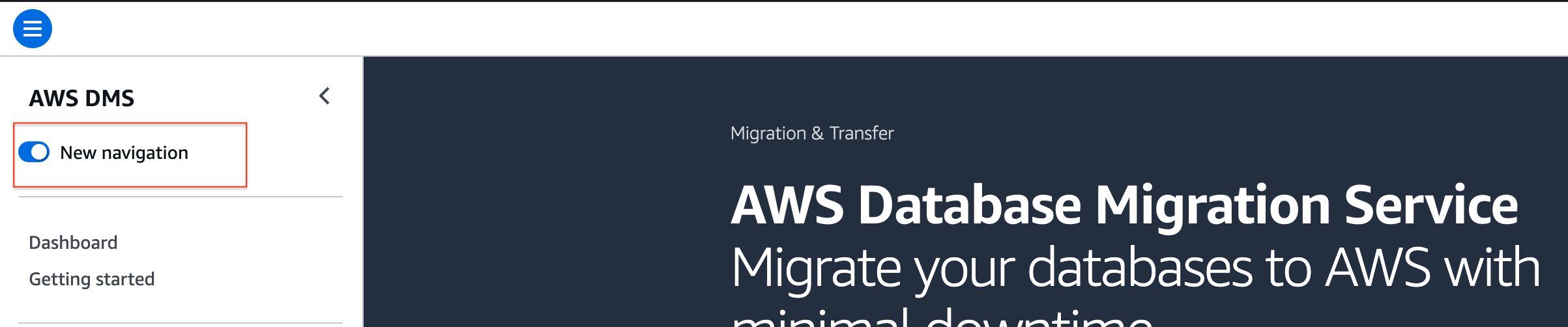
- Select the New navigation as shown in following screenshot
- Access Amazon Q through the console interface
- Ask questions about your migration tasks and configurations
- Follow the guided recommendations to optimize your migrations
Prerequisites
Amazon Q operates within the security context of your IAM identity, inheriting the permissions associate with your IAM user or role when interacting with AWS DMS. To enable Amazon Q Developer, attach the AmazonQDeveloperAccess managed policy to your IAM user or role, which grants the necessary permissions for Q to start conversations, send messages, and perform troubleshooting operations. However, this policy alone only enables Q’s core functionality. The actual AWS resources Q can access are determined by the IAM policies attached to your identity.
In the following section, we present real-world use cases demonstrating how to use Amazon Q integration within the AWS DMS console.
Validate your configuration before starting migrations
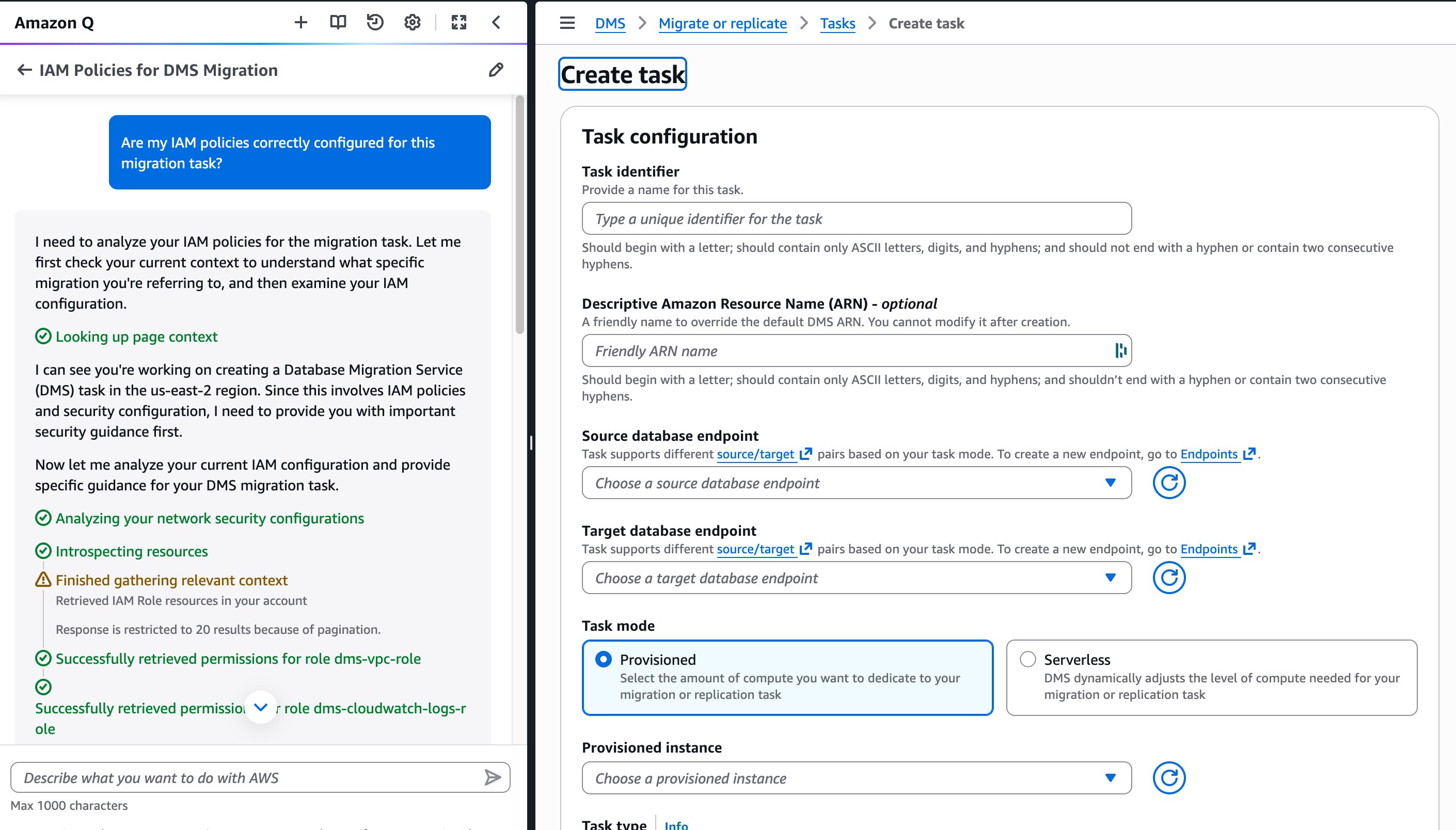
Before you start an AWS DMS migration task, Amazon Q can validate your configuration to help prevent common setup issues. This proactive approach reduces failed task attempts and accelerates your migration timeline. For instance, DMS requires certain roles such as “dms-vpc-role”, “dms-cloudwatch-logs-role” and “dms-access-for-endpoint” service roles. In the following screenshot, Amazon Q checks if these IAM roles are configured with the right permissions.
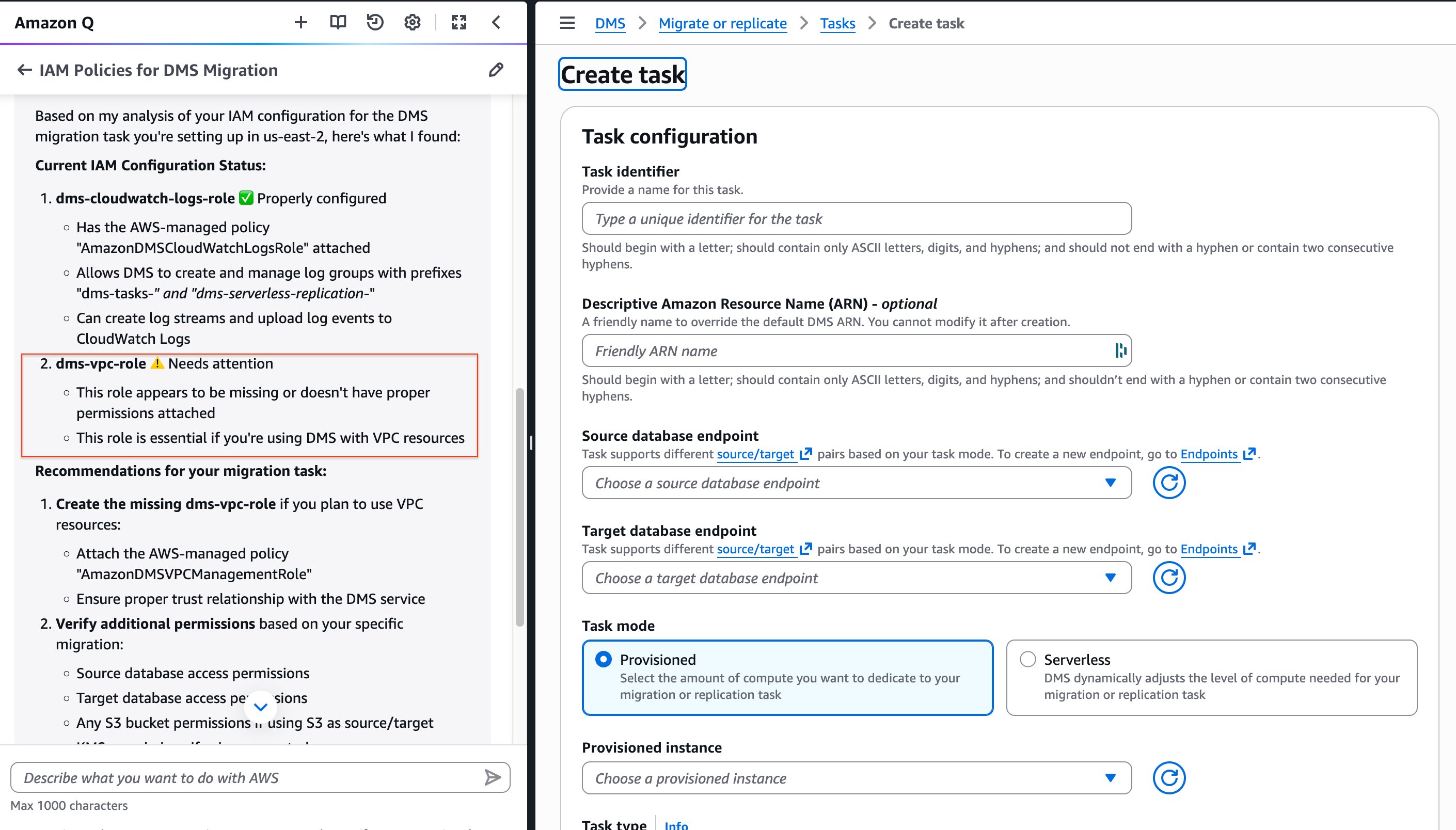
When Amazon Q detects a misconfiguration, it provides specific remediation steps. In this example, the IAM role “dms-vpc-role” is not configured correctly, and Amazon Q provides the details of the policy that needs to be attached to the role.
Diagnose task failures with AI-powered analysis
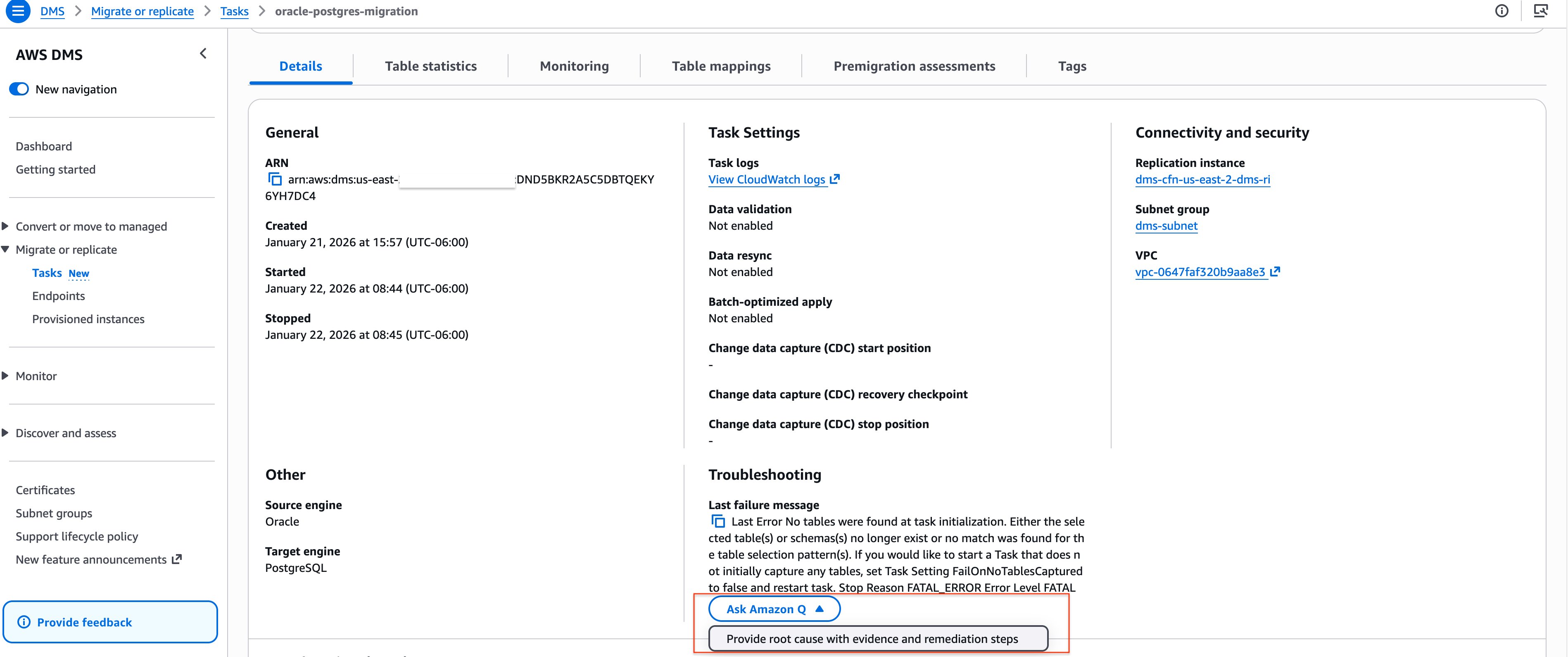
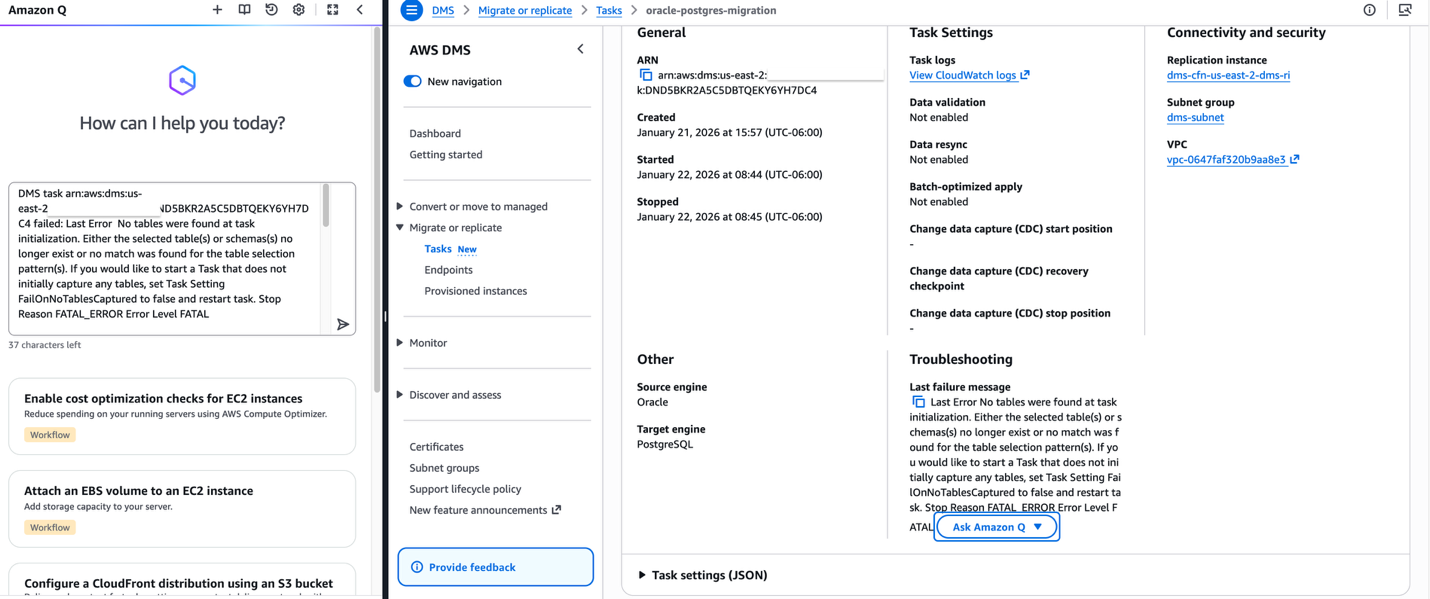
When an AWS DMS migration task fails, identifying the root cause often requires investigating multiple dimensions: task configuration, endpoint connectivity, resource capacity, CloudWatch logs, and service-level events. This multi-layered troubleshooting can delay your migration timeline and require expertise across various AWS services.Amazon Q simplifies this process by automatically diagnosing task failures and providing clear, actionable remediation steps. The following screenshot shows that the task that failed to load a table to the target. Using the “Ask Amazon Q” option, we can diagnose and remediate the failure.
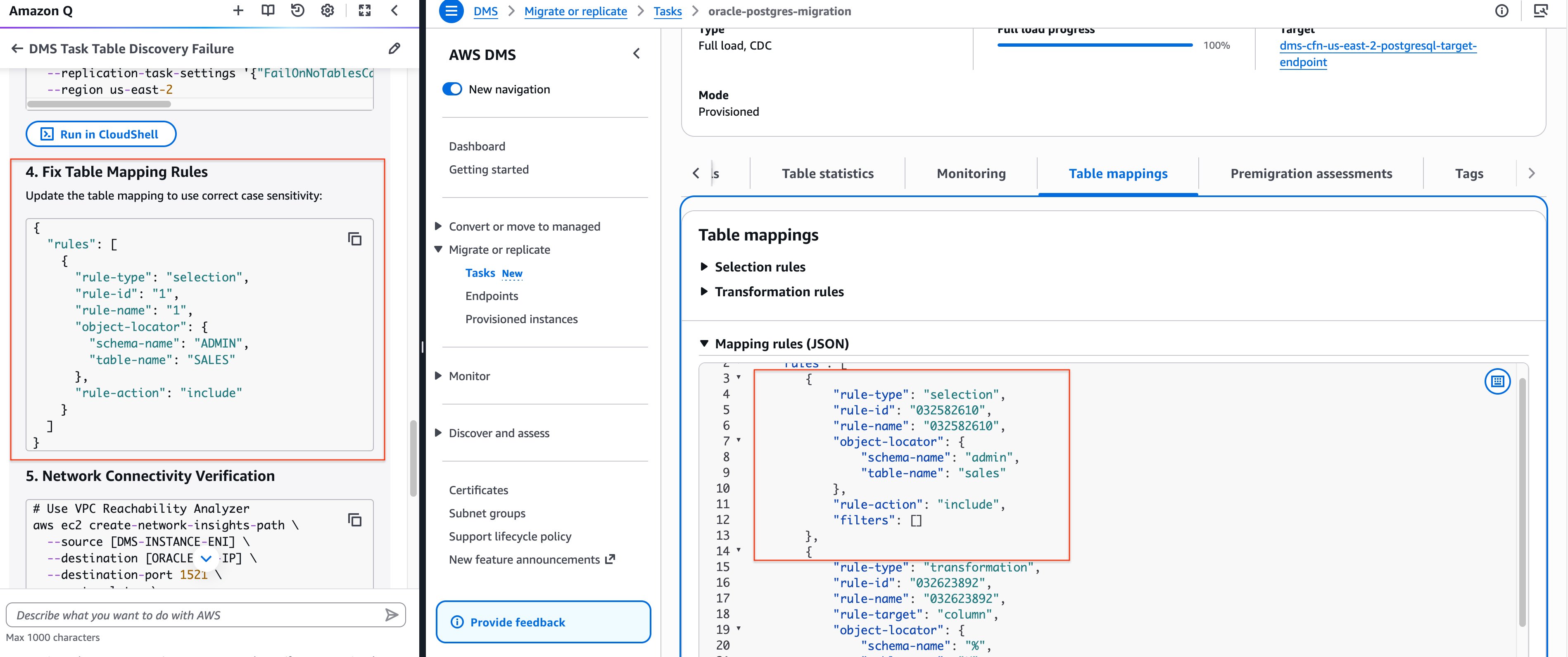
In the following screenshot, we can see Amazon Q runs several checks and identifies that the table mapping is in lowercase, while the source Oracle database is case-sensitive and requires uppercase table names. This precise diagnosis potentially eliminates hours of manual troubleshooting.
Analyze CloudWatch logs for faster troubleshooting
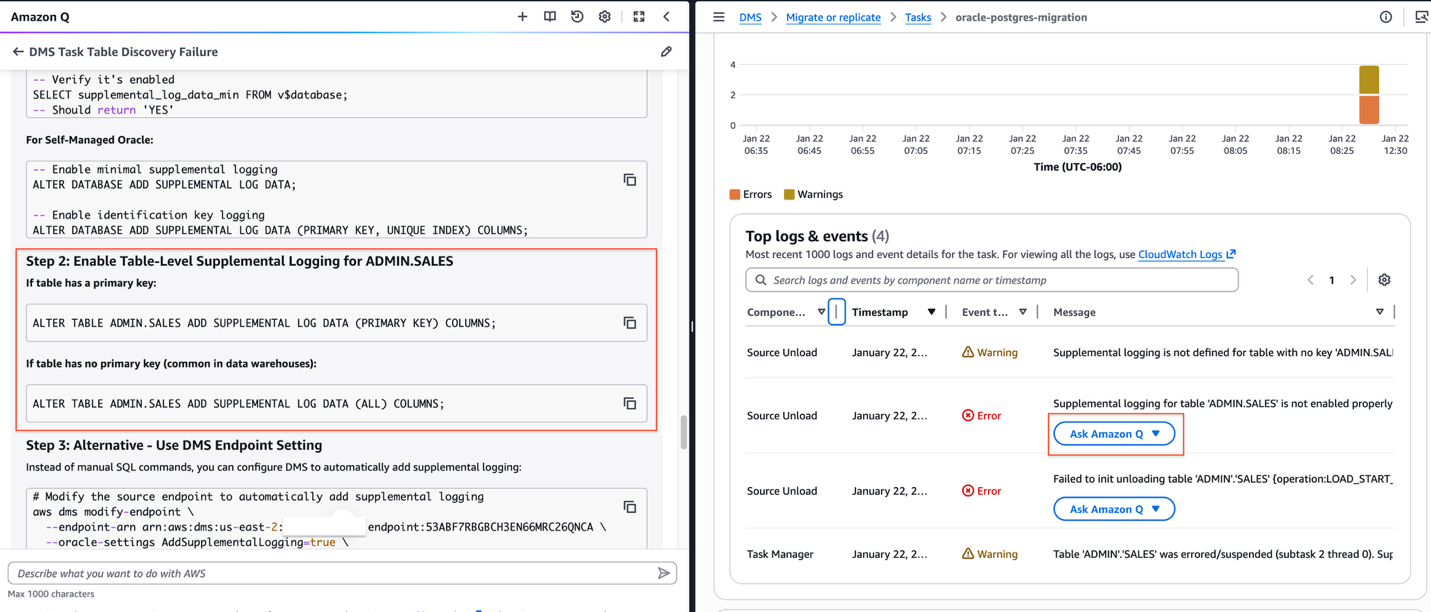
AWS DMS generates detailed logs in Amazon CloudWatch that capture table-level events, errors, and warnings during migration tasks. While these logs provide valuable diagnostic information, interpreting error messages and identifying root causes can be time-consuming, especially when dealing with hundreds or thousands of tables. Amazon Q transforms this troubleshooting experience by automatically analyzing CloudWatch logs and providing actionable insights. In the following screenshot, Amazon Q diagnoses table errors from the Monitoring section of the DMS task under “Top logs & events” and provides recommendations—eliminating the need to navigate to CloudWatch separately.
In this Oracle to PostgreSQL migration example, Amazon Q identifies that supplemental logging was not enabled on the source table and provides the exact SQL commands to enable it on the PRIMARY KEY or ALL columns.
Resolve endpoint connectivity issues quickly
When endpoint test connections fail, diagnosing the root cause often requires investigating network configurations, security groups, authentication credentials, and database-specific settings across multiple services. When an AWS DMS endpoint connection test fails, Amazon Q analyzes multiple layers of your configuration:
- Network connectivity – Validates VPC configuration, subnet routing, internet gateway or NAT gateway setup, and network ACLs
- Security group rules – Verifies that inbound and outbound rules allow traffic on the required database port from your DMS replication instance
- Endpoint configuration – Examines connection strings, SSL/TLS settings, and database-specific parameters
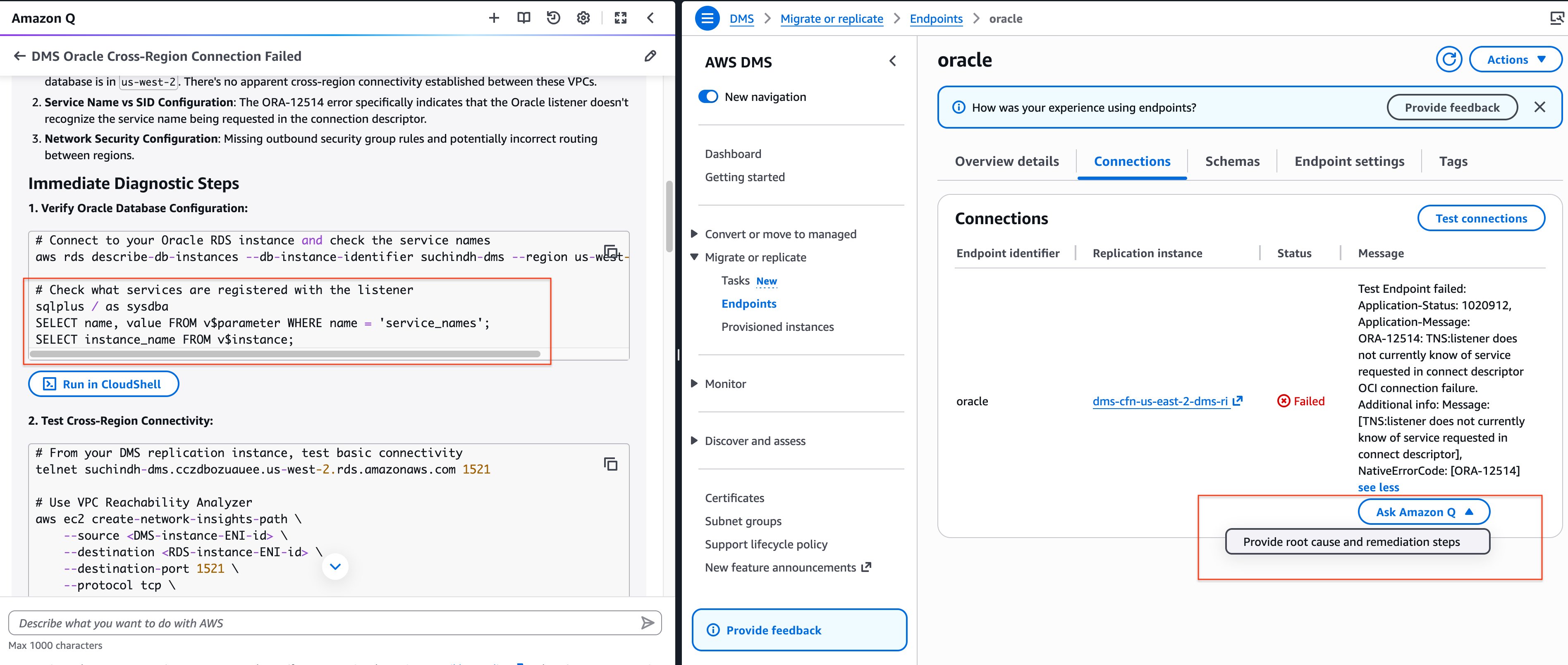
In the following screenshot, an Oracle test connection failed because the service name was not configured correctly. Amazon Q identified this as the preliminary diagnostic step, saving valuable troubleshooting time.
Conclusion
In this post, we showed you how to use AI-powered assistance directly into your DMS workflow, Amazon Q reduces the time and expertise required to successfully migrate databases to AWS. Whether you’re running your first migration or managing hundreds of tasks, Amazon Q acts as an intelligent partner—diagnosing issues, explaining errors in context, and guiding you to resolution. We’re continuously enhancing Amazon Q’s capabilities based on customer feedback. We invite you to explore these features and share your experience as we work together to make database migrations faster, more reliable, and more accessible.