AWS Database Blog
Achieve near-zero downtime database maintenance by using blue/green deployments with AWS JDBC Driver
Modern applications demand near-continuous availability, making database maintenance operations a critical challenge for development teams. Traditional approaches to database updates, patches, and upgrades often result in downtime, connection failures, and manual intervention requirements that disrupt business operations and impact user experience.
Amazon Relational Database Service (Amazon RDS) blue/green deployments help to address the challenge of planned downtime by creating parallel database environments that help you to make and test database changes before implementing them in a production environment. While this approach significantly reduces maintenance windows, applications can still experience brief interruptions during the switchover process, including connection termination, DNS propagation delays, and the need for manual intervention when connections fail.
AWS launched the AWS JDBC Driver in 2023 to extend standard JDBC drivers with AWS-specific capabilities. Built as a layer over PostgreSQL, MySQL, or MariaDB JDBC drivers, this wrapper adds support for Amazon Aurora and Amazon RDS features. The wrapper includes multiple plugins, such as connection tracking for Amazon Aurora, AWS Identity and Access Management (IAM) authentication, and read-write traffic splitting. With these plugins, you can customize the AWS JDBC Wrapper Driver to integrate with your application, providing enhanced features for failover management, monitoring, authentication, load distribution, and more.
In this post we introduce the blue/green deployment plugin for the AWS JDBC Driver, a built-in plugin that automatically handles connection routing, traffic management, and switchover detection during blue/green deployment switchovers. We show you how to configure and use the plugin to minimize downtime during database maintenance operations during blue/green deployment switchovers.
Introducing the AWS JDBC Driver Blue/Green Deployment Plugin
The blue/green deployment plugin is a built-in component of the AWS JDBC Driver that works with blue/green deployments to provide:
- Automatic switchover detection and preparation
- Traffic management during transitions
- DNS-independent routing to avoid stale DNS issues
- Minimal configuration changes—only JDBC connection configuration required
The plugin works by:
- Monitoring blue/green deployment status through an RDS metadata table
- Maintaining connection inventories for both blue and green environments
- Routing traffic based on switchover phases
- Handling connection failures gracefully during transitions
Key Features
The AWS JDBC Driver blue/green plugin provides three core capabilities that work together to minimize disruptions during database switchovers: automatic detection of blue/green deployment phases, intelligent inventory management of both environments, and dynamic traffic routing based on switchover status. These features operate continuously in the background to reduce connection failures, though applications should still implement retry logic to handle temporary exceptions that might occur during the switchover process.
Automatic Switchover Detection
The plugin uses a background monitoring thread that polls blue/green deployment APIs approximately every second to continuously detect deployment status changes and phase transitions. When a phase change is detected, the plugin immediately adjusts its connection routing strategy. With proactive monitoring, the plugin can anticipate switchover events and prepare connection management accordingly, improving application connectivity throughout blue/green transitions.
The plugin continuously monitors blue/green deployment status, detecting phase transitions as follows:
Phase Detection Timeline:

- NOT_CREATED: blue/green deployment plugin components are not yet created.
- CREATED: The blue/green deployment exists, and plugin components are initialized. The plugin compiles an inventory of both blue and green environments, mapping cluster endpoints to their corresponding IP addresses. Monitoring connections are established to both environments to track their health status.
- PREPARATION: The plugin establishes connection routing rules to redirect traffic. It creates configurations that map each source endpoint (blue environment) to specific IP addresses, ensuring that new connection attempts are directed to the appropriate targets while existing connections remain active. This phase sets up the infrastructure needed for the eventual traffic switchover without disrupting current database operations.
- IN_PROGRESS: An active switchover is in progress with query execution suspended on both source (blue) and target (green) environments during the transition. A temporary suspension on the execution of JDBC calls to the source (blue) environment reduces database load and allows replication to catch up in the target (green) environment. The plugin redirects new connections to source endpoints (blue) directly to blue environment IP addresses to eliminate connections to stale DNS entries, while suspending new connections to target endpoints (green).
- POST: The plugin updates cluster topology and DNS entries for both environments. The plugin monitors DNS propagation and gradually transitions from IP-based routing back to hostname-based connections as DNS entries stabilize.
- COMPLETED: Switchover completed successfully.
The plugin maps AWS blue/green deployment status to the following phases:
|
Blue/Green Deployment Status |
Blue/Green Deployment Plugin Phase |
Plugin Action |
| AVAILABLE | CREATED | Initialize monitoring. |
| SWITCHOVER_INITIATED | PREPARATION | Establish connection routing infrastructure to redirect new connections. |
| SWITCHOVER_IN_PROGRESS | IN_PROGRESS | Suspend all query executions and routes new connections to blue environment IP addresses. |
| POST | Initially route traffic using IP-based routing and gradually resume hostname-based connections. | |
| SWITCHOVER_COMPLETED | COMPLETED | Complete monitoring and resume normal operations. |
Connection Inventory Management
The plugin maintains comprehensive inventories of both blue and green environments to enable automatic switchover operations:
- Blue environment tracking: During the CREATED phase, the plugin discovers and catalogs all blue environment components, including cluster endpoints, reader endpoints, writer endpoints, and individual instance endpoints. For each endpoint, it resolves and stores the corresponding IP addresses, creating a complete mapping of the current production environment. This inventory serves as the baseline for comparison during switchover operations.
- Green environment tracking: Simultaneously, the plugin identifies and maps all corresponding green environment endpoints. Using blue/green deployment metadata, it establishes the relationship between blue and green components so that each blue endpoint has a known green counterpart. The plugin resolves IP addresses for all green endpoints and maintains this information for immediate use during switchover.
Intelligent Traffic Management
During switchovers, the plugin implements traffic management covering both connection establishment and query execution:
- Connection management: Controls the new database connection establishment using routing strategies
- Query execution management: Controls the execution of SQL statement on existing connections during critical phases
Traffic Management by Phase:
- PREPARATION:
- New connections to blue endpoints are routed using direct IP addresses.
- Existing connections continue normally.
- IP-based routing bypassing DNS resolution is used.
- IN_PROGRESS:
- New connections to green endpoints are suspended.
- New connections to blue endpoints use direct IP routing by default, but are also suspended when
bgSuspendNewBlueConnectionsis enabled. - All query executions are suspended across both endpoints (blue and green).
- Existing connections to both blue and green environments are dropped during the active switchover period.
- POST:
- New connections to blue endpoints are now routed to green endpoints (new blue environment) using IP-based routing.
- When DNS entries for blue endpoints are updated, transitions to use hostname-based routing.
- New connections to green endpoints (old green environment) are rejected.
- COMPLETED:
- Normal routing resumes to new active endpoints.
Prerequisites
Database Engine Requirements
|
Database Engine |
Blue Environment |
Green Environment |
|
Amazon Aurora PostgreSQL |
Engine Release 17.5, 16.9, 15.13, 14.18, 13.21 and above |
Engine Release 17.5, 16.9, 15.13, 14.18, 13.21 and above |
|
Amazon RDS for PostgreSQL |
rds_tools v1.7 and above (17.1, 16.5, 15.9, 14.14, 13.17, 12.21) |
rds_tools v1.7 and above (17.1, 16.5, 15.9, 14.14, 13.17, 12.21) |
| Amazon Aurora MySQL | Any database engine version | Engine Release 3.07 and above |
| Amazon RDS for MySQL |
Blue/green deployment supported versions |
Blue/green deployment supported versions |
Application Stack Requirements
- AWS JDBC Driver version 2.6.4 or later
- Database Driver: PostgreSQL JDBC driver or MySQL/MariaDB JDBC Driver
- Runtime environment: Amazon Corretto 8+ or Java 8+
Cluster Setup and Topology
To demonstrate how the AWS JDBC Driver blue/green plugin minimizes application downtime during database upgrades or maintenance, we have set up a test environment. The setup consists of an Aurora PostgreSQL cluster with a 1:1 writer-reader configuration, which represents a common production topology.
The sample java application generates a consistent read workload against the cluster’s writer endpoint to demonstrate the plugin’s ability to improve application connectivity during a blue/green deployment switchover.
As illustrated in the following diagram, we have created a blue/green deployment.
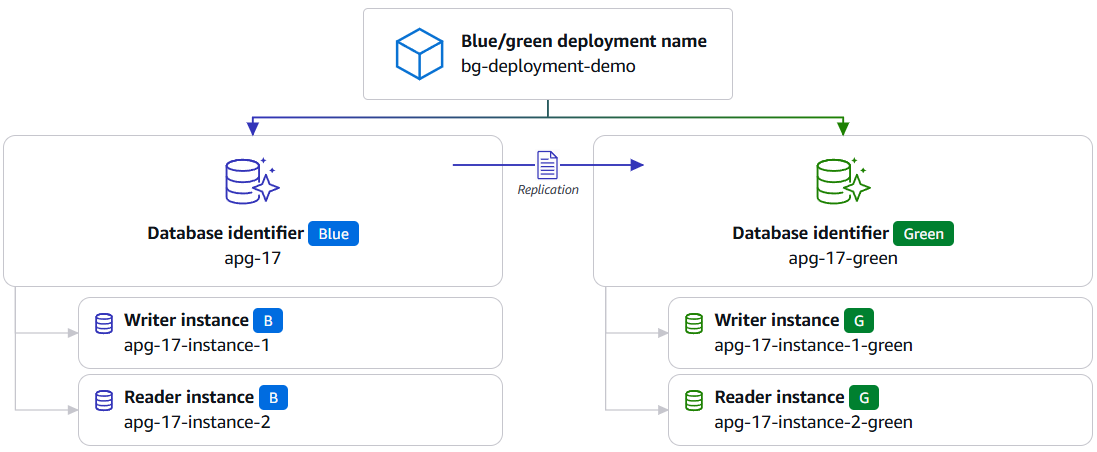
The source (blue) environment contains:
- One primary writer instance
- One reader instance
- Associated cluster and instance endpoints
The target (green) environment mirrors this topology with:
- A corresponding writer instance
- A matching reader instance
- Equivalent endpoint configuration
This symmetrical setup allows the target (green) environment to serve workload requests during the switchover process as the plugin actively monitors the blue/green deployment status and automatically redirects application connections to the appropriate endpoint as the switchover progresses.
Setting Up Your Java Application Using the Blue/Green Deployment Plugin
To integrate the AWS JDBC Driver into your application, use either Maven or Gradle build systems for dependency management. In our sample application, we demonstrate the setup using Maven, though the dependencies work with Gradle projects as well.
Maven Dependencies
Update the pom.xml file to include the following dependencies:
For Gradle users, the same dependencies can be added to the build.gradle file using Gradle’s dependency syntax.
Key Plugin Parameters
Configure the following parameters for the blue/green deployment plugin:
- wrapperPlugins: Specifies which AWS JDBC Wrapper plugins to load and activate for database connection. To use the blue/green deployment plugin, you must load the
bgplugin as shown in the following Java code: - bgdId: Specifies a user-defined unique identifier for tracking a specific blue/green deployment operation within the plugin (default: 1). This parameter is not related to the AWS Console blue/green deployment name or resource ID, but rather serves as an internal label that allows the plugin to distinguish between multiple blue/green deployments when monitoring them simultaneously. For example, if an AWS account has three blue/green deployments running concurrently, each must be assigned a unique bgdId value (such as 1, 2, 3 or bg1, bg2, bg3) to ensure the plugin can track and monitor each deployment’s status and switchover events independently.
- blue-green-monitoring-connectTimeout: Sets the connection timeout in milliseconds for the monitoring connection used to track blue/green deployment status (default: 30000). This parameter is critical because the plugin establishes separate monitoring connections to detect deployment phase changes. A proper timeout ensures the plugin can reliably connect to monitor deployment progress without hanging indefinitely.
- blue-green-monitoring-socketTimeout: Sets the socket timeout in milliseconds for monitoring connections that track deployment status (default: 30000). This timeout is essential for preventing monitoring operations from blocking indefinitely when checking deployment phases so that the plugin remains responsive during network issues or slow responses.
- bgSwitchoverTimeoutMs: Defines the maximum time in milliseconds that the plugin will continue to monitor the blue/green deployment status (default: 300000 – 5 minutes). This parameter determines how long the plugin will actively track the deployment switchover process before timing out. Set it to the same or greater value than the switchover timeout defined before you initiate the blue/green switchover operation. If the switchover completes successfully before the switchover timeout expires, the monitoring of the blue/green deployment status will automatically stop. Set an appropriate value so that the plugin doesn’t monitor indefinitely and to allow sufficient time for the Amazon RDS switchover process to complete and be detected.
- bgSuspendNewBlueConnections: Controls whether new connections to the blue cluster are suspended during the switchover phase (default: false). When set to true, the plugin temporarily suspends new connection attempts to blue nodes during the active switchover phase.
The following code shows you how to configure these blue/green plugin parameters:
In our testing, we evaluated two identical applications running continuous read-only workloads against an Aurora PostgreSQL cluster writer endpoint during a blue/green deployment switchover to measure the impact of the blue/green plugin. The baseline application without the blue/green plugin experienced connection disruption during the switchover phase, requiring application-level retry logic to handle connection failures. It experienced two query connection failures out of 400 total queries, with a 30.21 second application downtime during the switchover process and required manual connection re-establishment to the new endpoint.
The application with the blue/green plugin enabled and suspension to blue connections enabled had improved resilience during the switchover phase. In this specific test scenario, the plugin-enabled application experienced zero query connection failures out of 400 total queries, with an 11.77 second pause in workload execution during the switchover process, and managed connections through automatic routing suspension and recovery. The plugin proactively detected the blue/green deployment immediately upon application startup and continuously monitored both source and target environments throughout the deployment process. Throughout the POST plugin phase and COMPLETED plugin phase, the plugin automatically routed all queries to the target (green) environment, eliminating the need for manual endpoint updates during the blue/green switchover process. However, we recommend having a retry logic in your application to handle connection-related exceptions that might occur during network transitions.
Blue/Green Deployment Metadata and Lifecycle Summary
During the blue/green deployment switchover, you can monitor the metadata used by the plugin to track deployment progress and status. For Aurora PostgreSQL, use the get_blue_green_fast_switchover_metadata() function to retrieve real-time information about the deployment phases, topology changes, and switchover status. For RDS PostgreSQL, the rds_tools.show_topology() function provides similar metadata visibility; RDS/Aurora MySQL instances use the mysql.rds_topology table. This helps you determine the deployment status and verify successful transitions between blue and green environments. The following examples show sample status changes.
Detailed performance metrics and switchover timelines are captured automatically in the application logs through the plugin, which can be enabled by setting wrapperLoggerLevel to fine or finest to get the logSwitchoverFinalSummary and other diagnostic information for analysis and troubleshooting.
The logSwitchoverFinalSummary provides a chronological view of the entire blue/green deployment lifecycle.
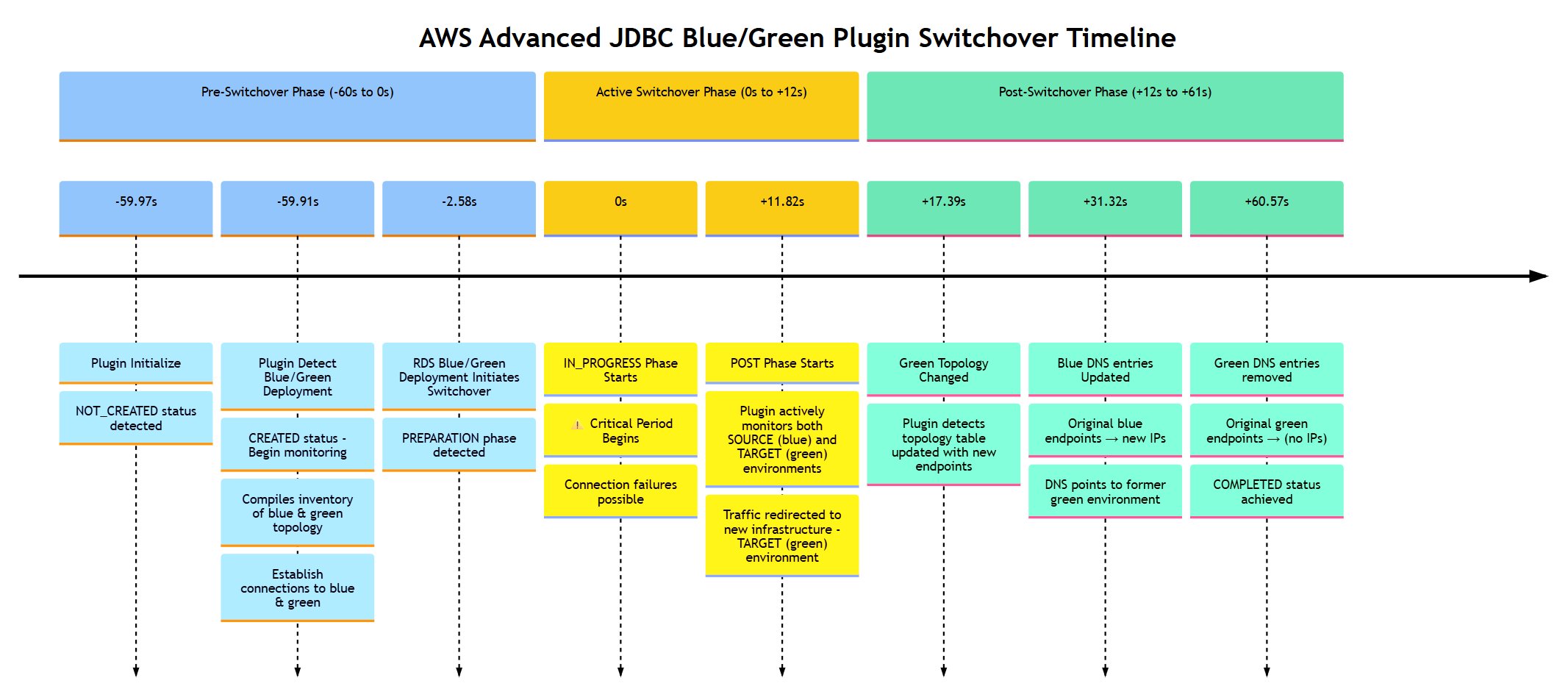
Pre-switchover phase (negative times):
- -44.13 seconds: The plugin initializes and first checks the blue/green deployment status (NOT_CREATED state).
- -44.08 seconds: The plugin detects blue/green deployment exists (CREATED transition) and immediately begins compiling inventories and establishing monitoring connections for both blue and green environments.
- -44.08 to -2.88 seconds: The plugin continuously monitors and maintains connections to both environments.
- -2.88 seconds: The RDS blue/green deployment initiates the switchover (PREPARATION phase detected by plugin). The preparation phase begins and the plugin is ready for imminent switchover.
- -2.88 to 0 seconds: Final preparation window completes.
Active and post switchover phase (0 ms and positive times):
- 0 seconds: The IN_PROGRESS phase starts, including active switchover execution.
- 0 to +11.62 seconds: The IN_PROGRESS phase is in progress, including active switchover time (connection failures can occur).
- +11.62 seconds: The POST phase starts. The plugin actively monitors both source (blue) and target (green) environments, detecting green topology changes, and begins routing new connections to the target (green) environment.
- +16.72 seconds: The green topology changes. The plugin detects that the green cluster’s topology table has been updated with the new endpoints (without the green- prefix), indicating that the infrastructure switchover is functionally complete.
- +46.15 seconds: The blue DNS is updated. The plugin detects that the DNS records for the original blue cluster endpoints have been updated to point to the new infrastructure (new IPs) that was previously the green environment.
- +46.42 seconds: The green DNS is removed. The plugin detects that DNS records for the green cluster endpoints (with the green- prefix) have been removed and no longer resolve to an IP address.
- +46.42 seconds: COMPLETED—All operations are finished.
Conclusion
In this post, we demonstrated how the blue/green deployment plugin within the AWS JDBC Driver automatically manages blue/green deployment switchovers to achieve near-zero downtime database maintenance. Using the intelligent connection routing and traffic management capabilities of this plugin, you can improve application availability and resiliency during database maintenance operations while performing blue/green deployments on RDS and Aurora. Try out the blue/green deployment plugin in your own use case, and share your feedback and questions in the AWS Advanced JDBC Wrapper GitHub discussions.
To explore additional capabilities of the AWS Advanced JDBC wrapper driver, we recommend checking out these related blogs:
- Learn about IAM authentication and AWS Secrets Manager integration in our introductory blog – Introducing the Advanced JDBC Wrapper Driver for Amazon Aurora.
- Learn about achieving one-second-or-less downtime during RDS Multi-AZ upgrades in Achieve One Second or Less Downtime with the Advanced JDBC Wrapper Driver when Upgrading Amazon RDS Multi-AZ DB Clusters.
- Discover how to enhance connection management using the Initial Connection Strategy plugin and Failover2 plugin in Demystifying the AWS Advanced JDBC Wrapper Plugins.
By implementing the blue/green deployment plugin alongside other AWS JDBC Driver capabilities, organizations can build more resilient applications while simplifying their database maintenance processes.