AWS Database Blog
Category: Storage
Upgrade legacy Amazon RDS file systems to increase storage capacity and improve performance with minimal downtime
Amazon RDS instances running on legacy file systems face several limitations. Storage is capped at 16 TiB, and some engines, including MySQL, MariaDB, and PostgreSQL, may encounter per-file size limits of approximately 2 TiB due to file system constraints, even though the database engines themselves support larger objects. In this post, I show you how to upgrade an RDS instance to the current file system with minimal downtime using Amazon RDS blue/green deployments.
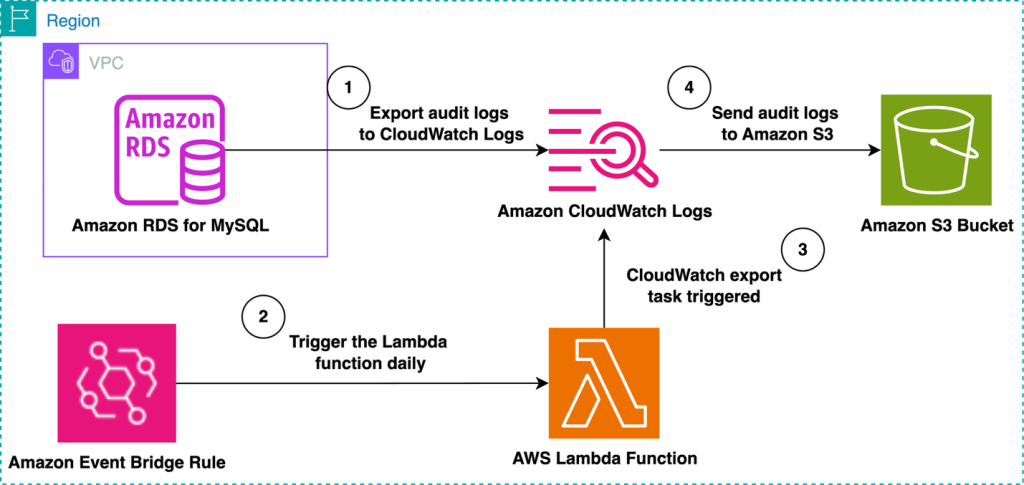
Automate the export of Amazon RDS for MySQL or Amazon Aurora MySQL audit logs to Amazon S3 with batching or near real-time processing
Amazon RDS for MySQL and Amazon Aurora MySQL provide built-in audit logging capabilities, but customers might need to export and store these logs for long-term retention and analysis. Amazon S3 offers an ideal destination, providing durability, cost-effectiveness, and integration with various analytics tools. In this post, we explore two approaches for exporting MySQL audit logs to Amazon S3: either using batching with a native export to Amazon S3 or processing logs in real time with Amazon Data Firehose.
Clone Amazon RDS Custom for Oracle to Amazon EC2 using multi-volume EBS snapshots
In this post, we walk you through the process of cloning an Amazon RDS Custom for Oracle database to an EC2 instance using multi-volume Amazon Elastic Block Store (Amazon EBS) snapshots for storage replication. This approach is useful for setting up a disaster recovery (DR) environment in a Region where RDS Custom is not yet available.
Stream Amazon DynamoDB table data to Amazon S3 Tables for analytics
In this post, we demonstrate how to stream data from DynamoDB to Amazon S3 Tables to enable analytics capabilities on your operational data.
Gracefully handle failed AWS Lambda events from Amazon DynamoDB Streams
In this post, we show how to capture and retain failed stream events for later analysis or replay using Amazon S3 as a durable destination. We compare this approach with the traditional Amazon SQS dead-letter queue (DLQ) pattern, and explain when and why Amazon S3 is a preferred option.
Optimize Amazon RDS Multi-AZ backups with incremental snapshots
As your business grows and your databases expand into the terabyte range, optimizing your backup strategy becomes increasingly important for maintaining operational excellence. Modern backup solutions that implement incremental backups where possible, offer an elegant way to protect your valuable data while minimizing maintenance windows and ensuring consistent application performance. In this post, we discuss the aspects of maximizing the use of incremental backups in Amazon RDS, leading to backup times remaining steady even while the database grows.

Optimize Amazon RDS performance with io2 Block Express storage for production workloads
Choosing the right storage configuration that meets performance requirements is a common challenge when creating and managing database instances. In this post, we provide an end-to-end guide for what storage class to choose depending on your use case. In addition, we compare the performance of different storage volumes on open source engines supported by Amazon RDS, to validate them from a database-centric perspective.

Shrink storage volumes for your RDS databases and optimize your infrastructure costs
Recently, Amazon RDS launched the ability to shrink storage volumes using Amazon RDS Blue/Green Deployments – a nice addition to the list of new use cases that Blue/Green Deployments now supports. In this post, we cover how to use the new storage volume shrink feature in Amazon RDS Blue/Green Deployments to minimize the downtime required to perform the storage size reduction operation. We also review various mechanisms to monitor the progress of storage shrink and best practices on how to arrive at the optimal storage size for your shrink storage task.

Modernize your legacy databases with AWS data lakes, Part 1: Migrate SQL Server using AWS DMS
This is a three-part series in which we discuss the end-to-end process of building a data lake from a legacy SQL Server database. In this post, we show you how to build data pipelines to replicate data from Microsoft SQL Server to a data lake in Amazon S3 using AWS DMS. You can extend the solution presented in this post to other database engines like PostgreSQL, MySQL, and Oracle.

Configure cross-account Amazon S3 as a source or target for AWS DMS
In this post, we delve into the intricacies of configuring AWS DMS replication instances to use an S3 bucket in a different account. We also explore the process of establishing a connection between AWS DMS Serverless and S3 buckets across distinct accounts.