AWS Database Blog
Category: RDS for MySQL
Knowing when new open source database engine versions release on Amazon Aurora and Amazon RDS
In this post, we share the version currency timelines for Aurora and RDS open source engines. We also explain why timelines differ across engines and how you can use them to plan your upgrades.
Upgrade strategies for Amazon RDS for MySQL 8.0 to 8.4
This post is part of a two-part series on upgrading RDS for MySQL 8.0 to 8.4. Here, we cover the end of standard support timeline, extended support costs, upgrade methods, and key best practices. For a step-by-step implementation guide, see Best practices for upgrading RDS for MySQL 8.0 to 8.4 with prechecks, Blue/Green, and rollback.
Best practices for upgrading Amazon RDS for MySQL 8.0 to 8.4 with prechecks, Blue/Green, and rollback
In this post, you learn how to build a complete upgrade workflow for RDS for MySQL 8.0 to 8.4, covering pre-upgrade compatibility checks, Amazon RDS Blue/Green Deployments for minimal downtime, and a rollback strategy for added protection.
Optimize full-text search in Amazon RDS for MySQL and Amazon Aurora MySQL
In this post, we show you how to optimize full-text search (FTS) performance in Amazon RDS for MySQL and Amazon Aurora MySQL-Compatible Edition through proper maintenance and monitoring. We discuss why FTS indexes require regular maintenance, common issues that can arise, and best practices for keeping your FTS-enabled databases running smoothly.
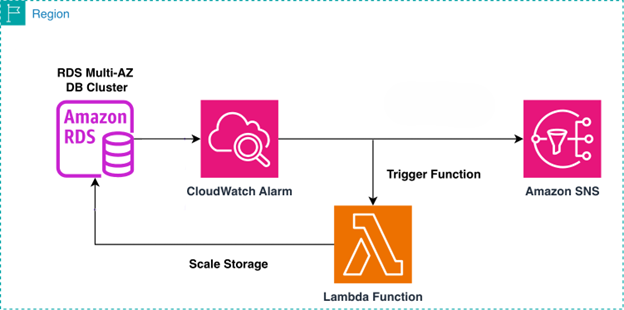
Automatically scale storage for Amazon RDS Multi-AZ DB clusters using AWS Lambda
In this post, we walk you through building an automated storage scaling solution for Amazon RDS Multi-AZ clusters with two readable standbys. We use AWS Lambda to execute scaling logic, Amazon CloudWatch to detect and alarm on storage thresholds, and Amazon SNS to deliver timely notifications. This combination provides event-driven automation, native AWS integration, and operational visibility without requiring third-party tooling.

Migrate Cloud SQL for MySQL to Amazon Aurora and Amazon RDS for MySQL Using AWS DMS
In this post, we demonstrate how to migrate from Cloud SQL for MySQL 8+ to Amazon RDS for MySQL 8+ or Amazon Aurora MySQL–Compatible using AWS DMS over an AWS Site-to-Site VPN. We cover preparing the source and target environments, exemplifying cross-cloud connectivity, and setting up DMS tasks.
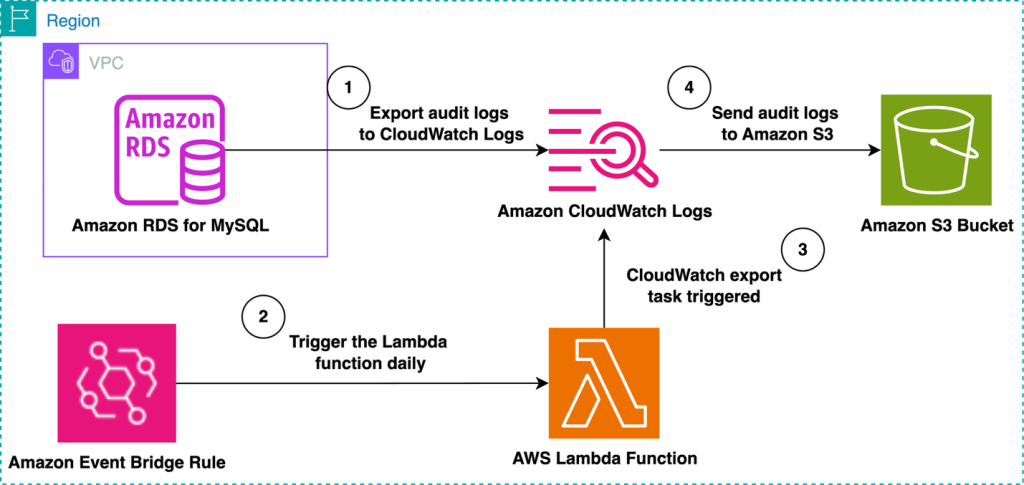
Automate the export of Amazon RDS for MySQL or Amazon Aurora MySQL audit logs to Amazon S3 with batching or near real-time processing
Amazon RDS for MySQL and Amazon Aurora MySQL provide built-in audit logging capabilities, but customers might need to export and store these logs for long-term retention and analysis. Amazon S3 offers an ideal destination, providing durability, cost-effectiveness, and integration with various analytics tools. In this post, we explore two approaches for exporting MySQL audit logs to Amazon S3: either using batching with a native export to Amazon S3 or processing logs in real time with Amazon Data Firehose.
Monitoring multithreaded replication in Amazon RDS for MySQL, Amazon RDS for MariaDB, and Aurora MySQL
In this post, we discuss methods to effectively monitor parallel replication performance and tune its related parameters for Amazon Aurora MySQL and Amazon Relational Database Service for MySQL and MariaDB.
Overview and best practices of multithreaded replication in Amazon RDS for MySQL, Amazon RDS for MariaDB, and Amazon Aurora MySQL
In this first post, we dive into the world of MySQL replication, with a special focus on parallel replication techniques. We start with a quick overview of how MySQL replication works, then explore the intricacies of multithreaded replication. We discuss key configuration options and best practices for optimization.
Performance optimization strategies for MySQL on Amazon RDS
In this post, we share infrastructure-level optimizations, RDS-specific performance features, and database design patterns to help improve MySQL performance on Amazon RDS. We focus on practical configurations and monitoring techniques that complement existing parameter tuning documentation, helping you make informed decisions for your specific workload requirements.