AWS Database Blog
Configure AWS Advanced JDBC Wrapper connection pooling with the assistant
In this post, we show you how to configure connection pooling for the AWS Advanced JDBC Wrapper on Amazon Aurora and Amazon Relational Database Service. You also learn how the wrapper’s external and internal pooling differ, how to choose between them, and how JDBC-WRAPPER-CONFIGURATION-ASSISTANT helps you build the right configuration.
The AWS Advanced JDBC Wrapper is a wrapper that sits on top of a community JDBC (Java Database Connectivity) driver, adding Amazon Aurora, Amazon Relational Database Service (Amazon RDS) and AWS cloud capabilities without replacing it. It places a single layer between your application and the actual driver. This layer intercepts every JDBC call to add features purpose-built for Amazon Aurora and Amazon RDS. With the wrapper, you keep your existing SQL code and tooling unchanged. You can enable or disable capabilities like accelerated failover, Enhanced Failure Monitoring (EFM), IAM authentication, and read/write splitting purely as plugins.
Plugin-based architecture
Every feature in the wrapper is packaged as a plugin, and each JDBC call flows through a chain of these plugins before it reaches the actual driver. The following diagram shows what happens when your application calls a JDBC method such as connection.prepareStatement(...):
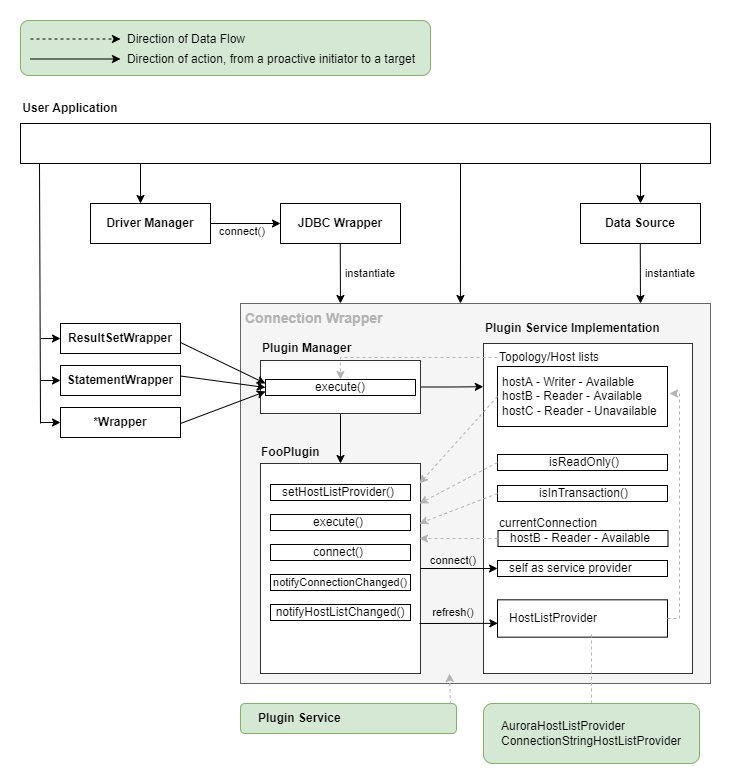
Figure 1: A JDBC method call flowing through the wrapper plugin chain to the community driver
A few key design points:
- A dedicated instance per connection: Each
Connectionobject has its own plugin manager, plugin service, and plugin instances. - Subscription-based execution: Plugins subscribe only to the JDBC methods that they care about through
getSubscribedMethods(). Methods that they aren’t interested in bypass the chain and go straight to the actual driver, keeping overhead to a minimum. - The end of the chain is always
DefaultConnectionPlugin: This plugin is responsible for actually creating the connection, and it’s the point where theConnectionProvideris invoked. This is where connection pooling hooks in.
The plugins enabled by default are initialConnection, auroraConnectionTracker, failover2, and efm2. Beyond these, the wrapper offers a variety of plugins, including read/write splitting, AWS Identity and Access Management (IAM) authentication, AWS Secrets Manager, Blue/Green deployments, and Limitless.
What is connection pooling?
Establishing a new database connection is expensive. A single connection can take tens to hundreds of milliseconds, accounting for the TCP handshake, TLS negotiation, authentication, session initialization, and more. If you open and close a new connection for every request, you pay this cost every single time.
A connection pool is a technique that creates a set number of connections in advance and reuses them. The application “borrows” a connection from the pool, and when it’s done, instead of closing it, “returns” it to the pool. A returned connection isn’t physically closed. It’s reused for the next request. The following diagram illustrates how an application borrows a connection from the pool and returns it after use:
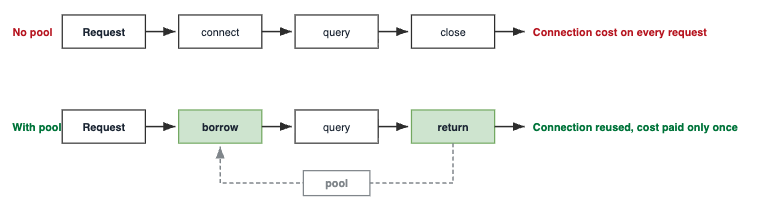
Figure 2: How an application borrows and returns pooled connections
Benefits of connection pooling
Reusing connections instead of opening a new one for every request delivers several concrete benefits:
- Lower latency: Removing the connection-establishment cost speeds up request response times.
- Higher throughput: The CPU and network resources once spent on creating connections can be used for actual query processing.
- Resource protection and limit control: Every connection consumes memory and CPU on the server, so in practice a given instance can sustain only a limited number of connections. By limiting how many connections stay open, a pool helps keep the database from being pushed past what it can handle.
- Load smoothing: Even during traffic spikes, the pool size acts as a ceiling, keeping the load sent to the database stable.
- Connection state management: Idle timeouts, maximum lifetime, and health checks (validation) filter out dead connections.
How external and internal pooling work in the wrapper
The key to understanding pooling in the wrapper is which side of the plugin chain the pool sits on. The following diagram shows where an external pool and an internal pool sit relative to the plugin chain:
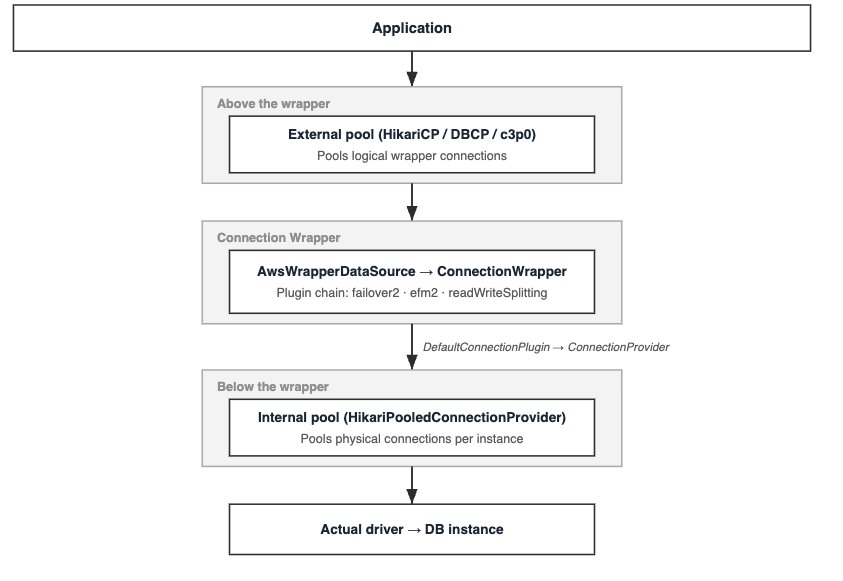
Figure 3: Placement of external and internal pools relative to the plugin chain
External pooling
- When the pool starts, it creates N wrapper connections. Each wrapper connection is a complete logical connection with its own plugin manager and plugin service.
- When the application borrows a connection from the pool, it receives a single
ConnectionWrapper. - Every query run on top of it passes through the plugin chain and is forwarded to the actual driver.
- When the application is done, closing the connection doesn’t physically close it. The
ConnectionWrapperreturns to the pool and is reused for the next borrow, so the same logical connection lives across many requests. - When a failover occurs, the wrapper reconnects the underlying physical connection to the new instance inside the same
ConnectionWrapperand then raises a failover exception. The wrapper object the pool holds stays the same and is immediately reusable. But the pool only sees the exception. It’s on you to catch it (instead of discarding the connection) and to tell the pool not to throw away the connection the wrapper just reconnected.- Handle the failover exceptions. Don’t blindly dispose the connection. On
08S02(failover succeeded outside a transaction) the same connection is reconnected and reusable. The wrapper transfers tracked session state (autoCommit,readOnly,isolation, and so on) to the new connection by default (transferSessionStateOnSwitch=true), so you re-execute the last statement (any in-flight work is rolled back). On08007(failure inside a transaction) do the same, then restart the whole transaction, because the in-flight commit status is unknown. Only on08001(failover failed) is the connection truly unusable. Discard it and open a new one. Catching these as a genericSQLExceptionand closing the connection in afinally/catch block is the classic mistake that silently disables fast failover.
- Handle the failover exceptions. Don’t blindly dispose the connection. On
Internal pooling
- How pools are partitioned. Internally, the wrapper holds multiple connection pools, distinguishing them by both “which instance you connect to” and “who connects.” In the default configuration, it separates pools by combining the target instance’s address with the username. As a result, the same instance gets separate pools for different users, and the same user gets separate pools for different instances. In effect, one pool is created per instance–user combination.
- How a connection is lent out. When the application requests a connection, the wrapper doesn’t create a new physical connection every time. Instead, it looks for the pool matching that combination. If the pool already exists, it pulls an idle connection from it and lends it out. If no pool exists yet, it creates one and then hands out a connection from it. When the connection is closed after use, it isn’t actually severed but returns to the pool to be reused.
- Cleaning up unused pools. A pool is marked as a cleanup candidate if no one requests a connection from it for a certain period (30 minutes by default). However, becoming a candidate doesn’t mean it’s closed immediately. The pool is actually closed and its resources reclaimed only when none of the connections borrowed from it remain outstanding. In other words, if someone is still using a connection from that pool, the pool stays alive even past the expiration time, so connections in use are never abruptly severed.
When does internal pooling provide benefits
Internal pooling delivers its biggest gains in a few specific scenarios, the most important being read/write splitting.
Read/write splitting: The biggest benefit of internal pooling shows up when it’s used together with the read/write splitting plugin.
Depending on setReadOnly(true/false) calls, the read/write splitting plugin lets a single logical connection move back and forth between the writer and reader physical connections.
- Without an internal pool: Each time
setReadOnly(true)is called for the first time, a new physical connection to the reader is opened, and that connection is cached only for the lifetime of that logical connection. Other logical connections can’t reuse it. - With an internal pool: Physical connections to each instance (writer/reader) gather in the pool, and multiple logical connections reuse these physical connections when switching through
setReadOnly. This is especially effective in Spring workloads that frequently move between reader and writer, such as@Transactional(readOnly = true).
What is JDBC-WRAPPER-CONFIGURATION-ASSISTANT?
JDBC-WRAPPER-CONFIGURATION-ASSISTANT is a generative AI configuration assistant for AWS Advanced JDBC Wrapper 4.0 and later. It helps you choose wrapper settings, review existing configurations, and diagnose configuration issues. Its responses are grounded in the wrapper source code and official documentation, including details such as plugin behavior, parameter names, defaults, and mutually exclusive combinations.
Using Kiro as an example, after the JDBC-WRAPPER-CONFIGURATION-ASSISTANT skill is enabled, the assistant presents three entry points at the start of the conversation. You can choose the one that best matches your situation.
- Greenfield – Describe the goal you want to achieve, such as “I want to configure failover for an Aurora PostgreSQL cluster behind HikariCP.” The assistant asks follow-up questions and narrows the configuration step by step.
- Review – Paste your current configuration or describe your stack. The assistant reviews it and suggests improvements.
- Skip the interview – Request a working configuration directly, such as “Give me a default Aurora PostgreSQL + HikariCP configuration.” The assistant returns a usable configuration and clearly states the assumptions it made.
Internal pooling configuration options and examples
There are two ways to enable internal pooling.
Option A — Built-in configuration parameter (connectionPoolType)
This is the most direct approach. Specify connectionPoolType in the connection properties, and pass the pool’s own settings using the cp- prefix. Here’s an example:
- Supported values:
hikari,c3p0. - The name after
cp-maps directly to a property oncom.zaxxer.hikari.HikariConfigorcom.mchange.v2.c3p0.ComboPooledDataSource. For example,cp-MaximumPoolSizemaps toHikariConfig.maximumPoolSize. - Internally,
InternalConnectionPoolServicecreates and caches aPooledConnectionProviderperclusterId. In other words, clusters with differentclusterIdvalues use separate pools.
Example using JDBC-WRAPPER-CONFIGURATION-ASSISTANT
Question: I enabled only
connectionPoolType=hikari. Where should I put detailed pool settings such as pool size?Response: Pass detailed pool settings with the
cp-prefix. The key after the prefix maps one-to-one to a HikariCPHikariConfigproperty. For example, to allow up to 20 connections and keep 2 idle connections, use the following configuration:
The internal pool is separated and cached by
clusterId, so if one application connects to multiple clusters, assign a uniqueclusterIdto each cluster to avoid mixing pools. When sizing the pool, be conservative: internal pooling can create multiple pools per instance, so the total configured maximum across pools must not exceed the database instance’smax_connectionslimit.
Option B — Custom HikariPooledConnectionProvider
Use this option when you need finer control. You provide a pool configuration function (HikariPoolConfigurator) and, optionally, a pool key function (HikariPoolMapping).
To make sure the pool works correctly, the wrapper automatically overrides the following four settings: jdbcUrl (including host/port/database), exceptionOverrideClassName, username, and password. As a result, even if you specify these values in the HikariPoolConfigurator, they are ignored. The constructor also accepts several optional parameters that control pool keys, cleanup, and eligibility, as summarized in the following table:
| Parameter | Type | Meaning |
hikariPoolConfigurator |
HikariPoolConfigurator | (Required) A function that returns the pool configuration. Returns an empty HikariConfig if there’s no additional configuration. |
mapping |
HikariPoolMapping | (Optional) A function that generates the pool key. Creates a new pool whenever the key is unique. Defaults to the username. |
acceptsUrlFunc |
AcceptsUrlFunc | (Optional) Decides which connections get an internal pool. Defaults to instance endpoints only. |
poolExpirationNanos |
long | The idle time before a pool becomes a cleanup candidate (30 minutes by default). |
poolCleanupNanos |
long | The interval for cleaning up expired pools. |
Differences between external and internal pooling
The following table summarizes the key differences between the two pooling approaches across location, topology awareness, configuration, and shutdown behavior:
| Aspect | External Pooling (such as HikariCP) | Internal Pooling (Wrapper) |
| Pool location | Above the wrapper (between the application and the wrapper) | Inside the wrapper (between the wrapper and the target driver) |
| What’s pooled | Logical connections (ConnectionWrapper) |
Physical connections (per instance) |
| Topology awareness | None (doesn’t know which instance) | Yes (pools separated per instance) |
| Pool key | Usually a single data source (endpoint) | (Instance URL, user/custom key). The pool provider is cached per clusterId |
| Cluster endpoint | Pooled as-is (caution needed) | Not pooled (only instance endpoints are pooled) |
| Configuration location | Pool library + AwsWrapperDataSource |
connectionPoolType or HikariPooledConnectionProvider |
setReadOnly switching |
Pool is unaware of the switched reader connection → limited sharing across objects | Reused from the instance pool → shared across objects |
leastConnections strategy |
Not available | Available |
| Shutdown cleanup | The pool library’s close |
ConnectionProviderManager.releaseResources() required |
Pros and cons of external and internal pooling
External pooling — Pros
External pooling offers several advantages, especially in framework-driven applications:
- Framework-friendly: Spring Boot and similar frameworks manage an external pool by default.
- Intuitive control over the total concurrent connection limit at the application level (
maximumPoolSize). - Plenty of familiar tuning know-how and troubleshooting resources.
External pooling — Cons
It also comes with some trade-offs, particularly around failover and read/write splitting:
- In
setReadOnly-based read/write splitting, it’s hard to reuse reader connections at the pool level. - Right after a failover, many connections in the pool become invalidated, which can temporarily drain the pool or cause a surge of reconnections.
- You can’t use pool-aware host selection strategies like
leastConnections.
Internal pooling — Pros
Internal pooling brings its own set of advantages, most of them tied to topology awareness:
- Topology-aware: Because it maintains a pool per instance, it greatly reduces the cost of switching to a reader in read/write splitting, and multiple
Connectionobjects share the pool. - Structurally avoids the pitfalls of cluster-endpoint pooling (only instance endpoints are pooled).
- Distributes reader load more evenly with pool-aware strategies such as
leastConnections. - During failover, the wrapper manages the instance pools directly, making the switch smooth.
Internal pooling — Cons
In exchange, internal pooling introduces a few operational trade-offs to plan for:
- Adds configuration and operational concepts (
HikariPoolConfigurator,HikariPoolMapping,releaseResources()). - If you omit the username from the pool key, permission isolation can break, and cached pool connections don’t re-validate the password.
- Pool count grows as instances × users, so plan for the added memory and connection overhead.
Differences in plugin compatibility between external and internal pooling
The following table shows how each plugin or feature behaves under external versus internal pooling, along with recommendations for each:
| Plugin / Feature | External Pooling | Internal Pooling | Notes |
Read/Write Splitting (readWriteSplitting) |
Works, but reader reuse is limited | Recommended | The internal pool reuses reader connections across objects |
@Transactional(readOnly=true) (Spring) |
Not recommended (overhead on every switch) | Recommended | Recommended only when used together with the internal pool |
leastConnections host selection strategy |
Not available | Available | Requires reading the pool’s active connection count, so an internal pool is required |
lowestLoad / highestLoad / roundRobin / weightedRandom / random |
Available (depending on the strategy) | Available | Directly supported by the internal pool provider |
| Failover / Failover2 | Available (needs pool-side exception handling) | Available | |
| EFM / EFM2 | Available | Available | Not compatible with Amazon RDS Proxy endpoints (no instance topology to monitor) |
| IAM / Secrets Manager authentication | Available | Available (cached connections might skip password re-validation) | The user must be included in the pool key |
| Blue/Green | Available | Available | Drops blue connections on switchover |
Considerations when choosing between external and internal pooling
The choice isn’t about which option is universally better. It’s about which option fits the workload and operating environment. The following sections summarize the main decision points and show how the assistant can be used in Greenfield mode to reason through each one.
Workload / feature perspective
- Whether you use read/write splitting: If you make heavy use of
setReadOnly-based R/W splitting → the internal pool is advantageous. If you don’t, and you’re on a simple single-instance/single-endpoint setup, an external pool is sufficient. - Read load-balancing strategy: If you want to distribute readers with
leastConnections→ an internal pool is required. - Failover frequency and sensitivity: If failover is frequent or fast recovery matters, the internal pool lets the wrapper manage the instance pools directly, making the switch smooth. With an external pool, you need settings to handle stale connections and pool drain.
- Transaction patterns: For Spring apps that use
@Transactional(readOnly=true)heavily, the combination of internal pool + R/W splitting is recommended.
Example using JDBC-WRAPPER-CONFIGURATION-ASSISTANT (Greenfield)
Question: This is a Spring application, and it frequently uses
@Transactional(readOnly = true). Which pooling approach should I use?Response: This looks like a read/write splitting goal. I would first confirm two points: (1) Is the target an Aurora cluster? (2) Is read mode switching handled by the framework through
@Transactional(readOnly = true)?Question: Yes to both. It is Aurora PostgreSQL.
Response: In that case, use the
readWriteSplittingplugin together with the wrapper’s internal pool. Without internal pooling, a new physical reader connection can be opened whenever read mode is first enabled for a logical connection, increasing connection churn and putting pressure on instance connection limits. A reasonable starting point is:
Don’t add
auroraConnectionTrackerin this setup. The internal pool already tracks and invalidates instance connections byclusterId, so the tracker would be redundant. It’s also worth verifying through trace logs that@Transactional(readOnly = true)is actually propagated to the wrapper.
Endpoint / topology perspective
- Type of connection URL: If you connect through cluster/reader-cluster endpoints, an external pool carries the risk of stale DNS, so the
initialConnectionplugin plus validation settings matter. The internal pool works per instance, so it structurally avoids this pitfall. - Multi-cluster connections: If a single application connects to multiple clusters, you need to assign a different
clusterIdper cluster. Since the internal pool isolates pools byclusterId, this setting is especially important. - Custom domains/IPs/proxies: For non-standard URLs, review the
clusterIdandclusterInstanceHostPatternsettings.
Example using JDBC-WRAPPER-CONFIGURATION-ASSISTANT (Greenfield)
Question: One service connects to two Aurora clusters. How should I separate the pools?
Response: For multi-cluster configurations, assign a unique
clusterIdto each cluster regardless of the pooling approach. If both clusters share the default value, topology caches can collide, causing failover to the wrong cluster or interference between monitors. With internal pooling,clusterIdis also the pool isolation boundary.
Question: If I connect through the cluster writer endpoint and use external pooling, what should I be careful about?
Response: Immediately after failover, the cluster endpoint can briefly resolve to the former writer because of stale DNS. If you use only external pooling, include the
initialConnectionplugin so the first connection lands on the actual instance endpoint. This also helps EFM monitor the instance endpoint rather than the cluster endpoint. Internal pooling avoids this issue structurally because it pools only instance endpoints.
Security perspective
- Multi-user permission isolation: Always include the username in
HikariPoolMapping(omitting it risks sharing a pool across users with different permissions). - IAM token authentication: Consider the relationship between token TTL and pool connection lifetime. Configuring a ConfigurationProfile is recommended so that internal monitoring workers don’t lose the IAM plugin.
Example using JDBC-WRAPPER-CONFIGURATION-ASSISTANT (Greenfield)
Question: I use IAM authentication with HikariCP, and some connections start failing around the 15-minute mark. How should I fix it?
Response: The instinctive fix is to shorten HikariCP
maxLifetime, but it won’t help here. Theiamplugin subscribes toconnectandforceConnectonly, so the token is presented once during the handshake and the plugin has no hook on any later call. A connection that authenticated successfully cannot fail because its token aged. SetmaxLifetimeon pool-hygiene grounds and keep the token out of that decision.The lever that matters is
iamExpiration. The wrapper caches tokens per(region, host, port, user), andiamExpirationis that cache’s TTL, defaulting to 870 seconds against a server-side token window of 15 minutes. Don’t set it above 900. The driver reads the value without clamping it, so a larger TTL makes the cache serve tokens RDS has already stopped accepting. The plugin documentation uses 600 as its example value:
When a cached token is rejected, the plugin regenerates it and retries connect once, so the driver partly self-heals rather than failing outright. But every affected connection pays a rejected handshake first. That is why the symptom appears as intermittent failures rather than a hard outage.
In container or Lambda environments, explicitly setting
iamRegionis safer. If internal pooling is used and permissions differ by user, include the user in the pool key so cached connections are not reused across users.
Operations / framework perspective
- Framework standards: Frameworks like Spring Boot manage an external pool by default. If your team standard is an external pool and you don’t use R/W splitting, an external pool is operationally simpler.
- Pool sizing: The internal pool can grow to as many pools as instances × users, increasing the total connection count. Set each instance’s
maximumPoolSizeconservatively so that it stays within the database’smax_connectionslimit. - Memory/thread cost: More pools mean higher costs for idle connections and health-check threads. Tune the expiration/cleanup intervals (
poolExpirationNanos,poolCleanupNanos) andminimumIdle. - Connection lifetime control: Design the reader keep-alive (
cachedReaderKeepAliveTimeoutMs) together with the pool’smaxLifetime/idleTimeoutpolicies.
Example using JDBC-WRAPPER-CONFIGURATION-ASSISTANT (Greenfield)
Question: Our team standard is Spring Boot + HikariCP. We do not use read/write splitting. Do we still need internal pooling?
Response: No. For a simple single-endpoint Spring application without read/write splitting, the familiar external HikariCP pool is sufficient and operationally simpler. One important setting is still required for HikariCP + failover: configure
exception-override-class-nameassoftware.amazon.jdbc.util.HikariCPSQLExceptionso HikariCP does not discard connections that the wrapper has already reconnected after failover.
Question: If I split the read data source and write data source completely, can I avoid internal pooling?
Response: Yes. If reads use a reader-cluster URL and writes use a writer-cluster URL through two separate data sources, you can avoid both the read/write splitting plugin and internal pooling. Give each data source a fixed role and set
failoverModetostrict-readerorstrict-writeras appropriate. Do not addreadWriteSplittingto the reader data source because there is no role to switch.
Decision summary (quick guide)
- Simple single endpoint + standard Spring app, no R/W splitting → external pool (HikariCP). Take care of failover SQLState mapping.
- Read/write splitting + reader load balancing (
leastConnections) needed → internal pool. - Able to split data sources so reads use the reader-cluster URL and writes use the writer-cluster URL → you can skip the R/W plugin and internal pool altogether and get by with two external pools.
Conclusion
The key to understanding connection pooling in the AWS Advanced JDBC Wrapper is the positional relationship: “Is the pool above the wrapper (external) or below it (internal)?”
- External pooling pools logical connections. Its tooling is mature and framework-friendly, but it has limitations in read/write splitting.
- Internal pooling pools physical connections on a per-instance basis. Because it’s topology-aware, it excels at read/write splitting, reader load balancing (
leastConnections), and failover switching. In return, it doesn’t pool cluster endpoints (only instance endpoints), and it adds operational concepts such as pool keys, password re-validation, and resource cleanup.
Ultimately, the wrapper’s plugin architecture and its pooling approach aren’t separate choices but a pair that must be designed together. To get started, open JDBC-WRAPPER-CONFIGURATION-ASSISTANT, describe your workload, and let it propose a starting configuration you can drop into your application. If you weigh your workload’s read/write ratio, failover sensitivity, security requirements, and operational standards together, you can capture both the high availability of Aurora and the performance benefits of pooling.
And if you’re unsure which side of the wrapper your pool belongs on, describe your workload (engine, endpoint, framework, read/write pattern) to the JDBC-WRAPPER-CONFIGURATION-ASSISTANT. It can propose a starting configuration and flag common anti-patterns, such as a read/write splitting plugin without an internal pool or a missing HikariCP exception override.