AWS Database Blog
Provision a secure Amazon DocumentDB cluster with Terraform
Infrastructure as code (IaC) provides a systematic approach to managing deployments with version control, peer reviews, and automated deployments. For Amazon DocumentDB (with MongoDB compatibility), IaC makes sure critical security configurations like encryption keys, network isolation, and access controls are consistently applied across development, staging, and production environments. This approach transforms the infrastructure provisioning process into a reliable, repeatable pattern that scales with your organization’s needs.
In this post, we show you how to provision a secure Amazon DocumentDB cluster using Terraform, implementing best practices and comprehensive security controls including encryption, authentication, network isolation, and monitoring.
Solution overview
Amazon DocumentDB version 8.0 offers added support for drivers compatible with MongoDB API versions 6.0, 7.0, and 8.0. Amazon DocumentDB 8.0 also improves query latency by up to 7x and compression ratio by up to 5x, so you can build high-performance applications at a lower cost.
This post demonstrates how to deploy a secure Amazon DocumentDB 8.0 cluster with multiple layers of security to protect your data:
- Network isolation: Deploying the Amazon DocumentDB cluster in an Amazon Virtual Private Cloud (Amazon VPC) with private subnets and no direct internet access.
- Encryption in transit: Enabling TLS for communications with the cluster.
- Encryption at rest: Using AWS Key Management Service (AWS KMS) customer managed keys to encrypt stored data.
- Access control: Implementing security groups to restrict traffic and disabling the default security group.
- Authentication: Using AWS Secrets Manager managed passwords for secure credential handling.
- Monitoring and auditing: Configuring encrypted Amazon CloudWatch logs for audit and profiler data, and enabling Performance Insights.
The following diagram shows the architecture of the Amazon DocumentDB 8.0 deployment within a VPC with private subnets across two Availability Zones.
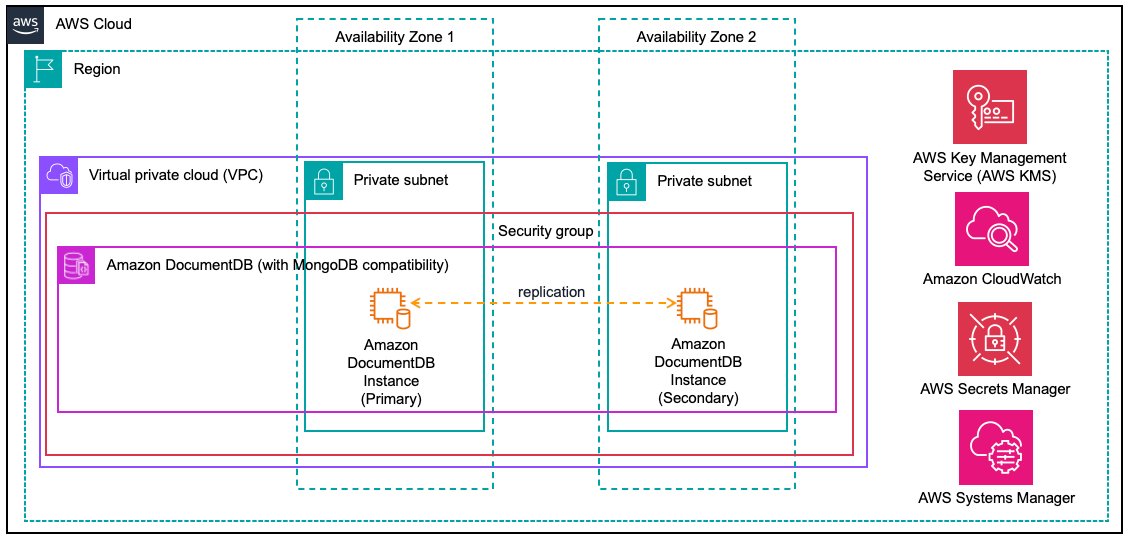
Figure 1: Architecture diagram of a secure Amazon DocumentDB 8.0 deployment
The Terraform code is organized into a reusable network module and deployment-specific configuration files for the Amazon DocumentDB cluster, KMS encryption, CloudWatch logging, and AWS Systems Manager Parameter Store outputs.
Walkthrough
In this walkthrough, we deploy a secure Amazon DocumentDB 8.0 cluster using Terraform. The walkthrough includes the following steps:
- Clone the repository and review the network module.
- Review the Amazon DocumentDB configuration.
- Deploy the Amazon DocumentDB cluster.
- Review security best practices.
- Clean up resources.
Prerequisites
For this walkthrough, you need the following prerequisites:
- An AWS account with permissions to create VPC, Amazon DocumentDB, AWS KMS, AWS Secrets Manager, CloudWatch, SSM Parameter Store, and AWS Identity and Access Management (IAM) resources.
- Terraform (v1.0.0 or later) installed on your local machine.
- AWS Command Line Interface (AWS CLI) configured with your credentials and appropriate AWS Region.
- Basic understanding of Terraform and AWS networking concepts.
Step 1: Clone the repository and review the network module
Start by cloning the GitHub repository containing the Terraform code and reviewing the foundational network infrastructure.
To clone the repository and examine the network module
- Open your terminal and clone the repository:
- Review the project structure:
The Terraform code is organized into the following files:
File Purpose 1 network.tfModule call to the reusable network module 2 network/Reusable module: VPC, private subnets, endpoints, security groups 3 documentdb.tfAmazon DocumentDB cluster, instances, parameter group, subnet group 4 kms.tfKMS key for Amazon DocumentDB encryption at rest 5 logs.tfEncrypted CloudWatch log groups for audit and profiler logs 6 ssm.tfSSM Parameter Store for infrastructure outputs 7 variables.tfConfigurable parameters with validation 8 outputs.tfResource outputs 9 provider.tfProvider configuration pinned to version 6.44.0 - Examine the network module that creates the foundational infrastructure:
The network module creates a secure foundation with private subnets across multiple Availability Zones, restrictive security groups, and no internet access to facilitate network isolation. The VPC enables enable_dns_hostnames and enable_dns_support because Amazon DocumentDB cluster endpoints are DNS names (for example, docdb-terraform-demo.cluster-xxxxx.us-east-1.docdb.amazonaws.com). Without DNS resolution enabled in the VPC, resources within the VPC cannot resolve these endpoints to connect to the cluster.
The default security group is managed with ingress and egress rules removed, making sure that resources accidentally launched without an explicit security group assignment have no network access:
The custom security group tightly controls access to the Amazon DocumentDB cluster. Ingress is restricted to TCP port 27017 (the Amazon DocumentDB port) from the VPC CIDR only, so no other ports or external sources can reach the cluster. Egress is similarly limited to the VPC CIDR rather than the internet (0.0.0.0/0), so the cluster cannot open direct connections to the internet. This significantly narrows the paths for data to leave the environment, though it is one layer of defense in depth rather than an absolute guarantee.
Step 2: Review the DocumentDB configuration
This section walks through the key Terraform configuration files that implement the Amazon DocumentDB cluster.
DocumentDB cluster
The documentdb.tf file defines the subnet group, parameter group, cluster, and instances. The subnet group tells Amazon DocumentDB which subnets to place instances in:
This references the private subnets from the network module, making sure the cluster is only deployed in subnets with no internet access.
The cluster configuration in documentdb.tf implements encryption, network isolation, and secure credential management:
This configuration includes several critical elements for a secure deployment:
- Managed password: Setting
manage_master_user_password = trueinstructs Amazon DocumentDB to automatically create and manage the master password in AWS Secrets Manager. The password does not appear in Terraform state, alleviating a common security risk. - Encryption at rest: Uses a customer managed KMS key rather than encryption managed by AWS for enhanced security control and auditability.
- Network isolation: The cluster is deployed in private subnets with restrictive security groups that only allow traffic on port 27017 from within the VPC.
- TLS enforcement: The parameter group enforces TLS 1.2 or higher for connections through the tls = tls1.2+ parameter. For stricter requirements, DocumentDB also supports tls1.3+ and fips-140-3 (in select regions).
- Audit logging: The
audit_logsparameter is set toddl,dml_writeto capture schema changes and data modifications; both audit and profiler logs are exported to CloudWatch. - Deletion protection: Enabled by default to help prevent accidental cluster deletion.
Cluster instances
The cluster instances provide the compute capacity for the Amazon DocumentDB cluster, deployed across multiple Availability Zones for high availability (HA):
This creates two instances (configurable through var.instance_count) that Amazon DocumentDB automatically distributes across the available subnets in different Availability Zones. The first instance becomes the primary (writer) and the second becomes a replica (reader). Performance Insights is enabled with the same customer-managed KMS key used for cluster encryption, providing encrypted monitoring data for query performance analysis.
Cluster parameter group
The parameter group in documentdb.tf enforces security settings at the cluster level:
KMS encryption
This solution uses three separate customer-managed KMS keys, one each for Amazon DocumentDB, Amazon CloudWatch Logs, and SSM Parameter Store, following the principle of separating encryption keys by purpose. Each key has automatic rotation enabled and a least-privilege key policy scoped to its respective service principal (rds.amazonaws.com, logs.<region>.amazonaws.com, ssm.amazonaws.com). The CloudWatch Logs key policy further restricts usage with an ArnEquals condition, allowing encryption and decryption only for the specific Amazon DocumentDB audit and profiler log groups.
The following snippet from kms.tf shows the Amazon DocumentDB encryption key as an example of this pattern:
Encrypted CloudWatch logging
The logs.tf file creates pre-provisioned CloudWatch log groups with a separate KMS key for log encryption:
By creating the log groups before the cluster, we make sure they are encrypted from the first log entry. Audit logs are retained for 365 days to support compliance requirements. Profiler logs are retained for 30 days because they can capture query content, so a shorter window limits the exposure of potentially sensitive data.
Infrastructure outputs in SSM Parameter Store
The ssm.tf file stores cluster outputs as a single encrypted JSON document in AWS Systems Manager Parameter Store:
By consolidating cluster details into a single SSM parameter, applications that connect to the Amazon DocumentDB cluster can retrieve everything they need from one place. This includes the endpoint, port, secret ARN, VPC, and security group. This avoids the need for hardcoded values or cross-referencing multiple sources. For example, a containerized application deployed in the same VPC can read this parameter at startup to configure its database connection, without infrastructure details baked into its code or environment variables.
Step 3: Deploy the DocumentDB cluster
With the configuration reviewed, initialize Terraform and deploy the cluster.
To deploy
- Initialize Terraform to download the required providers and modules:
- Preview the resources that will be created:
- Deploy the Amazon DocumentDB cluster:
Tip: For production, use a remote backend such as Amazon Simple Storage Service (Amazon S3), with encryption and state locking, to secure your Terraform state file.
The deployment typically takes 8–12 minutes to complete. You see output similar to the following:
Verify the deployment
After the resources are provisioned, verify your deployment using the AWS CLI:
You see output similar to the following:
Verify the following key properties in the CLI output:
- Status: “available” (cluster is ready for use).
- Engine: “docdb” (Amazon DocumentDB engine).
- EngineVersion: “8.0.1” (deployed Amazon DocumentDB version).
- StorageEncrypted: true (encryption at rest enabled with customer managed KMS key).
- DeletionProtection: true (helps prevent accidental deletion).
Note: Amazon DocumentDB does not upgrade engine minor versions automatically. A cluster stays on its pinned version until you update engine_version and re-apply, which performs an in-place modify.
Connect to your cluster
For detailed instructions on connecting to your Amazon DocumentDB cluster, including driver configuration, TLS certificate setup, and connection string options, see Connecting to Amazon DocumentDB.
Step 4: Review security best practices
This section summarizes the security best practices implemented in this solution and provides guidance for adapting them to your environment.
KMS encryption best practices
The deployment uses three separate customer-managed KMS keys, each with explicit key policies and automatic key rotation enabled:
- Amazon DocumentDB encryption key: Encrypts the cluster data at rest and Performance Insights data.
- CloudWatch Logs encryption key: Encrypts audit and profiler log groups.
- SSM Parameter Store encryption key: Encrypts infrastructure outputs stored in Parameter Store.
The Terraform code in this solution implements the following KMS best practices:
- Key rotation: Automatic key rotation is enabled on all three keys (
enable_key_rotation = true). - Key policies: Beyond the standard account-root permission that AWS recommends retaining for key manageability, each policy grants access only to the specific service that needs the key.
- Service conditions:
kms:ViaServiceconditions restrict key usage to specific AWS services, helping prevent misuse from other contexts. - Separate keys: Dedicated keys for different purposes (data encryption, log encryption, parameter encryption) limit the blast radius if a key is compromised.
Additionally, consider setting up CloudWatch alarms for key usage and access patterns to detect anomalous activity.
For detailed KMS security guidance, refer to the AWS KMS Best Practices documentation.
Secure credential management
A common challenge with database provisioning through IaC is handling the master password securely. Hardcoding passwords in configuration files exposes them in version control, and even using Terraform variables means the password ends up in the state file as plain text.
Amazon DocumentDB solves this by integrating directly with AWS Secrets Manager through a single configuration option (manage_master_user_password = true). When this flag is set, Amazon DocumentDB automatically generates a strong password and stores it in Secrets Manager. Terraform does not see or store the actual password value. This managed secret is encrypted with the AWS managed key (aws/secretsmanager) rather than the customer-managed KMS keys used for the cluster, logs, and parameters, because DocumentDB does not currently support specifying a customer-managed key for the managed secret.
This approach provides several advantages:
- No secrets in Terraform state: The password isn’t written to Terraform state files, avoiding a common attack vector where state files are accidentally exposed.
- Automatic rotation: AWS manages the password lifecycle, and you can configure rotation schedules through Secrets Manager without redeploying infrastructure.
- Centralized access: Applications retrieve credentials from Secrets Manager at runtime rather than reading them from configuration files or environment variables.
- Audit trail: Every access to the secret is logged in AWS CloudTrail, providing visibility into which principals retrieved the credentials and when.
The secret ARN is available as a Terraform output (master_user_secret_arn) and is also stored in the SSM parameter for consuming applications to reference.
Network security
The network module implements defense in depth:
- Private subnets only: No internet gateway or NAT gateway. The cluster has no path to the internet.
- Default security group disabled: The default security group of the VPC has all rules removed, forcing explicit security group assignment.
- Restrictive egress: Outbound traffic is limited to the VPC CIDR, not the internet.
- Port-specific ingress: Only port 27017 (Amazon DocumentDB) is allowed, and only from within the VPC.
The network module also provisions interface VPC endpoints for AWS Secrets Manager, AWS Systems Manager, and Amazon CloudWatch Logs, each secured by a dedicated security group that only allows HTTPS (port 443) from within the VPC. These endpoints let workloads in the private subnets reach those AWS services privately, without traversing the public internet.
Cleaning up
To avoid incurring future charges, delete the resources by running the following commands:
Confirm the deletion when prompted by typing yes. The destruction typically takes 5–8 minutes as Amazon DocumentDB instances are terminated.
Conclusion
In this post, you learned how to use Terraform to deploy a secure Amazon DocumentDB 8.0 cluster implementing multiple layers of security including network isolation, encryption at rest and in transit, secure credential management, and encrypted audit logging.
For next steps, clone the repository and customize the Terraform configurations to match your specific requirements. Modify the variables in variables.tf to adjust instance types, backup settings, or network configurations for your environment. You can also adapt the KMS key policies to align with your organization’s compliance requirements.
To learn more about Amazon DocumentDB 8.0 features, visit the Amazon DocumentDB documentation.