Desktop and Application Streaming
Agent identity for Amazon WorkSpaces for AI agents
Identity management has always followed whoever, or whatever, does the work. The first generation secured people: authenticate a person, authorize what they can reach, and remove their access when they leave. The second generation extended that model to software through service accounts, which are non-human identities with a fixed set of permissions and, often, long-lived credentials.
AI agents don’t fit either model. An agent isn’t a person, but it isn’t an ordinary service either. It acts on behalf of a specific person, the access it needs changes from one task to the next, and its work can run longer than the credentials it started with.
Most organizations have already solved part of this. Their identity provider (IdP) decides who can use AI assistants and tools such as Claude or Kiro, through single sign-on, provisioning, and offboarding. That model works because the assistant only helps the person who is signed in, so there’s only one identity to manage.
That is changing. With Amazon WorkSpaces for AI agents, AI agents don’t just work alongside a person; they work for them, on their own. Agents operate desktop and business applications inside managed streaming sessions, with the same monitoring and governance that you apply to the people who use those desktops. As soon as an agent works in a session for someone, the session involves two identities: the person who asked for the work, and the agent doing it.
“Who is this user?” is no longer enough. Security and audit teams need to know which agent acted, and for whom. A shared service account or a static access key can’t answer that question. They also bypass the controls that you already enforce in your IdP, such as multi-factor authentication, conditional access, and the ability to turn off access when something changes.
The answer is on-behalf-of (OBO). With OBO, each agent has its own identity in your IdP, separate from the identity of any person. When a user signs in and asks the agent to act, the agent exchanges that sign-in for a token that represents this agent, acting for this user. Your IdP signs both identities, so they’re verified rather than reported by the agent itself. The agent uses its identity to prove who it is, but it never acts on its own authority: it acts with authority that the user delegated to it, and only within what you allow that agent to do.
Agent identity for WorkSpaces for AI agents brings this pattern to the desktop. WorkSpaces for AI agents uses OBO with the IdP that you already use for your workforce, such as Microsoft Entra ID or Okta. Both identities are checked before a session starts, and both are recorded in AWS CloudTrail. Inside the session, the agent acts for the user, never with more access than you allow that agent and that user. On domain-joined fleets, it works under the user’s own Active Directory account. The agent doesn’t store a password or a long-lived AWS access key.
Example use case: Maria asks an agent to clear a claims backlog
Maria is a claims adjuster at an insurance company. Her team uses a claims application that runs only on Windows desktops and has no API. For each case, she checks coverage, reviews documents, and approves or denies a payout. With a backlog of routine cases building up, she asks a Claims Agent to work through it for her. The agent opens a WorkSpaces for AI agents session and uses the same application that Maria does.
Approving a payout is a regulated action. For every claim the agent touches, Maria’s auditors and security team ask four questions:
- Who authorized it?
- Which agent carried it out?
- Which credential was used?
- Can the record be disputed?
Without agent identity, the answers are weak. If the agent runs under a shared bot account, the record shows the bot, not Maria, and not which agent used the account. If the agent uses Maria’s own credentials, the record shows only Maria, so you can’t tell her work from the agent’s. Either way, the agent’s name is at best a label in a log.
Acting as Maria, not hiding behind her
On a domain-joined desktop, the agent works under Maria’s Active Directory account, with Maria’s access. What OBO changes is everything around that. Before a session can start, the agent presents its own identity together with proof that Maria authorized it to act. Maria signs in through your IdP, with the same sign-in policies she uses every day. The agent then exchanges that sign-in for a token that names both the Claims Agent and Maria.
That is the core difference. Many systems can write an agent’s name into a log. With OBO, your IdP vouches for both Maria and the Claims Agent, so the record doesn’t depend on what the agent or the application says about itself. That’s what makes it hard to dispute.
Where the agent’s identity matters
The agent never gets its own access to the desktop. It borrows Maria’s, and only when both your IdP and your AWS Identity and Access Management (IAM) policies agree that this agent can act for her. The agent’s own identity does its work around that session:
- Before the session starts. IAM checks both identities. In AWS, the agent assumes its own IAM role, which decides which environments it can reach; the user’s identity travels with that role session. You can allow only the Claims Agent to open sessions in the environment that hosts the claims application, and only for users like Maria. A different agent with Maria’s sign-in gets nothing.
- Inside the session. If Maria can’t approve claims above her authority limit, neither can the agent. There’s no separate bot account with its own permissions to manage, review, or forget about.
- In the audit trail. CloudTrail records both identities when the agent assumes its role. After that, each request records Maria’s identity under the agent’s role, including each action the agent takes when you enable CloudTrail data events. With one role per agent, every action traces back to both. Your IdP’s sign-in logs add the record of which agent Maria allowed to act for her. Together, these records answer all four audit questions.
- When something changes. You can revoke the Claims Agent without touching Maria’s access. If Maria leaves, disabling her in your IdP stops every agent from starting new sessions on her behalf. Revoking or disabling an identity stops new sessions. To stop an agent that is already working, remove the permissions from its IAM role or revoke the role’s active sessions.
Maria’s sign-in also works as her consent. A session can’t start without a valid token for Maria from your IdP, so her authorization is proven rather than assumed, and your IdP’s sign-in policies decide how often she must confirm it.
If you’ve worked with robotic process automation (RPA), this may look familiar. RPA bots typically run under dedicated bot accounts, which tell you that the bot did something. OBO adds what bot accounts never had: verified proof of which person authorized the work.
Solution overview
Agent identity builds on standards that your IdP and AWS already support. It uses the following building blocks:
- Your IdP, such as Microsoft Entra ID or Okta. Each agent is registered as its own application, with its own credentials, so it authenticates as itself and you can disable it independently of any user. The IdP, not the agent, adds the agent’s and the user’s identities to the token.
- IAM. IAM trusts your IdP and decides which agents can act for which users, and in which WorkSpaces for AI agents environments.
- AWS Security Token Service (AWS STS). AWS STS exchanges the IdP token for temporary AWS credentials that carry both identities.
- WorkSpaces for AI agents. A WorkSpaces Applications environment (called a stack) provides the streaming desktop, and the managed Model Context Protocol (MCP) server gives the agent tools to see and operate that desktop.
- AWS CloudTrail. CloudTrail records who acted and for whom.
- AWS Key Management Service (AWS KMS) (optional). AWS KMS holds the private key that the agent uses to prove its identity to your IdP.
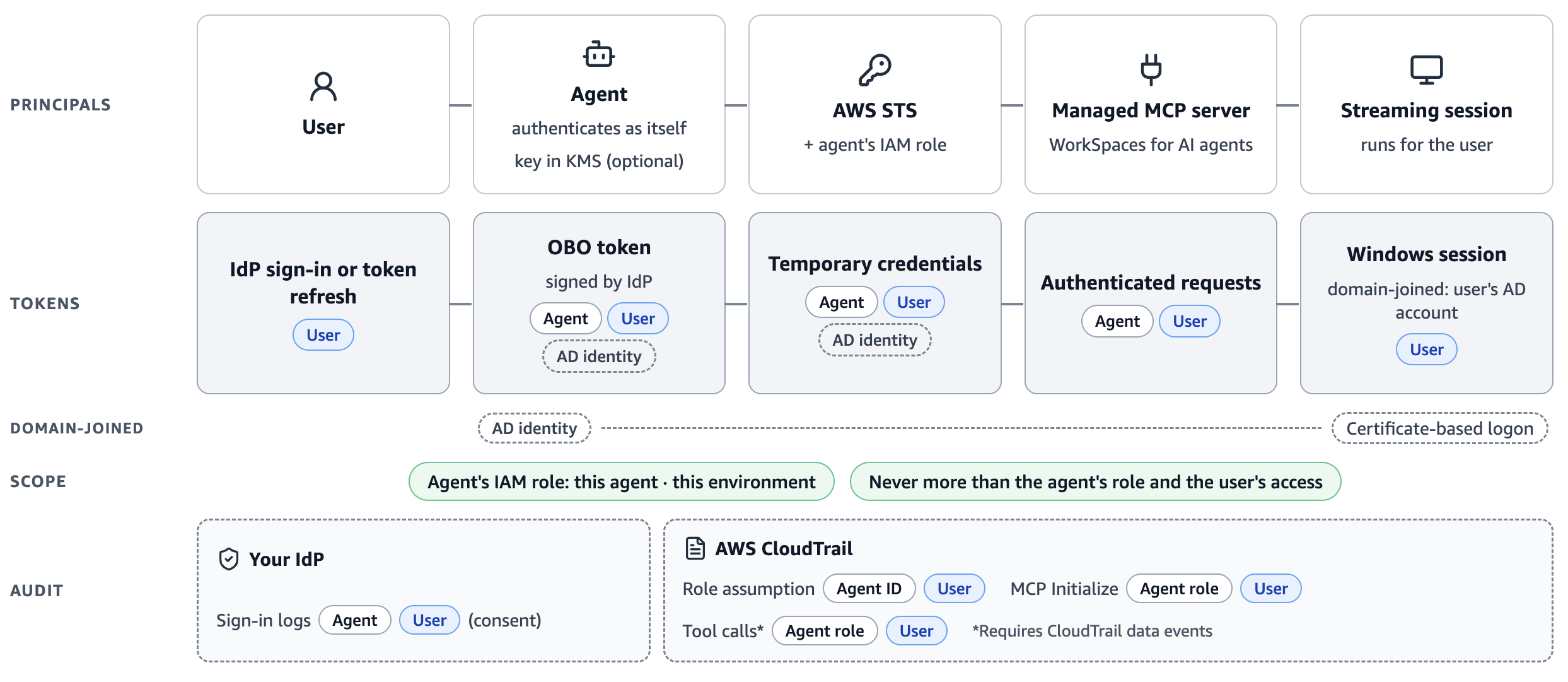
Figure 1
As shown in Figure 1, a session works as follows:
- Maria signs in. She signs in to your IdP through the agent, as she normally would. Later exchanges can use a refresh token instead of a new sign-in, within your IdP’s policies.
- The agent exchanges her sign-in. The agent authenticates to your IdP as itself and exchanges Maria’s sign-in for a new token that names both the Claims Agent and Maria. Your IdP signs it.
- AWS issues temporary credentials. AWS STS validates the token and returns short-lived credentials for the agent’s IAM role. Both identities travel with those credentials, so IAM policies can check them.
- The agent operates the desktop. The agent uses those credentials to authenticate its requests to the managed MCP server. The streaming session runs for Maria.
- CloudTrail records it. CloudTrail records both identities when the agent assumes its role. After that, each request in that session records Maria’s identity under the agent’s role, including each action the agent takes when you enable CloudTrail data events. With one role per agent, you can trace any action back to both. Your IdP’s sign-in logs record which agent Maria allowed to act for her.
Non-domain-joined and domain-joined fleets
Agent identity works with both fleet types:
- Non-domain-joined fleets. The flow in Figure 1 is all you need. The agent performs one exchange, and the session starts for the user named in the token.
- Domain-joined fleets. Windows has to log the user on to your Active Directory domain. Your IdP also supplies the user’s Active Directory identity, which WorkSpaces for AI agents uses to issue a short-lived certificate and log the user on with certificate-based authentication, with no password. Certificate-based authentication must already work for your users.
The examples in the documentation use Microsoft Entra ID, but you can use any IdP that supports OpenID Connect (OIDC), an on-behalf-of or token exchange grant, and custom attributes in its tokens. For domain-joined fleets, your IdP must also add the user’s Active Directory attributes to the token, so users must be synchronized from Active Directory.
Agents can run anywhere
Agent identity doesn’t depend on where your agent runs. The agent can run in your own environment, in containers, or in a managed service such as Amazon Bedrock AgentCore. As long as it performs the exchange and authenticates its requests with the resulting credentials, both identities reach AWS. You choose where to run your agents, and agent identity provides the secure connection between your IdP and the desktop.
Design considerations
Agent identity gives you the building blocks. How much value you get from them depends on a few decisions that are best made before you build:
- Who is the agent? Give each agent function its own identity in your IdP, rather than one identity shared by many agents. Give each one its own IAM role too, so every action in CloudTrail points to one agent. A Claims Agent and a Reporting Agent do different work with different risks, so they should appear separately in your audit trail, and you should be able to revoke one without affecting the other. A shared identity is the familiar service-account problem, just with a new name.
- Who holds the agent’s key? The agent should prove its identity with a private key rather than a stored password or client secret, and you can keep that key in AWS KMS so the agent never holds it directly. What matters most is who else can use it. Keep control of the agent’s key separate from the administration of user identities in your IdP. That way, no single person or system can vouch for both the user and the agent. This holds wherever the agent runs.
- What do you trust in your IdP? AWS trusts what your IdP signs, and can’t check whether your IdP mapped the right user and agent details into the token. Treat that attribute mapping as security-critical configuration: restrict who can change it, and review changes as carefully as you would an IAM trust policy.
- When can the agent act? Agent identity is built for agents that act for a person who has signed in. The credentials that the agent receives are short-lived, so longer tasks need a fresh exchange to continue. That exchange normally uses a refresh token rather than a new sign-in, and your IdP’s token and sign-in policies decide how long an agent can continue before the user must sign in again. Disabling a user or agent in your IdP stops new sessions from starting. Agents that run with no user present at all don’t fit this model.
Conclusion
As people hand more of their work to AI agents, identity has to answer a new question: which agent acted, and for whom. With agent identity for WorkSpaces for AI agents, your IdP vouches for both the agent and the user it acts for. IAM checks both before a session starts, CloudTrail records both, and the agent never has more access than you allow that agent and the person who asked for the work. You get this with the IdP and sign-in policies that you already use, and without giving the agent a password or a long-lived access key.
To get started, see the following resources:
- Agent identity in the Amazon WorkSpaces Applications Administration Guide, including setup for non-domain-joined fleets and domain-joined fleets
- Get started with WorkSpaces for AI agents
- Use Amazon Bedrock AgentCore with WorkSpaces for AI agents
- WorkSpaces for AI agents sample code
The agent identity topics in the Administration Guide walk through the setup with Microsoft Entra ID for both fleet types, including the IdP configuration, IAM policies, and how to verify both identities in CloudTrail.
 |
Roberto is a Senior Solutions Architect and Agentic WorkSpaces Specialist at AWS. He helps customers adopt cloud and AI, from strategy and design to deploying secure, AWS-optimized solutions. |