AWS DevOps & Developer Productivity Blog
Accelerate autonomous incident resolutions using the Datadog MCP server and AWS DevOps agent (in preview)
This post was co-written with Omri Sass (Director of Product Management), Cansu Berkem (Director of Product Management), and Mohammad Jama (Product Marketing Manager) from Datadog.
On-call engineers spend hours manually investigating incidents across multiple observability tools, logs, and monitoring systems. This process delays incident resolution and impacts business operations, especially when teams need to correlate data across different monitoring platforms. AWS DevOps Agent (in preview) is a frontier agent that resolves and proactively prevents incidents, continuously improving reliability and performance of applications in AWS, multicloud, and hybrid environments. Frontier agents represent a new class of AI agents that are autonomous, massively scalable, and work for hours or days without constant intervention. AWS DevOps Agent offers built-in integration with Datadog Model Context Protocol (MCP) Server, enabling you to access the untapped insights in your data by connecting directly to Datadog’s monitoring solutions. DevOps Agent maps your application resources and correlates telemetry, code, and deployment data to reduce MTTR (Mean Time To Resolution) and drive operational excellence.
You can use this integration to collect and analyze Datadog logs, metrics, and traces, correlating this data across AWS services. When incidents occur, AWS DevOps Agent identifies issues and provides mitigation plans which engineers can then implement. Engineers can monitor automated investigations through a central dashboard and engage with the agent through interactive chat at any time. Using this integration, engineers are able to reduce mean time to resolution (MTTR) from hours to minutes, while maintaining full visibility into automated actions.
How Datadog MCP and AWS DevOps Agent work together
The integration between Datadog MCP Server and AWS DevOps Agent connects your monitoring data with automated incident response. Datadog MCP Server acts as a central access point for your monitoring data. It securely connects to Datadog through a standardized protocol, allowing AWS DevOps Agent to query logs, metrics, and traces during investigations. The service uses OAuth 2.0 authentication and supports multiple regions to help maintain data sovereignty requirements.
AWS DevOps Agent learns your resources and relationships while correlating data from both AWS services and Datadog. It analyzes Amazon CloudWatch logs and metrics, deployment data, and code alongside Datadog telemetry to build a complete picture of the incident. This combined view helps identify root causes faster than examining each data source separately. Security considerations are built into every interaction. All interactions between AWS DevOps Agent and Datadog MCP Server uses authentication, authorization, encryption, and logging for audit purposes. While the service currently only runs in us-east-1, it can monitor and analyze applications deployed across any AWS Region in customer accounts globally.
Setting up and using AWS DevOps Agent with Datadog
In this section, we will guide you through the steps required to enable Datadog MCP Server in your AWS DevOps Agent account and configure it for incident resolution.
Pre-requisites
For this walkthrough, you should have access to and understanding of the following:
- An AWS account with permissions to create AWS IAM (Identity and Access Management) roles:
- Agent Space role – for basic service operations
- Agent Space web app role – for using the Agent Space web app functionality
- (Optional) Secondary source account roles if monitoring multiple AWS accounts. Refer to the DevOps Agent user guide for the details on setting up these roles.
- A Datadog account
- Access to Datadog MCP Server (in preview)
Setting up Datadog in the AWS DevOps Agent console
Start the setup in the AWS DevOps Agent console by connecting your Datadog MCP Server. Navigate to Settings, select the Datadog integration panel, and choose “Register.” Enter your Datadog MCP Server details when prompted (you can learn more about requesting access to this server in their documentation). AWS DevOps Agent validates the connection and displays a confirmation message.
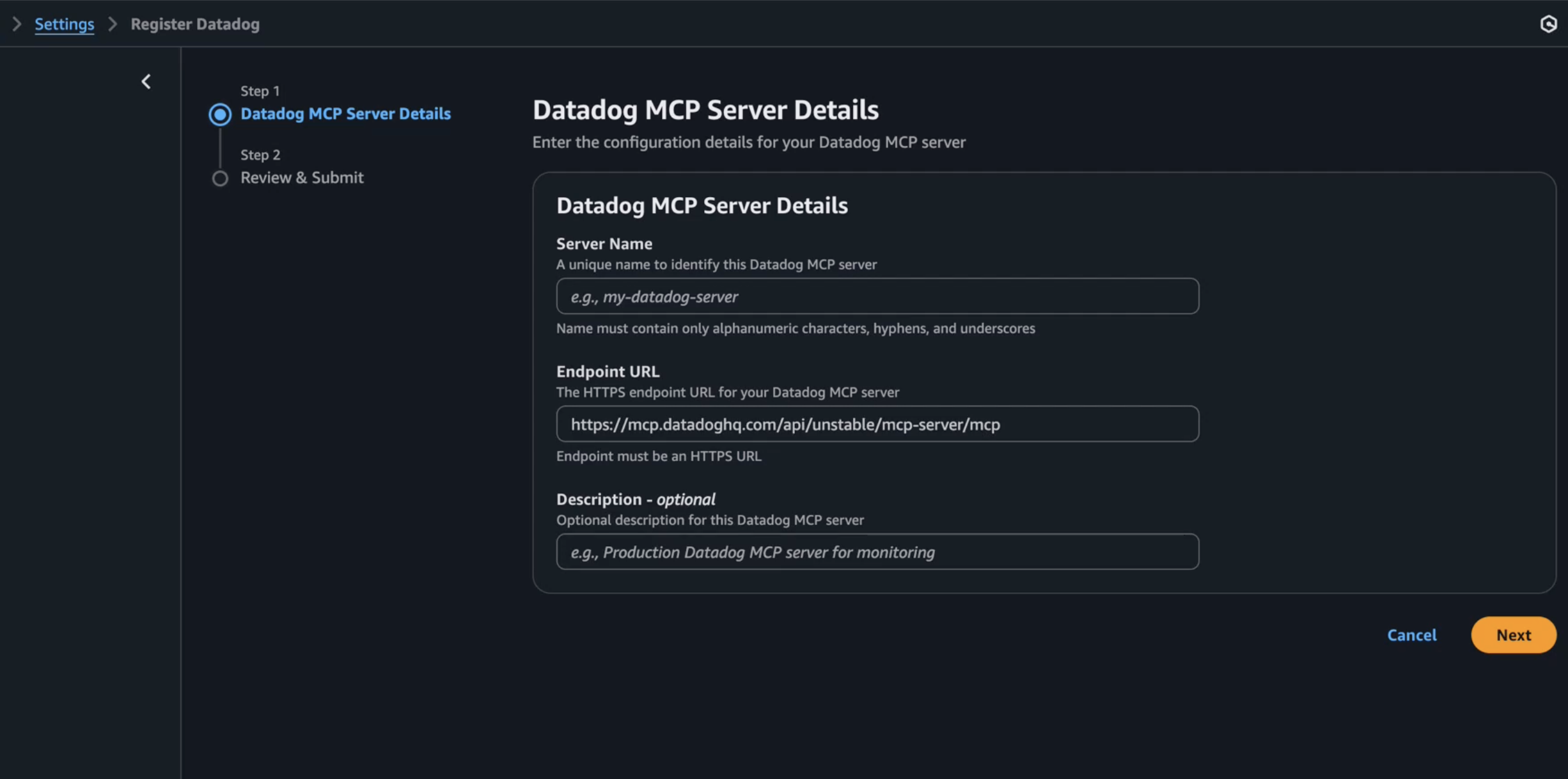 Figure 1: Setting up Datadog MCP Server in AWS DevOps Agent Console
Create an AWS DevOps Agent Agent Space
Next, create an Agent Space in your primary AWS account. This requires an AWS IAM role that grants AWS DevOps Agent access to your AWS resources. After creating your Agent Space, add Datadog MCP Server as a telemetry source to enable comprehensive incident investigation.
To create your Agent Space, start by accessing the AWS DevOps Agent console in us-east-1. Choose the “Create Agent Space” button and provide a meaningful name and description for your space. After submitting the form, you’ll need to configure the required IAM roles, which can be done through either the automated creation process or manual setup.
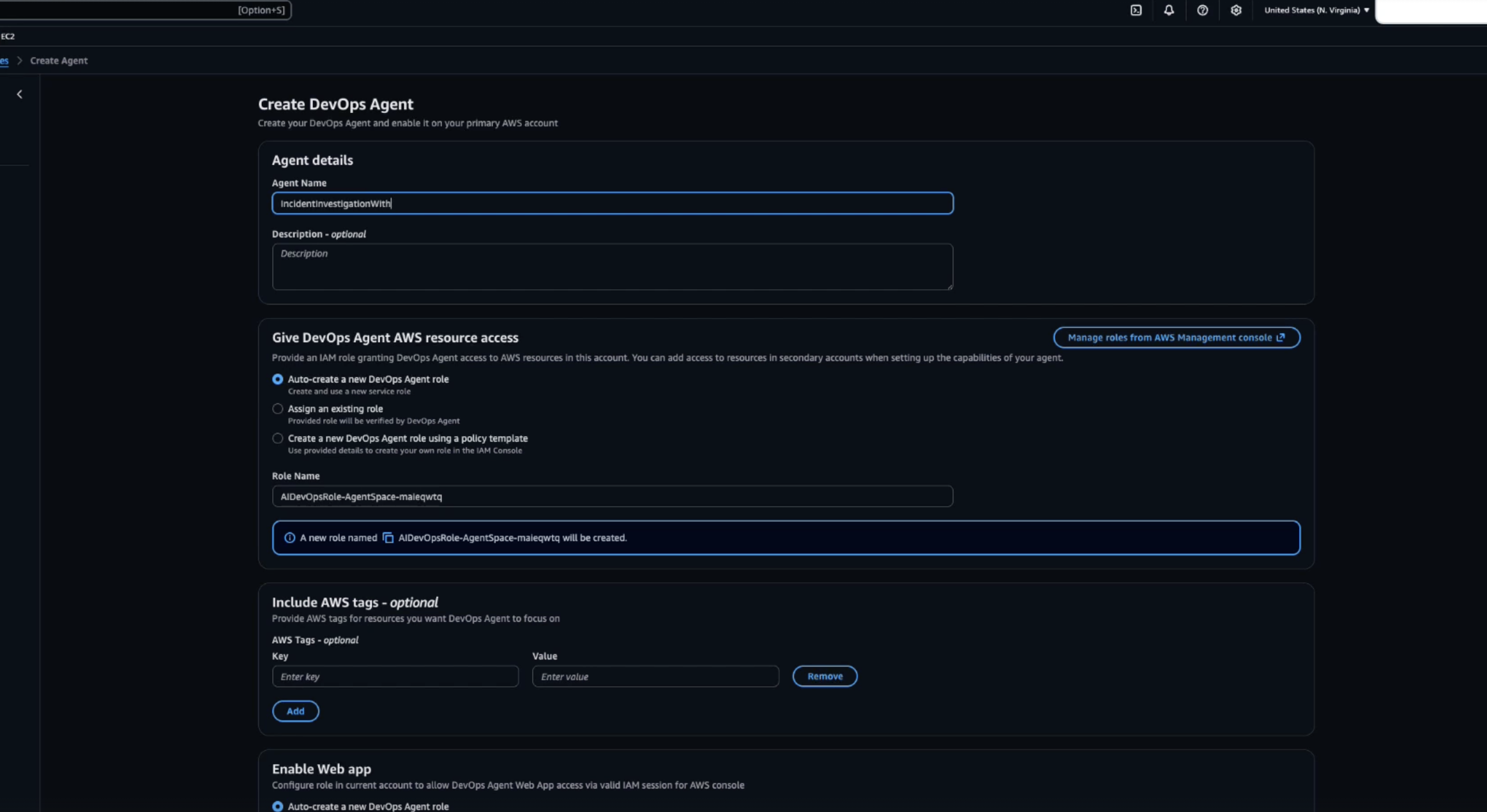 Figure 2: Creating a AWS DevOps Agent in Agent Space
Your Agent Space topology can be initialized using either AWS CloudFormation stacks or AWS Tags as starting points to identify your application components. Once the basic setup is complete, you can enhance your Agent Space configuration by adding Secondary source accounts for multi-account monitoring and configuring integrations with services like SIM ticketing system, Pipelines (where GitFarm packages and CloudFormation Stacks are located), Slack, and most importantly for our use case, Telemetry with the Datadog MCP Server.
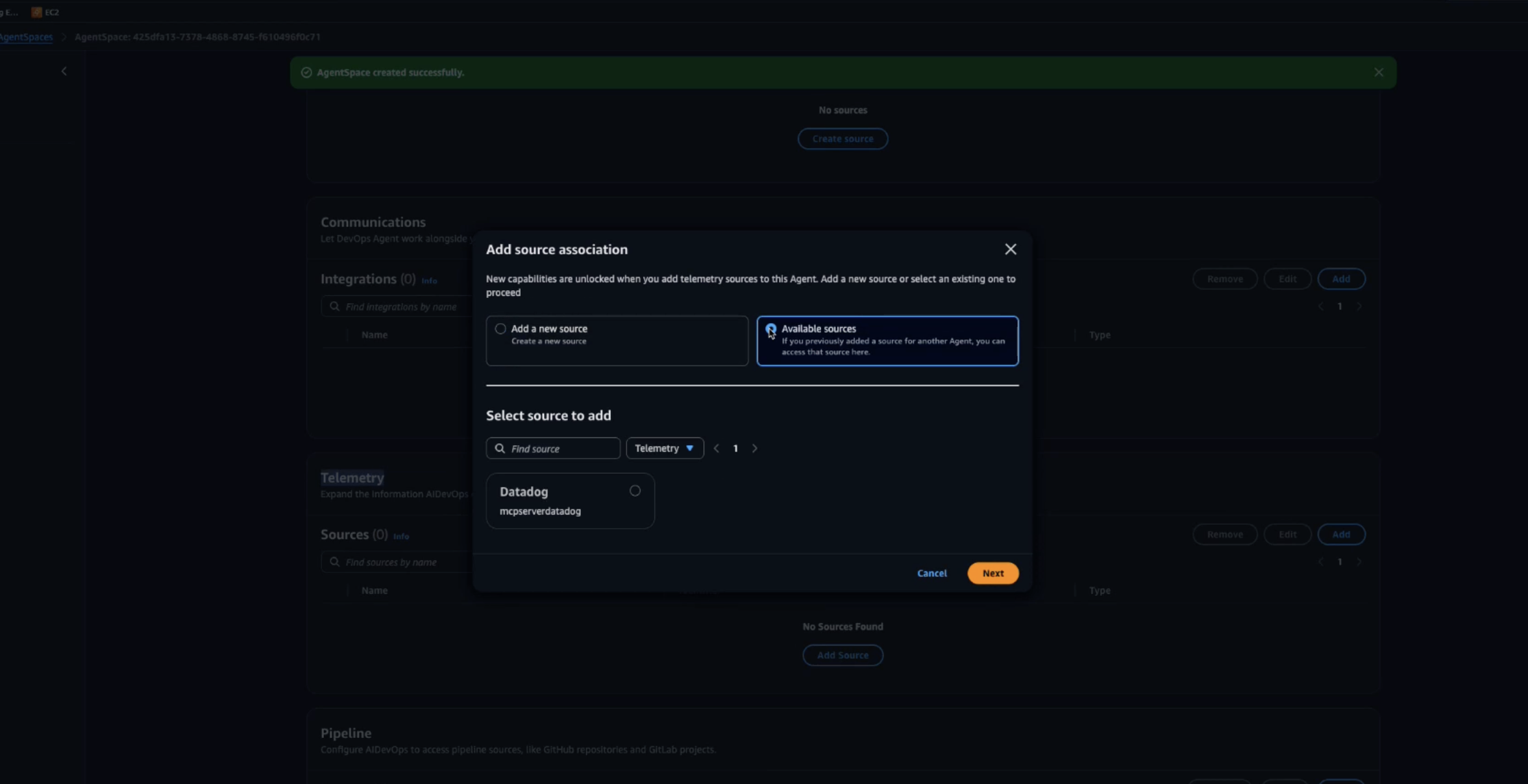 Figure 3: Add additional telemetry sources for AWS DevOps Agent to investigate
From here, we can launch the Agent Space web app to begin the investigation.
Real-World example: Resolving API Gateway errors
Let’s walk through how AWS DevOps Agent and Datadog work together to resolve a production incident. In this scenario, Datadog detects a spike in Amazon API Gateway 5XX errors affecting downstream services.
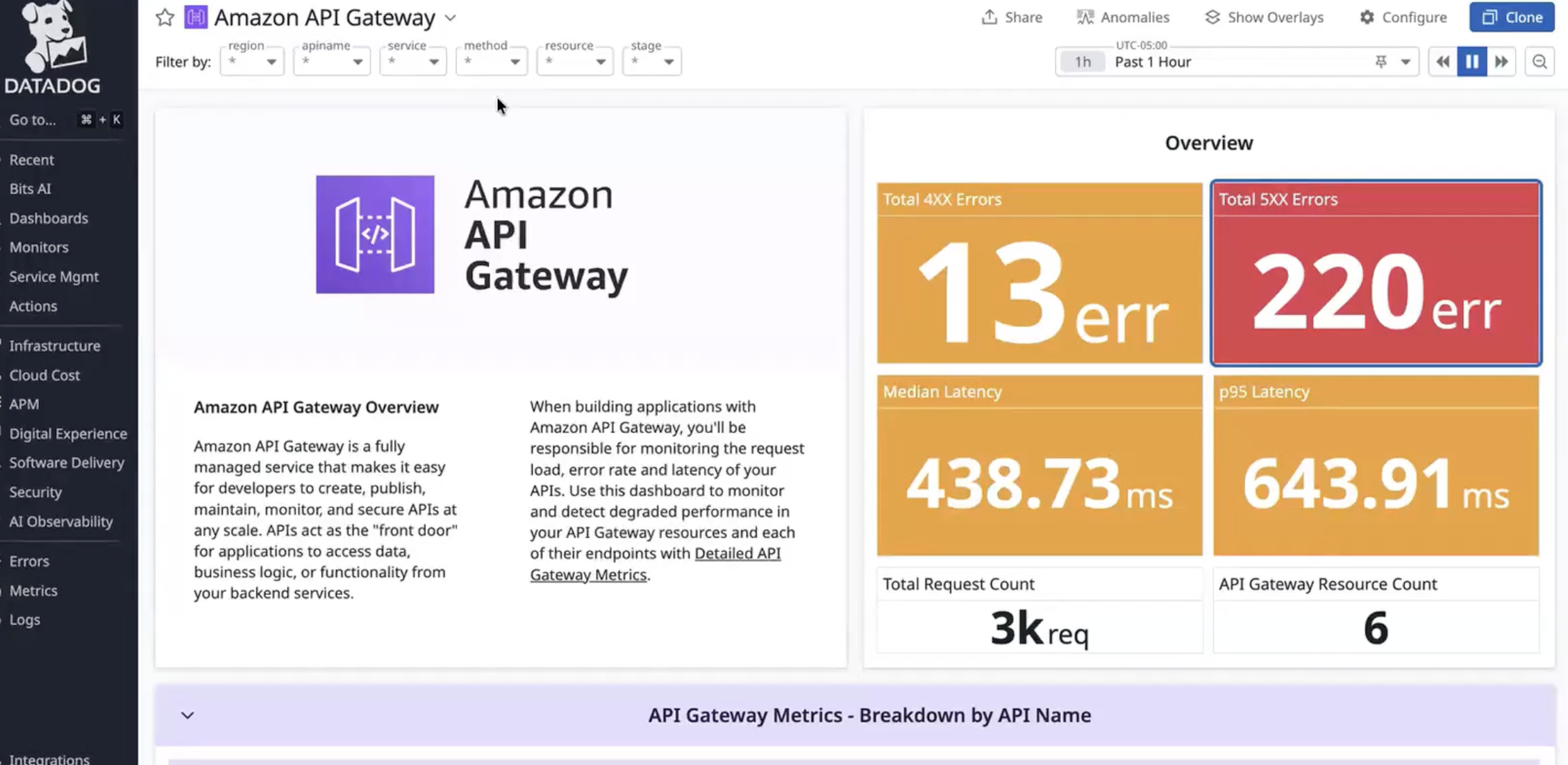 Figure 4: Sample API Gateway errors in Datadog
Investigating 5XX errors from API Gateway Incident with the Datadog MCP Server and AWS DevOps Agent
When the alert triggers, AWS DevOps Agent automatically analyzes both Datadog metrics and API Gateway logs. Through the investigation chat interface, an engineer guides AWS DevOps Agent to examine the API Gateway configuration. The agent correlates API Gateway and AWS Lambda execution logs, quickly identifying error patterns.
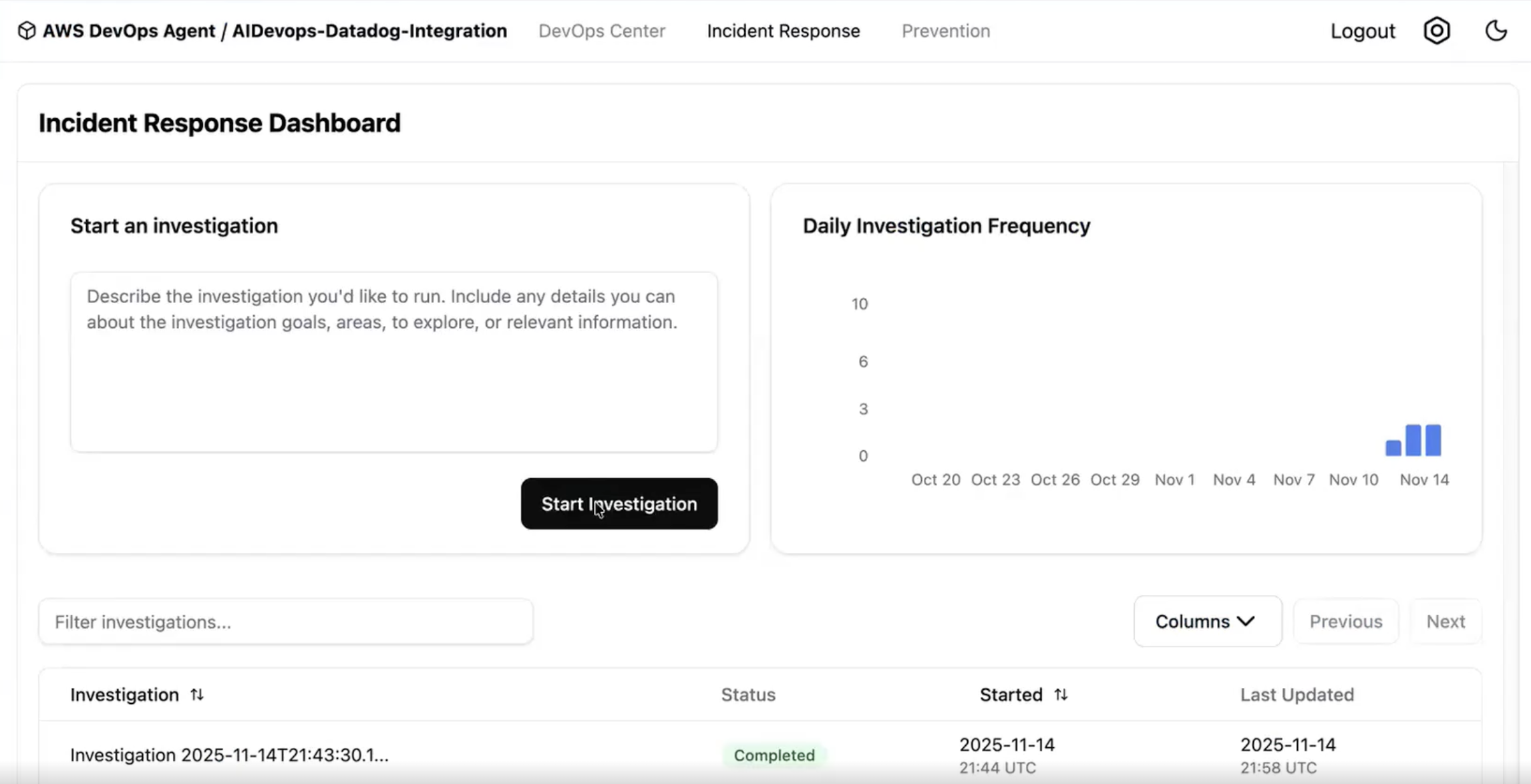 Figure 4: Investigating an incident with AWS DevOps Agent and Datadog MCP
Resolving and prevention
AWS DevOps Agent helps identify potential misconfigurations in the Lambda and Amazon DynamoDB integration and implements immediate fixes. The agent documents all findings and actions in an incident record, backed by telemetry from both Datadog and AWS services. After resolution, AWS DevOps Agent generates a detailed analysis report with specific recommendations to prevent similar incidents. Teams can review and implement these suggestions through the Prevention feature in the AWS DevOps Agent web app.
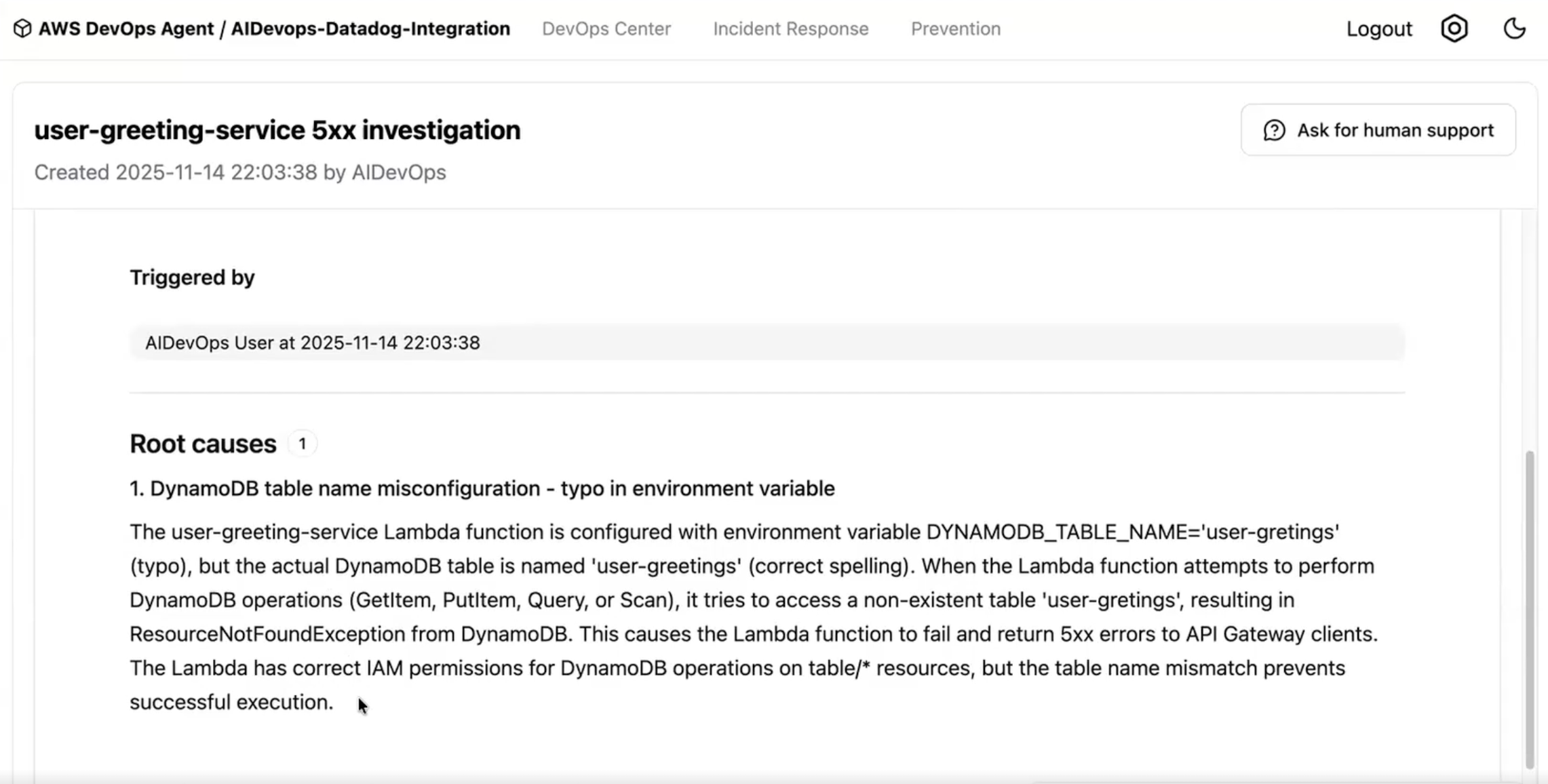 Figure 5: Investigation summary produced by AWS DevOps Agent
Clean up
When you’re done using the integration, you can clean up your resources by following these steps:
- Delete your Agent Space from the AWS DevOps Agent console
- Remove the Datadog MCP Server connection from your settings
- Delete the IAM roles created for the Agent Space
- (Optional) If you created additional source account roles, remove those as well
Conclusion
The integration between Datadog MCP Server and AWS DevOps Agent reduces incident resolution time by automatically correlating data across your monitoring tools. Instead of manually switching between Datadog and AWS dashboards during incidents, teams can now get an AI-powered investigation that identifies root causes and suggests fixes. Early adopters report significant improvements in their incident response. Resolution times drop from hours to minutes, while on-call teams spend less time gathering data. Teams also see more consistent incident responses and improved root cause analysis through comprehensive data correlation. To learn more, check out the AWS DevOps Agent product page.
Datadog is an AWS Specialization Partner and AWS Marketplace Seller that has been building integrations with AWS services for over a decade, amassing a growing catalog of 100+ AWS and 1000+ built-in integrations. This new AWS DevOps Agent and Datadog MCP Server integration builds upon Datadog’s strong track record of AWS partnership success. If you’re not already using Datadog, you can get started with a 14-day free trial via the AWS Marketplace.