.NET on AWS Blog
Securing GraphQL APIs with AWS AppSync Lambda Authorizers in .NET
In our previous post Building a GraphQL API with AWS AppSync Using Direct Lambda Resolvers in .NET, we demonstrated how to build a serverless GraphQL API using AWS AppSync with Direct Lambda Resolvers. By eliminating Velocity Template Language (VTL) and JavaScript mapping templates, we simplified resolver development and enabled .NET developers to implement all backend logic directly inside AWS Lambda functions using familiar tools and patterns.
While the earlier solution focused on API functionality and developer experience, security and access control are critical requirements for production-grade GraphQL APIs. AWS AppSync supports multiple authentication mechanisms — including API keys, AWS Identity and Access Management (IAM), Amazon Cognito User Pools, OpenID Connect, and AWS Lambda authorizers — providing security at the application, user, and service level.
This post shows you how to implement AWS Lambda authorizers with Direct Lambda Resolvers in .NET. You will learn how Lambda authorizers work, when to use them, and how authorization context flows from your authorizer function into your resolver logic. The complete solution, including source code and deployment instructions, are available in GitHub repository at aws-samples/sample-appsync-dotnet-lambda-resolvers.
AWS AppSync Authorization Overview
AWS AppSync supports multiple authorization modes that can be configured at the API level and selectively applied to individual GraphQL operations. With this capability, you can implement fine-grained access control without duplicating APIs or introducing complex routing logic. The following authorization mechanisms are available in AWS AppSync:
1. API Keys – Simple authentication for development and testing
2. AWS Lambda Authorizer – Custom authorization workflows with complete control over validation logic
3. Amazon Cognito User Pools – User-based authentication for web and mobile applications
4. OpenID Connect (OIDC) – External identity provider integration with Auth0, Okta, or custom OIDC systems
5. AWS Identity and Access Management (IAM) – Service-to-service authorization for secure communication between AWS services
Solution Overview
This post demonstrates how to implement AWS Lambda authorizers with Direct Lambda Resolvers in .NET, extending the Todo API from Part 1 with custom authorization capabilities. The solution showcases how authorization context flows directly from AppSync through Lambda authorizers into your .NET resolver functions, enabling advanced access control patterns.
When using Direct Lambda Resolvers, AWS AppSync forwards the complete authorization and identity context directly to your .NET Lambda function. This includes user claims, IAM identity details, request headers, and authorization metadata without requiring any mapping templates.
This approach provides the following benefits:
- Make authorization decisions in strongly typed .NET code – Uses C# type safety and .NET patterns to implement security logic.
- Apply fine-grained, business-driven access rules – Implements role-based access control (RBAC), attribute-based access control (ABAC), or custom authorization workflows.
- Centralize validation and security logic alongside application logic – Keeps authorization and business logic together in your Lambda functions for better maintainability.
- Improve maintainability and testability of authorization flows – Authorization logic can be unit tested using standard .NET testing frameworks.
Lambda authorizers are used for custom token validation scenarios, including proprietary tokens and legacy authentication systems. They also enable external system integration and request-based authorization decisions driven by user attributes and business rules.
Figure 1 shows the architecture where AWS AppSync integrates with Lambda authorizers to provide custom authentication while maintaining the Direct Lambda Resolver pattern for business logic.
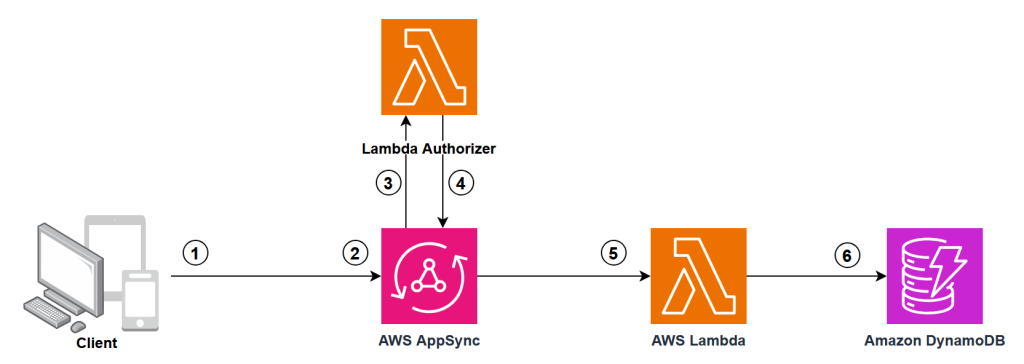
Figure 1: AWS AppSync with Lambda Authorizer and Direct Lambda Resolvers
The authorization flow works as follows:
- Client Request: The client sends a GraphQL request with an Authorization header containing a token.
- Token Extraction: AppSync extracts the authorization token from the request headers.
- Lambda Authorizer Invocation: AppSync invokes your custom Lambda authorizer function with the token and request context.
- Token Validation: Lambda function validates the token using custom business logic and returns an authorization result with user context and permissions.
- Request Processing: If authorized, AppSync processes the GraphQL request and invokes the appropriate Direct Lambda Resolvers.
- Data Access: Direct Lambda Resolver fetch data from Amazon DynamoDB.
Implementing Lambda Authorization in .NET
You will extend the Todo API from the previous post to support Lambda authorization. Using AWS CDK context variables, you can deploy with either API Key authentication (default) or Lambda authorization, ensuring backward compatibility.
Step 1: Add the Lambda Authorizer Function
Create a new file AuthorizerFunction.cs in your TodoApp.Api project. This function validates tokens and returns authorization context:
[LambdaFunction]
[Logging(LogEvent = true)]
public Task<AppSyncAuthorizerResult> CustomLambdaAuthorizerHandler(AppSyncAuthorizerEvent appSyncAuthorizerEvent, ILambdaContext context)
{
    Logger.LogInformation("Processing authorization request");

    var authorizationToken = appSyncAuthorizerEvent.AuthorizationToken;
    var apiId = appSyncAuthorizerEvent.RequestContext?.ApiId ?? "unknown";
    var accountId = appSyncAuthorizerEvent.RequestContext?.AccountId ?? "unknown";

    if (string.IsNullOrEmpty(authorizationToken))
    {
        Logger.LogError("Missing authorization token");
        return Task.FromResult(new AppSyncAuthorizerResult { IsAuthorized = false });
    }

    // CUSTOM LOGIC REQUIRED - Replace this simple token validation with your authentication logic
    // Examples: JWT validation, OAuth token verification, database user validation

    var isAuthorized = authorizationToken == "valid-token" || authorizationToken == "admin-token";
    Logger.LogInformation($"Authorization result: {isAuthorized}");

    return Task.FromResult(new AppSyncAuthorizerResult
    {
        IsAuthorized = isAuthorized,
        ResolverContext = new Dictionary<string, string>
        {
            { "userId", "sample-user" },
            { "role", authorizationToken == "admin-token" ? "admin" : "user" },
            { "apiId", apiId },
            { "accountId", accountId }
        },
        // CUSTOM LOGIC OPTIONAL - Adjust TTL based on your security requirements
        TtlOverride = 300
    });
}
The authorizer function receives the authorization token from AppSync and validates it against your business logic. It then returns an authorization response that indicates whether to allow or deny the request. The response can also include additional context data, such as user roles, permissions, or custom claims, that AppSync passes to your resolvers. You can use this context to perform fine-grained authorization checks at the field or data level.
Step 2: Update the CDK Stack
Modify your AppSyncApiStack.cs to conditionally enable Lambda authorization based on a CDK context variable:
public AppSyncApiStack(Construct scope, string id, IStackProps props = null) : base(scope, id, props)
{
    // Check if Lambda authorization is enabled by using context
    var useLambdaAuth = this.Node.TryGetContext("useLambdaAuth")?.ToString() == "true";

    // Create authorization config based on context
    AuthorizationConfig authConfig;
    Function authorizerFunction = null;

    if (useLambdaAuth)
    {
        // Create Lambda Authorizer Function
        authorizerFunction = new Function(this, "AppSyncAuthorizerFunction", new FunctionProps
        {
            Runtime = Runtime.DOTNET_8,
            Code = Code.FromAsset("src/TodoApp.Api/bin/Release/net8.0/publish"),
            Handler = "TodoApp.Api::TodoApp.Api.AuthorizerFunction_Authorize_Generated::Authorize",
            // ... other properties
        });

        authConfig = new AuthorizationConfig
        {
            DefaultAuthorization = new AuthorizationMode
            {
                AuthorizationType = AuthorizationType.LAMBDA,
                LambdaAuthorizerConfig = new LambdaAuthorizerConfig
                {
                    Handler = authorizerFunction,
                    ResultsCacheTtl = Duration.Minutes(5)
                }
            }
        };
    }
    else
    {
        // Default API Key authorization
        authConfig = new AuthorizationConfig
        {
            DefaultAuthorization = new AuthorizationMode
            {
                AuthorizationType = AuthorizationType.API_KEY,
                ApiKeyConfig = new ApiKeyConfig
                {
                    Expires = Expiration.After(Duration.Days(30))
                }
            }
        };
    }

    // Create AppSync API with dynamic authorization
    var api = new GraphqlApi(this, "TodoApi", new GraphqlApiProps
    {
        Name = "dotnet-appsync-todo-api",
        Definition = Definition.FromFile("src/TodoApp.Cdk/graphql/schema.graphql"),
        AuthorizationConfig = authConfig,
        XrayEnabled = true
    });
}
The key changes include:
- Reading the
useLambdaAuthcontext variable to determine authorization mode - Creating the Lambda authorizer function when Lambda auth is enabled
- Configuring the AppSync API with the appropriate authorization mode
- Setting up result caching to improve performance
Step 3: Build and Deploy
Build your Lambda functions:
cd src/TodoApp.Api
dotnet lambda package
cd ../..
Deploy with API Key authentication (default):
cdk deploy
Deploy with Lambda authorization:
cdk deploy -c useLambdaAuth=true
After you deploy, the stack outputs the authorizer function ARN and usage instructions for testing with tokens.
Testing the Lambda Authorizer
Once AWS AppSync is deployed with Lambda authorization enabled, test the API using the authorization tokens:
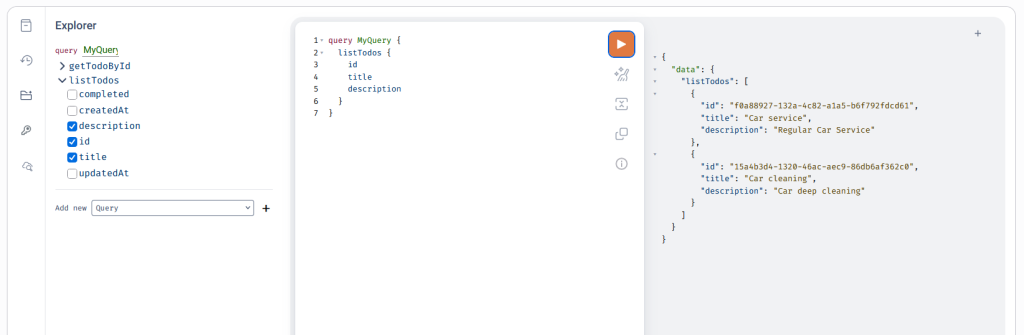
Figure 2: GraphQL API testing from AWS console
The sample authorizer accepts two test tokens:
valid-token– Regular user accessadmin-token– Admin user access
Authorization Context in Resolvers
The authorization context returned by your Lambda authorizer flows into your resolver functions, enabling fine-grained access control. You can access user information and roles from the authorization context to implement role-based data filtering and access control within your resolver logic.
Role-Based Access Control Example
You can use the authorization context for fine-grained access control within your resolvers. For example, you can restrict certain operations to admin users only:
[LambdaFunction]
public async Task<Todo> DeleteTodoItem(AppSyncResolverEvent<Dictionary<string, string>> appSyncEvent)
{
    // Check if user has admin role
    var role = appSyncEvent.RequestContext.Identity.Claims["role"];
    if (role != "admin")
    {
        throw new UnauthorizedAccessException("Only admins can delete todos");
    }

    var id = appSyncEvent.Arguments["id"].ToString();
    return await _todoService.DeleteTodoItem(id);
}
When a non-admin user attempts to delete a todo item, the resolver throws an UnauthorizedAccessException with the message Only admins can delete todos.
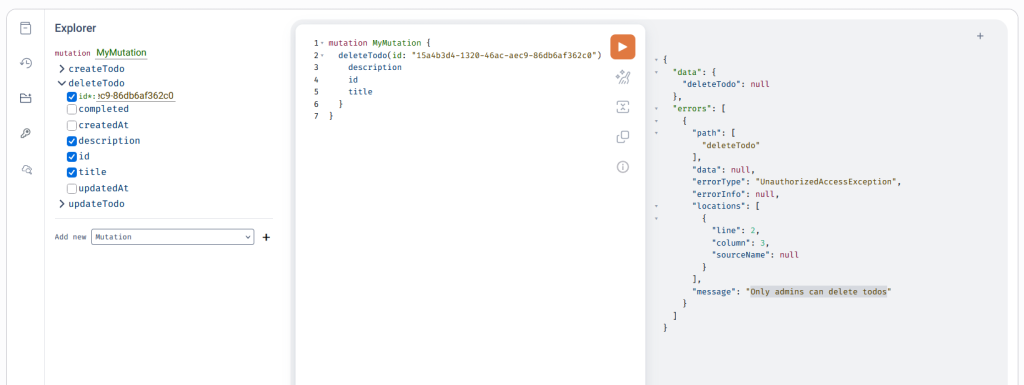
Figure 3: GraphQL API testing from AWS console for role-based access control
With this approach, you can implement role-based permissions without changing your GraphQL schema or authorization configuration. Regular users can create and update todos, while only admin users can delete them.
Clean Up
Clean up the resources that were created for the sample application to avoid incurring charges. To delete resources and prevent additional charges, use either of these methods:
- Use the AWS CloudFormation console to delete the stack.
- Using terminal, run
cdk destroycommand.
Conclusion
With AWS Lambda authorizers, you have complete control over authentication logic in your AppSync GraphQL APIs. By combining Lambda authorizers with Direct Lambda Resolvers in .NET, you can build secure, scalable GraphQL APIs that integrate with your existing authentication systems and business logic.
The conditional deployment pattern demonstrated in this post helps maintain backward compatibility while adding advanced authorization capabilities. This pattern is particularly useful when migrating existing APIs or supporting multiple deployment environments with different security requirements.
Next Steps
Deploy the secure Todo API with Lambda authorization using the CDK commands provided in this post. Test both authentication modes by switching between API key and Lambda authorization to understand their differences. Use the AWS AppSync Console’s query editor to experiment with different authorization tokens and observe how access control is enforced.
To extend this implementation for production use, consider these improvements:
- Authentication Integration: Integrate with external identity providers like Auth0 or Okta, implement JWT token validation with signature verification, or connect to your existing user management systems.
- Advanced Authorization: Add field-level permissions to restrict access to specific GraphQL fields, implement attribute-based access control (ABAC) for dynamic permission evaluation, or create multi-tiered role hierarchies within your Lambda authorizer function.
Explore the complete source code and deployment instructions in the GitHub repository (https://github.com/aws-samples/sample-appsync-dotnet-lambda-resolvers).