AWS for Industries
Build a Multi-Agent Assessment Workbench with Amazon Bedrock AgentCore
In most financial institutions, project document assessment is a late-stage activity. Architecture teams design digital banking services. Security teams review them weeks later. Risk teams produce assessments months after deployment decisions are locked in. By the time a Chief Risk Officer sees a risk report, the architecture is fixed, exposure is unquantified, and remediation is expensive.
Financial regulators across jurisdictions share a common expectation: assess risk at the design stage, not after deployment. Whether through operational resilience frameworks, information security standards, or technology risk guidelines, the supervisory message is consistent. Institutions must identify and manage risks before deploying new systems. The assessment must be structured, traceable, and proportionate to the materiality of the change.
In this post, we introduce Assess Workbench, an open-source solution that orchestrates configurable AI agents to conduct structured document assessments. The system ships with architecture, risk, security, and compliance agents as a starting point, but these can be edited through an administrative interface without code changes. It handles documents that requires structured assessment, from technical architecture documents and concept papers to business policies, committee charters, risk registers, and board papers. It adapts its workflow to each document and runs assessments in 3-8 minutes instead of weeks. We built Assess Workbench using Strands Agents, Amazon Bedrock AgentCore, and AWS Step Functions.
The challenge: siloed sequential assessment
Today’s assessment process in financial services follows a predictable sequence. An architecture team designs a cloud workload. Weeks later, a security team reviews it against control frameworks. Weeks after that, a risk team produces an assessment. Finally, a compliance function validates the output against prudential standards. This sequential process creates four problems:
Late visibility: Risks such as data sovereignty violations or missing encryption surface after architecture decisions are locked in. Remediation at this stage causes delays and can cost significantly more than at design time.
Lost context: Each handoff between teams loses nuance. The risk team does not see the architecture rationale. The architecture team does not see the regulatory implications of their design choices. No participant has full picture visibility across all domains simultaneously.
Inconsistent language: Architecture teams speak in components and data flows. Security teams speak in controls and vulnerabilities. Risk teams speak in likelihood and regulatory capital exposure. No single document connects these perspectives into a coherent view that executives and regulators can follow.
Reduced velocity: The sequential process becomes a bottleneck. Institutions managing hundreds of cloud workloads across multiple divisions cannot scale manual, workload-by-workload assessment. Teams queue for reviewer availability. Deadlines slip. Risk acceptance becomes the path of least resistance.
The solution: configurable agents mapped to your organization
Rather than building a single monolithic AI system, we designed a multi-agent architecture where each agent mirrors a role in your organization. The system ships with four agents as a working example:
| Agent | Role | Optimizes for | Speaks the language of |
|---|---|---|---|
| Architecture Agent | Technology review | Technical quality, scalability, design patterns | Head of Technology |
| Security Agent | Information security | Security posture, control gaps, vulnerability mapping | CISO |
| Risk Agent | Technology risk | Risk quantification, treatment strategies, residual risk | CRO |
| Compliance Agent | Regulatory compliance | Regulatory obligations, prudential standards, compliance gaps | Head of Compliance |
These are starting points, not the only configuration. Teams can:
- Edit existing agents: update prompts, adjust severity thresholds, change knowledge base references
- Delete agents: remove those not relevant to your organization
- Create new agents: add specialist reviewers for any assessment domain
Example configurations we have seen teams build: an internal audit agent that audits documents against internal policies loaded into the knowledge base. A board governance agent that assesses papers against the organization’s board charter and committee terms of reference. A model risk agent for AI/ML governance documentation. The architecture is deliberately generic, any structured assessment domain that benefits from specialist knowledge and consistent methodology is a candidate for an agent.
Each agent is owned by the team it represents. The security team updates their agent’s control mappings without filing a ticket with the engineering team. The compliance team adds new regulator commentary to their agent’s knowledge base as guidance evolves. This mirrors the governance model that regulators expect from the institution itself, distributed ownership with centralized oversight.
The key architectural insight: these agents do not replace human reviewers. They provide a structured first pass that identifies issues and maps them to standards and frameworks. Human experts then review, challenge, and approve findings, spending their time on judgement rather than discovery. This human-in-the-loop design aligns with the supervisory expectation that accountability for decisions remains with qualified professionals, not automated systems.
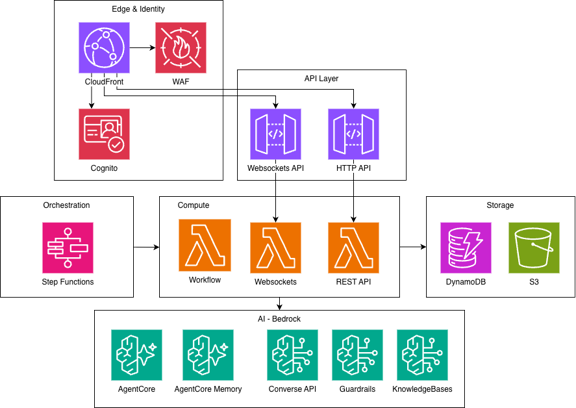
Figure 1: Multi-agent architecture with configurable specialist agents. Each agent runs on Amazon Bedrock AgentCore with its own prompt, tools, and knowledge base access. AWS Step Functions orchestrates execution based on an AI-generated plan.
Architecture overview
Assess Workbench deploys entirely within your AWS account. Documents, findings, and agent outputs are designed to remain within your environment, critical for regulated industries where data sovereignty is non-negotiable.
The system uses a serverless architecture on the AWS Cloud:
- Agent runtime: Strands Agents running on Amazon Bedrock AgentCore Runtime, using Claude Sonnet 4 as the foundation model. Each agent has its own system prompt, tool configuration, and structured output schema.
- Orchestration: AWS Step Functions executes an AI-generated review plan with retry semantics, progress tracking, and human-in-the-loop approval gates
- Knowledge grounding: Amazon Bedrock Knowledge Bases indexes your standards, policies, and regulatory frameworks so agents ground assessments in authoritative source material rather than model training data
- Shared semantic memory: Amazon Bedrock AgentCore Memory provides a vector-based store for all review findings. Findings are written to memory namespaced by project and domain. Chat agents retrieve relevant findings via semantic search, enabling cross-agent context without explicit data passing.
- Document analysis: PyMuPDF extracts text, and a two-pass image analysis pipeline triages then deep-analyzes architecture diagrams and data flows
- Data layer: Amazon DynamoDB stores projects, reviews, and findings; Amazon S3 stores uploaded documents and generated reports
- Authentication: Amazon Cognito provides JWT-based auth for the HTTP API and WebSocket connections
- Real-time updates: WebSocket connections stream live progress as agents execute, including quality scores and coaching iterations
- Benchmarking: Compare models and configurations side-by-side with automated quality scoring to optimise cost and quality trade-offs
- Infrastructure: Terraform modules manage all resources; AWS SSM Parameter Store holds runtime configuration
- Observability: Amazon CloudWatch, AWS X-Ray, and AgentCore OpenTelemetry integration provide end-to-end tracing from document upload to finding delivery
The adaptive workflow
Most multi-agent systems use an orchestrator agent, a single LLM that decides which agents to call and in what order. This works for simple cases but creates problems at scale. The orchestrator is opaque. It cannot retry individual agents. Users have no visibility into what is happening, and there is no way to intervene before agents run.
We split orchestration into two phases: intelligent planning and deterministic execution.
Phase 1: AI Planner
When a team uploads a document, an AI planner analyzes it using the Amazon Bedrock Converse API. The planner identifies the document type, complexity, and relevant assessment domains. It produces a structured JSON execution plan specifying which agents to invoke, in what order, with what depth and focus areas.
The planner makes four intelligent decisions for each document:
- Agent selection: For a simple API specification, it selects the architecture agent only. For a payment system processing card data, it invokes all configured agents including compliance.
- Execution order: Architecture and security run in parallel (they are independent). Risk runs after both (it needs their findings as context for compound risk identification).
- Depth calibration: A quick scan for low-complexity documents. Thorough analysis for complex distributed systems with sensitive data or cross-border concerns.
- Document-specific guidance: The plan includes tailored analysis instructions referencing technologies, patterns, and concerns specific to this document.
The plan is presented to the user for review and approval before execution begins. Users add agents, remove agents, adjust depth, or modify focus areas. This provides human oversight without requiring human effort for plan creation.
{
  "document_type": "microservices_architecture",
  "complexity": "high",
  "rationale": "Distributed event-driven system with PII handling and multi-region
    deployment. Architecture and security run in parallel; risk runs after both.",
  "groups": [
    {
      "group_id": "initial_reviews",
      "label": "Initial Reviews",
      "execution": "parallel",
      "agents": [
        {
          "agent_type": "architecture",
          "depth": "thorough",
          "focus_areas": ["event-driven patterns", "data flow", "scaling strategy"],
          "prompt_addendum": "Pay attention to event ordering guarantees and
            message loss scenarios in the Kafka pipeline."
        },
        {
          "agent_type": "security",
          "depth": "thorough",
          "focus_areas": ["authentication", "PII handling", "encryption"],
          "prompt_addendum": "This system processes healthcare-adjacent data.
            Evaluate HIPAA implications."
        }
      ]
    },
    {
      "group_id": "informed_risk",
      "label": "Risk Assessment",
      "execution": "sequential",
      "agents": [
        {
          "agent_type": "risk",
          "depth": "thorough",
          "depends_on": ["architecture", "security"],
          "focus_areas": ["operational risk", "vendor lock-in", "disaster recovery"],
          "prompt_addendum": "Consider risks that compound across the architecture
            and security findings."
        }
      ]
    }
  ]
}
Figure 2: Example execution plan generated by the AI planner. The planner selects agents, determines execution order and parallelism, calibrates depth, and provides document-specific analysis guidance, all as structured JSON that Step Functions consumes directly.
Phase 2: Deterministic executor
AWS Step Functions executes the approved plan. The state machine is fixed, it does not change between reviews. But the plan controls what runs, making every execution adaptive to the specific document.
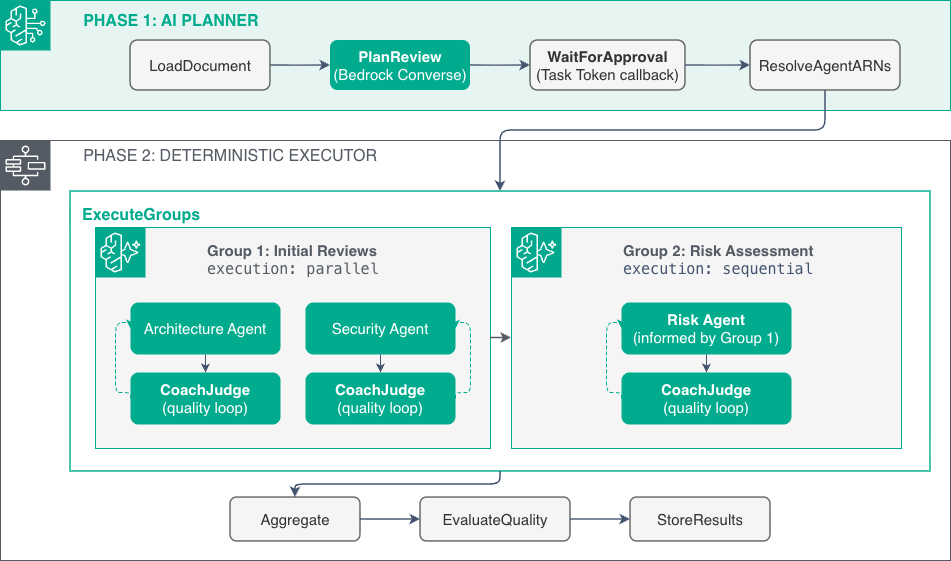
Figure 3: Step Functions state machine execution flow. The outer Map iterates through plan groups sequentially. Within each group, agents execute in parallel or sequentially as the plan specifies. A quality judge scores each agent’s output and triggers coaching iterations when needed.
The core of the executor is a nested Map state. The outer Map iterates through the plan’s groups in sequence. For each group, an inner Map fans out to the agents within it, parallel or sequential based on the plan.
"ExecuteGroups": {
  "Type": "Map",
  "ItemsPath": "$.plan.groups",
  "ItemSelector": {
    "group.$": "$$.Map.Item.Value",
    "project_id.$": "$project_id",
    "review_id.$": "$review_id"
  },
  "Iterator": {
    "StartAt": "ExecuteAgentsInGroup",
    "States": {
      "ExecuteAgentsInGroup": {
        "Type": "Map",
        "ItemsPath": "$.group.agents",
        "ItemSelector": {
          "agent.$": "$$.Map.Item.Value",
          "project_id.$": "$project_id",
          "review_id.$": "$review_id",
          "s3_bucket.$": "$s3_bucket"
        },
        "MaxConcurrencyPath": "$.group.max_concurrency",
        "Iterator": {
          "StartAt": "InvokeAgent",
          "States": {
            "InvokeAgent": {
              "Type": "Task",
              "Resource": "arn:aws:states:::lambda:invoke",
              "Next": "CoachJudge"
            },
            "CoachJudge": { "..." : "quality scoring and retry logic" }
          }
        },
        "End": true
      }
    }
  },
  "Next": "Aggregate"
}
Figure 4: The MaxConcurrencyPath field is key: when the plan specifies “execution”: “parallel”, this resolves to 0 (unlimited concurrency). For “sequential”, it resolves to 1. The same fixed state machine handles both modes, the plan data controls the execution behaviour.
This separation provides four benefits:
- Observability: Users see which agents are running, which have completed, and which are pending, in real time via WebSocket
- Partial recovery: If the risk agent fails after architecture and security complete, only the risk agent reruns. Completed work is preserved.
- Human-in-the-loop: Users approve the plan before any agent executes. No opaque autonomous decisions.
- Deterministic guarantees: Step Functions provides retry semantics, timeouts, and error handling that an LLM cannot guarantee
Quality judge and coaching loop
After each agent completes, a quality judge scores the output on three dimensions: completeness, specificity, and actionability. Each dimension receives a score from 0 to 1.
If the combined score falls below a configurable threshold (default: 0.7), an optional coaching loop provides structured feedback to the agent. The coach identifies which findings lack specificity, which areas the agent missed, and which recommendations need more detail. The agent then produces a revised assessment incorporating this feedback. The frontend visualizes this loop in real time, users see the score, the coach feedback, and the improved output side by side.
No-code agent customization
Adding a new specialist agent, a compliance auditor, a model risk agent, an internal audit reviewer, or a board governance assessor, requires zero Python code. Each agent is defined entirely in a YAML configuration file:
# agents/au_fsi_compliance_review/agent.yaml
registry:
  agent_type: au_fsi_compliance
  display_name: AU FSI Compliance
  description: "Assesses compliance against Australian prudential standards..."
  model_id: us.anthropic.claude-sonnet-4-6
  finding_schema:
    severity_levels: [critical, high, medium, low]
    severity_source: direct
    fields:
      regulatory_reference:
        type: str
        required: true
        description: "Specific regulatory reference"
      obligation_type:
        type: str
        required: true
        enum: [mandatory, guidance, best_practice]
      compliance_gap:
        type: str
        required: true
        enum: [non_compliant, partially_compliant, insufficient_evidence]
A single generic runtime reads this configuration and builds a Pydantic model dynamically using pydantic.create_model(). It passes the model’s JSON schema to the foundation model via Strands Agents’ structured_output_model parameter. The foundation model returns validated, typed findings, not free-form text that needs parsing.
The risk agent demonstrates advanced schema capabilities. Its severity is not assigned by the LLM directly. Instead, the agent provides likelihood and consequence ratings. A 5×5 matrix defined in YAML derives the severity automatically:
severity_source: derived
severity_derivation:
  inputs: [likelihood, consequence]
  matrix:
    "almost_certain,catastrophic": critical
    "likely,major": high
    "possible,moderate": medium
    "rare,insignificant": low
This means the institution controls risk appetite calibration, not the foundation model. Different divisions define different matrices reflecting their specific risk appetites while using the same agent runtime and assessment methodology.
The administrative UI exposes these YAML configurations as editable forms. A compliance officer updates regulatory references, adjusts severity thresholds, or adds new finding fields through the browser. No code deployment required. No engineering team dependency.
Grounding agents in your organization
Assess Workbench provides two mechanisms for grounding agents in organization-specific knowledge: context documents and the standards knowledge base. Together, these ensure assessments reflect your institution’s reality, not generic training data.
Context documents
Context documents are Markdown files that provide organizational grounding for agents at runtime. They encode the information a human assessor would bring to a review, risk appetite, technology standards, regulatory environment, and team conventions.
Context can be set at three levels:
- Organization level: Enterprise-wide risk appetite statements, company values, strategic technology direction, overarching policies
- Business unit level: Division-specific risk tolerances, team conventions, local regulatory environment, business-specific constraints
- Project level: Specific project constraints, related prior decisions, previous assessments, known exceptions or accepted risks
The principle: wherever there is a specific risk appetite or specific context that a human assessor would rely on, add it as context. A retail banking division provides its specific risk appetite statement. A global markets division provides its market risk tolerances. Same agents, same assessment methodology, different organizational context driving different calibration.
Context documents are uploaded through the application and managed as living documents. As regulatory guidance evolves or internal policies change, teams update their context documents directly, no redeployment required.
Standards knowledge base
The standards knowledge base (the standards/ folder in the repository) gives agents access to authoritative reference material that the foundation model may not have encountered during training. It accepts:
- Internal standards and policies: your organization’s own control frameworks, risk management policies, technology standards, and operating procedures
- Specific regulations: prudential standards, legislation, and industry codes relevant to your jurisdiction
- New information: regulator guidance, speeches, consultation papers, and industry commentary released after the foundation model’s training cutoff
This is critical for assessment quality. Regulatory guidance evolves faster than foundation model training cycles. A speech by a regulator at an industry conference, a new consultation paper, or an updated FAQ on an existing standard, all can be added to the knowledge base and immediately influence agent assessments.
Agents do not have direct access to search the internet. This is a deliberate design choice, not a limitation. Assessments are grounded exclusively in curated, approved source material, your standards knowledge base and your context documents. This ensures findings can be traced to authoritative sources that your institution has reviewed and accepted, rather than unvetted web content. If your use case requires internet access, it can be added as an agent tool, but for regulated assessment workflows, curated knowledge is typically preferred.
Organization-controlled agent ownership
Each agent’s prompt, schema, and knowledge base access can be owned by the team it serves:
- The security team maintains the security agent’s control mappings and vulnerability taxonomy
- The compliance team updates their agent’s regulatory references as new guidance is published
- The risk team calibrates their agent’s severity matrix to reflect current risk appetite
- A board secretariat creates and maintains a governance agent tuned to their committee terms of reference
This distributed ownership model ensures domain expertise stays with domain experts. No single central team bottlenecks agent evolution. Teams iterate on their agent’s behavior at the pace their domain demands, weekly for an active regulatory consultation, quarterly for stable international standards.
Traceability: examination-ready output
Every finding produced by the system links back to three sources:
- Document section: The specific paragraph, diagram, or data flow in the uploaded document that triggered the finding
- Standard or policy: The specific clause or requirement retrieved from the knowledge base
- Agent reasoning: The chain of logic the agent used to connect the document content to the requirement
This three-point traceability means a regulator or internal auditor can verify any finding by following the evidence chain from conclusion back to source. Agents are configured to include specific citations, not generic statements like “does not meet compliance requirements” but precise references to the relevant standard or policy clause.
After any review completes, users can chat directly with each specialist agent. The architecture agent explains why it flagged a design pattern. The risk agent discusses likelihood ratings and suggests treatment strategies. Each chat agent retrieves its domain findings from AgentCore Memory via semantic search, maintaining full access to the review context. Conversations persist across sessions, enabling ongoing dialogue as designs evolve.
An analytics dashboard tracks quality trends across assessments, coverage matrix, finding distribution by severity, user feedback scores, and model comparison data, providing the ongoing evidence of methodology effectiveness that regulators expect.
Results
In our testing against representative financial services documents, we observed four measurable outcomes:
Speed: A complete multi-perspective assessment, architecture, security, risk, and compliance, completes in 10-15 minutes. The equivalent manual process takes 2-6 weeks depending on team availability and document complexity. This represents a reduction from 10-30 business days to under 20 minutes.
Consistency: Every assessment uses the same methodology, the same reference corpus, and the same quality threshold. The 200th assessment of the year uses the same rigor as the first. Different divisions receive assessments tuned to their specific obligations through agent configuration, not variable analyst judgement or availability.
Continuity: Because assessments take minutes instead of weeks, institutions run them at every design iteration, not once before deployment. Risk identification shifts from periodic gate review to continuous design-time feedback. Teams receive risk signals while they can still act on them at low cost.
Examination readiness: When a regulator asks “how did you assess the risks of this deployment?”, the institution provides a complete evidence package. The package includes the AI-generated plan, human approval record, individual agent findings with citations, quality scores, and any coaching iterations. This audit trail satisfies the supervisory expectation for structured, traceable assessment of material technology changes.
Cost efficiency: Each assessment costs approximately $1.00-$1.25 (USD – at time of publication) in AWS service charges, depending on document complexity and number of agents invoked. Refer to our pricing page for more information.
Get started in four steps
Assess Workbench deploys into your own AWS account. Clone the repository and have a working instance running in under 30 minutes:
Step 1: Clone and configure
git clone https://github.com/aws-samples/sample-assess-workbench.git
cd sample-assess-workbench
cp .env.example .env
Edit .env: set AWS_REGION and PROJECT_NAME
Step 2: Deploy
The project uses Task as its runner. A single command provisions the full stack, AgentCore agents, knowledge bases, Terraform infrastructure, and a hosted frontend:
task deployThis registers four example review agents (Architecture, Security, Risk, and Compliance), loads a sample standards corpus, and provisions an S3 + CloudFront frontend, all in your account.
Step 3: Create a user and sign in
task deploy:user # prompts for email, password, and groupOpen the app at the CloudFront URL printed at the end of task deploy.
Step 4: Run your first assessment
Create a project, upload a design document, and click Start Review. The AI planner analyzes your document, produces an execution plan for your approval, and the Step Functions executor runs the assessment. Findings appear in 3–8 minutes.
For prerequisites (Python 3.13+, Node.js 18+, Terraform, AWS CLI, AgentCore CLI) and detailed configuration, see the Setup Guide.
Conclusion
Regulators expect structured assessment at the design stage. Manual, sequential processes cannot keep pace with modern deployment velocity. Assess Workbench provides a different approach: configurable AI agents, each owned by the team it serves, grounded in your organization’s standards and policies rather than generic training data.
The adaptive planner ensures every review is tailored to the specific document. No-code agent customization means new specialist agents, internal audit, board governance, model risk, or any other domain, require configuration, not engineering effort. Organization-controlled context documents and a curated knowledge base ground assessments in your institution’s reality. Examination-ready traceability satisfies regulators by linking every finding to document sections and authoritative sources.
While this post demonstrates the pattern in a financial services context, Assess Workbench is configurable for any industry and geography. The standards knowledge base accepts any regulatory framework, international standard, or company policy. The agent architecture, specialist reviewers with domain-specific schemas and curated knowledge bases, applies wherever structured document assessment is needed. We have seen teams adapt it for ESG reporting assessments, health and safety documentation reviews, and board governance evaluations.
The source code is available on GitHub. We welcome contributions, feedback, and stories about how you apply this pattern in your organization.