Artificial Intelligence

Author: Ying Wang
Data modeling best practices for Amazon Quick Sight multi-dataset relationships
Today, we are excited to announce Multi-Dataset Relationships in Amazon Quick Sight. This new capability lets you define logical relationships between Quick Sight datasets and perform runtime joins at query time. Instead of flattening tables ahead of time, you keep each table as its own Quick Sight dataset and declare how those datasets relate to one another inside a Quick Sight Topic.
Data modeling patterns for Amazon Quick Sight multi-dataset relationships
In this post, we shift from concepts to patterns. For each schema, you’ll find a table structure, use cases, implementation steps, and sample SQL queries. We also cover workarounds for advanced scenarios that require extra modeling steps, and close with a summary of current limitations.
Multi-dataset Topic best practices for Amazon Quick Chat
This post is for data architects, business intelligence (BI) engineers, and analytics engineers building or optimizing Quick Sight Topics for natural-language Chat-based exploration.
AI-powered BI with Snowflake and Amazon Quick
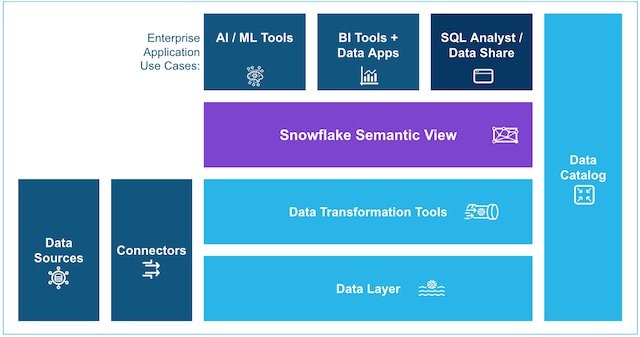
In this post, you will learn how to build an end-to-end integration between Snowflake semantic views and Amazon Quick. The sample data is user review data for a media company. You start by loading movie review data from Amazon Simple Storage Service (Amazon S3) into Snowflake, define a semantic view in SQL to add business meaning, explore it with natural-language queries through Cortex Analyst, and then generate an Amazon Quick dataset and dashboard. The dataset can be created manually or with a provided automation script. By the end, your BI team or AI team can ask natural-language questions against a governed data layer and trust that every response reflects the same business logic.