Migration & Modernization
Accelerate refactored mainframe performance tuning with Kiro Power
Your modernized mainframe application passes functional testing but fails its performance targets. Each fix takes a developer 1–2 days of manual analysis. In this post, we show how a Kiro Power cuts the remediation to hours by identifying performance hotspots and proposing proven remediation patterns that you review and approve. You can apply the Power to any functionality that fails its performance target.
Prerequisites
- Working AWS Transform-refactored application
- Kiro integrated development environment (IDE), subscription required for commercial use
- Underperforming functionality with a known expected performance target
- A PostgreSQL client such as pgAdmin
Why manual performance tuning slows modernization
Applications modernized with AWS Transform for mainframe refactor go through performance equivalence testing before production cutover. As the modernized application now runs on a distributed, multitier architecture, its performance profile differs from the monolithic source. For instance, every database write call in the modern application results in a network round trip from the application server to the database server which can result in performance challenges. Manual performance tuning can be slow and expensive:
- A single optimization takes a developer 1–2 days.
- An engagement carries multiple such optimizations, compounding the cost to timelines and budgets.
- The cycle creates unpredictable delays and diverts senior engineers from higher-value work.
The sample application and its bottleneck
We used a sample CloudFrame securities trading back-office application, originally z/OS COBOL with DB2, refactored to Java with AWS Transform for mainframe refactor. The walkthrough focuses on the ACCPCAD batch job, which runs program TRDPB000 (order acceptance and matching). For one currency, the job reads every accepted buy order, finds the matching sell order, validates both customers, the security and the trading accounts, then marks the pair as matched and adds it to the settlement queue.
On a dataset of 200,000 buy/sell order pairs, with 2,000 customers and 1,000 securities, the job takes approximately 5 minutes to complete. The bottleneck is that for each buy order the job:
- Reads the matching sell order with a separate SELECT (1 round trip per order)
- Looks up the buyer, the seller and the security through sub-program calls (3 calls and 3 SELECTs per order), even though the same customers and securities repeat across thousands of orders
- Reads the buyer’s and seller’s security and money accounts one at a time (4 SELECTs per order)
The result is approximately 2.4 million individual database round trips per run. Operations that were microsecond-fast on the mainframe’s local DB2 become millisecond network calls in the distributed architecture, creating a bottleneck. With this in mind, we used Kiro to analyze the application’s access patterns and propose optimizations tailored to what it finds.
Using Kiro Powers for performance optimization
Kiro is an AI-powered IDE whose agent reads, reasons about, and modifies code across a project. It supports Powers, reusable knowledge packages that encode domain expertise (patterns, APIs, remediation steps) in structured skill files Kiro consults when trigger keywords appear in your prompt.
We built a Power encoding proven optimization patterns for AWS Transform-refactored mainframe applications covering the three most common use cases and solutions we have encountered. These include replacing row-by-row database calls with batch writes, offloading Java-side aggregation to SQL, and pre-loading reference data into in-memory caches.
Inside the Kiro Power: patterns and structure
At the core of this approach is a Kiro Power, a self-contained knowledge package that gives Kiro domain expertise in optimizing AWS Transform-refactored mainframe applications. The Power exposes this expertise as skills, which are Markdown instruction files that Kiro loads on demand, pulling in the ones relevant to the current hotspot (a section of code where repeated database calls create a performance bottleneck).The encoded optimization patterns fall into three groups:
- SQL-level remediation using SQLExecutorBuilder: The AWS Transform for mainframe refactor runtime API for executing native SQL. On the mainframe the COBOL program and DB2 interaction doesn’t involve a network hop, so reading and summing rows one at a time cost microseconds per row and was the idiomatic design. After refactoring, that loop runs in Java on an application server while the data sits in a separate PostgreSQL database, which turns each of those reads into a JDBC call across the network. The Power rewrites the loop as a single set-based statement (cursor, join, or aggregation), leaving the filtering, joining, and summing with the database where the data already is. One round trip replaces N.
- DAO batch operations: The runtime’s Data Access Object (DAO) layer exposes batch insert and update methods (addRecordToBatch(), batchWriteDirect(), batchUpdateDirect()). The Power collapses a loop of individual writes into a single database round-trip.
- Pre-load caching: For reference data queried repeatedly in a loop, the Power replaces repeated lookups with a single up-front cursor read into an in-memory HashMap, switching the loop to fast in-memory lookups.
The Power contains five files: a manifest (plugin.json), skill files for getting started, hotspot identification, SQL-level remediation and pre-load caching, and DAO batch operations, plus a sql-file-locations.md reference file for SQL path configuration. The full file layout is available in the GitHub repository. Step 2 of the walkthrough below shows how to import the Power into Kiro.
How it flows end to end:
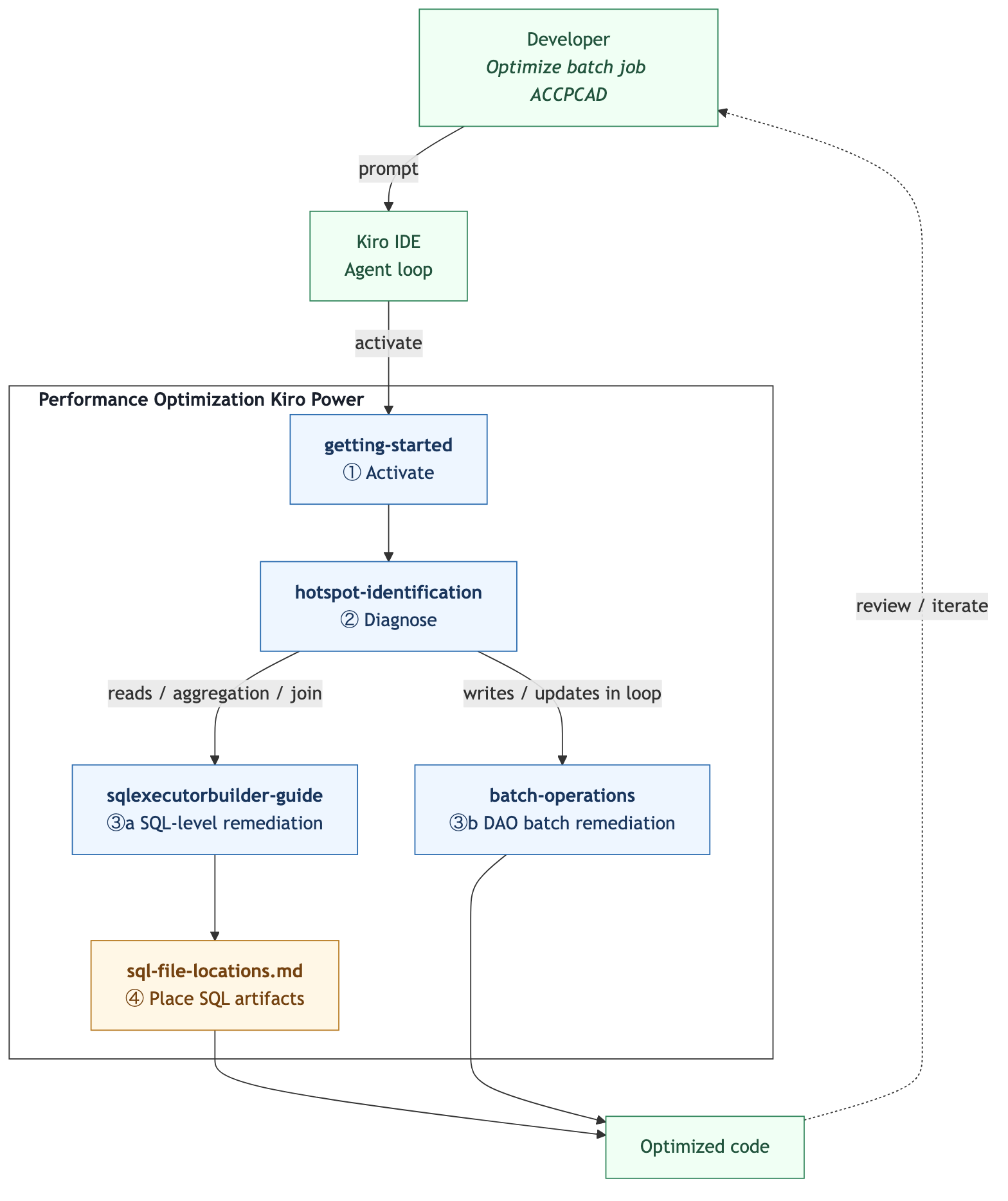
When you prompt “Optimize batch job ACCPCAD for performance,” the keywords match the Power’s trigger list and Kiro activates it. Kiro then runs four steps in sequence (activate, diagnose, remediate, and place), loading only the skill relevant to each stage, and writing new SQL files to both the build and runtime paths defined in sql-file-locations.md.
Walkthrough: identify and fix batch job performance hotspots
In this walkthrough, you use the Performance Optimization Kiro Power to identify and resolve performance hotspots in batch jobs modernized by AWS Transform for mainframe refactor. The same workflow applies to any application modernized through this pattern.
1. Clone the sample application and open it in Kiro
git clone https://github.com/aws-samples/sample-aws-transform-mainframe-refactor-performance-optimization.gitOpen the app-pom folder in Kiro. This is the Maven aggregator POM for the multi-module project (modules: entities, service, tools) and is the correct root to open so Kiro can resolve the full project structure.
Note: After cloning, build and deploy the application locally following Build and deploy your modernized application post-refactoring user guide. This includes creating and populating the PostgreSQL database using the DDL scripts in the database/ folder of the cloned repository. Verify that the ACCPCAD batch job runs successfully before proceeding.
2. Set up the Performance Optimization Power in Kiro
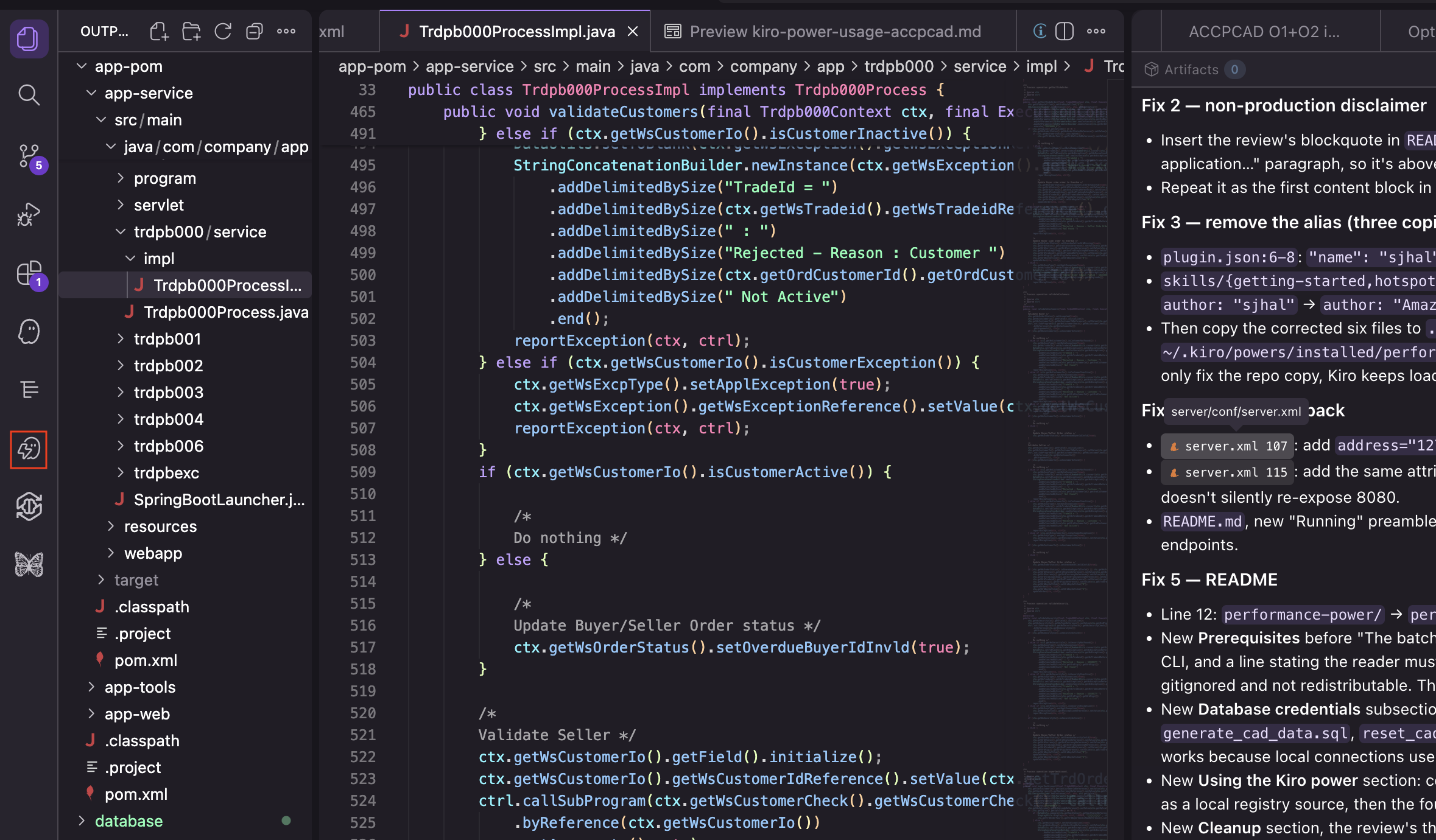
With CloudFrame securities trading back-office application running locally, set up the Kiro Power. In the Kiro sidebar, choose the Powers icon (highlighted in the following screenshot).
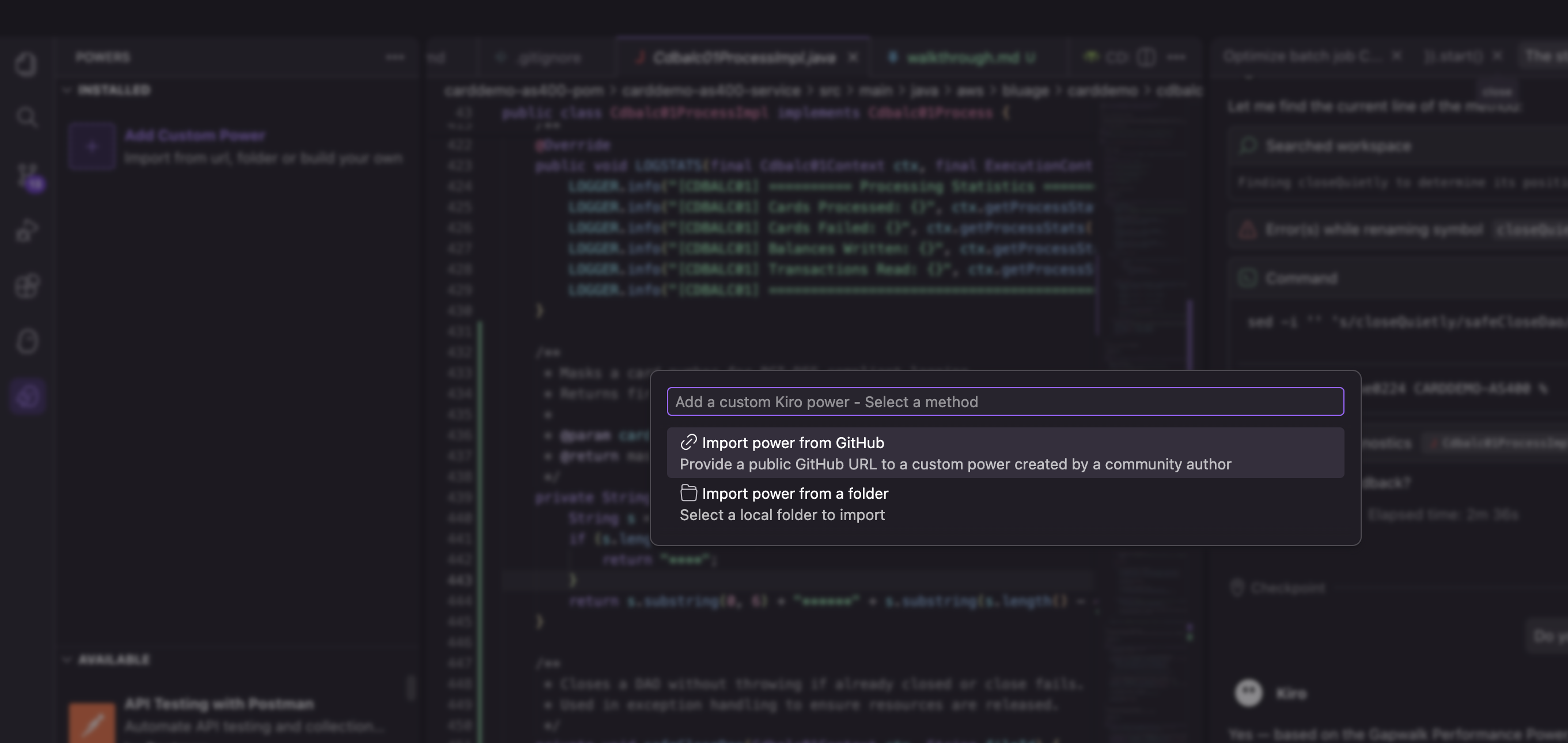
Choose Add Custom Power, then choose Import Power from GitHub. Point it to the GitHub repository that contains the Performance Optimization Power related files.
3. Capture the execution time and functional output of ACCPCAD batch job
- Open the CloudFrame securities trading back-office application batch job list at http://localhost:8080/gapwalk_application/scripts
- Open browser developer tools and switch to the Network tab:
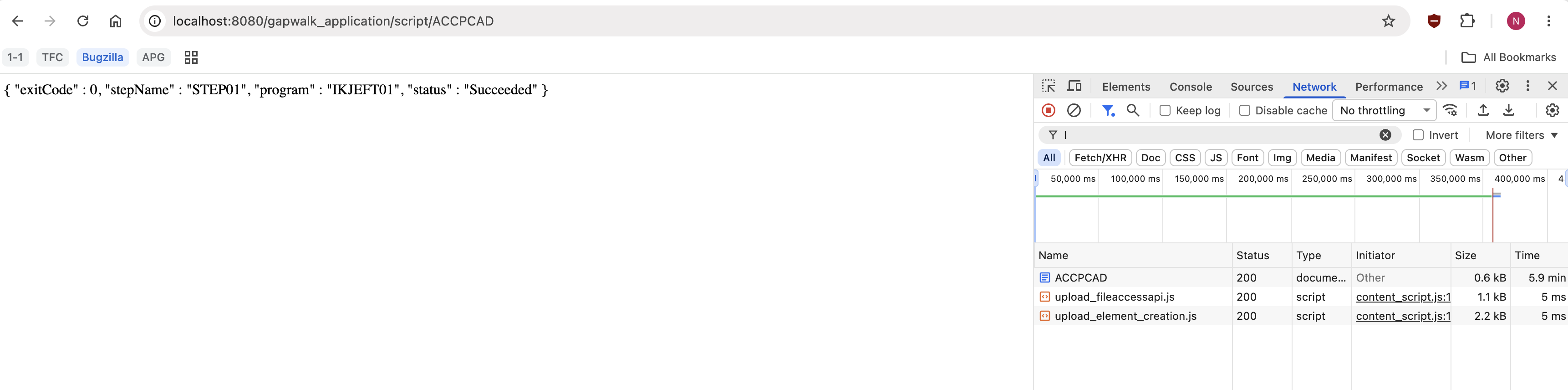
- Trigger the batch job ACCPCAD by clicking its link, which calls the Groovy script endpoint /gapwalk_application/script/ACCPCAD
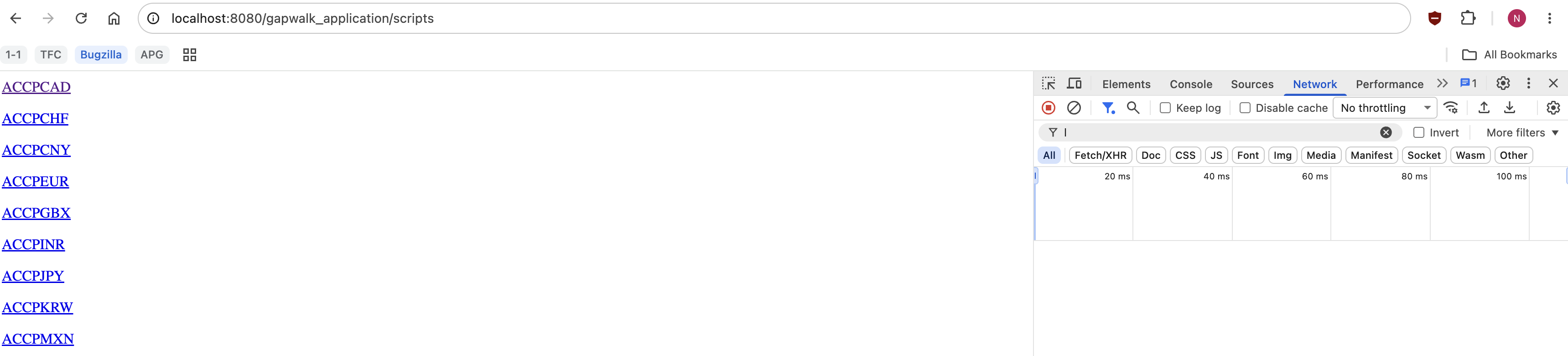
- Record the request duration from the Network tab — this is the baseline execution time.
- Save a snapshot of the modified tables using the following queries
DROP TABLE IF EXISTS base_ord, base_stq;
CREATE TABLE base_ord AS SELECT * FROM tbtrdord WHERE ord_currency = 'CAD';
CREATE TABLE base_stq AS SELECT * FROM tbtrdstq;
4. Restore to the database state before executionExecute the queries below:
BEGIN;
UPDATE tbtrdord SET ord_status = '101' WHERE ord_currency = 'CAD' AND ord_status <> '101';
TRUNCATE tbtrdstq, tbtrdexc, tbtrdsum, tbtrdlog;
COMMIT;
5. Run the optimization
In Kiro chat, enter the prompt: “Optimize batch job ACCPCAD. It’s slow as of now. You can use the performance optimization Kiro power to check what patterns you can optimize and the implementation details to do. First provide the list of optimizations you are planning to do and I will approve”
Kiro recognizes the keywords optimize, batch, and performance, activates the Power, and gains access to its four skills: getting-started (technique decision matrix), hotspot-identification (diagnosis patterns), sqlexecutorbuilder-guide (SQLExecutorBuilder API reference), and batch-operations (DAO batch write and update guide).
6. Review the analysis
Kiro analyzes the batch job implementation and identifies the hotspots:
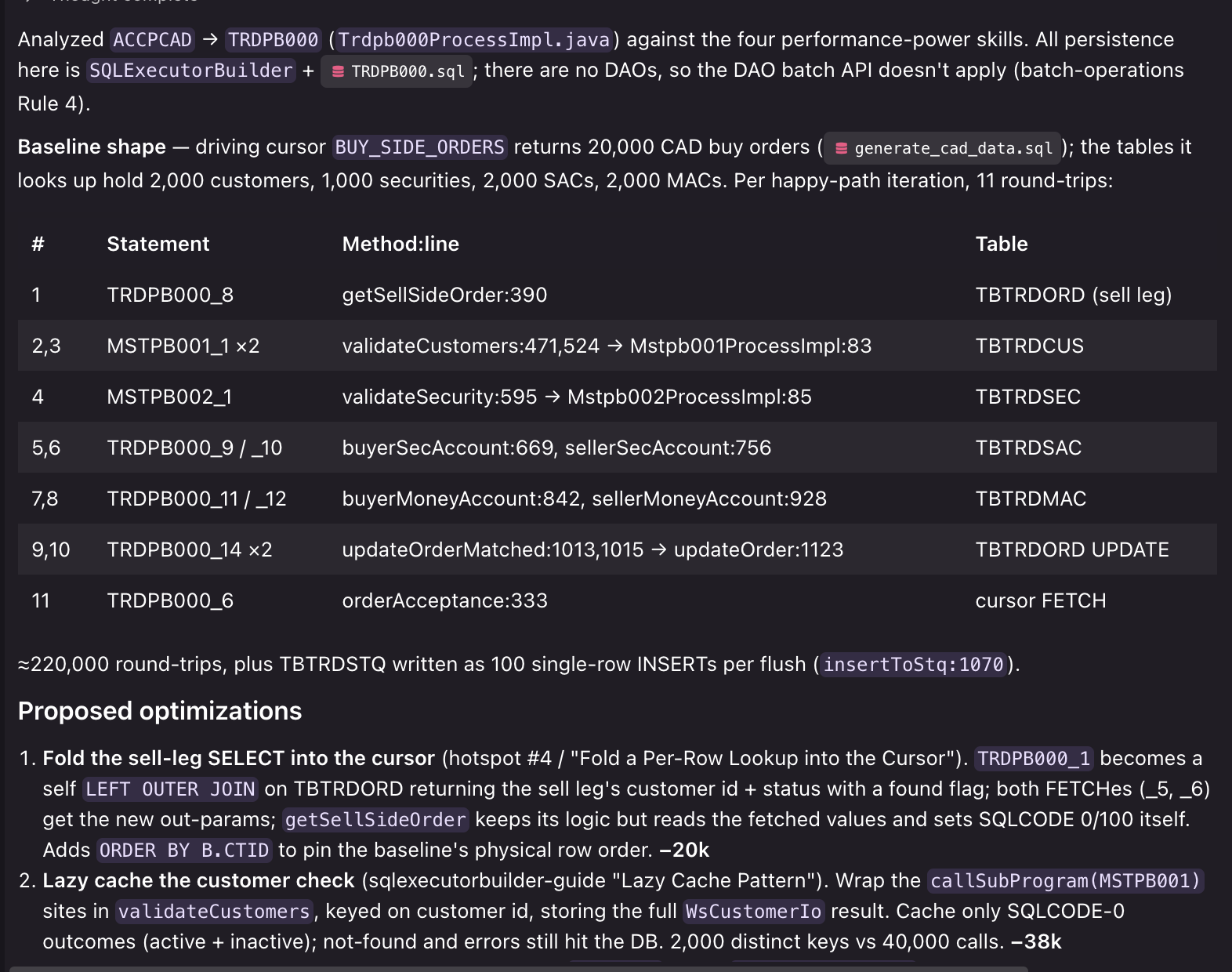
Kiro proposes specific optimizations for each. You review and choose which to approve.
7. Approve and apply optimizations
For each hotspot, Kiro proposes the code change. You can approve, skip, or request modifications. Then reply to Kiro, for example:
I approve 1 and 2 only. For 1, cache lazily on first lookup instead of preloading, and don’t cache errors or not-found results. Output must stay identical.
Sell-side order lookup: the database join replaces the per-order SELECT:The buy-order cursor now LEFT JOINs the matching sell order, so the separate SELECT for each buy order is no longer needed:
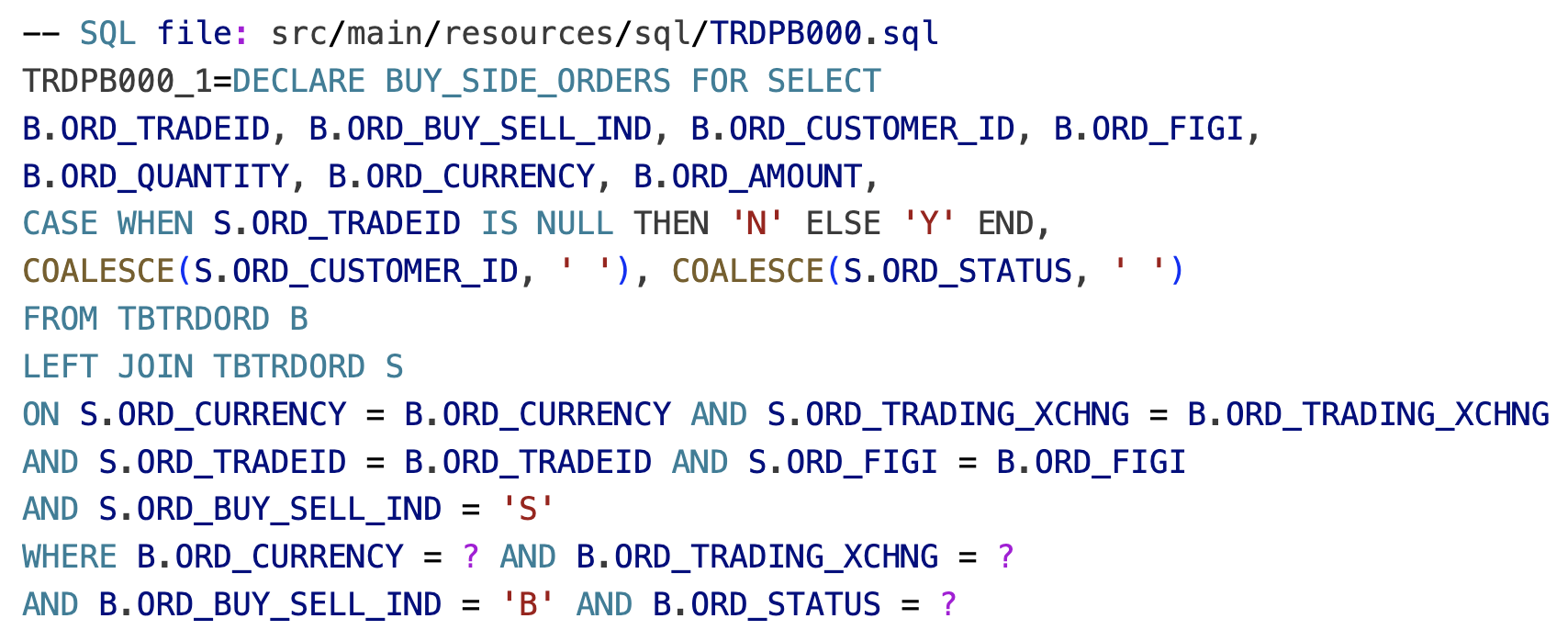
Reference lookups: a lazy HashMap cache replaces repeated reads:For customer, security and account checks, Kiro wraps each lookup in a cache. The first lookup for a key goes to the database or sub-program as before. Later lookups for the same key are served from memory:
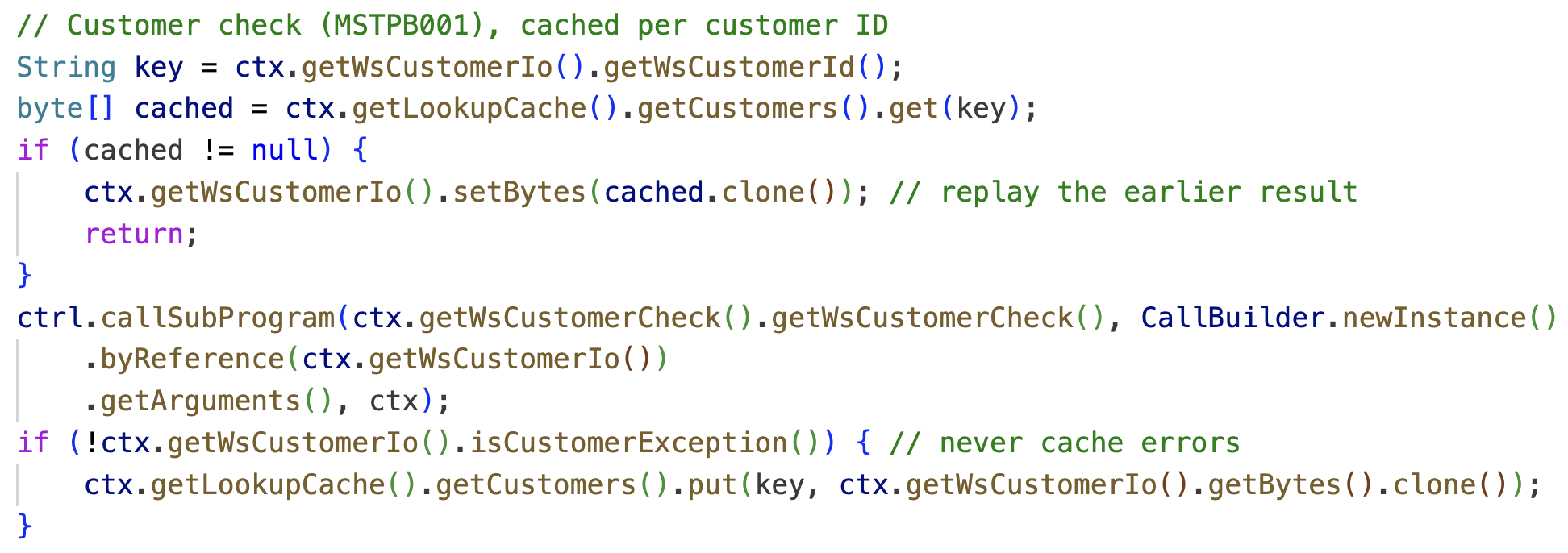
The cache is cleared at the start of each run. Errors and not-found account results are never cached, so those cases still go to the database and behave exactly as before.
8. Capture the execution time and functional equivalence of the optimized batch job
- Rebuild the WAR with the optimized code and redeploy to Tomcat, then trigger the ACCPCAD batch job again and record the new execution time following the instructions in step 3
- Compare the post-optimization tables row-by-row with the baseline snapshot. Use the Compare Tool of AWS Transform for mainframe refactor, or a SQL-based check:
 -- Order statuses must be identical (TBTRDORD)

(SELECT * FROM tbtrdord WHERE ord_currency = 'CAD'
EXCEPT SELECT * FROM base_ord)

UNION ALL

(SELECT * FROM base_ord EXCEPT SELECT * FROM tbtrdord WHERE ord_currency = 'CAD');


-- Settlement queue entries must be identical (TBTRDSTQ)

(SELECT stq_currency, stq_trade_data FROM tbtrdstq
EXCEPT ALL SELECT stq_currency, stq_trade_data FROM base_stq)

UNION ALL

(SELECT stq_currency, stq_trade_data FROM base_stq
EXCEPT ALL SELECT stq_currency, stq_trade_data FROM tbtrdstq);
Zero rows returned confirms functional equivalence. The execution time should drop because each order needs fewer database round trips, while the TBTRDORD and TBTRDSTQ output stays identical. Faster execution with no change in behavior shows that the optimization is safe to promote.
9. Verify the results
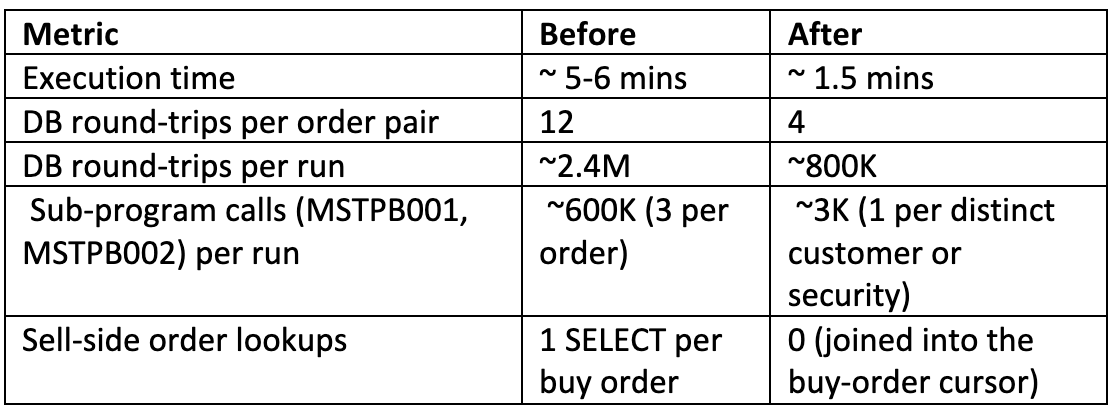
The ACCPCAD batch job now completes in approximately 1.5 minutes, down from 5–6 minutes, for 200,000 CAD order pairs. The gain comes from removing repeated per-order work: the matching sell order is now read by the buy-order cursor itself, and customer, security and account data is read once per key and then served from an in-memory cache.
Scale and enterprise rollout across projects
The Power’s value grows with engagement size: write it once, then apply it to every program with similar symptoms across every project. The Power scales on three axes:
- Horizontal scale across programs. The Power triggers on code symptoms (loops with database calls, Java-side aggregation, individual writes and updates) rather than specific program names, so it applies uniformly to AWS Transform-refactored batch or online programs. A single Power covers every program that shares the same access pattern across an engagement.
- Throughput shift for your team. You supervise Kiro across multiple programs in parallel rather than hand-tuning each one, shifting effort from 2 days of manual work per fix to under an hour of review per fix across the engagements.
- Vertical scale across codebase size and pattern coverage. Each Kiro invocation reads only the target program, and the Power’s skill files, so workspace size does not affect remediation quality: a workspace with 10 programs and one with 10,000 programs produces the same output for the same hotspot. Coverage scales the same way: add a skill file for each new pattern. Write a Markdown file describing when the new pattern applies, the API or SQL to use, and the guardrails for when not to use it, and Kiro consults it from the next session on. Index coverage for refactored keyed reads is a natural first candidate, since a keyed read with no supporting index becomes a scan that no code-level fix can rescue.
Treat the Power as a version-controlled artifact: review and distribute it the same way you would framework code. When adopting the Power in a project, run Kiro in Supervised mode, where Kiro proposes each change and waits for you to accept or reject it. As your confidence grows, switch to Autopilot mode, where Kiro applies a full sequence of changes end to end and you review the final differences. The Kiro documentation covers both modes in detail.
Security considerations and best practices
Security:
Kiro is an AI-powered development environment from AWS, built on Amazon Bedrock and following the AWS shared responsibility model. Kiro protects communication between your IDE and its services with TLS 1.2+ and encrypts stored content at rest using AWS Key Management Service (AWS KMS) keys. For full details on data handling, encryption, cross-region processing, and opt-out settings, see the Kiro privacy and security documentation.
Best practices:
- Diagnose before remediating: Always run the hotspot-identification pass first; applying an optimization to the wrong loop can introduce silent correctness bugs.
- Respect the “when NOT to batch” guardrails: Operations that require immediate consistency, depend on a value from the previous insert, or risk conflicting updates to the same row must stay row-by-row.
- Verify functional equivalence: Run the existing test suite on the optimized program before measuring the performance delta.
- Measure, don’t assume: Capture baseline and post-optimization runtimes on like-for-like data, so you have measured baselines to present to stakeholders.
- One batch job per change: Keep each Kiro session focused on one hotspot change so the difference is reviewable, git history stays clean and reverts remain easy.
We have successfully applied this approach across multiple customer engagements with comparable architectures. Your specific hotspots and time savings will vary based on your application’s access patterns, data volumes, and codebase complexity.
Clean up your environment
To restore your machine to a clean state after completing the tutorial:
- Stop the application
Run<TOMCAT_HOME>/bin/shutdown.sh(or stop the IntelliJ run configuration). If the Angular frontend is running, press Ctrl+C in its terminal. - Shut down Kiro IDE
The Performance Optimization Power remains installed for future use. To remove it:rm -rf ~/.kiro/powers/installed/performance-optimization-power
- Optional: Remove the Cloned Repository
rm -rf sample-aws-transform-mainframe-refactor-performance-optimization
Note: This walkthrough provisions no AWS resources. If you adapt these patterns to your AWS Transform for mainframe refactor deployment, follow your organization’s standard teardown procedures for those resources to avoid ongoing charges.
Conclusion
In this post, we showed how a purpose-built Kiro Power reduces performance optimization work on AWS Transform-refactored mainframe applications from days to hours per issue. We demonstrated the approach on a sample application and delivered a 4x speed-up with results identical to the unoptimized run.
Once recurring patterns live inside a Power, Kiro handles the routine engineering while you diagnose, review, and validate, keeping modernization timelines predictable and freeing senior engineers for architecture decisions, cutover planning, and other high-impact work. Performance is the first candidate, but any recurring class of post-refactor work fits the same model: standardizing error handling, instrumenting for observability, and bringing refactored code in line with your own conventions can all be encoded as Powers and applied consistently across every program in your engagement.
Next steps
- Apply the Power to your own workloads: Clone the sample repository, import the Power into Kiro IDE, and point it at your application’s batch jobs.
- Extend the Power: When you find a remediation pattern not already encoded, add it to the skill files, or create an entirely new skill for patterns specific to your organization’s codebase and environment. The Power’s value compounds with every contribution.
For further reading:
- Kiro documentation: Powers, skills files, hooks, and context management
- AWS Transform for mainframe: refactor pattern and runtime architecture