Migration & Modernization
Accelerating VMware migration: AWS Transform’s new experience
Building on a momentous launch earlier this year, AWS adds new powerful AI capabilities to AWS Transform for VMware migration agent. AWS Transform for VMware understands your business priorities, adapts to your environments, and gives you greater control at every migration step. The agent orchestrates migration processes including dependency mapping, intelligent wave planning, and network configuration conversions across multiple target accounts. The migration agent’s network capability now supports new vendors for translation to Security groups, including Cisco ACI, Palo Alto, and Fortinet networks.
Whether you’re planning an end-to-end migration of your complete VMware environment into Amazon EC2 or targeting specific workloads and servers of your VMware infrastructure, AWS Transform’s AI-driven approach delivers versatility in execution. You can modify migration plans as needed, repeat discovery steps as infrastructure evolves, and selectively implement migration waves while maintaining the integrity of completed work. This intelligent approach reduces migration risks and accelerates deployment timelines. The unified web interface and AI assistance helps you maintain consistency throughout your migration. AWS Transform for VMware is available at no additional cost. This new solution is now available in all AWS Regions where AWS Transform is offered, with support for migrating servers and networks to 16 AWS regions.
In this blog, we’ll guide you through an end-to-end migration: discovery for environment analysis, migration planning, network translation for infrastructure adaptation, and server migration for workload transformation to Amazon EC2.
Prerequisites
To begin your setup, you must have the following:
- AWS Organizations setup
- AWS IAM Identity Center setup
- AWS Accounts:
- Migration planning account – Serves as the control center for migration activates and orchestration. AWS Transform runs in this account.
- Target accounts – Destination accounts for your migrated workloads.
For enterprise scale migrations, we recommend having different accounts for specific purposes as described above; however, you can also choose to combine functions into a single account setup. All accounts must be part of the same AWS Organization.
Getting started
Follow the steps to enable AWS Transform and assign users in the migration planning account:
AWS Transform setup
- In AWS Console, navigate to AWS Transform
- Choose Get started
- Choose the Encryption key and select Enable AWS Transform
- Choose Manage users
- Add users or groups from IAM Identity Center to AWS Transform
- Navigate to Settings from the left pane and copy the Web application URL
- Users can log in to AWS Transform using the Web application URL
Create your first AWS Transform job
- On the Transform console, choose Create workspace to create a new workspace
- Choose Create job and choose Migration > VMware Migration to create the VMware migration job
- Choose a job from the list of available job options
- Follow the subsequent prompts in chat to continue the migration journey
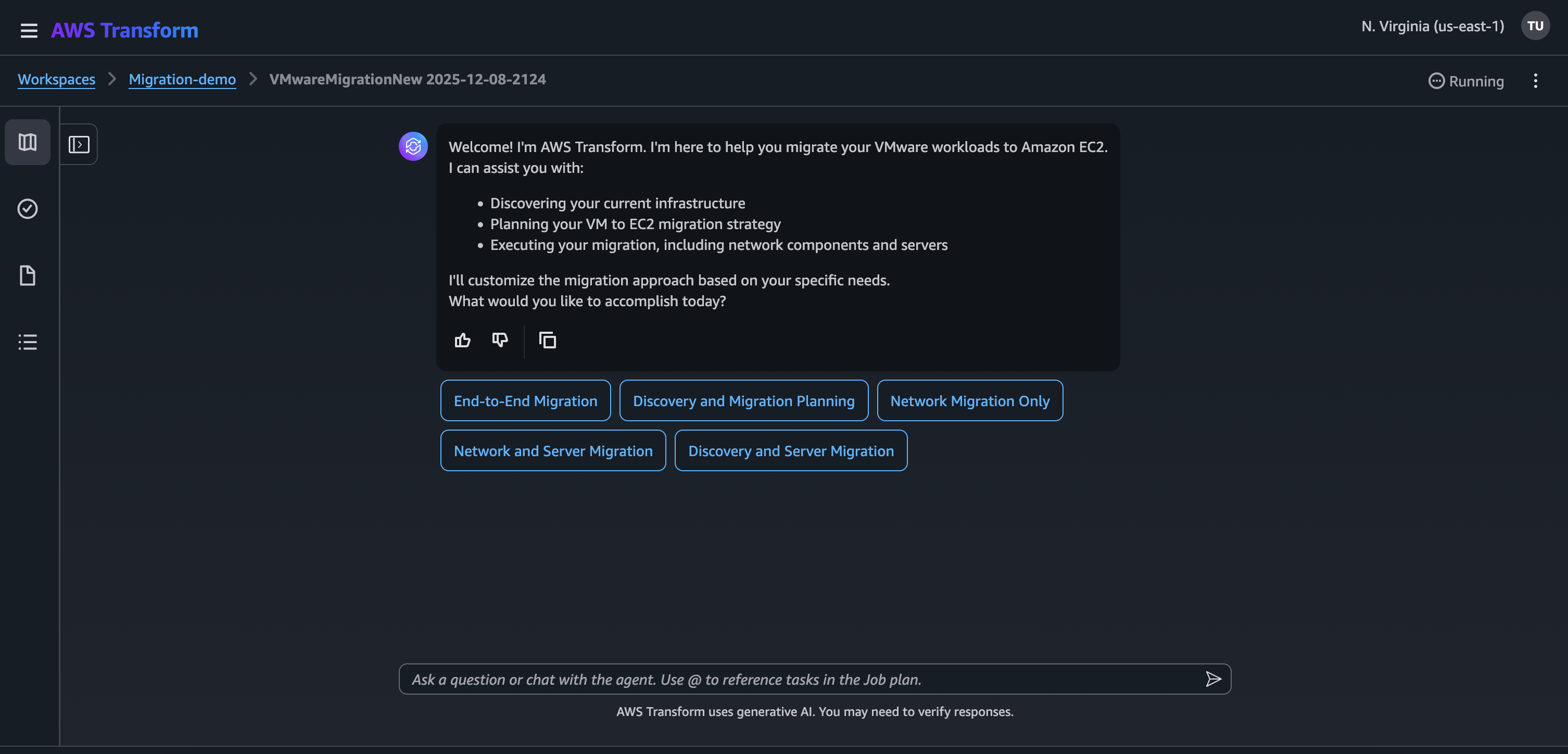
Figure 1: AWS Transform for VMware job options
Discovery
AWS Transform analyzes source data, automatically identifies patterns, resolves data conflicts, and eliminates duplicate entries, providing a cleaner and more accurate view of your VMware environment. The migration agent’s discovery capabilities are agnostic; it can work with different types of exports that can be generated by multiple data collectors.
At the core of the discovery is the AWS Transform discovery tool, which is deployed through a centralized Discovery Collector OVA (Open Virtualization Format Archive) file in your VMware vCenter. Operating entirely within your on-premises environment without requiring AWS connectivity, this tool automatically discovers and collects detailed information about your environment, including server specifications and network dependencies. The tool goes beyond basic inventory collection by capturing critical data points such as resource utilization for right-sizing recommendations, SQL server database metadata, and server-to-server connections for dependency mapping. All collected data remains securely stored within your on-premises infrastructure until you choose to proceed with the migration.
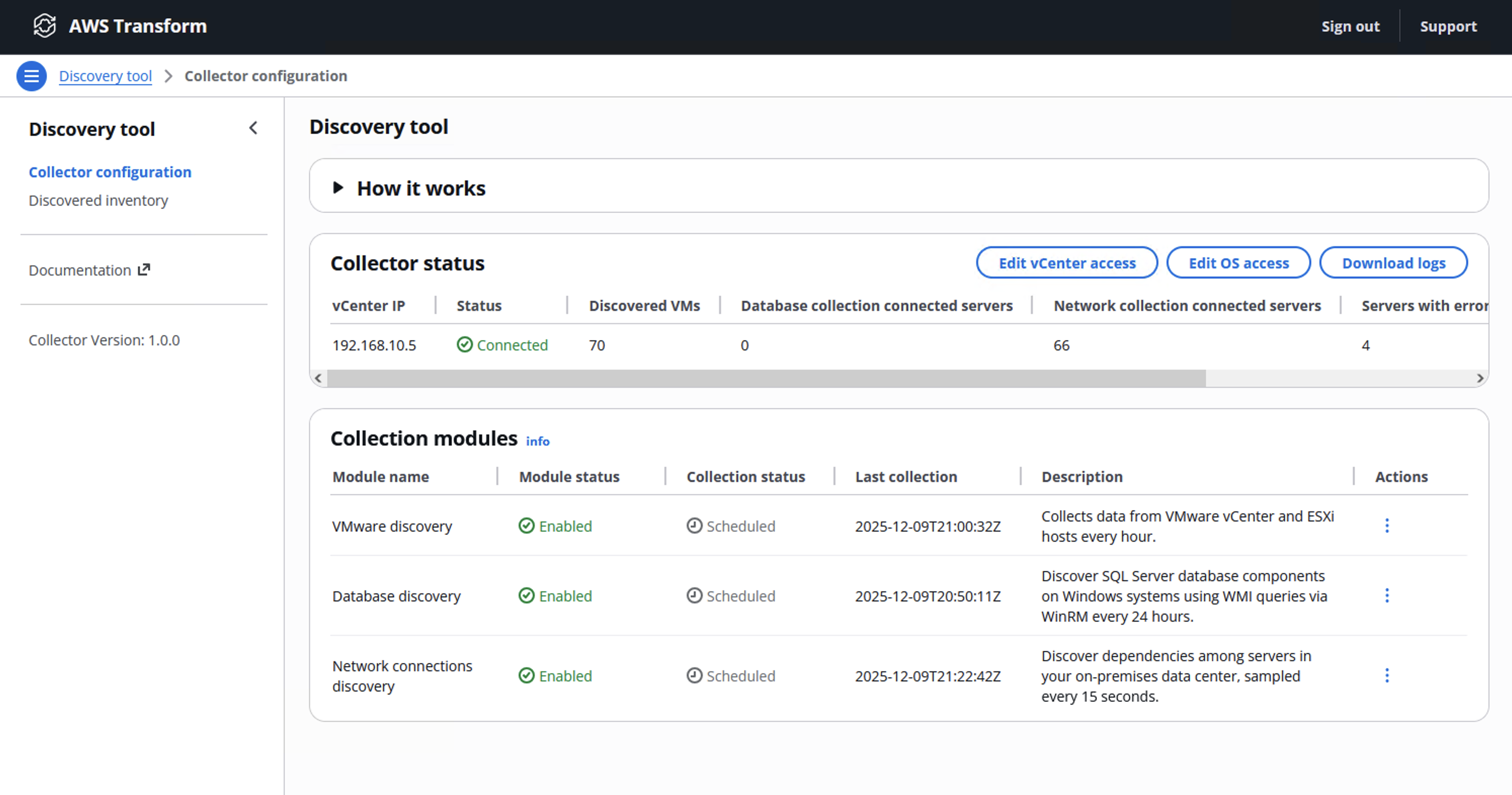
Figure 2: AWS Transform for VMware Discovery tool
For existing tools and processes, AWS Transform offers flexible data ingestion options. You can leverage RVTools exports in CSV or XLSX formats, which provide detailed information about your VMware environment, including vSwitches, port groups, and VLANs. The agent also supports data imports from select third-party tools like ModelizeIT and Cloudamize, integrating with your existing infrastructure management solutions.
In addition to this, AWS Transform discovery step can process files in any format using a Large Language Module (LLM) to analyze the content. When successful, it extracts server information to update existing inventory records or create new entries.
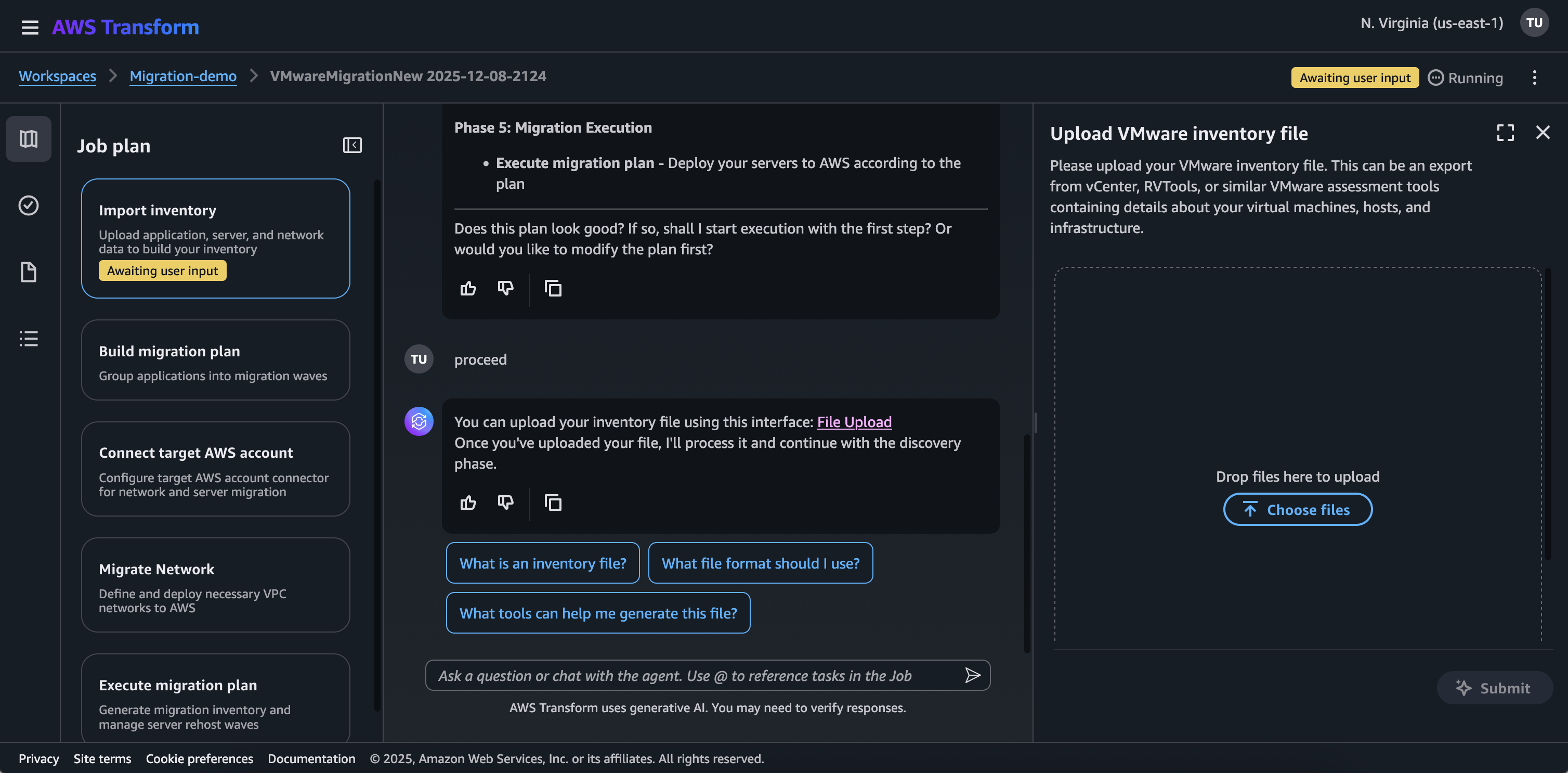
Figure 3: Migration job data ingestion
The discovery step creates a validated infrastructure inventory that identifies data quality issues and highlights any gaps or inconsistencies requiring attention. This comprehensive understanding of your environment becomes the foundation for subsequent migration steps, including migration planning, network translation, and server migration.
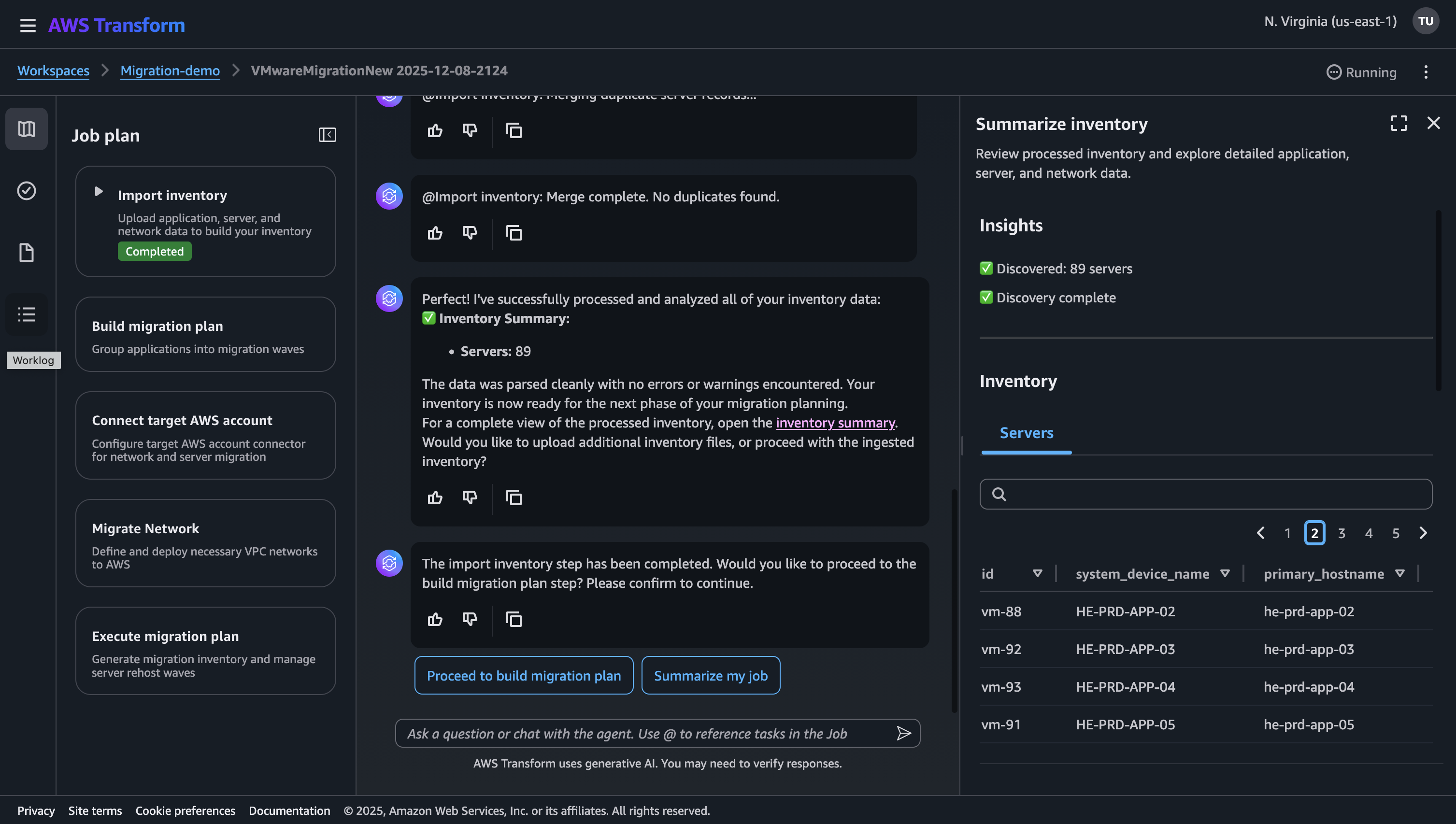
Figure 4: Migration job discovery summary
Build migration plan
The next step of end-to-end migration is creating the migration wave plan. AWS Transform introduces a new AI-powered migration planning capability that redefines how customers approach VMware migration planning. Through a conversational interface, this capability transforms complex infrastructure data into actionable migration strategies. By combining structured validation with intelligent dependency analysis, AWS Transform helps customers maintain control of their migration journey while adapting to evolving business requirements of the planning process.
This begins with data processing and infrastructure analysis. AWS Transform processes your infrastructure inventory files, typically in CSV or XLSX formats, extracting server names, operating systems, configurations, CPU, memory, storage allocations, and network dependencies details. This analysis produces a validated infrastructure inventory, identifies data quality issues, and highlights any gaps or inconsistencies that need clarification.
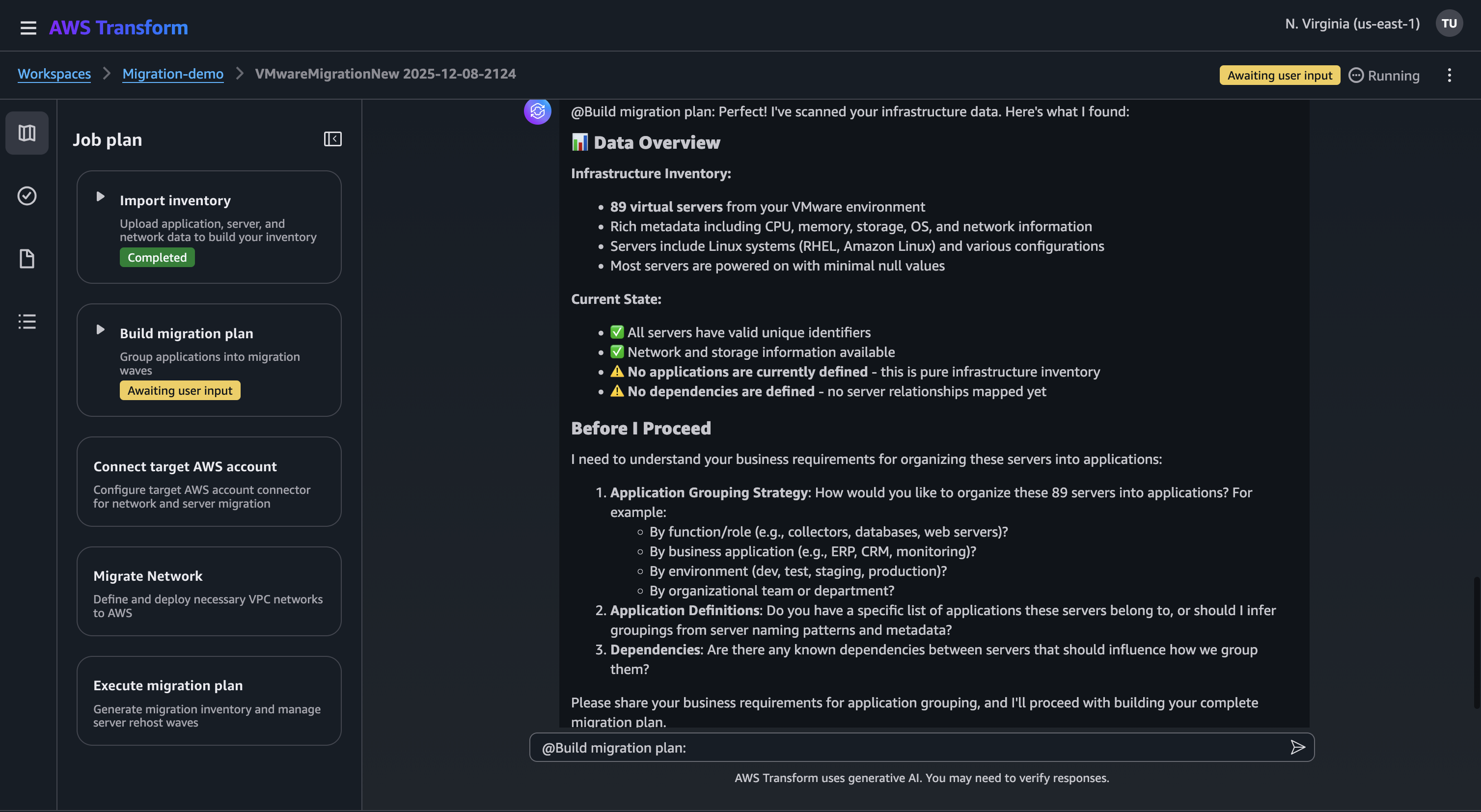
Figure 5: Infrastructure inventory analysis
In the migration planning step, AWS Transform implements a three-phase process. First, you define your approach and share business inputs to the agent related to your applications. Second, the agent applies these rules to create application definitions, ensuring each server is assigned to exactly one application. Third, applications receive priority scores based on factors such as business criticality, technical complexity, and risk tolerance, creating a structured portfolio that drives migration sequencing.
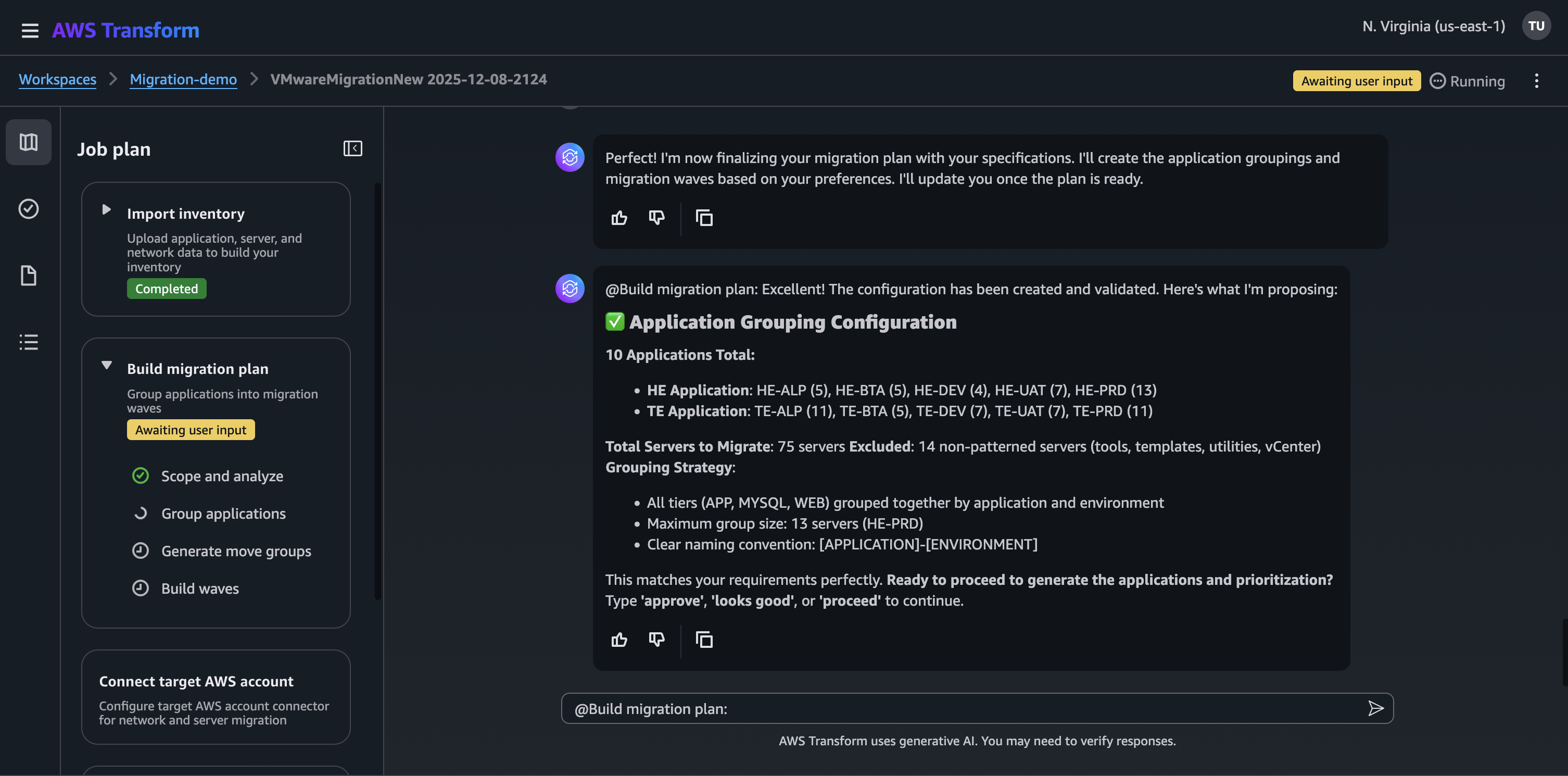
Figure 6: Migration plan – Application grouping
The next phase is to create move groups. Each move group includes related applications that must migrate together. AWS Transform analyzes inter-application dependencies to prevent scenarios where applications migrate before their dependencies. Move groups follow your defined sizing rules and composition requirements, such as keeping database applications together or separating development and production environments.
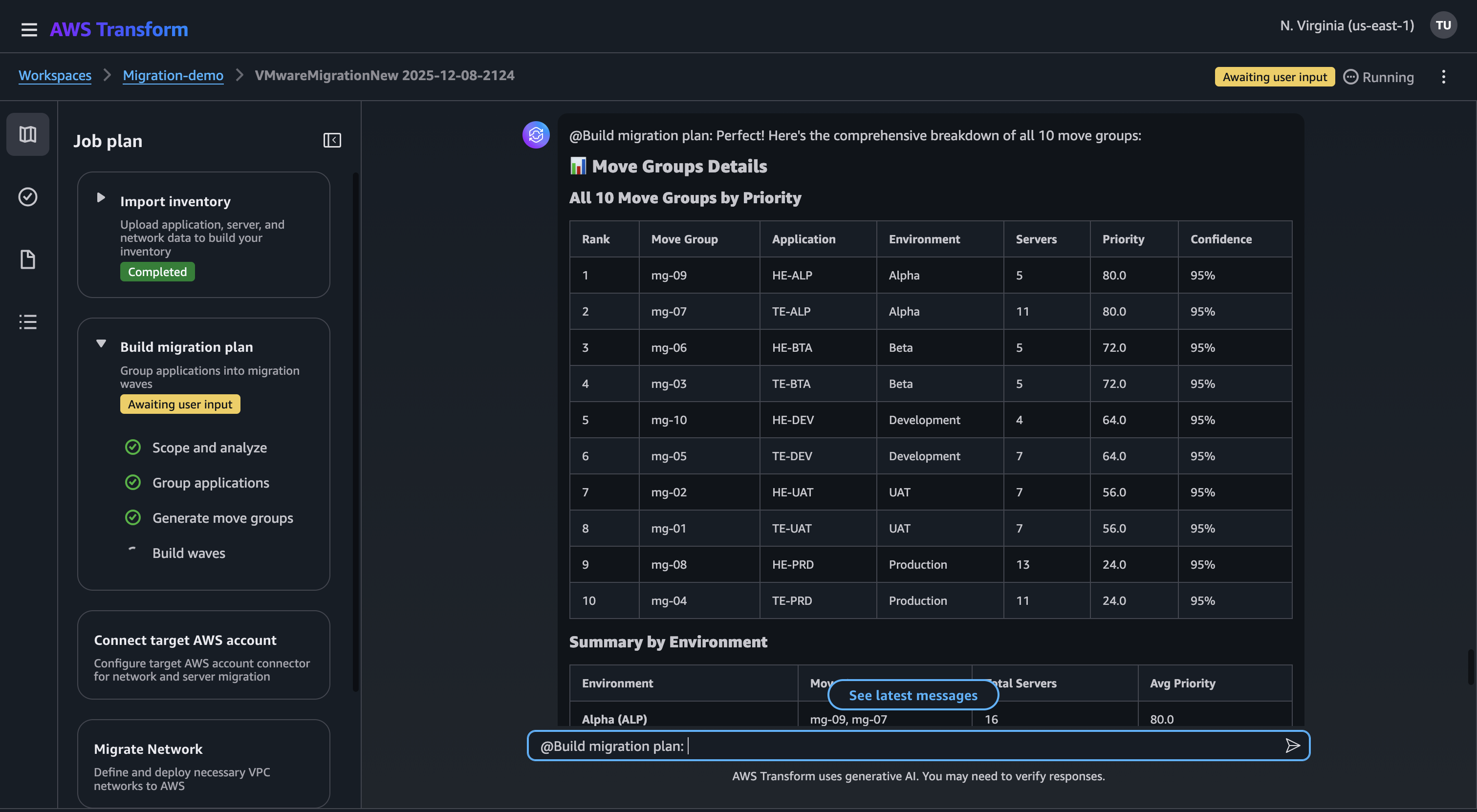
Figure 7: Migration plan – Move groups
Building migration plan ends with the creation of waves. AWS Transform creates the migration timeline by organizing move groups into sequential waves. Each wave contains one or more move groups and executes in a defined sequence. AWS Transform optimizes the schedule while respecting dependencies. The move groups with no dependencies can execute in parallel, while those with dependencies must follow a specific order. The agent incorporates your business constraints, such as the maximum number of waves per month or required buffers between waves, to create a feasible migration schedule.
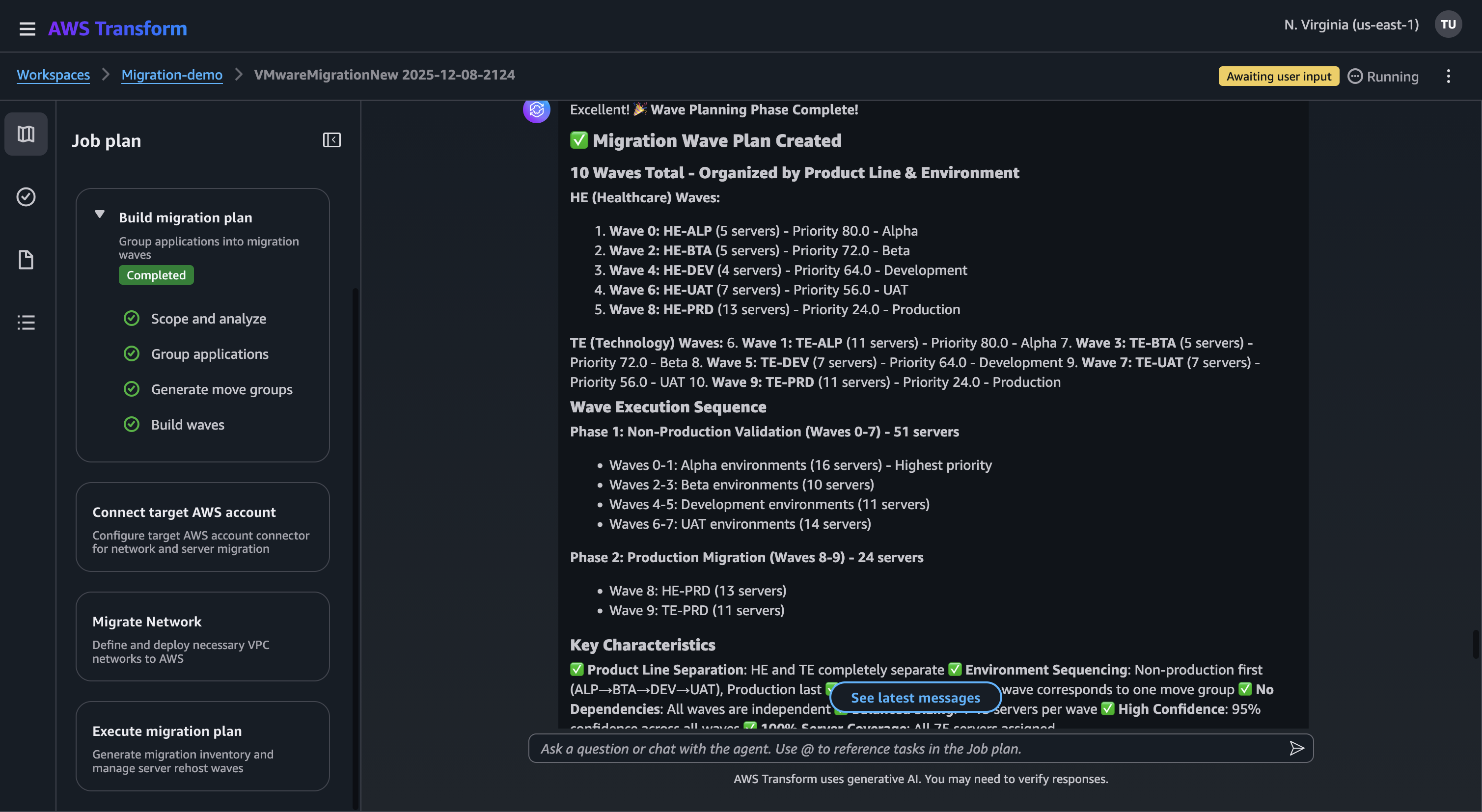
Figure 8: Migration plan – wave plan
Throughout the migration planning step, AWS Transform supports iterative refinement at any phase. Changes to application grouping triggers regeneration of move groups and waves, while move group modifications only regenerate the wave plan. This targeted regeneration ensures efficient updates without disrupting completed work.
Network translation and migration
After finalizing your migration waves, AWS Transform for VMware automates network configuration migration by translating your source network settings and deploying them across target AWS accounts. In addition to support for VMware vSphere and VMware NSX, the migration agent now supports an expanded range of following network infrastructure sources, enabling seamless conversion of existing network configurations to AWS networking constructs:
- Cisco Application Centric Infrastructure (ACI) Network policy configurations
- Palo Alto Networks firewall security policy
- Fortinet FortiGate firewall security policy
The network translation begins with connecting your target AWS account, you can define single-account or multi-account migration. After connecting the target account, you can import your source network configuration. AWS Transform supports multiple file formats from VMware NSX and VMware vSphere RVTools exports. After file validation, it proceeds to security group configuration, where you can enhance the security posture by incorporating additional configuration data from supported security appliances. This is optional but recommended for maintaining consistent security policies in the target environment.
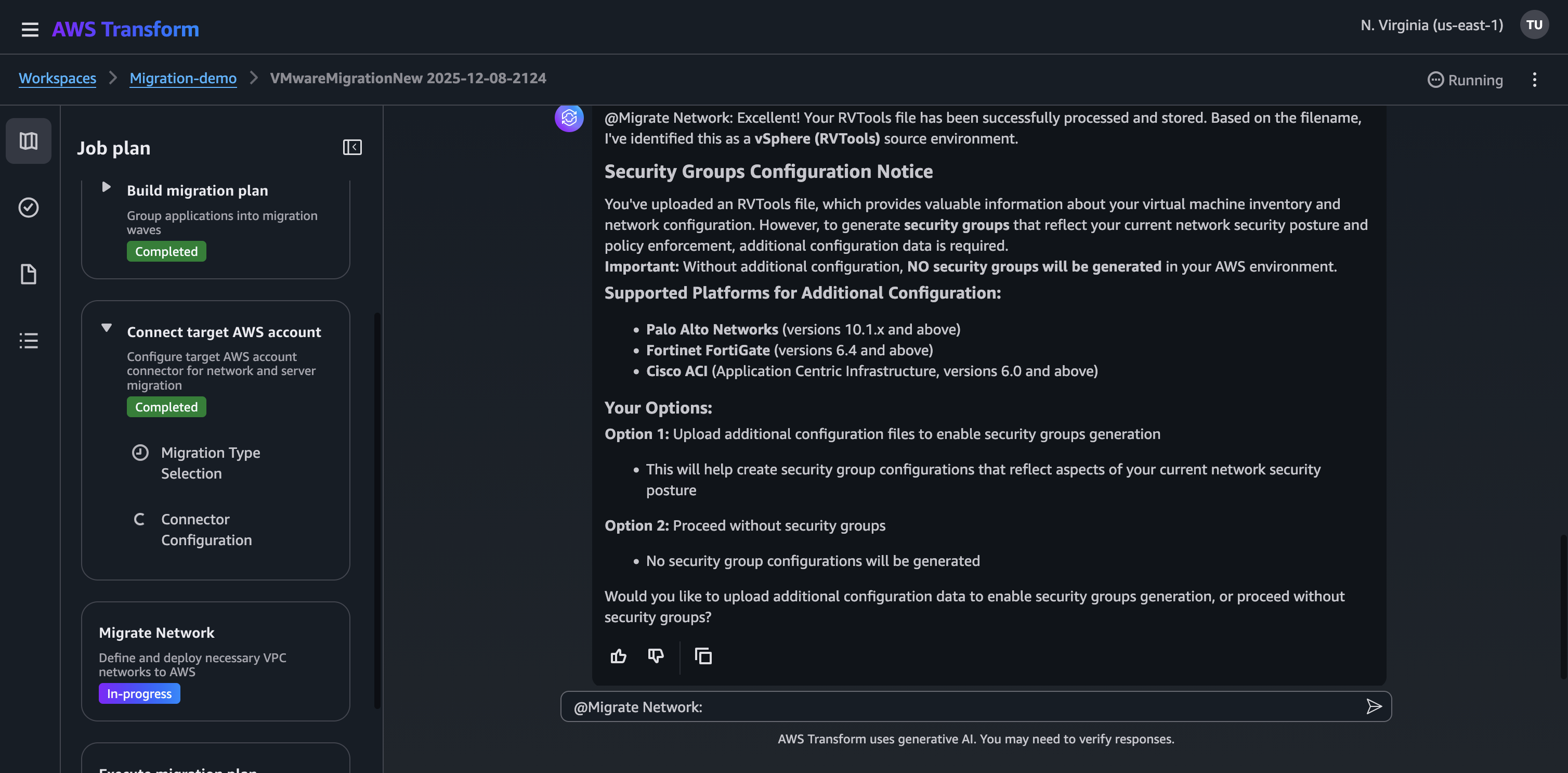
Figure 9: Network configuration inputs for Security groups configuration
After completing security group configuration, AWS Transform guides you through network topology selection, offering two architectural patterns. You can also chat to describe the sample architectures for either topology, helping understand the network design before implementation.
- Isolated Virtual Private Clouds (VPCs)
- Creates VPCs that operate independently
- Each VPC functions as a standalone network with its own internet gateway and routing configuration
- Best suited for simple deployments and environments with minimal cross-VPC communication needs
- Ideal for custom network designs where you plan to manually make additional changes and configure connectivity between VPCs.
- Hub and Spoke VPCs
- Creates an AWS Transit Gateway and connects all VPCs using route tables
- All cross-VPC traffic routes through the Transit Gateway, providing centralized network management and shared services
- Ideal for environments requiring centralized control, shared services, or frequent cross-VPC communication
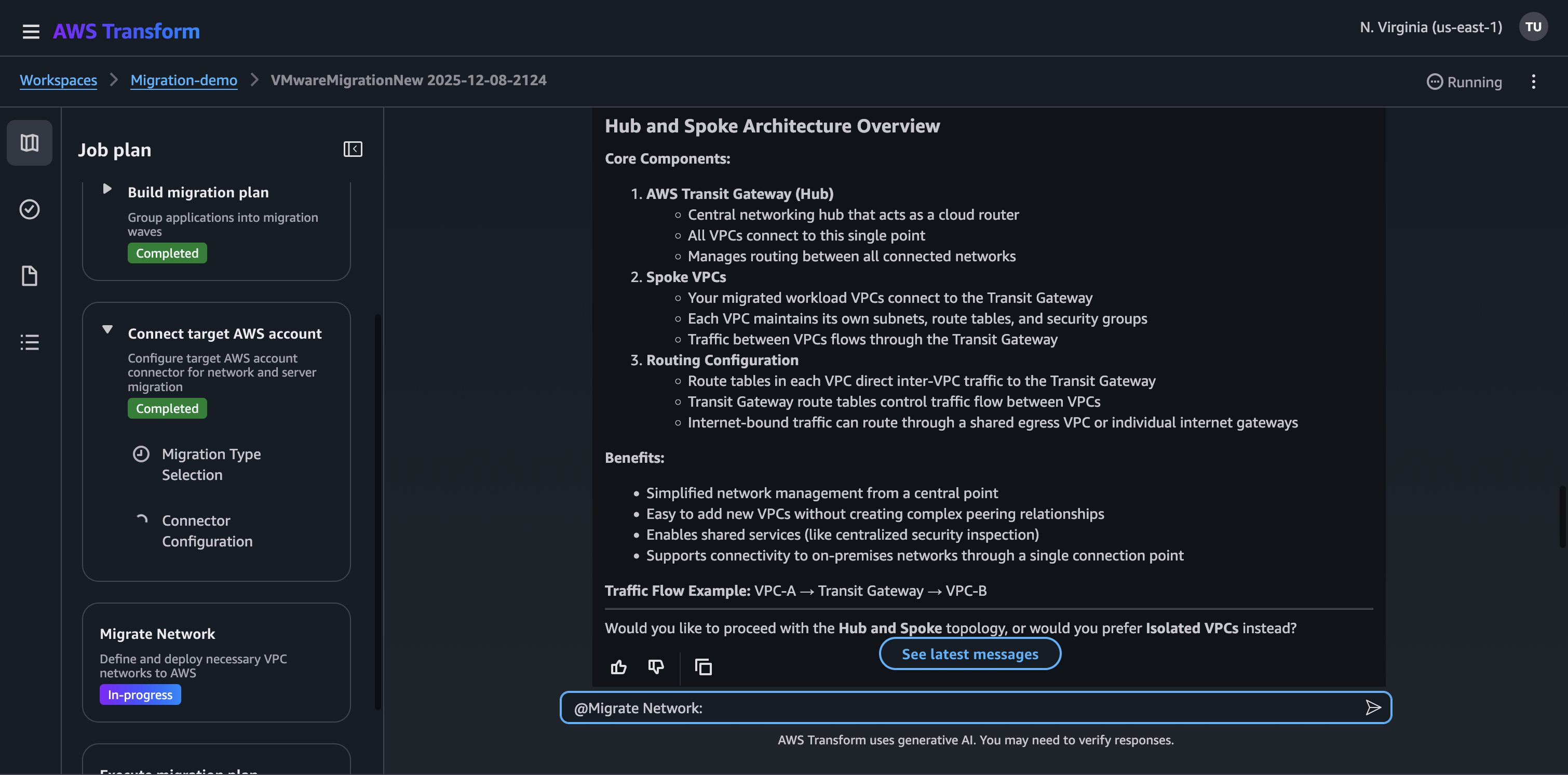
Figure 10: Network topology description
This automates converting your on-premises network architecture to AWS networking components. It analyzes your source network configurations and generates Infrastructure as Code (IaC) templates that define your target AWS network environment, including VPCs, subnets, security groups, and routing tables. You can leverage multiple IaC formats including Landing Zone Accelerator (LZA) on AWS compatible YAML, AWS CloudFormation, AWS Cloud Development Kit (CDK) , and HashiCorp Terraform, providing flexibility in deployment approaches. These templates are automatically stored in S3 buckets for easy access.
AWS Transform offers both automated and manual deployment options to suit different organizational needs. During the network configuration, AWS Transform allows you to specify and edit CIDR ranges for generated VPCs, enabling you to avoid network overlaps, comply with IP addressing policies, and ensure sufficient IP address space for all planned subnets and workloads. Additionally, network deployment requests require explicit approval through the AWS Transform Approvals tab, with deployments proceeding only after validation by AWS Transform workspace administrator. If AWS Transform is used to deploy the network, the VPC Reachability Analyzer service is used to verify connectivity across the deployed network. This flexibility in network configuration, combined with support for deployment through various IaC solutions, ensures a secure and well-architected network foundation.
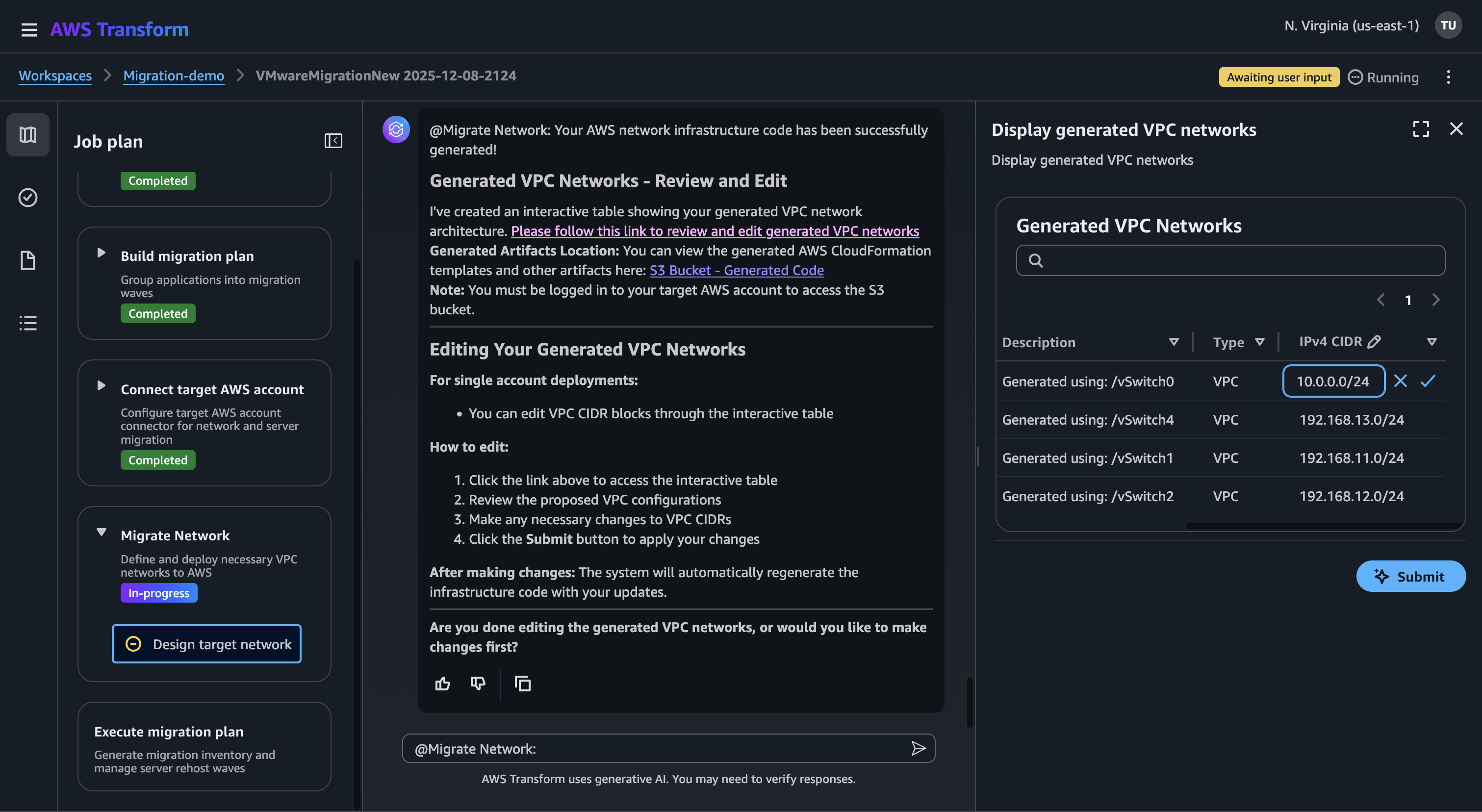
Figure 11: Review and edit the generated VPC configurations
A key strength of the agent lies in its versatility; you can execute network translation as a standalone migration or integrate it with other steps like discovery, wave planning, and server migration across multiple target accounts. Throughout the process, you can review and validate the proposed network configurations, adjust as needed, and maintain consistent compliance requirements, ultimately minimizing potential connectivity issues and reducing migration risks.
Server migration
As the final step in your migration journey, AWS Transform streamlines the server migration with automated rehosting capabilities that transform your servers to run natively on AWS. The migration agent leverages the proven AWS Application Migration Service (MGN) to handle the data replication while providing control over the migration at both wave and individual server levels.
AWS MGN is available at no charge for the first 90 days of continuous use, per source server. During replication and when launching test or cutover instances, you will incur standard charges for provisioned AWS resources such as Amazon EC2 instances and Amazon EBS volumes, according to your AWS pricing plan.
The server migration begins with EC2 instance recommendations, where AWS Transform provides intelligent rightsizing options based on your workload utilization. You can choose between average or peak utilization metrics to determine the optimal instance size, select dedicated or shared tenancy options, and specify any EC2 instance types to exclude from consideration. This customizable approach ensures that migrated workloads are properly sized for both performance and cost-efficiency.
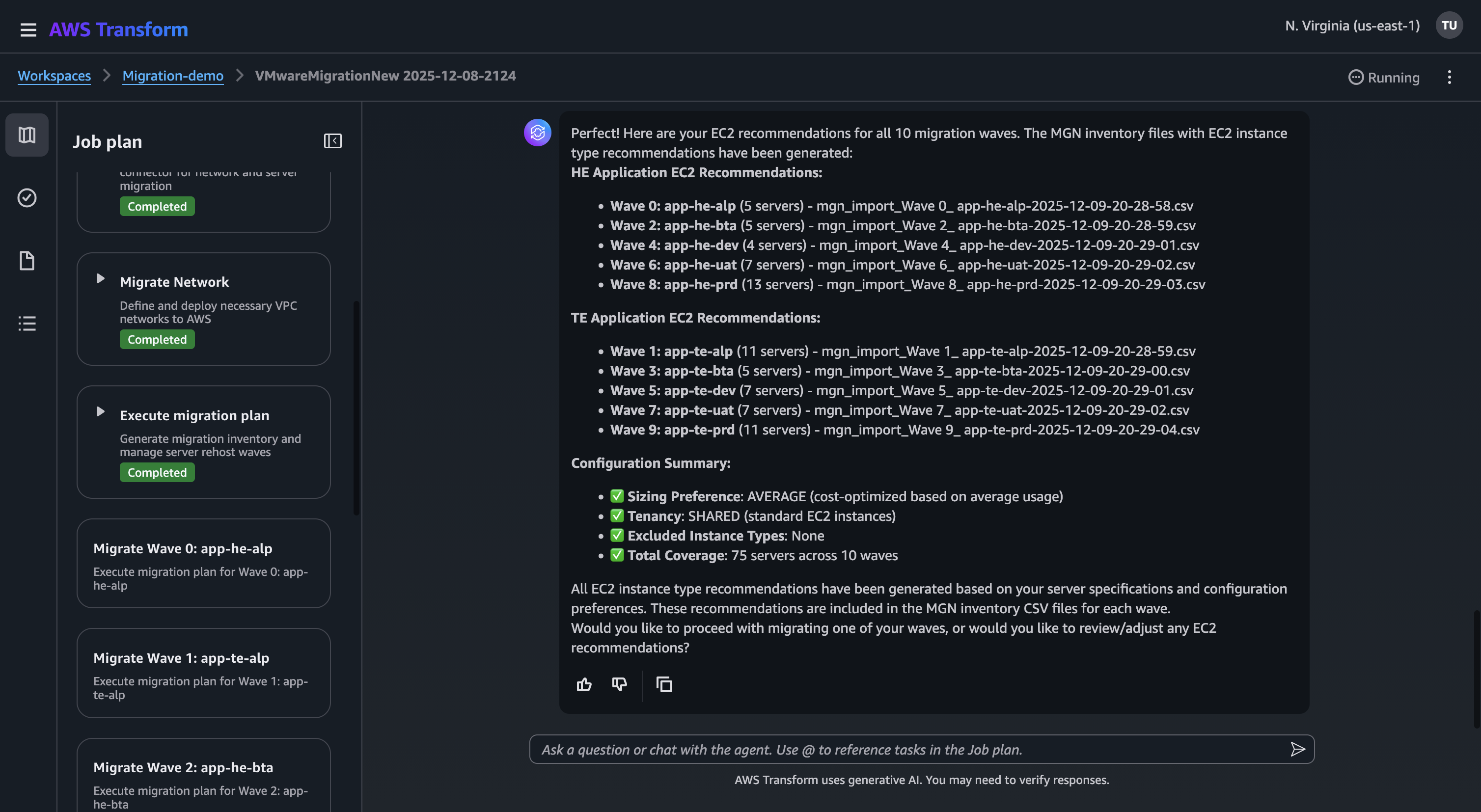
Figure 12: EC2 recommendations for the servers
For each migration wave, AWS Transform offers flexible IP addressing options, allowing you to choose between static or dynamic IP allocation based on their networking requirements. It generates a comprehensive inventory of servers scheduled for migration, including:
- Target EC2 instance type recommendations
- Target subnet assignments
- Security group configurations
- IP addressing schemes as selected earlier
You can review and modify the inventory to ensure accuracy before proceeding with the migration. The migration agent’s chat-based interface provides granular server-level control, enabling you to manage individual server operations such as reverting tests or cutover actions for specific cases that require attention.
AWS Transform automates the critical aspects of the server migration, including:
- Server replication
- Compatibility checks and conversions
- Testing and validation
- Cutover orchestration
The automation significantly reduces manual errors and accelerates the migration timeline while maintaining application stability. Throughout the step, AWS Transform provides enhanced error handling capabilities, including detailed error detection and explanations for common issues.
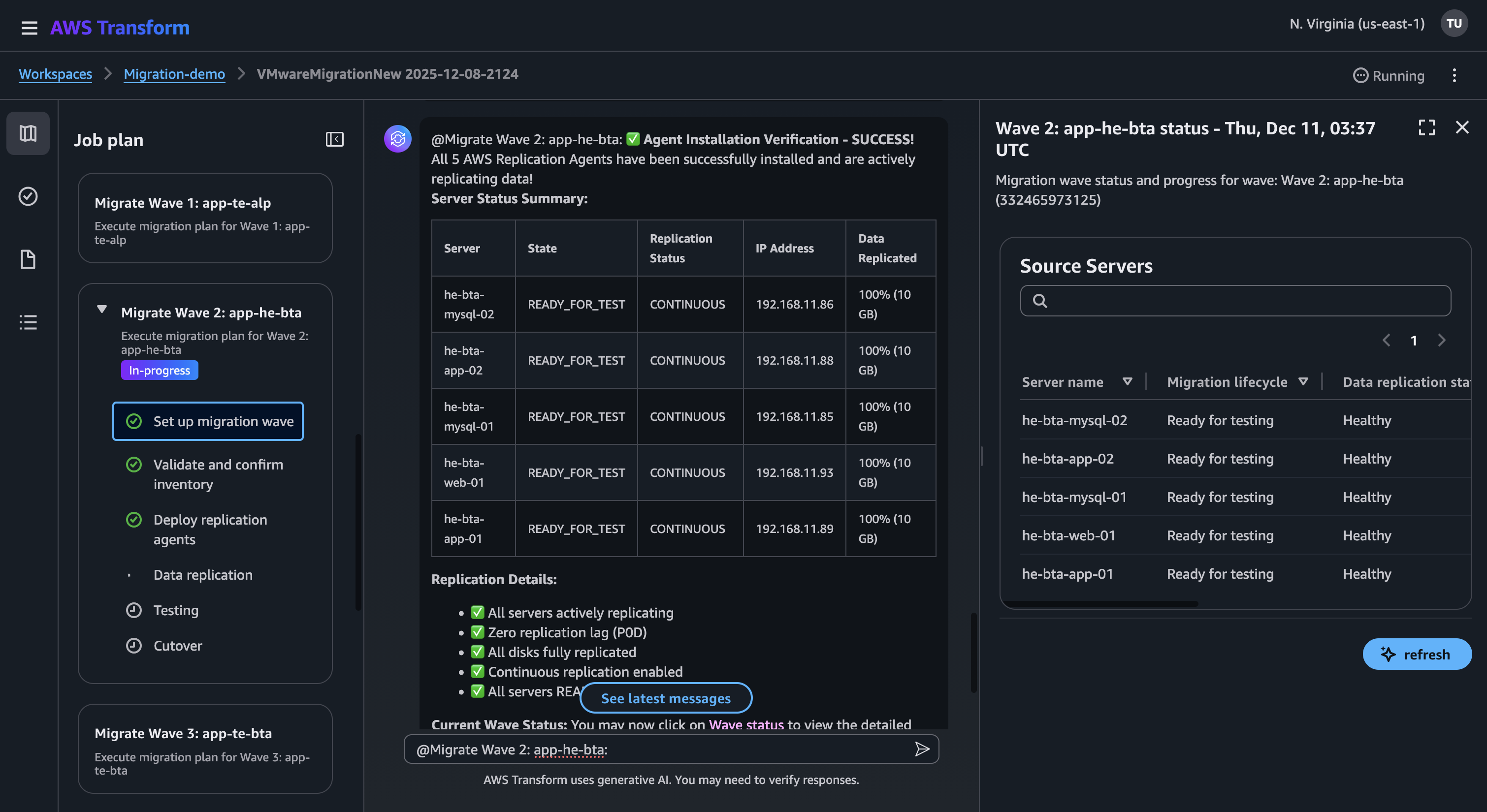
Figure 13: Server replication status
For private data transfer, as AWS Transform uses MGN, servers can be replicated through AWS Direct Connect or Site-to-Site VPN, eliminating the need for public internet connectivity. It maintains comprehensive encryption for data both in transit and at rest, utilizing TLS 1.2 or higher encryption for communications between AWS Transform and AWS Services, and AWS managed encryption keys for stored data in Amazon S3 buckets.
AWS Transform’s modular approach allows you to execute server migrations either as independent projects or as part of an orchestrated migration strategy. It lets you control the server migration test and cutover instances at both the wave level and individual server level, allowing you to manage how your servers are moved to AWS.
Cleanup
The cleanup process differs based on whether you executed a production migration or testing a migration.
For production migrations, delete the Transform job from AWS Transform console, if needed. Note that deleting the Transform job will permanently remove all generated artifacts, including network IaC templates and migration planning documents. Back up any required artifacts before proceeding with deletion. You would not delete the migrated resources as they are running in production.
If you are testing a migration, perform the following to clean up resources:
- Navigate to the AWS Transform console, delete the AWS Transform job and delete the workspace (optional)
- Navigate to the Amazon VPC console and delete the deployed network resources (VPCs, subnets and Security groups)
- After finalizing cutover, AWS MGN service cleans up the staging area resources (Amazon EC2 replication instances, Amazon EBS volumes). If you did not finalize a cutover, you can manually uninstall the AWS MGN replication agent.
- Navigate to Amazon EC2 console, verify replication resources are terminated and terminate any launched test/cutover instances.
Conclusion
This latest release of new agentic capabilities represents the AWS commitment to empowering you with the intelligence and flexibility you need to meet your migration goals. To recap, AWS Transform for VMware now features:
- Chat-based operations that simplify complex migration tasks
- Multi-account support for enterprise-scale migrations
- Dynamic migration planning that enables real-time modifications
- Expanded network infrastructure support including Cisco ACI, Palo Alto, and Fortinet
- Flexible Infrastructure as Code (IaC) generation with support for multiple formats
- Enhanced server migration controls at both wave and individual server levels
These capabilities work together to help you accelerate your migration journey while maintaining control and reducing risks. The new features support various migration scenarios, from end-to-end infrastructure migration to targeted workload migrations, allowing you to choose the approach that best suits your needs.
To learn more, visit the AWS Transform for VMware page, learn about the latest capabilities, and get started with AWS Transform.