Migration & Modernization
From Structural Insight to Automated Transformation – Bridging CAST Imaging with AWS Transform Custom
This post has been co-written with the CAST team
Introduction
Enterprises want AI agents to work directly with the systems that run their business: placing orders, reading customer records, triggering workflows. Most of those systems were built long before agents existed, so they need to be assessed and modernized before an agent can call them safely. This is the third post in our series on that journey. In the first, Agentic Readiness: A Method for Evaluating Applications for Agent Interaction, we defined what makes an application ready for AI agents. In the second, Application Agentic Transformation – AI Acceleration Insights in CAST Highlight, we showed how CAST Highlight scans an application portfolio to decide which applications to modernize first. It then hands them to AWS Transform for a detailed Agentic Readiness Analysis (ARA).
This post introduces the CAST Imaging for AWS Transform Custom Power. This Kiro Power bridges the structural intelligence of CAST Imaging, from software intelligence company CAST, with the execution engine of AWS Transform Custom. CAST Imaging maps an application’s calls, transaction flows and dependencies into a structural model of how the whole system fits together. For the most complex, business-critical systems, that model gives the transformation agent an application-wide view. Each automated change is grounded in the application’s real structure, protecting the callers and transaction flows that depend on it. We then walk through an example using the open-source WebGoat application.
Key Terms
Model Context Protocol (MCP) An open protocol that allows AI agents to connect to external data sources and tools in real time. In this integration, MCP is the channel through which the transformation agent queries CAST Imaging’s structural model during execution.
Transformation Definition (TD) The instructions and knowledge needed to perform a specific code transformation, packaged as a skill (SKILL.md plus optional reference docs and scripts).
Agentic Readiness Analysis (ARA) An analysis under AWS Transform – continuous modernization that evaluates whether systems are ready to be safely called by AI agents – across five pillars: API and interface readiness, security and identity, data handling, operational resilience, and observability. ARA provides criterion-level assessment and remediation guidance.
Modernization Analysis (MODA) An analysis under AWS Transform – continuous modernization that assesses cloud modernization readiness across infrastructure, application, data, security, and operations dimensions, and identifies candidates for containerization, serverless migration, and platform upgrades across your repositories.
AWS Transform – continuous modernization An AWS Transform capability that analyzes and remediates technical debt across repositories at scale, prioritizes findings across technical debt, security, agentic readiness, and modernization readiness, and opens validated pull requests, on demand or on a recurring schedule.
Kiro Power A pre-packaged, installable plugin for the Kiro IDE that bundles MCP servers, Agent Skills, and steering into a single capability the agent activates on demand. Powers follow the open Agent Plugins specification. Developers install a Power with one click and use it directly in the IDE, with Kiro loading its context and tools automatically when relevant, no manual configuration or context switching between tools.
Problem
The enterprise systems AI agents need to call are often the hardest ones to modernize. Many have grown over decades and carry undocumented dependencies, fragile call chains, and code paths that only a few people still understand.ARA and MODA scope the work needed to make these systems agent-ready – assessing readiness at the criterion and file level and producing prioritized remediation guidance. CAST Highlight feeds portfolio-level AI Acceleration Insights into ARA so the right applications are assessed first.Once the work is scoped, the transformation agent in AWS Transform Custom makes the code changes: for example, updating a method signature to expose a cleaner interface, upgrading a library with known vulnerabilities, or removing unused code. In a large application, each of these changes can affect code well beyond the file being edited. The agent works best when it knows which methods call the one it is changing, which transactions flow through that path, and what depends on that library. With that application-wide view, the agent avoids changes that build successfully but break callers or cause regressions later in production.This is where CAST Imaging fits. ARA and MODA decide what to change and why. CAST Imaging adds the structural model – call graphs, transaction flows, dependency chains – that makes executing those changes safe by grounding every edit in the system’s real architecture.Note: AWS Transform – continuous modernization analyzes and remediates technical debt at scale, opening validated pull requests on demand or on schedule. The CAST Imaging Power is not a substitute – it adds the application-wide structural context that continuous modernization does not carry, so that on the most complex, high-stakes systems, each change is grounded in how the application fits together.
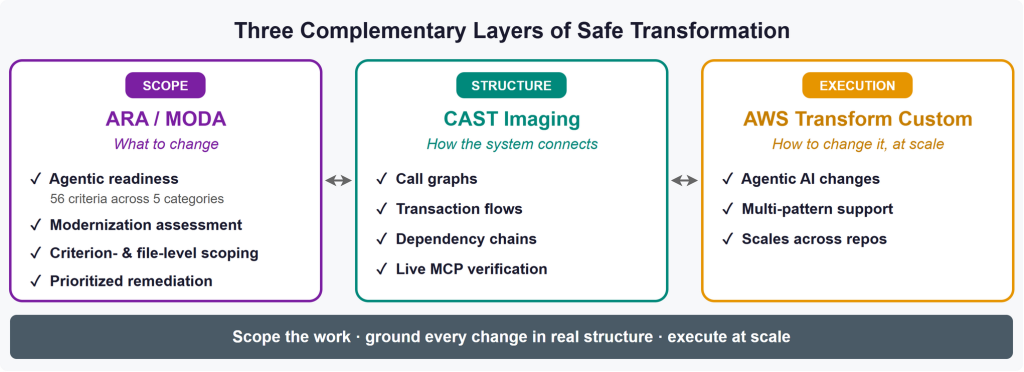
Figure 1 shows how the three tools work together. Each one answers a different question
Scope: ARA and MODA decide what to change. They assess an application’s agentic readiness and modernization readiness, then produce a prioritized list of fixes down to individual criteria and files.
Structure: CAST Imaging shows how the system connects. It maps the application’s call graphs, transaction flows and dependency chains. The transformation agent queries this map through MCP while it works, so each change is checked against what depends on it.
Execution: AWS Transform Custom makes the changes. Its AI agent applies the transformation to the code. It supports many transformation patterns, such as library upgrades and code refactoring, and can run across multiple repositories.
Together, they cover what to change, what each change affects, and how to make the change at scale.
Solution Overview
The CAST Imaging for AWS Transform Custom Power (available in the Kiro power registry) layers structural intelligence on top of ARA and MODA readiness workflows. It connects CAST Imaging’s MCP server directly with AWS Transform Custom’s CLI, operating in two phases:
- Phase 1 – Structural Context and TD Generation: The Kiro Power connects to CAST Imaging via MCP, gathers deep structural context (architecture, dependencies, call graphs, transaction flows, quality violations), and generates a complete TD enriched with that context – real file paths, object counts, violation locations, and fix strategies.
- Phase 2 – Execution with Live Structural Verification: AWS Transform Custom executes the TD against the codebase while CAST Imaging MCP remains connected, so the agent can check what each change affects, such as finding every caller before changing a method signature. A CAST Imaging rescan after the run confirms the fixes.
Prerequisites
To use the CAST Imaging for AWS Transform Custom Kiro Power, you need:
- CAST Imaging, with your application already analyzed. The Power reads the structural model from CAST Imaging’s MCP server, so the application must be analyzed in CAST Imaging first. If you don’t have CAST Imaging set up yet, contact your CAST representative.
- Kiro IDE, with the CAST Imaging for AWS Transform Custom Power installed and connected to CAST Imaging MCP server.
- The AWS Transform CLI and an AWS account with permissions to use AWS Transform Custom. See Getting started with AWS Transform custom. CAST Imaging MCP server should be registered in ~/.aws/atx/mcp.json. Run
atx mcp toolsto check that it’s listed. - The application’s source code and build tools, so the transformed code can be built and tested (for example, Maven for a Java application).
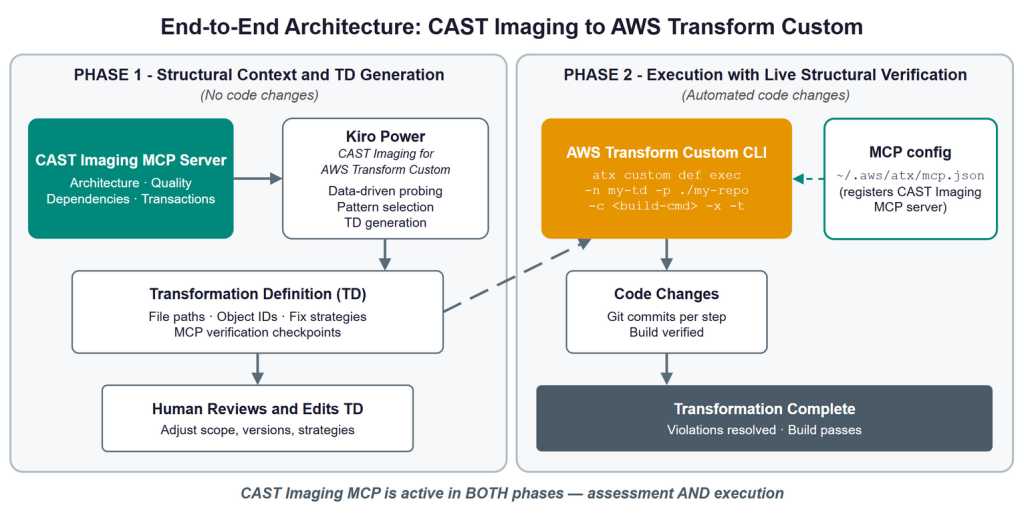
Figure 2 End-to-End Architecture – CAST Imaging to AWS Transform Custom
Figure 2 shows the two phases. In Phase 1 (Structural Context and TD Generation), the Kiro Power reads the application’s structure from CAST Imaging, asks you targeted questions, and writes a TD that you review and edit. Nothing in the code changes yet. In Phase 2 (Execution with Live Structural Verification), the AWS Transform Custom CLI runs the reviewed TD against your repository. The agent stays connected to CAST Imaging throughout, commits each step to Git, and checks that the build passes.
How It Fits the Broader Pipeline
A typical modernization journey moves through several stages. Here’s how each tool contributes:
| Stage | Tool | What Happens |
| Discover | CAST Highlight, CAST Imaging | Scan your application portfolio to identify AI opportunities and assess agentic readiness at scale. Prioritize which applications to focus on first. Dive deep into the most complex application-database systems to regain understanding and accelerate integrating them with AI. |
| Analyze | AWS Transform (ARA / MODA), CAST Imaging | For prioritized applications, run ARA and MODA for criterion-level assessment and remediation guidance that scopes the work. CAST Imaging adds the application-wide structural context (call graphs, dependencies, transaction flows) that lets the agent execute those changes safely. Together they produce a complete, execution-ready TD. |
| Modernize | AWS Transform Custom, Kiro, CAST Imaging (structural context via MCP) | Execute modernization actions using the TD, with CAST Imaging MCP connected for live structural context. Resolve readiness gaps and advance cloud maturity. |
| Activate | Agent Deployment | Deploy AI agents against remediated systems with confidence that the environment supports safe, observable, autonomous operations. |
| Continuously Enhance | AWS Transform – continuous modernization, CAST Highlight, CAST Imaging | AWS Transform – continuous modernization keeps the portfolio healthy over time, analyzing and remediating new technical debt on a recurring schedule and opening validated pull requests. CAST Highlight and CAST Imaging maintain a living structural knowledge base of your applications that grounds those ongoing changes in each system’s real architecture. |
Note: CAST Imaging appears at multiple steps because it serves different roles – portfolio discovery and deep structural understanding (Discover), structural context for scoping changes (Analyze), live structural checks during execution (Modernize), and ongoing lifecycle monitoring (Continuously Enhance).This blog focuses on the intersection of Analyze and Modernize: how CAST Imaging’s structural context feeds directly into AWS Transform Custom’s execution, with the CAST Imaging for AWS Transform Custom Power bridging the two.
How It Works
Phase 1: Structural Context and TD Generation
The Kiro Power connects to CAST Imaging via MCP, pulls the application’s full structural model ( architecture, call graphs, transaction flows, quality violations, dependencies), then asks targeted questions in the Kiro chat, with options based on what it found. For example: “You have 12 critical CVEs in Apache Struts 1.3.10 – upgrade or migrate entirely?””47 cloud blockers: 15 hardcoded file paths, 12 stateful sessions, 20 hardcoded URLs. What’s your target compute service?””57 methods flagged as unreferenced. Include dead code removal?”
- Based on the answers, the Kiro Power selects the matching transformation patterns, such as language version upgrades, framework upgrades and migrations, architecture migrations, or code refactoring, and generates a complete TD populated with real file paths, object IDs, violation locations, and fix strategies – all drawn from the structural model.
Phase 2: Execution with Live Structural Verification
Phase 2 executes the TD you generated and reviewed in Phase 1 via the AWS Transform Custom CLI. CAST Imaging MCP stays connected for the whole run, so the agent checks the application’s structure at every step.
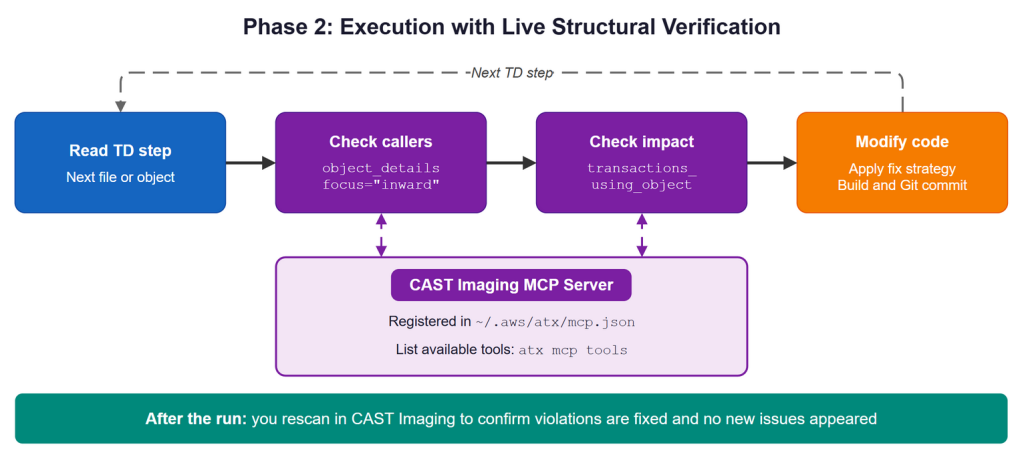
Figure 3 Phase 2 – Execution with Live Structural Verification
- Before you start: CAST Imaging’s analysis reflects the last scan. If the code has changed since then, rescan in CAST Imaging first, because the agent can’t detect an out-of-date analysis on its own.
- Run the TD: publish the Phase 1 TD under a name, then run it by that name from a terminal:
Here, ./td/ is the folder Phase 1 created, and my-td is the name you publish it under. The CLI connects to CAST Imaging through the MCP server registered in ~/.aws/atx/mcp.json.
- During the run: for each step in the TD, the agent:
- checks callers with object_details focus=”inward” before changing a method signature
- checks impact with transactions_using_object to see which transactions use the object
- modifies the code and commits the change to Git.
- After the run: review the run log, because Phase 2 runs without prompts (-x). Then rescan the modified code in CAST Imaging to confirm violations are fixed and no new issues appear. You trigger this rescan yourself, because the MCP server has no rescan tool.
Example: WebGoat Security Training Application
To demonstrate the end-to-end flow, we ran the CAST Imaging for AWS Transform Custom Power against WebGoat_v3 – a Java application with 37,140 LOC, 3,273 objects, 29 CVEs, and 31 structural flaw violations.
Phase 1: Structural Context and TD Generation
The Kiro Power gathered structural context and identified:
- 29 CVEs (4 Critical) in Apache Commons FileUpload, Log4j 1.2.x, Commons Collections, Apache Axis
- 12 SQL injection paths through API requests (CWE-89)
- 57 unreferenced methods (dead code)
- 7 eval() usages in JavaScript
- 3 empty catch blocks in high-fan-in methods
Based on data-driven probing, the Kiro Power selected the Code Refactoring pattern. The generated TD included:
- Specific object IDs and file paths from CAST Imaging
- Fix strategies for each violation category
- MCP verification checkpoints for the execution agent
- Scope exclusions (intentional training vulnerabilities preserved)
Phase 2: Execution with Live Structural Verification
From a terminal in the project folder, we published the TD generated in Phase 1 and ran it against the WebGoat repository:
The transformation agent fixed empty catch blocks, replaced eval() usages, and removed confirmed dead code, checking callers and affected transactions through CAST Imaging MCP before each change.
Outcome
The transformation completed in a single unattended run. MCP checkpoints caught potential side effects before they reached the codebase, eliminating the rework cycles typical of execution without structural context. After the run, we rescanned the modified code in CAST Imaging, which confirmed the violations were resolved.
Benefits
For Assessment Teams
- Structural findings flow into execution grounded in the call graph, not just a file list.
- Every recommendation is backed by specific file paths and object IDs.
- No context loss between assessment and remediation.
For Development Teams
- Automated refactoring guided by the application’s structural model.
- Changes verified against the application’s call graph and transaction flows.
- Reduced risk of regressions – blast radius quantified before each change.
For Enterprise Leaders
- On the most complex, high-stakes systems, changes are grounded in real structure, not the file in isolation.
- Measurable progress: violation counts tracked before and after (via rescan).
- Complements AWS Transform – continuous modernization: continuous handles portfolio-wide remediation, the CAST Imaging Power adds structural depth where the cost of a wrong change is highest.
Getting Started
- Before you begin: check that you have:
- CAST Imaging, with your application analyzed and its MCP server enabled
- Kiro, with the CAST Imaging for AWS Transform Custom Power installed and connected to CAST Imaging MCP server.
- the AWS Transform CLI set up, with the CAST Imaging MCP server registered in ~/.aws/atx/mcp.json. Run
atx mcp toolsto check that it’s listed.
- Generate the TD: in Kiro, let the Kiro Power analyze your application in CAST Imaging and answer its questions (Phase 1).
- Review and run it: edit the TD as needed, then publish and run it with the AWS Transform Custom CLI (Phase 2).
- Confirm the results: rescan in CAST Imaging, check the Git diff, and make sure the build passes.
Caution: -t (–trust-all-tools) runs the agent without pausing for tool-approval prompts, and -x (–non-interactive) runs with no human assistance. Together they let the agent modify code unattended. Run on a dedicated branch or in an isolated environment (not against main or a shared working tree), so every change is captured in version control and easy to review or roll back.
Conclusion
The enterprise systems that AI agents need to call are often the hardest ones to modernize. ARA and MODA show what needs to change, but in a large application, a change to one file can break callers and transactions elsewhere.In this post, we used the CAST Imaging for AWS Transform Custom Power to make those changes with the whole application in view. In Phase 1, the Kiro Power read the application’s structure from CAST Imaging and generated a TD with real file paths, object IDs and fix strategies. In Phase 2, AWS Transform Custom ran that TD while staying connected to CAST Imaging, checking callers and affected transactions before each change. On WebGoat, the agent fixed empty catch blocks, replaced eval() usages and removed dead code in a single run. A CAST Imaging rescan then confirmed the violations were resolved.Try out the CAST Imaging for AWS Transform Custom Power in your Kiro IDE and reach out to your AWS account team or CAST representative to get started.