Migration & Modernization
Right-Size AWS Transform MGN Replication Servers
Migration teams need a consistent way to right-size AWS Transform MGN replication servers when a wave includes many source servers. The challenge grows when source servers range from small systems to workloads with several tebibytes of provisioned disk capacity.
AWS Transform MGN, formerly AWS Application Migration Service, uses lightweight Amazon Elastic Compute Cloud (Amazon EC2) replication servers to replicate data from source servers to AWS. Depending on the data replication settings, a source server can use a shared or dedicated replication server. When Amazon EBS is the configured target storage type, replication servers write replicated blocks to Amazon Elastic Block Store (Amazon EBS). Its instance type influences the network and storage throughput available to the replication process.
AWS Transform MGN includes right-sizing for test and cutover instances. In this post, you will deploy an AWS Lambda function that evaluates provisioned source-disk capacity, maps each eligible source server to a configurable replication-server instance tier, and reports proposed changes in dry-run mode by default. After approval, invoke it manually or use an Amazon EventBridge schedule for recurring evaluation.
The sample uses provisioned source-disk capacity as a stable policy signal. It does not measure occupied file system space, source write rate, replication lag, transferred bytes, or remaining migration time. Treat the example tiers as a starting point, not an AWS Transform MGN sizing recommendation or performance guarantee.
Solution overview
For every non-archived source server in one configured account and AWS Region, the solution follows this workflow:
- Call DescribeSourceServers and sum sourceProperties.disks[].bytes across the reported source disks.
- Call GetReplicationConfiguration to read replicationServerInstanceType.
- Select the highest configured capacity tier that the server meets.
- Report the current type, proposed target, and decision reason in dry-run mode.
- When apply mode is approved, call UpdateReplicationConfiguration for eligible upgrades.
To protect a server with incomplete or invalid disk inventory, the function skips that server. It selects no target instance type and makes no configuration change for that server. It also skips equal targets, lower targets, and instance types outside the managed baseline and tier sets.
The function retrieves source servers through the paginated DescribeSourceServers API and processes them sequentially. The Lambda timeout is 300 seconds, and AWS SDK calls use adaptive retry mode with max_attempts=5. This sample does not establish a supported maximum fleet size and does not implement a separate rate limiter or per-server checkpoint. Test runtime, throttling, log volume, and response size before using it for a large fleet. If one invocation does not complete with sufficient margin, partition the workload by account or AWS Region, or use a queue or AWS Step Functions workflow.
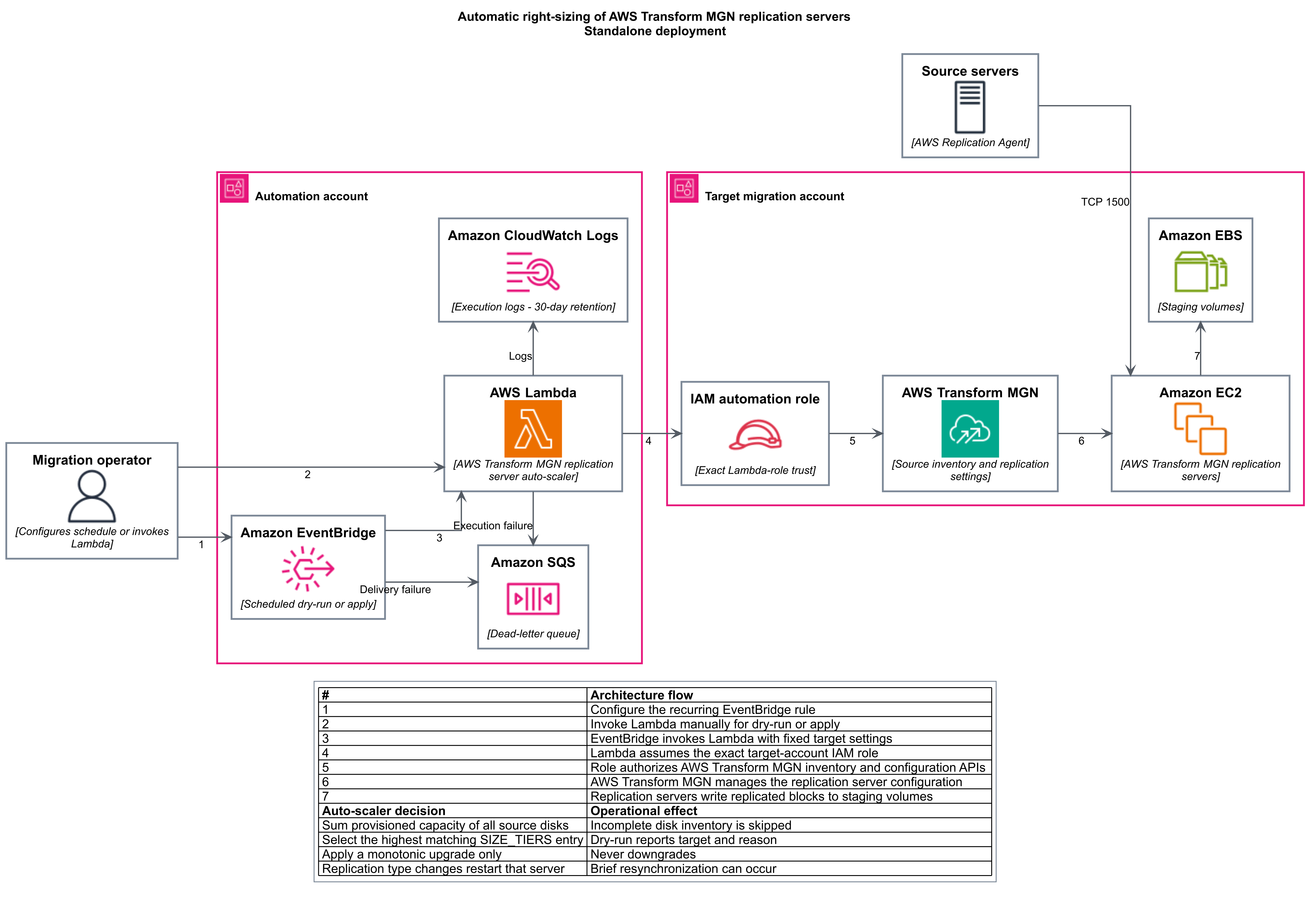
Figure 1: Standalone architecture for AWS Transform MGN replication server right-sizing.
How the architecture works
The following table explains the numbered flow in Figure 1.
| Step | Architecture flow |
| 1 | A migration operator configures an optional recurring EventBridge rule. |
| 2 | The operator invokes the Lambda function manually for a dry run or an approved apply. |
| 3 | EventBridge invokes the function with deployment-fixed target settings. |
| 4 | The function assumes an exact target-account AWS Identity and Access Management (IAM) role. |
| 5 | The role authorizes scoped AWS Transform MGN inventory and configuration calls. |
| 6 | AWS Transform MGN manages the replication-server configuration. |
| 7 | Replication servers write replicated blocks to Amazon EBS staging volumes. |
Amazon CloudWatch, including Amazon CloudWatch Logs, records function activity. When scheduling is enabled, an encrypted Amazon Simple Queue Service (Amazon SQS) dead-letter queue receives events that exhaust asynchronous retries.
To follow the walkthrough, download the source code from the mgn-replication-server-autoscaler repository.
Prerequisites
Before you deploy the solution, confirm that you have the following prerequisites:
- AWS Transform MGN initialized in the target Region, with source servers registered.
- Terraform 1.3 or later.
- AWS Command Line Interface (AWS CLI) version 2 for invocation and validation.
- Permissions in the deployment account to create AWS Lambda, AWS Identity and Access Management (IAM), Amazon CloudWatch Logs, Amazon EventBridge, and Amazon Simple Queue Service (Amazon SQS)
- Target-account deployment credentials that can call sts:GetCallerIdentity and manage the dedicated IAM role and inline policy. Required IAM actions include iam:CreateRole, iam:GetRole, iam:UpdateAssumeRolePolicy, iam:TagRole, iam:UntagRole, iam:ListRoleTags, iam:ListRolePolicies, iam:PutRolePolicy, and iam:GetRolePolicy. Cleanup also requires iam:DeleteRolePolicy and iam:DeleteRole. Restrict these permissions to the configured automation-role name where possible.
- Available quotas and approved Amazon EC2 instance types for every configured tier.
- A change window that allows for a replication-server replacement or restart and possible re-driving of data transfer.
The function uses Python 3.12 and the AWS SDK for Python (Boto3) supplied by the Lambda runtime. It doesn’t require a Lambda layer or another Python package.
Configure the tier policy
Thresholds use gibibytes (GiB), where 1,024 GiB equals one tebibyte (TiB). Each min_gib value is an inclusive lower bound and remains in effect until the next tier’s min_gib, so no upper-bound field is required. When size_tiers is empty, the function uses the Python defaults shown in the following table.
| Provisioned source-disk capacity | Target replication instance |
| Below 3,072 GiB (3 TiB) | No change |
| 3,072 GiB ≤ capacity < 6,144 GiB | m5.xlarge |
| 6,144 GiB ≤ capacity < 10,240 GiB | m5.2xlarge |
| 10,240 GiB ≤ capacity < 14,336 GiB | m5.4xlarge |
| 14,336 GiB ≤ capacity < 20,480 GiB | m5.8xlarge |
| 20,480 GiB or more | m5.12xlarge |
To override the defaults, add size_tiers to stacks/standalone/terraform.tfvars, as shown in this example:
size_tiers = [
  { min_gib = 3072,  instance_type = "m5.xlarge" },
  { min_gib = 6144,  instance_type = "m5.2xlarge" },
  { min_gib = 10240, instance_type = "m5.4xlarge" },
  { min_gib = 14336, instance_type = "m5.8xlarge" },
  { min_gib = 20480, instance_type = "m5.12xlarge" },
]
AWS Transform MGN requires an exact Amazon EC2 instance type; family wildcards such as m5.* are not supported. The built-in ladder uses exact m5 types based on AWS guidance, which documents t3.small as the service default and m5 types as common scale-up choices. If your migration account starts with exact m6i or m7i types, configure baseline_instance_types and a matching exact size_tiers ladder together.
Deploy the solution
The deployment uses two phases because the target-account role needs the Lambda execution-role ARN. Start with the EventBridge schedule disabled and with dry-run as the default invocation mode. The sample does not technically record or enforce a prior approval before an authorized caller submits auto_update=true.
Credential and command context
- Standalone Terraform: run from the repository root with a deployment-account operator profile in the configured AWS Region.
- Target-role Terraform: run from the repository root with a target-account IAM deployment profile in the same AWS Region.
- Lambda invocation, CloudWatch Logs, and SQS: use the deployment-account operator profile.
- Direct MGN validation and manual instance-type restoration: use the target-account migration operator profile.
The human caller does not assume the target automation role directly. Lambda runs with its deployment-account execution role and assumes the configured target-account automation role.
Deploy the automation stack
Run the following commands from the repository root with deployment-account credentials. Replace the example profile and AWS Region values, update terraform.tfvars, and verify the active identity before applying the reviewed plan:
export AWS_PROFILE="deployment-profile"
export AWS_REGION="us-east-1"

aws sts get-caller-identity
cp stacks/standalone/terraform.tfvars.example \
stacks/standalone/terraform.tfvars

# Set aws_region, deployment_account_id, and target_account_id.
# Keep enable_schedule = false and auto_update = false.

terraform -chdir=stacks/standalone init
terraform -chdir=stacks/standalone plan -out=tfplan
terraform -chdir=stacks/standalone apply tfplan
terraform -chdir=stacks/standalone output -raw lambda_role_arn
The AWS provider checks deployment_account_id and refuses to operate when the active credentials belong to another account. Save the lambda_role_arn output for the next phase.
Create the target-account role
Switch to target-account credentials, verify the active identity, set lambda_role_arn to the output from the previous phase, and apply the reviewed target-role plan:
export AWS_PROFILE="target-profile"
export AWS_REGION="us-east-1"

aws sts get-caller-identity

cp stacks/target-account/terraform.tfvars.example \
  stacks/target-account/terraform.tfvars

# Set aws_region, target_account_id, and lambda_role_arn.
terraform -chdir=stacks/target-account init
terraform -chdir=stacks/target-account plan -out=tfplan
terraform -chdir=stacks/target-account apply tfplan
The role trusts only the exact Lambda execution-role ARN. MGN and Amazon EC2 actions that support resource-level permissions are scoped to account- and Region-specific ARNs. Actions that require Resource “*” are restricted with the aws:RequestedRegion condition. Launch-template write actions require the AWSApplicationMigrationServiceManaged tag key to be present.
Run and review a dry run
Demo input
The checked-in events/dry-run.json file is the demo input. It evaluates every non-archived source server without changing its configuration:
{
  "action": "evaluate_replication_servers",
  "auto_update": false
}
Switch back to the deployment-account profile. From the repository root, derive the deployed function name from Terraform output, invoke the function synchronously, and format the returned payload:
export AWS_PROFILE="deployment-profile"
export AWS_REGION="us-east-1"

aws sts get-caller-identity
FUNCTION_NAME=$(terraform -chdir=stacks/standalone output -raw lambda_function_name)

aws lambda invoke \
  --function-name "$FUNCTION_NAME" \
  --payload fileb://events/dry-run.json \
  --cli-binary-format raw-in-base64-out \
  response.json

python3 -m json.tool response.json
The following sanitized example shows one source server that meets a configured tier:
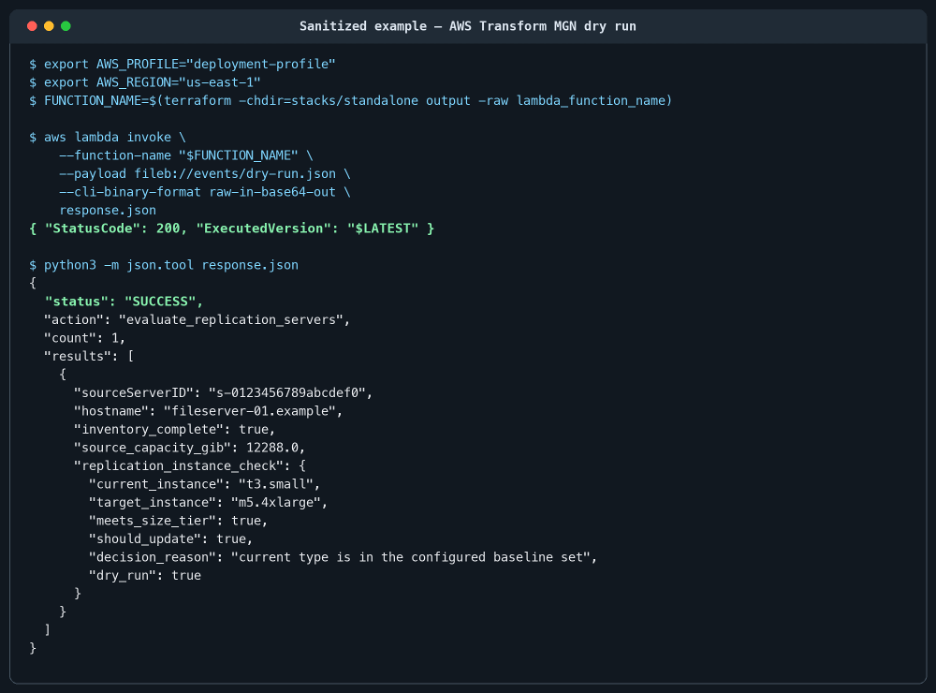
Figure 2: Sanitized dry-run output showing a proposed replication server instance type upgrade.
Validate the demo output
Review these fields for every source server before you enable updates:
- inventory_complete must be true.
- source_capacity_gib must agree with the expected provisioned capacity.
- current_instance must be a managed baseline or configured tier type.
- target_instance must be available and approved in the target Region.
- should_update and decision_reason must match the intended policy.
Apply approved changes
Apply mode updates every eligible non-archived source server in the configured account and AWS Region.
Change impact: Changing replicationServerInstanceType makes AWS Transform MGN use the selected type for the replication server. AWS documentation states that data replication continues from where it stopped using the new instance type. Apply the change early in the migration wave, allow replication to return to a healthy state, and do not schedule it near test or cutover.
Before you run apply mode, complete these checks:
- Confirm that the complete dry-run result contains only the intended source servers.
- Record replicationServerInstanceType for each source server.
- Confirm that every proposed target is approved and available in the target Region.
- Restrict lambda:InvokeFunction to approved operators or automation.
Use the checked-in apply event after approval:
{
  "action": "evaluate_replication_servers",
  "auto_update": true
}
With deployment-account credentials, invoke the function with the approved apply event and format the response:
export AWS_PROFILE="deployment-profile"
export AWS_REGION="us-east-1"

FUNCTION_NAME=$(terraform -chdir=stacks/standalone output -raw lambda_function_name)

aws lambda invoke \
  --function-name "$FUNCTION_NAME" \
  --payload fileb://events/apply.json \
  --cli-binary-format raw-in-base64-out \
  apply-response.json

python3 -m json.tool apply-response.json
Validate the changes
Switch to target-account credentials and query AWS Transform MGN directly to verify the type for each changed source server:
export AWS_PROFILE="target-profile"
export AWS_REGION="us-east-1"

aws mgn get-replication-configuration \
  --source-server-id "s-0123456789abcdef0" \
  --query replicationServerInstanceType \
  --output text
Review replication health, lag, and CloudWatch Logs. A second invocation doesn’t update a server that already reached its selected target.
Restore a lower-cost type after initial synchronization
This sample never scales a replication-server instance type down automatically. After initial synchronization completes and replication returns to a healthy state, review whether the larger instance is still required. If it is not, use target-account credentials to restore the recorded original or another approved instance type. Do not wait until the end of a multi-week migration wave to perform this cost review.
export AWS_PROFILE="target-profile"
export AWS_REGION="us-east-1"

aws mgn update-replication-configuration \
  --source-server-id "s-0123456789abcdef0" \
  --replication-server-instance-type "t3.small"
Run get-replication-configuration again, and confirm that replication returns to a healthy state after the manual change.
Schedule recurring evaluation
After a successful manual dry run, you can enable an EventBridge schedule. Use deployment-account credentials and start with scheduled dry runs. Enable scheduled updates only after you approve the operating model.
Set the following values in stacks/standalone/terraform.tfvars:
enable_schedule     = true
auto_update         = false  # Set true only after approval
schedule_expression = "rate(6 hours)"
With deployment-account credentials, apply the change and record the schedule rule and dead-letter queue:

export AWS_PROFILE="deployment-profile"
export AWS_REGION="us-east-1"
terraform -chdir=stacks/standalone apply
terraform -chdir=stacks/standalone output -raw schedule_rule_name
terraform -chdir=stacks/standalone output -raw event_dlq_url
EventBridge retries target-delivery failures. After EventBridge accepts an asynchronous invocation, Lambda handles execution retries. Both exhausted paths use the encrypted Amazon SQS dead-letter queue. Manual AWS CLI invocations are synchronous and return errors directly.
Investigate failed invocations
A server-level AWS client error is recorded while the function continues evaluating the remaining servers. The invocation fails after traversal when one or more servers failed. This behavior makes failures visible, but an earlier successful update isn’t rolled back.
With deployment-account credentials, inspect the response file and search the function log group:
export AWS_PROFILE="deployment-profile"
export AWS_REGION="us-east-1"

FUNCTION_NAME=$(terraform -chdir=stacks/standalone output -raw lambda_function_name)
LOG_GROUP="/aws/lambda/$FUNCTION_NAME"
python3 -m json.tool apply-response.json

aws logs tail "$LOG_GROUP" \
  --since 1h \
  --filter-pattern "?Failed ?failures"
With deployment-account credentials, count and receive messages from the dead-letter queue:
export AWS_PROFILE="deployment-profile"
export AWS_REGION="us-east-1"

DLQ_URL=$(terraform -chdir=stacks/standalone output -raw event_dlq_url)

aws sqs get-queue-attributes \
  --queue-url "$DLQ_URL" \
  --attribute-names ApproximateNumberOfMessagesVisible

aws sqs receive-message \
  --queue-url "$DLQ_URL" \
  --max-number-of-messages 10 \
  --message-attribute-names All
Recover from a failed invocation by following these steps:
- Correct the cause, such as a missing permission, unavailable instance type, or exceeded quota.
- Run another dry run and confirm the expected result for each failed server.
- Run apply mode again. Servers already at their target remain unchanged.
- Validate each changed server independently.
- Delete each processed dead-letter message by using its receipt handle.
After investigation and recovery, delete only the processed message by using its current receipt handle:
export AWS_PROFILE="deployment-profile"
export AWS_REGION="us-east-1"
RECEIPT_HANDLE="replace-with-receipt-handle"

aws sqs delete-message \
  --queue-url "$DLQ_URL" \
  --receipt-handle "$RECEIPT_HANDLE"
Operational and security considerations
Use the following controls to reduce operational risk when you adapt the sample:
- Use a dedicated migration account or AWS Region, or add implementation-specific source scoping. The sample evaluates every non-archived source server in its configured target.
- Keep exact Lambda-role trust, provider account guards, regional conditions, resource-scoped write permissions, and an encrypted, access-controlled Terraform backend with locking.
- Keep reserved Lambda concurrency at one to prevent overlapping executions.
- Leave unknown or operator-selected instance types unmanaged, and allow only upgrades.
- Updates aren’t all-or-nothing. Record current settings and validate every changed server independently.
- Grant lambda:InvokeFunction only to approved migration-operator roles and scope the permission to this function ARN. Limit CloudWatch Logs read access to this function log group. Grant SQS receive and delete permissions only to the failed-event recovery role. Function responses, logs, state, and dead-letter messages can contain source-server identifiers and infrastructure details.
For implementation guidance, see IAM for AWS Lambda, CloudWatch Logs access control, IAM in Amazon SQS, and the Terraform S3 backend.
- Don’t publish local tfvars files, state, plans, provider caches, generated archives, response files, or credentials.
Cost considerations
Estimate the staging infrastructure and automation cost before enabling the policy. Record each server original replicationServerInstanceType during the dry run, review the larger type after initial synchronization, and restore a lower approved type manually when the additional capacity is no longer required.
- Larger replication-server instance types increase staging Amazon EC2 charges while AWS Transform MGN uses them.
- AWS Lambda, EventBridge, Amazon SQS, and CloudWatch Logs charges depend on invocation frequency, execution duration, failed-event retention, and log volume.
- Pricing, instance availability, and quotas vary by AWS Region. Use current pricing when you review each tier.
- Disable recurring evaluation after the migration wave, and retain logs only as long as you need them.
Cleanup
Cleanup requires both configuration review and Terraform changes. Complete these steps in order:
- Set enable_schedule = false in stacks/standalone/terraform.tfvars and apply the stack.
- Restore the intended replicationServerInstanceType for each source server when required.
- Destroy stacks/standalone.
- Destroy stacks/target-account only if this sample created the dedicated automation role.
Use the following Terraform commands after you restore any required AWS Transform MGN settings:
export AWS_PROFILE="deployment-profile"
terraform -chdir=stacks/standalone destroy
export AWS_PROFILE="target-profile"
terraform -chdir=stacks/target-account destroy
Important: Terraform destroy doesn’t revert AWS Transform MGN replication configuration changes. Restore the intended replication-server types before you remove the automation resources.
Conclusion
This post showed how to automate the evaluation and controlled scale-up of AWS Transform MGN replication-server instance types using configurable source-capacity tiers. The Lambda function reviews every eligible source server, reports proposed changes before applying them, and skips incomplete or unmanaged configurations. Migration teams can invoke it manually or schedule recurring evaluation with EventBridge.
The Lambda function can assume only the configured target-account role, and that role limits supported actions to the configured account and AWS Region. Reserved concurrency prevents overlapping runs of this function. The upgrade-only policy avoids automatic downgrades, and per-server results allow operators to verify each proposed or completed change.
Use the sample as a starting point rather than a universal sizing formula. Validate the tiers against workload behavior, instance availability, quotas, throughput, and cost in each AWS Region. Review every dry-run result, monitor replication after each change, and manually restore a smaller approved instance type when initial synchronization no longer requires the larger server. This approach reduces repetitive configuration work while keeping approval, cost decisions, and post-change validation with the migration operator.
Related resources
Use the following public AWS documentation to validate service behavior and adapt the implementation.
- AWS Application Migration Service is now AWS Transform MGN
- AWS Transform MGN replication server settings
- AWS Transform MGN instance type right-sizing
- AWS Transform MGN best practices
- AWS SDK for Python (Boto3) update_replication_configuration
- Amazon EventBridge dead-letter queues
- AWS Lambda asynchronous invocation error handling
- AWS Transform MGN IAM actions and resources
- Source code for this post