Networking & Content Delivery
Adding HTTP security headers using Amazon CloudFront
This post is written for web developers, DevOps engineers, and security professionals who want to strengthen their application security posture without complex implementations. HTTP security headers represent a critical yet often overlooked layer of defense that can protect your users from common web vulnerabilities such as cross-site scripting (XSS), clickjacking, and man-in-the-middle attacks. They are implemented by adding a certain set of response headers that are targeted to improve the security and privacy of both the viewer and the content provider. In this post, we will explain how website and web application owners can streamline the implementation of these headers using Amazon CloudFront.
There are multiple benefits to adding these headers at CloudFront instead of at your server:
- There can be situations when the origin server code can’t be modified.
- The application at the origin server can focus on serving the content requested and save resources in adding these headers.
- You save bandwidth between CloudFront and the origin server by offloading the header addition logic to CloudFront and also reduce the compute capacity at the server.
- You have more flexibility in modifying the security headers at CloudFront when compared to modifying it at the origin server.
What are security headers?
Security headers are a set of headers in the HTTP response from a server that help your browser to understand how to behave when handling your site’s content. For example, X-XSS-Protection is a header that Internet Explorer and Chrome browsers respect to stop pages loading when they detect XSS attacks. The following is a list of each header that we’re adding to the response using CloudFront.
- Strict Transport Security
- Content-Security-Policy
- X-Content-Type-Options
- X-Frame-Options
- X-XSS-Protection
- Referrer-Policy
You can find more information on these headers in the Mozilla’s Web Security Guide.
HTTP security headers can help protect your web applications from common vulnerabilities. The following scenarios show how you can use CloudFront to implement these headers and enhance your website’s security.
- Consider an online retailer that wants to enhance the security of their checkout process. They might be concerned about potential clickjacking attacks, where bad actors try to embed checkout pages in iframes on other websites. The retailer can use CloudFront to implement HTTP security headers such as
X-Frame-OptionsandContent-Security-Policy, to help prevent their pages from appearing on unauthorized sites. This approach can improve customer protection without requiring changes to the origin server, which is especially useful for businesses using third-party e-commerce platforms. - Imagine a healthcare provider wanting to strengthen security for their patient portal to help with regulatory compliance and data protection. They could use CloudFront to implement security headers such as
Strict-Transport-Security(HSTS) for enforcing HTTPS connections, andContent-Security-Policyto help prevent unauthorized data access. With CloudFront, the provider can apply these security measures across multiple subdomains without modifying each backend application. This approach may assist in improving security audit results while enhancing patient data protection.
In this post we demonstrate three ways to implement security headers with CloudFront with CloudFront response headers policies, CloudFront Functions, and Lambda@Edge.
We can start by looking at CloudFront response headers policies.
CloudFront response headers policies
CloudFront response headers policies provide customers with more control when defining header modifications performed by CloudFront. You can use the CloudFront response headers policy to directly add the headers just before the response is sent to the client, with no custom coding or cost implication.
You can configure a CloudFront response headers policy by using a managed or custom policy. Managed policies contain sets of predefined HTTP response headers managed by Amazon Web Services (AWS) for common use cases, while custom policies allow fine tuning of the header values. Before you create a custom response headers policy, we recommend checking if one of the managed response headers policies fits your use case. If one does, then you can attach it to your cache behavior. Therefore, you don’t need to create or manage your own response headers policy. In this section, we demonstrate how to add the HTTP security headers using a CloudFront response headers policy.
To access the CloudFront response headers policies menu, navigate to the AWS CloudFront console and choose Policies from the navigation menu on the left. Choose Response headers as shown in Figure 1.
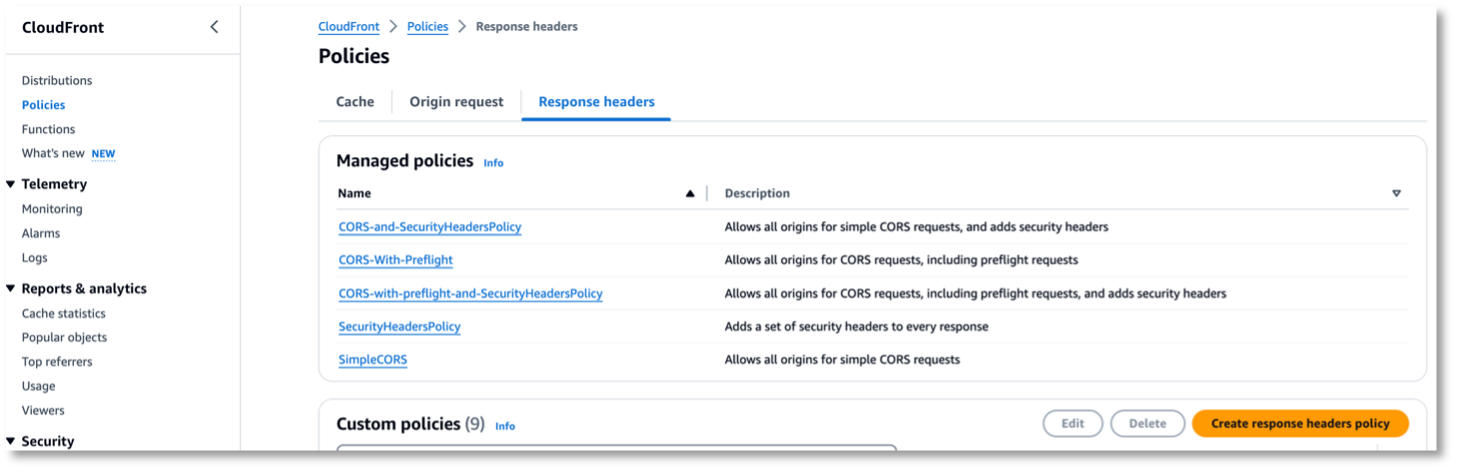
Figure 1: CloudFront Response Headers Policy
When in this screen, there is already a SecurityHeadersPolicy pre-defined for use in the Managed policies section. You can select the policy name to see more details about the policy, as shown in Figure 2.
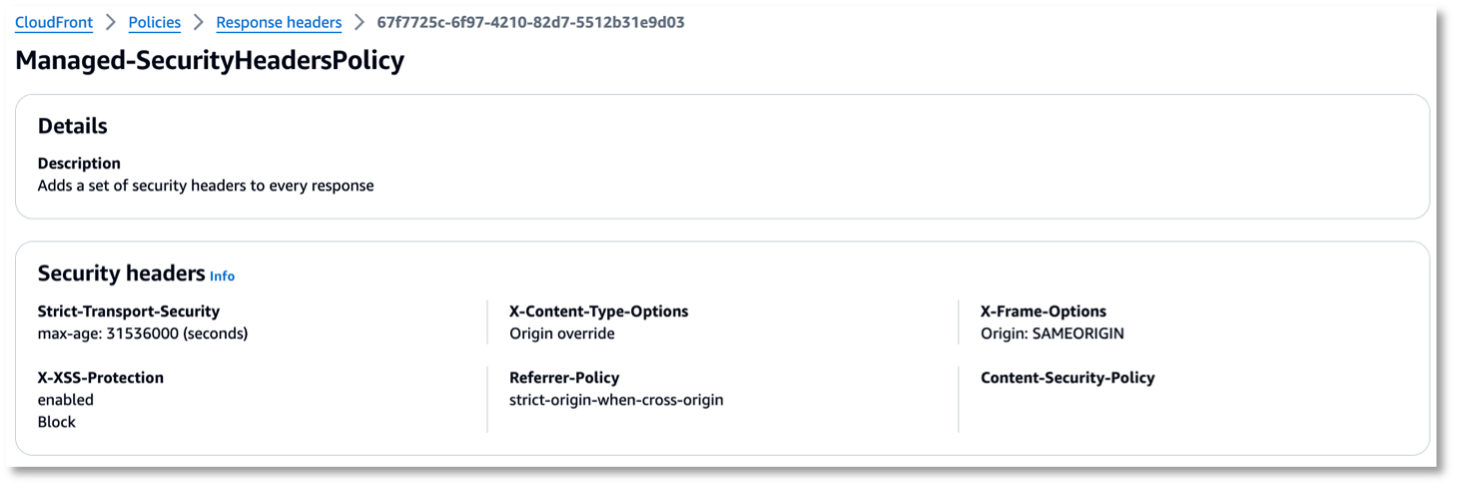
Figure 2: CloudFront Response header policy showing the Managed-Security Headers Policy
This managed policy contains a predefined set of common security headers and values. If the predefined response headers and values fit your use case, then you can attach this policy to a CloudFront cache behavior to have them added to the responses served by CloudFront. With a managed response headers policy, you don’t need to write or maintain your own policy.
If you need to modify the security headers settings or make more response header modifications for other purposes, then check to see if the other managed policies meet your requirements. If none of the managed policies meet your use case, then you can create a custom response headers policy by choosing Create response headers policy button at the bottom right corner as shown in Figure 1, then provide a name and a description for the policy. Select the appropriate security header(s) as required, as shown in Figure 3.
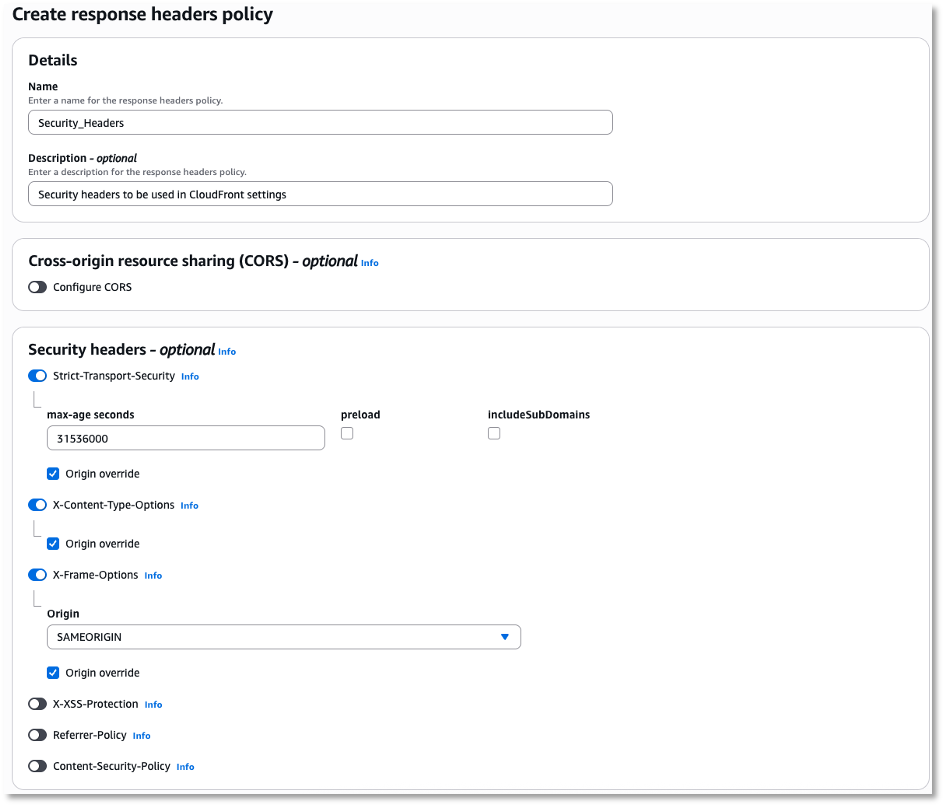
Figure 3: Create a response headers policy
When you’re satisfied with the response header policy, go to the CloudFront distribution where you want to use this policy and choose Edit on the appropriate behavior as shown in Figure 4.
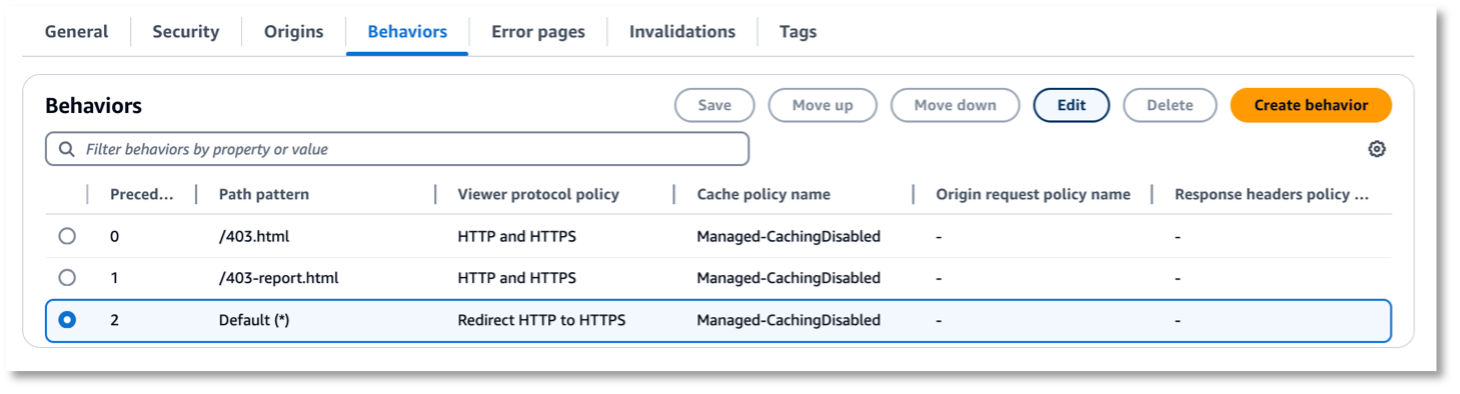
Figure 4: Select the behavior where the response header policy must be enabled
In the next screen, scroll down to the bottom of the screen until you find the Response headers policy section, as shown in Figure 5. Select the managed security header policy or the custom policy that you might have created in the previous step, and choose Save changes at the bottom of the screen.
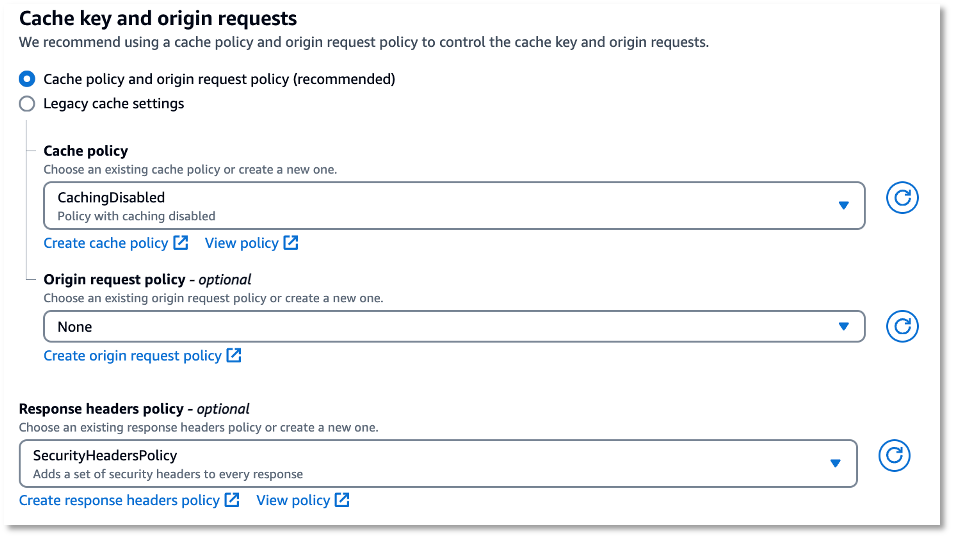
Figure 5: Add the SecurityHeaderPolicy in the Response headers policy section
When the new changes are deployed, you can observe the security headers in the response headers when you browse the website.
https://www.example.com/
HTTP/1.1 200 OK
Connection: keep-alive
Content-Type: text/html; charset=UTF-8
Date: Fri, 23 Aug 2024 03:12:49 GMT
ETag: W/"773-6027e43eccd62"
Last-Modified: Wed, 09 Aug 2023 14:26:28 GMT
Referrer-Policy: strict-origin-when-cross-origin
Server: Apache/2.4.58 (Amazon Linux)
Strict-Transport-Security:max-age=31536000
Transfer-Encoding: chunked
Via: 1.1 ec09137e1a146c0a7d4ba39d013ba29c.cloudfront.net (CloudFront)
X-Amz-Cf-Pop: ATL58-P3
X-Cache: Miss from cloudfront
X-Content-Type-Options: nosniff
X-Frame-Options: SAMEORIGIN
X-XSS-Protection: 1; mode=block
content-encoding: gzip
vary: accept-encoding
You have successfully configured security headers on your website using a CloudFront response headers policy.
Using edge functions to add security headers
If your requirements involve dynamically adding or changing the value of the security headers only during certain conditions, such as when a specific request header or cookie exists, or when a query string contains a specific value, then you can use custom functions at the edge with CloudFront Functions or Lambda@Edge. You can understand the differences between CloudFront Functions and Lambda@Edge and recommended use cases by reading this developer guide.
CloudFront Functions is a feature that you can use to deploy and run lightweight JavaScript functions at CloudFront edge locations. To add the security headers using CloudFront Functions, you must create a function by choosing Create function in the CloudFront console, as shown in Figure 6.

Figure 6: Create a new CloudFront Function
Provide a name for the function and the function description, and select the runtime, as shown in Figure 7.
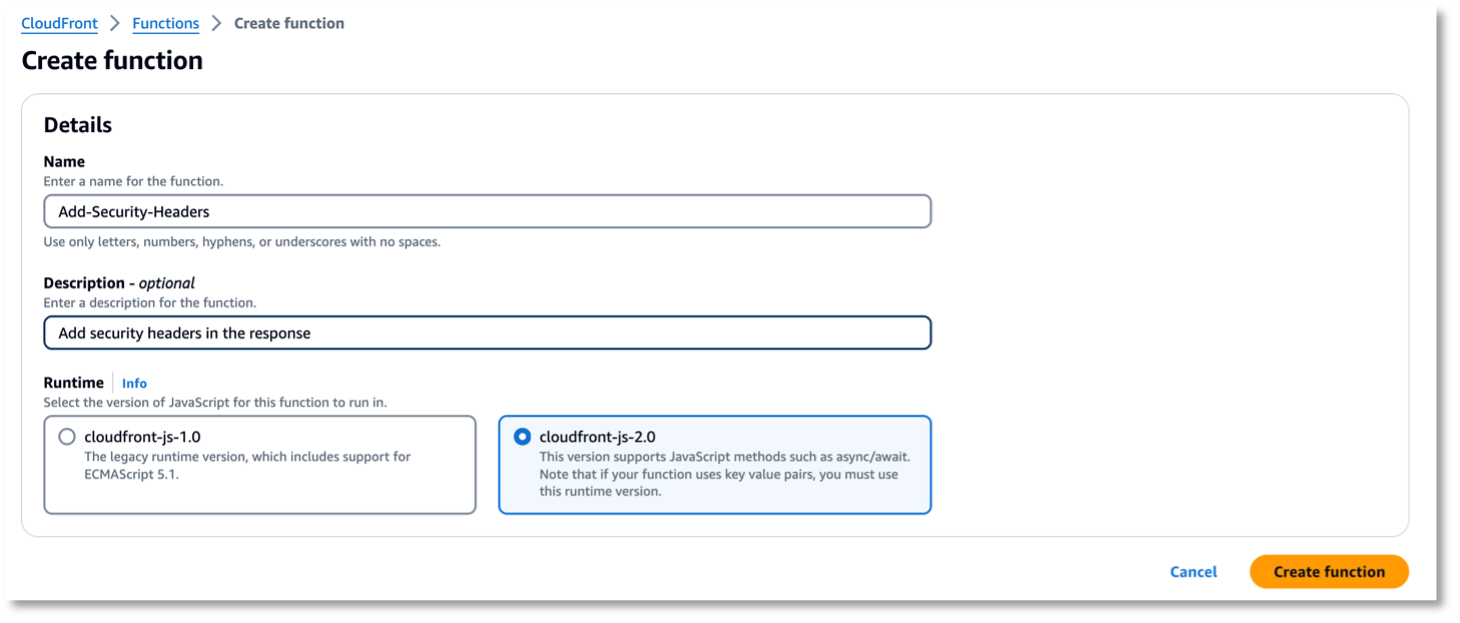
Figure 7: Enter a name, description, and select the runtime for the function
You can find sample code to add security-headers in aws-samples GitHub repository. Test the function before deploying it to production.
It will take few seconds for the function to deploy. When it’s deployed, follow the function association steps. You’ve now configured security headers using CloudFront Functions.
Using Lambda@Edge
There can be situations when using one is better than the other. For example, an implementation for another separate requirement at the viewer response trigger may require functionality that is only available with Lambda@Edge. This may include network calls, third-party libraries, and request body access, which may prevent you from using CloudFront Functions.
You can add the Lambda@Edge function to CloudFront by following the steps in this guide. Furthermore, you can write a Lambda@Edge function using Node.js, or Python.
The following sample code written in Node.js shows how to add security headers such as Strict-Transport-Security, Content-Security-Policy, X-Content-Type-Options, X-Frame-Options, X-XSS-Protection, and Referrer-Policy in the response using Lambda@Edge.
export const handler = async (event) => {// Get contents of response const response = event.Records[0].cf.response; const headers = response.headers;// Set new headers headers['strict-transport-security'] = [{key: 'Strict-Transport-Security', value: 'max-age=63072000; includeSubdomains; preload'}]; headers['content-security-policy'] = [{key: 'Content-Security-Policy', value: "default-src 'none'; img-src 'self'; script-src 'self'; style-src 'self'; object-src 'none'"}]; headers['x-content-type-options'] = [{key: 'X-Content-Type-Options', value: 'nosniff'}]; headers['x-frame-options'] = [{key: 'X-Frame-Options', value: 'DENY'}]; headers['x-xss-protection'] = [{key: 'X-XSS-Protection', value: '1; mode=block'}]; headers['referrer-policy'] = [{key: 'Referrer-Policy', value: 'same-origin'}]; return response; };
Verifying improvement in security posture with security headers
You can use Mozilla Observatory before and after adding the security headers. In turn, the scan rating improves after adding the security headers, as shown in in Figures 8, 9, 10, and 11.
Before adding the security headers
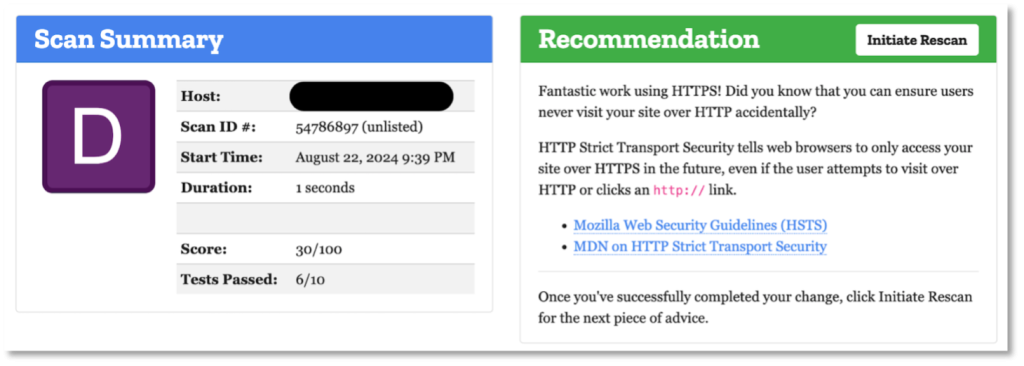
Figure 8: Mozilla Observatory rating before adding the security headers
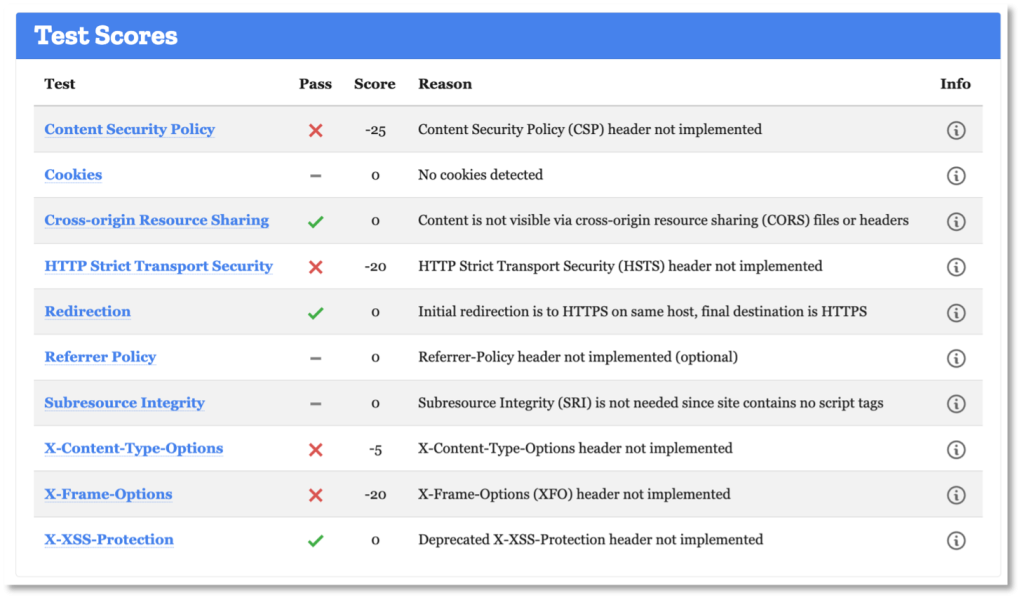
Figure 9: Mozilla Observatory Test score before adding the security headers
And Figure 10 and Figure 11 show after adding the security headers:
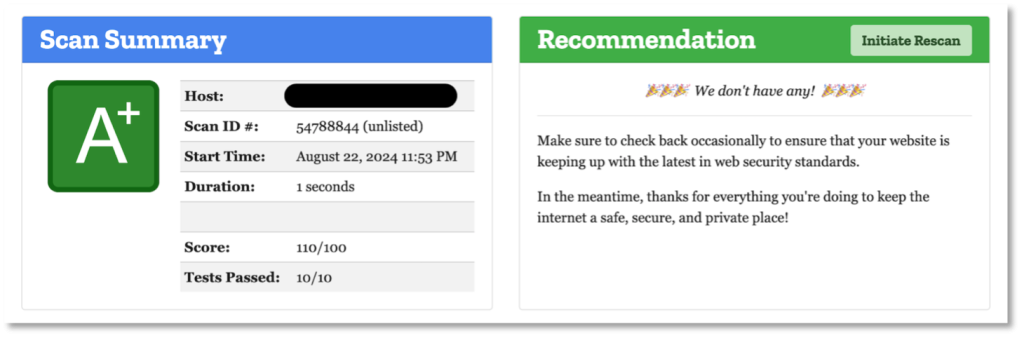
Figure 10: Mozilla Observatory rating after adding the security headers
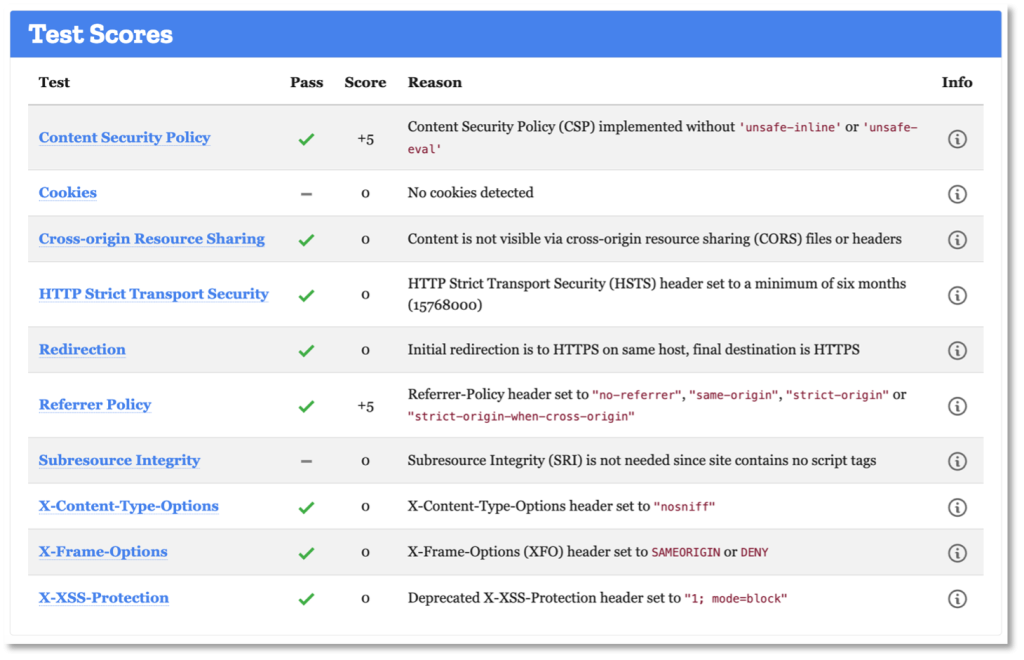
Figure 11: Mozilla Observatory Test score after adding the security headers
Cleanup
Following this post means that you might have created Response Header Policies, CloudFront Functions, Lambda@Edge functions, and CloudFront distributions. Make sure to remove these resources if you are no longer using them.
Conclusion
In this post we demonstrated what HTTP security headers are and how to add those headers using CloudFront response headers policies, CloudFront Functions, and Lambda@Edge. You can use the appropriate method that is suitable for your use case to add privacy and security to your websites by following the process described in this post. Start with the essential headers like Content-Security-Policy, X-Frame-Options, and Strict-Transport-Security, then gradually implement more protections based on your application’s specific needs. Remember to test thoroughly in development environments and monitor for any compatibility issues after deployment.
Security is an ongoing process. Regularly audit your headers, stay updated on new security recommendations and adjust your policies as your application evolves.
You can find more information on the preceding features by following the links provided in this post. If you’re new to CloudFront, then follow this link to understand more about CloudFront and get started with it.
About the authors

Karthic Chinnannasamy
Karthic Chinnannasamy is a Sr. Edge Specialist Solutions Architect at AWS, helping customers with architecting critical web infrastructure and security solutions. With expertise in perimeter protection and web acceleration, he guides large retailers build secure, resilient, and cost effective web architectures.

Jason Bradley
Jason Bradley is a Sr. Solutions Architect at AWS in Nashville with a focus on higher education. He helps customers effectively architect their applications to run on AWS. Jason has over 20 years of experience in IT and higher education, loves reading, movies, and spending time with his son.