Networking & Content Delivery
Build resilient and scalable multicloud connectivity architectures with AWS Interconnect – multicloud
Enterprises are building distributed applications that span multiple cloud environments to optimize for resilience, data locality, and specialized services communication. These architectures require consistent, private, and high-performance network connectivity between clouds without exposing traffic to the public internet. Amazon Web Services (AWS) announced AWS Interconnect – multicloud, a new capability that enables private, managed Layer 3 connectivity between AWS and other Cloud Service Providers (CSPs) through pre-provisioned interconnect capacity at global Interconnect Points of Presence (PoPs).
In this post, we walk through the key design principles of AWS Interconnect – multicloud and explore reference architectures that demonstrate how to integrate this capability into existing AWS network topologies: single VPC with a Virtual Private Gateway (VGW), regional aggregation using AWS Transit Gateway, and global network integration with AWS Cloud WAN.
AWS Interconnect – multicloud represents a new specification for cross-cloud connectivity. We are launching this capability in Preview with Google Cloud and releasing an open specification in a public GitHub repository. This specification enables any cloud service provider to integrate with AWS Interconnect – multicloud, creating a consistent, interoperable framework for private multicloud networking. Whether connecting to Google Cloud, Microsoft Azure (coming in 2026), or other CSPs, AWS Interconnect – multicloud provides a unified approach to establishing private, high-performance connections across cloud boundaries.
With this launch, you can establish private connections between AWS and Google Cloud without the complexity of physical provisioning or manual cross-connects. AWS and Google Cloud have pre-built large pools of capacity between select Direct Connect and Google Cloud Interconnect PoPs, eliminating the need for maintaining physical connections. As additional cloud providers adopt the open specification, you can use the same operational model and tooling to connect to multiple cloud environments.
Before you begin
Before getting started, you should be familiar with key AWS networking constructs such as AWS Direct Connect, VGWs, AWS Transit Gateway, and AWS Cloud WAN. You’ll also need a Google Cloud project with a configured Google Virtual Private Cloud. We do not focus in the post on defining these services, but we do highlight their capabilities and how you can use them to achieve the desired connectivity patterns. For additional background, we recommend reviewing AWS Cloud WAN architectures and how you can configure Direct Connect gateways with AWS Cloud WAN.
Region availability: AWS Interconnect – multicloud launched in preview with support for five region pairs: US East (N. Virginia) paired with Google Cloud N. Virginia (us-east4), US West (N. California) paired with Google Cloud Los Angeles (us-west2), US West (Oregon) paired with Google Cloud Oregon (us-west1), Europe (London) paired with Google Cloud London (europe-west2), and Europe (Frankfurt) paired with Google Cloud Frankfurt (europe-west3). More Regions will be added as the service expands.
Preview limitations: During the preview, you can create one 1 Gbps connection per AWS Account at no cost. We do not recommend routing production traffic through your preview connection. Preview connections will be removed when the service becomes generally available.
How AWS Interconnect – multicloud works
AWS and Google Cloud have collaborated to pre-cable backbone capacity between select Direct Connect and Google Cloud Interconnect PoPs around the world. Multicloud Interconnects require an attach point. On AWS the attach point is the Direct Connect gateway. On Google Cloud is the attach point is the Cloud Router. The AWS Direct Connect gateway is a global construct that acts as a route reflector and is as highly available as the Interconnect connections and Direct Connect virtual interfaces associated with it. You can connect your Virtual Private Gateways, Transit Gateways, or Cloud WAN core networks to the Direct Connect gateway to achieve seamless connectivity between workloads across clouds.
Unlike traditional cross-cloud interconnects that require manual cross-connects, the multicloud Interconnect is provisioned entirely through API or console calls. You can request, modify, or delete Interconnects programmatically and monitor traffic through a new Amazon CloudWatch derived metric that understands the Interconnect speed and utilization. All multicloud Interconnects use MACsec (Media Access Control Security) encryption at the physical layer, providing line-rate, hardware-based data confidentiality and integrity between AWS and Google Cloud network devices.
Traffic between AWS and Google Cloud flows entirely across the private backbones of both cloud providers, ensuring predictable latency, consistent throughput, and strong isolation from internet congestion or route instability. The infrastructure spans multiple network devices distributed across at least two physical facilities with independent power and networking for built-in resiliency. This configuration follows our time-tested AWS Direct Connect resiliency recommendations.
Creating a multicloud Interconnect involves two main actions:
- Create: The create action, which you initiate on either AWS or Google Cloud, generates an activation key.
- Accept: The accept action, performed on the other cloud provider using the activation key, completes the provisioning process.
During preview, AWS Console supports both actions, while on Google Cloud you can use CLI/SDK.
Reference architectures
Architecture 1: Single VPC with Virtual Private Gateway
For customers with a single workload or small footprint in one AWS Region, the simplest deployment model uses a VGW attached to the Amazon VPC and associated with a Direct Connect gateway. The Direct Connect gateway hosts a multicloud Interconnect that connects to the corresponding Google Cloud VPC via a Google Cloud Router. This model provides a straightforward way to enable private connectivity between a single AWS VPC and Google Cloud without the complexity of regional aggregation. The following diagram shows an example setup:
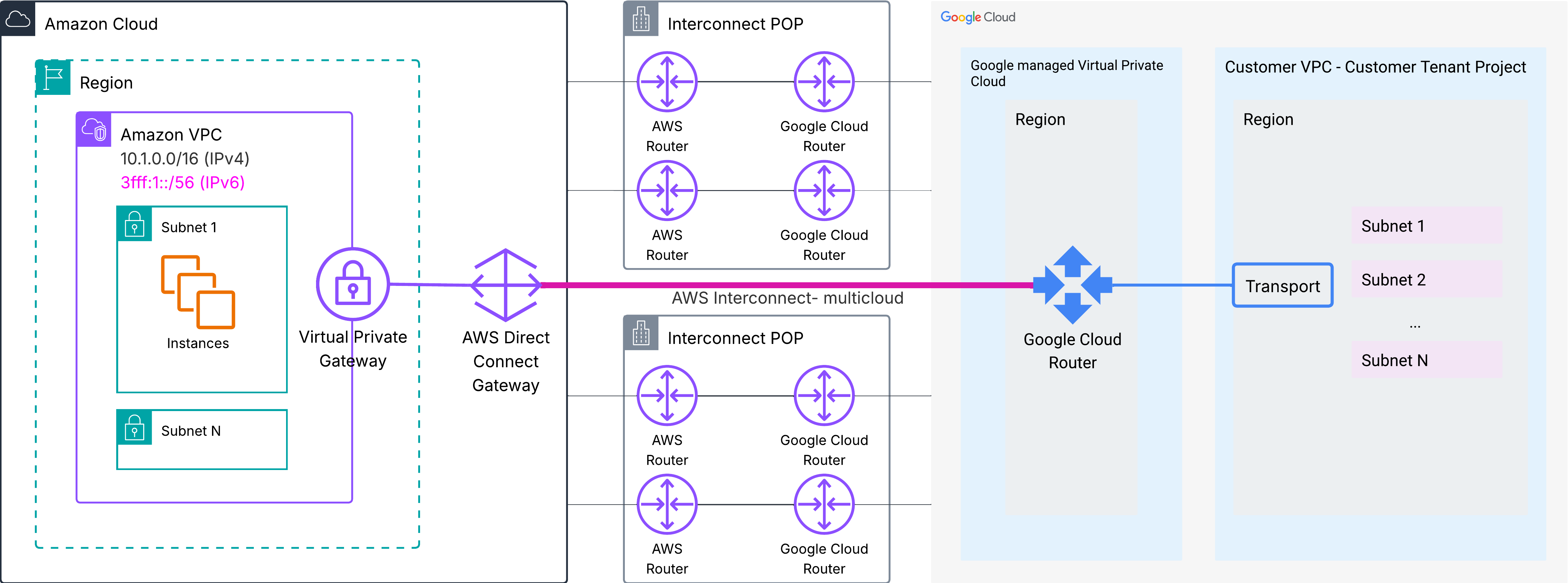
Figure 1 – Single-VPC architecture with AWS Virtual Private Gateway and Direct Connect Gateway – Single Region & single Interconnect
Route propagation
AWS to Google Cloud route propagation:
- The VGW automatically propagates to the Direct Connect gateway the Amazon VPC IPv4 and IPv6 prefixes.
- The Direct Connect Gateway dynamically advertises the Amazon VPC IPv4 and IPv6 prefixes to the Google Cloud Router, using BGP.
- The Google Cloud Router propagates the received routes to the Google Cloud Customer VPC as Cloud Routes.
Google Cloud to AWS route propagation:
- On the Google Cloud side, the Cloud Router dynamically advertises the Google Cloud Customer VPC subnet prefixes back to the AWS Direct Connect gateway.
- You can enable route propagation from the VGW to your VPC route tables to automatically populate routes learned via BGP from Google Cloud. Once route propagation is enabled, the VGW dynamically adds routes for Google Cloud prefixes to your VPC route tables with the VGW as the next hop. Optionally, you can configure static routes in your VPC route tables.
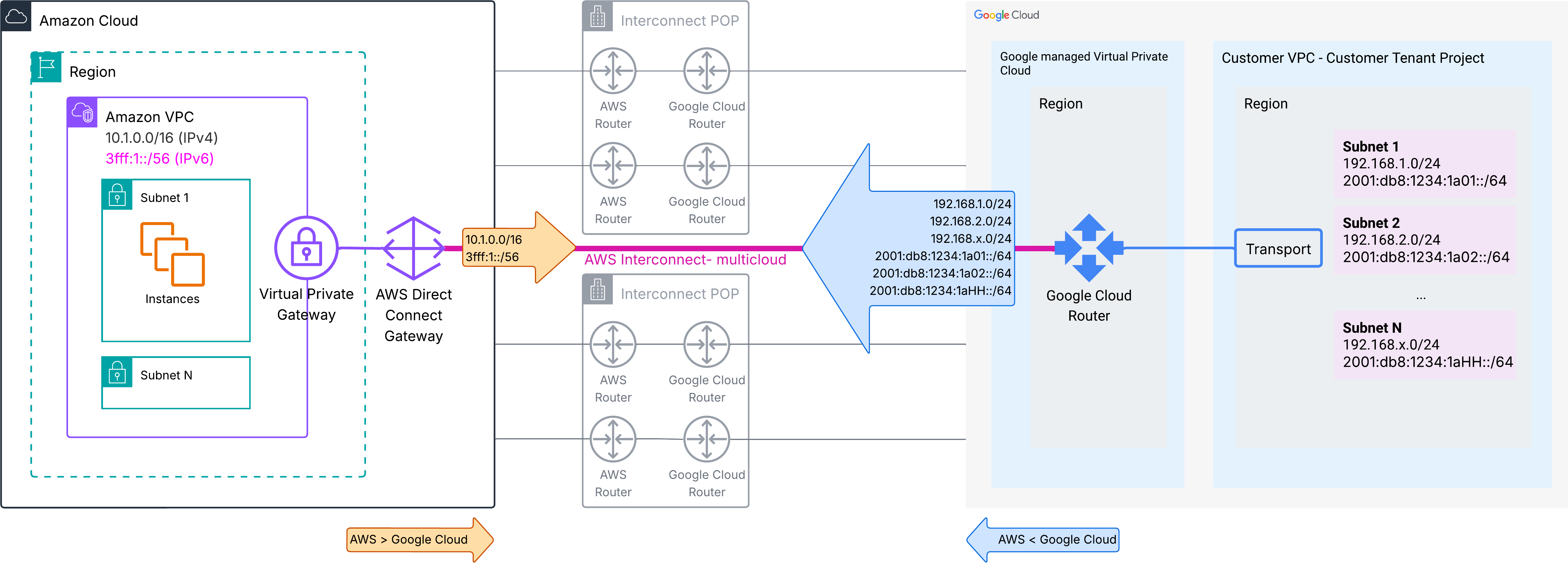
Figure 2 – Route advertisements – Single-VPC architecture with AWS Virtual Private Gateway and Direct Connect Gateway – Single Region & single Interconnect
Route tables and traffic flows
AWS to Google Cloud:
- When traffic originates from workloads in your Amazon VPC destined for a resource in Google Cloud, the VPC route table is evaluated first. Traffic destined for Google Cloud prefixes is forwarded to the VGW, which then sends the traffic through the Direct Connect gateway to the multicloud Interconnect.
- The traffic traverses the private Interconnect to Google Cloud, where the Cloud Router receives the packets and forwards them to the appropriate Customer VPC subnet based on its routing table.
Return traffic follows a reverse symmetrical path. The following diagram shows the route tables on the path:
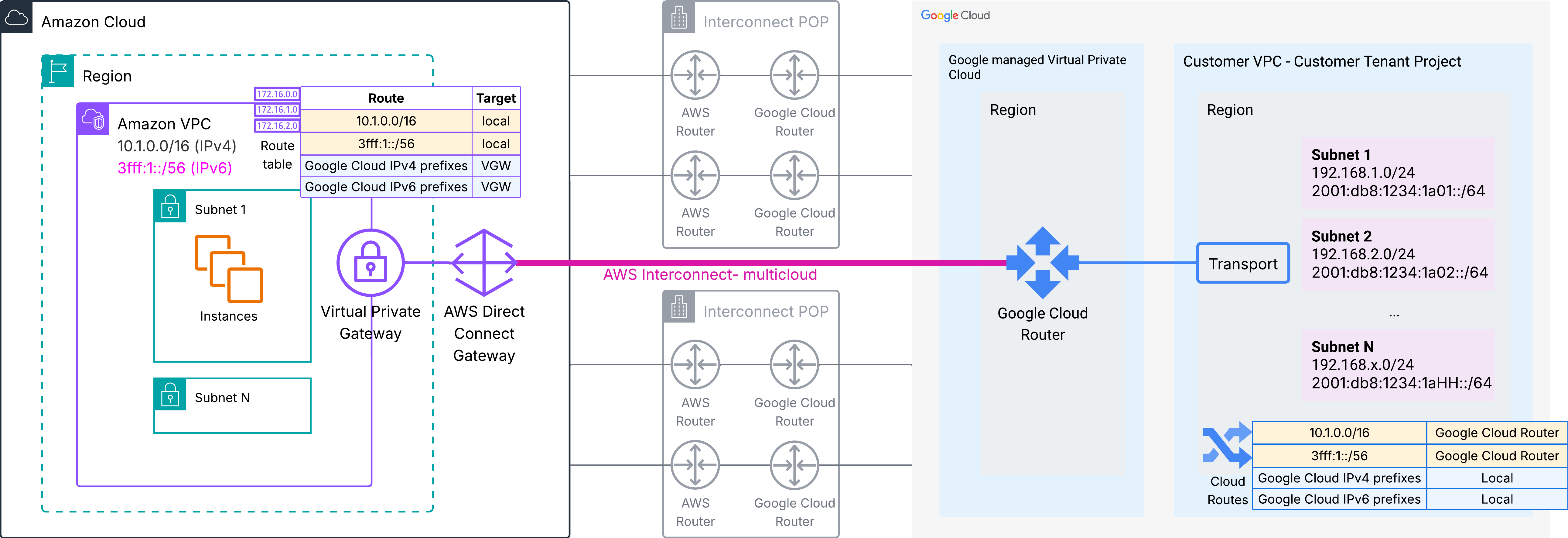
Figure 3 – Route tables and traffic flows – Single-VPC architecture with AWS Virtual Private Gateway and Direct Connect Gateway – Single Region & single Interconnect
When to use this architecture
This architecture is ideal for organizations with a focused, single-region deployment that requires straightforward private connectivity between AWS and Google Cloud. Use this pattern when you have a specific workload or application in one AWS VPC that needs to communicate with resources in a corresponding Google Cloud VPC. This solution also works well for proof-of-concept deployments, small-scale production workloads, or scenarios where you need to establish initial multicloud connectivity quickly. The simplicity of this architecture makes it suitable for teams with limited networking experience or organizations that want to minimize operational complexity while still achieving secure, private cross-cloud communication.
Considerations
While this architecture offers simplicity and ease of deployment, it has inherent scalability limitations that you should evaluate against your long-term requirements:
- Each VPC requires its own VGW attached to the Direct Connect gateway. As your AWS footprint grows to include multiple VPCs, you will need to manage route propagation and BGP advertisements independently for each VPC.
- This architecture does not provide native support for advanced routing scenarios such as transitive routing between multiple VPCs through Google Cloud or centralized egress patterns.
- For multi-Region deployments, you will need to create separate Virtual Private Gateways and multicloud Interconnects for each region pair, as Virtual Private Gateways in a specific AWS Region can only reach multicloud Interconnects that provide connectivity to the paired Google Cloud Region.
- Consider whether your organization’s growth goals align with managing multiple independent Interconnects, or whether investing in Transit Gateway or Cloud WAN from the outset would provide better long-term scalability and operational efficiency.
Architecture 2: Regional aggregation with AWS Transit Gateway
As workloads grow, customers often deploy multiple Amazon VPCs per Region to separate environments, business units, or application tiers. AWS Transit Gateway (TGW) provides a regional routing hub that simplifies connectivity between these VPCs while offering enhanced scalability for connections to on-premises networks and other cloud providers. With AWS Interconnect – multicloud, you attach your TGW to a Direct Connect gateway. The TGW aggregates routes from all attached VPCs and can advertise summary routes through the Direct Connect gateway to your Google Cloud environment. This centralized routing model eliminates the need to manage individual VGWs for each VPC, reducing operational complexity. The following diagram shows an example setup:
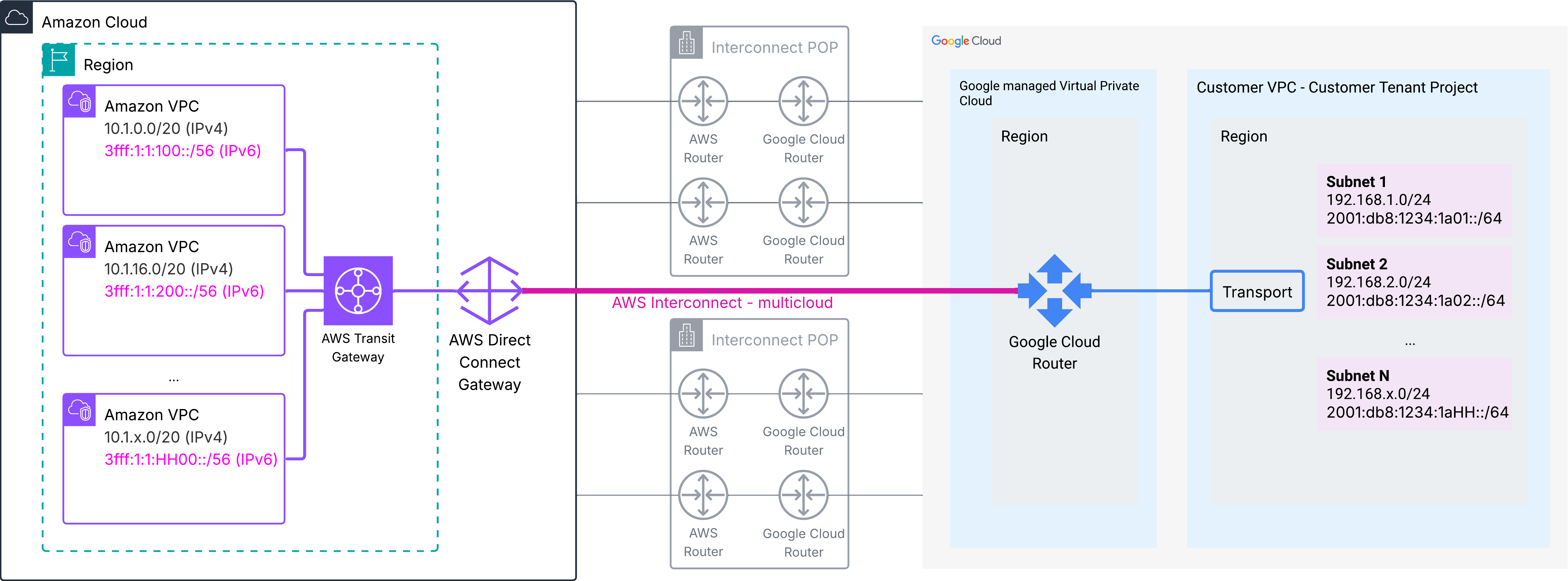 Figure 4 – Regional aggregation with AWS Transit Gateway – Single Region & single Interconnect
This architecture supports isolated route tables per environment, enabling you to implement segmentation policies using separate TGW route tables. This helps you control which VPCs can communicate with Google Cloud resources. You can also natively integrate AWS Network Firewall with TGW or use third-party security appliances in an inspection VPC attached to TGW to filter traffic flowing between AWS and Google Cloud.
Route propagation
AWS to Google Cloud route propagation:
- AWS Transit Gateway automatically learns IPv4 and IPv6 prefixes of the attached VPCs and populates its route table(s).
- When you associate a Transit Gateway to a Direct Connect gateway, you must configure the prefixes to be advertised by the DXGW on the Interconnect. Configuration details are described in the documentation.
- The Direct Connect gateway advertises the configured prefixes to Google Cloud through BGP.
- The Google Cloud Router propagates the received routes to the Google Cloud Customer VPC subnets’ Cloud Routes.
Google Cloud to AWS route propagation:
- On the Google Cloud side, the Cloud Router advertises Google Cloud VPC subnet prefixes back to the AWS Direct Connect gateway.
- The TGW automatically learns routes from the Direct Connect gateway through attachment propagation and populates the route table(s) where the Direct Connect gateway attachment is propagated.
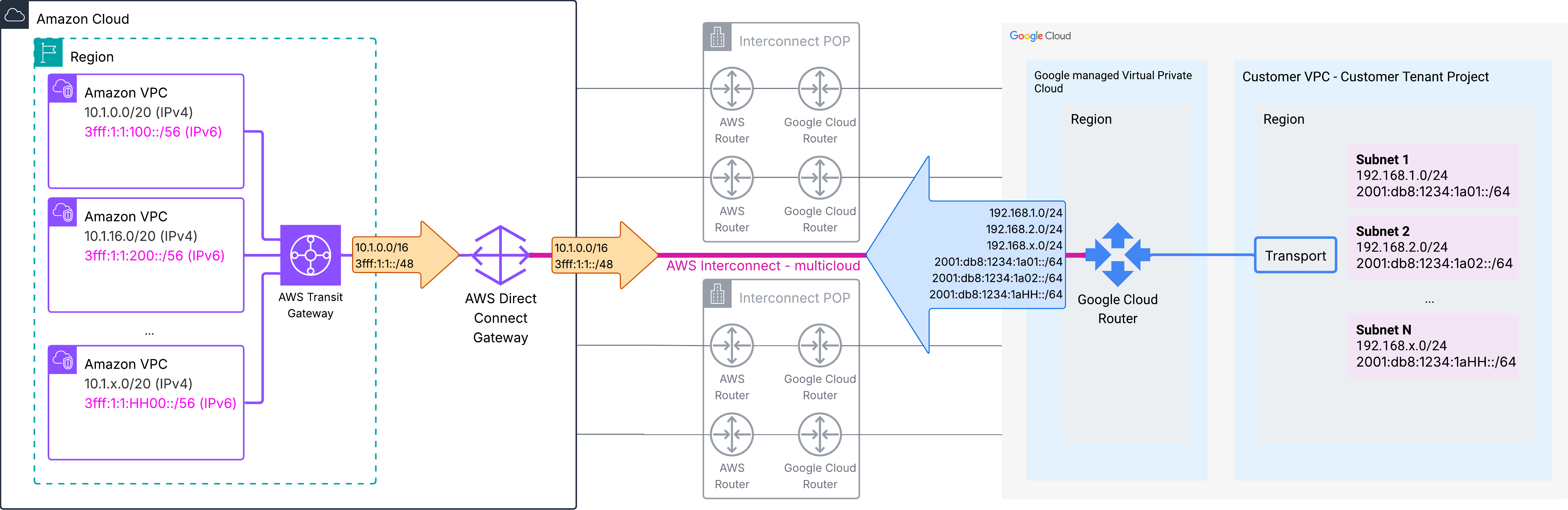
Figure 5 – Route advertisements – Regional aggregation with AWS Transit Gateway – Single Region & single Interconnect
Route tables and traffic flows
AWS to Google Cloud:
- When your workloads on AWS send traffic destined for a Google Cloud prefix, the Amazon VPC route table is evaluated first and must contain a route pointing to the Transit Gateway attachment for the destination IPv4 or IPv6 prefix. You can configure summary or default IPv4 and IPv6 routes in your Amazon VPC route tables.
- The Transit Gateway receives the packet and evaluates its route tables based on the association of the source VPC attachment. Transit Gateway forwards the packet to the Direct Connect gateway, which then sends it through the multicloud Interconnect to Google Cloud.
- The traffic traverses the private Interconnect, arriving at the Google Cloud Router, which forwards packets to the appropriate Google Cloud Customer VPC subnet based on its routing table.
Return traffic follows the reverse symmetrical path.
This architecture allows you to create multiple Transit Gateway route tables with different routing policies, enabling you to control which VPCs can communicate with Google Cloud by associating VPC attachments with specific route tables that either include or exclude the static routes to Google Cloud prefixes.
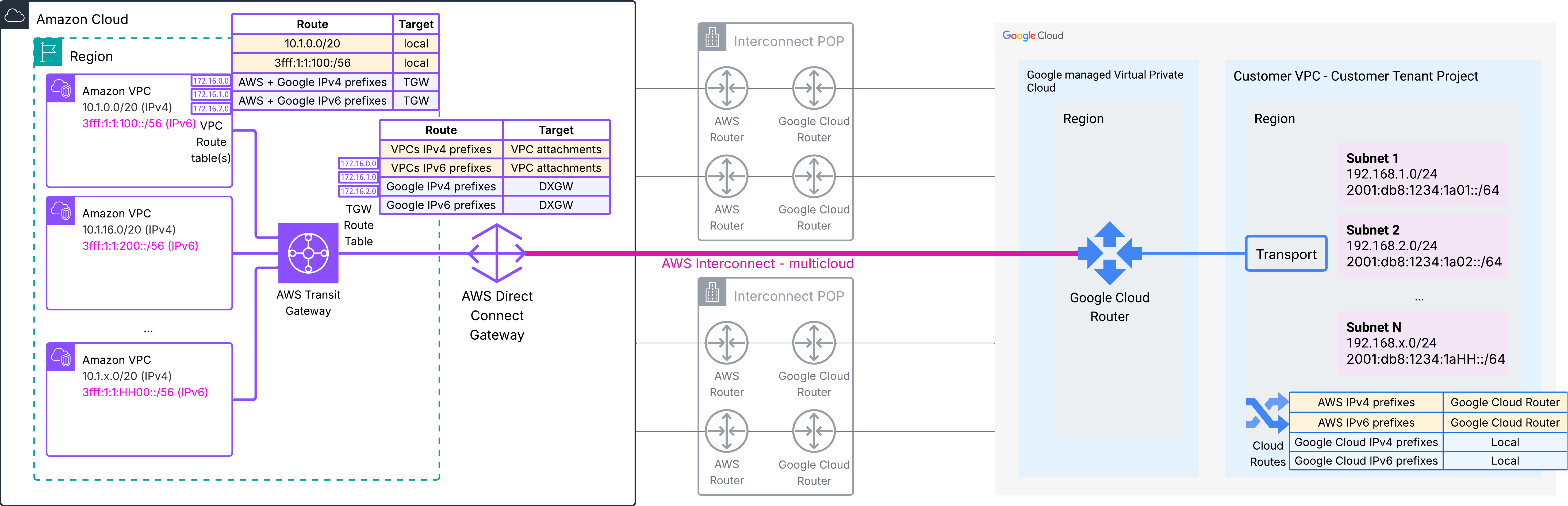 Figure 6 – Route tables – Regional aggregation with AWS Transit Gateway – Single Region & single Interconnect
When to use this architecture
This architecture is suited for organizations operating multiple VPCs within a single AWS Region that require centralized routing control and consistent connectivity policies to Google Cloud. Use this pattern to aggregate connectivity for multiple environments such as development, test, and production while maintaining network segmentation through Transit Gateway route table isolation. This solution works well for enterprises that have standardized on Transit Gateway for regional AWS networking and want to extend the same operational model to multicloud connectivity.
Consider this pattern if you anticipate growth in the number of VPCs within the Region, as adding new VPCs to Transit Gateway is more scalable and operationally simpler than managing individual Virtual Private Gateway attachments to a Direct Connect gateway. This architecture provides a foundation for implementing advanced traffic inspection and security controls by routing traffic through AWS Network Firewall or third-party virtual appliances deployed in inspection VPCs attached to Transit Gateway.
Considerations
While Transit Gateway provides significant scalability and operational benefits over the single VPC architecture, there are important technical constraints and design considerations to evaluate:
- TGW is a region-scoped service, which means each AWS Region requires its own TGW.
- Coordinate IP address management between your Amazon VPC CIDR blocks and Google Cloud VPC subnet ranges to prevent overlapping address spaces, which would cause routing conflicts.
- We recommend you use IP prefixes that easy to summarize for your Amazon VPCs. This allows you to configure a summary prefix on the TGW attachment to Direct Connect gateway and optimize route table size.
- VGWs or TGWs in a specific AWS Region can only reach multicloud Interconnects in the local Region, so if you need to connect to Google Cloud resources from multiple regions, you will need to provision separate multicloud Interconnects in each region pair and configure appropriate routing for your TGWs.
- Consider the bandwidth requirements for your cross-cloud traffic flows and ensure your multicloud Interconnect capacity is sufficient to handle peak loads, as all traffic between your Transit Gateway-attached VPCs and Google Cloud will traverse the same multicloud Interconnect connection.
Architecture 3: Global connectivity with AWS Cloud WAN
Enterprises operating globally can integrate AWS Interconnect – multicloud with AWS Cloud WAN to build a private, fully managed global backbone that interconnects AWS Regions and Google Cloud environments worldwide. In this design, your AWS Cloud WAN core network can aggregate multiple segments such as production, development, shared services, or business unit segments. You control which segments have Direct Connect gateway connectivity through segment-based routing policies.
AWS Cloud WAN provides a global networking service where any AWS Cloud WAN Core Network Edge can reach any multicloud Interconnect globally that is attached to an associated Direct Connect gateway. This enables seamless routing across AWS Regions and Google Cloud locations fully controlled by your core network policy.
Unlike VGWs or TGWs that are Region-scoped and can only reach multicloud Interconnects in the local Region, Cloud WAN leverages the AWS global backbone to provide any-to-any connectivity across all regions where you have deployed AWS Cloud WAN Core Network Edges (CNEs) – the AWS Cloud WAN fully managed regional routing hubs. The AWS Direct Connect gateway is a global construct, so you can attach your CNEs across multiple Regions to a Direct Connect gateway.
3.1. Single AWS Interconnect and single global segment on AWS Cloud WAN
The following diagram shows an architecture option where you attach the DXGW directly to an AWS Cloud WAN segment, for end-to-end direct reachability between your environments on AWS and your resources on Google Cloud. For simplicity, this first example shows you a single AWS Cloud WAN segment, and a Cloud WAN Core Network deployed across 3 AWS Regions. The Cloud WAN Core Network Edges (CNEs) are fully managed by Cloud WAN. The following diagram shows the architecture example:
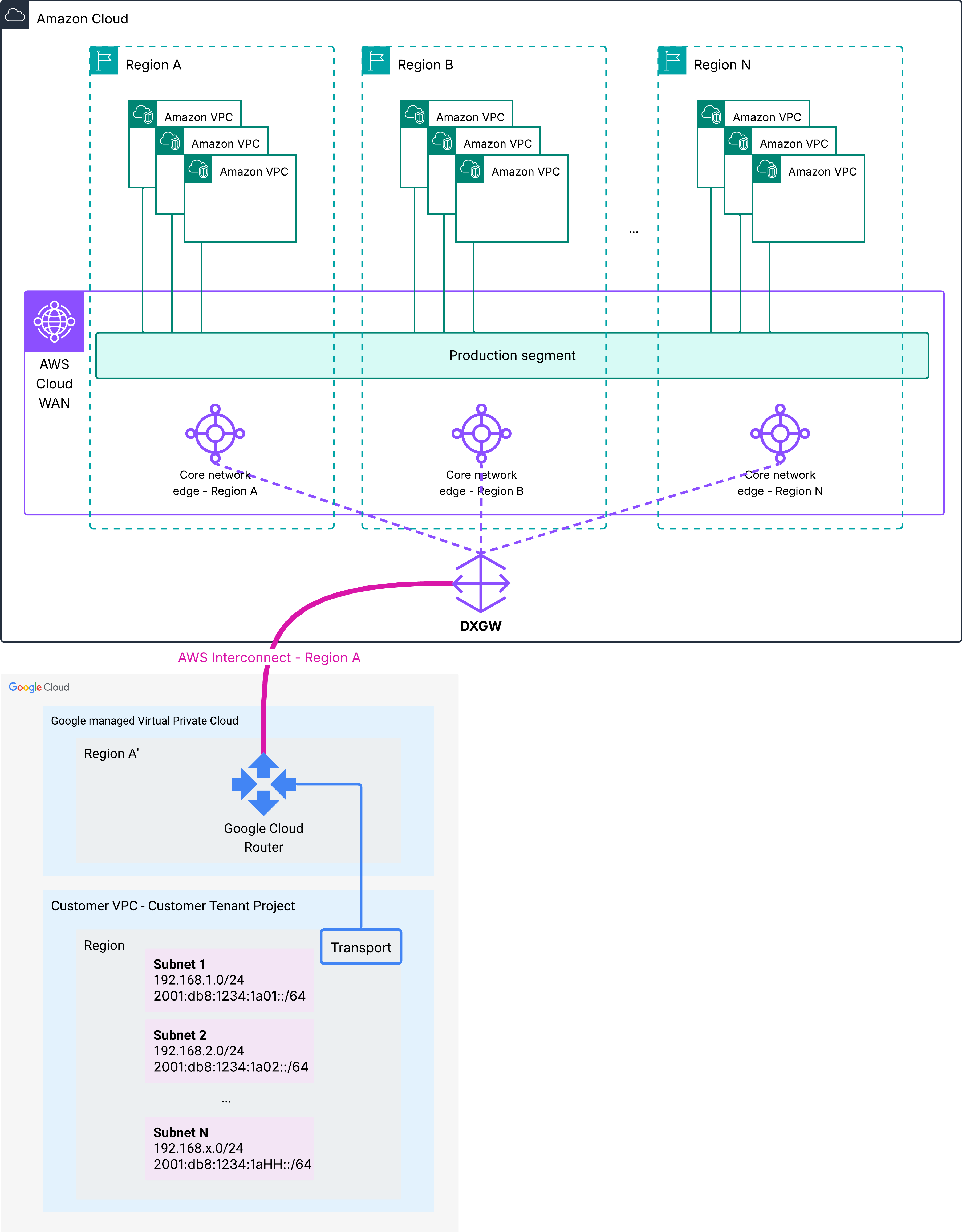
Figure 7 – Global routing architecture with AWS Cloud WAN – Single segment and single Interconnect
3.2. Single AWS Interconnect and multiple global segments on AWS Cloud WAN
AWS Cloud WAN helps you simply global segmentation, inspection insertion and routing policy control. You can configure AWS Interconnect for globally segmented environments, with integrated inspection, as shown in the following diagram. This is a common architecture deployment on AWS, and you can manage connectivity fully using your AWS Cloud WAN core network policy.
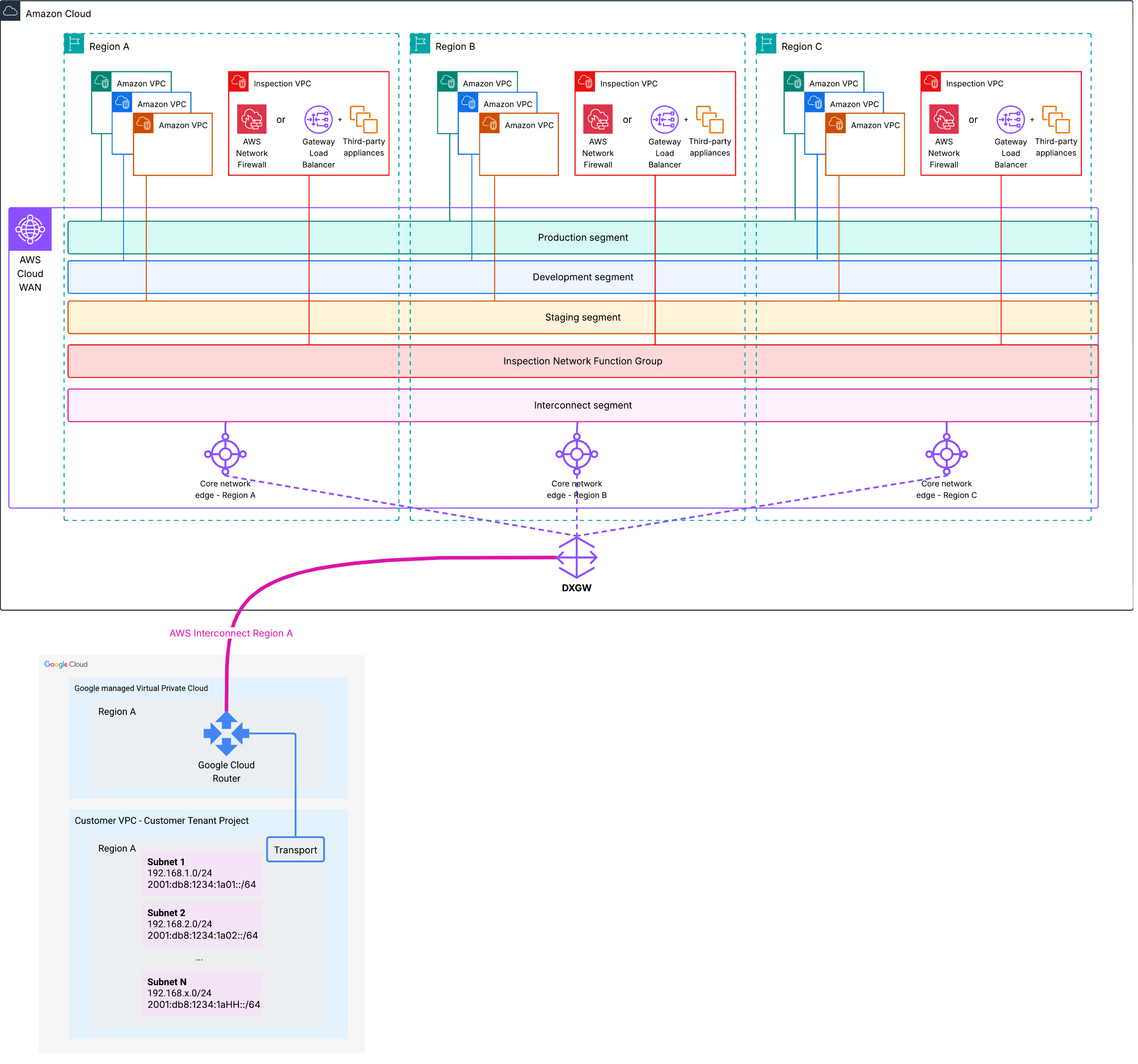
Figure 8 – Architecture 3.2. – Global routing architecture with AWS Cloud WAN, segmentation, inspection and AWS Interconnect
In this example, we show three separate AWS Cloud WAN segments for your workloads: Production, Development and Staging. We also created a separate Interconnect segment for the multicloud Interconnect connection.
To facilitate traffic filtering and inspection between Cloud WAN segments, we configured the Cloud WAN core network policy with a Network Function Group for service insertion, which has Inspection VPCs attached in each Region. Traffic between workloads in different segments is automatically routed through the appropriate Inspection points. This post describes the implementation details for this architecture.
Route propagation
AWS to Google Cloud route propagation:
- AWS Cloud WAN dynamically learns IPv4 and IPv6 prefixes of the attached VPCs in the correct segment for your VPCs and globally populates its route tables.
- AWS Cloud WAN advertises the Amazon VPC prefixes across all CNEs to the attached Direct Connect gateway based on your segment policies. In this example, we do not configure AWS Cloud WAN routing policies, so all Amazon VPC IPv4 and IPv6 prefixes across all segments are advertised to the Direct Connect Gateway.
- The Direct Connect gateway dynamically propagates these routes to Google Cloud through BGP across the AWS Interconnect. This global route propagation enables any VPC attached to any AWS Cloud WAN CNE to reach Google Cloud resources, provided the segment policies and firewall filtering rules allow connectivity.
- The Google Cloud Router propagates the received routes to the Google Cloud Customer VPC subnets’ Cloud Routes.
Google Cloud to AWS route propagation:
- On the Google Cloud side, the Cloud Router advertises Google Cloud VPC subnet prefixes back to the AWS Direct Connect gateway.
- When you attach AWS Cloud WAN to a Direct Connect gateway associated with a multicloud Interconnect, Cloud WAN automatically learns routes from the Direct Connect gateway through BGP in the Interconnect segment.
Routing and traffic flows
AWS to Google Cloud:
- When your workload on AWS sends traffic destined for a Google Cloud resource, the VPC route table is evaluated first and must contain a route pointing to the Cloud WAN attachment for the destination CIDR range. We recommend you configure summary routes at the VPC level, for simplified management.
- Cloud WAN receives the packet and evaluates the segment policy associated with the source VPC attachment to determine if that segment has connectivity to the Direct Connect gateway that has the Interconnect attached. In this example, traffic is routed automatically through the firewall, which inspects it. If the firewall allows the traffic, it sends it to the Direct Connect gateway attachment across the AWS global backbone.
- Traffic traverses the private Interconnect, arriving at the Google Cloud Router, which forwards packets to the appropriate VPC subnet based on its routing table.
Return traffic follows the reverse symmetrical path. AWS Cloud WAN service insertion ensures traffic symmetry through the Inspection VPC attachments.
When to use this architecture
This architecture suits global enterprises with distributed workloads across multiple AWS Regions requiring consistent, policy-driven connectivity to Google Cloud resources. Use this pattern to implement hub-and-spoke or any-to-any global network topologies spanning both clouds with centralized policy management and unified visibility. This solution works well for organizations that have deployed Cloud WAN for global AWS networking and want to extend the same operational model to multicloud connectivity. It allows your workloads in any AWS Region to access Google Cloud resources without creating region-specific connectivity patterns. Cloud WAN global routing capabilities combined with AWS Interconnect – multicloud optimize traffic flows based on proximity while maintaining consistent security policies. The segment-based policy model makes this architecture valuable for managed service providers or large enterprises with multiple business units that need to share global network infrastructure while enforcing security between network segments, business units or tenants.
Considerations
While Cloud WAN provides powerful global routing capabilities and operational simplicity through centralized policy management, there are important architectural and operational considerations to evaluate:
- Cloud WAN segment policies can be designed to control which VPCs, and regions have connectivity to the Direct Connect gateway and therefore to Google Cloud, as the default any-to-any connectivity model may not align with your security and compliance requirements.
- Coordinate IP address management between your Amazon VPC CIDR blocks and Google Cloud VPC subnet ranges across all regions to prevent overlapping address spaces, which would cause routing conflicts.
- Consider the latency implications of your routing design, as traffic from a VPC in one AWS Region may need to traverse the AWS backbone reach a Direct Connect gateway Interconnect attachment in a different region before crossing to Google Cloud.
3.3. Multiple AWS Interconnect – multicloud connections
For enterprises requiring global multicloud connectivity to multiple environments in Google Cloud, deploying multiple multicloud Interconnects across different Region pairs with Cloud WAN provides optimized latency and performance. In this advanced architecture, you can provision multicloud Interconnects in multiple AWS and Google Cloud Region pairs, with each Interconnect attached to its own dedicated Direct Connect gateway.
Cloud WAN can connect to multiple Direct Connect gateways simultaneously, enabling granular routing control per Interconnect. The core network policy controls which workloads can use which Direct Connect gateways and their associated Interconnects, and BGP routing dynamically adjusts traffic flows based on path availability and performance across all connections.
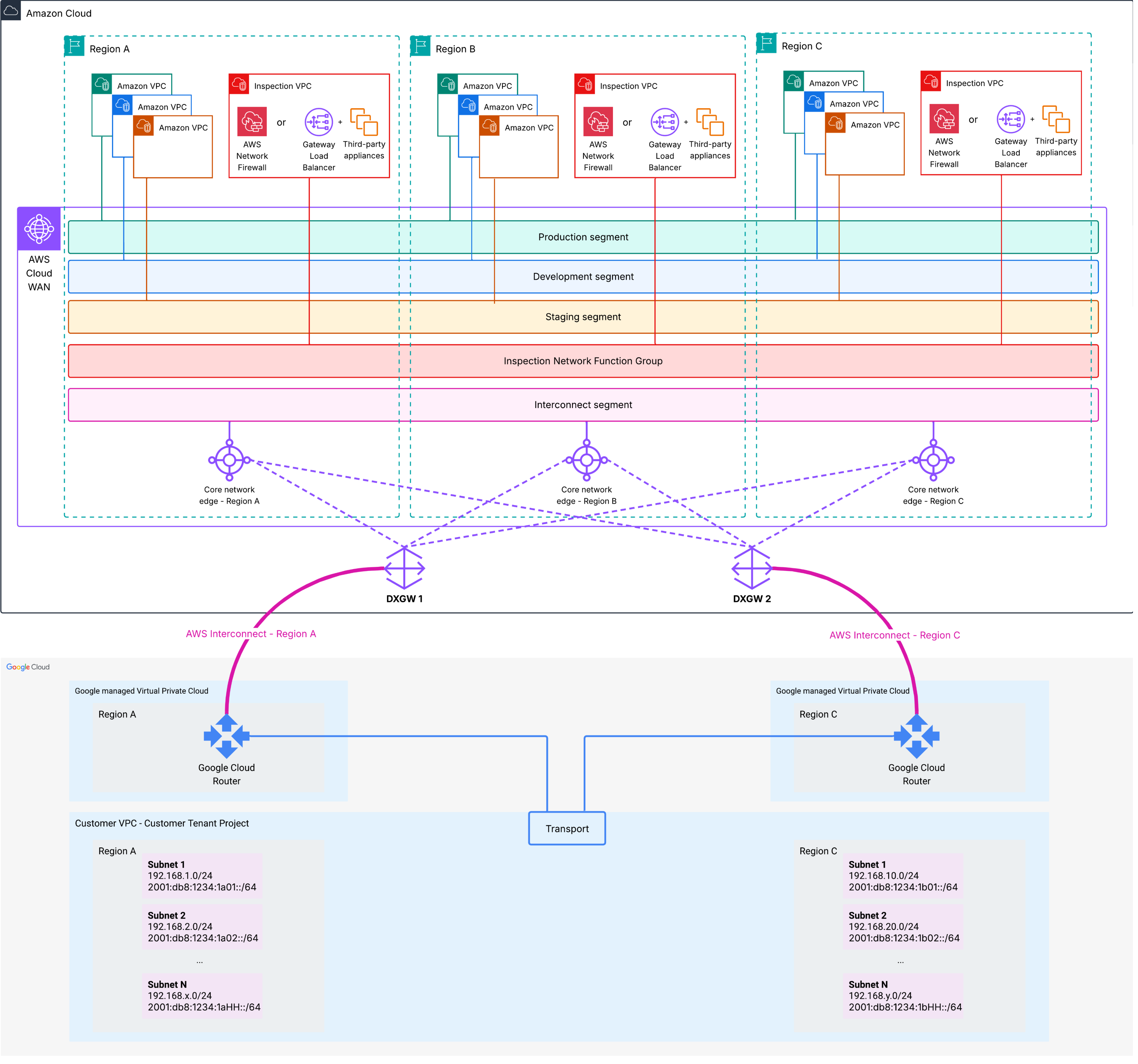
Figure 9 – Architecture 3.3. – AWS Cloud WAN with multiple AWS Interconnect – multiple AWS Interconnect – multicloud connections
Route propagation
AWS to Google Cloud route propagation:
- Amazon VPC and Cloud WAN routing configuration remains the same as in Example 3.2
- Each Direct Connect gateway advertises on its Interconnect all the prefixes from all the attached CNEs. In this example, prefixes from AWS Regions A, B and C are advertised on both Interconnects by each of the two Direct Connect gateway.
- The Google Cloud Routers receive the AWS prefixes and propagate them to the Customer VPC as Cloud Routes.
Google Cloud to AWS route propagation:
- Each multicloud Interconnect advertises all Google Cloud prefixes from the Google Cloud Customer VPC, across all Google Cloud Regions, to the Direct Connect gateway.
- Each Cloud WAN CNE receives route advertisements from the attached Direct Connect gateways (DXGW 1 and DXGW 2) and the Cloud WAN routing policy allows you to select which DXGW each CNE should prefer for each destination. Because each Interconnect has its own Direct Connect gateway, you gain independent control over route advertisements and can implement different routing policies per connection.
The following diagram shows route propagation:
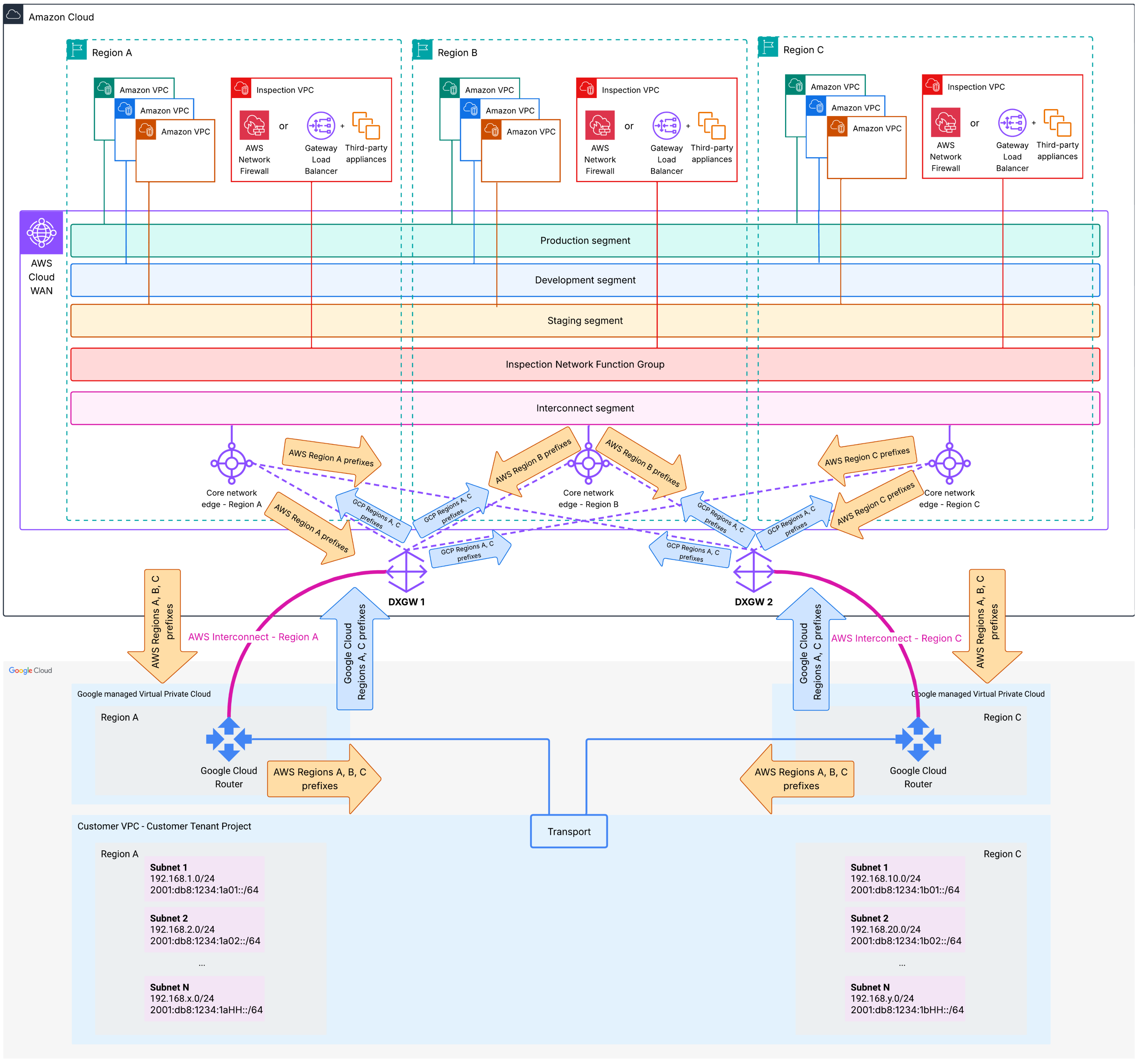
Figure 10 – Route propagation – AWS Cloud WAN with multiple AWS Interconnect – multiple AWS Interconnect – multicloud connections
Route tables and traffic flows
AWS to Google Cloud:
- When an instance sends traffic destined for a Google Cloud prefix, the VPC route table directs the packet to the Cloud WAN CNE in its respective Region.
- The CNE receives the packet, routes it through the appropriate Inspection VPC, and if the traffic is permitted, traffic is sent to the preferred DXGW attachment, based on the routing policy. In this example, to maintain traffic symmetrical, you can configure:
- AWS Region A CNE to prefer:
- DXGW 1 for Google Cloud Region A prefixes
- DXGW 2 for Google Cloud Region C prefixes
- AWS Region B CNE to prefer:
- DXGW 1 for Google Cloud Region A prefixes
- DXGW 2 for Google Cloud Region C prefixes
- AWS Region C CNE to prefer:
- DXGW 1 for Google Cloud Region A prefixes
- DXGW 2 for Google Cloud Region C prefixes
- AWS Region A CNE to prefer:
Return traffic follows the reverse symmetrical path. Each Google Cloud Customer VPC subnet prefers the nearest Google Cloud Router to route to AWS prefixes. In this example:
- Customer VPC subnets in Region A will prefer the Google Cloud Router in Region A
- Customer VPC subnets in Region C will prefer the Google Cloud Router in Region C
When to use this architecture
This architecture is suited for global enterprises requiring high availability, performance, and operational flexibility for multicloud connectivity across multiple geographic regions. Use this pattern for workloads distributed across multiple AWS and Google Cloud regions that require optimized routing based on geographic proximity with comprehensive failover capabilities. Consider this architecture when implementing different routing policies, bandwidth allocations, or traffic engineering strategies for different region pairs. This pattern works well for organizations with compliance requirements mandating data sovereignty or requiring traffic between certain regions to follow specific paths.
Considerations
While this architecture provides maximum resilience, performance, and operational flexibility, consider the following:
- Deploying multiple multicloud Interconnects with dedicated Direct Connect gateways across different region pairs can increase your operational costs.
- We recommend you coordinate IP address management meticulously across all AWS Regions and Google Cloud regions to prevent overlapping address spaces as you add more interconnection points and expand your global footprint across multiple routing domains.
- BGP routing behavior with multiple Direct Connect gateways and multiple paths requires deep understanding of path selection algorithms, route aggregation strategies, and traffic engineering techniques, and you must carefully configure Cloud WAN routing policies.
- Consider Region preferences when configuring Cloud WAN routing policies, to maintain symmetrical traffic flows, especially when traffic is inspected using stateful firewall solutions.
Conclusion
AWS Interconnect – multicloud extends the power of AWS Direct Connect to multicloud architectures, enabling private, elastic, and high-performance connectivity between AWS and Google Cloud Platform. By removing the complexity of physical provisioning and introducing API-driven control, Interconnect – multicloud unifies hybrid and multicloud networking into a single, simplified experience. Whether you operate a single Amazon VPC, aggregate connectivity regionally with AWS Transit Gateway, or build a global network with AWS Cloud WAN, AWS Interconnect – multicloud offers a consistent model for private multicloud communication, so you can focus on your applications. To get started, refer to the AWS Interconnect – multicloud documentation.
About the authors

Alexandra Huides
Alexandra Huides is a Principal Networking Specialist Solutions Architect in the AWS Networking Services product team at Amazon Web Services. She focuses on helping customers build and develop networking architectures for highly scalable and resilient AWS environments. Alex is also a public speaker for AWS, and is helping customers adopt IPv6. Outside work, she loves sailing, especially catamarans, traveling, discovering new cultures, running and reading.

Santiago Riesco
Santiago Riesco is a Senior Product Manager for AWS Networking Services. He has worked on AWS Direct Connect since 2020, focusing on developing the service’s roadmap. More recently he led the project to launch AWS Interconnect, AWS’ first purpose-built multicloud connectivity service which redefined multicloud networking. Outside of work, Santiago spends his time with his family, on cars, and grilling. He is still looking for the best way to combine all three.