Networking & Content Delivery
Consolidate dual-stack architectures with listener rules for Network Load Balancer
Today, Amazon Web Services (AWS) announces listener rules for Network Load Balancer (NLB), a feature that routes connections to different target groups based on the source IP address type allowing customers to simplify their dual-stack deployments. With listener rules, a single dual-stack NLB sends IPv6 client traffic to IPv6 targets and IPv4 client traffic to IPv4 targets, with no protocol translation and full source IP preservation for both address families.
As organizations adopt IPv6, most run mixed environments where some clients connect over IPv4 and others over IPv6. Serving both from one NLB used to mean accepting a tradeoff. A dual-stack NLB accepts connections from both IPv4 and IPv6 clients. Its listener forwards through a default action, and every target group in that action must use the same IP address type. A single default action therefore sent all clients, IPv4 and IPv6 alike, to one family of targets. For example, IPv6 clients that land on IPv4 targets are translated at the load balancer, so the target sees the load balancer address rather than the original client address. For workloads that rely on the client IP for security policies, access logging, or compliance, that loss of end-to-end source IP is not acceptable. The workaround was to run two load balancers (one per IP version) and split clients with DNS, or to enable NLB’s Proxy Protocol version 2 (PPv2) support to recover the client IP at the target. Listener rules remove that tradeoff.
In this post, we review how listener rules work on Network Load Balancer, walk through consolidating IPv4 and IPv6 clients onto a single dual-stack NLB, and cover monitoring, migration, and the considerations to plan for.
Before listener rules
A dual-stack NLB terminates connections from both IPv4 and IPv6 clients. The complication is on the target side. Each target group has a single IP address type (IPv4 or IPv6), and a listener’s default action can only forward to target groups of one type. That left two options before this launch:
- Run two load balancers: Deploy one NLB for IPv4 traffic and another for IPv6, then split clients with separate DNS records (for example, an A record pointed at the IPv4 NLB and a AAAA record pointed at the IPv6 NLB). Each NLB carries its own listeners, target groups, health checks, and hourly and LCU charges, so you operate and pay for two parallel stacks that front the same application. This deployment option is shown in figure 1.
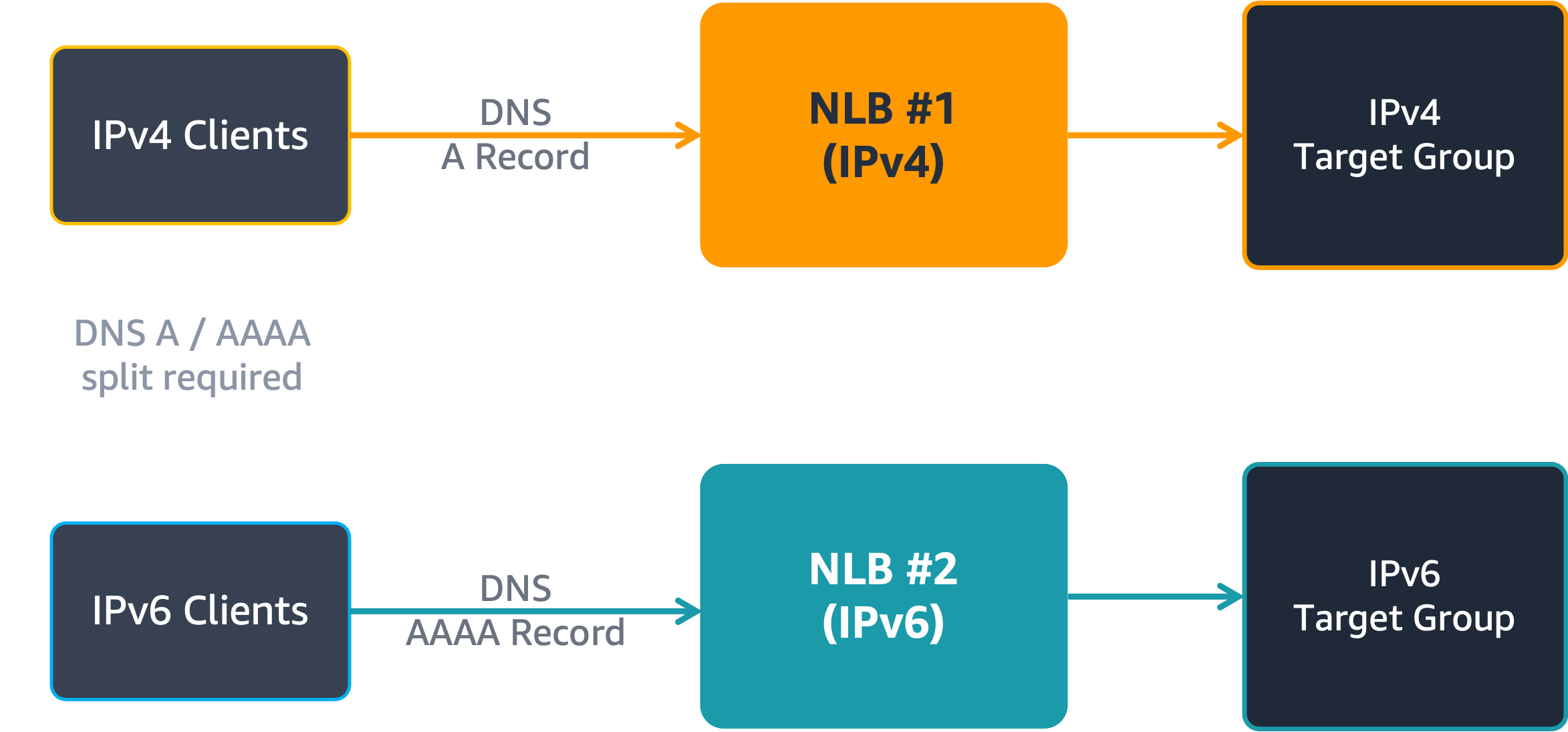
Figure 1: Two load balancer deployment
- Send everything to one target group and use PPv2 to capture the client IP: Point a single dual-stack NLB at one target group and let the load balancer translate the other family. At the network layer the target sees the load balancer address, so security groups, network ACLs, and VPC Flow Logs no longer show the original client. Recovering the client IP then requires enabling Proxy Protocol version 2 (PPv2) and updating every target application to parse the PPv2 header, which adds operational overhead across the fleet.
How listener rules work on Network Load Balancer
The new listener rules add conditional routing to an NLB listener. You define rules that match on the source IP address type of the connection and forward matching traffic to a target group of the same type. The concept mirrors listener rules on Application Load Balancer (ALB), with one difference in where the match happens: ALB rules evaluate Layer 7 attributes (for example, host headers and path patterns), while NLB rules evaluate the Layer 3 attribute of source IP address type.
Rules on a listener evaluate in priority order, where a lower priority number is evaluated first. When a rule’s condition matches, the connection is forwarded to that rule’s target group. Connections that match no rule fall through to the listener’s default action. A typical dual-stack configuration uses two rules:
(1) An IPv4 rule that forwards IPv4 source connections to an IPv4 target group.
(2) An IPv6 rule that forwards IPv6 source connections to an IPv6 target group.
Because traffic for each IP address family now reaches a target group of its own type, there is no protocol translation in either direction, and the original client IP is preserved end to end for both IPv4 and IPv6 clients. Figure 2 shows dual-stack NLB running with listener rules.
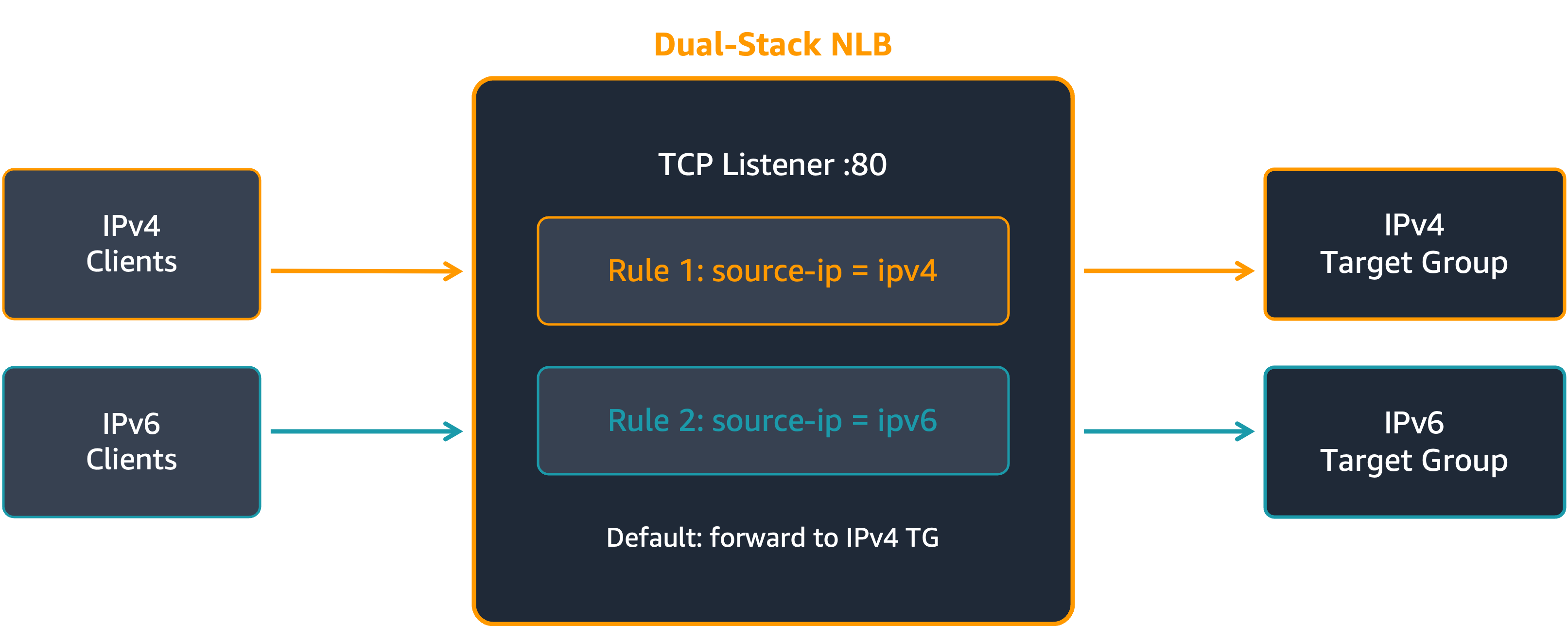
Figure 2: Dual-stack NLB with listener rules
The following table summarizes what the feature supports.
| Element | Details |
| Condition | Source IP address type (ipv4 or ipv6) |
| Listener protocols | TCP, UDP, TCP_UDP, TLS |
| Actions | Forward to a target group, or forward to multiple weighted target groups (ForwardConfig) |
| Load balancer type | Dual-stack NLB |
| Existing NLBs | Supported. You can add rules to an existing dual-stack NLB without recreating it. |
Getting started
The following walkthrough consolidates IPv4 and IPv6 clients onto one dual-stack NLB using the AWS Command Line Interface (AWS CLI). Replace the example resource identifiers with values from your account.
Step 1: Create a dual-stack NLB
The VPC and subnets you specify must have IPv6 CIDR blocks associated, and the subnet route tables must route IPv6 traffic.
aws elbv2 create-load-balancer \

          --name my-nlb \

          --subnets subnet-1234567890abcdef0 subnet-1234567890abcdef0 \

          --type network \

          --ip-address-type dualstack
Step 2: Create target groups
Create one target group per IP address type. Both point at the same application tier.
# Create IPv4 target groupaws elbv2 create-target-group \--name my-nlb-ipv4-tg --protocol TCP --port 80 \--vpc-id vpc-021345abcdef67890 --ip-address-type ipv4
# Create IPv6 target groupaws elbv2 create-target-group \--name my-nlb-ipv6-tg --protocol TCP --port 80 \--vpc-id vpc-021345abcdef67890 --ip-address-type ipv6
Step 3: Create a listener
Set the default action to one of the target groups. Traffic that matches no rule falls through to this action, so choose the family you prefer as the fallback. This example uses the IPv4 target group.
aws elbv2 create-listener \--load-balancer-arn <nlb-arn> \--protocol TCP --port 80 \--default-actions Type=forward,TargetGroupArn=<ipv4-tg-arn>
Step 4: Create listener rules
Add one rule per IP address type. Lower priority numbers evaluate first. Note that you need AWS CLI version 2.35.24 or newer for these commands to work, otherwise you will get an error: Unknown parameter in Conditions[0].SourceIpConfig: "IpAddressType", must be one of: Values
# Route IPv4 source connections to the IPv4 target groupaws elbv2 create-rule \--listener-arn <listener-arn> --priority 10 \--conditions '[{"Field":"source-ip","SourceIpConfig":{"IpAddressType":"ipv4"}}]' \--actions '[{"Type":"forward","TargetGroupArn":"<ipv4-tg-arn>"}]'
# Route IPv6 source connections to the IPv6 target groupaws elbv2 create-rule \--listener-arn <listener-arn> --priority 11 \--conditions '[{"Field":"source-ip","SourceIpConfig":{"IpAddressType":"ipv6"}}]' \--actions '[{"Type":"forward","TargetGroupArn":"<ipv6-tg-arn>"}]'
Alternatively, you can also configure Listener Rule using AWS Console as described in the following steps.
As shown in figure 3, first go to your dual-stack NLB, and then select “Listeners and rules” tab. Select the TCP:80 listener and then choose on “Add rule”, under the “Manage rules” drop down.
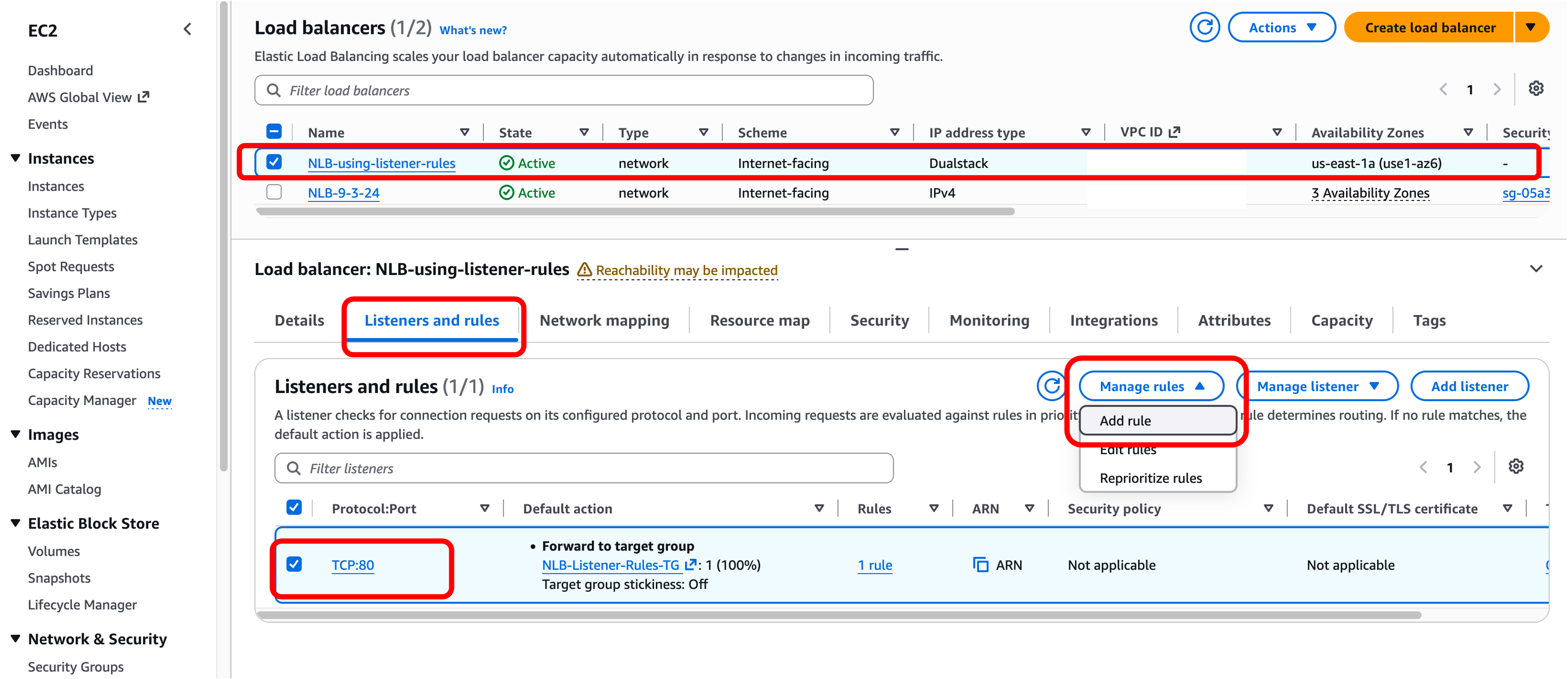
Figure 3: Creating rule
The console tab will open up as shown in figure 4. Create a rule for handling IPv4 and/or IPv6 traffic by providing the appropriate target group to forward the traffic. Select “Next” to save the rule.
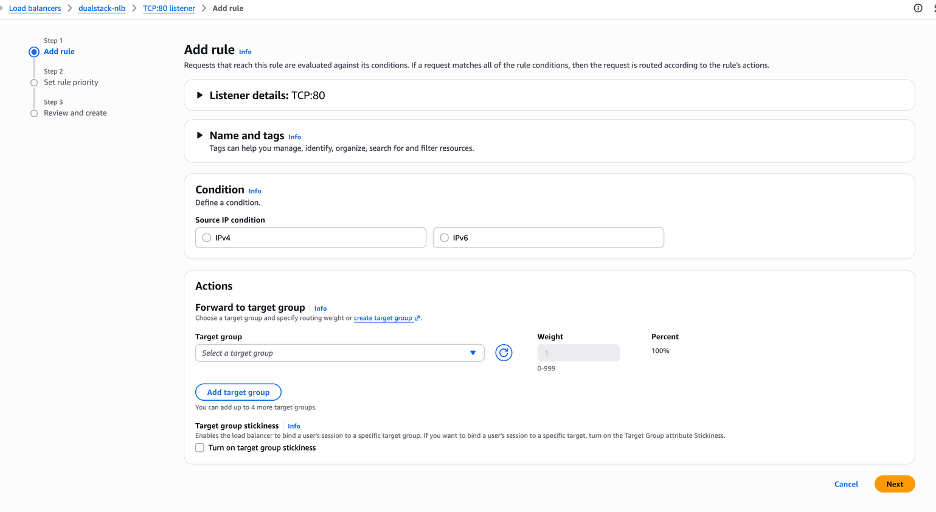
Figure 4: Adding rule
Once the rule is created, you can see it in the console as shown in figure 5. Now assign priority to the newly created rule.
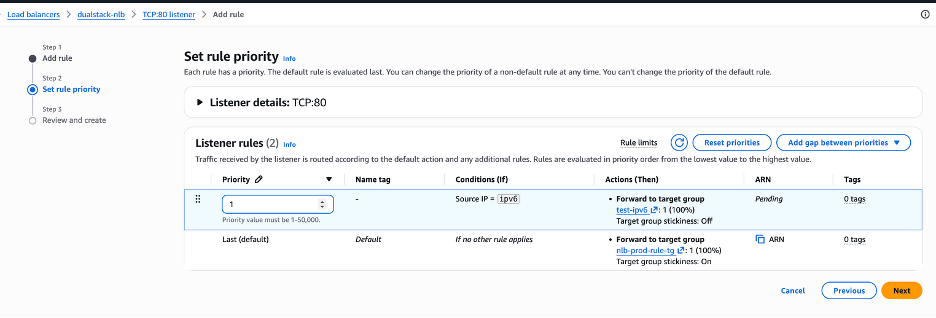
Figure 5: Assigning priority to rule
Select “Next” after assigning priority to the rule, then select “Add rule” on the confirmation screen that follows. You will then see all the rules and traffic handling conditions for the listener as shown below.
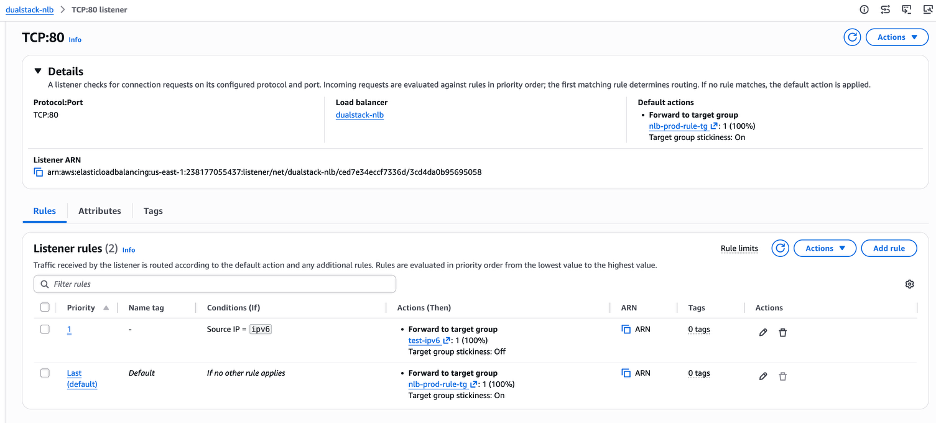
Figure 6: See all the listener rules
You can thus configure rules for handling IPv4 and IPv6 traffic. With both rules in place, the single dual-stack NLB forwards each client to a same-family target group, and both IPv4 and IPv6 targets see the original client address.
Monitoring and observability
Before and after you consolidate, you can confirm how traffic divides across the two families using existing NLB telemetry:
- Amazon CloudWatch metrics are published per load balancer and per target group. Filter by the TargetGroup dimension to compare connection volume on the IPv4 and IPv6 target groups (for example, NewFlowCount and ActiveFlowCount), and watch HealthyHostCount and UnHealthyHostCount on each target group independently. Byte-level metrics such as ProcessedBytes are published at the load balancer and Availability Zone level rather than per target group.
- VPC Flow Logs record connection-level source and destination addresses, which lets you verify that IPv6 clients reach IPv6 targets and IPv4 clients reach IPv4 targets with the client address preserved.
- NLB access logs (available on TLS listeners) capture per-connection detail for auditing and troubleshooting.
Reviewing the per-target-group metrics is the practical way to validate the routing behavior on a subset of traffic before you move production DNS.
Consolidating two NLBs into one
If you run separate IPv4 and IPv6 NLBs today, you can collapse them onto a single dual-stack NLB with no disruption to existing clients:
- Enable dual-stack on one of your existing NLBs, or create a new dual-stack NLB.
- Create an IPv4 target group and an IPv6 target group, and register the same application tier in both.
- Add listener rules that forward IPv4 source connections to the IPv4 target group and IPv6 source connections to the IPv6 target group.
- Validate the split on a subset of traffic using the per-target-group CloudWatch metrics described earlier.
- Update DNS to point both the A and AAAA records at the consolidated dual-stack NLB.
- After connections drain from the retired load balancer, decommission it.
Considerations
Prerequisites
Listener rules require a dual-stack NLB. The VPC and subnets must have IPv6 CIDR blocks associated, and the subnet route tables must route IPv6 traffic.
Rule evaluation and the default action
Rules evaluate in priority order, where a lower priority number is evaluated first. Traffic that matches no rule falls through to the default action, so set the default action to the family you want as the fallback.
Weighted target groups
Listener rules support ForwardConfig with multiple weighted target groups, which is useful for canary rollouts or gradual migrations. Each target group takes a weight from 0 to 999, and a group with weight 0 receives no new connections. The following example sends 70 percent of matching connections to one target group and 30 percent to another.
aws elbv2 create-rule --listener-arn <arn> --priority 10 \--conditions '[{"Field":"source-ip","SourceIpConfig":{"IpAddressType":"ipv4"}}]' \--actions '[{"Type":"forward","ForwardConfig":{"TargetGroups":[{"TargetGroupArn":"<tg-1>","Weight":70},{"TargetGroupArn":"<tg-2>","Weight":30}]}}]'
Protocols and target groups
Listener rules apply to TCP, UDP, and TLS listeners. A UDP listener on a dual-stack NLB requires an IPv6 target group, so make sure the IPv6 target group exists before you split UDP traffic.
Health checks
Each target group health-checks its targets over its own IP family. Confirm that target security groups allow health check traffic from the load balancer over both IPv4 and IPv6.
Performance and availability
A consolidated dual-stack NLB carries the combined traffic of both IPv4 and IPv6 address families compared to two individual NLBs. While one NLB provides simplification, two separate NLBs provide natural fault isolation per address family. Evaluate your scale and availability requirements before consolidating.
Compatibility with existing NLB features
Listener rules work alongside the existing NLB feature set: connection draining (deregistration delay), target group stickiness (sticky sessions), cross-zone load balancing, client IP preservation (preserve_client_ip), and TLS termination on TLS listeners.
Relationship to Application Load Balancer listener rules
Both load balancers use a source-ip condition, but they match on different attributes. ALB matches the source address against one or more CIDR blocks:
{"Field": "source-ip", "SourceIpConfig": {"Values": ["0.0.0.0/0"]}}
NLB matches on the IP address type of the source connection:
{"Field": "source-ip", "SourceIpConfig": {"IpAddressType": "ipv4"}}
In short, ALB routes by specific address range, and NLB routes by IP version. If you already use ALB listener rules, use the CIDR form on ALB for range-based routing and the IP-address-type form on NLB to split IPv4 and IPv6 clients onto same-family targets.
Pricing and availability
Listener rules for Network Load Balancer are available in all AWS commercial Regions and the AWS GovCloud (US) Regions. There is no additional charge for the feature. You pay standard NLB pricing for load balancer hours and LCUs. Consolidating separate IPv4 and IPv6 NLBs onto a single dual-stack NLB removes the hourly charges of the second load balancer and the operational cost of running two parallel stacks.
Conclusion
In this post, we introduced listener rules for Network Load Balancer and showed how a single dual-stack NLB can route IPv4 and IPv6 clients to same-family targets, preserving the original client IP for both families without running two load balancers. If you operate dual-stack environments or are planning an IPv6 migration, this simplifies the architecture while keeping the source IP visibility your applications depend on.
To learn more, see the Network Load Balancer User Guide and the Elastic Load Balancing API Reference. If you have questions, start a new thread on AWS re:Post or contact AWS Support.
About the authors

Alexandra Huides
Alexandra Huides is a Principal Networking Specialist Solutions Architect at Amazon Web Services. She focuses on helping customers build and develop networking architectures for highly scalable and resilient AWS environments.

Milind Kulkarni
Milind Kulkarni is a Principal Product Manager at Amazon Web Services (AWS). He has extensive experience in networking, data center architectures, SDN/NFV, and cloud computing. He is a co-inventor of twelve US patents and has co-authored three IETF standards.