Networking & Content Delivery
Deployment models for AWS Network Firewall: Transit Gateway attachment and multiple VPC endpoints
Customers adopting AWS Network Firewall at scale have shared two consistent pieces of feedback. First, managing inspection for centralized deployments adds operational complexity. Second, deploying separate firewalls for each VPC in distributed deployments becomes costly and difficult to manage as the number of VPCs increases. In this post, we explore the architectural patterns for two AWS Network Firewall features that address these challenges: Transit Gateway-attached firewalls and multiple VPC endpoint associations.
In our previous blog posts, we explored various deployment models for AWS Network Firewall. In part 1, we introduced the foundational deployment models: distributed, centralized, and combined. In part 2, we expanded on these models with VPC routing enhancements that enabled inter-subnet traffic inspection within the same VPC.
With Transit Gateway-attached firewalls, you can attach a Network Firewall directly to a transit gateway as a transit gateway attachment, eliminating the need to provision and manage a dedicated inspection VPC.
With the multiple VPC endpoint associations capability, you can associate up to 50 VPC endpoints per Availability Zone with a single firewall, extending firewall protection across multiple VPCs while managing a centralized security policy and reducing costs through lower-priced secondary endpoints.
These features give you more flexibility, simplified architecture, and cost optimization opportunities.
Transit Gateway-attached firewalls for AWS Network Firewall
Prior to Transit Gateway-attached firewalls, customers were responsible for creating and managing their own inspection VPCs and their corresponding Transit Gateway attachments, as illustrated in Figure 1.
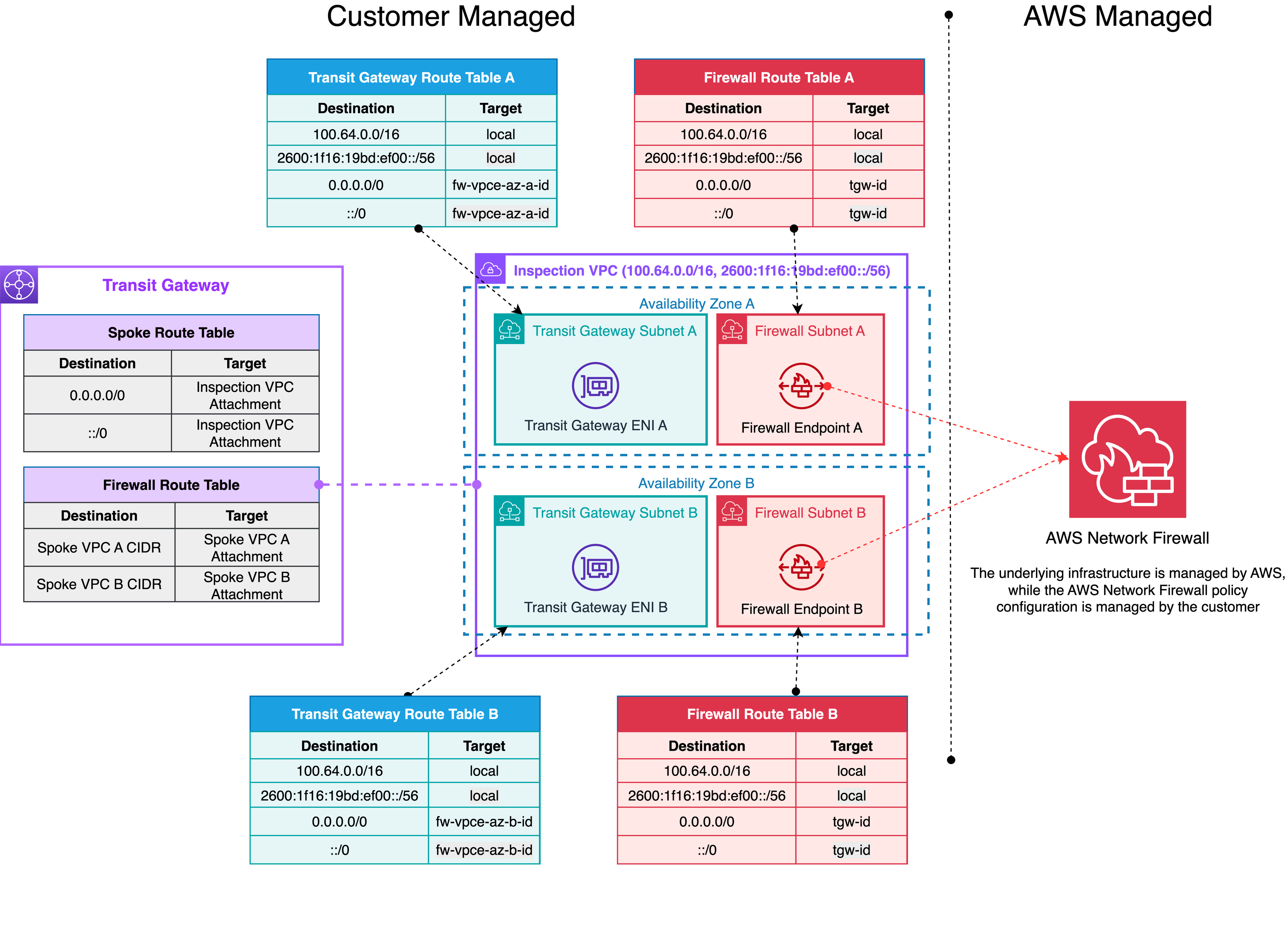
Figure 1: AWS Network Firewall centralized deployment without Transit Gateway network function attachment
Transit Gateway-attached firewalls represent an operational simplification for AWS Network Firewall, delivering a streamlined deployment model. Key aspects include:
- Direct attachment of Network Firewall to , eliminating the need for a customer-managed dedicated inspection VPC
- Simplified administrative interface where the firewall appears as a network function attachment on the Transit Gateway
Figure 2 shows this architecture, which significantly reduces operational complexity while maintaining robust network security capabilities.
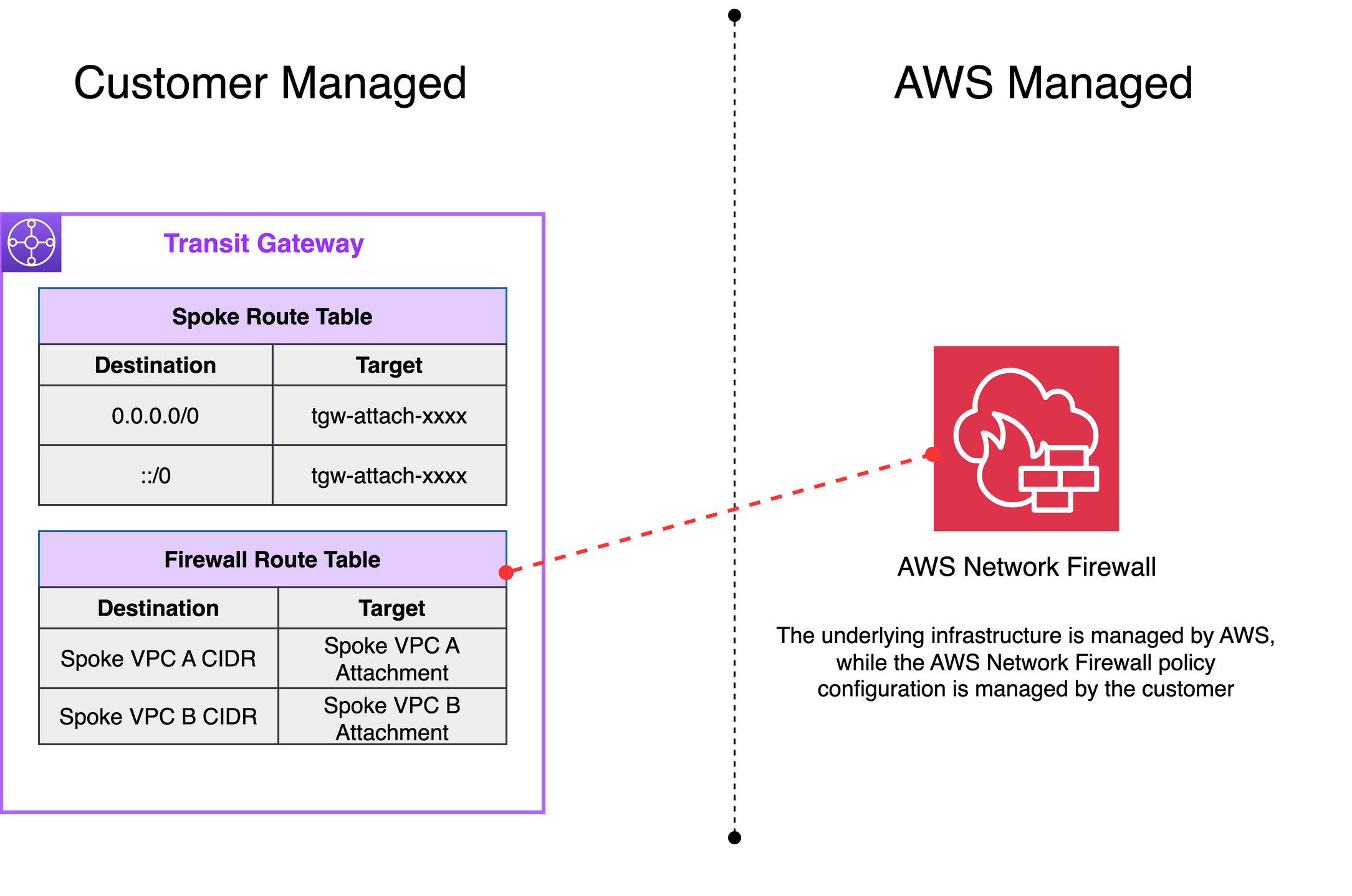
Figure 2: AWS Network Firewall centralized deployment with Transit Gateway network function attachment
From an architectural perspective, Transit Gateway-attached firewalls introduce an abstraction layer that shields you from the underlying complexity of managing inspection VPCs. The service creates and manages an AWS-controlled VPC containing the necessary subnets, internal route tables, firewall endpoints, and the transit gateway attachment. Customers still need to configure their Transit Gateway route tables with static routes to direct traffic through the firewall attachment. This AWS-managed VPC is fully controlled by AWS Network Firewall. It is not visible or accessible to you, which simplifies your network architecture and reduces operational overhead.
Benefits of Transit Gateway-attached firewalls
Transit Gateway-attached firewalls offer several key architectural benefits:
- Access to flexible cost allocation: With native attachment, you can use Transit Gateway metering policies to charge back account owners for traffic they send through the centralized firewall. Flexible cost allocation for Network Firewall traffic over a Transit Gateway is only available with a Transit Gateway-attached firewall. Without native attachment, you can only allocate Transit Gateway data processing charges, not the Network Firewall charges.
- Simplified network design: By eliminating the need for a customer-managed inspection VPC, Transit Gateway-attached firewalls reduce the number of components in your network architecture.
- Reduced operational overhead: The service manages all resources required for the firewall to function with your Transit Gateway, allowing you to focus on security policy rather than infrastructure management.
Architectural patterns with Transit Gateway-attached firewalls
Transit Gateway-attached firewalls support several architectural patterns for inspecting traffic at different points in your network.
1) East-west traffic inspection pattern
In this pattern, a transit gateway-attached firewall is used to inspect traffic between VPCs connected to the same Transit Gateway. This pattern is ideal for organizations that need to enforce security policies between different application tiers or business units that reside in separate VPCs.
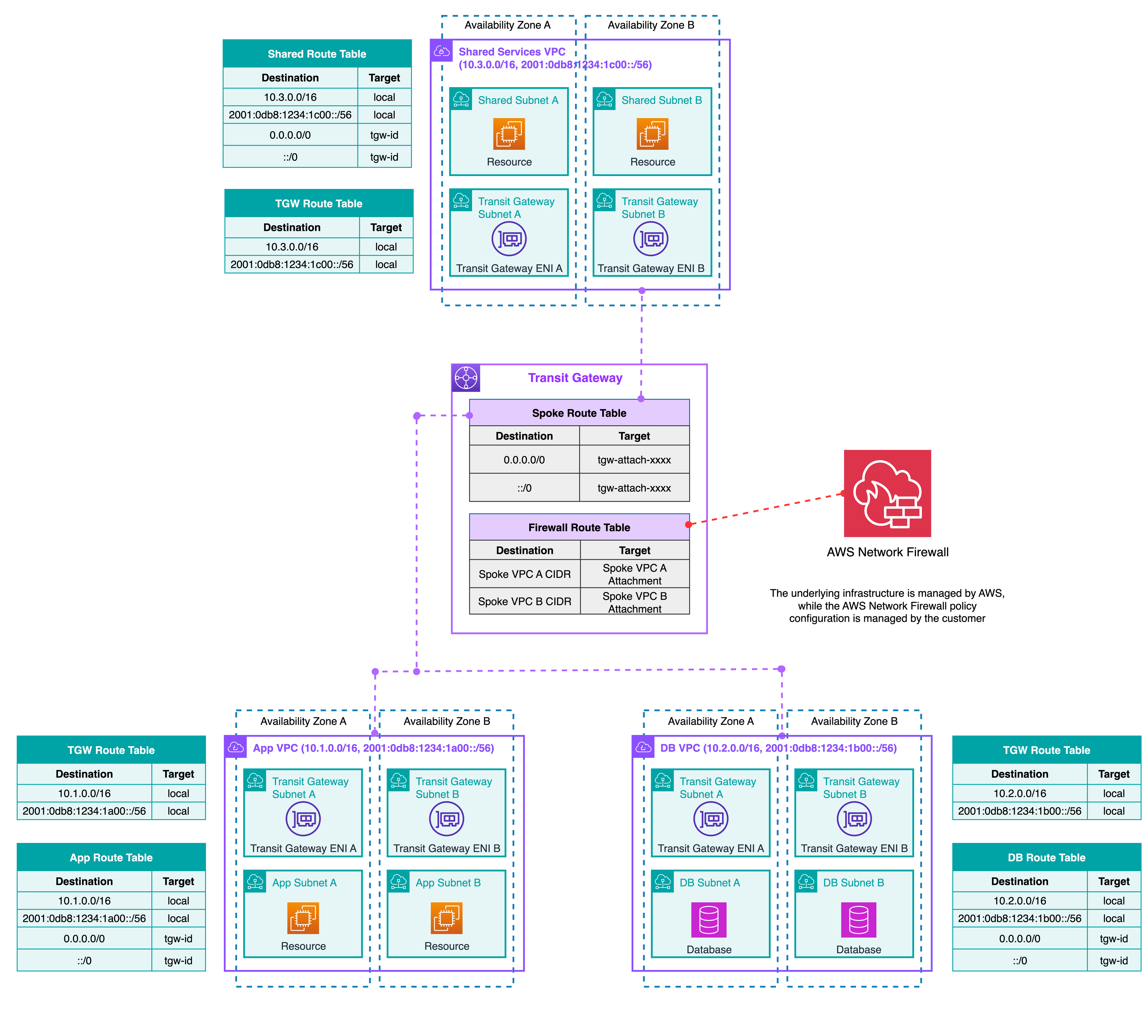
Figure 3: East-west traffic inspection between VPCs using Transit Gateway network function attachment
2) Centralized internet egress pattern
This pattern uses a transit gateway-attached firewall to inspect outbound traffic from multiple VPCs to the internet. Traffic is routed from the spoke VPCs through the transit gateway to the Network Firewall attachment. From there, it routes to a centralized egress VPC with a NAT gateway and internet gateway for internet access.
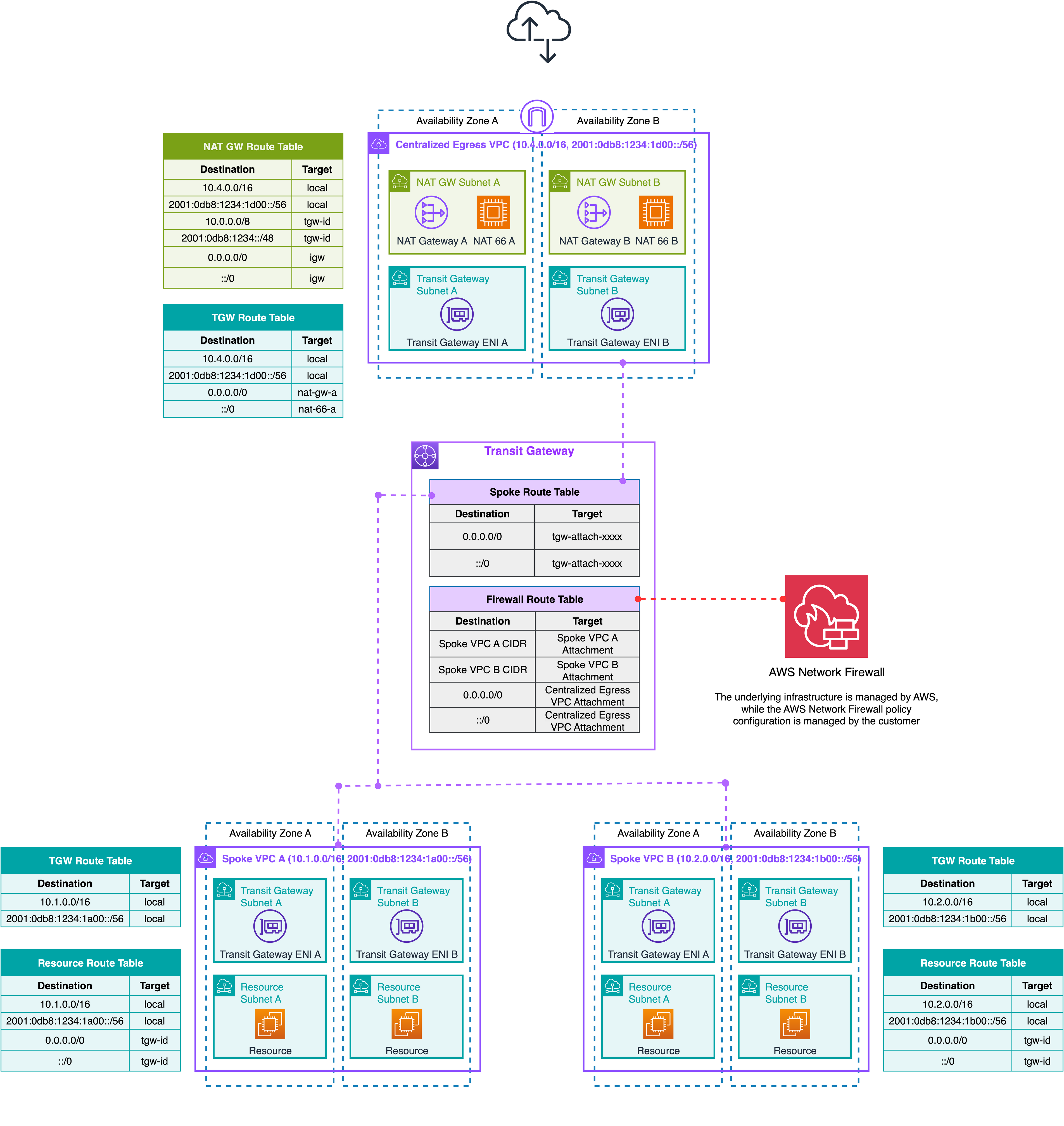
Figure 4: Centralized internet egress inspection using Transit Gateway network function attachment
3) Combined egress and east-west
You can consolidate both egress and inter-VPC (east-west) traffic inspection through a single centralized AWS Network Firewall deployment, eliminating the need for separate inspection architectures and reducing operational overhead while maintaining consistent security policy enforcement across all traffic flows.
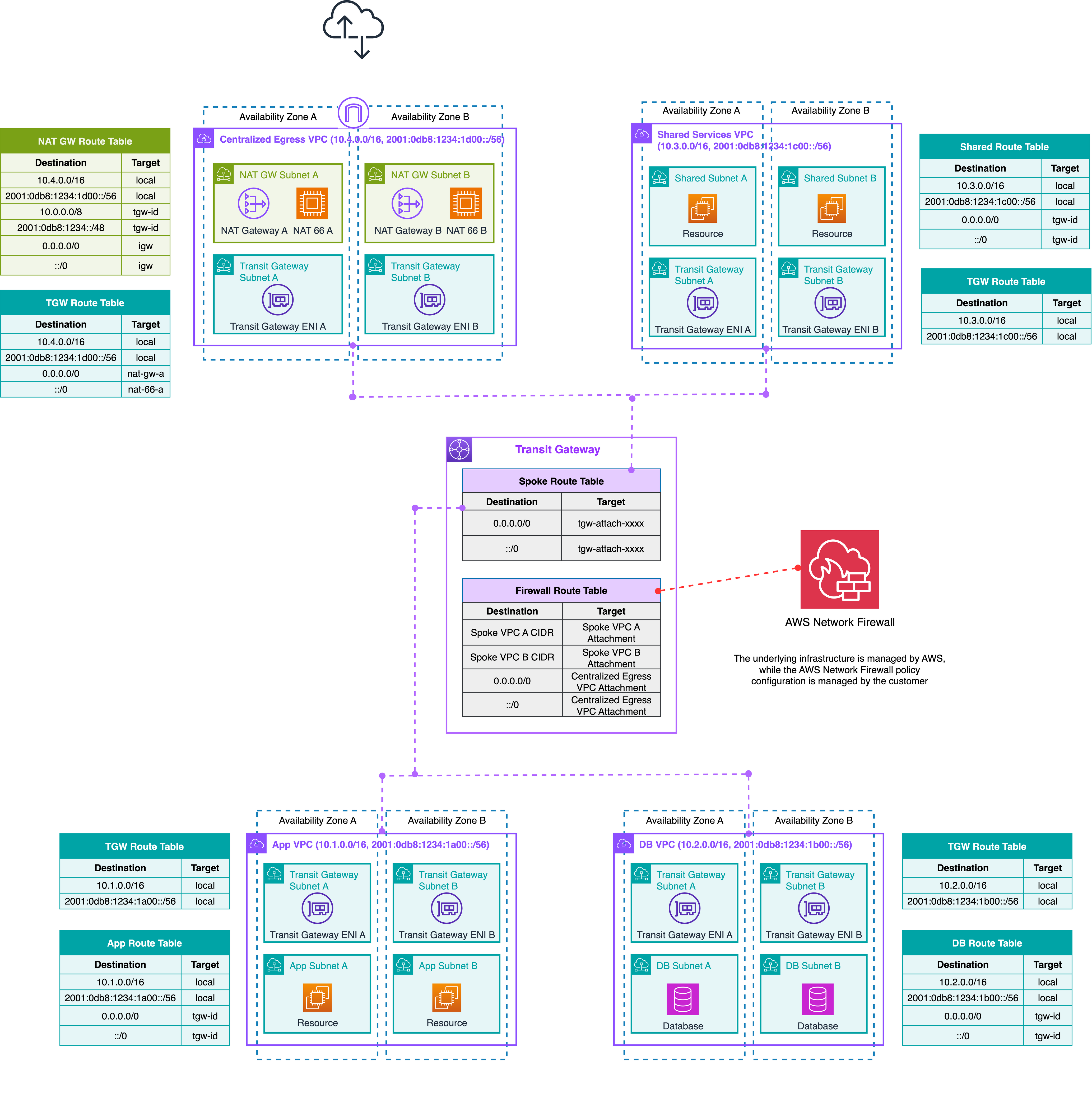
Figure 5: Combined egress and east-west inspection using Transit Gateway network function attachment
Considerations for Transit Gateway-attached firewalls
For egress traffic:
- No NAT gateway or internet gateway in inspection VPC: Since the inspection VPC is AWS-managed, you cannot place a NAT Gateway or Internet Gateway inside it. For centralized egress, a separate centralized egress VPC (with NAT Gateway + Internet Gateway) is required for the centralized egress traffic.
- Double Transit Gateway hop: Egress traffic traverses Transit Gateway twice, once from the spoke VPC to the firewall attachment, and again from the firewall to the egress VPC. Each hop incurs Transit Gateway per-GB data processing charges.
For ingress traffic:
- Centralized ingress inspection is not a recommended pattern with Transit Gateway-attached firewalls. Because the inspection VPC is fully controlled by AWS, you don’t have access to the firewall endpoints to configure them as a next hop in a gateway route table. This prevents placing AWS Network Firewall in front of an ingress-facing load balancer for pre-load-balancer inspection, and post-load-balancer inspection introduces additional cost (double Transit Gateway hop) and limitations around client IP visibility. For ingress inspection patterns, see design your firewall deployment for internet ingress traffic flows.
Management and control:
- AWS-managed infrastructure: AWS manages the inspection VPC, Transit Gateway ENIs, subnets, and routing internally in an AWS-managed VPC. You have no visibility or control into this layer.
Routing:
- Static routes only: Only static routes are supported on Transit Gateway route tables pointing to the firewall attachment. Dynamic propagation is not supported.
- Appliance mode: Transit Gateway appliance mode is automatically activated on the native attachment, which provides symmetric routing for stateful inspection without requiring manual configuration.
Observability:
- Available logs: Transit Gateway flow logs and AWS Network Firewall flow, alert, and TLS logs are available for monitoring and troubleshooting.
- Unavailable metrics: Since AWS Network Firewall endpoints reside in an AWS-managed VPC, AWS PrivateLink endpoint metrics and VPC flow logs for the firewall endpoint ENIs are not available.
Cross-account (AWS Resource Access Manager (AWS RAM) shared Transit Gateway):
- Sharing prerequisite: Transit Gateway must be shared through AWS RAM before the firewall owner can attach to it. The Transit Gateway owner must accept the attachment request.
Multiple VPC endpoint associations for Network Firewall
Another architectural advancement is the ability to create Multiple VPC Endpoint Associations with a single AWS Network Firewall. To understand what this feature provides, it helps to first understand the constraint it removes. Prior to the addition of this feature, AWS Network Firewall had a strict 1:1 relationship between a firewall and its VPC, each firewall could only create endpoints within the single VPC it was defined in. As shown in Figure 6, this meant that in a distributed deployment model, both the firewall endpoints and the firewalls themselves were distributed across VPCs. A customer managing 10 spoke VPCs needed 10 separate firewalls. Each of those firewalls had its own firewall policy or copies of the same policy, its own rule groups, and its own operational lifecycle.
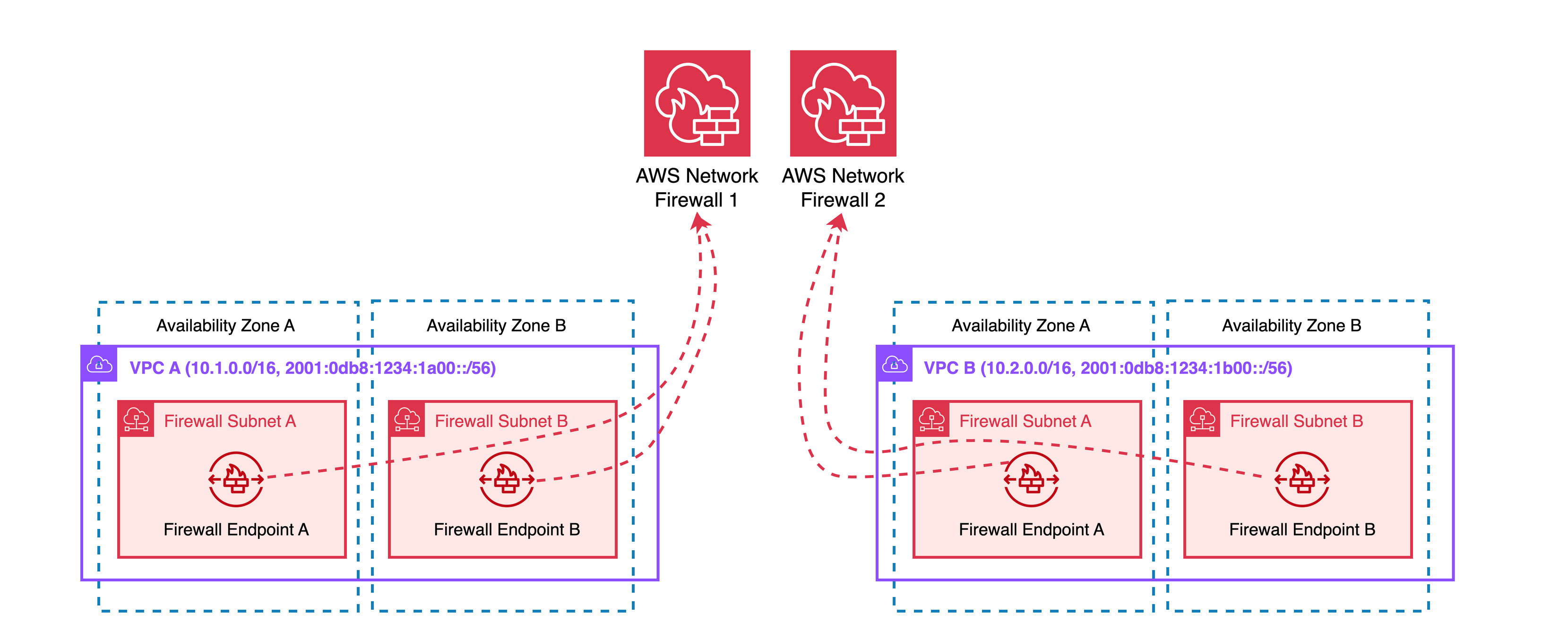
Figure 6: AWS Network Firewall distributed deployment without multiple VPC endpoint associations
This created two compounding problems:
- Cost: Each firewall incurred its own hourly endpoint charge regardless of traffic volume.
- Operational overhead: While AWS Firewall Manager can centralize policy management across multiple firewalls, it still means orchestrating N firewalls rather than one. Firewall Manager helps enforce consistent policies, but it doesn’t eliminate the underlying resource sprawl. You still have N firewalls to monitor, N sets of logs to aggregate, N endpoint health states to track, and N resources consuming your service quotas. The operational challenge scales with the number of VPCs, even with Firewall Manager in the picture.
What customers wanted was the distributed endpoint model (endpoints co-located in each spoke VPC for AZ-local traffic inspection and symmetric routing) but with a single centralized firewall, one policy, one rule set, one management plane.
The Multiple VPC Endpoint Association feature, shown in Figure 7, delivers exactly this: secondary endpoints can now be deployed into any VPC within the same AZ as the endpoint while traffic is governed by the single firewall policy.
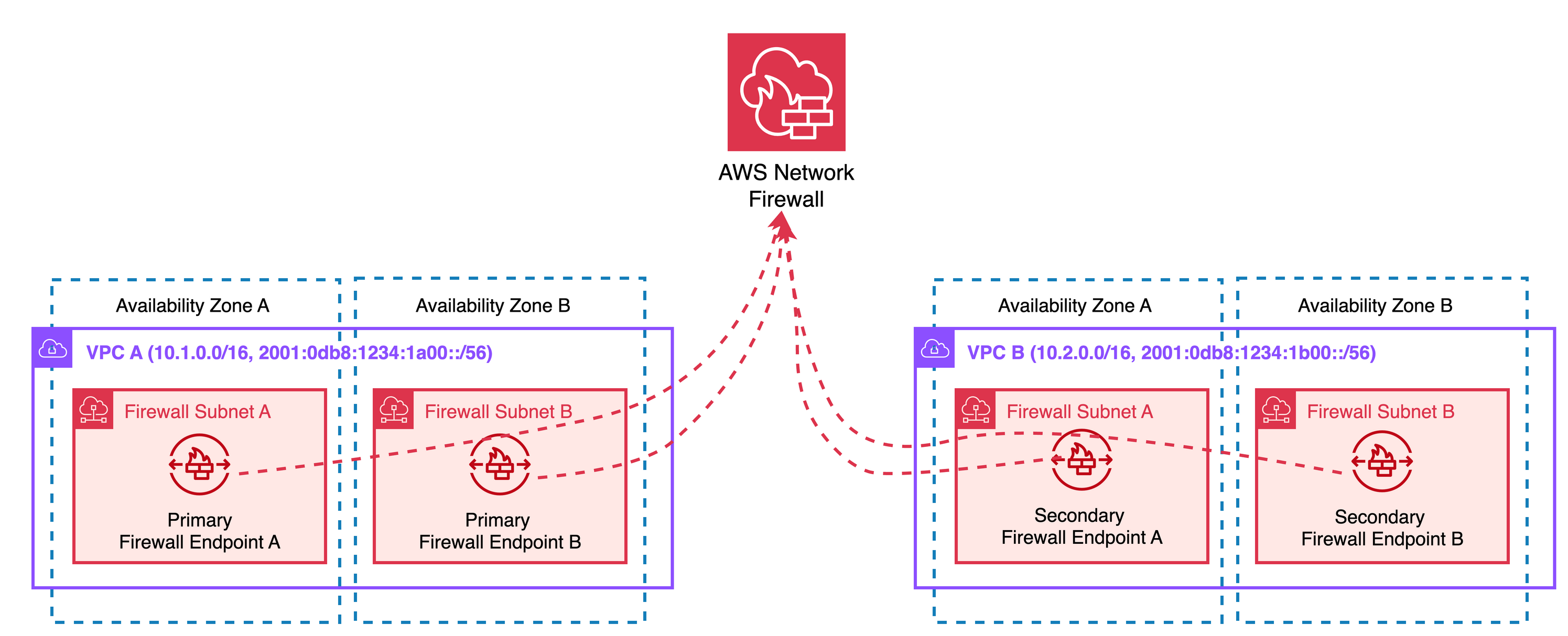
Figure 7: AWS Network Firewall with multiple VPC endpoint association
From an architectural perspective, the Multiple VPC Endpoint Association provides a hub-and-spoke model for firewall management, where a single firewall policy hub can protect multiple VPC spokes. This model maintains the distributed nature of firewall endpoints for optimal traffic flow while centralizing policy management.
Architectural benefits of multiple VPC endpoint associations
Multiple VPC endpoint associations offer several architectural advantages:
- Optimized resource utilization: Multiple underutilized firewalls can be consolidated into a single, more efficiently utilized firewall, with secondary endpoints priced at a reduced rate compared to primary endpoints, improving overall cost efficiency.
- Reduced management overhead: Maintaining fewer firewall policies and rule groups simplifies security governance and compliance operations.
- Cross-account security: Firewall protection can be extended across VPCs in different AWS accounts, so you can centrally manage security in multi-account environments.
- Simplified network design: The need for complex traffic routing through dedicated inspection VPCs is reduced while maintaining distributed, AZ-local traffic inspection.
Architectural patterns with multiple VPC endpoint associations
With multiple VPC endpoint associations, you can implement a distributed inspection architecture with centralized firewall management. The following patterns demonstrate common use cases.
1) Internet egress pattern
This pattern demonstrates how multiple VPC endpoint associations provide centralized egress filtering across multiple VPCs. Each VPC maintains its own NAT Gateway for internet access, with traffic inspected by the Network Firewall before egressing to the internet.
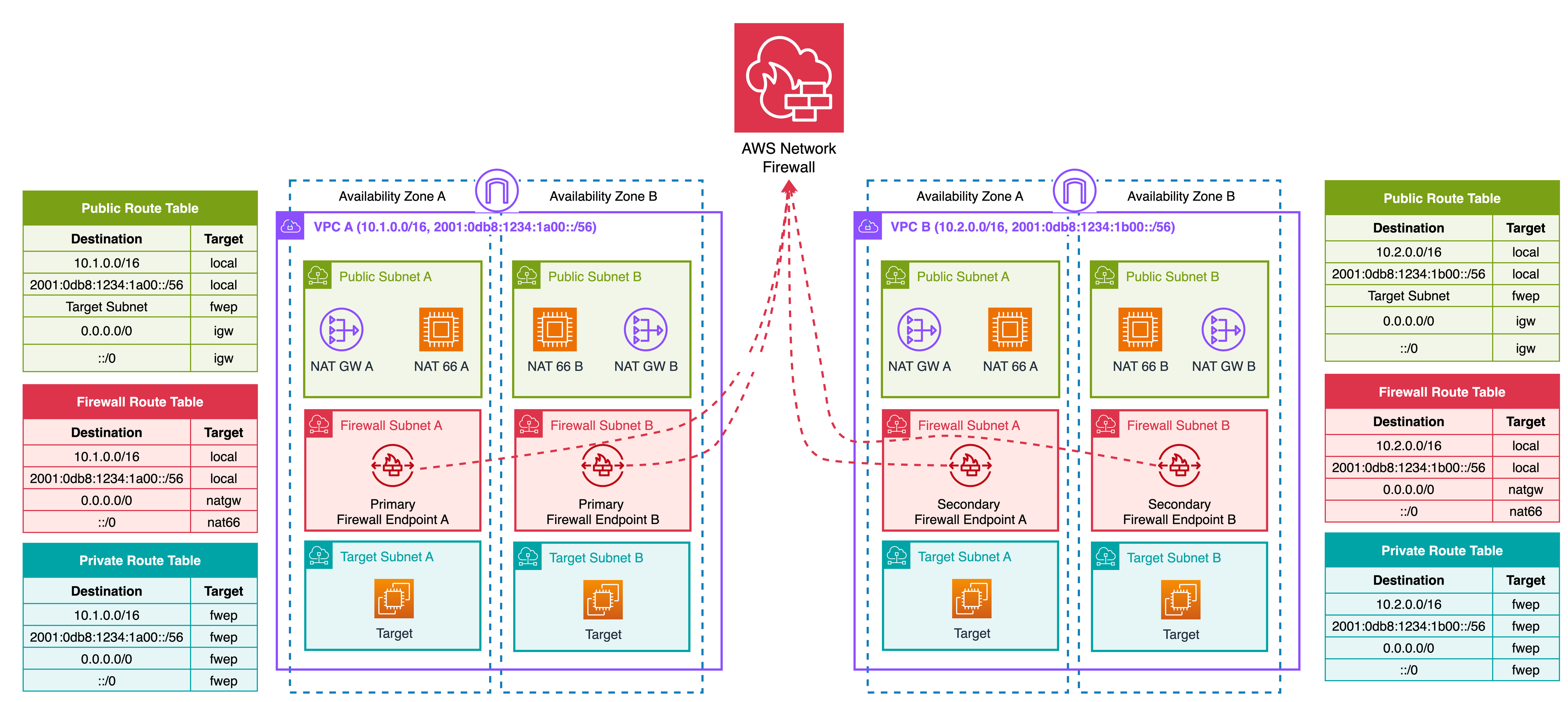
Figure 8: Egress traffic inspection with multiple VPC endpoint association
2) Internet ingress pattern
This pattern demonstrates how multiple VPC endpoint associations provide centralized ingress filtering across multiple VPCs. For ingress web traffic filtering, AWS WAF is typically the better fit. It can inspect decrypted HTTP/S requests without requiring TLS inspection configuration. Network Firewall is commonly used for ingress filtering of non-web protocols such as custom TCP/UDP applications, though it can also filter web traffic when needed. For more information on ingress firewall filtering patterns, see Design your firewall deployment for internet ingress traffic flows.
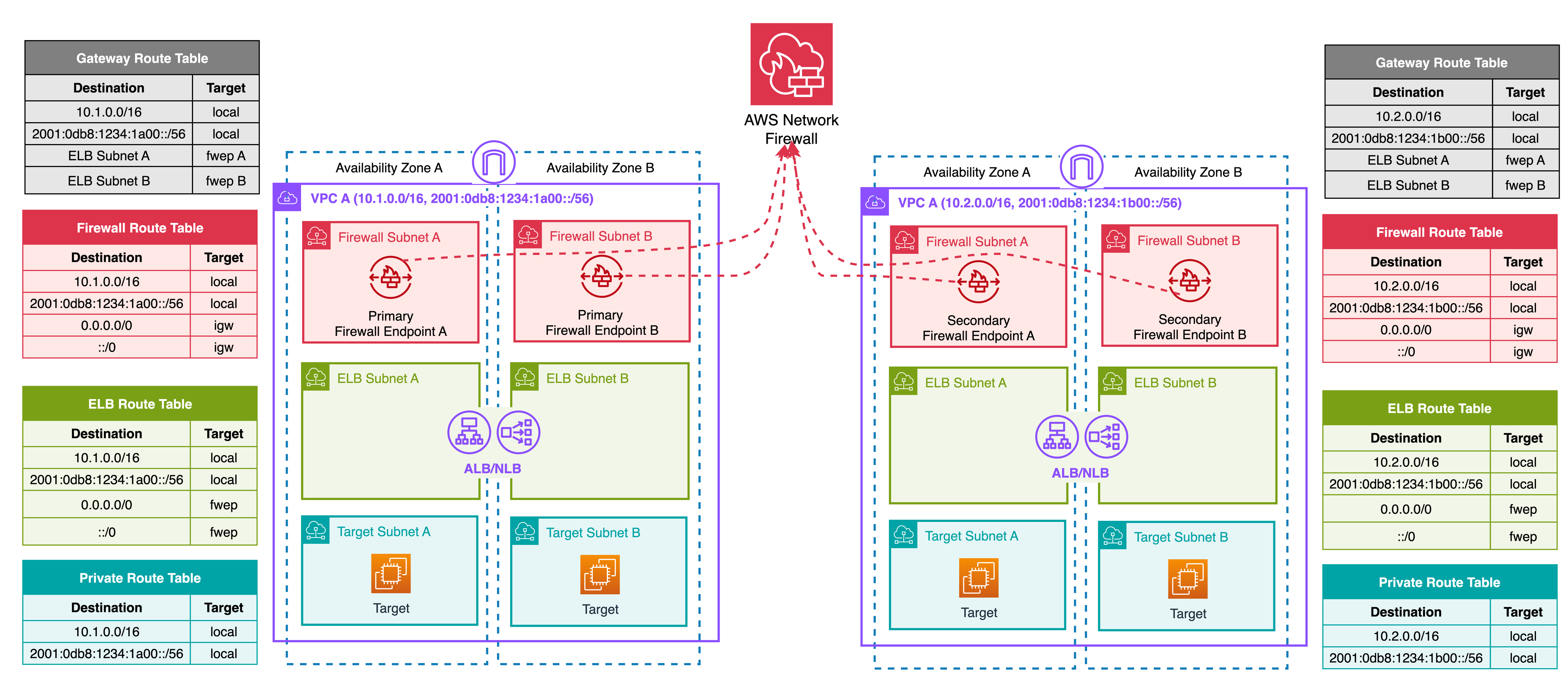
Figure 9: Ingress traffic inspection with multiple VPC endpoint association
3) Internet ingress + egress pattern
This pattern combines ingress and egress traffic inspection using multiple VPC endpoint associations with dedicated firewalls for each traffic direction. One primary firewall handles ingress filtering, with secondary endpoints distributed across your spoke VPCs. A separate primary firewall handles egress filtering with its own set of secondary endpoints across the same VPCs. Separating ingress and egress into distinct firewalls is a recommended practice wherever possible, as it simplifies rule and policy management. Each firewall maintains a focused rule set for a single traffic direction, avoiding the complexity of segmenting ingress and egress policies within a single firewall policy.
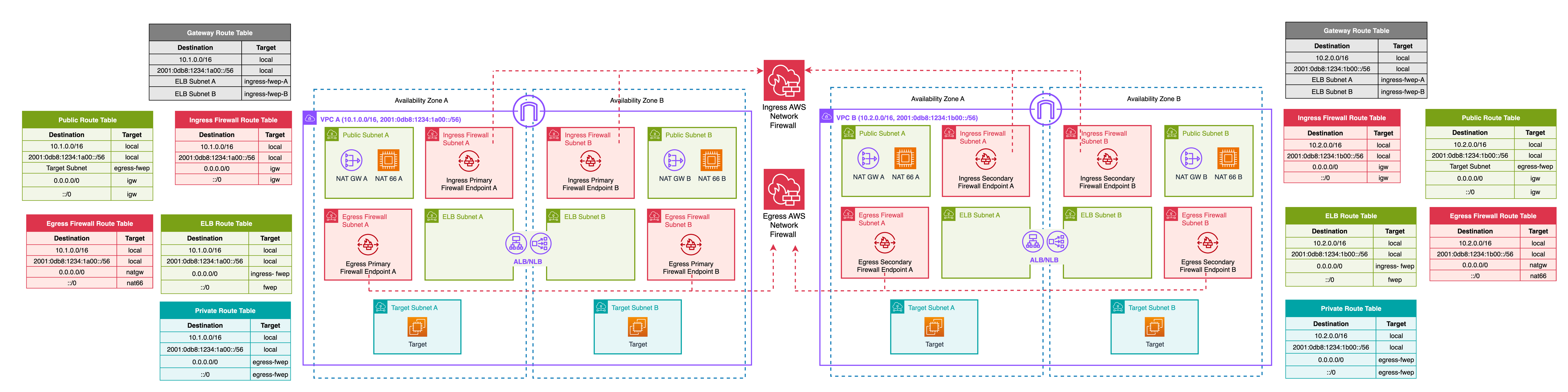
Figure 10: Ingress and egress traffic inspection with multiple VPC endpoint association
Considerations
Management and operations:
- Cross-account firewall sharing: To use a firewall across accounts, the firewall owner must share it through AWS RAM. If the firewall is unshared, existing VPC endpoint associations continue to function, but association owners lose visibility into firewall metadata. The firewall cannot be deleted until all VPC endpoint associations are removed.
- Amazon CloudWatch metrics access: Firewall owners have full access to Amazon CloudWatch; VPC endpoint association owners have limited metrics access. Factor this into your observability and alerting design, particularly in cross-account deployments.
Security and inspection:
- TLS inspection limitation: TLS inspection is not supported for firewalls with Multiple VPC Endpoint Associations. A firewall policy with TLS inspection enabled cannot be associated with a firewall that has VPC endpoint associations, and vice versa. If your security requirements include inspecting encrypted traffic, this feature cannot be used for that traffic flow.
- IPv6 ingress inspection: Egress-Only Internet Gateways (EIGW) do not support gateway route table associations, which means inbound IPv6 traffic cannot be steered through a firewall endpoint the way IPv4 ingress traffic can through IGW ingress routing. This is a known gap that affects all inline inspection solutions for IPv6, not specific to multi-endpoint. Workarounds exist but introduce additional operational complexity.
- Policy segmentation in hybrid models: When using a single firewall for ingress, egress, and east-west inspection, policy segmentation is achievable using STRICT_ORDER with rule group priorities to logically separate traffic flows within one policy. However, this is operationally harder to reason for auditing. Customers with strict requirements to segment ingress and egress inspection planes should consider alternative deployment models.
Routing and network design:
- Overlapping CIDRs: While Multiple VPC Endpoint Associations can function with overlapping IP ranges across associated VPCs, the firewall policy cannot differentiate between them. Because AWS Network Firewall rules match on source and destination IP, two VPCs sharing the same CIDR will receive identical policy enforcement. For example, if VPC A and VPC B use the same CIDR range, a rule permitting that CIDR to access specific internet domains applies to both VPCs equally. If you require per-VPC policy differentiation, verify that associated VPCs use non-overlapping CIDR ranges.
- Availability Zone constraint: Secondary endpoints can only be deployed in Availability Zones where the primary firewall already has an endpoint defined. Plan your AZ coverage at the time of firewall creation, as this constrains where secondary endpoints can be placed.
- HOME_NET configuration: The HOME_NET variable, used in stateful domain list and IPS rule groups, must be explicitly configured to include all relevant CIDR ranges from all associated VPCs. Failure to do so may result in rules not matching traffic as expected.
- Dedicated egress stack per spoke VPC: Each spoke VPC requires its own public subnet, NAT Gateway, and Internet Gateway to support egress traffic. As a result, each spoke VPC is independently exposed to the internet.
Capacity and scaling:
- Shared throughput: All endpoints associated with a single firewall, primary and secondary, share a combined throughput capacity per Availability Zone. Refer to AWS Network Firewall quotas for the current limit. When planning your architecture, calculate aggregate traffic across all associated VPCs to avoid oversubscription. For example, if multiple endpoints share a single AZ, the total throughput is shared across all of them, not allocated per endpoint.
- Scaling limits: The maximum number of secondary endpoints per primary firewall endpoint and the shared throughput limit per Availability Zone are subject to service quotas. See AWS Network Firewall quotas for current values.
Cost:
- Secondary endpoint pricing: Secondary endpoints are charged at a reduced hourly rate compared to primary endpoints. See AWS Network Firewall pricing for details.
- NAT gateway cost optimization: When a NAT Gateway is placed in the same networking path as a Network Firewall endpoint, standard NAT Gateway per-hour and data processing charges are waived on a one-to-one basis with Network Firewall endpoint charges. This discount applies to both primary and secondary endpoints and is automatically applied in the AWS Regions where Network Firewall is available.
Deployment model comparison
The following table can help you decide which architectural pattern is most applicable for your use case:
| Distributed AWS Network Firewall | Distributed with Multiple VPC Endpoint Associations | Centralized with Inspection VPC | Centralized with Transit Gateway-Attached Firewall | |
|---|---|---|---|---|
| East-West: VPC to VPC traffic flow | Not supported | Limited to same AZ | Supported | Supported |
| North-South: VPC to Internet traffic flow | Supported | Supported | Supported | Supported |
| North-South: VPC to on-prem via VPN or DX traffic flow | Not supported | Limited to same AZ | Supported | Supported |
| Architectural complexity | Low per VPC, High overall | Low | Medium | Low |
| Centralized management | Through AWS Firewall Manager | Through a single instance of AWS Network Firewall | Through a single instance of AWS Network Firewall | Through a single instance of AWS Network Firewall |
| Source IP visibility for ingress | Configuration dependent | Configuration dependent | Configuration dependent | No (Centralized ingress is not a recommended pattern with TGW-attached firewall) |
| Source IP visibility for egress | Yes | Yes | Yes | Yes |
| Source IP visibility for east/west | Yes | Yes | Yes | Yes |
| Misconfiguration risk and potential blast radius | Lowest | Low | Medium | Low |
| TLS Inspection Support | Yes | No | Yes | Yes |
Conclusion
AWS Network Firewall’s transit gateway-attached firewall and multiple VPC endpoint associations capabilities represent significant advancements in network security architecture on AWS. These deployment models address key customer challenges by simplifying architecture, reducing operational overhead, and optimizing costs.
Transit Gateway-attached firewalls eliminate the need to create and manage inspection VPCs, making centralized deployment models more accessible and more straightforward to implement. Multiple VPC endpoint associations allow you to consolidate multiple firewall endpoints into a single, centrally managed firewall, reducing costs and simplifying policy management across multiple VPCs.
With these capabilities, you can design a network security architecture that meets your specific requirements for security, operational efficiency, and cost optimization. We encourage you to explore these architectural patterns and consider how they can strengthen your network security posture on AWS.
An update was made on August 18, 2026: This post has been updated to correct various typos in diagrams and text.
About the authors

Lawton Pittenger
Lawton is a Worldwide Security Specialist Solutions Architect at AWS, based in New York City. He specializes in helping customers design and implement effective network security controls. At AWS, he works with customers at scale and collaborates closely with service teams to drive continuous improvement in security services based on customer needs and feedback. Outside of work, his interests include skateboarding, snowboarding, and spending time in nature.

Pratik Mankad
Pratik is a Network Solutions Architect at AWS with deep expertise in network technologies, including High Performance Compute (HPC) networking. He is driven by a passion for innovation, helping customers solve complex challenges through well-architected solutions. He provides technical guidance to customers and partners, enabling them to achieve their technical and business objectives.

Evgeny Vaganov
Evgeny Vaganov is a CSC SA Leader for ANZ at AWS based in Sydney, Australia. With over 11 years at AWS, Evgeny has supported customers across Australia and New Zealand in adopting Cloud. Passionate about learning and experimenting, he has a goal of making Cloud networking simpler for everyone.

Shakeel Ahmad
Shakeel Ahmad is a Specialist SA Leader for APJ at AWS based out of Melbourne, Australia. As part of his role, he works with customers globally to share best practices of cloud networking in AWS. He has a BS in Computer Science and a MS in Network Systems. He’s passionate about technology and helping customers architect and build solutions to adopt the art of the possible on AWS.