Networking & Content Delivery
Enhanced security with DMZ architecture using Amazon VPC Block Public Access
As organizations scale their AWS environments across multiple accounts and Amazon virtual private clouds (VPCs), controlling internet access to cloud resources becomes challenging. With multiple accounts and network paths, maintaining secure network boundaries becomes a priority. A common security pattern is the demilitarized zone (DMZ) architecture, which isolates public-facing services from internal networks to reduce threat vectors.
AWS has launched a feature that simplifies this approach: Amazon VPC Block Public Access (BPA). This declarative control provides an authoritative way to block internet traffic to and from your VPCs, helping organizations maintain compliance with security requirements while reducing the risk of accidental exposure.
In this post, we walk through how to use VPC BPA to build centralized egress and ingress architectures for a DMZ. We also cover how to enforce VPC BPA across multiple accounts using declarative policies, and a brief comparison of VPC BPA with service control policies (SCPs) for controlling internet access.
Solution overview
VPC BPA authoritatively blocks incoming (ingress) and outgoing (egress) VPC traffic through AWS provided internet paths. With this feature, customers can comply with their organization’s security requirements by centrally blocking AWS provided internet access to resources in their VPCs. For full details on how VPC BPA works, refer to Block public access to VPCs and subnets.
VPC BPA offers two configuration modes:
- Bidirectional block – Blocks traffic to and from internet gateways (IGWs) and egress-only internet gateways (EIGWs) in the selected AWS Region, except for excluded VPCs and subnets
- Ingress-only block – Blocks inbound internet traffic to VPCs in the Region, except for excluded VPCs or subnets, while allowing outbound connections through NAT gateways and EIGWs
Prerequisites
Before you begin, make sure you have the following in place:
- An AWS account with permissions to create and manage VPCs, subnets, AWS Transit Gateway, NAT gateways, and internet gateways
- AWS Command Line Interface (AWS CLI) version 2 installed and configured
- Familiarity with Amazon VPC concepts, including route tables, subnets, and internet gateways
- At least two spoke VPCs and one dedicated VPC for centralized egress or ingress
- (Optional) AWS Organizations configured, if you plan to enforce VPC BPA across multiple accounts using declarative policies
Create DMZ architecture with VPC Block Public Access
A traditional DMZ architecture in on-premises environments involves creating a separate network segment that sits between the public internet and the private internal network. In AWS, you can achieve a similar architecture using VPC BPA to control internet access for workloads that require strict isolation.When designing network architectures on AWS, organizations choose between centralized or decentralized approaches for internet connectivity. VPC BPA can strengthen security in both models. The following sections describe centralized egress and ingress architectures.
Implement centralized egress architecture with VPC Block Public Access
A centralized egress architecture uses a single, common inspection point for network traffic destined for the internet. This approach offers the following benefits:
- Cost-efficiency – Reduces costs by alleviating the need to deploy NAT gateways in each VPC
- Improved security – Limits exposure to externally accessible malicious resources, such as malware command and control infrastructure
- Simplified management – Provides a single point for traffic inspection and policy enforcement
- The following diagram illustrates the centralized egress architecture with VPC BPA.
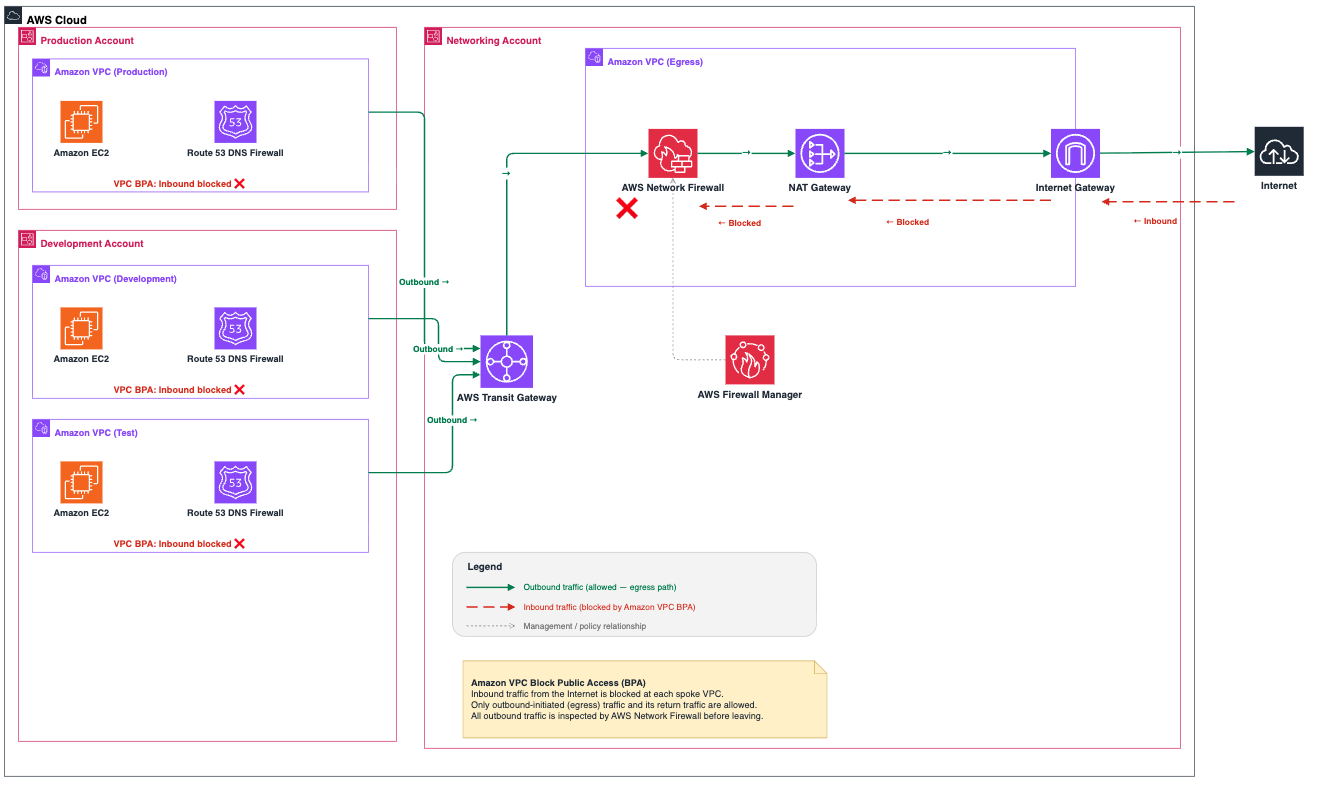
Figure 1. Centralized egress architecture with VPC BPA
Figure 1. Centralized egress architecture with VPC BPAThe following steps correspond to the architecture in Figure 1:
- Create a dedicated VPC containing public subnets with NAT gateways, private subnets for transit gateway attachments, and an internet gateway for outbound connectivity. For instructions, refer to Create a VPC.
- Create a transit gateway with multiple route tables to maintain VPC-to-VPC isolation while centralizing outbound traffic. For instructions, refer to Create a transit gateway in AWS Transit Gateway.
- Apply bidirectional block mode to spoke VPCs so they can’t access the internet directly. For instructions, refer to Enable VPC BPA bidirectional mode for your account.
- Configure an exclusion for the Egress VPC to allow it to communicate with the internet. For instructions, refer to Create and delete exclusions.
- Set up route tables in the spoke VPCs to send internet-bound traffic (0.0.0.0/0) to the transit gateway, which then routes it to the Egress VPC. For instructions, refer to Create a transit gateway route table in AWS Transit Gateway.
In this architecture, traffic from Amazon Elastic Compute Cloud (Amazon EC2) instances in spoke VPCs routes to the transit gateway through the default route. The transit gateway forwards this traffic to the Egress VPC, where it passes through NAT gateways before reaching the internet.
Implement centralized ingress architecture with VPC Block Public Access
For incoming traffic from the internet, a centralized ingress architecture provides a controlled entry point to your AWS environment.
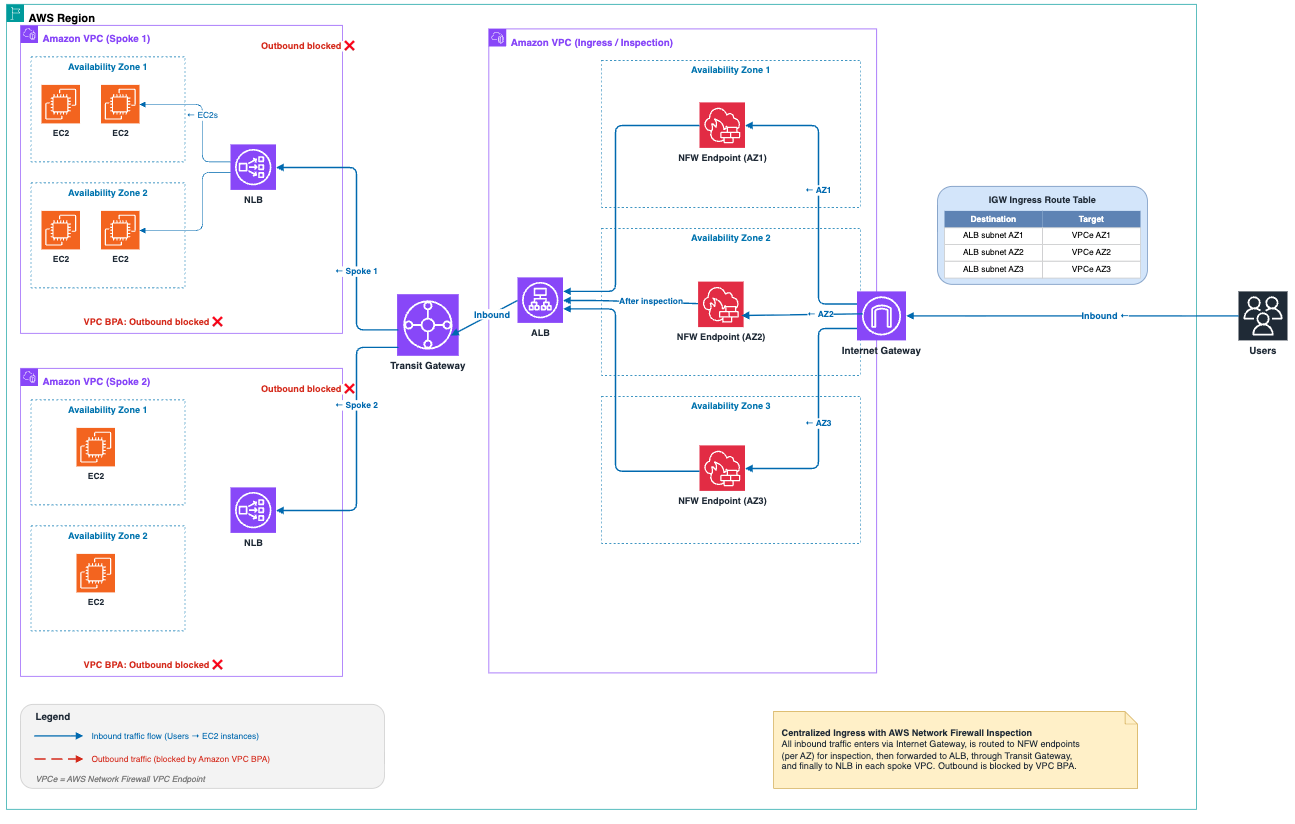
Figure 2. Centralized ingress architecture with VPC BPA
The following steps correspond to the architecture in Figure 2:
- Create a VPC containing public subnets with an internet-facing Application Load Balancer (ALB) or Network Load Balancer (NLB), and private subnets for transit gateway attachments. For instructions, refer to Create a VPC.
- Set up route tables to direct traffic from the Ingress VPC to destination VPCs. For instructions, refer to Create a transit gateway route table in AWS Transit Gateway.
- Apply bidirectional block mode to application VPCs so the internet can’t reach them directly. Use the same procedure described in the centralized egress section (Step 3).
- Configure an exclusion for the Ingress VPC to allow it to receive traffic from the internet. Use the same procedure described in the centralized egress section (Step 4), replacing the VPC ID with your Ingress VPC ID.
In this architecture, traffic from the internet reaches the central Ingress VPC, where the ALB/NLB forwards requests to target groups in application VPCs through the transit gateway.
Enable VPC Block Public Access across multiple accounts using declarative policies
For organizations operating in a multi-account environment, AWS Organizations provides declarative policies to implement VPC BPA at scale. Unlike SCPs that control API authorization, declarative policies enforce configurations directly at the service level, providing a consistent security posture across your organization.
To deploy VPC BPA across multiple accounts, follow these steps:
- Create a declarative policy document. The following example enables bidirectional blocking with an exclusion for a specific VPC:
- Create and attach the policy through the AWS Organizations console or the AWS CLI, targeting the organization root, specific organizational units (OUs), or individual accounts. For instructions, refer to Declarative policies.
- Use the account status report to monitor compliance and identify accounts with matching or non-matching configurations.
This approach provides the following benefits:
- Centralized enforcement – You can apply consistent VPC BPA settings across your organization
- Automatic inheritance – New accounts automatically inherit policies based on their OU membership
- Simplified management – You can maintain security controls at scale without configuring each account individually
- Flexible exclusions – You can define organization-wide exceptions for internet-facing resources that need connectivity.
For the full declarative policy syntax, refer to Declarative policy syntax and examples.
Comparing VPC BPA with SCPs
SCPs have been a traditional method to control internet access at the account level. VPC BPA provides a more granular approach. The following table summarizes the key differences relevant to DMZ architecture decisions.
| Feature | SCP Approach | BPA Approach |
| Scope | Account/OU level | VPC/subnet level |
| Existing resources | Doesn’t affect VPCs with existing IGWs | Blocks traffic even in VPCs with pre-existing IGWs |
| Enforcement | Prevents API actions (for example, creating IGWs) | Actively blocks network traffic |
| Directional control | All-or-nothing approach | Supports bidirectional or ingress-only blocking |
| Exceptions | Requires complex OU structures | Granular exclusions per VPC/subnet |
| Onboarding legacy accounts | Breaks existing internet-dependent workloads | Maintains functionality while blocking unwanted traffic |
| Compliance | Reactive (prevents configuration changes) | Proactive (enforces traffic flow rules) |
Best practices for VPC Block Public Access in DMZ architectures
To get the most out of VPC BPA in your network architecture, follow these recommendations:
- Assess current internet exposure – Before you enable VPC BPA, identify which resources currently have internet access.
- Plan your exclusions – Determine which VPCs or subnets need internet access and create exclusions for them.
- Apply least privilege – Create exclusions only for VPCs or subnets that genuinely need internet access.
- Monitor blocked traffic – Use VPC Flow Logs with the reject-reason field to monitor traffic blocked by VPC BPA. Enabling VPC Flow Logs has an associated cost.
- Review exclusions regularly – Periodically review your exclusions to confirm they are still necessary and properly configured.
- Use centralized egress for security-centric workloads – Implement a centralized egress architecture with VPC BPA to provide a single, controlled path to the internet.
Clean up
To avoid ongoing charges for the demo, delete the resources you created during this walkthrough:
- Remove VPC BPA exclusions that you created.
- Disable VPC BPA by setting the block mode to off.
- Delete the transit gateway attachments and the transit gateway.
- Delete NAT gateways, internet gateways, and release associated Elastic IP addresses.
- Delete the Egress VPC, Ingress VPC, and spoke VPCs.
- If you created declarative policies in AWS Organizations, detach and delete them.
Conclusion
In this post, we walked through how to use Amazon VPC Block Public Access to build a DMZ architecture with centralized ingress and egress patterns. We also covered how to enforce VPC BPA across accounts using declarative policies and how VPC BPA compares to SCPs for controlling internet access.VPC BPA gives you granular, proactive control over internet traffic at the VPC and subnet level. Combined with Transit Gateway and declarative policies, it provides a scalable approach to securing your network boundaries across multi-account environments.To learn more, refer to the following resources:
- Block public access to VPCs and subnets
- AWS Transit Gateway Guide
- Declarative policies in AWS Organizations
- Building a Scalable and Secure Multi-VPC AWS Network Infrastructure