Networking & Content Delivery
Fast failover with Amazon Route 53 Private Endpoint Health Checks
Reliable private endpoint failover matters most for the business-critical services that never touch the public internet, such as internal APIs, databases, custody and key-management systems, and self-hosted nodes behind internal load balancers or in private subnets. Many AWS customers run exactly these kinds of workloads with Amazon Route 53 Private Hosted Zones. Until now, Amazon Route 53 health checks reached only public endpoints, so teams built custom failover automation to cover the private ones. This post shows you how Amazon Route 53 Private Endpoint Health Checks close that gap, how to set one up step by step, and which resilience patterns they unlock.
If you already monitor public endpoints with Amazon Route 53 health checks, the private-endpoint workflow will feel familiar. What’s new is the ability to health-check a private target inside your Amazon Virtual Private Cloud (Amazon VPC) and drive DNS failover natively, without a custom control loop.
The problem: Private endpoints had no native failover
Route 53 health checks have long monitored public endpoints and driven DNS failover when an endpoint becomes unhealthy. A large share of workloads, though, run entirely on private paths. Trading and matching engines, blockchain nodes and RPC endpoints, custody and Hardware Security Module (HSM) clusters, market-data feeds, and private links to banking partners all tend to live in private subnets or behind internal load balancers. These workloads can’t tolerate public exposure, and they cannot wait minutes to recover from the loss of a node, an Availability Zone, or an AWS Region.
To work around the gap, teams typically assemble their own control loop for configuring failover for a private hosted zone. An Amazon CloudWatch alarm watches a custom metric, an alarm state change invokes an AWS Lambda function, and that function calls the Route 53 API to update DNS records. For a full walkthrough, see performing Route 53 health checks on private resources in a VPC with AWS Lambda and Amazon CloudWatch. It works, but it carries three costs.
- Latency: The chain of metric publication, alarm evaluation, function invocation, and DNS update commonly takes several minutes.
- Operational burden: You own and maintain the metric plumbing, alarm thresholds, function code, and permissions.
- Correctness risk: Custom failover logic is prone to subtle errors, and it tends to fail at the worst moment, during an actual outage.
What Private Endpoint Health Checks give you
With Amazon Route 53 Private Endpoint Health Checks, you can health-check private resources reachable from your Amazon VPC, not just public endpoints. You can health-check any reachable target, such as a specific IP address, domain, or port over HTTP, HTTPS, or TCP. A failover routing policy then moves DNS to a healthy standby. Detection and DNS failover are designed to complete in seconds rather than minutes. Nothing is exposed to the public internet, and it works with or without a load balancer in the path.
In short, the native resilience you already rely on for public endpoints now applies to your private ones, without the custom CloudWatch and Lambda control loop.
How it works
Private Endpoint Health Checks introduce a Health Check Source. The source provides an entry point into your Amazon VPC through Elastic Network Interfaces (ENIs), letting Route 53 send health-check traffic into your private network.
The flow has three parts:
- Create a Health Check Source – This setup gives Route 53 a path into your VPC. A single source creates ENIs in three Availability Zones. For the number of checks a source supports, see the Amazon Route 53 documentation.
- Point a health check at a private target – Target a private IP address, domain, or port over HTTP, HTTPS, or TCP. No load balancer is required. Add string matching and faster check intervals as needed.
- Let failover routing shift DNS – A failover routing policy in your private hosted zone moves the DNS name to the healthy standby automatically. The service is fully managed, so you operate nothing.
Health checkers reach your private endpoints from inside the VPC, evaluate health, and drive Route 53 failover records exactly as public health checks do today.
Figure 1 shows how Private Endpoint Health Checks work in a multi-VPC, multi-account environment spanning multiple Regions.
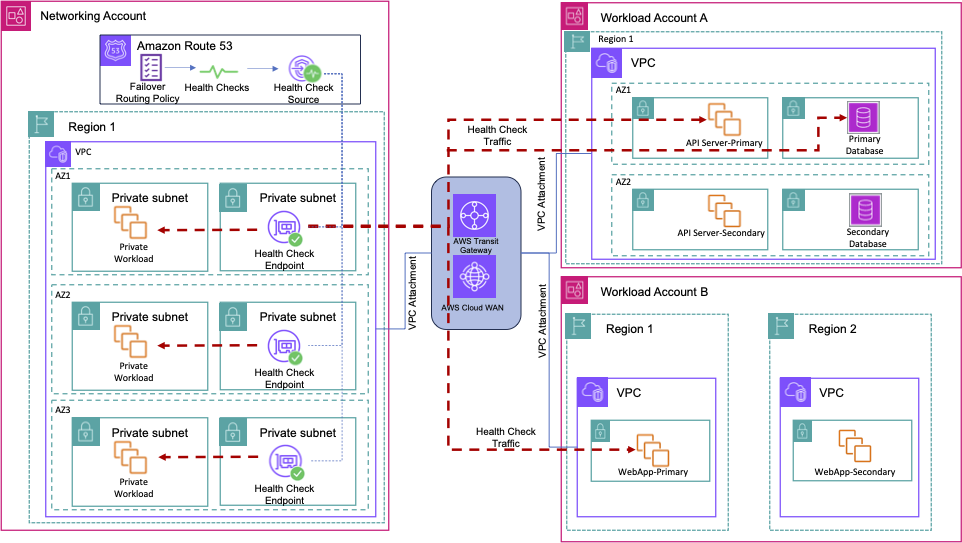
Figure 1: Multi-VPC, multi-account architecture with Private Endpoint Health Checks for multiple workloads
As shown in the diagram, private workloads span multiple accounts. Workload Account A runs a resilient API server and a central database queried by the clients, each with a primary endpoint in one AZ and a secondary in another. Workload Account B hosts a business-critical web application with a cross-Region disaster recovery (DR) environment. A shared Networking Account hosts a central VPC connected to the workload VPCs through AWS Transit Gateway or AWS Cloud WAN. This provides global connectivity across the workloads and clients. Route 53 Private Endpoint Health Checks are created in the Networking Account and associated with a Health Check Source in the central VPC. The source creates ENIs to run health checks against reachable private IPs and private hosted zones. Because all VPCs are interconnected, the source can health-check the primary endpoints in Accounts A and B. A failover routing policy then routes clients to the secondary when a primary fails. Health checks can run every 10 or 30 seconds for fast detection and failover, building a resilient, highly available design.
Next, we will set this up for one of the applications in this architecture and see it in action.
Setting up a Private Endpoint Health Check and failover routing
We will run through a scenario where you can use Private Endpoint Health Checks to manage failover between primary and secondary environments across Regions for a web application.
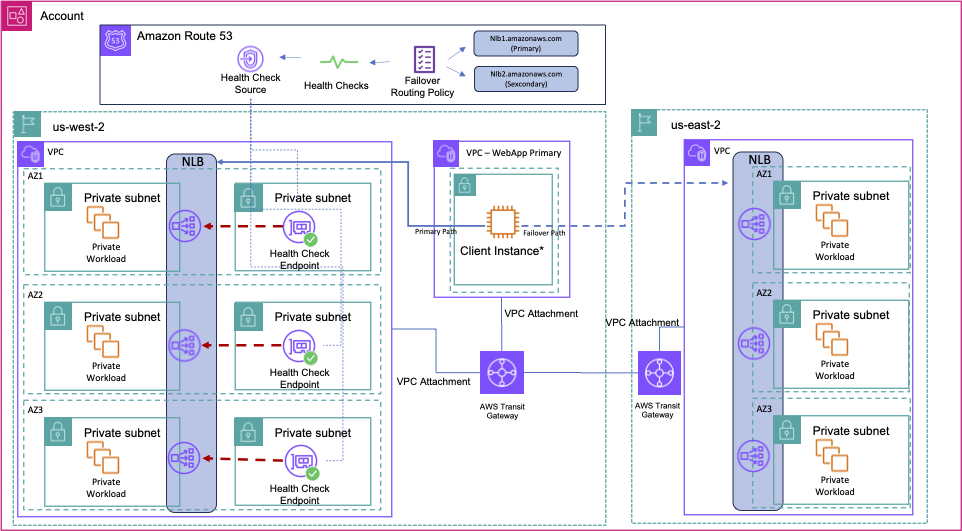
Figure 2: Test setup for the failover scenario of a multi-Region disaster recovery web application using Private Endpoint Health Checks
In this example setup, we have a VPC in us-west-2 that hosts an internal web application fronted by a Network Load Balancer and running on Amazon Elastic Compute Cloud (Amazon EC2). This is the primary endpoint of the application. We also have a DR environment in us-east-2 that hosts the same setup: an NLB-fronted application running on EC2. A client EC2 instance sits in a separate VPC. A Transit Gateway pair provides connectivity to the Regions and associated VPCs. We configure the health check source in the same VPC as the workload. It can be the same VPC as your workload or another VPC that can reach your private endpoint.
For our setup in Figure 2, we will configure failover of the primary internal web application by following these steps:
- Open the Amazon Route 53 console, choose Health checks, and select the Health check sources tab. Choose Create a health check source as shown in Figure 3.
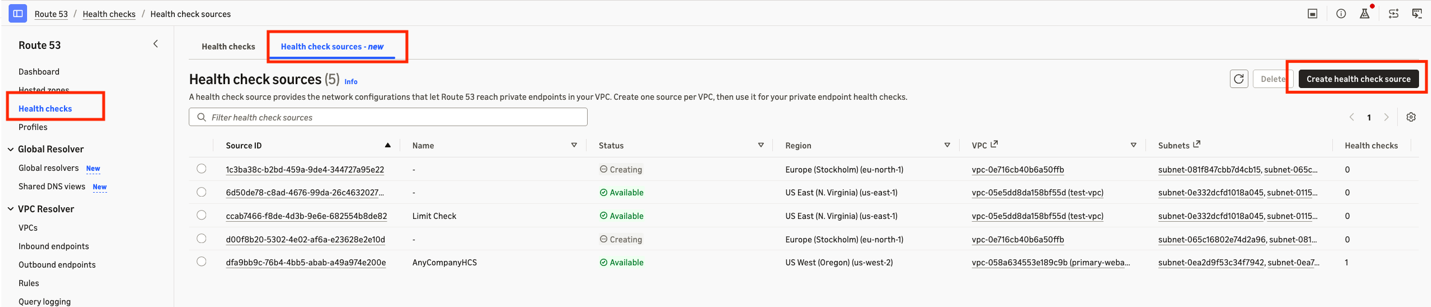
Figure 3: Amazon Route 53 console for configuring health check sources
- Configure the following details, as shown in Figure 4:
- Region: The Region where you want to deploy the health check source.
- VPC: Where the health check source should create ENIs, and the corresponding subnets.
- Security groups: The security groups selected here should allow bidirectional traffic to flow between your health check ENI and the target. Likewise, the security groups and network ACLs of your target endpoint should allow the health check traffic. You configure the protocol and port for the health check traffic in the health check itself, in Step 3.
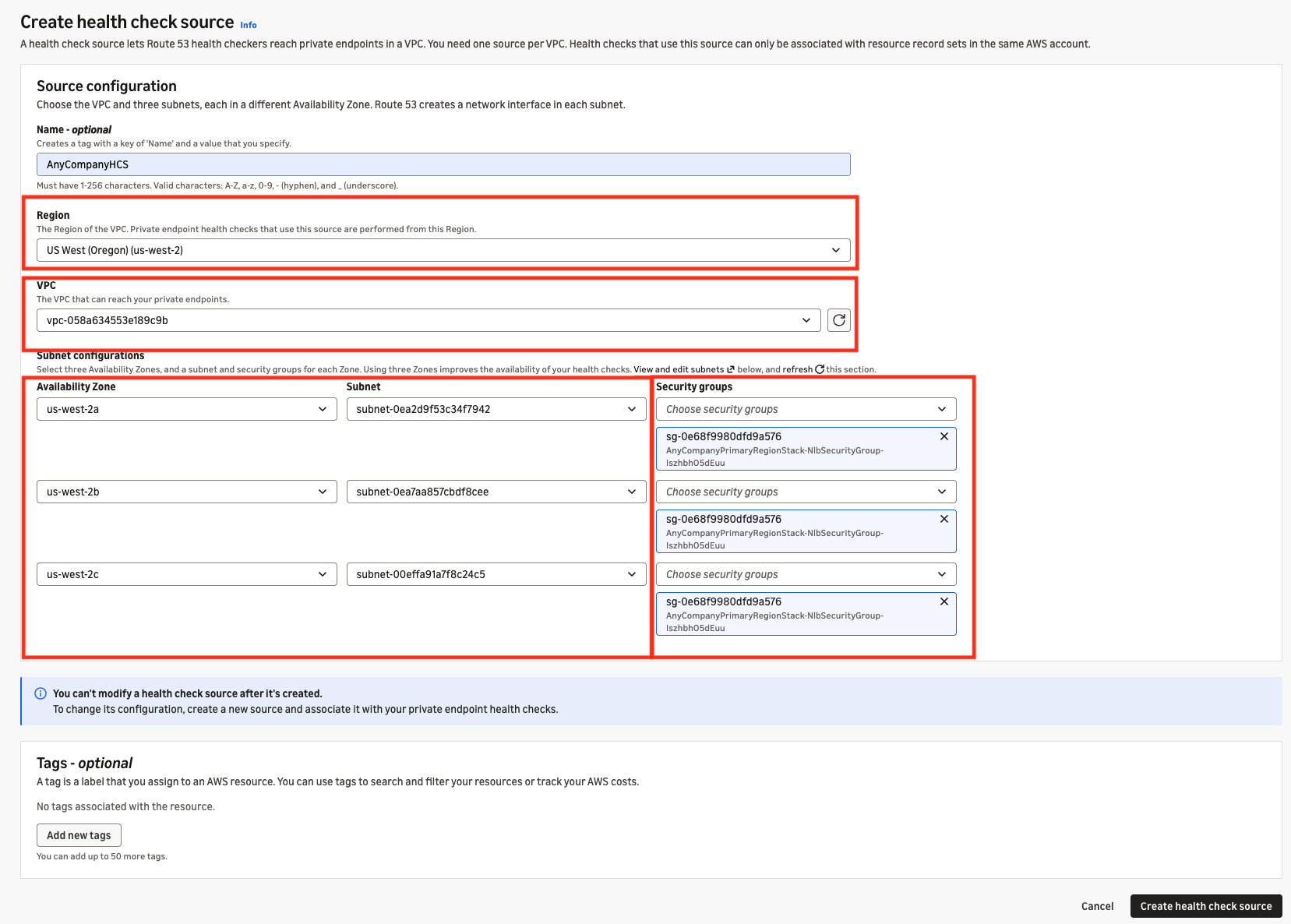
Figure 4: AWS console UI for creating a Route 53 health check source
After configuring these details, choose Create Health check source. The health check source first shows the Creating state, and after a few minutes it shows the Available state.
- Choose the Health checks tab, choose Create a health check, and configure the parameters shown in Figure 5:
- Resource: Private Endpoint.
- VPC: Select the VPC where you set up the health check source.
- Health check source: Select the health check source you configured in Step 2.
- Endpoint and domain name: Specify the target and health-check parameters:
- Target – By IP or domain name. Here, specify the DNS name of the us-west-2 Network Load Balancer.
- Protocol – HTTP, HTTPS, or TCP.
- Port and failure threshold.
Optionally, add string matching, faster check intervals, and custom HTTPS headers to authenticate requests, based on how your application handles health check requests. Then choose Create health check.
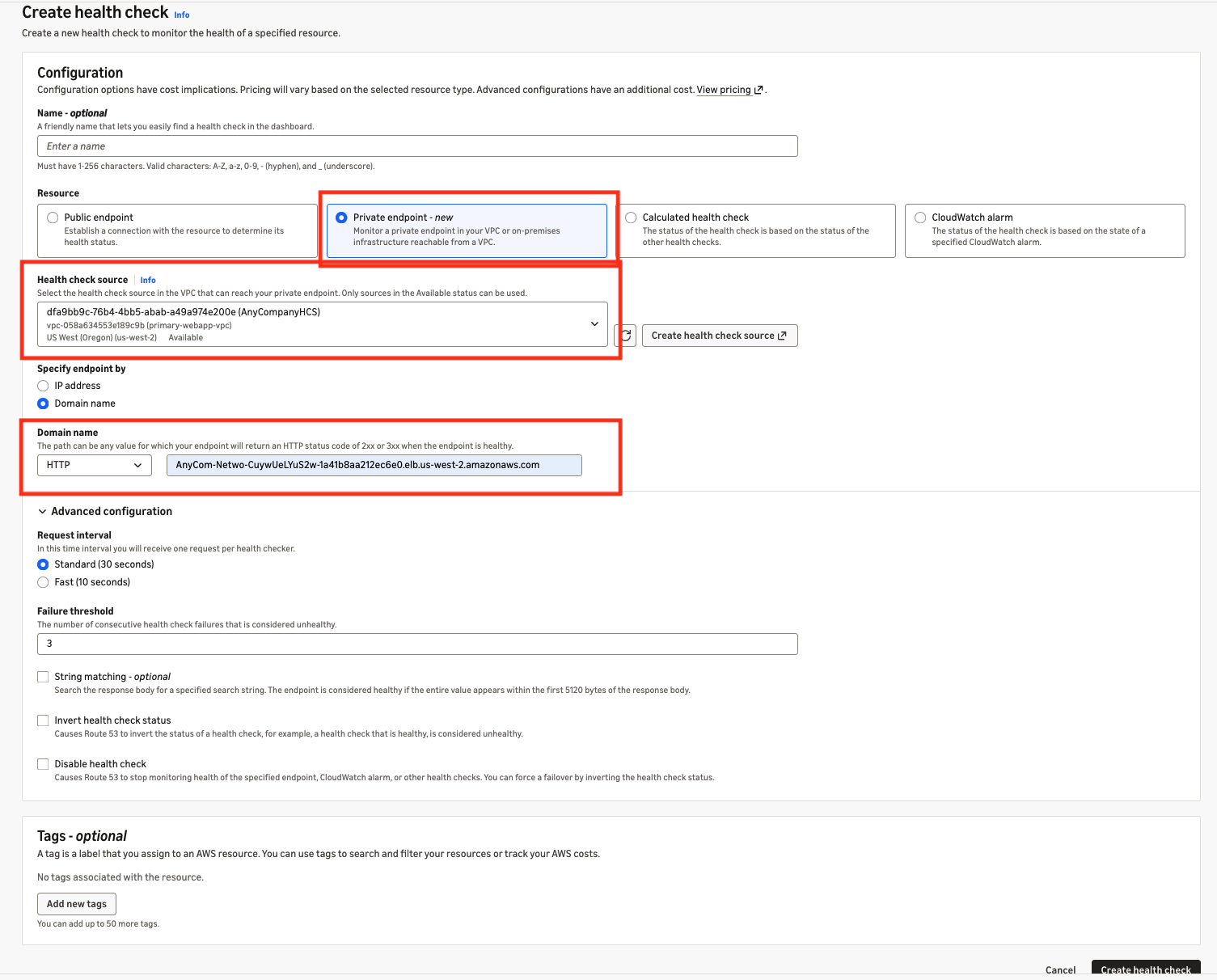
Figure 5: AWS console UI showing creation of a health check that uses a Health Check Source for private endpoints
- Create primary and secondary failover records in a private hosted zone, and associate the health check with the primary record as described in Failover routing in the AWS documentation. During creation, you use the health check ID from the health check you created in Step 3. Set short DNS TTLs (1 minute) on the failover records so clients move to the standby quickly. The failover records in the private hosted zone are shown in Figure 6.
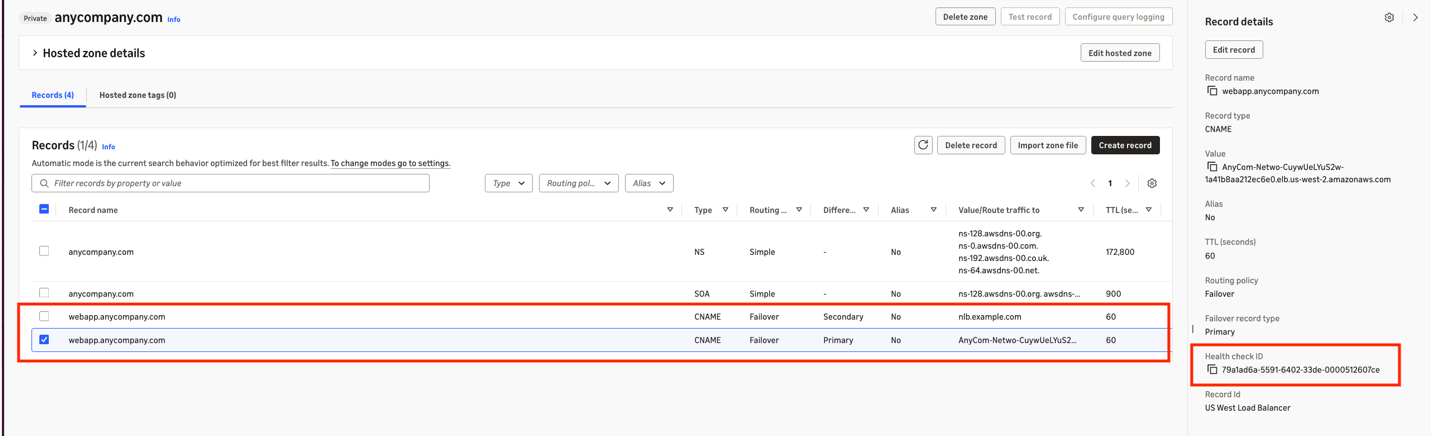
Figure 6: Configuration of a private hosted zone with failover routing using the health check for private endpoints
With this setup, you can fail over your private endpoints without relying on internet connectivity or the public health checkers of Route 53.
Testing the setup
Test the setup by running the following command on your client EC2 instance terminal, and verify that you are connecting to the primary web application endpoint in us-west-2, as shown in Figure 7.
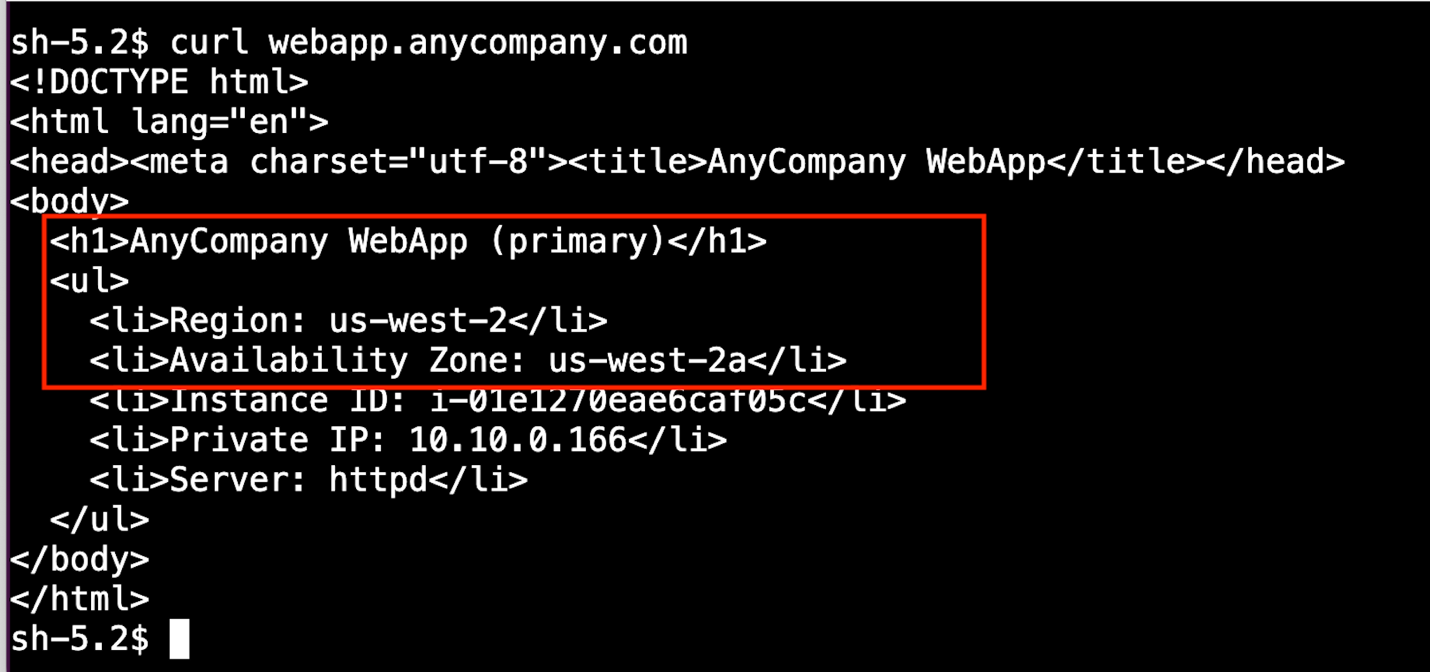
Figure 7: Test EC2 instance querying the web application with the primary endpoint responding
To simulate loss of the primary NLB, we will remove the NLB listener, as shown in Figure 8.
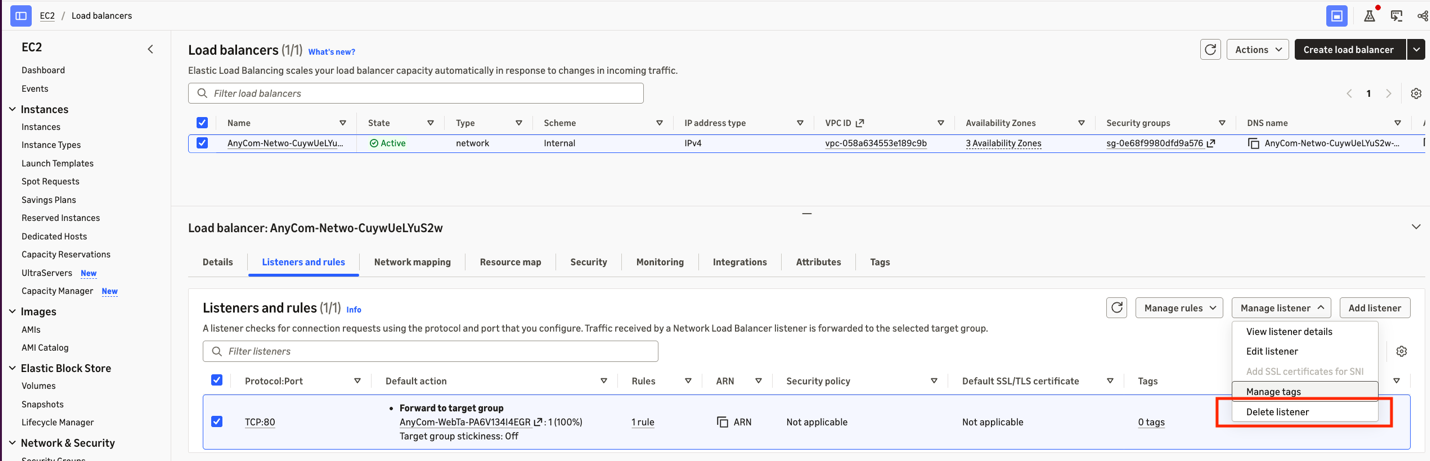
Figure 8: Removing the NLB listener rule to simulate loss of the primary
We can run the command from Step 1 again and see that the call to the web server now directs to the secondary NLB in us-east-2. The traffic has failed over to the secondary environment, as shown in Figure 9.
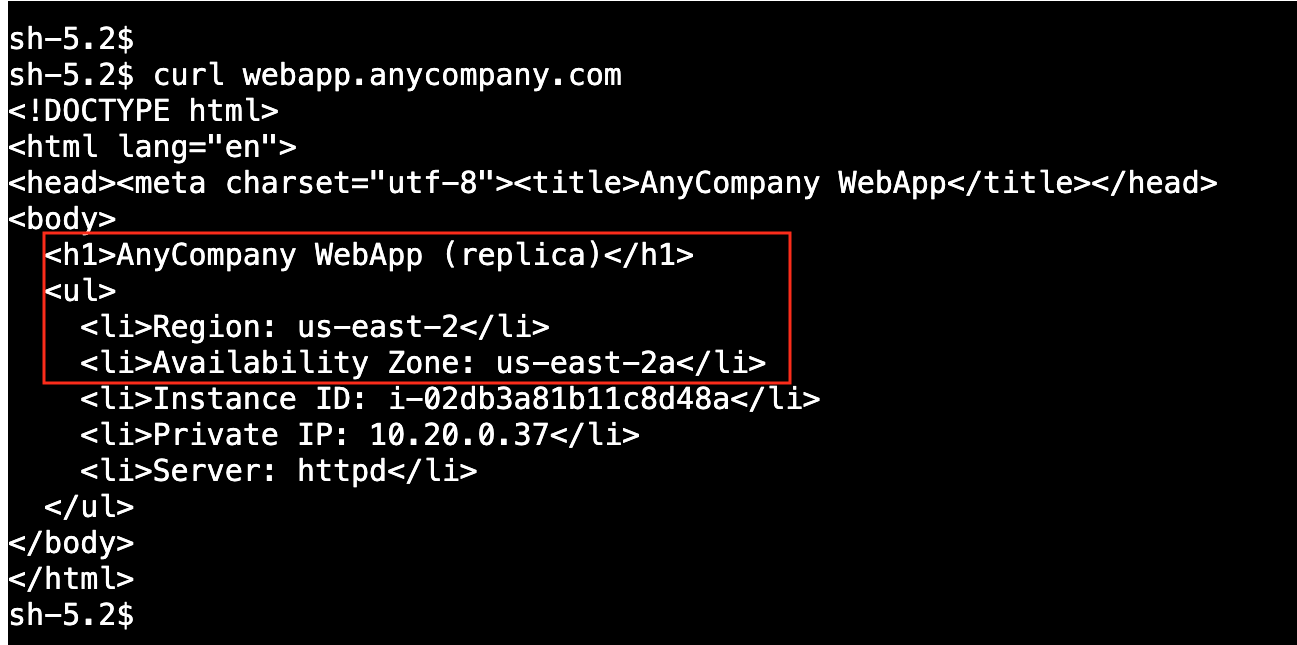
Figure 9: Test EC2 instance querying the web application with the secondary endpoint responding
Use cases
Private Endpoint Health Checks support a range of private-only resilience patterns:
- Active-passive failover for private applications and self-hosted nodes – Run a primary with a warm standby (or multiple peers) under a single private DNS name, with health checks by IP address, domain, or port. A failover routing policy shifts DNS to a healthy standby when the primary falls behind or becomes unhealthy, so clients need no failover logic of their own. This fits stateful, single-instance engines as well as applications behind internal load balancers and private API endpoints.
- Custody and key-management resilience – Point health checks at private custody services, HSM clusters, and signing endpoints. Shift traffic to a redundant deployment on failure, without placing these high-value endpoints on the public internet.
- Market-data and price-feed failover – Health-check redundant private feed endpoints and fail over automatically so downstream systems keep receiving fresh data.
- Private links to partners – Health-check endpoints reached over AWS PrivateLink or private peering, and fail over between redundant partner connections or Regions.
- Cross-Region disaster recovery and hybrid – With inter-Region connectivity such as AWS Transit Gateway or AWS Cloud WAN, drive active-passive regional failover for private workloads, and fail over to endpoints located on premises or in a colocation facility over AWS Direct Connect or AWS Site-to-Site VPN AWS Direct Connect.
Considerations
Keep the following in mind as you plan a deployment:
- Use short DNS TTLs on failover records so clients move to the standby quickly.
- Allow traffic from the Health Check Source to your targets in both security groups and network ACLs.
- For a VPC that spans more than three Availability Zones, add a Health Check Source so every target Availability Zone is covered.
- At launch, the scope covers private VPC endpoints and endpoints located on premises or in hybrid environments that are reachable from the Health Check Source VPC.
- Some capabilities are not part of the initial launch: private-endpoint latency measurement, public checks through a source, and calculated checks that reference private checks.
Conclusion
Private endpoints run many of your most critical workloads, yet native, fast DNS failover stopped at the public boundary, leaving teams to build and operate their own CloudWatch and Lambda failover automation. Amazon Route 53 Private Endpoint Health Checks remove that gap. To get started, create a Health Check Source in your Amazon VPC, point a health check at a private IP address, domain, or port, and attach it to a Route 53 failover record in a private hosted zone. Detection and DNS failover happen in seconds, nothing is exposed to the public internet, and the service is fully managed.
For configuration details and current limits, see the Amazon Route 53 Developer Guide.