Networking & Content Delivery
Intelligent VPN observability: Decoding AWS Site-to-Site VPN logs
When an AWS Site-to-Site VPN connection degrades, you sift through hundreds of log entries, correlate Border Gateway Protocol (BGP) state transitions with Internet Key Exchange (IKE) phase changes and decide whether the cause is a prefix quota violation, an autonomous system (AS) path loop, or a hold timer expiry. That repetitive manual work prolongs recovery.
With BGP logging, announced in November 2025 for AWS Site-to-Site VPN, you can stream BGP and IKE messages to Amazon CloudWatch Logs and analyze them automatically instead of by hand.
In this post, you will build an observability pipeline that shortens mean time to resolution: it detects VPN anomalies, analyzes the messages with Amazon Bedrock, and delivers remediation recommendations to your inbox. You can deploy the full pipeline from the aws-samples GitHub repository.
If you’d rather act on findings directly in Slack or your ticketing system instead of triaging email reports, Approach 2 shows how to replace the notification step with AWS DevOps Agent for a more interactive, scalable workflow.
BGP logging overview
AWS Site-to-Site VPN logs stream two categories of messages to CloudWatch Logs:
- BGP messages cover both session status (state transitions, prefix limit warnings and violations, session notifications, and attribute updates) and route status (prefix advertisements, updates, withdrawals, and routing attributes). For the full list of message types, see Sample BGP status messages and Sample route status messages.
- IKE messages cover IPsec tunnel negotiation, including Phase 1 and Phase 2 establishment, proposal selection, Network Address Translation (NAT) traversal detection, Dead Peer Detection (DPD) keepalives, rekeying failures, and tunnel teardown. For details, see Sample IKE log messages.
Each VPN connection has two tunnels, and each tunnel generates separate BGP and IKE log streams, for a total of four streams. The log stream naming convention is:
<vpn-connection-id>_<tunnel-outside-ip>-BGP.log
<vpn-connection-id>_<tunnel-outside-ip>-IKE.log
The resource_id field inside each log message follows the same <vpn-connection-id>_<tunnel-outside-ip> pattern.
Understanding BGP log messages
BGP log messages use a JSON format with two primary message types. For the complete log format reference, see Site-to-Site VPN logs.
BGPStatus type track session state changes and BGP protocol messages:
{
  "resource_id": "vpn-1a2b3c4d5e6f_203.0.113.10",
  "timestamp": "2026-06-12 20:42:07.550Z",
  "type": "BGPStatus",
  "status": "UP",
  "message": {
    "details": "AWS-side peer BGP session state has changed from OpenConfirm to Established with neighbor 169.254.100.2"
  }
}
RouteStatus type track route advertisements, updates, and denials:
{
  "resource_id": "vpn-1a2b3c4d5e6f_203.0.113.10",
  "timestamp": "2026-06-12 20:42:08.697Z",
  "type": "RouteStatus",
  "status": "ADVERTISED",
  "message": {
    "prefix": "10.0.0.0/16",
    "asPath": "65001",
    "localPref": 100,
    "med": 0,
    "nextHopIp": "169.254.100.2",
    "weight": 0
  }
}
The status field indicates the tunnel state: UP when the BGP session is established, DOWN when it is not.
Approach 1: Email delivery with Amazon Bedrock
This approach builds a serverless pipeline that runs only when anomalies occur and automatically correlates both BGP and IKE logs into a single timeline, so you do not have to manually cross-reference separate log streams during an event.
Figure 1 shows the pipeline which detects BGP and IKE anomalies through a CloudWatch Logs subscription filter, deduplicates messages with Amazon SQS FIFO, analyzes them with Amazon Bedrock, and delivers a consolidated report through Amazon SNS.
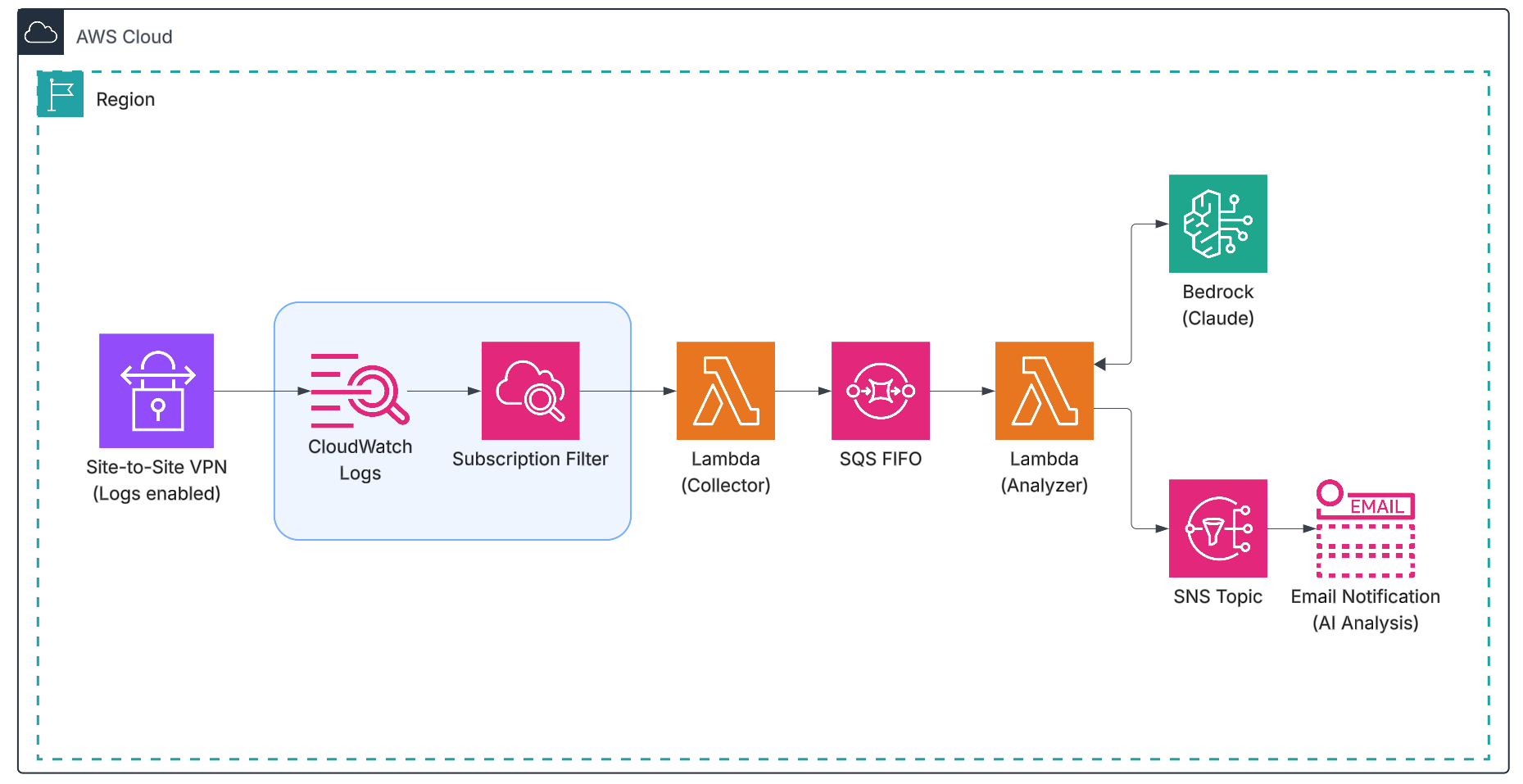 Figure 1: AWS Site-to-Site VPN observability pipeline architecture.
Prerequisites
Before you deploy the solution, complete the following steps:
- Confirm that you have an active AWS Site-to-Site VPN connection with BGP routing.
- Enable Site-to-Site VPN logging for both tunnels and record the CloudWatch log group name.
- Request Amazon Bedrock model access for the model you intend to use (for example, Claude Haiku 4.5 from Anthropic).
- Provide an email address and confirm the Amazon SNS topic subscription.
- Install the AWS Serverless Application Model (AWS SAM) Command Line Interface, AWS Command Line Interface (AWS CLI) version 2, and Python 3.12 or later.
The pipeline uses two AWS Lambda functions. The collector function receives messages from the subscription filter, and the analyzer function queries logs and calls Amazon Bedrock. An Amazon SQS FIFO queue deduplicates messages that belong to the same event, and Amazon SNS delivers email alerts. The repository uses Claude Haiku 4.5 for analysis, and you can change the model. For available models, see the Amazon Bedrock User Guide.
Deploy Approach 1
Deploy from the GitHub repository, then trigger a test event or wait for the next one to validate the pipeline.
Customizing the AI prompt
To change the analysis behavior, update the PROMPT_TEMPLATE variable in the Lambda function. For example, you can reference internal runbook IDs, flag a specific customer gateway vendor (such as Cisco, Juniper, or strongSwan), or match a downstream ticketing system’s required fields:
- Open the Lambda console and choose Functions.
- Choose the function with your stack name (for example,
vpn-bgp-observability-analyzer). - On the Code tab, open
vpn_bgp_analyzer.py. - Locate the
PROMPT_TEMPLATEvariable near the top of the file and modify the prompt text. - Choose Deploy to save your changes.
Alternatively, modify template.yaml in the cloned repository and redeploy the AWS CloudFormation stack. For production, you can externalize the prompt to Amazon Bedrock Prompt Management so you can version and update it independently of the function code.
Why use a subscription filter instead of polling?
A polling approach (for example, Amazon EventBridge Scheduler on a two-minute schedule) runs on fixed schedule and incurs Lambda and CloudWatch API cost even when the VPN is healthy. A CloudWatch Logs subscription filter runs the pipeline only when anomaly patterns appear. The filter pattern matches VPN-specific anomalies that typically impact connectivity:
?"Cease" ?"prefix limit" ?"\"status\":\"DOWN\"" ?"DENIED" ?"ike_phase1_state\":\"down" ?"ike_phase2_state\":\"down"
This pattern catches BGP Cease notifications (prefix quota exceeded, administrative shutdown, connection rejected), route denials (AS path loops), session-down events, and IKE phase failures.
Deduplication with Amazon SQS FIFO
A single event generates many log messages; a tunnel failover produces roughly 20 messages across both tunnels. Without deduplication, each message triggers a separate analysis and email. The collector sends a small trigger token to the SQS FIFO queue with a constant deduplication ID:
DEDUP_ID = "vpn-bgp-event"
SQS FIFO suppresses duplicate messages that share this ID for the deduplication interval (five minutes), anchored at the first message of the event. As a result, the pipeline produces one analysis email per event, even when the event crosses five-minute boundary.
The analysis delay
BGP and IKE messages from the same event arrive over several seconds because of CloudWatch Logs ingestion latency. The SQS queue applies a delivery delay (30 seconds by default, configurable through the AnalysisDelaySeconds parameter) so the analyzer function runs after CloudWatch ingests the correlated messages. Because the queue holds the message during this wait, no Lambda compute is billed.
Real-world troubleshooting scenarios
Each scenario uses actual BGP log messages captured from a live VPN connection. The sample analysis email later shows the format you receive: timeline, severity, root cause, and recommended actions.
Scenario 1: Prefix quota exceeded
AWS Site-to-Site VPN connections have a default BGP prefix quota per tunnel. When the on-premises router advertises more than the quota, the VPN endpoint tears down the BGP session. The logs show the full sequence.
Prefix warning at 76% capacity:
{
  "type": "BGPStatus",
  "status": "UP",
  "message": {
    "details": "AWS-side peer is reporting a maximum prefix limit warning - received 76 prefixes from neighbor 169.254.100.2, limit is 100"
  }
}
Quota exceeded (Cease notification 6/1):
{
  "type": "BGPStatus",
  "status": "DOWN",
  "message": {
    "details": "AWS-side peer sent a notification 6/1 (Cease/Maximum Number of Prefixes Reached) to neighbor 169.254.100.2"
  }
}
The analysis correlates the warning (76 prefixes) with the exceeded event and the Cease 6/1 notification, and recommends that you aggregate routes on the customer gateway device (for example, summarize /24 prefixes into larger blocks) and configure neighbor X maximum-prefix 90 warning-only for early alerting.
Scenario 2: AS path loop detection
When the customer gateway re-advertises routes learned from the VPN back to the AWS endpoint, the VPN endpoint detects the AS path loop and denies the route:
{
  "type": "RouteStatus",
  "status": "UPDATED",
  "message": {
    "prefix": "10.3.0.0/24",
    "asPath": "64513",
    "details": "DENIED due to: as-path contains our own AS;"
  }
}
Amazon Bedrock parses the AS path and identifies that the customer gateway (for example, AS 65001) is reflecting routes that contain the AWS-side AS (for example, AS 64513) back to the VPN endpoint. It recommends an outbound route-map filter on the customer gateway to stop re-advertising learned routes.
Scenario 3: Connection collision during establishment
During tunnel establishment, the AWS endpoint and the customer gateway can initiate BGP sessions simultaneously, which causes a connection collision:
{
  "type": "BGPStatus",
  "status": "DOWN",
  "message": {
    "details": "AWS-side peer sent a notification 6/5 (Cease/Connection Rejected) to neighbor 169.254.100.2"
  }
}
The analysis identifies the connection rejection (Cease 6/5) and recommends that you verify the customer gateway peer IP and AS number match the VPN connection configuration, confirm that only one BGP session per tunnel is initiated, and check that the customer gateway allows inbound TCP 179 from the AWS tunnel outside IP.
Scenario 4: IKE tunnel failure with BGP correlation
When an IPsec tunnel fails, the pipeline correlates the IKE phase transitions with the resulting BGP session impact.
IKE Phase 1 and Phase 2 down:
{
  "timestamp": "2026-06-12 20:25:55.015Z",
  "details": "AWS tunnel received DELETE for IKE_SA from CGW",
  "ike_phase1_state": "down",
  "ike_phase2_state": "down"
}
Correlated BGP session teardown:
{
  "type": "BGPStatus",
  "status": "DOWN",
  "message": {
    "details": "AWS-side peer BGP session state has changed from Established to Clearing with neighbor 169.254.100.2"
  }
}
The foundational model correlates the IKE DELETE with the BGP teardown and reports that the customer gateway initiated the teardown, with the IKE failure preceding BGP loss. For IKE troubleshooting guidance, see Troubleshooting AWS Site-to-Site VPN connectivity.
Sample analysis email
Figure 2 shows a sample email when the pipeline detects a VPN anomaly, Amazon Bedrock analyzes the correlated BGP and IKE messages and Amazon SNS sends a single consolidated email.
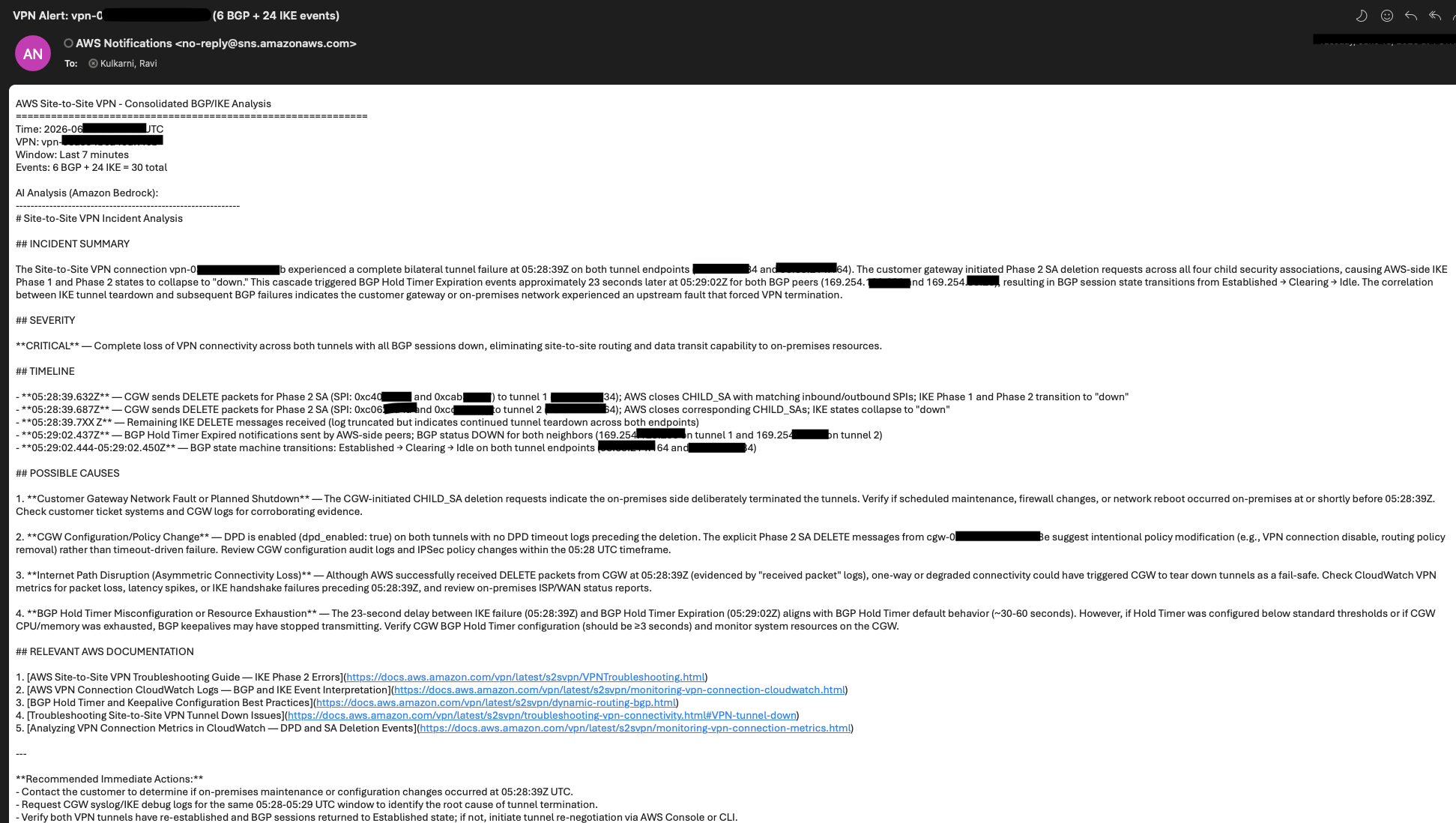 Figure 2: Sample consolidated BGP/IKE analysis email.
Benefits of this approach
- Native email delivery with supporting evidence: Findings, root cause, timeline, and mitigation steps reach your inboxes through Amazon SNS, with the relevant BGP and IKE messages and exact timestamps in one place.
- Plain-language root cause and recommendations: Amazon Bedrock correlates BGP and IKE anomalies into an event summary with probable causes and links to the VPN logging documentation. You can also choose a different foundation model.
- Self-contained and pay-per-event: No external agent or webhook. AWS Lambda, SQS, Bedrock, and SNS run only when the anomaly pattern triggers the subscription filter, so the pipeline stays at zero cost during healthy operation.
Adapting the pipeline to AWS Transit Gateway or VPC Flow Logs
The subscription filter, SQS, and Bedrock pattern works for other CloudWatch Logs sources, such as AWS Transit Gateway Flow Logs or VPC Flow Logs. Change three things:
- Subscription filter target: Point the filter at the Transit Gateway or VPC Flow Logs CloudWatch log group.
- Filter pattern: Replace the BGP and IKE keywords with flow log action values such as
REJECT. - Bedrock prompt: Update
PROMPT_TEMPLATEto describe the flow log schema (elastic network interface, source and destination IP and port, protocol, action, log status) and ask for flow-level root cause, for example, security group or network ACL changes, asymmetric routing, or unexpected east-west traffic.
Best practices
- Alert thresholds: The defaults are a five-minute deduplication window and a seven-minute log lookback. Increase the deduplication window to 10 minutes in high-volume environments.
- Security: Each Lambda function uses least-privilege AWS Identity and Access Management (AWS IAM) permissions scoped to the VPN log group, Amazon Bedrock model, SNS topic, and SQS queue. AWS managed keys encrypt the SNS topic and the SQS queue, and the pipeline processes only BGP and IKE control plane messages.
Approach 2: Delivery through chat and ticketing tools with AWS DevOps Agent
For teams on Slack, ServiceNow, or PagerDuty, replace the Amazon SQS, Bedrock, and SNS path with AWS DevOps Agent. The agent runs an autonomous investigation that correlates VPN logs with topology, deployments, and telemetry, and then posts findings to your chat channel or ticketing system.
Figure 3 shows DevOps Agent how it correlates logs with integrations such as Datadog, updates a ticketing system such as PagerDuty or ServiceNow, and posts key findings, root cause analyses, and mitigation plans to Slack.
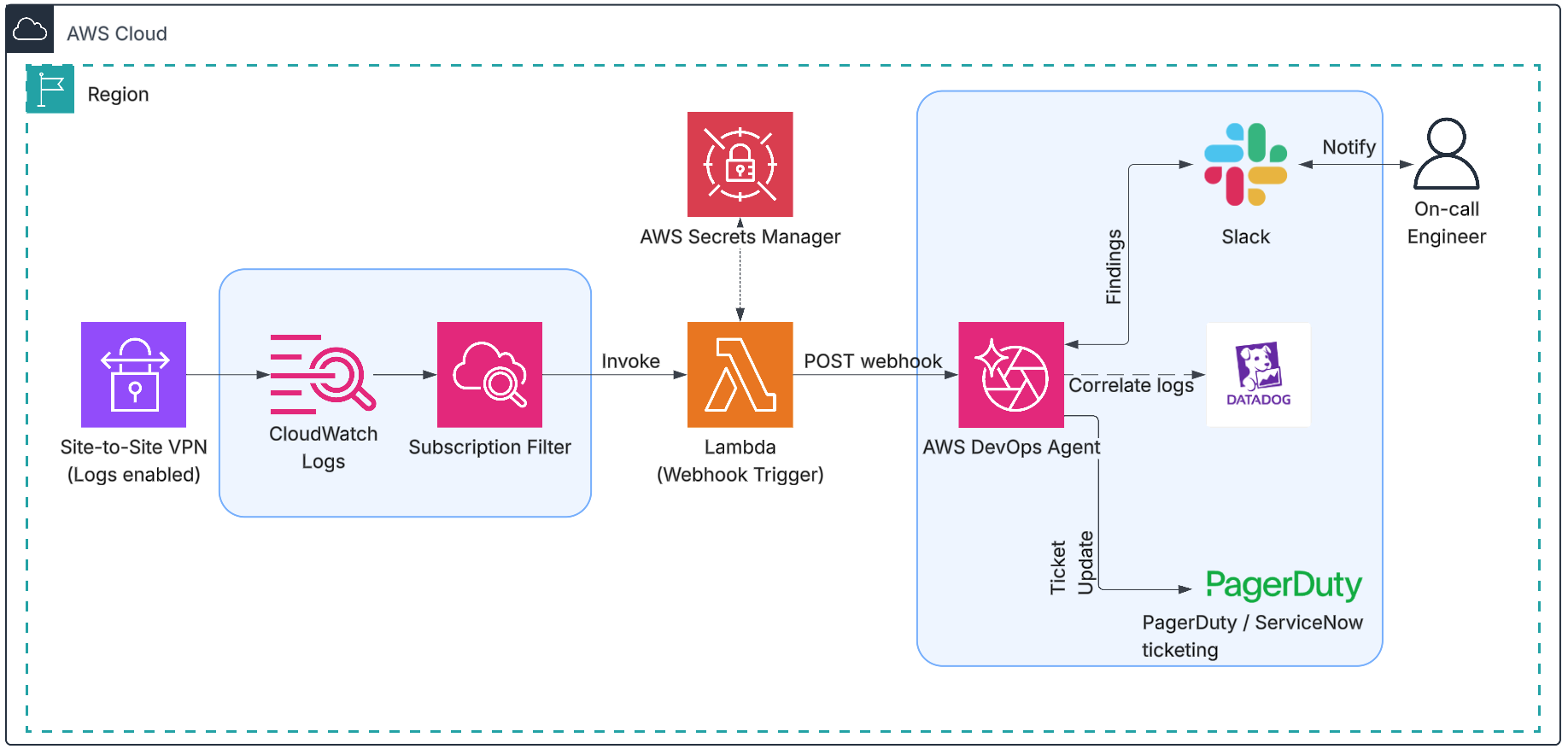 Figure 3: Alert delivery using AWS DevOps Agent.
Setup
- Enable VPN logging and create the subscription filter: VPN logs stream to CloudWatch Logs, and a subscription filter watches for BGP and IKE anomaly patterns, as in Approach 1.
- Create the Agent Space and webhook: In the AWS DevOps Agent console, create an Agent Space and generate a webhook. Store the returned Hash-based Message Authentication Code (HMAC) secret in AWS Secrets Manager and note the endpoint URL.
- Connect output channels and telemetry sources: In the Agent Space, connect Slack, ServiceNow, or PagerDuty for delivery, and add Datadog, Splunk, or other telemetry sources for correlation.
- Deploy the webhook-trigger Lambda: Deploy a Lambda function that reads the HMAC secret from AWS Secrets Manager, signs the request body with HMAC-SHA256, and sends an HTTPS POST to the webhook URL. Point the subscription filter from step 1 at this function.
- Validate: Trigger a BGP or IKE event on a test VPN connection and confirm that AWS DevOps Agent posts findings to your Slack channel, PagerDuty event, or ServiceNow ticket.
Benefits of this approach
- Native chat and ticket delivery: Findings, root cause, and mitigation plan land in-channel in Slack or as work notes on the originating ServiceNow ticket.
- Cross-signal correlation: The agent investigates beyond the log window, correlating CloudWatch with third-party telemetry integrations.
- Interactive follow-ups: Responders ask clarifying questions in Slack, and the agent continues in-thread.
Clean up
To avoid ongoing charges, run sam delete to remove the stack. Optionally, disable VPN logging through the AWS Management Console or the AWS CLI. Deleting the stack removes the Lambda functions, SQS queue, SNS topic, and AWS IAM roles, but it does not affect your VPN connection or its logs.
Conclusion
In this post, you built an automated VPN observability pipeline that turns manual log analysis into a consolidated event report. A CloudWatch Logs subscription filter detects BGP and IKE anomalies, an SQS FIFO queue deduplicates messages, and Amazon Bedrock generates a timeline, root cause, and remediation recommendations delivered through Amazon SNS.
For teams that prefer chat and ticketing workflows, you saw how to replace the email path with AWS DevOps Agent, which delivers findings through Slack and other integrations, correlates with third-party telemetry, and supports interactive follow-up in-thread.
Shorten your VPN mean time to resolution: deploy the full pipeline from the GitHub repository. To extend the same approach to flow logs, see Transit Gateway and VPC Flow Logs.
About the authors

Donald Quindardo
Donald is a Principal Technical Account Manager in AWS Enterprise Support. With nearly two decades of IT experience, he leads organizations in solving complex networking challenges and cloud infrastructure transformations. He combines strategic insight with hands-on experience in network design, resiliency, and performance optimization to drive customer success. Away from the cloud, Donald enjoys making memories with friends and family.

Ravi Kulkarni
Ravi Kulkarni is a Technical Account Manager at AWS specializing in networking. He helps enterprises design and optimize network architectures and accelerate adoption of advanced AWS networking services. Outside of work, he enjoys exploring new places and experiencing different cultures.