Networking & Content Delivery
Introducing network calls in Amazon CloudFront Functions
Amazon CloudFront lets you securely deliver static and dynamic content with low latency and high transfer speeds. With CloudFront Functions, you can run business logic such as redirecting requests, selectively routing to alternate origin, or modifying headers at every CloudFront edge location with low latency and scale.
Today, we are introducing network calls in CloudFront Functions. With the new cf.fetch() and cf.beacon() methods, a function can call an origin on the same distribution during request processing and use the response to make a decision, all within the same lightweight runtime you already use. Until now, a function could only act on information it already had. CloudFront KeyValueStore lets it look up data stored in advance, which works well for redirect maps, URL rewrites, and feature flags. What a function couldn’t do was ask a live service about the request in front of it, such as whether a token is still valid or which content this viewer should get. That logic had to move to Lambda@Edge or back to your origin and you would have to accept added latency. With CloudFront Functions, following the network call, the logic stays at the edge location providing lower latency and scalability.
Unlocking new possibilities
Authorizing API and Model Context Protocol (MCP) requests against permissions and budget
Exposing an API or MCP server to AI agents means authorizing every bearer token. It means answering two questions: can this agent perform this action on this resource, and does it have budget left? Until now, either your origin made that check on every request, or a proxy such as Amazon API Gateway sat in front of it.
With network calls, the call to check the token happens at the edge (Figure 1). A viewer request function sends the token, URL and method in one cf.fetch() call. The function receives the auth result, and decides whether the request should be allowed or blocked. Your API only receives requests that are authorized and within budget, and rejected traffic stops at the edge location.
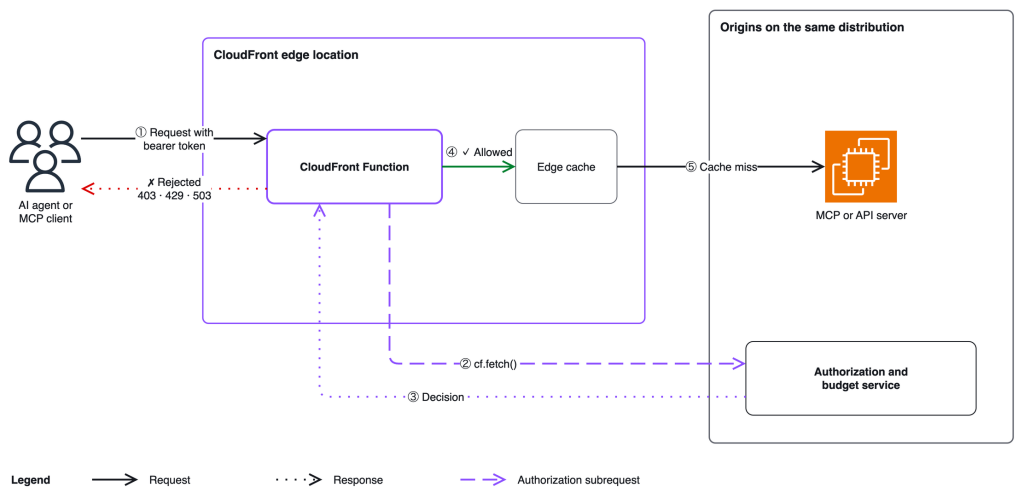
Figure 1: Authorizing AI agent requests against permissions and usage budget with cf.fetch()
Third-party bot and fraud detection
Some customers integrate third-party security services with their CDN. DataDome, for example, inspects API requests and decides whether it comes from anunauthorized bot or user before it reaches the origin. The service needs signals from every request, and it has to answer fast enough that real users don’t notice. DataDome previously ran this integration for CloudFront customers on Lambda@Edge. Working with us ahead of this launch, DataDome rebuilt their solution on CloudFront Functions. As a result, they saw 60% lower cost for their customers compared to their Lambda@Edge implementation.
Figure 2 shows how the integration works with network calls. The detection API is added as an origin on the distribution. A viewer request function sends the signals the service needs, such as the URI, method, user agent, and selected headers, in a cf.fetch() call. Based on the verdict, the function lets the request continue, blocks it with a 403 response, or redirects the viewer to a challenge page.
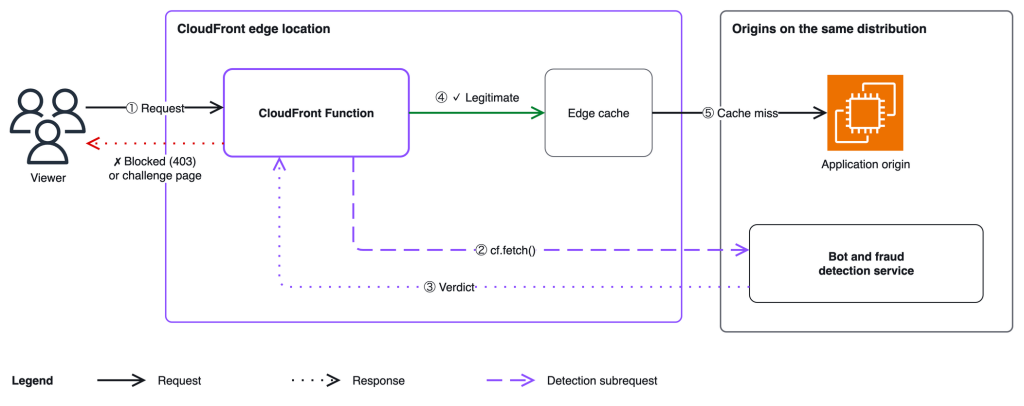
Figure 2: Third-party bot and fraud detection
Collecting signals at the edge
Customers often need metrics from the edge, such as how often cached content is viewed and from where. You can use CloudFront access logs for this, but it requires a pipeline that collects the logs and extracts the required value from the logs. Consider a marketing agency that runs an online campaign and sends each recipient a landing page link with a unique track ID. To see which links are working, the agency has to find those track IDs in the logs.
With cf.beacon(), the function sends the metric itself. When a viewer opens the link, the function reads the track ID and sends a small event with the track ID, the edge location, and a timestamp to a metrics collector configured as an origin on the distribution (Figure 3). The beacon is sent in the background, so the landing page is served without waiting for a response. This makes it a good fit for fire-and-forget signals. Because the function runs before the cache lookup, views of cached pages are counted too.
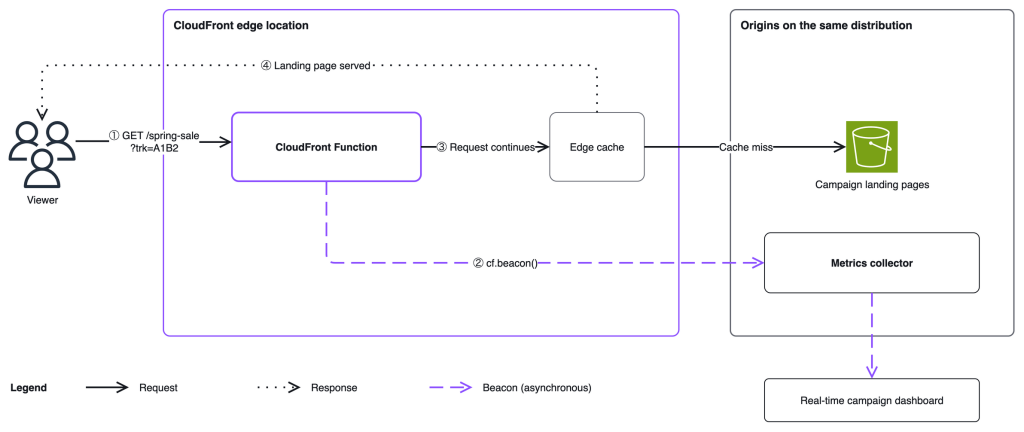
Figure 3: Collecting campaign signals at the edge with cf.beacon()
Example: Authorizing a request with a network call
Here is a sample code that shows how the network call works.
Configuring the origin
A function can only call an origin that is configured on the same distribution. Set up origin access control such as VPC origin, and do not create a cache behavior which routes traffic to this origin unless needed. In the CloudFront console, open your distribution, choose the Origins tab, and add the origin your function will call. Because the target is an origin, network calls use connection reuse and connection pooling to prevent opening a new connection on every request.
Writing the function
In the CloudFront console, choose Functions in the navigation pane, then Create function. Select the cloudfront-js-2.0 runtime and add the following code:
import cf from 'cloudfront';
async function handler(event) {
     const request = event.request;
     const token = request.headers['authorization'] ? request.headers['authorization'].value : null;

       if (!token) {
         return { statusCode: 401, statusDescription: 'Unauthorized' };
       }

       let decision;
       try {
           decision = await cf.fetch('/v1/check', {
               originId: 'auth-origin',
               method: 'POST',
               headers: {
                   'content-type': 'application/json',
                   'authorization': token,
               },
               body: JSON.stringify({
                   action: request.method === 'GET' ? 'read' : 'write',
                   resource: request.uri,
               }),
               includeBody: true,
           });
       } catch (e) {
           return { statusCode: 503, statusDescription: 'Service Unavailable' };
       }

       if (!decision.ok) {
         return { statusCode: 403, statusDescription: 'Forbidden' };
       }

       const result = await decision.json();

       if (!result.allowed) {
         return { statusCode: 403, statusDescription: 'Forbidden' };
       }
       return request;
}
The function sends the agent’s token, the action, and the resource to the authorization service, and lets the request through only if the service allows it. Save and publish the function, then associate it with your distribution using the Viewer Request event type on desired cache behavior, such as /api/*.
Get started
Network calls in CloudFront Functions are available today at all CloudFront edge locations. For limits and quotas, visit the CloudFront documentation. Network calls are charged at $0.10 per million calls in addition to standard CloudFront Functions invocation charges. For flat-rate pricing plans, CloudFront network calls require Pro tier and above. For details, see the CloudFront pricing page.
To learn more, see the CloudFront Functions documentation.

 Julian Ju