AWS Quantum Technologies Blog
Explore NVIDIA CUDA-Q Applications Hub and Academic Library with Amazon Braket
Amazon Braket managed notebook instances (NBIs) now include NVIDIA CUDA-Q Applications Hub and CUDA-Q Academic Library launch notebooks, bringing peer-reviewed quantum research examples and structured learning resources directly into your Braket environment and making it simple to explore and develop hybrid quantum-classical applications. Braket NBIs support a range of Amazon Elastic Compute Cloud (Amazon EC2) instances so you can match your applications to the right compute resources. Deploy a low-cost general-purpose ml.t3.medium instance for light applications or the ml.p4de.24xlarge instance with 8 NVIDIA A100 GPUs and 640 GB of memory when working with GPU-accelerated applications that require parallel compute and high memory.
In this blog post we walk you through the process of launching the new notebooks and enabling the CUDA-Q Application Hub and CUDA-Q Academic Library on an Amazon Braket NBI.
What are the CUDA-Q Applications Hub and CUDA-Q Academic Library?
NVIDIA CUDA-Q is an open-source platform for hybrid quantum-classical computing. It enables seamless integration of accelerated computing with quantum processors and supports scaling complex hybrid algorithms across simulators and real quantum hardware.
NVIDIA maintains two curated repositories that make CUDA-Q capabilities accessible to researchers and students:
- CUDA-Q Applications Hub: Industry-driven use cases including diffusion models for quantum compilation, molecule generation with transformers, and domain-specific research.
- CUDA-Q Academic library: Structured learning resources covering quantum programming fundamentals, hybrid workflows, error correction, and HPC and AI integration techniques.
Prerequisites
To follow along, you need:
- An AWS account.
- Access to Amazon Braket in a supported AWS Region.
- An Amazon Braket managed notebook instance. To create one, see Create an Amazon Braket notebook instance in the Amazon Braket Developer Guide.
To access the CUDA-Q Applications Hub
- Open your Amazon Braket managed notebook instance.
- In the Launcher tab, click the CUDA-Q and Braket icon to navigate to the CUDA-Q examples folder, Figure 1.
- Open 1_CUDA-Q_Applications_Hub.ipynb, Figure 2.
- Run the first cell to upgrade your CUDA-Q packages.
- Run the clone cell to download the Applications Hub into the cuda-q-applications folder.
- Navigate into cuda-q-applications to explore and run the examples.
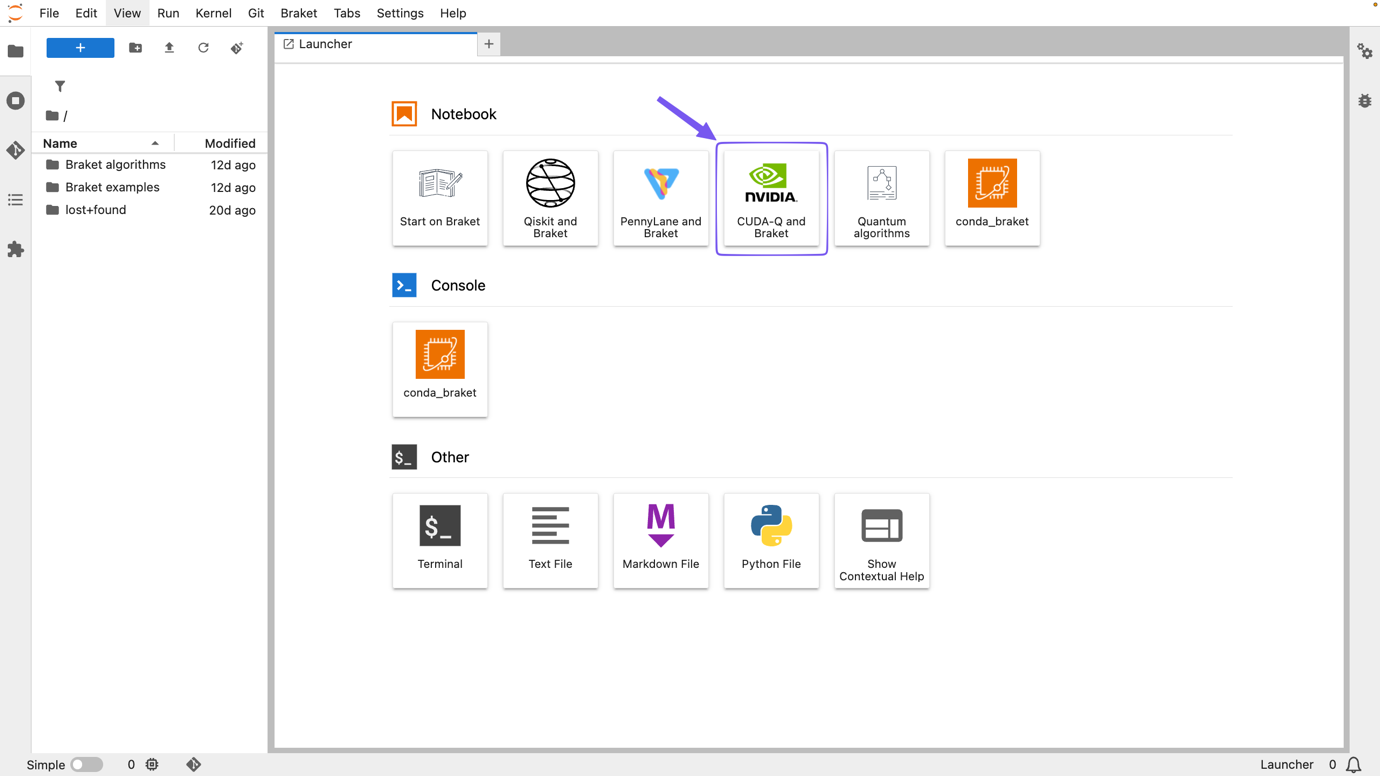
Figure 1: “CUDA-Q and Braket” icon in a Braket notebook instance opens the CUDA-Q examples repository
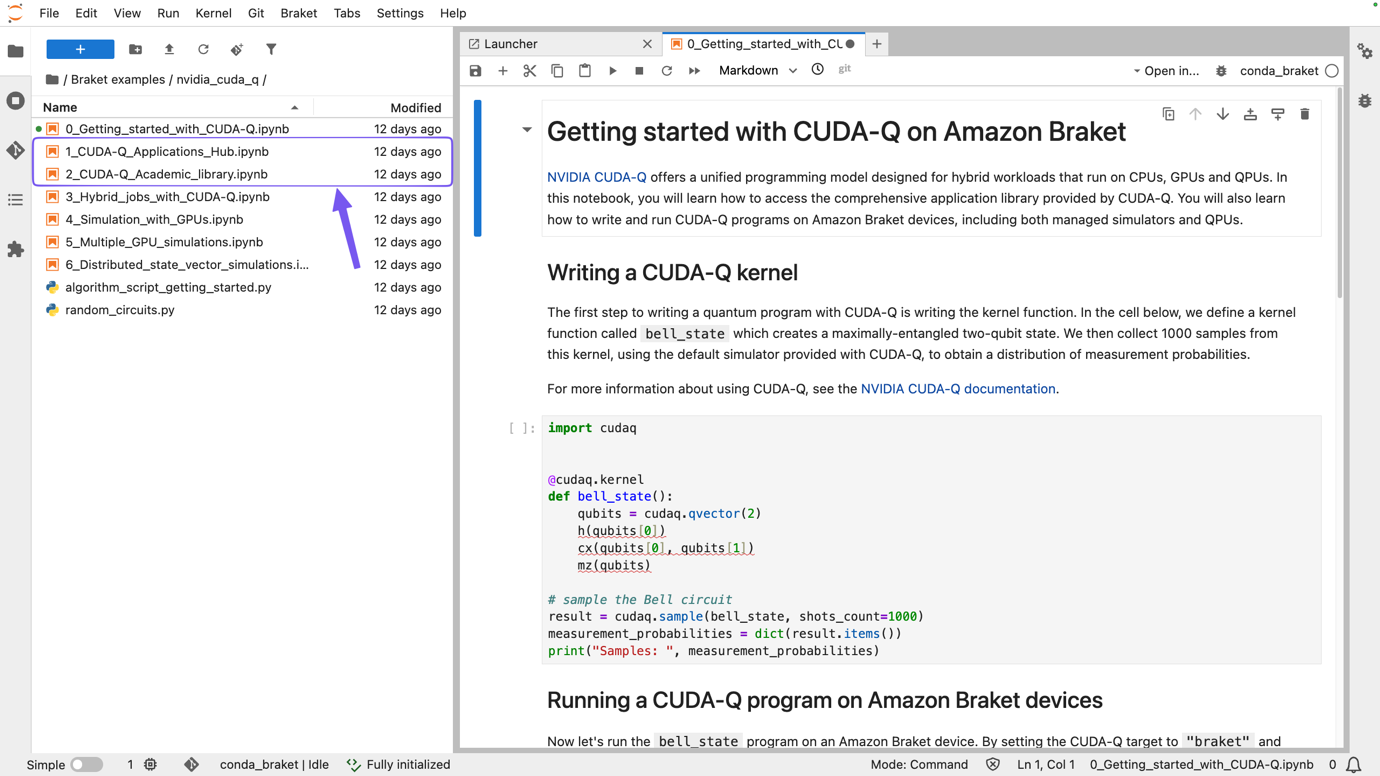
Figure 2: Launch notebooks in a Braket notebook instance for CUDA-Q Applications Hub and CUDA-Q Academic Hub
To access the CUDA-Q Academic library
- Open your Amazon Braket managed notebook instance.
- In the Launcher tab, click the CUDA-Q and Braket icon, as seen in Figure 1, to navigate to the CUDA-Q examples folder.
- Open 2_CUDA-Q_Academic_library.ipynb, as seen in Figure 2.
- Run the first cell to upgrade your CUDA-Q packages:
- Run the clone cell to download the Academic library into the cuda-q-academic folder.
- Navigate into cuda-q-academic to explore the learning paths and exercises.
Note: The cells download content provided by NVIDIA. While most notebooks run as expected, some may not be fully functional within an Amazon Braket notebook instance. If you encounter issues, open a GitHub issue in the CUDA-Q Applications Hub repo or the CUDA-Q Academic repo.
What’s included
CUDA-Q Applications Hub features research-backed examples across:
- Quantum compilation using diffusion models
- Molecular generation with quantum transformers
- Domain-specific hybrid algorithms
CUDA-Q Academic library covers structured learning paths including:
- Quantum programming fundamentals and error correction
- Hybrid quantum-classical workflows
- GPU-accelerated and AI-enhanced quantum algorithms
- Simulation of open quantum systems
Browse the full Applications Hub at nvidia.github.io/cuda-quantum and the Academic learning paths at nvidia.github.io/cuda-q-academic.
Conclusion
Amazon Braket managed notebook instances now provide access to the NVIDIA CUDA-Q Applications Hub and Academic Library, connecting researchers and students to peer-reviewed quantum examples and structured learning resources on AWS. To learn more about Amazon Braket, visit the Amazon Braket Developer Guide. Give it a try today!
Have questions or feedback? Leave a comment below or open an issue on GitHub.