AWS Security Blog
Building secure B2C applications with fine-grained access control using Amazon Cognito and Amazon Verified Permissions
Modern web applications require robust security controls to protect user data and application resources. Authentication and authorization are two fundamental pillars of application security that answer critical questions: Who are you? and What are you allowed to do? Implementing these controls correctly can be challenging for developers, especially when building data-intensive applications with frameworks like Streamlit (an open-source Python framework for building interactive web applications) or when requiring fine-grained access control. Key challenges include protecting access to application resources, implementing application identity with multi-factor authentication (MFA), and implementing usage-based controls.
In this post, you will learn how to build fine-grained access controls for a sample Streamlit application using Amazon Cognito for authentication and Amazon Verified Permissions with Cedar policies for authorization. This architecture provides enterprise-grade security with minimal development effort, so you can focus on your application’s core functionality. You will learn how to reduce development time for secure applications, implement enterprise-grade authentication, through proper access management, and scale security with growing user bases.
Security architecture overview
The reference architecture follows a layered security design with four key components; separating identity verification, authorization evaluation, application logic, and enforcement boundaries. By assigning clear responsibilities to each layer, the architecture limits blast radius and ensures that a failure in any single control does not compromise the overall system.
- Authentication layer: Amazon Cognito handles user authentication with secure credential validation and JSON web tokens (JWTs). It provides built-in password policies, account lockout protection, and session management.
- Authorization layer: Verified Permissions uses the Cedar policy engine to evaluate fine-grained access requests based on centrally stored policies.
- Application layer: The Streamlit frontend integrates with both services, managing user sessions and enforcing access controls in the user interface.
- Security boundaries: Multiple layers of security controls protect against unauthorized access, privilege escalation, authentication verification, authorization checks, and input validation.
This separation of concerns enables authentication and authorization to function as complementary security controls, following defense-in-depth principles. Figure 1 illustrates the end-to-end authentication and authorization workflow, showing how a user’s sign-in request flows through Amazon Cognito for identity verification, then through Verified Permissions for Cedar policy-based access decisions, before the application enforces the result.
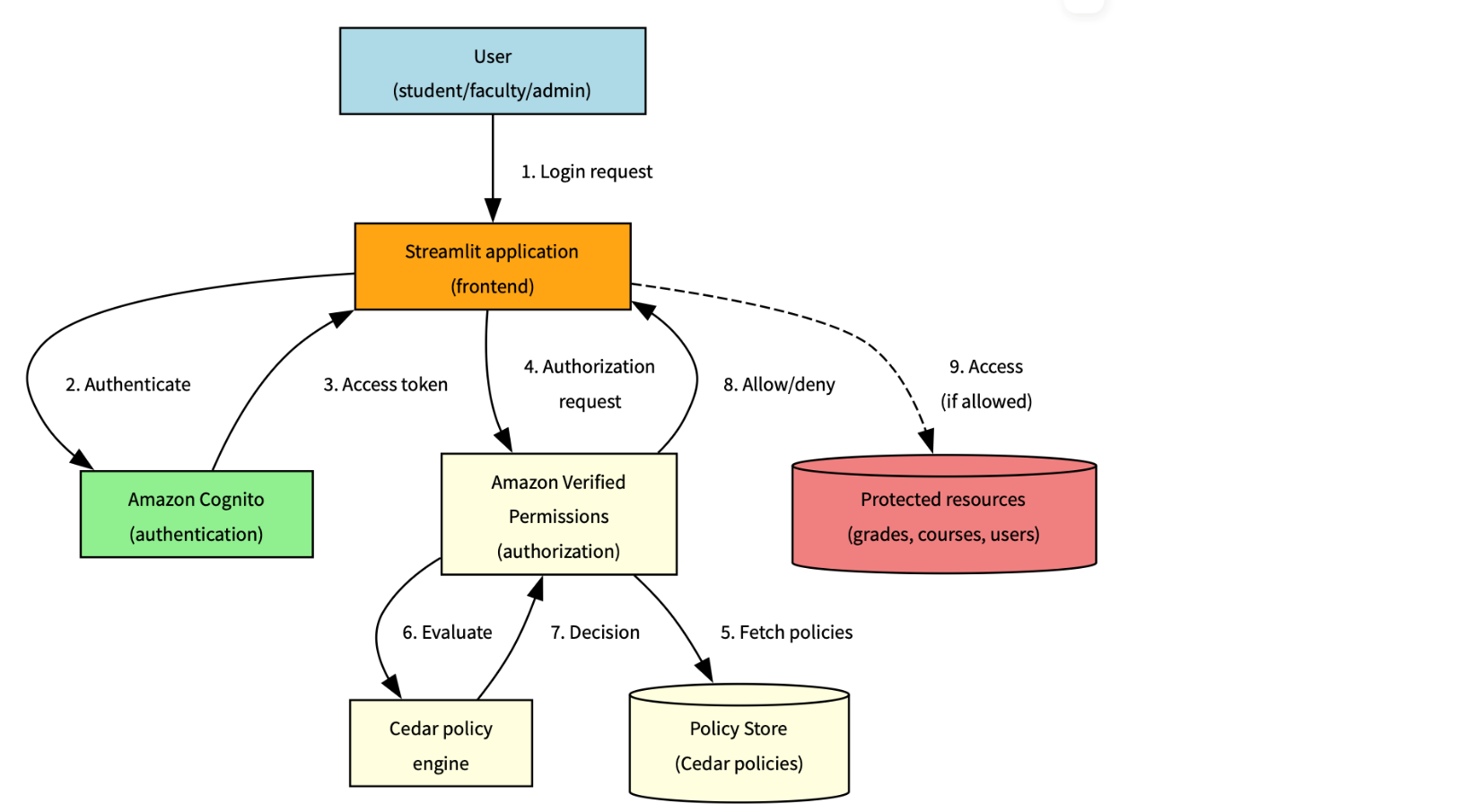
Figure 1: Solution architecture and workflow
The following workflow demonstrates how the three architecture layers work together: the authentication layer (steps 1–3) handles identity verification using Amazon Cognito, the authorization layer (steps 4–6) evaluates Cedar policies using Verified Permissions, and the application layer (steps 7–8) enforces the decision in Streamlit.
- The user sends a sign-in request, which is submitted through Streamlit
- The request is authenticated by Amazon Cognito
- An access token is sent back to Streamlit
- An authorization request is sent to Verified Permissions
- The Cedar policy engine evaluates the request
- A decision is sent back by the policy engine
- The instruction to allow or deny is sent back to Streamlit
- If the instruction is to allow, access is provided
Understanding authorization with Cedar
While authentication establishes user identity, authorization determines what actions users can perform. Verified Permissions provides a scalable authorization service based on Cedar, a policy language specifically designed for fine-grained access control.
Cedar policies follow a structured format that defines who can perform which actions on what resources. Let’s examine the anatomy of a Cedar policy:
Policy components
- Effect:
permitorforbiddetermines whether the policy allows or denies access - Principal: The entity (user) making the request, represented by
?principalas a variable - Action: The operation being performed, scoped to your application namespace
- Resource: The target of the action, also represented as a variable
- Conditions: The
whenclause contains logical expressions that must evaluate totrue
Advanced Cedar policy patterns
This section describes commonly used Cedar policy patterns for implementing fine-grained authorization with Amazon Verified Permissions. The examples illustrate how to model ownership, role-based access, hierarchical permissions, and administrative controls in real-world applications
Resource ownership control
This pattern helps ensure that users can only access resources they own:
What it does – This policy allows students to view only their own grades by:
- Checking that the user has the
Studentrole - Verifying that the grade resource’s student attribute matches the student’s
entityId - Preventing students from accessing other students’ grades while allowing access to their own academic performance
Role-based access with resource type
This pattern grants access based on role and resource type:
What it does – This policy allows faculty members to edit courses they teach by:
- Verifying the user has the
Facultyrole - Confirming the resource is of type
Course - Verifying that the course’s instructor attribute matches the faculty member’s
entityId - Restricting faculty to modify only their own courses, not courses taught by other instructors
Hierarchical authorization
This pattern allows department heads to manage faculty in their department:
What it does – This policy implements departmental hierarchy controls by:
- Requiring the user to be a
DepartmentHead - Verifying the resource is a faculty member
- Matching the faculty member’s department with the department head’s department
- Preventing department heads from managing faculty in other departments
Administrative override
This pattern provides emergency access with proper justification:
What it does – This policy provides emergency access capabilities by:
- Allowing administrators to perform any action on any resource
- Requiring an emergency access flag to be set to
true - Requiring a justification for emergency access
- Supporting accountability through required documentation while enabling emergency operations
Cedar policy evaluation flow
Understanding how policies are evaluated helps design effective authorization systems. Figure 2 shows a common evaluation pattern for an academic scenario
Note: A policy match evaluates to the policy’s effect (permit or forbid). Forbid policies take precedence: if any forbid policy matches, access is denied regardless of permit policies.

Figure 2: Policy evaluation process
The policy evaluation process follows these steps:
- User attempts to access a protected resource
- Application sends an authorization request to Verified Permissions
- Verified Permissions retrieves applicable Cedar policies from the policy store
- The Cedar policy engine evaluates each policy against the request
- If any
forbidpolicy matches, access is denied immediately - If any
permitpolicy matches and noforbidpolicies match, access is allowed - If no policies match, access is denied by default
- The evaluation result (
ALLOWorDENY) is returned to the application - Application enforces the authorization decision
Cedar policy language
Cedar is an Amazon open source policy language designed for fine-grained authorization. Every policy defines who (principal) can perform what action on which resource under what conditions, as shown in Figure 3.
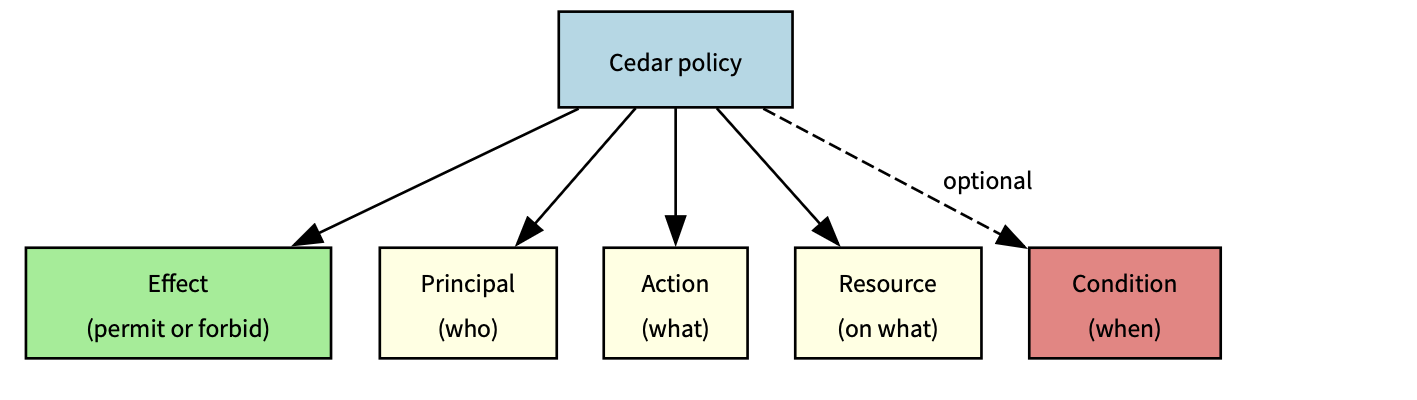
Figure 3: Cedar policy definitions
Policy interaction
The following table shows how different policies interact in complex scenarios where multiple policies could apply:
| Scenario | Student policy | Faculty policy | Department head policy | Admin policy |
| Student accessing own grade | Permit | N/A | N/A | Override |
| Faculty editing course | N/A | Permit | N/A | Override |
| Department head managing faculty | N/A | N/A | Permit | Override |
| Emergency admin access | N/A | N/A | N/A | Permit |
Legend:
- Permit – Policy allows access
- N/A – Policy doesn’t apply
- Override – Emergency admin access
The preceding table shows how each role’s policy applies to different scenarios, with admin access having override capabilities across most situations except for emergency admin access where it’s the primary permit authority. The Override column specifically indicates that the administrator’s emergency access policy can supersede other role-specific policies, but only when the emergencyAccess context flag is explicitly set and a justification is provided. This is not an automatic override.
Policy optimization tips:
- Order conditions by likelihood of success – Place the most frequently true conditions first in your when clause to enable short-circuit evaluation. For example, check role before resource ownership, because role mismatches are caught earlier. See Cedar best practices.
- Use indexed attributes for faster lookups – Use entity attributes that Verified Permissions indexes natively (
entityId,role,resource type) as primary conditions. Best practices for designing an authorization model - Cache policy evaluations when appropriate
- Monitor evaluation metrics and performance
Real-world application: Academic system
Consider an academic system with different user roles and their corresponding permissions:
Student: View own grades
- Policy helps ensure students can only access grade resources where they are listed as the student
- The policy verifies the student’s role and matches the resource owner to the principal’s entity ID
Faculty: Edit course content, manage grades
- Policy allows faculty to edit courses they teach
- Faculty can view and modify grades for students in their courses
Teaching assistant (TA): Grade management and course support
- Policy permits TAs to manage grades for courses they assist with
- Access is limited to specific courses assigned to the TA
Department head: Manage faculty assignments
- Policy allows department heads to manage faculty in their department
- Access is scoped to the department hierarchy
Administrator: System-wide access
- Policy provides emergency access with proper justification
- Administrative actions are logged and audited
Prerequisites
To implement the preceding Academic system application, you need an active AWS account, Python 3.8 or later, basic Streamlit knowledge, and AWS Identity and Access Management (IAM) permissions for Amazon Cognito and Verified Permissions.
Run the sample and extend the solution
- Download the code base: Start by downloading the code base from the avp streamlit samples repository
- Set up your development environment: Install the AWS SDK for Python (boto3) and configure your AWS credentials.
- Install the AWS SDK for Python:
- Log in to your AWS account:
- Verify that your AWS Command Line Interface (AWS CLI), Python, and dependencies are correctly configured.
- Create your AWS resources: Use the AWS Management Console or infrastructure as code (IaC) tools to provision your Amazon Cognito user pool and Verified Permissions policy store.
This provisions an Amazon Cognito user pool, a Verified Permissions policy store, and any sample resources needed for the demo.
- Verify the login screen:
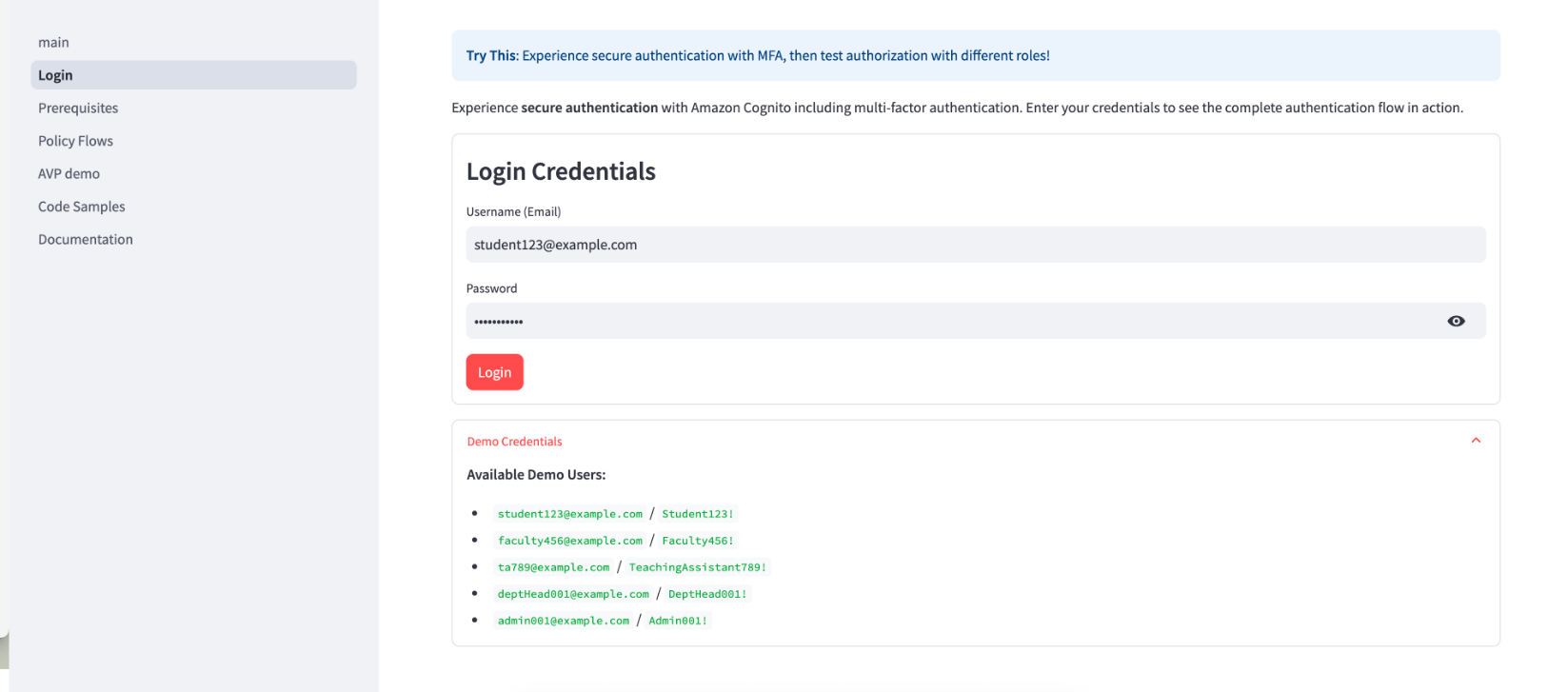
Figure 4: Verify login credentials
- Demo walkthrough and shut down: Interact with the demo and test the policies and features. When you’re ready to exit, press
Ctrl+Cto shut down and stop. - Define your Cedar policies: Start with basic policies and gradually add complexity as you understand the evaluation model.
- Implement authentication: Integrate Amazon Cognito authentication into your application with proper error handling.
- Add authorization checks: Implement authorization checks at critical access points in your application. For authentication, implement proper error handling for expired tokens, failed MFA challenges, and account lockouts. Use the Amazon Cognito built-in token refresh flow. For authorization, place Verified Permissions checks at every API endpoint and UI component that accesses protected resources.
- Test thoroughly: Create test scenarios for each user role and permission combination.
- Monitor and iterate: Set up AWS CloudTrail logging and Amazon CloudWatch alarms to monitor your security controls and refine them based on real-world usage.
Security best practices
When implementing this architecture, follow these best practices to support security:
- Layer your security controls: Use both authentication and authorization as complementary controls rather than relying on a single mechanism.
- Follow least privilege principles: Grant only the permissions needed for specific user roles. Start with minimal permissions and add more as needed.
- Implement proper session management: Set appropriate token expiration and refresh policies. Amazon Cognito handles much of this automatically, but you should configure timeouts based on your security requirements.
- Validate all inputs: Sanitize user inputs to prevent injection attacks. Don’t rely on client-side validation alone.
- Monitor authentication events: Set up logging and alerts for suspicious activities such as repeated failed login attempts or unusual access patterns.
- Conduct regular security reviews: Periodically audit your policies and security configurations to verify they still meet your requirements and follow current best practices.
- Implement secure error handling: Avoid information disclosure through error messages. Provide helpful feedback to users without revealing system details that could aid attackers.
Conclusion
Implementing proper authentication and authorization is critical for application security. By using Amazon Cognito and Amazon Verified Permissions, you can build robust security controls without complex custom code. Through this approach, you can implement enterprise-grade authentication with minimal effort, define and enforce fine-grained authorization policies, scale your security controls as your application grows, and centrally manage and audit security policies.
To get started with your implementation, create your AWS resources including an Amazon Cognito user pool and Verified Permissions policy store. Define your Cedar policies based on your application’s access requirements. Integrate authentication and authorization checks into your application flow. Test thoroughly with different user roles and access scenarios. Finally, monitor and refine your security controls based on usage patterns.
For additional resources, check out the Amazon Cognito documentation and Amazon Verified Permissions documentation.
If you have feedback about this post, submit comments in the Comments section below.