AWS Security Blog
Incident response guide for AWS CloudTrail investigations – Part 1
AWS CloudTrail logs contain the evidence you need when investigating suspicious activity in your AWS environment, but knowing which fields matter and how to interpret them can mean the difference between surface-level analysis and uncovering the full scope of an incident. This guide walks you through real-world scenarios, showing you how to analyze CloudTrail events to uncover cross-account unauthorized access, cryptocurrency mining operations, and AI service abuse. You’ll learn the investigative techniques our Security Incident Response Team (SIRT) team uses to handle threats, with practical methodologies you can apply to your own investigations.
Each scenario includes:
- Architecture diagrams showing the event progression
- Annotated CloudTrail logs highlighting significant fields
- Investigation frameworks with specific questions to ask
- Lessons learned and preventive measures
Whether you’re in security operations, cloud engineering, compliance, or leadership, this guide provides the investigative mindset needed to move beyond basic CloudTrail queries to comprehensive security analysis.
Incident response definitions
Throughout this guide, we reference terminology commonly used in incident response and threat intelligence. We’ve provided definitions for key terms to help ensure this guide is accessible to readers from diverse backgrounds, whether you’re in security operations, cloud engineering, compliance, or leadership.
- Reconnaissance: The initial phase where a threat actor gathers information about the target environment (for example, listing Amazon Simple Storage Service (Amazon S3) buckets or browsing available resources) to understand what’s available before taking action.
- Enumeration: Systematically cataloging specific resources, users, or configurations within an environment to identify potential targets or access paths.
- Lateral movement: When a threat actor moves from one resource to another within the same environment (for example, pivoting from an Amazon Elastic Compute Cloud (Amazon EC2) instance to an AI service) to expand their access.
- Privilege escalation: Attempting to gain higher-level permissions than initially obtained, such as trying to create admin users or modify AWS Identity and Access Management (IAM) policies.
- Defense evasion: Techniques used to avoid detection, such as operating in a different AWS Region where monitoring might be less robust, or naming unauthorized resources to look legitimate.
- Persistence: Establishing ongoing access to an environment (for example, creating new IAM users or access keys) so the threat actor can return even if the original entry point is closed.
- Credential harvesting: Stealing authentication credentials (passwords, access keys, temporary tokens) to impersonate legitimate users or roles.
- Server-side request forgery (SSRF): A web application technique where an unauthorized user tricks a server into making requests on their behalf, often used to access internal services such as the Amazon EC2 Instance Metadata Service (IMDS) endpoint. For more information, see Understanding SSRF.
- IMDSv1 (Instance Metadata Service v1): Amazon EC2 Instance Metadata Service version 1 (IMDSv1) provides temporary credentials to applications running on an instance. IMDSv1 itself isn’t inherently insecure; however, when an application with issues (for example, one susceptible to SSRF) is running on the instance, an unauthorized user can use that application to reach the metadata endpoint and retrieve credentials. IMDSv2 mitigates this risk by requiring session-based authentication tokens.
- Indicators of compromise (IOCs): Observable artifacts (IP addresses, user agents, session names, resource names) that suggest unauthorized activity has occurred.
- Exfiltration: The unauthorized transfer of data out of an environment, such as copying files before deleting them.
- Event chain: The sequence of steps a threat actor follows from initial access to achieving their objective, where each step enables the next.
- Pivot: Shifting from one technique, service, or Region to another during a security event, often after an initial approach is blocked or to avoid detection.
Scenario 1: Cross-account S3 data deletion with ransomware implications
Cross-account access is sometimes necessary in AWS, but misconfiguration creates security risks. In this scenario, your security operations center has received an automated alert that multiple objects have been deleted from the customer-important-data S3 bucket. The initial response seems straightforward: check the CloudTrail logs, identify who deleted the objects, and determine if it was authorized. But as our SIRT team investigated further, what appeared to be a straightforward unauthorized deletion revealed itself as a cross-account incident with ransomware implications. CloudTrail analysis requires recognizing patterns, understanding context, and thinking like a threat actor.
Scenario architecture
Figure 1 shows the architecture layout for accessing a trusted account and deleting objects from an S3 bucket, which is achieved through the following steps:
- Threat actor assumes the
CrossAccountS3Accessrole from a trusted account. - Lists S3 buckets to identify targets (ListBuckets API call).
- Lists objects within the target bucket to catalog contents.
- Executes scripted deletions of three files within 13 seconds.
- Each deletion returns an HTTP 204 (successful) status code.
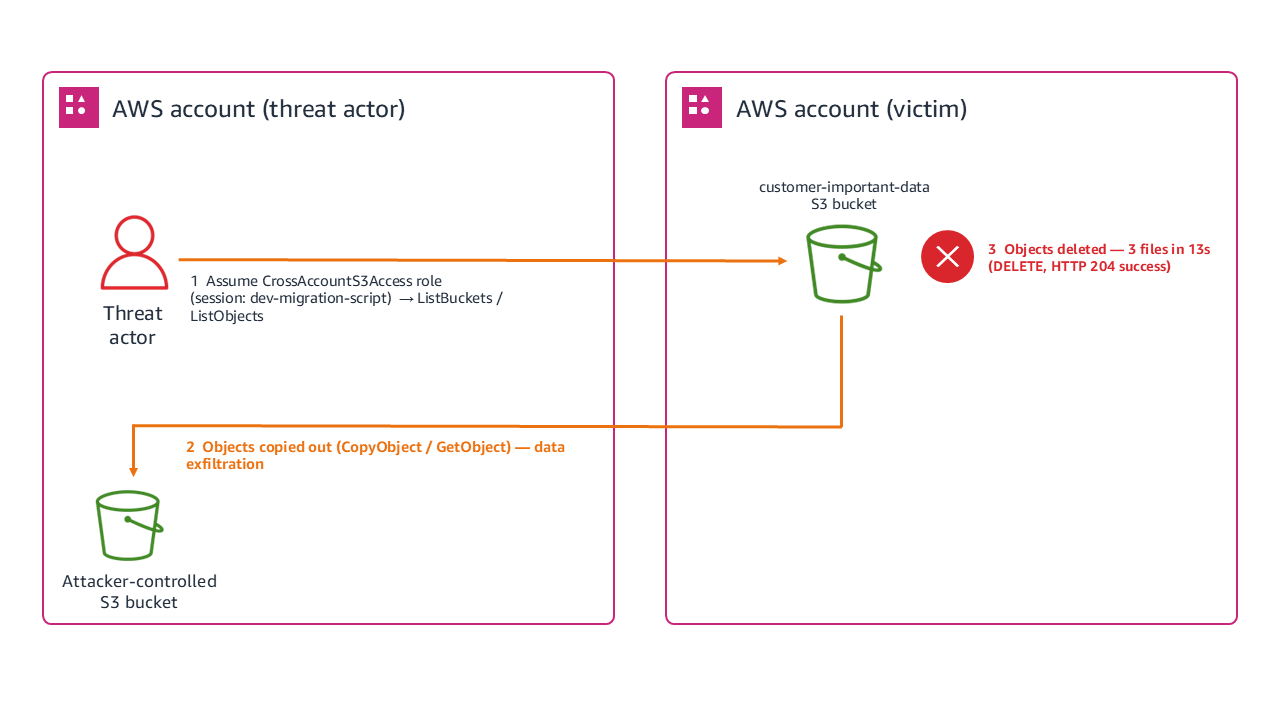
Figure 1: Scenario 1 architecture
Reconnaissance phase
Our investigation began with examining the CloudTrail logs, where we discovered that the unauthorized activity started with what many analysts might dismiss as routine activity: a ListBuckets API call made through an assumed role at 14:31:22 UTC. The CloudTrail entry contains a session named dev-migration-script using the CrossAccountS3Access role.
While cross-account access is common in enterprise environments, session names typically reflect legitimate business units. Attackers frequently use masquerading techniques, naming their sessions after common developer tasks or automation scripts, to blend seamlessly into daily operational noise. However, cross-referencing this session name against the external source IP and historical deployment logs confirmed that no such migration project was authorized, signaling a clear evasion attempt by a threat actor and the first indication of unauthorized access. Three seconds later, our logs showed a GET request to list objects in the bucket, which is classic reconnaissance behavior. The threat actor was cataloging available targets, using the same assumed role and IP address. This pattern, which you can see in the arn and eventname in the following log, showed us that the threat actor gathered intelligence, assessed targets, and planned their approach.
Systematic deletion
After completing their reconnaissance at 14:31:25 UTC, the threat actor went silent for 14 minutes before the first deletion at 14:45:12 UTC. During this window, the threat actor likely reviewed the inventory of objects they’d just enumerated, selected their highest-value targets (financial data, PII, and database backups), and prepared an automated deletion script to execute quickly once ready. We can infer this preparation period based on several factors: no other CloudTrail events from this session appeared during the 14-minute window, the subsequent deletions were precisely timed at 6-7 second intervals suggesting scripted execution, and the targets chosen were the three most business-critical files rather than a bulk delete of everything in the bucket. This selective, scripted approach indicates the threat actor used the reconnaissance data they gathered in the listing phase to build a targeted attack plan before executing it. Within 13 seconds (14:45:12–14:45:25 UTC), the threat actor deleted three files from the customer-important-data bucket: a financial report (q4-2024.xlsx at 14:45:12), a customer personally identifiable information (PII) database (pii-database.csv at 14:45:18), and a production database backup (prod-database-backup.sql at 14:45:25). Each deletion returned an HTTP 204 status code. The Amazon S3 access logs confirm these successful DELETE operations, all originating from the same session.
Analysis of timing and access patterns
The 13-second deletion window wasn’t arbitrary. The user-agent string showed AWS Command Line Interface (AWS CLI) usage on Linux, and the precise timing suggested scripted execution rather than manual operations. This indicated preplanned targeting and automated execution to minimize the detection window.
The consistent source IP across events let us search for other suspicious activities from the same source, correlate with threat intelligence feeds, and identify potential lateral movement attempts.
The broad Amazon S3 permissions of the CrossAccountS3Access role raised questions about least privilege implementation, regular access reviews, and the business justification for such extensive cross-account permissions.
Investigation priorities
With confirmation that misconfigured cross-account access had been taken advantage of to delete data, the next step was to prioritize the investigation. In incident response, priority is driven by three factors: whether the threat actor still has active access (containment urgency), whether sensitive data was exposed or exfiltrated (regulatory and business impact), and whether the attack can spread to other resources or accounts (blast radius). We applied these factors to guide the following questions:
- How did the threat actor gain access to the
CrossAccountS3Accessrole? We examined the role’s trust policy and recent modifications, authentication events in both the trusting and trusted accounts, and other sessions using the same role around the same timeframe. - Were the files copied before deletion? We searched for
GetObjectoperations on the same objects before the deletions, unusual network traffic patterns during the reconnaissance phase, andCopyObjectactivities that might indicate data theft. - Did the objects have specific significance? Understanding why these specific objects mattered helped us prioritize recovery efforts based on business impact, assess regulatory notification requirements for the PII exposure, and determine the full scope of business disruption from backup loss.
Response checklist
After identifying the scope of the cross-account deletion, the following steps help ensure a thorough response and prevent recurrence.
- Determine if the business purpose served by this cross-account access is legitimate
- Identify the corresponding authentication events that show how the role was assumed
- Identify other AWS resources that this role might access beyond Amazon S3
- Check for failed attempts or reconnaissance activities that preceded the successful event
- Determine when this cross-account trust relationship was created
- Determine when the last access review of this role was conducted
- Locate any backup copies of the deleted data
- Determine detection rules that can be used to catch similar activity in the future
Key takeaways
This scenario illustrates several principles that apply broadly to cross-account incident investigations. Unusual identifiers in session names often reveal threat actor intent or poor operational security. The progression from ListBuckets to targeted deletions shows how threat actors operate with a plan. Cross-account access needs extra scrutiny because trusted relationships become vectors for unauthorized access when credentials are exposed. Understanding why specific files matter helps prioritize response efforts and assess true impact. Precise timing and consistent technical signatures often indicate scripted events that need different response strategies than manual intrusions.
Scenario 2: Cryptocurrency mining using CloudFormation with console credentials
In this scenario, your finance team notices an unexpected spike in AWS costs, particularly around Amazon EC2 compute charges in the us-east-1 AWS Region. During the investigation, we examine how threat actors use legitimate console access to deploy cryptocurrency mining operations through AWS CloudFormation and how investigators can uncover the scope of resource hijacking events. We discover a CloudFormation stack named CRYPTO which you have no record or knowledge of being created. The stack contains EC2 instances running in your production Amazon Virtual Private Cloud (Amazon VPC) consuming significant compute resources, which signals an immediate security investigation.
Architecture and sequence
Figure 2 shows how the threat actor moved from credential acquisition to active mining, following these steps:
- Threat actor obtains console credentials (username and password without multi-factor authentication (MFA)).
- Accesses AWS Management Console.
- Creates CloudFormation stack
CRYPTOin us-east-1. - Stack deploys EC2 instances configured for cryptocurrency mining in a public subnet.
- Mining instances begin consuming compute resources.
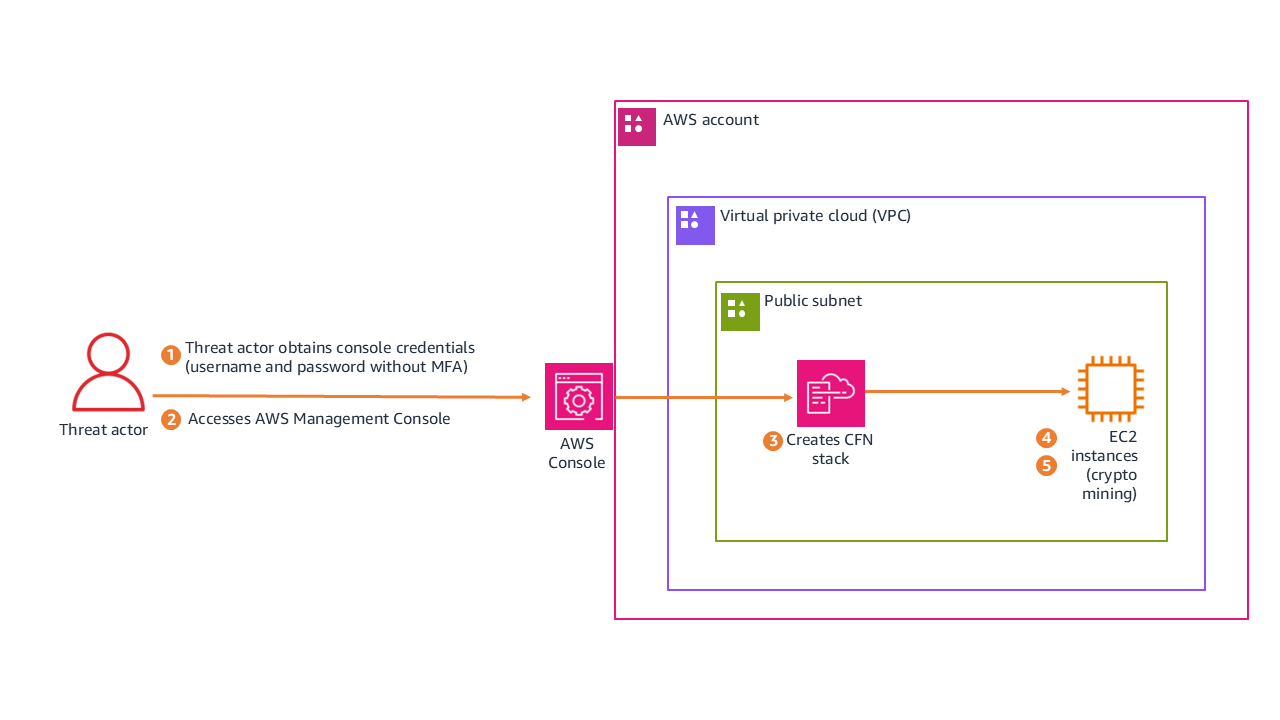
Figure 2: Scenario 3 architecture
The following is the redacted CloudTrail event record for the unauthorized CreateStack action. See if you can use it to find the following information:
- The name of the CloudFormation stack that was created
- The CloudFormation stack Amazon Resource Name (ARN)
- If the credentials were secured by MFA
- If the threat actor used the AWS Management Console to perform the actions, or if they were performed programmatically using the AWS CLI or a script
Analysis of authentication and access
The CloudTrail event record includes fields that answer the questions for this scenario.
Stack details summary:
The CloudTrail event confirms the following details about the deployed stack:
- Stack name:
CRYPTOis an indicator of cryptocurrency-related activity - Stack ARN:
arn:aws:cloudformation:us-east-1:stack/CRYPTO/2102e190-98a8-11f0-bcea-1209335b107 - Region: us-east-1 (a common choice for threat actors because of immediate service availability)
Authentication and session context analysis:
Examining the session metadata reveals how the threat actor authenticated and accessed the environment:
- MFA status:
“mfaAuthenticated": “false”indicates that the session was entirely unauthenticated by MFA. - Access method:
“sessionCredentialFromConsole": “true”means that access was funneled through the console. - User context:
AssumedRoleusingWSParticipantRole. Session creation occurred at 2025-09-23T18:06:22Z (approximately 50 seconds before stack creation).
Advanced forensic insight (the CloudShell pivot)
The sessionCredentialFromConsole: true field is important to note because this access originated from the AWS console rather than external programmatic API keys. Interestingly, while the session originated from the console, the userAgent field reveals the execution environment was exec-env/CloudShell. This shows that the threat actor didn’t manually click through the CloudFormation user interface, instead launching AWS CloudShell on sign-in to execute a prepackaged deployment script. This allowed the threat actor to achieve automated speed while evading traditional static API key monitoring. The mfaAuthenticated: false field represents a security control gap. Particularly in environments handling sensitive data or production workloads, MFA must be enforced for console access.
Investigation priorities
With the unauthorized stack confirmed, the investigation focused on understanding the full timeline and blast radius. We approached this in three phases, each building on the findings of the previous one.
Reconstruct the console session timeline
The session began at 18:06:22Z and the stack was created at 18:07:12Z, only 50 seconds later. That speed tells us the threat actor came prepared with a script rather than exploring the environment manually. But we needed to know what happened before and after. By filtering CloudTrail for the same session token across the full session duration, we could identify whether the threat actor performed any reconnaissance before deploying the stack, whether they accessed other services or regions during the same session, and whether they attempted to establish persistence (such as creating IAM users or access keys) before or after the mining deployment. Any actions taken outside the CloudFormation deployment could indicate secondary objectives beyond cryptomining.
Examine what the stack actually deployed
The stack name alone doesn’t tell us the full impact. We needed to inspect the CloudFormation template to understand what resources were created and how they were configured. This meant identifying the EC2 instance types (larger instances mean higher costs and potentially more mining output), reviewing the security group rules to determine what network access these instances had to internal resources, checking whether the template included custom AMIs or user data scripts that pulled mining software on boot, and determining if the stack created its own IAM roles with permissions that could be used for further lateral movement. The template itself is evidence. If it was hosted in Amazon S3, the upload event tells us when the threat actor first staged their tools.
Calculate business impact and determine blast radius
Finally, we needed to quantify the damage and determine whether this was isolated or part of a broader compromise. We calculated the total compute cost by multiplying instance hours by instance type pricing, checked whether the mining instances had network paths to production databases or internal services, examined outbound traffic logs for connections to known mining pool IP addresses, and searched for similar stacks or naming patterns across other regions and accounts. The presence of outbound connections to anything other than mining pools would suggest the instances served a dual purpose, potentially exfiltrating data while generating cryptocurrency.
Response checklist
The following checklist captures the key actions needed to contain the incident, assess its impact, and close security gaps.
- Determine why MFA wasn’t required for this sensitive operation
- Investigate how the threat actor obtained valid console credentials
- Check for failed sign-in attempts preceding this successful access
- Check for other activities that occurred during this console session
- Look for resources that were created by the CloudFormation stack
- Determine how long those resources have been running and consuming costs
- Look for other similarly named or suspicious stacks in the environment
- Check what network access these instances have to internal resources
- Determine what outbound connections these instances are making
- Look for cryptocurrency mining pool connections
- Check if IAM users or roles were created
- Check if additional access keys were generated
- Determine if the threat actor modified existing permissions or policies
Key takeaways
This scenario highlights how credential hygiene and monitoring controls intersect with resource hijacking threats.
- MFA enforcement prevents console-based credential abuse for IAM users. The absence of MFA enabled the full sequence. Console access to production environments should require multi-factor authentication as a security best practice.
- Resource naming can be an indicator. The obvious
CRYPTOnaming suggests either threat actor confidence or poor operational security, both concerning for different reasons. - Cost monitoring is security monitoring. Unusual billing spikes can be early indicators of resource hijacking events.
- Console-based activity has different patterns than programmatic activity and requires specialized investigation approaches. The
sessionCredentialFromConsolefield is your starting point for distinguishing between the two.
Conclusion
In this first part, we walked through two real-world scenarios that demonstrate how CloudTrail analysis can reveal the full scope of a security incident. In Scenario 1, we showed how a seemingly routine cross-account role assumption led to targeted data deletion with ransomware implications, and how session names, timing patterns, and source IP correlation help investigators piece together the event chain. In Scenario 2, we examined how stolen console credentials enabled a cryptocurrency mining deployment through CloudShell, highlighting the critical role of MFA enforcement and cost monitoring as security controls. Both scenarios reinforce a core principle: effective CloudTrail investigation goes beyond identifying what happened. It requires understanding how and why, so you can contain the immediate threat and close the gaps that enabled it.
In Part 2 of this guide, we examine how a web application vulnerability can cascade into a multi-Region event targeting AI services, chaining together SSRF, IMDSv1 credential harvesting, and cross-Region pivoting to access Amazon Bedrock. We also cover critical investigation techniques including root user compared to IAM user named root, role name imitation tactics, and the HIDDEN_DUE_TO_SECURITY_REASONS username trick, along with critical hardening steps and additional resources you can use to strengthen your cloud forensic capabilities.
If you have feedback about this post, submit comments in the Comments section below.