AWS Storage Blog
Bring high-performance analytics to your lakehouse with ClickHouse and Amazon S3 Tables
Organizations are increasingly keeping transactional and operational data in open table formats like Apache Iceberg to allow different processing engines to work with it. But storing and organizing the data efficiently is only half the work. The moment both humans and agents need fast, holistic access to data, it often needs to be copied into separate systems with different processing engines. That copy is expensive to build, goes stale the moment it’s made, fragments governance, and locks results into one system.
Amazon S3 Tables provide fully managed, scalable, cost-effective storage for Apache Iceberg. They store data in an open format for any Iceberg-compatible engine to read. ClickHouse is a high-performance real-time database that, when combined with S3 Tables, handles analytics at speed without migration.
In this post, we show you how to bring ClickHouse’s high-performance engine directly to data in S3 Tables, using bidirectional connectivity between the two. This approach avoids copying data into separate systems. You can query your Iceberg tables in place, run transformations using ClickHouse SQL, and write curated results back, while S3 Tables remain the single open source of truth.
We walk you through the connectivity workflow using a retail analytics use case. Then we show how the same pattern extends to AI agent workloads that need fast, iterative access to analytical results. This walkthrough works with a self-managed ClickHouse deployment.
Why query in place
There are four key challenges we solve in this walkthrough:
- Cost of copies: Every pipeline is compute, storage, and engineering time spent duplicating data you already have.
- Data staleness: A copy is only as fresh as its last sync, often causing analysts and agents to routinely reason over out-of-date data.
- Governance sprawl: Each additional copy is another place to secure, audit, and reason about for compliance.
- Lock-in: If results live only inside one engine’s proprietary format, other tools cannot use them without yet another export.
Solution overview
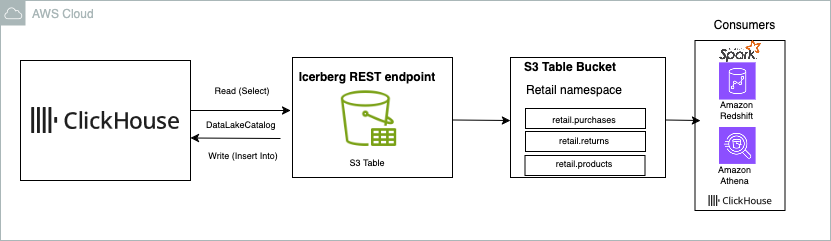
Figure 1: Solution overview
ClickHouse connects to Amazon S3 Tables through the Iceberg REST endpoint using the DataLakeCatalog database engine. When you connect, your table bucket appears as a database inside ClickHouse. You can discover namespaces, query existing Iceberg tables, create new tables, and write results back, all using standard ClickHouse SQL.
The two systems have distinct responsibilities:
- Amazon S3 Tables manage storage, Iceberg metadata, and automatic table maintenance including compaction, snapshot expiry, and unreferenced file cleanup. See the S3 Tables documentation for current defaults.
- ClickHouse provides the analytical engine, including columnar processing, parallel query execution, and the ability to read only the data relevant to each query.
How the data flows
- The source data physically lives in S3 Tables. ClickHouse stores none of it locally unless you deliberately materialize a subset.
- On a read, ClickHouse first calls the Iceberg REST catalog to resolve the current table metadata and snapshot, then reads only the relevant Parquet objects directly from S3.
- On a write, ClickHouse writes new Parquet data and Iceberg metadata objects to S3. It then commits by updating the table’s root metadata pointer to the new snapshot through the catalog. This atomic pointer swap means readers either see the old snapshot or the new one, never a partial write.
- Authentication uses AWS Signature Version 4. Requests are authorized through AWS Identity and Access Management (IAM) policies attached to the identity that ClickHouse assumes.
🔗 When to use the AWS Glue Iceberg REST endpoint instead:
We use the direct S3 Tables endpoint in this walkthrough because it’s the most direct path for connecting one engine to one table bucket. If your organization needs centralized catalog governance, fine-grained access control across multiple engines, or cross-account access, use the AWS Glue Iceberg REST endpoint instead.
Prerequisites
You need the following before starting:
- ClickHouse 26.8 or later (open source, self-managed). The S3 Tables read and write path described here is not yet generally available in ClickHouse Cloud (managed option).
- AWS account with permissions to create an S3 Tables bucket and IAM roles.
- An Amazon S3 table bucket with at least one namespace. Note the AWS Region and the table bucket ARN (for example,
arn:aws:s3tables:us-east-1:123456789012:bucket/retail-analytics). - Network access from your ClickHouse host to the regional S3 Tables endpoint (
s3tables.<region>.amazonaws.com). - An IAM role with least-privilege permissions for S3 Tables. See the following sample policy.
Create an IAM role with least-privilege permissions
ClickHouse needs an AWS identity to authenticate to the S3 Tables catalog and to read and write objects on your behalf. Rather than granting broad account access, create an IAM role that grants only the S3 Tables actions your workflow requires. The following sample policy grants ClickHouse permission to list, read, and write tables within a single table bucket. Replace the AWS Region, account ID, and bucket name with your own values.
Note: The correct action for committing Iceberg writes is s3tables:UpdateTableMetadataLocation. This updates the table root metadata pointer when ClickHouse commits an INSERT INTO write. See the supported Iceberg REST APIs and how they map to S3 Tables IAM actions. As a security best practice, use short-term credentials in ClickHouse configuration files or SQL statements.
ClickHouse reads credentials from the standard AWS credential chain (environment variables, instance profile, or configuration file), so no credentials appear in your SQL statements.
Walkthrough: Retail analytics on Amazon S3 Tables
This walkthrough connects ClickHouse to an S3 table bucket, runs a retail analytics transformation across three Iceberg tables, and writes the curated result back to S3 Tables.
The scenario
A retailer stores three Iceberg tables in an S3 table bucket under the retail namespace. The analytics team needs a daily view of net sales, units sold, units returned, and return rates broken down by product, day, and region.
| Table | Description | Key columns |
retail.purchases |
Every completed purchase | order_id, product_id, region, purchased_at, sales_amount, units |
retail.returns |
Returned items | order_id, product_id, returned_at, refund_amount, units_returned |
retail.products |
Product catalog | product_id, product_name, category |
Today, this requires a multi-table join that runs slowly when analysts query it ad hoc. The goal is to run the join once in ClickHouse and write the result back as a curated table, daily_product_performance. Dashboards, reports, and downstream tools can then read the pre-aggregated result directly from S3 Tables at low latency and high concurrency. The following steps demonstrate how to connect ClickHouse to S3 Tables.
Step 1: Connect ClickHouse to the S3 table bucket
Enable the Iceberg catalog integration and write support:
Next, create the catalog connection. Swap in your own Region, account ID, and table bucket name:
ClickHouse authenticates using the AWS credential chain on the host. No credentials are embedded in the SQL statement. The warehouse value is the ARN of your table bucket. You do not need to register each table individually.
Step 2: Discover and query tables
List all tables visible through the catalog:
S3 Tables use single-level namespaces. The namespace and table name are passed to ClickHouse as a single identifier, so you must use backticks. Note: This applies to all table references throughout this walkthrough.
Step 3: Transform to join purchases and returns
Run the analytical query. This query joins purchases to returns, calculates net sales after refunds, and groups the result by day, product, and region:
ClickHouse processes this query in parallel and reads only the columns and row groups it needs from S3 Tables, thanks to Iceberg metadata and Parquet column pruning.
Step 4: Write results back to S3 Tables
First, create the destination table in the retail namespace through the same catalog connection:
Then populate it with INSERT INTO ... SELECT. This re-runs the transformation from Step 3 and writes the output directly to S3 Tables:
Verify the result:
The daily_product_performance table now lives in S3 Tables as a standard Iceberg table. Any Iceberg-compatible engine (Amazon Athena, Amazon Redshift, AWS Glue, Amazon EMR, DuckDB, Apache Spark, Trino, or others) that connects to the same table bucket can discover and query it without re-running the joins.
Agent-driven analytics
AI agents can run in an AWS service such as Amazon Bedrock or in your own application. They do not run inside ClickHouse or access S3 Tables directly. Instead, the agent calls ClickHouse as a tool or function, and ClickHouse uses the DataLakeCatalog connection and IAM identity configured earlier to query S3 Tables and write curated results back.
Consider an agent tasked with investigating a spike in product returns for a specific region. The agent workflow looks like this:
- Read: The agent calls ClickHouse (as a tool or function) to query
retail.purchasesandretail.returnsin S3 Tables, filtering to the region and time window of interest. - Analyze: Based on the first result, the agent runs follow-up queries: return rates by product category, comparison to the previous period, or correlation with a recent promotion.
- Write: The agent writes its curated findings (for example, a
return_spike_investigationtable) back to S3 Tables through ClickHouse. - Share: Other agents, business intelligence (BI) tools, and analysts can read the investigation results directly from S3 Tables without re-running the analysis.
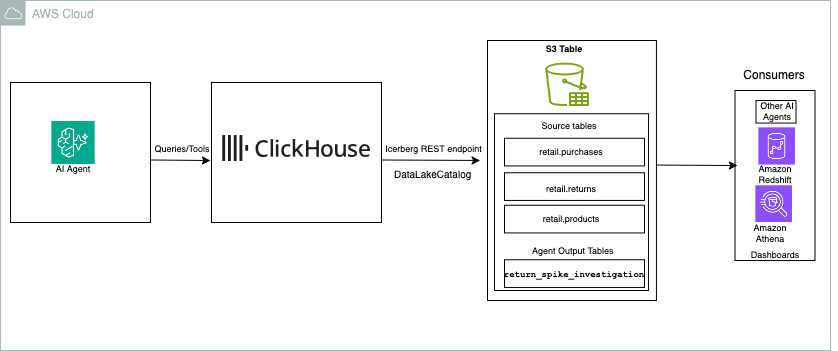
Figure 2: AI agent workflow with ClickHouse and Amazon S3 Tables
There are two primary benefits of this architecture:
- Speed: Agents often execute a chain of dependent queries, where each query depends on the previous result. ClickHouse’s parallel, columnar execution keeps each step fast, reducing total agent latency from minutes to seconds.
- Reusability: Writing results back to S3 Tables in open Iceberg format allows tools, engines, and other agents to consume them without vendor lock-in.
S3 Tables remain the central, open store for both source data and derived results. ClickHouse provides the fast analytical layer that keeps the agent workflow moving.
Considerations and limitations
- Single-level namespaces: S3 Tables support single-level namespaces through their Iceberg REST endpoint. Tables are addressed as
namespace.table_name. - Regional availability: S3 Tables availability varies by AWS Region. Check the current Region list in the Amazon S3 Tables documentation before deploying.
- Dropping tables: The S3 Tables Iceberg REST endpoint only supports
DROP TABLEwithpurge=true. If ClickHouse issues a drop without that flag, you might receive a400 Bad Request. Verify ClickHouse default behavior before running drop operations. - Performance characteristics: Querying Iceberg tables with ClickHouse in place on object storage has different latency and throughput characteristics than querying a local MergeTree table. For exploration, batch transforms, and low-concurrency workloads, query in place. For dashboards and applications requiring consistently low latency at high concurrency, ClickHouse recommends materializing the data into MergeTree.
- ClickHouse Cloud support: The ClickHouse Cloud support for this workflow is not yet generally available.
- Automatic table maintenance: S3 Tables automatically compact smaller objects into larger files (default target: 512 MB), expire old snapshots, and remove unreferenced files. You do not need to schedule these operations manually.
Clean up
If you created resources while following this post, review the following to avoid ongoing charges:
- S3 Tables: S3 Tables have their own pricing model based on storage, requests, and compaction. Delete any test tables and namespaces you no longer need.
- ClickHouse: If you launched an Amazon Elastic Compute Cloud (Amazon EC2) instance for ClickHouse, terminate it or stop it when not in use.
- IAM resources: Remove the IAM role and policies created for this walkthrough if they are no longer needed.
Conclusion
This post demonstrated a practical workflow for analyzing data in Amazon S3 Tables with ClickHouse, without data migration. By connecting ClickHouse to S3 Tables through the Iceberg REST endpoint, you can query, transform, and enrich your Iceberg tables in place. You can then write curated results back for any Iceberg-compatible engine to consume. This solves the problems of data copying cost, data staleness, governance sprawl, and vendor lock-in.
The same read-transform-write pattern extends to AI agent workloads that need fast, iterative access to analytical data. In both cases, S3 Tables serve as the shared, open source of truth, while ClickHouse provides the analytical speed.
To get started, create an Amazon S3 table bucket, connect it to ClickHouse using the steps in this post, and start querying your Iceberg tables in place.