AWS Storage Blog
How Seltz cut data costs 40% with Amazon S3 Tables
Seltz operates a web search engine for artificial intelligence (AI) agents where information freshness is critical. Its Knowledge Pipeline processes billions of documents through a sequence of enrichment steps (text extraction, quality scoring, deduplication, vectorization) to produce structured knowledge that AI agents can reason over. Building and operating a pipeline at this scale demanded significant engineering time and cost, so Seltz turned to Amazon S3 Tables.
S3 Tables provide fully managed Apache Iceberg tables directly in Amazon S3, handling compaction, snapshot management, and unreferenced file removal automatically so teams can focus on more strategic work like pipeline logic instead of table maintenance. For Seltz, this meant getting the table semantics they needed without building the operational infrastructure around them.
In this post, we explore why Seltz chose S3 Tables, the benefits they gained, and how you can replicate the same pattern with a step-by-step walkthrough.
The Knowledge Pipeline: Architecture and storage needs
Seltz crawls the web continuously to keep its search index fresh. The raw HTML that comes back is only the starting point. What follows is a sequence of enrichment steps that transform unstructured pages into structured knowledge: text extraction, language detection, quality scoring, near-duplicate detection, and vector representation.
Each enrichment is a modular, composable unit. The system builds a directed acyclic graph (DAG) from declared dependencies and resolves execution order automatically. Content flows through continuously, and when one step changes, only the affected subgraph re-executes. This incremental design means Seltz avoids reprocessing billions of documents when a single quality classifier improves.
Every enrichment step produces output that downstream steps consume. At Seltz’s volume, that translates to millions of writes per stage, terabytes of data retained temporarily, and old versions that expire after they’re consumed.
What they evaluated
The team considered four options for intermediate storage:
- Raw Parquet on Amazon S3 – The most economical option, but it meant building transactions, schema evolution, and statistics-based pruning from scratch.
- Amazon DynamoDB – Amazon DynamoDB is strong for point lookups, but the team needed a more cost-efficient solution for the analytical scans that dominate the pipeline workload.
- Self-managed Iceberg on Amazon S3 – The table format aligned with requirements (metadata-level partitioning, atomic snapshots), but it required owning compaction, snapshot management, and catalog operations.
- Amazon S3 Tables – S3 Tables offers fully managed Iceberg tables with compaction, snapshot management, and unreferenced file removal, while preserving the open format and engine flexibility.
Seltz chose S3 Tables. It gave them the table semantics they needed without the operational overhead they didn’t want to own.
Pipeline architecture
The pipeline consists of enrichment stages. Each enrichment has a specific goal such as deduplication, extracting information, or vectorization of content. Enrichment stages are essential to building an accurate index for the runtime. The Seltz team adds and updates enrichments several times a week.
The following diagram shows the Knowledge Pipeline architecture.
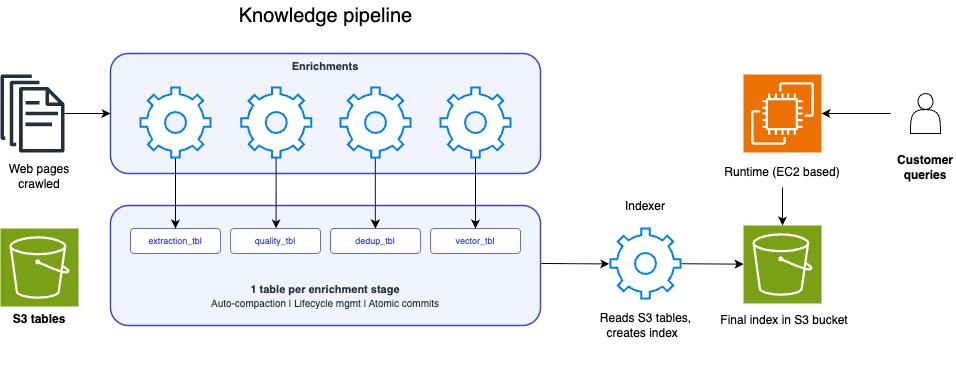
Figure 1: Seltz Knowledge Pipeline architecture
The pipeline flows from left to right:
- Web pages enter the pipeline as raw HTML.
- Enrichment stages process pages in DAG order. Each enrichment writes intermediate results to its own S3 table (one table per stage), providing isolation and independent lifecycle management.
- The Indexer reads from S3 Tables across all enrichments and creates compacted, sharded index files in a separate S3 bucket.
- The runtime, based on Amazon Elastic Compute Cloud (Amazon EC2), loads the index for serving search queries.
S3 Tables are never read directly by the runtime. They serve as the storage layer between enrichment processing and index creation, with ad-hoc query access available for debugging and monitoring.
Why S3 Tables fit
Three properties of S3 Tables made them a natural match for this workload.
Managed compaction as a cost lever
The cost advantage for Seltz comes from the operational work that a small-file, scan-heavy Iceberg workload requires to stay performant. Each enrichment stage produces millions of small writes. To keep analytical scans efficient, those small files must be compacted into larger ones, expired snapshots must be removed, and orphaned files must be cleaned up on an ongoing basis. Implementing this directly on Amazon S3 means building and operating a maintenance pipeline, typically an Apache Spark or AWS Glue job. S3 Tables perform this maintenance automatically as a managed capability.
Built-in lifecycle without complexity
Enrichment results are versioned. When a stage produces a new version of its output, the previous version becomes unnecessary after downstream stages consume it. In a raw Amazon S3 setup, managing this lifecycle (writing expiration policies, handling edge cases around in-flight reads) adds operational complexity.
With S3 Tables, Seltz uses the Iceberg Merge on Read strategy to mark old enrichment versions for deletion. On the next compaction cycle, the service physically removes the obsolete data files, giving the team versioned eviction without building and managing custom lifecycle management.
Incremental-friendly table semantics
Pipeline stages can append to and read each S3 table independently. When Seltz adds a new enrichment to the pipeline, only downstream tables need reprocessing. Upstream tables remain untouched.
This works because of the following features:
- Atomic commits – These give strong correctness guarantees across the multi-stage pipeline. A partially written enrichment is never visible to downstream consumers.
- Time-ordered IDs – These make file-level min/max pruning effective for range scans, which dominate the pipeline’s read pattern.
- Independent table access – Each enrichment reads only the tables it depends on, without locking or coordinating with unrelated stages.
Compared to managing partitioned Parquet on Amazon S3 directly, this incremental pattern is straightforward to implement and maintain.
Ad-hoc access for debugging and monitoring
Beyond the primary write-then-index flow, the team uses S3 Tables for day-to-day observability:
- Amazon Athena gives SQL access to pipeline stages. The team runs queries to monitor enrichment quality, investigate anomalies, and validate pipeline correctness, all without additional extract, transform, and load (ETL) or data movement.
- DuckDB connects to S3 Tables through the S3 Tables Iceberg REST Catalog endpoint for local development and debugging. Engineers inspect intermediate results on their laptops without provisioning infrastructure.
These integrations made S3 Tables more than a storage layer. They gave Seltz an observable pipeline where any stage can be queried interactively.
Walkthrough overview
You can replicate Seltz’s pattern in four steps. This walkthrough creates a table bucket, defines a table for one enrichment stage, writes data using PyIceberg, queries it with Athena, and reads results programmatically as a downstream consumer.
Prerequisites
You must have the following prerequisites:
- An AWS account with permissions to create S3 table buckets.
- Python 3.9+.
- Athena configured in your account.
Create table bucket and namespace
Create a table bucket and namespace with the following commands:
Create table and write enrichment results with PyIceberg
Install PyIceberg with Amazon S3 support:
This script connects to the S3 Tables REST endpoint, creates a table for one enrichment stage, and appends a batch of results. Each enrichment stage gets its own table, providing isolation and independent lifecycle management.
Create a Python file, such as sample_s3tables.py:
After it’s saved, you can run the file with the following command:
This append-per-batch pattern produces the small writes that S3 Tables compacts automatically in the background. In a production pipeline, each enrichment stage runs this pattern independently against its own table.
Query results with Athena
To query the table bucket with Athena, you must enable the AWS analytics services integration. On the Amazon S3 console, navigate to the table bucket and choose Enable integration.
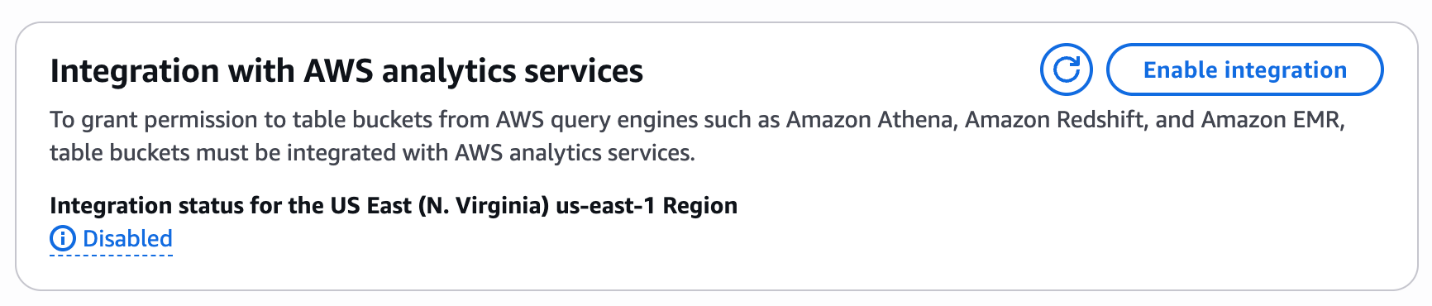
Figure 2: The Enable integration option on the Amazon S3 table bucket page
The console confirms the integration is enabled.
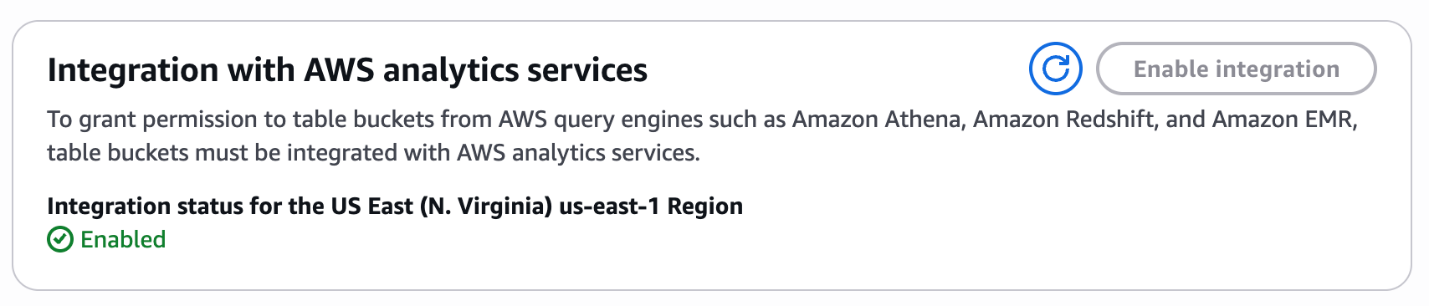
Figure 3: The AWS analytics services integration showing Enabled status
Athena can query S3 Tables directly through the built-in s3tablescatalog data source. Open the Athena query editor on the Athena console and select s3tablescatalog/my-pipeline-tables as the data source.
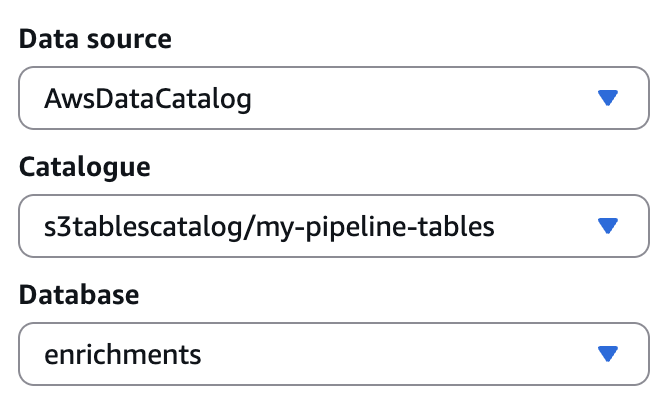
Figure 4: Athena query editor configured with the s3tablescatalog data source, catalog, and database
In the query editor, run the following query:
Alternatively, you can run the query from the AWS Command Line Interface (AWS CLI):
The three-part table reference follows the pattern "s3tablescatalog/<bucket-name>"."<namespace>"."<table>". No additional catalog registration is required. Athena discovers S3 Tables automatically through the s3tablescatalog prefix.
You can run similar queries across any table in the pipeline for debugging, monitoring, or downstream index creation.
Read tables programmatically (downstream consumer pattern)
In Seltz’s architecture, the Indexer reads enrichment results directly from S3 Tables to build the search index. You can follow the same pattern using PyIceberg to scan tables with filters and column projection.
You can create a new script to read the documents, such as s3_tables_read.py:
After it’s saved, you can run the file with the following command:
A downstream consumer reads only the columns and rows it needs, and Iceberg’s file-level min/max metadata prunes irrelevant data files automatically, keeping reads efficient even as tables grow.
Clean up resources
To avoid ongoing charges, delete the table and table bucket when you are done experimenting:
Conclusion
Cost modeling of Seltz’s workload at current scale showed that running on S3 Tables saves 40 percent on infrastructure cost compared to a self-managed pipeline. This figure is before accounting for the engineering effort to build and operate it. S3 Tables give Seltz managed compaction, lifecycle, and incremental semantics without the engineering cost of operating those capabilities on raw Amazon S3. The team writes at whatever granularity the pipeline produces and lets the service handle the rest.
Seltz plans to expand by one to two orders of magnitude as they add new verticals and new enrichment steps. They are also evaluating additional pipelines for migration to S3 Tables as the pattern matures within their infrastructure.
To apply this pattern to your own workload, create a table bucket and one table per pipeline stage using the steps outlined in this post. Then evaluate whether automatic compaction and built-in lifecycle management reduce the operational overhead you currently carry. For full API reference and pricing details, see Working with Amazon S3 Tables and table buckets.