AWS Storage Blog
Optimize data management on S3 Tables with Intelligent-Tiering
Organizations are rapidly adopting Apache Iceberg for their data lakes because it supports petabyte-scale growth and performance with the flexibility to evolve schemas and partitions without costly rewrites. Its architecture enables modern data lake management via features like time travel and incremental processing. However, managing Iceberg datasets efficiently can become a challenge over time as data grows. Many organizations retain data for months or years, driven by regulatory requirements or long-term analytics needs, and struggle to balance performance and accessibility with affordability. Maintaining tables, optimizing file layouts, and implementing cost-effective retention policies becomes an ongoing effort that consumes resources and increases associated costs.
Amazon S3 Tables introduced purpose-built tabular storage and a new bucket type for Iceberg tables that makes it simple to store structured data in Amazon S3. S3 Tables automatically handle maintenance tasks like compaction, snapshot management, and unreferenced file removal. Recently, S3 Tables added support for the Intelligent-Tiering storage class, which is designed to optimize storage costs by automatically moving data through storage tiers based on access patterns. This capability continuously optimizes tables for cost-efficiency without performance impact, even as your data lake scales and data ages.
In this post, we will dive deeper into how Intelligent-Tiering can be combined with our maintenance capabilities such as compaction and snapshot management to help reduce total cost of ownership over time.
Optimizing data management on S3 Tables
When data arrives in S3 Tables, it may initially land in a suboptimal state. It might be ingested in a way that prioritizes ingestion throughput and flexibility over analytical efficiency, for example. This situation commonly arises from streaming updates that commit frequent changes to the table and generate small files, or adding incremental delete/data files when updating tables in a merge-on-read pattern. In such cases, maintenance operations may be required to enhance query performance and further optimize long-term storage. S3 Tables support the following techniques for long-term data optimization:
- Snapshot management – Ensure you retain only necessary historical data while systematically retiring or removing redundant information and eliminating unreferenced files permanently
- Compaction (Binpack, Sort, Z-order) – Create larger, more efficient files by consolidating smaller ones, potentially reordering data using sort or z-order techniques to enable faster and more cost-efficient queries, or merge delete files with data files
- Storage tiers optimization – Utilize the Intelligent-Tiering storage class to reduce storage costs for long-term data retention, whether required by regulations or business needs
S3 Tables snapshot management
Iceberg snapshots are immutable point-in-time records of a table’s complete state, capturing all data files and metadata without modifying existing content. They enable powerful capabilities including time travel queries, consistent reads during concurrent operations, and seamless rollbacks to previous table versions for quick access for operational recovery and restore.
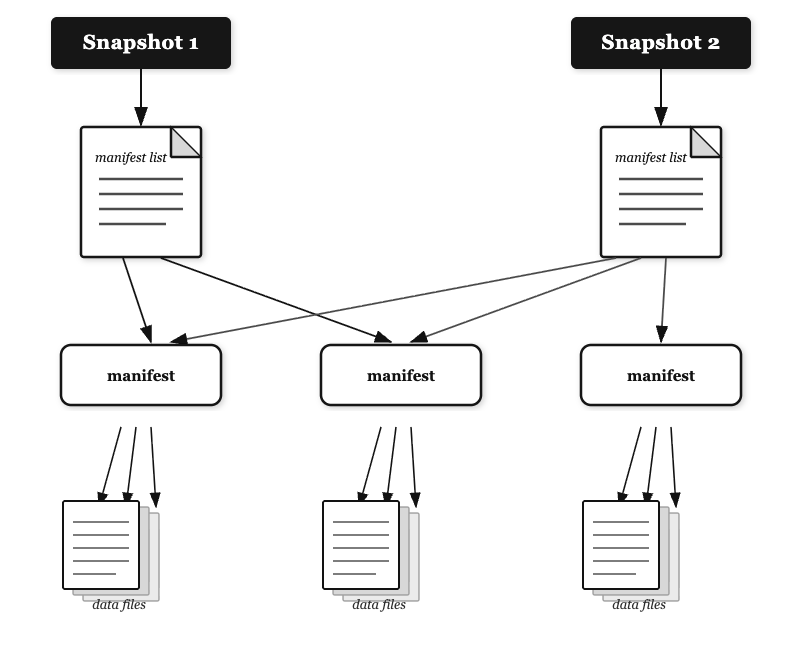
S3 Tables streamline snapshot administration through console controls and API operations for setting retention policies and automating lifecycle management.
S3 offers configurable expiration rules to balance historical data needs with storage optimization, while providing detailed snapshot metrics and audit trails for governance requirements. This includes properties like minimum snapshots to retain, maximum snapshot age, unreferenced file removal, and more. This video explains snapshot management in further detail.
We recommend careful evaluation of the considerations and limitations of tunables such as nonCurrentDays, unreferencedDays, maximumSnapshotAge, or minimumSnapshots. You should ensure and tune the values, where appropriate, to meet your retention needs.
S3 Tables compaction
Compaction in Apache Iceberg optimizes table performance through multiple strategies: consolidating small files into larger ones to reduce metadata overhead and I/O request charges, merging delete files, rewriting data with sort-ordering to accelerate partition predicate, and applying multi-dimensional clustering to co-locate related data for improved scan efficiency on multiple columns. Amazon S3 Tables automate compaction operations through intelligent policies that continuously optimize your table’s file layout for superior query performance and reduced costs. This eliminates operational overhead by handling compaction scheduling, resource allocation, and execution automatically. S3 Tables support the following compaction techniques:
- Binpack compaction – Consolidates many small data files into fewer, optimally-sized files that match the underlying storage, reducing metadata overhead and minimizing the “small file problem” that degrades query performance in distributed processing frameworks
- Sort compaction – Rewrites data files to physically arrange records according to one or more specified columns, enabling more efficient data skipping through metadata-based filtering and dramatically improving query performance when predicates match the sort columns
- Z-order compaction – Organizes data using space-filling curve algorithms that map multi-dimensional data to a one-dimensional space, collocating records that are similar across multiple columns to optimize queries with predicates on any subset of the z-ordered dimensions
- Auto (Default) – Amazon S3 Tables select the best compaction strategy based on your table sort order. This is the default compaction strategy for all tables. For tables with defined sort order in their metadata, auto will automatically apply sort compaction. For tables without sort-order, auto will default to using binpack compaction
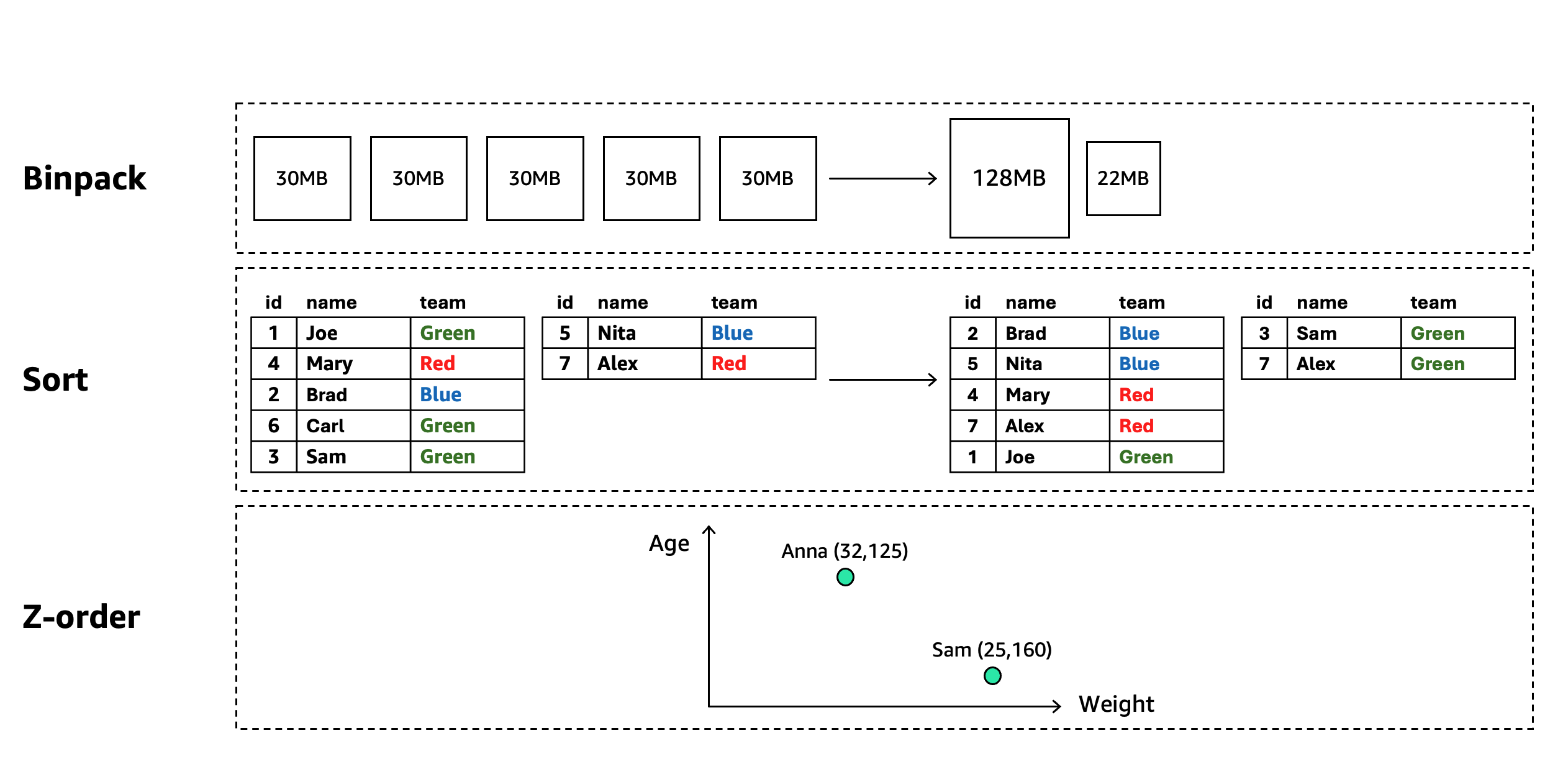
For more details see S3 Tables maintenance documentation and the compaction section in our prescriptive guidance for using Apache Iceberg on AWS.
Implementing a compaction strategy is essential for sustainable data lake management as unoptimized tables inevitably degrade in performance and increase in cost over time. Regular compaction operations prevent the accumulation of small files, maintain optimal data organization and ensure query efficiency even as tables grow to petabyte scale. Beyond immediate performance benefits, well-executed compaction improves storage efficiency through better compression ratios and file layout. Such implementation leads to potentially better and more consistent query performance, more predictable charges, and the ability to focus engineering resources on value-creating activities rather than reactive table maintenance.
S3 Tables Intelligent-Tiering
Building on the snapshot and compaction capabilities discussed above, S3 Tables, as of re:Invent 2025, offer intelligent storage optimization through S3 Intelligent-Tiering. This storage class automatically moves data between cost-effective access tiers based on changing access patterns, without retrieval fees, performance impacts, or availability changes.
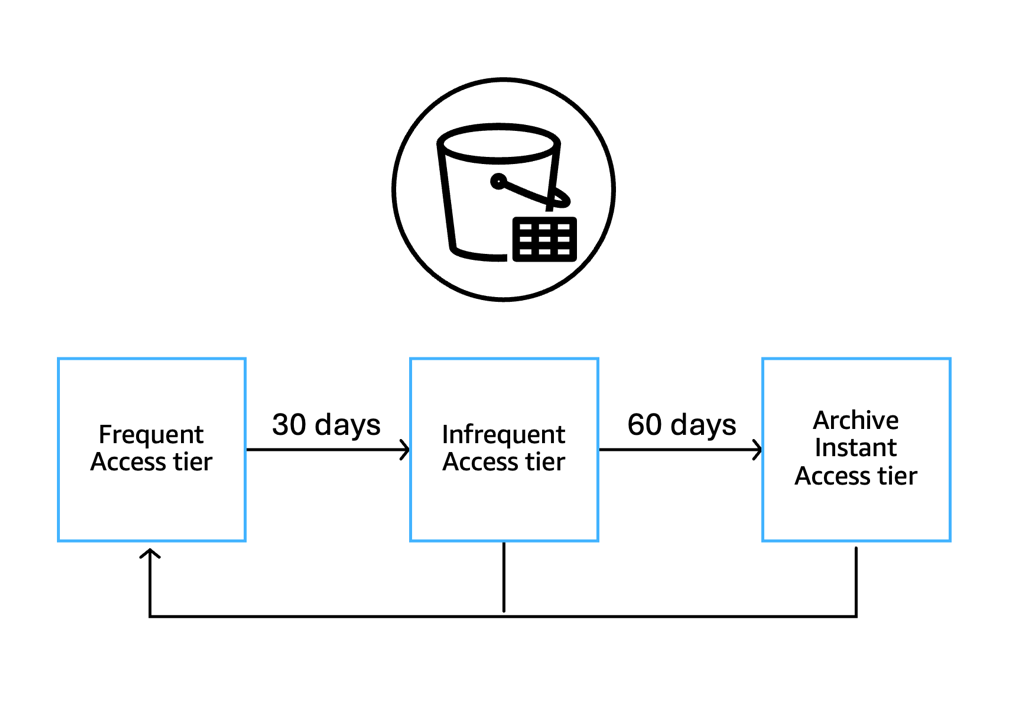
S3 Intelligent-Tiering works at the individual data file level, allowing a single table to have files in different tiers simultaneously. The system automatically manages data across three access tiers:
- Frequent Access (FA) – Default tier for all files; other tiers return here when accessed
- Infrequent Access (IA) – Files move here after 30 consecutive days without access
- Archive Instant Access (AIA) – Files move here after 90 consecutive days without access
All tiers maintain millisecond latency, high throughput performance, 99.9% availability, and 99.999999999% durability. Objects transition to the Frequent Access (FA) tier when accessed via Get API calls. This occurs whenever data files within a table are read, regardless of the operation that triggers the read. Operations that trigger data file reads (and thus FA transitions) are:
- Direct table access – Queries or scans that read data files
- Table management operations – REST API calls such as LoadTable or UpdateTable that require reading existing data files
- Replication – When a table is replicated, the source data files must be read to transfer content to the destination, triggering Get calls on any files in IA/AIA tiers
A key point to remember is that tier transition happens at the data file level when those files are read, not when the table is referenced. Any operation that results in reading the underlying S3 objects will cause those objects to move from IA/AIA to FA tier. It is important to note that files smaller than 128 KB remain in the Frequent Access tier, though compaction can combine them into larger files that then become eligible for tiering.
How S3 Tables Intelligent-Tiering works in conjunction with maintenance tasks
Table maintenance operations like snapshot management and file cleanup continue across all tiers. When it comes to compaction, S3 Tables take a unique approach. As a compaction task starts, regardless of the compaction type (binpack, sort, or z-order), S3 Tables check the tier of the data files which are candidates for compaction. This check does not impact a tier change by itself. S3 Tables will only perform the compaction operation on files that are in the FA tier, to ensure that compaction does not promote data or files that you have not touched over 30 days. This approach optimizes performance for frequently accessed data while reducing maintenance costs for colder data. When a data file in a colder tier is accessed, it is transitioned back to FA tier and becomes eligible for compaction.
Because compaction only processes files in the Frequent Access tier, delete operations on data in lower-cost tiers create delete files that are not automatically compacted. These delete files become eligible for compaction when the associated data files are accessed and move back to the Frequent Access tier. You can read more about this behavior in our documentation.
We will walk through two examples that illustrate the behavior below.
Binpack compaction example
Let’s look at a simple binpack compaction process. A customer decides to enable compaction operation, which has not been enabled initially. Some data files in a partition have been frequently accessed, while some have not, and after 30 days have automatically transitioned into the IA tier.

When S3 Tables compaction engine starts it will validate the tier of the data files that are candidates for compaction. It will only perform the compaction operation on the data files that are in FA tier, while leaving the untouched files in place. Even as it looks at files in IA or AIA tiers, it will not affect their tier status. The result is a more efficient file where data was frequently accessed, while retaining the cost savings of the files that are untouched. Two weeks later, queries touched the data in the two remaining files and now they are moved back to the FA tier.
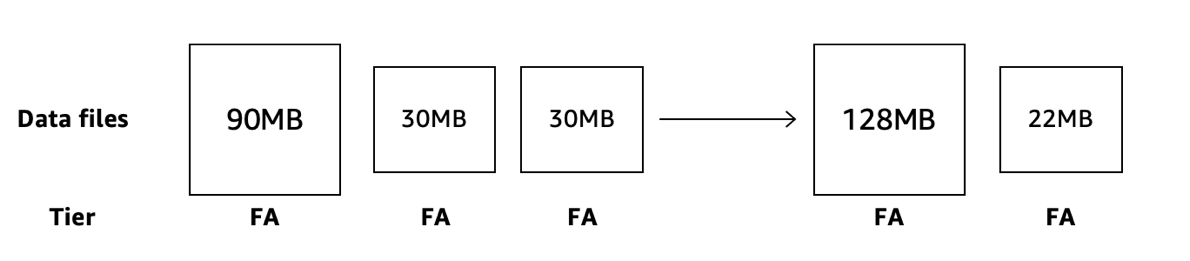
Now, in the next iteration of the compaction engine, when all files are in FA tier, the S3 Tables compaction engine will now perform an additional compaction operation and merge the two small files with the large one.
Delete files example
Delete file types in Apache Iceberg such as equality deletes, positional deletes, and deletion vectors (v3) generate separate delete reference files. These files are either used in merge-on-read or at some point merged back into data files during maintenance operation. We will use equality deletes to illustrate how the compaction engine interacts with S3 Tables Intelligent-Tiering, demonstrating the lifecycle of delete file management combined with data file storage tiers.
Equality delete in Apache Iceberg is a data modification operation that allows users to delete records matching specific filter conditions without requiring position-based metadata, enabling potentially more efficient and precise data removal in large datasets. This is a merge-on-read method for updated tables.
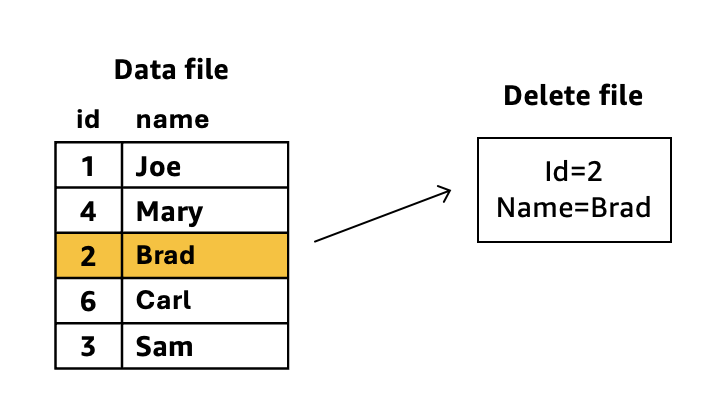
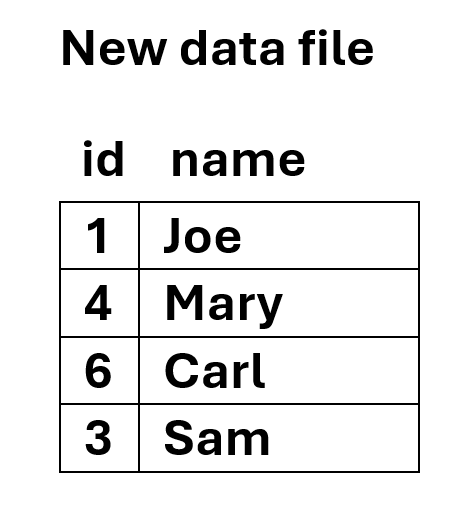
For the above diagram example, during query time, Iceberg dynamically applies the delete file’s predicates to the data file. The row with id=2 and name=Brad remains in storage but becomes invisible to queries. Iceberg “merges” the delete information during read operations without modifying the original data files. If compaction runs against these two files, it would:
- Read both the data file and delete file
- Physically remove the row matching id=2 and name=Brad from the data
- Create a new consolidated data file without the deleted row
- Eliminate the separate delete file since its conditions have been applied
While this is generally a good operation to perform to optimize access to table data and reduce overhead processing during read operations, if the data file is in IA or AIA tiers, S3 Tables will not perform the compaction operation. However, if and when that file is re-read and moves back to the Frequent Access tier, when compaction starts a new cycle, it will assess the data file tier, realize that it is now in FA tier, and perform the maintenance task on the file, deleting the unneeded row(s) and create a more read-optimal file.
While compaction can be manually run on S3 Tables to consolidate delete files and permanently remove records, these external compaction jobs operate independently of Intelligent-Tiering storage class awareness. S3 Tables cannot anticipate when you’ll run external compaction jobs, so Intelligent-Tiering optimizations are based solely on your table’s organic access patterns. When you run manual compaction, the process reads data files to perform consolidation, including any files that have transitioned to IA or AIA tiers. This moves those files back to the FA tier, which may result in higher storage costs.
Conclusion
In a data-driven landscape, effective table maintenance is a necessity for organizations managing large-scale data lakes. S3 Tables deliver a comprehensive solution by integrating snapshot management, compaction strategies, and Intelligent-Tiering into unified data life cycle management. S3 Tables provide coordination of these maintenance operations, preserving critical historical data through snapshots, optimizing file layouts with targeted compaction that respects access patterns, and automatically moving colder data to cost-effective storage tiers.
This orchestration ensures your data remains both performant and cost-effective throughout its lifecycle, whether accessed daily or stored for years. Organizations can redirect their focus from complex maintenance workflows to extracting valuable insights from their data, while benefiting from more predictable performance, optimized storage costs, and a data lake that scales with their ever-evolving business needs. Thank you for reading this blog. If you have any comments or questions, don’t hesitate to leave them in the comments section.