AWS Storage Blog
Preserve FlexClone space efficiency when migrating to Amazon FSx for NetApp ONTAP
What happens when you need to migrate between separate ONTAP file systems but have multiple long-lived clones? Whether you are moving from on-premises NetApp to Amazon FSx for NetApp ONTAP, between FSx file systems, or across AWS accounts, preserving these clone relationships becomes critical. Standard file-based migration tools like rsync, robocopy, or AWS DataSync have no awareness of ONTAP’s block-sharing metadata and will produce duplicates on the destination. A single production database volume might have 10 or more active clones serving different development teams, QA environments, and staging pipelines, and these clones share data blocks with their parent, consuming only a fraction of the storage that full copies would require.
In this post, we demonstrate an ONTAP SnapMirror-based approach that preserves your clone space efficiency during migration. FSx for ONTAP is a fully managed storage service built on NetApp’s ONTAP software, and the technique shown here applies whether you are migrating to, from, or between FSx file systems.
This is a 300-level post intended for storage administrators and solutions architects who are familiar with ONTAP concepts. The approach was developed to solve a real challenge at Pearson, a global education company and AWS Partner running a 50 TB enterprise Oracle ERP platform on FSx for ONTAP that serves 27,000 employees across Finance, HR, and Supply Chain. More than 40 concurrent development projects rely on FlexClone to provision environments instantly, avoiding what would otherwise be roughly 2 PB of storage. When Pearson reached the 192 TB capacity limit of a Gen1 file system and needed to move to Gen2, migrating the clones as standard volumes would have inflated storage to approximately 2 PB across multiple file systems.
Understanding FlexClone space efficiency
A FlexClone volume is an instant, writable copy of a FlexVol volume based on a Snapshot copy. Rather than duplicating every data block, the clone shares unchanged blocks with its parent volume through pointer-based metadata. Only new or modified blocks in the clone consume additional storage. Figure 1 illustrates the block architecture.
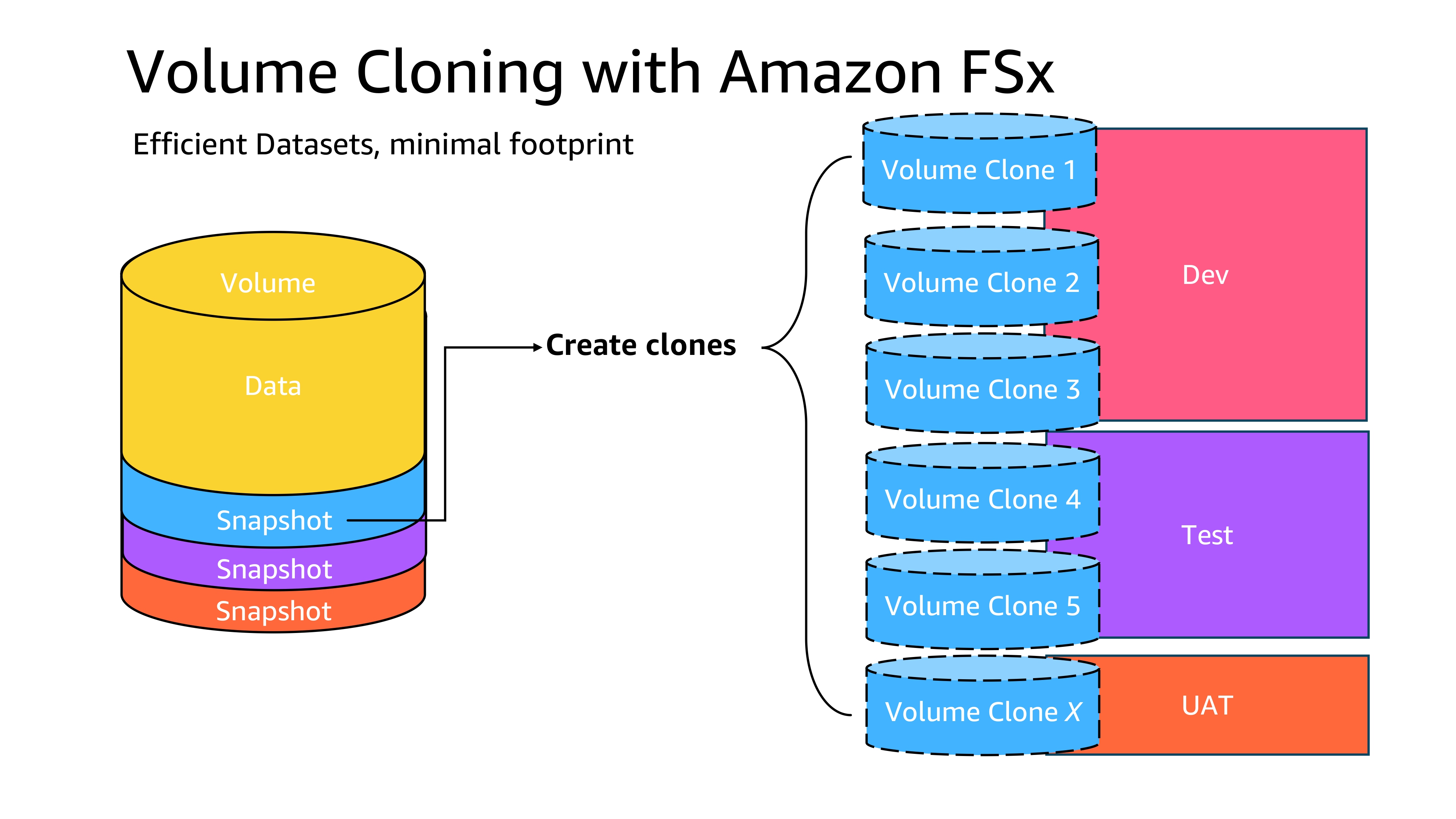
Figure 1: FlexClone shared block architecture. Clones share unchanged data blocks with the parent volume using pointers. Only divergent (modified) blocks consume additional space.
Consider a real-world scenario: a 2 TB database volume used for application development. The development team maintains 10 active clones for the following:
- Feature branch development (four clones)
- Test (three clones)
- QA (two clones)
- UAT (one clone)
The following table summarizes relevant metrics with and without clones.
| Metric | Without Clones | With Clones |
| Parent volume | 2 TB | 2 TB |
| 10 development copies | 20 TB | ~200 GB* |
| Total storage consumed | 22 TB | ~2.2 TB |
| Space savings | 0% | ~90% |
*Assuming each clone has diverged approximately 1% from parent (typical for active development) without FlexClone technology, each independent copy requires a full 2 TB of storage. With clones, the 10 environments share the unchanged blocks with the parent, and only the modified blocks (typically 1–5% for active development workloads) consume additional capacity.The physical-used column reveals the true space consumption. Each clone uses only the storage for its divergent blocks:
Migration challenge: Moving between file systems
When migrating data between two separate ONTAP file systems, the fundamental problem is that standard migration tools operate at the file level. They have no knowledge of the underlying block-sharing relationships.
- File-based tools (rsync, robocopy, DataSync) – These tools see each clone as an independent volume. They copy every file independently, producing complete duplicates. A 2 TB parent with 10 clones becomes 22 TB of transferred and stored data.
- NFS/SMB file copy – Mounting source and destination volumes and copying files at the protocol level produces the same result. Every clone is treated as a full, independent dataset.
- NDMP-based backup and restore – Although NDMP operates at a lower level than file copies, restoring clone volumes from NDMP backups creates independent volumes on the destination without parent-clone relationships.
The core issue is that the FlexClone relationship is metadata internal to the ONTAP file system. When data leaves the source through any file-level mechanism, that metadata is lost. The destination has no way to reconstruct which blocks should be shared. Figure 2 compares the storage impact of file-based migration with and without block-level sharing.
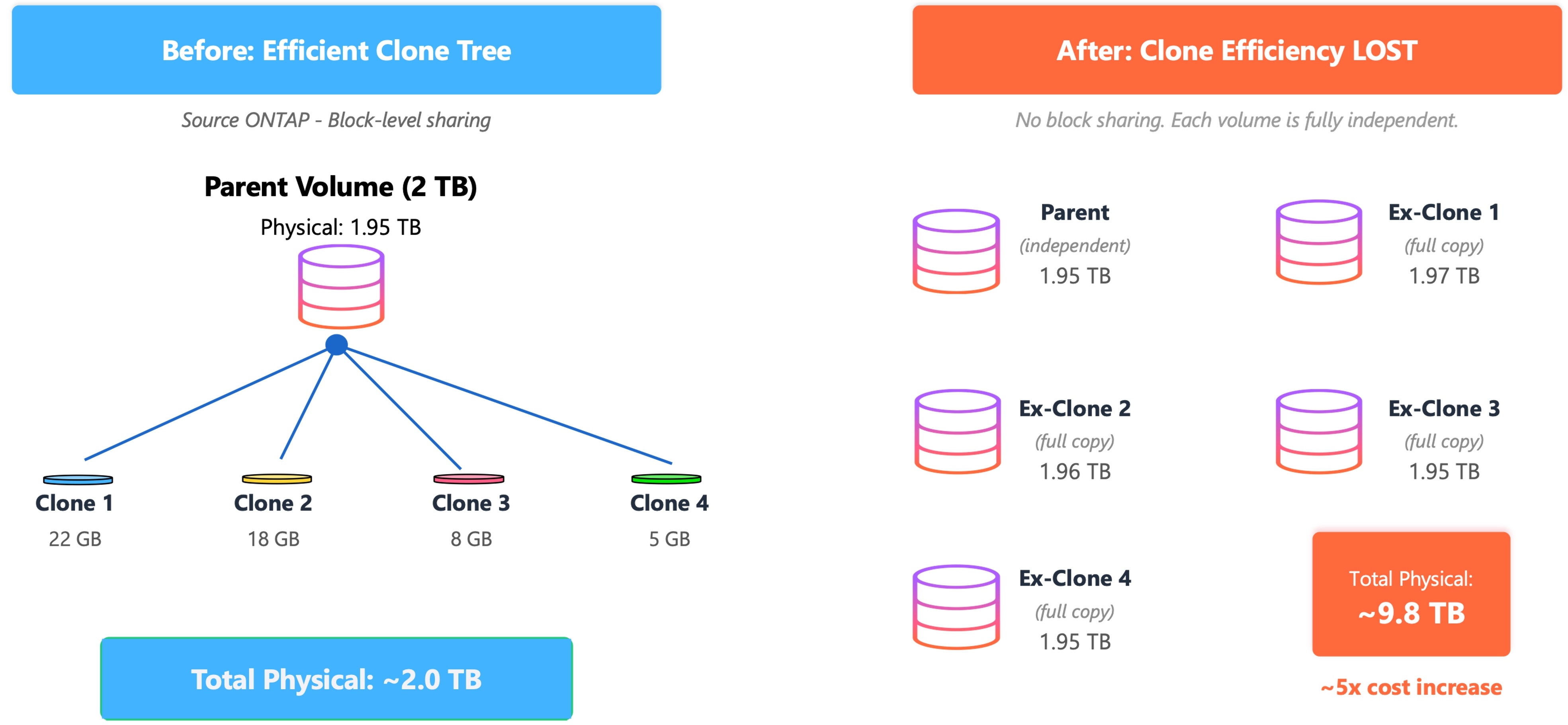
Figure 2: Storage impact of file-based migration. Each clone becomes a full independent copy, eliminating block sharing and multiplying storage consumption.
For the 2 TB database scenario, losing clone efficiency during migration has the following results:
- Storage cost explosion – 2.2 TB becomes 22 TB, a tenfold increase in FSx storage costs.
- Migration bandwidth – Transferring 22 TB takes significantly longer than the approximately 2.2 TB of unique data.
- Development continuity – Active clones contain in-progress work including uncommitted code changes and test data modifications. You can’t simply re-clone post-migration without losing that work.
- Snapshot overhead – Split clones lose their shared Snapshot lineage, increasing backup storage requirements.
You need a migration mechanism that understands ONTAP’s block-level data sharing and can reconstruct clone relationships on the destination file system.To put this in perspective at enterprise scale: in Pearson’s environment, a 50 TB Oracle ERP platform with roughly 300 clone volumes, treating each clone as an independent copy would have required provisioning on the order of 2 PB of destination storage. During a dual-run migration window, that translates to approximately $250,000 per month of additional storage cost, on the order of $1.5 million before clones could be refreshed. Preserving clone efficiency during the migration can be the difference between a viable and an nonviable migration.
Solution overview
SnapMirror is ONTAP’s built-in block-level replication technology. Unlike file-based tools, SnapMirror replicates data at the block level and understands Snapshot-based lineage. By combining SnapMirror with FlexClone operations on the destination, you can reconstruct the parent-clone tree with full space efficiency on the new file system.The approach consists of the following high-level steps:
- Replicate the parent volume (including its Snapshots) using SnapMirror.
- Create FlexClone volumes on the destination from the same base Snapshots.
- Use SnapMirror resync to transfer only the divergent blocks from each source clone to its corresponding destination clone.
Because the destination clones share a common Snapshot lineage with their parent, ONTAP establishes an incremental transfer. Only the blocks that diverged in each source clone are replicated. The result is a destination clone tree with identical space efficiency to the source. Figure 3 illustrates the SnapMirror-based clone migration workflow.
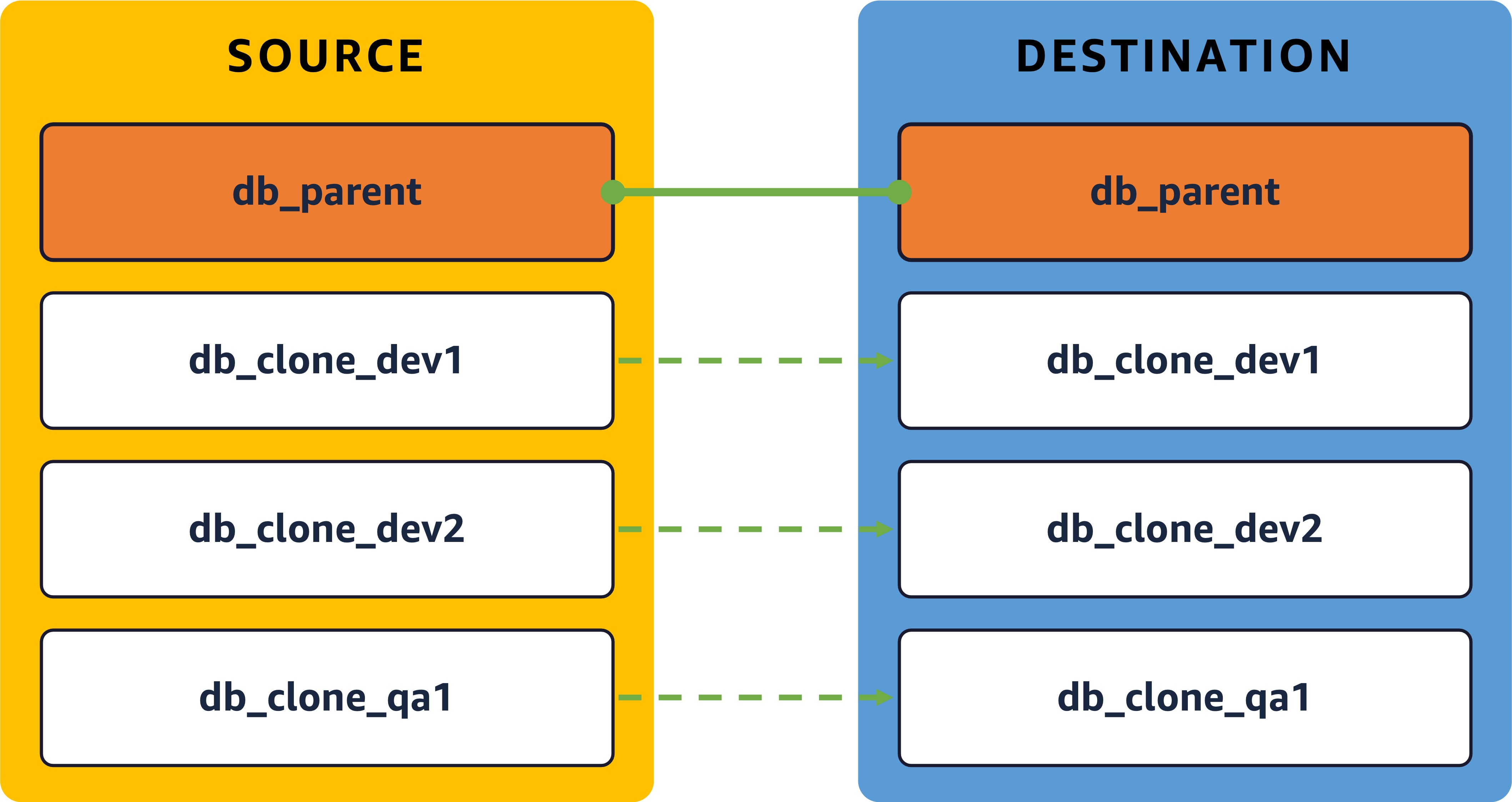
Figure 3: SnapMirror-based clone migration workflow. The solid arrow represents the full parent SnapMirror baseline. The dashed arrows represent incremental clone resyncs (divergent blocks only).
Prerequisites
Before beginning the migration, verify the following:
- Cluster or SVM peering is established between source and destination file systems (supported between on-premises ONTAP and FSx, or between FSx file systems).
- SnapMirror licensing is active. This is included with FSx for ONTAP at no extra cost. SnapMirror licensing must be present on both ends of the relationship: the source and the destination. On FSx for ONTAP, it is included at no extra cost, so both an FSx source and an FSx destination are covered automatically. When the source is an on-premises ONTAP system, confirm that a SnapMirror (data protection) license is active on that system as well.
- A common Snapshot copy exists between the parent and each clone volume on the source.
- Sufficient network bandwidth and throughput capacity is available on the destination FSx file system.
The following screenshot shows an example CLI output confirming SVM peering status and intercluster LIF configuration between source and destination clusters.
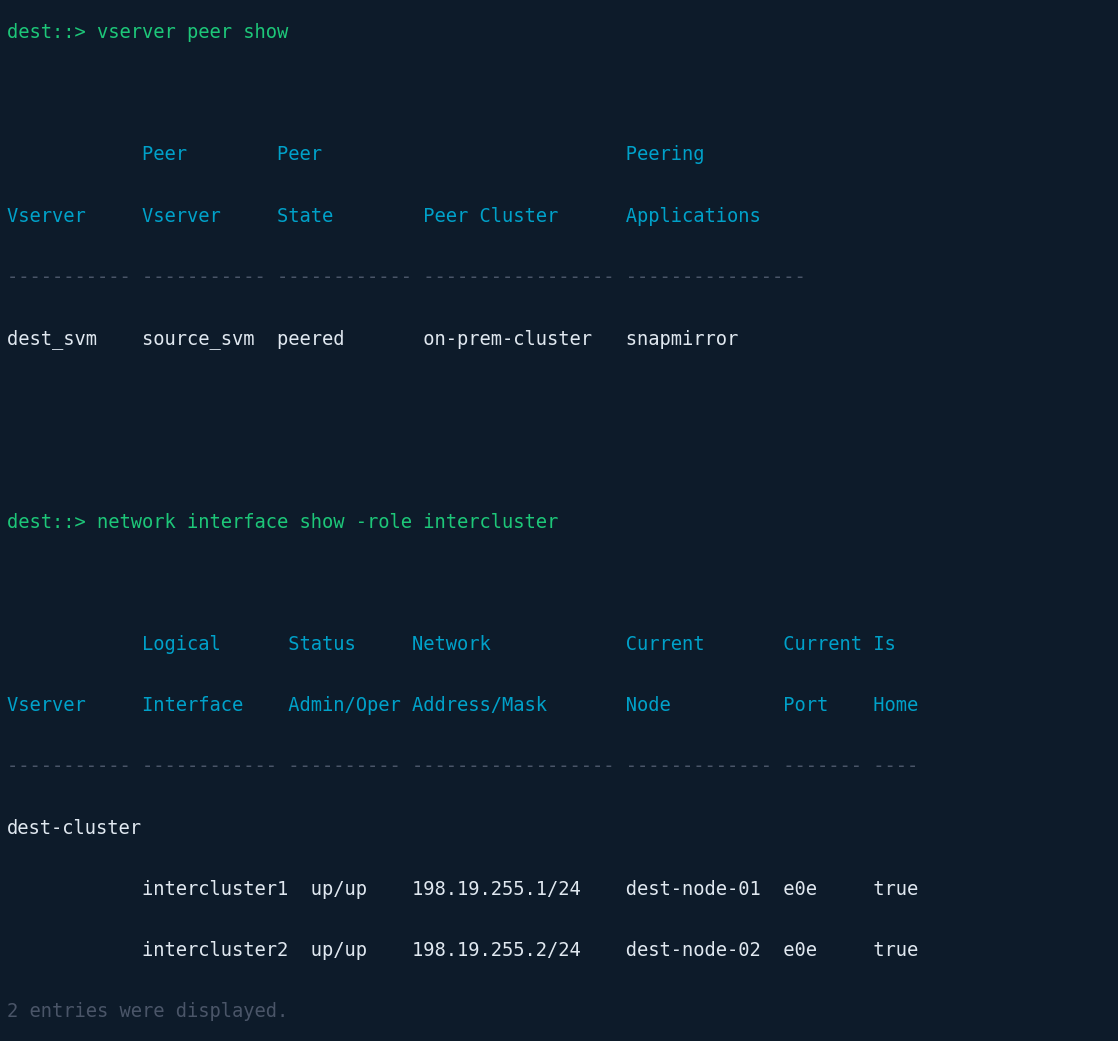
Figure 4: CLI output showing SVM peering status and intercluster LIF configuration between source and destination clusters.
Establish SnapMirror on parent volume
Create a SnapMirror relationship for the parent volume using a MirrorAllSnapshots policy, as shown in the following code. This replicates the parent, including Snapshot copies that the clones reference, to the destination file system.
Wait for the initial baseline transfer to complete. For large volumes, this might take hours depending on network throughput. Figure 5 shows example CLI output.
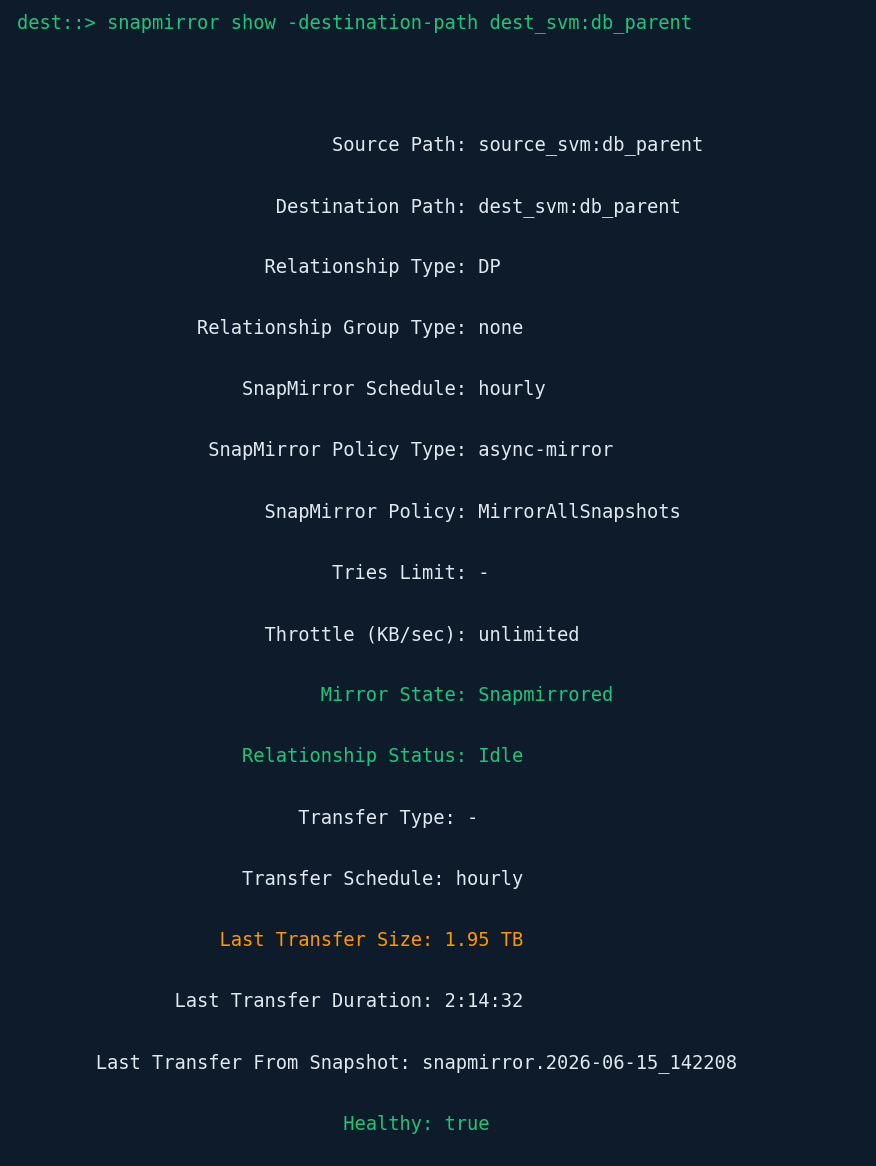
Figure 5: CLI output showing the SnapMirror relationship for the parent volume in Snapmirrored/Idle state. Note the 1.95 TB transfer size.
Verify common Snapshot copies
Confirm that the Snapshot copies used to create each source clone are now present on the destination parent:
dest::> snapshot show -vserver dest_svm -volume db_parent -fields name,create-time
Each source clone was created from a specific Snapshot on the parent. You need to identify which Snapshot corresponds to each clone. Figure 6 shows an example CLI output.
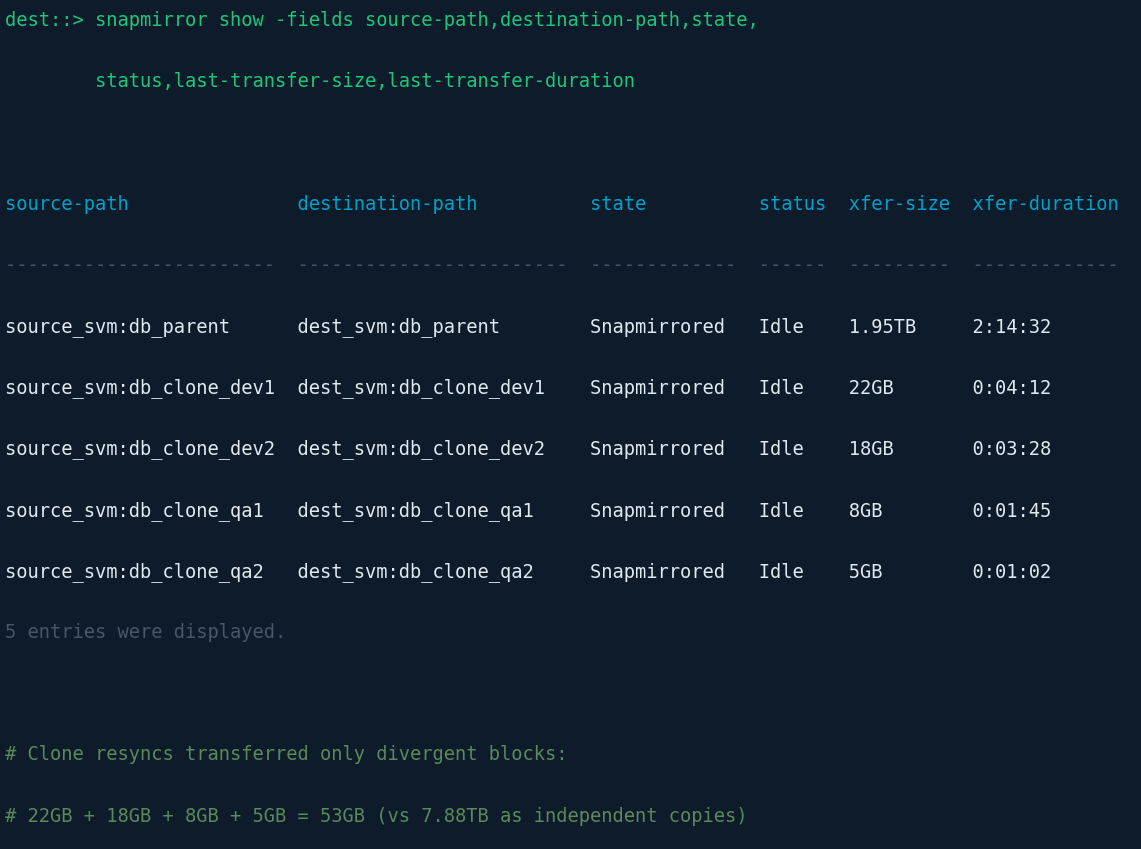
Figure 6: CLI output showing Snapshot copies on the destination parent volume. The snap_for_clone_* entries are the common Snapshots used as the base for each FlexClone.
Create FlexClone on destination from common Snapshot
For each source clone, create a corresponding FlexClone on the destination parent using the same base Snapshot:
At this point, the destination clone has the same starting point as the source clone (same base Snapshot), but it lacks any of the changes made to the source clone after it was created.
Run SnapMirror resync between clone volumes
This is the critical step. Perform a SnapMirror resync between the source clone and the newly created destination clone. This establishes a relationship and because both clones share a common Snapshot ancestor (through their respective parents), ONTAP can calculate an incremental delta and transfer only the blocks that have diverged in the source clone:
This resync transfers only the approximately 22 GB of divergent data (not the full 1.97 TB), and the destination clone maintains its space-efficient relationship with the destination parent. Figure 7 shows example CLI output.
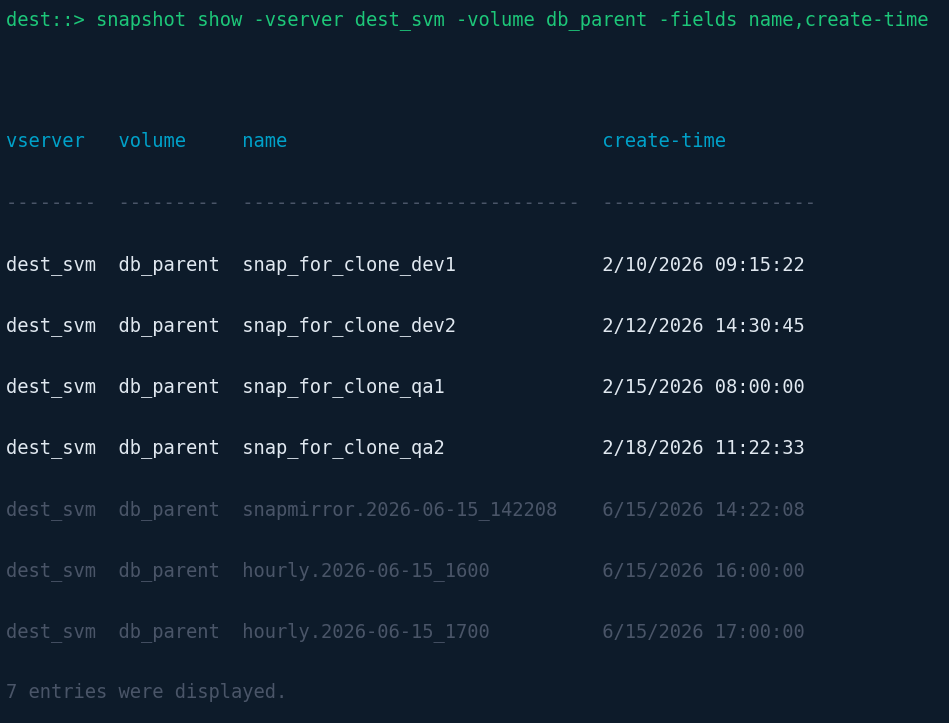
Figure 7: CLI output showing all SnapMirror relationships after clone resync. The parent required 1.95 TB, but each clone transferred only its divergent blocks (5 to 22 GB), totaling 53 GB.
Repeat for all clone volumes
Repeat the preceding FlexClone creation and SnapMirror resync steps for each source clone. Because the parent is already replicated and all base Snapshots are present, each subsequent clone migration transfers only that clone’s divergent blocks. Multiple clone resyncs can run concurrently.
Cut over to destination filesystem
When ready to switch over, use the following commands:
Repeat for the parent volume and all clones, then redirect client access to the destination.
Verify space efficiency post-migration
After you complete the migration, confirm that clone relationships and space savings are intact:
The physical-used values confirm that clone space efficiency has been preserved across the file system migration.
Considerations and best practices
Keep in mind the following:
- Throughput sizing – Verify the destination FSx file system has sufficient throughput capacity for SnapMirror transfers.
- Migration order – Always migrate the parent volume first; clone operations depend on it.
- Nested clones – For clone-of-clone hierarchies, migrate in lineage order (grandparent, then parent, then child).
- Concurrent resyncs – Multiple clone resyncs can run in parallel after the parent mirror is established.
- Cutover window – Use SnapMirror incremental updates to minimize final cutover downtime.
- Automation – For environments with many clones, script the FlexClone creation and SnapMirror resync steps using the ONTAP REST API or Ansible.
- ONTAP version compatibility – Confirm source and destination are running compatible ONTAP versions for SnapMirror interoperability.
Conclusion
Migrating FlexClone volumes between ONTAP file systems without preserving their space efficiency can turn a cost-effective development environment into a storage cost issue. For organizations running multiple database clones (a common pattern in DevOps, CI/CD, and data analytics workflows), standard file-based migration tools are inadequate because they can’t preserve the block-level sharing that makes clones efficient. By using SnapMirror’s block-level replication combined with FlexClone operations on the destination, you can migrate entire clone trees to FSx for ONTAP while maintaining the 90% (or more) space savings that made clones attractive in the first place. SnapMirror understands Snapshot lineage, the same lineage that underpins FlexClone’s space efficiency, enabling it to reconstruct those relationships on the new file system. When applied to Pearson’s migration, this SnapMirror-based method reduced the dual-run migration cost and unblocked a critical Oracle upgrade for 27,000 users. Because the source volume details and per-volume commands for roughly 300 volumes were generated programmatically rather than by hand, the cutover was executed with far less manual effort and lower risk. The pattern is repeatable for customers who reach similar scale. “The team engineered a migration approach that simply didn’t exist before,” says Tony Real, Senior Cloud Services Engineering Manager at Pearson. “Working together with AWS and NetApp, we moved hundreds of clone volumes to Gen2 while preserving the space savings our development teams depend on.”
Try out FSx for ONTAP and SnapMirror for yourself:
- To get started, review the Amazon FSx for NetApp ONTAP User Guide
- For guidance on configuring SnapMirror for migration, see Migrating to FSx for ONTAP using NetApp SnapMirror
- To create your first FSx for ONTAP file system, see Getting started with Amazon FSx for NetApp ONTAP