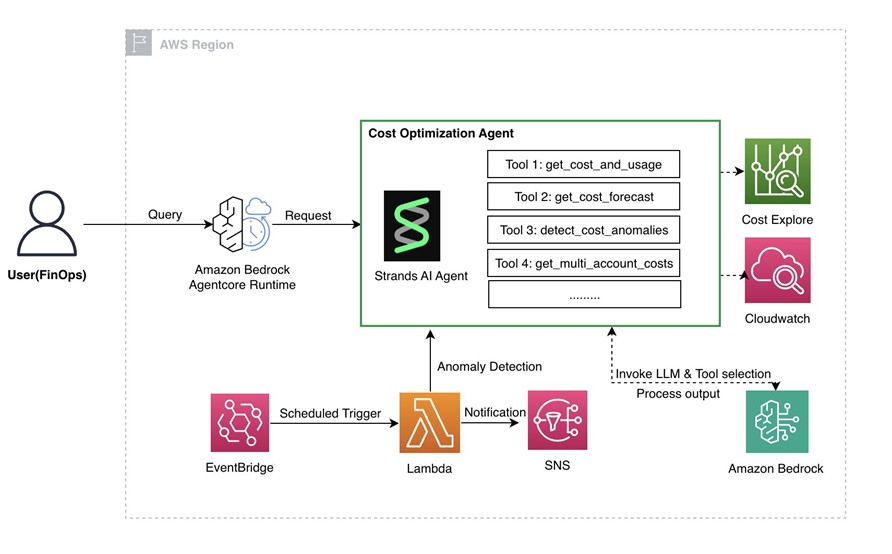
摘要:在云原生时代,企业数字化转型的步伐不断加快,云基础设施已成为业务发展的核心支撑。云成本的有效监控与管理,已不再是可选项,而是企业数字化战略成功的关键要素。本文设计并实现了一套智能云成本监控与告警系统,使用者通过自然语言与智能体交互,获取与云成本相关的分析建议和优化方案,同时实现异常告警。
在云原生时代,企业数字化转型的步伐不断加快,云基础设施已成为业务发展的核心支撑。然而,伴随着云服务使用规模的快速增长,云成本管理正成为企业面临的重大挑战。云成本的有效监控与管理,已不再是可选项,而是企业数字化战略成功的关键要素。
云计算的弹性特性虽然带来了便利,但也埋下了成本失控的隐患。在实际生产环境中,经常遇到代码缺陷导致的资源泄露问题,如程序bug引起的无限循环创建实例,或者异常退出后未正确释放资源;临时创建的大规格实例在项目结束后被遗忘,持续产生费用;自动扩缩容策略配置不当也是常见问题。这些问题往往在月度账单生成时才被发现,此时损失已经造成,错过了最佳的止损时机。
不同于 LangGraph 等需要开发者手动定义复杂状态机或图结构的框架,Strands 强调由 LLM 原生地进行规划、工具调用和自我反思。开发者只需定义 Prompt、工具和模型,剩下的编排逻辑由模型自主完成,另外Strands Agents与AWS 云原生深度整合,提供与 Amazon Bedrock、Lambda、ECS 等服务的无缝集成,在某些场景下可减少的开发步骤。
import os
from strands import Agent, tool
from strands.models import BedrockModel

# Configuration - can be overridden via environment variables
MODEL_ID = os.getenv("MODEL_ID", "xxxxxxxx")

model = BedrockModel(model_id=MODEL_ID)

agent = Agent(
    model=model,
    tools=[
        list_linked_accounts,
        analyze_cost_anomalies,
        get_budget_information,
        forecast_future_costs,
        get_service_cost_breakdown,
        get_multi_account_cost_breakdown,
        compare_accounts_costs,
        get_current_month_costs,
    ],
    system_prompt= prompt
system_prompt="""You are an AWS Cost Optimization Expert Assistant deployed in a payer account. Your role is to help users understand, monitor, and optimize AWS spending across all linked accounts in the organization.
You have access to powerful tools to:
- List all linked accounts in the organization
- Detect cost anomalies and unusual spending patterns
- Retrieve budget status and forecasts
- Analyze service-level cost breakdowns
- Predict future costs using ML
- Provide current month spending details
- Analyze costs across all linked accounts in the organization
- Compare spending between different linked accounts
Guidelines:
1. When users ask about costs, FIRST use list_linked_accounts to show available accounts
2. Always use the appropriate tools to get real data - never make up numbers
2. Provide clear, actionable insights based on the data
3. When users ask about costs, be specific about time periods and services
4. For multi-account scenarios, clearly identify which linked account has the highest costs
5. If you detect high costs or anomalies, proactively suggest optimization strategies
6. Be conversational and helpful, explaining technical concepts in simple terms
7. When multiple tools are needed, use them in logical order
8. Remember you're running from the payer account and can see all linked accounts
Cost Optimization Best Practices to recommend:
- Review and terminate idle resources (EC2, EBS, RDS) across all accounts
- Right-size over-provisioned instances based on utilization
- Use Savings Plans or Reserved Instances for predictable workloads
- Implement auto-scaling to match demand
- Move infrequently accessed data to cheaper storage tiers
- Set up budget alerts to catch cost spikes early
- Use AWS Cost Explorer regularly for trend analysis
- Implement cost allocation tags across all linked accounts
- Consider account-level budgets for better cost control
Always be proactive in identifying cost-saving opportunities across the entire organization!""",
)
3.2 Agentcore runtime 初始化与调用
在cost optimization agent 定义时,完成agentcore runtime的注册
from bedrock_agentcore.runtime import BedrockAgentCoreApp

# 初始化AgentCore Runtime App
app = BedrockAgentCoreApp()

# 注册Agent到Runtime
@app.agent()
def invoke_agent(prompt: str) -> str:
    return cost_agent.chat(prompt)
在deploy.py 中,完成镜像打包和agent推送
# AgentCore Runtime创建
def create_agent_runtime():
    agentcore_client = boto3.client('bedrock-agentcore')

    response = agentcore_client.create_agent_runtime(
        agentRuntimeName=runtime_name,
        containerImage=container_image_uri,
        executionRoleArn=execution_role_arn,
        # 其他配置参数
    )

    return response['agentRuntimeArn']
3.3 关键Tools 定义
成本异常检测工具
使用AWS Cost Anomaly Detection API进行机器学习驱动的异常检测,分析指定天数内的成本模式,识别异常波动。关键代码如下:
def detect_cost_anomalies(days: int = 7) -> str:
    """
    检测AWS成本异常,使用机器学习算法识别异常模式
    """
    try:
        ce_client = boto3.client("ce")

        # 计算时间范围
        end_date = datetime.now().date()
        start_date = end_date - timedelta(days=days)

        # 获取异常检测结果
        response = ce_client.get_anomalies(
            DateInterval={
                'StartDate': start_date.strftime('%Y-%m-%d'),
                'EndDate': end_date.strftime('%Y-%m-%d')
            },
            MaxResults=50
        )

        anomalies = response.get('Anomalies', [])

        if not anomalies:
            return f"过去{days}天未检测到成本异常"

        # 分析异常详情
        analysis = []
        total_impact = 0

        for anomaly in anomalies:
            impact = float(anomaly.get('Impact', {}).get('MaxImpact', 0))
            total_impact += impact

            # 获取异常根因分析
            root_causes = []
            for cause in anomaly.get('RootCauses', []):
                service = cause.get('Service', 'Unknown')
                region = cause.get('Region', 'Unknown')
                usage_type = cause.get('UsageType', 'Unknown')
                root_causes.append(f"{service} ({region}) - {usage_type}")

            analysis.append({
                'date': anomaly.get('AnomalyStartDate'),
                'impact': impact,
                'score': anomaly.get('AnomalyScore', {}).get('MaxScore', 0),
                'root_causes': root_causes
            })

        # 生成分析报告
        report = f"检测到 {len(anomalies)} 个成本异常\n"
        report += f"总影响金额: ${total_impact:.2f}\n\n"

        for i, item in enumerate(analysis[:3], 1):
            report += f"异常 {i}:\n"
            report += f" 日期: {item['date']}\n"
            report += f" 影响: ${item['impact']:.2f}\n"
            report += f" 异常分数: {item['score']:.1f}\n"
            report += f" 根因: {', '.join(item['root_causes'][:2])}\n\n"

        return report

    except Exception as e:
        return f"异常检测失败: {str(e)}"
多账户成本聚合工具
为Payer账户设计的多账户成本管理,Organizations API集成、权限处理、数据聚合与排序,提供账户级别的成本排名和趋势分析。特别说明:该功能需要为执行角色添加 ce:GetDimensionValues 权限才能查看各个关联账号的详细成本分解
def get_multi_account_costs(days: int = 30) -> str:
# 获取所有关联账户
        try:
            accounts_response = org_client.list_accounts()
            all_accounts = {
                acc['Id']: acc['Name']
                for acc in accounts_response['Accounts']
            }
        except Exception:
            # 如果不是组织主账户,使用当前账户
            sts_client = boto3.client("sts")
            current_account = sts_client.get_caller_identity()['Account']
            all_accounts = {current_account: "Current Account"}

        # 按账户分组获取成本数据
        response = ce_client.get_cost_and_usage(
            TimePeriod={
                'Start': start_date.strftime('%Y-%m-%d'),
                'End': end_date.strftime('%Y-%m-%d')
            },
            Granularity='MONTHLY',
            Metrics=['UnblendedCost'],
            GroupBy=[
                {'Type': 'DIMENSION', 'Key': 'LINKED_ACCOUNT'}
            ]
        )
      # 按成本排序
        sorted_accounts = sorted(
            account_costs.items(),
            key=lambda x: x[1],
            reverse=True
        )
        report = f"多账户成本分析 (过去{days}天)\n"
        report += f"总成本: ${total_cost:.2f}\n"
        report += f"账户数量: {len(account_costs)}\n\n"

    return report
其他工具功能说明
- 预算监控工具(get_all_budgets):获取所有AWS预算的状态和利用率,控预算超支风险和剩余额度
- 成本预测工具(get_cost_forecast)):基于历史数据预测未来成本趋势,使用AWS Cost Explorer的ML预测能力
- 服务成本分析工具(get_service_costs):按AWS服务维度分析成本分布,提供服务级别的优化建议
- 账户成本比较工具 (compare_account_costs):比较不同账户间的成本差异,提供账户级别的成本优化建议
详细代码和实现方式,请参考Github。
3.4 定时监控实现
定时监控系统使用EventBridge触发定时任务,驱动Lambda调用cost optimization agent, 查询input固定为“检查过去7天的成本异常,如果发现异常请详细说明”,并在lambda中针对返回结果进行关键字匹配,并将告警通知推送至指定位置。
其中lambda 函数的关键代码如下所示
def lambda_handler(event, context):
    """Lambda处理函数 - 每日成本异常检查"""

    agent_runtime_arn = os.environ['AGENT_RUNTIME_ARN']
    sns_topic_arn = os.environ['SNS_TOPIC_ARN']
    try:
        query = "检查过去7天的成本异常,如果发现异常请详细说明"

        response = agentcore_client.invoke_agent_runtime(
            agentRuntimeArn=agent_runtime_arn,
            qualifier='DEFAULT',
            payload=json.dumps({"prompt": query})
        )
 # 异常检测
        if detect_anomaly_keywords(agent_response):
            send_anomaly_alert(sns_client, sns_topic_arn, agent_response)
            return create_response(200, '发现成本异常,已发送告警', True, agent_response)
        else:
            return create_response(200, '成本检查正常,无异常', False, agent_response)

def detect_anomaly_keywords(agent_response):
    """基于关键词和上下文的异常检测"""
    anomaly_keywords = [
        '异常', '异常检测', '成本激增', '超出预期',
        '显著增长', '预算超支', '成本飙升', '异常波动'
    ]

    # 关键词匹配
    has_keywords = any(keyword in agent_response for keyword in anomaly_keywords)

    # 上下文分析(简化版)
    negative_indicators = ['正常', '未检测到', '无异常', '稳定']
    has_negative = any(indicator in agent_response for indicator in negative_indicators)

    return has_keywords and not has_negative
3.5 功能测试
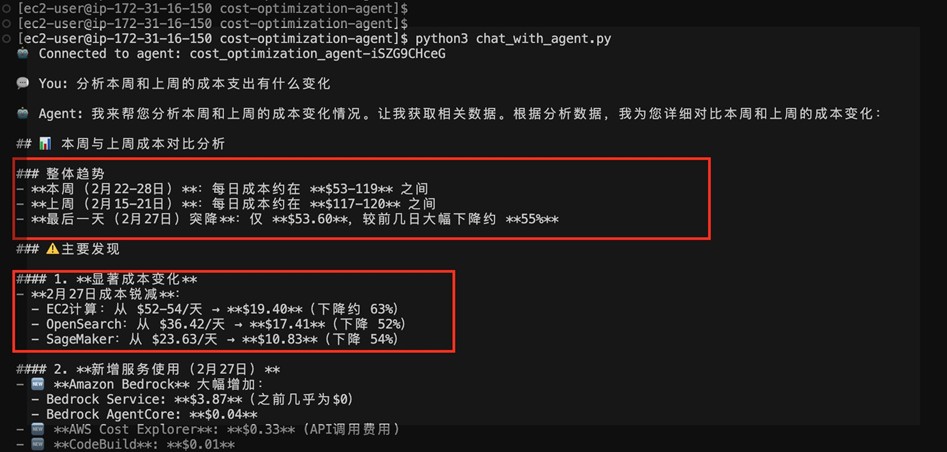
本节对成本分析的常见场景进行效果测试。根据下图结果,agent能够根据问题进行针对性回答,并且给出有效建议,满足系统设计需求。
4、附录
4.1 核心文件架构
cost_optimization_agent.py          # 主代理文件
├── tools/
│   ├── cost_explorer_tools.py      # Cost Explorer API工具
│   ├── budget_tools.py             # Budgets API工具
│   └── multi_account_tools.py      # 多账户成本分析工具
├── test_local.py                   # 本地基础功能测试
├── test_agentcore_runtime.py       # runtime功能测试
└── deploy.py                       # AgentCore部署脚本
4.2 参考资料
>5、结语
➡️ 下一步行动:
相关产品:
相关文章:
*前述特定亚马逊云科技生成式人工智能相关的服务目前在亚马逊云科技海外区域可用。亚马逊云科技中国区域相关云服务由西云数据和光环新网运营,具体信息以中国区域官网为准。
本篇作者
AWS 架构师中心:云端创新的引领者
探索 AWS 架构师中心,获取经实战验证的最佳实践与架构指南,助您高效构建安全、可靠的云上应用

|
 |