摘要:使用Kiro AI IDE开发工具,快速实现各种业务Agent。从业务需求,到开发测试,到云上部署,整个过程缩短到几个小时。Amazon Bedrock Agentcore的免运维、安全隔离和扩展性,结合记忆、认证、安全策略、可观测性、评估等组件,更适合生产级别Agent大规模部署。
一、引言
Agent应用已经逐渐渗透到企业和个人生活。无论是AI原生公司,还是传统企业进行Agent AI创新,关于Agent 的问题,已经从是否需要,变成如何实现。
那么,怎样从业务需求快速落地,并部署到安全可靠的云端生产环境?
二、AI 驱动开发
传统的开发模式下,产品经理描述需求,开发人员根据需求,设计架构,编写代码,测试并部署上线。从业务需求到产品上线,周期短则几个星期,长则几个月。在AI浪潮下,开发模式从手写代码进化到AI编程,产品经理和开发者需要描述业务需求,制定技术实现规范,并以工程化方式管理产品项目。整个产品研发周期缩短到几天,开发效率极大提高。
AI驱动开发模式下,AI负责编排开发过程,包括规划、任务分解、架构建议,开发人员负责验证、决策和监督。这种高效模式,让AI承担项目规划和代码编写,而作为产品的灵魂,人类聚焦在产品的创造性,和项目监督。
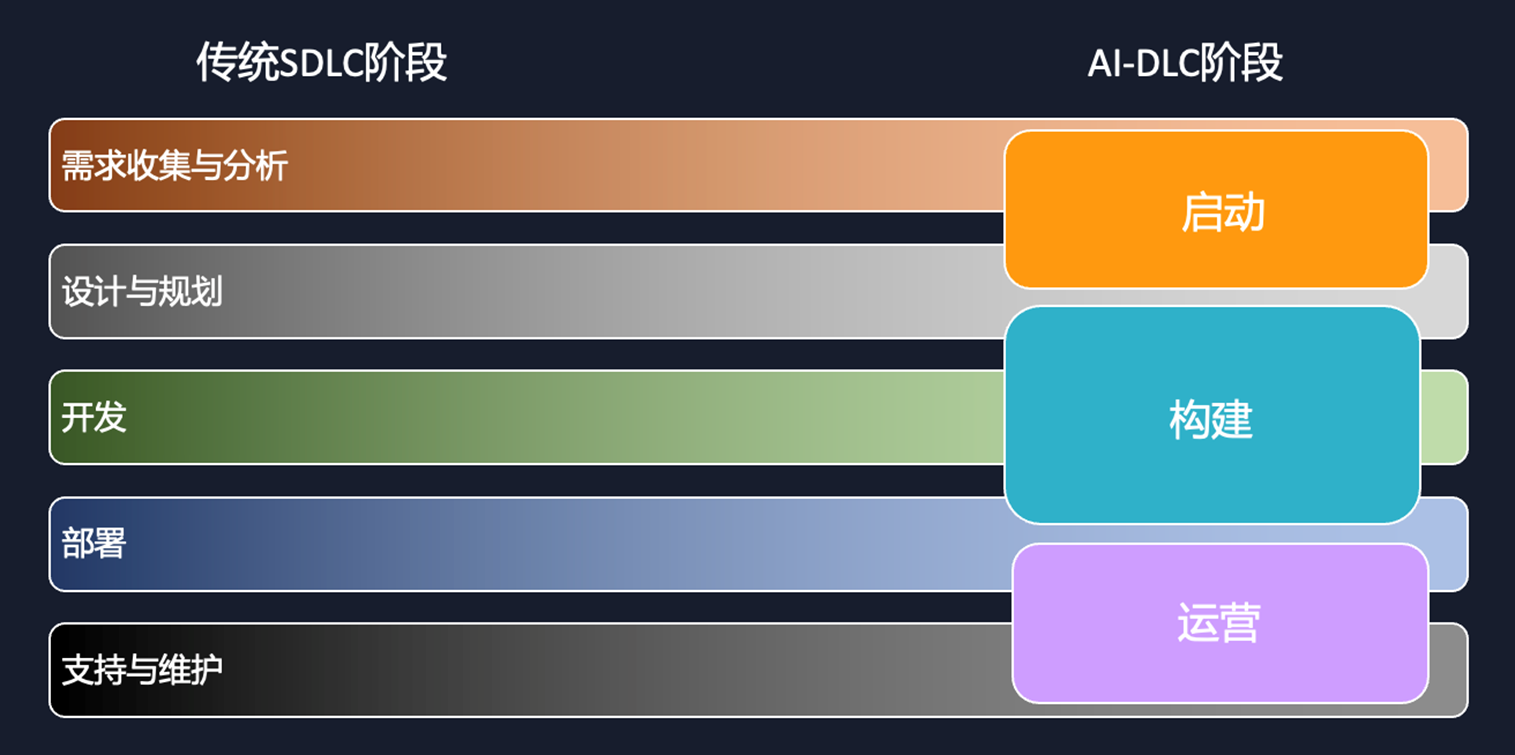
[图1] |
以AI工具驱动,以客户产品业务为核心的创新流程,主要分以下几个步骤:
- 深入业务调研:识别痛点与机会点,理解业务场景,定义问题,明确AI介入目标
- 搭建Demo验证:验证可行性,结合最佳实践。快速构建原型,探索技术方案,确保安全合规
- 评估改造收益:包括效率提升、成本优化、业务灵活性,量化对比分析,ROI预测,业务价值。
- 确定适合Agent场景:例如数据分析、流程自动化,避开OLTP在线数据库。进行适用性评估,风险分析,明确边界。
- 持续迭代优化:确保符合业务需求,收集反馈,模型调优, 功能扩展,持续交付
核心思维需要转变,从单纯架构适配转向以业务价值为导向的AI重构与创新。
AI IDE工具的出现,虽然解决了高效编码问题,但是也存在一些问题:
- 扩展性:AI 编码工具擅长处理小任务,但在复杂的项目中可能会失败。
- 控制有限:现有工具与 Agent 协作变得困难,开发者难以控制 Agent 的输出。
- 代码质量:在保持质量控制的同时将项目从概念验证到生产变得越来越困难。
氛围编程(Vibe Coding)可以一句话生成程序,但是更适合简单的原型,缺乏工程规范和流程。规范驱动开发(Spec-driven Development)正是解决此问题。

[图2] |
多种AI IDE开发工具出现,应该如何选择?Kiro IDE适合从原型到生产,除了通常的氛围编程,更能通过规范驱动开发为人工智能编码引入更加可控的结构化工作流。
Kiro提供两种会话模式:
- Vibe: 以互动问答为核心的会话模式,专为快速提问、解释说明以及通过更加对话化的方式构建项目而设计。
- Spec: 提供结构化的方法来处理复杂的开发任务,将软件开发流程正规化。能够将高层次的想法转化为详细的实施计划,并进行系统化执行和清晰的跟踪。
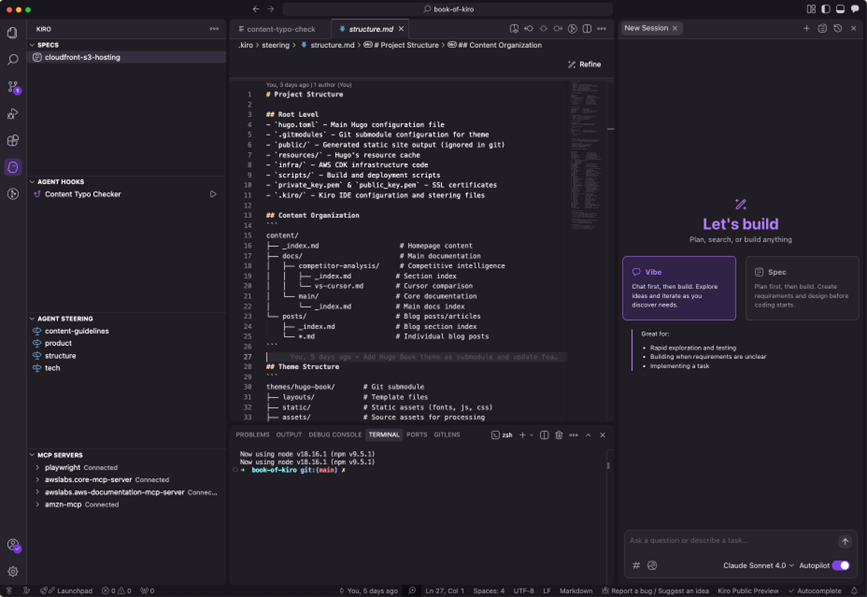
[图3] |
Spec模式下,提供详细的业务需求描述,以及技术实现规范,Kiro IDE会分别生成requirements(需求),design(设计),tasks(任务),从产品需求,到架构设计,到项目编码、测试、部署,每一个步骤都以文档形式进行规范,更加符合项目流程。相对而言,Vibe coding虽然可以快速编写代码,但是没有文档规范,对于生产应用,难以一次生成正确代码,返回修改效率不高。
对于Agent应用,除了工程项目架构设计,还要考虑Agent编排,以及运行环境。云上运行Agent,需要考虑几个方面:
- 隔离性:Agent基本都运行于完全隔离的沙盒环境,以防数据泄露。更严格的虚拟化技术实现硬件级别的执行环境隔离,会话结束后自动清理所有数据,严格限制CPU和内存使用量,以防止资源耗尽攻击。
- 快速启动:Agent调用很频繁,需要几百ms级别的启动时间,传统的虚拟机启动时间需要几分钟,通常会使用Firecracker这样的轻量微虚拟机加速启动。
- 扩展性:Agent需要同时启动多个会话,特别是C端应用,需要几百个并发。传统的基于主机实例级别的方式,如果为了扩展提前预置多个实例,虽然可以解决扩展性问题,并不能频繁快速启动和关闭,而且预置多个实例,成本提高。
Amazon Bedrock AgentCore服务,解决以上问题,适合云上规模化部署Agent应用。无需运维底层设施,即可快速启动基于Firecracker microVM,完全隔离的沙箱环境,会话结束后立即销毁,并满足大规模并发需求。
此外,Amazon Bedrock Agentcore多个组件,可以满足生产级别Agent的各种需求,包括运行、记忆、认证、统一访问、安全策略、可观测性、评估、代码运行、浏览器。
详见以下组件功能。
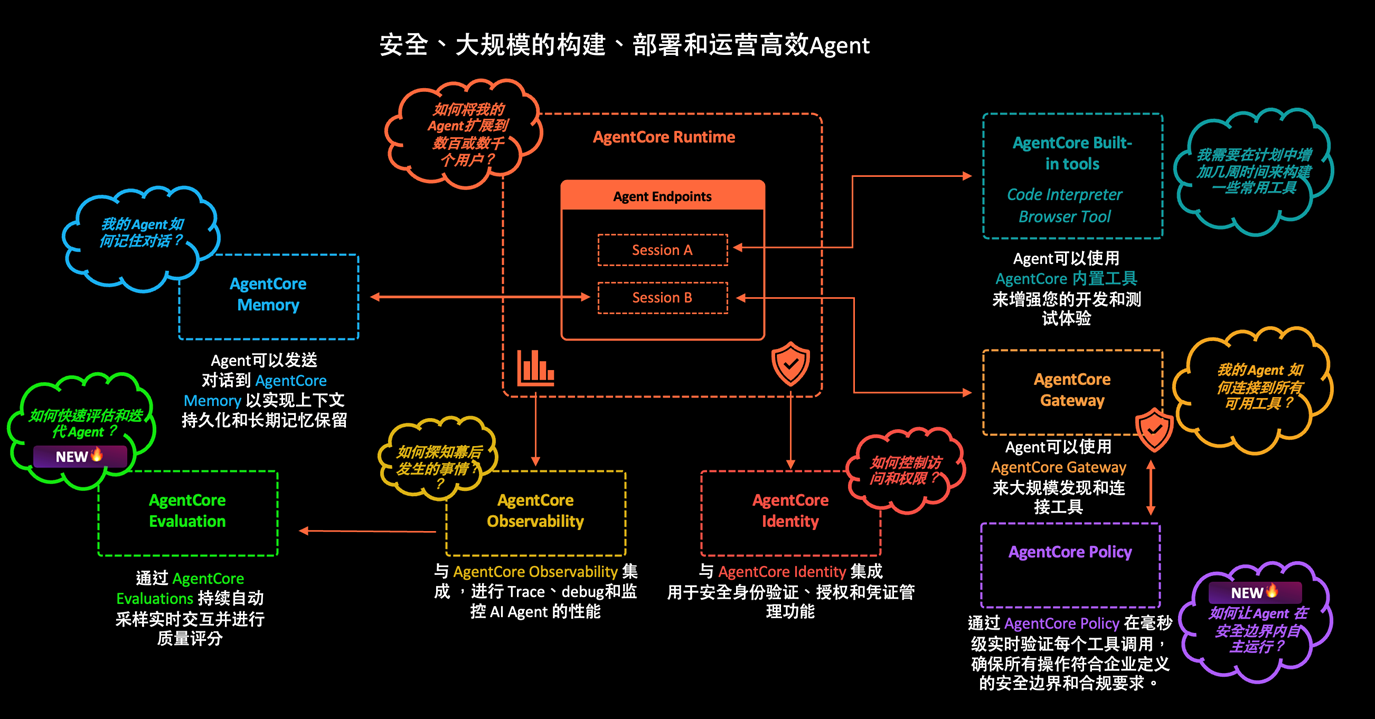
[图4] |
Amazon Bedrock AgentCore支持多种Agent业务场景,例如:
- 广告营销流程自动化
- 以浏览器获取电商营销信息
- 电商搜索Agent
- 自动量化交易平台
- 多Agent个人助手和办公助理
- 代码助手,个性化推荐,页面设计
- IT巡检和运维
- 数据分析爬虫
展示几个实际例子,通过Kiro IDE快速开发并部署Agent应用到Amazon Bedrock Agentcore,整个开发部署周期缩短到几个小时,极大提高Agent从需求到落地的速度。
三、案例1:金融逾期处理Agent
金融机构贷款需要管理逾期资产,通过智能化手段提高回收率,同时确保催收过程合规,降低投诉风险。催收过程分为5个阶段:
1.逾期识别
- 系统自动检测还款日到期未还款
- 生成逾期案件进入案件池
2. 画像评分
- 采集用户多源数据(交易、行为、还款历史、征信)
- 计算B卡评分(行为风险)和C卡评分(还款概率)
- 构建用户画像
3. 分拨决策
- 根据案件信息、用户画像、评分匹配策略规则
- 决定触达渠道(机器人/人工/短信)、优先级、话术模板、触达时间
4. 触达执行
- 按分拨结果执行外呼或消息推送
- 机器人外呼:ASR识别 → NLU理解 → 对话管理 → TTS合成
- 人工外呼:坐席拨打并记录
- 记录触达结果(承诺还款/拒绝/无法触达)
5. 合规质检
- 实时监控通话数据
- 检测情绪、禁用词、必说项、频次
- 按风险等级(P0/P1/P2)告警和处置
- P0级违规立即暂停坐席
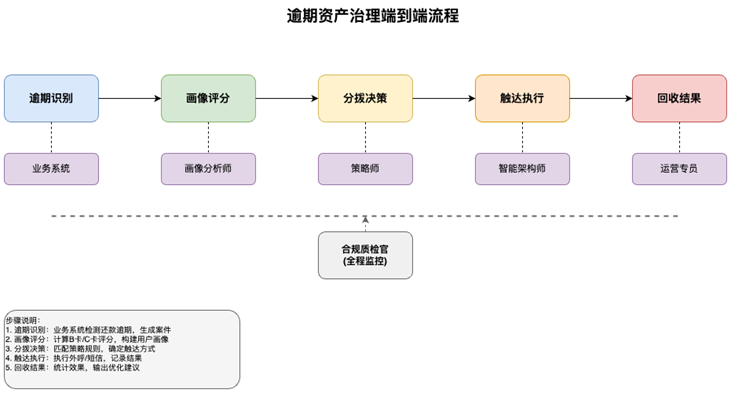
[图5] |
关键角色包括
- 大数据画像分析师:构建评分模型
- 风险策略师:配置分拨规则
- 智能技术架构师:管理外呼系统
- 合规质检官:监控违规行为
- 运营管理专员:绩效监控和优化
逾期案件状态流转:
创建 → 已评分 → 已分拨 → 触达中 → 承诺还款/拒绝/无法触达 → 已回收/重新分拨
此业务流程中,传统方式有多种角色参与,存在不足之处:
- 人工识别逾期案例,效率低下
- 客户画像分析标准不一
- 风险评估依赖主观判断
- 渠道分配缺乏优化
- 人工外联成本高昂
考虑以AI优化业务,使用Multi-Agent AI系统替代人工操作,实现从逾期识别到客户外联的端到端自动化,处理效率从几天缩短到几个小时,提高风险处理准确率。
使用Kiro IDE SPEC模式,生成规范文档。包括业务需求,技术要求和规范,开发部署流程。加入架构设计要求,多个Agent运行在云上Amazon Bedrock Agentcore,使用数据库存储风险案例和用户画像数据,前后端分离,外联组件使用Amazon Connect自动呼叫。对于云上环境,也定义了技术要求。
初始提示词如下:
业务需求
创建自动化金融逾期处理流程Multi Agent,从逾期开始到触达处理结束,使传统处理流程中的人工步骤都由Agent实现。
业务流程参考Flows.txt,从逾期识别-->画像评分-->分拨决策-->触达执行流程,无需后续合规质检和绩效监控流程

技术要求
重点是创建多Agent架构自动化实现流程,模拟逾期金融数据和客户特征画像,进行评分,自动进入案件池,触发通知客户。触达流程分阶段部署,第一阶段使用SNS发送邮件通知。等所有流程完成之后,第二阶段使用Amazon Connect外呼系统,并结合Nova Sonic语音服务。
使用Strands Agent SDK,部署在Amazon Agentcore。
简化其他技术组件,不需要Kafka, Flink, Clickhouse等模块。实时和离线数据源统一使用Aurora Postgresql,特征和分析数据也使用Aurora Postgresql。

Separate backend & frontend. Backend Python language, deploy on ECR + Fargate. Frontend: React & Node.js, request routes to backend. By frontend, business operator can view business dashboard and risk details. Run all programs directly instead of docker, unless at Agentcore deployment stage.
Deploy multi agents in Agentcore Runtime. Make sure LLM reasoning is used. Orchestrator agent processes requests, invoke other agents to finish business process. Data agent query and write business data. User, order, events and processing data are stored in Aurora Postgresql database.
Each conversation generates an Agentcore Runtime Session and stores the conversation history in Agentcore Memory, including short-term and long-term memories.
Using Cognito as user authentication, integrated with Agentcore Runtime authentication.

技术规范
DO NOT use any Cloudformation.
Use real AWS services rather than simulated functionality.
Store all test scripts in directory "tests", documentation in directory "docs".
Refer to Kiro Power for Strands Agents SDK& AgentCore to deploy according to best practices.

开发部署流程
Credential: Use .env file for environment config.  Local credential in development environment, production environment can be switched to role.
1.Initialize related AWS services. Make sure each service can be called well.
AWS region: us-west-2, environment config with local credential
LLM Model: Amazon Nova Pro
Set up IAM roles to access all needed AWS services, including Bedrock, AgentCore, Database Data API, ECS Fargate, Secret Manager, S3, etc.
Aurora Postgresql Serverless with Data API & Secret Manager. Initialize some business related data in this financial scenario.
SNS with email
2.Development multiple agents locally. Make sure all agents run with real Bedrock Nova LLM reasoning, access real Aurora database. Follow Agentcore development best practice.
3.Test all agents run business flow correctly in local host. Create test cases for each agent, and integration, simulate real cases.
4.If local test fine, change env production env with role. Deploy agents to Agentcore Runtime with production env. Make sure configure Agentcore Runtime with HTTP 8080 port, following Agentcore deployment best practice.
5.Create backend with Python for calling agents. Test backend integrated with Agentcore. If fine, deploy backend to ECS Fargate.
6.Create React & Node.js front-end UI, for business operator, including user interfaces, and login authentication.
7.Test full process from frontend to backend & Agentcore.
8.Deploy frontend to Cloudfront + s3. Remember DO NOT make S3 public access. Make sure Cloudfront origin access control for secure access.
Kiro生成SPEC规范文档
- requirements.md : 使用清晰的用户故事和 EARS 符号作为验收标准,提供结构化的 PM 风格功能需求
部分内容
## Requirements
### Requirement 1: Multi-Agent Architecture
**User Story:** As a financial institution, I want an automated multi-agent system to handle overdue processing, so that manual intervention is eliminated while maintaining processing quality.
#### Acceptance Criteria
1. THE Orchestrator_Agent SHALL receive processing requests and coordinate other agents to complete business workflows
2. WHEN a business process requires data operations, THE Orchestrator_Agent SHALL invoke the Data_Agent using AgentCore Runtime API calls
3. WHEN customer profiling is needed, THE Orchestrator_Agent SHALL invoke the Scoring_Agent using AgentCore Runtime API calls
4. WHEN distribution decisions are required, THE Orchestrator_Agent SHALL invoke the Allocation_Agent using AgentCore Runtime API calls
5. WHEN customer outreach is needed, THE Orchestrator_Agent SHALL invoke the Outreach_Agent using AgentCore Runtime API calls
6. THE System SHALL deploy all agents in AgentCore_Runtime with proper session management
7. THE System SHALL use Nova_Pro LLM for all agent reasoning and decision-making
8. THE Orchestrator_Agent SHALL use boto3 bedrock-agentcore client to make actual agent invocation calls
9. THE System SHALL pass session IDs between agent calls to maintain workflow context
### Requirement 2: Overdue Identification and Case Management
**User Story:** As a business system, I want to automatically detect overdue events and create cases, so that processing can begin immediately without manual intervention.
#### Acceptance Criteria
1. WHEN a payment due date passes without payment, THE System SHALL automatically detect the overdue event
2. WHEN an overdue event is detected, THE Data_Agent SHALL create a new case record in the Case_Pool
3. WHEN a case is created, THE System SHALL include user ID, overdue amount, and payment plan details
4. WHEN a case enters the Case_Pool, THE System SHALL trigger the profiling and scoring workflow
5. THE System SHALL maintain case status throughout the processing lifecycle
- design.md : 通过技术图表和实施细节记录系统架构和组件交互
部分内容
### Multi-Agent Pattern Selection
Based on the Strands framework analysis, this system uses a **hybrid approach**:
1. **Workflow Pattern** for the core business process: The overdue processing follows a deterministic DAG (Directed Acyclic Graph) where each stage has clear dependencies and parallel execution opportunities.
2. **Orchestrator Agent** for coordination: A central agent manages the workflow execution, handles error conditions, and maintains session state across the entire process.
3. **Specialized Agents** for domain expertise: Each agent focuses on a specific business capability with appropriate tools and LLM reasoning.
## Components and Interfaces
### 1. Orchestrator Agent
**Purpose**: Central coordination and workflow management
**LLM Model**: Amazon Nova Pro
**Key Responsibilities**:
- Receive and parse business requests
- Coordinate workflow execution across specialized agents
- Maintain session state and conversation history
- Handle error conditions and retry logic
- Provide status updates to backend API
### 2. Data Agent
**Purpose**: Database operations and data management
**LLM Model**: Amazon Nova Pro
**Key Responsibilities**:
- Execute CRUD operations on Aurora PostgreSQL
- Manage case lifecycle and status updates
- Retrieve customer profiles and historical data
- Store processing results and audit trails
**Tools**:
- `query_database`: Execute SELECT queries with parameterization
- `insert_case`: Create new overdue cases
- `update_case_status`: Update case processing status
- `get_customer_profile`: Retrieve comprehensive customer data
- `store_processing_result`: Save agent processing outcomes
### 3. Scoring Agent
**Purpose**: Customer profiling and risk assessment
**LLM Model**: Amazon Nova Pro
**Key Responsibilities**:
- Calculate B-Card scores (behavioral risk assessment)
- Calculate C-Card scores (repayment probability)
- Analyze multi-source customer data
- Generate risk profiles and recommendations
**Tools**:
- `calculate_b_card_score`: Behavioral risk scoring algorithm
- `calculate_c_card_score`: Repayment probability scoring
- `analyze_transaction_patterns`: Transaction behavior analysis
- `assess_payment_history`: Historical payment performance analysis
- `generate_risk_profile`: Comprehensive risk assessment
### 4. Allocation Agent
**Purpose**: Distribution decision-making and strategy application
**LLM Model**: Amazon Nova Pro
**Key Responsibilities**:
- Apply business rules for case routing
- Determine optimal outreach channels
- Select appropriate message templates
- Calculate priority scores and timing
**Tools**:
- `apply_allocation_rules`: Execute business rule engine
- `select_outreach_channel`: Determine communication method
- `choose_message_template`: Select appropriate messaging
- `calculate_priority_score`: Determine case urgency
- `optimize_contact_timing`: Find optimal contact windows
### 5. Outreach Agent
**Purpose**: Customer communication execution
**LLM Model**: Amazon Nova Pro
**Key Responsibilities**:
- Execute Phase 1 email notifications via SNS
- Execute Phase 2 voice calls via Amazon Connect
- Handle communication compliance and frequency limits
- Process customer responses and outcomes
**Tools**:
- `send_email_notification`: SNS email delivery
- `initiate_voice_call`: Amazon Connect call initiation
- `check_compliance_limits`: Validate communication rules
- `process_customer_response`: Handle inbound responses
- `record_communication_outcome`: Log results and status
- tasks.md : 将实施分解为清晰、可跟踪的步骤,并定义结果和依赖关系
部分内容
## Overview
This implementation plan converts the multi-agent financial overdue processing system design into discrete coding tasks. The approach follows a phased deployment strategy: Phase 1 implements email notifications via SNS, Phase 2 adds voice calls via Amazon Connect. All agents are built using Python with Strands Agent SDK and deployed on Amazon AgentCore Runtime.
## Tasks
- [x] 1. Initialize AWS Infrastructure and Services
  - Set up AWS region (us-west-2) with local credentials for development
  - Configure IAM roles for Bedrock, AgentCore, Aurora, SNS, and other AWS services
  - Initialize Aurora PostgreSQL Serverless with Data API and Secret Manager
  - Set up Amazon SNS for email notifications
  - Configure Amazon Bedrock Nova Pro model access
  - Create sample financial business data for testing scenarios
  - _Requirements: 10.3, 10.4, 10.5, 12.4_
- [x] 2. Set up Development Environment and Configuration
  - Create .env file structure for environment configuration
  - Install Strands Agent SDK and AgentCore development tools
  - Configure local development credentials and AWS service access
  - Set up project directory structure for multi-agent system
  - Initialize Aurora PostgreSQL database schema with business tables
  - _Requirements: 12.1, 12.5_
- [x] 3. Implement Database Schema and Data Models
  - [x] 3.1 Create core database tables (cases, customer_profiles, communications, allocation_rules)
    - Design and implement cases table with overdue processing lifecycle
    - Create customer_profiles table for risk assessment data
    - Build communications table for outreach history and outcomes
    - Implement allocation_rules table for business rule engine
    - _Requirements: 7.1, 7.3_
  - [ ]* 3.2 Write property test for database schema integrity
    - **Property 9: Unified Data Storage Consistency**
    - **Validates: Requirements 7.1, 7.2, 7.3, 7.4, 7.5**
  - [x] 3.3 Create data access layer with Aurora PostgreSQL Data API integration
    - Implement database connection management with Secret Manager
    - Create CRUD operations for all business entities
    - Add transaction management and connection pooling
    - _Requirements: 7.2, 10.4_
  - [x] 3.4 Validate Bedrock Nova LLM and Aurora PostgreSQL Integration
    - Comprehensive integration testing of Bedrock Nova Pro model
    - Validate Aurora PostgreSQL Data API connectivity and operations
    - Test LLM + Database integration for financial risk assessment
    - Verify performance and reliability of both services working together
    - _Requirements: 1.7, 7.2, 10.4_
业务架构如下:
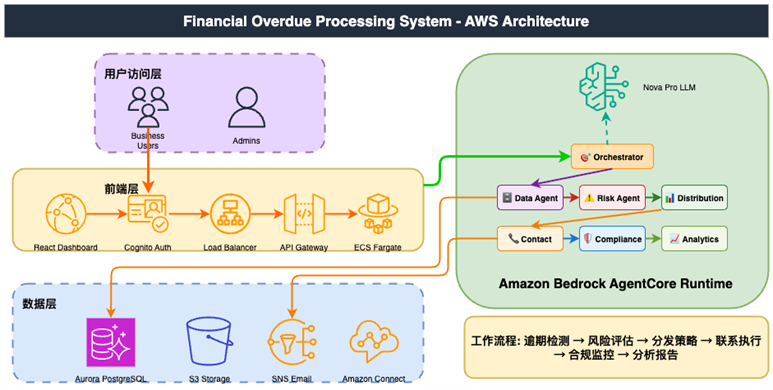
[图6] |
前端使用React框架,部署在S3静态网站,通过Cloudfront分发。后端应用部署在ECS Fargate serverless,无需设置后端应用实例,自动通过容器模版启动。数据库使用Amazon Aurora PostgreSQL,由于Kiro在本地,云上数据库访问需要通过VPC访问,这里为了测试方便,设置Aurora Data API,可以用API方式从公网访问数据库,而无需数据库驱动连接,生产环境可以使用VPC连接。
Agent运行在Amazon Bedrock Agentcore Runtime,调用Amazon Bedrock Nova LLM,进行流程处理。多个Agent使用orchestrator编排模式,主Agent负责管理调度其他agent,运行各自功能,包括案例数据处理、信用风险评估、联系渠道分配、电话外呼或者邮件联系,最终完成全自动业务流程。后端请求调用主Agent Orchestrator,流程先调用Data Agent,查询逾期案例数据和用户信息和历史数据,然后Scoring Agent进行信用评分和风险评估,Allocation Agent根据评分,决定采用哪种联系方式(电话/邮件/短信),最后由Outreach Agent实施外呼动作,邮件或者Amazon Connect语音呼叫。
生成项目结构:
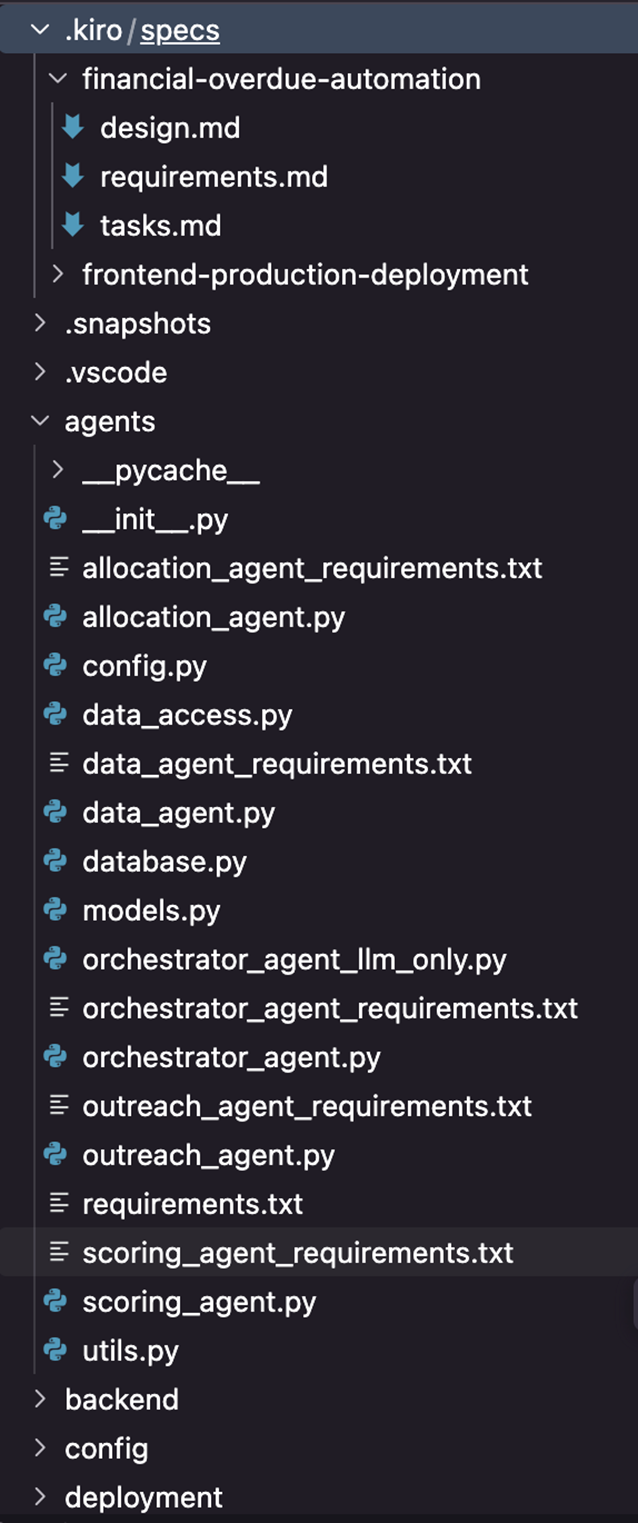
[图7] |
Orchestrator agent入口代码逻辑如下:
@app.entrypoint
def invoke(payload, context):
    """
    Main entry point for overdue processing requests
    Args:
        payload: {
            "action": "process_overdue",
            "user_id": "string",
            "case_id": "string",
            "overdue_amount": float,
            "session_id": "string"
        }
        context: AgentCore runtime context
    Returns:
        {
            "status": "success|error|in_progress",
            "case_id": "string",
            "current_stage": "string",
            "result": dict,
            "error_message": "string"
        }
    """
Data Agent部分分析接口代码:
    @tool
    def analyze_customer_data(self, user_id: str) -> Dict[str, Any]:
        """
        Use Nova Pro LLM to analyze customer data and provide insights
        Args:
            user_id: The unique identifier for the customer
        Returns:
            LLM analysis and insights about the customer
        """
        try:
            # Get customer profile
            profile = data_access.get_customer_profile(user_id)
            if not profile:
                return {
                    "success": False,
                    "message": f"No customer profile found for user {user_id}"
                }
            # Create analysis prompt
            prompt = f"""
You are a financial risk analyst. Analyze this customer profile and provide insights:
Customer ID: {profile.user_id}
Transaction Volume: ${profile.transaction_volume:,.2f}
Average Monthly Spend: ${profile.avg_monthly_spend:,.2f}
Payment History Score: {profile.payment_history_score:.2f} (0-1 scale)
App Activity Score: {profile.app_activity_score:.2f} (0-1 scale)
External Credit Score: {profile.external_credit_score}
Current Risk Category: {profile.risk_category.value}
Preferred Contact: {profile.preferred_contact_method.value}
Provide:
1. Risk assessment summary
2. Key behavioral indicators
3. Recommended engagement strategy
4. Potential concerns or red flags
Keep response concise and actionable.
"""
            # Get LLM analysis
            analysis = llm_client.invoke_model(prompt, max_tokens=400, temperature=0.2)
            return {
                "success": True,
                "data": {
                    "user_id": user_id,
                    "analysis": analysis,
                    "profile_summary": {
                        "risk_category": profile.risk_category.value,
                        "payment_score": profile.payment_history_score,
                        "credit_score": profile.external_credit_score,
                        "preferred_contact": profile.preferred_contact_method.value
                    }
                },
                "message": f"Customer analysis completed for user {user_id}"
            }
        except Exception as e:
            return {
                "success": False,
                "error": str(e),
                "message": f"Error analyzing customer data for user {user_id}"
            }
由于此业务流程固定,多Agent通过工作流方式编排,Agent之间通过通过HTTP API请求调用。如果是更复杂灵活的Agent,还可以考虑MCP/A2A协议,和其他编排模式。
这里使用Strands Agents SDK框架,定义了灵活的Agent使用方法,无需从底层实现agent行为。Strands Agents通过充分发挥顶尖模型的规划、思维链、工具调用能力和反思能力,大幅简化了Agent开发流程。开发者只需在代码中定义提示词和工具列表,即可快速构建Agent,完成本地测试后可直接部署至云上。开发者可在Strands Agents中深度定制Agent行为,例如:指定工具选择策略、自定义上下文管理方式、选择会话状态与记忆存储方案,乃至构建多Agents协作应用。
使用Amazon Bedrock Agentcore ,无需运维底层设施,自动扩缩容,健康检查。按照Agent运行时间计费,空闲时间不收取CPU费用,运行后即可结束会话以节省费用。所有Agent都使用Amazon Bedrock大模型进行推理,以reasoning LLM方式决定行为。这里是固定流程,如果以后加入更灵活的业务流程,reasoning LLM方式更加智能。
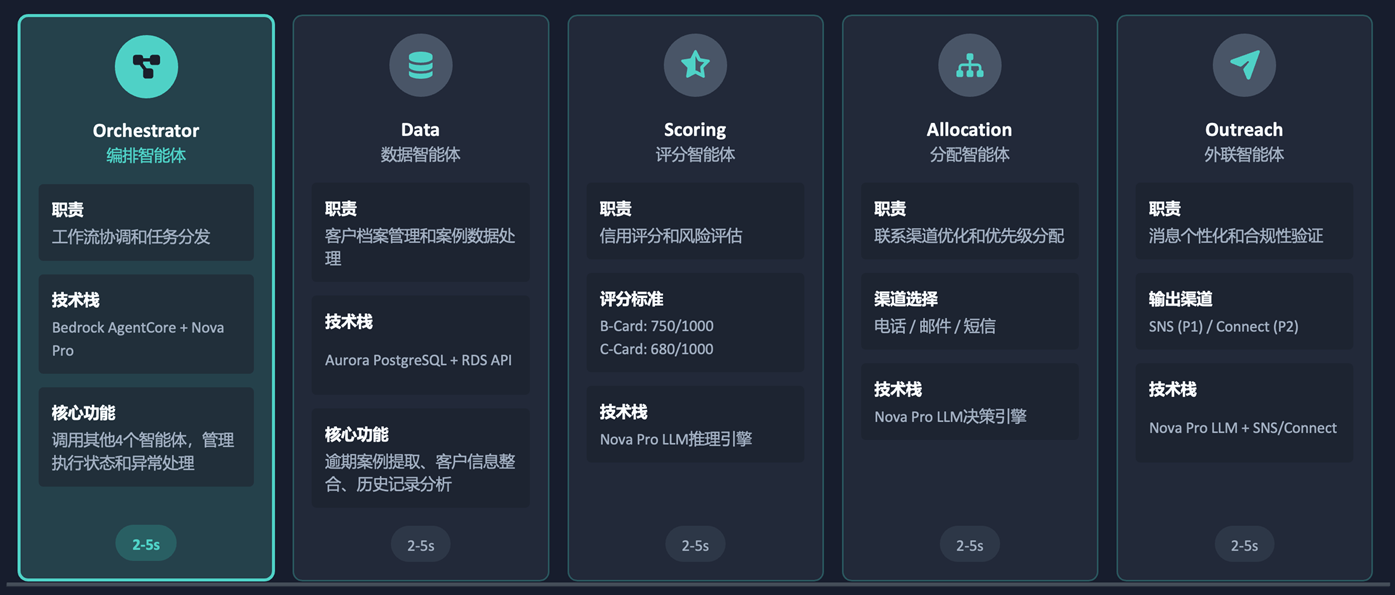
[图8] |
根据SPEC规范文档,Kiro依次运行tasks任务,分为本地开发和云端部署阶段。每个任务运行结束后,可以检查运行结果,根据需要进行调整。
1. 环境搭建
- Credential配置和IAM权限设置
- Aurora PostgreSQL数据库创建
- Amazon Bedrock Nova Pro LLM初始化
- VPC网络和子网配置
2. 本地Agent开发
- 使用Strands SDK开发多个Agent
- 定义Agent间调用接口和数据格式
- Nova Pro LLM集成和参数调优
- 实现业务逻辑和错误处理机制
3. 多Agent集成测试
- 验证Orchestrator调用其他Agent
- 端到端流程测试(~30秒)
- JSON数据提取和传递验证
- 错误场景和异常处理测试
4. AgentCore部署
- ARM64 Graviton环境配置
- HTTP 8080端口和安全组设置
- 多个Agent部署到Amazon Bedrock AgentCore
- Agent健康状态和运行监控
5. 后端开发
- FastAPI框架搭建和API设计
- Amazon Cognito身份认证集成
- Agent调用接口封装和重试机制
- Docker容器化和ECR镜像推送
6. 前端开发
- React + Vite项目初始化
- 用户界面设计和状态管理
- 实时监控和轮询机制实现
- CloudFront + S3静态部署
7. 生产验证
- 成功率验证
- 性能基准测试
- 配置CloudWatch监控
- 启用分布式追踪
开发代码时间约2小时,测试部署时间约6小时,更多时间花在验证Agent模块,以及部署到云上。相对传统开发周期几天到几个星期,整个开发部署时间大幅降低。
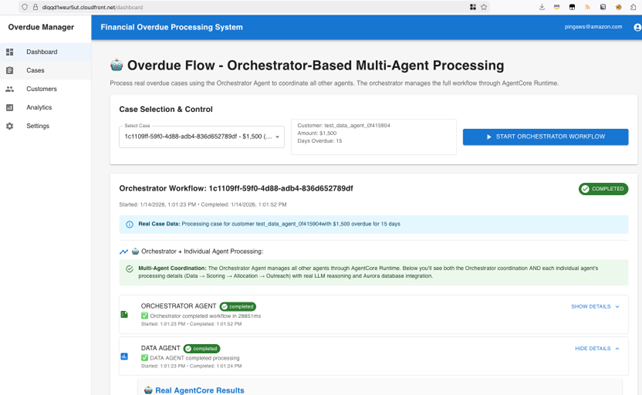
部署Demo: https://diqqd1weur5ut.cloudfront.net/
项目代码:https://github.com/milan9527/overdueagent
[图9] |
整个过程也并非一帆风顺,以下是部分问题总结。
Orchestrator Agent无法正确调用其他Agent
解决方案:实现真实的Agent调用机制,替代模拟调用
部署到生产环境后出现bedrock-agentcore权限不足
解决方案:添加bedrock-agentcore:InvokeAgentRuntime权限
从数据库提取的案例ID在Agent间传递时出现解析失败
解决方案:增强JSON数据提取和解析逻辑,建立标准化数据格式
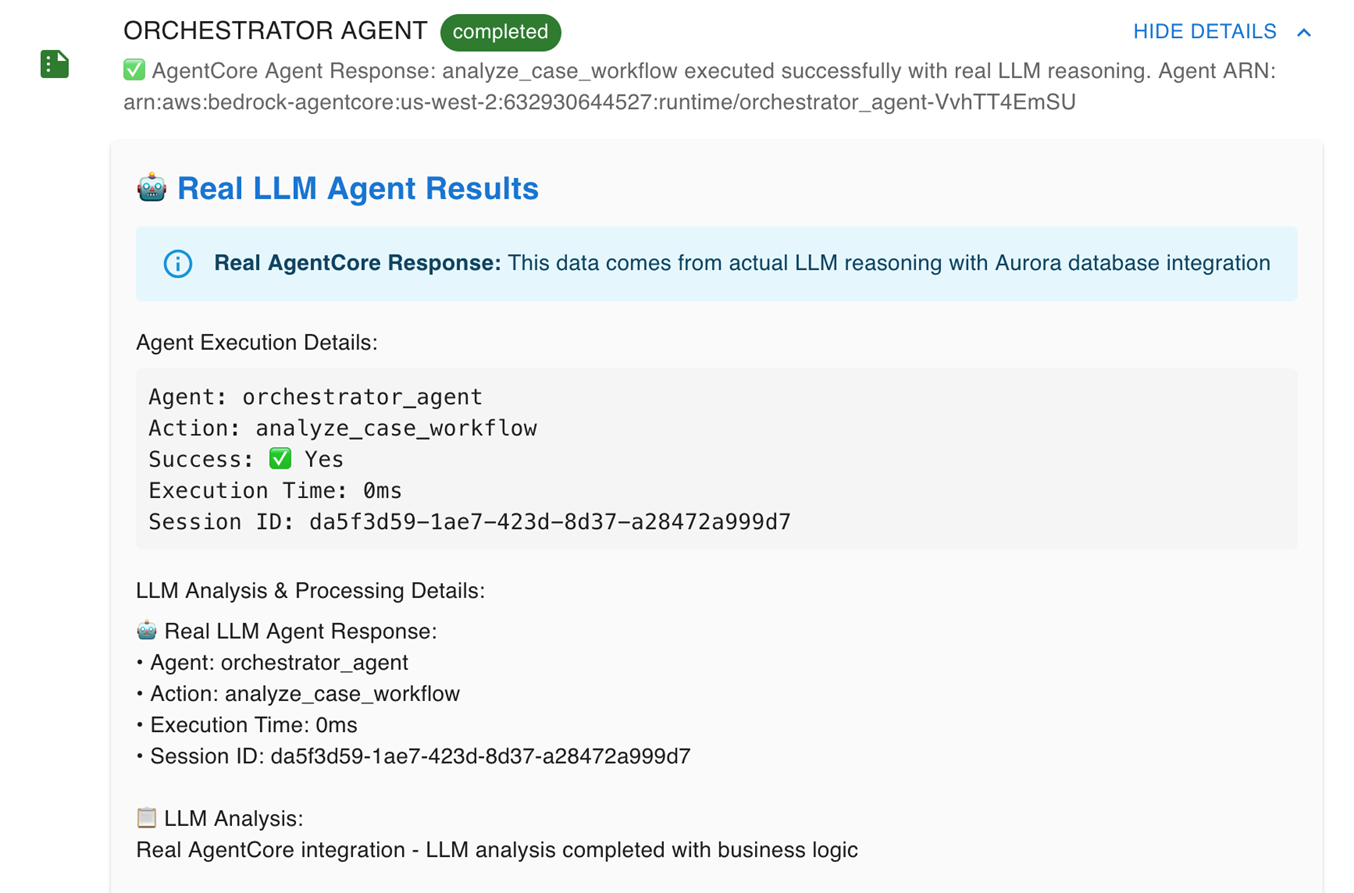
如下图所示,Agent显示工作正常,但是执行时间0ms,显然不符合大模型调用时间。
经过分析,使用模拟方法,而并非真正大模型调用。
解决办法:强制使用真实LLM调用
[图10] |
AI IDE工具可以大幅提高业务开发落地效率,相信AI,但是不能完全相信AI。人类的知识经验,需要监督AI生成的代码,即使看上去可以运行,也需要验证真实可靠。
金融逾期处理Agent系统,业务处理时间从几小时缩短到30秒,标准化风控评分准确性提高。基于Amazon Bedrock Agentcore Serverless部署方式,Agent运行成本大幅降低。最为显著的优势,在于开发周期从传统的几天甚至几周,缩短到几小时。对于AI创新业务,时间效率更为重要。如果需要其他生产级别组件,例如Agent记忆、评估,Amazon Bedrock Agentcore也提供了相应功能,更适合企业生产部署。
如果需要进一步改进优化,从业务角度,加入更多业务需求模块,快速构建符合生产需求的Agent。技术层面可以考虑多个Agent MCP化,使用统一接口访问各个业务MCP,让其他业务也能相互调用,形成AI微服务。产品层面,可以接入CRM,实现数据互通。这些需求在AI驱动开发的实践下,都可以更快速完成。
四、案例2:智能过敏原分析Agent
构建智能过敏原分析系统,通过AI将复杂的医疗检测报告转化为直观易懂的卡通可视化内容,帮助患者更好地理解过敏原信息并获得个性化治疗建议。
此Agent自动分析过敏原测试报告,生成个性化卡通可视化图像,提供可靠的治疗建议,并且安全处理医疗行业文档。使用Amazon Bedrock Agentcore作为Agent运行环境,调用Amazon Bedrock Nova大模型,作为Agent处理依据,并且按照过敏程度生成图标。垂直行业更需要专业知识,医疗行业的专业文档作为RAG知识库,让大模型处理更有深度专业性。
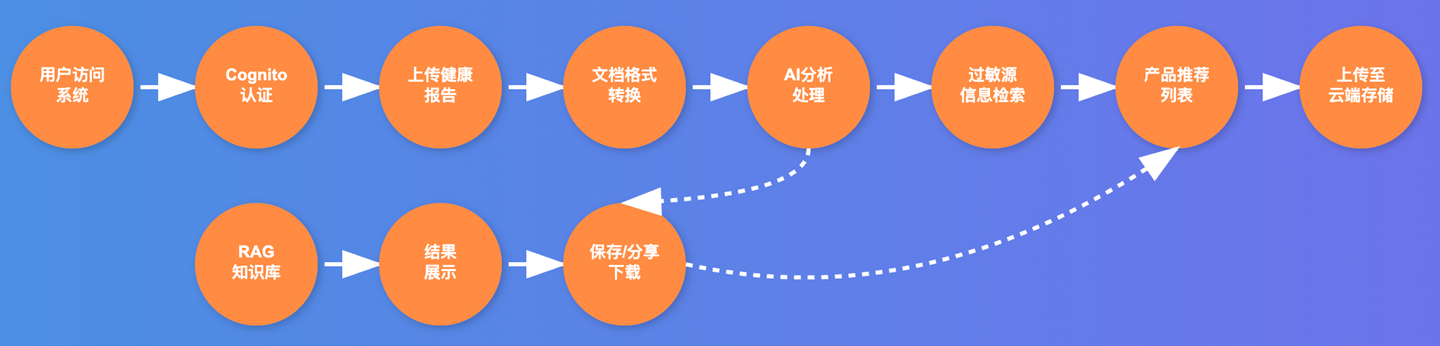
业务流程如下:
[图11] |
同样采用Kiro IDE作为快速开发和部署工具,几小时内完成开发测试到部署在云上整个过程。
Kiro SPEC初始提示词,包括业务需求、技术架构、技术要求规范:
Create a Smart Allergen Cartoonizer (Smart Allergen Cartoonizer) on Amazon AgentCore
Business process:
1. Users upload allergen test reports to S3 by uploading or taking pictures
2. Identifying the abnormal portion of the allergen report: Bedrock LLM (Amazon Nova Pro)
3. Generate a cartoon image (Bedrock LLM Amazon Nova Canvas) to give patients a more specific allergen risk profile (Bedrock LLM Amazon Nova Premium)
4. Once the patient sees it, remind the user to click Next to get the solution (Bedrock LLM Amazon Nova Premium)

Requirements:
1. Allergens are limited to mites. An LLM is required to generate a mite profile picture to be used for different levels of allergies
2. Involves scientific research and requires the preservation of all original documents
3. Data privacy protection, patient information desensitization
4. Provide solutions based on different user data
5. RAG vector library: user documents are vectorized and administrators can also add medical industry documents to gain more expertise
6. The administrator interface can view user statistics and manage the RAG documents uploaded by itself

Technical highlights:
AWS region: us-west-2
LLM Model: Amazon Nova Premium as agent processing and analysis. Amazon Nova Canvas generates images, pre-generates multiple allergy level images, and stores them in S3, and can be directly used in customer processes
Run the Agentcore Runtime using the Agentcore Agent SDK. Agents can communicate with customers, answer questions, and run business processes. The agent language uses Python and doesn't use Docker, unless it reaches the Agentcore deployment stage. Create a separate directory for each agent, add AgentCore Runtime entry point files separately, use BedrockAgentCoreApp Decorator, and import agent files, so agents can run locally or Agentcore. All agents expose HTTP 8080 port, path /invocations, and /ping health checks.
Each conversation generates an Agentcore Runtime Session and stores the conversation history in Agentcore Memory, including short-term and long-term memories.
Using Cognito as a user authentication system, Agentcore Runtime combines Cognito authentication.
User data is stored in a database, and current report data and historical data can be viewed. Databases: Aurora Postgresql Serverless uses Data API & Secret Manager to access and create user and business sample data. The database enables pgVector as RAG to store user documents and industry knowledge documents after vectorization.
Test the entire agent process locally to confirm normal operation, then configure and deploy to Agentcore Runtime through Docker. Next, use Next.js to build a Chinese front-end UI, including user and administrator interfaces, and login authentication.
Set up IAM roles to access all AWS services, including Bedrock, AgentCore, Database Data API, Secret Manager, S3
Store all test scripts and documentation in the relevant directory.
Use real AWS services rather than simulated functionality.
Credential: Use the local credential “xxx” in the development environment, and the production environment can be switched to a role
Refer to Kiro Power to build AgentCore & Administer Agent to deploy according to best practices. This scenario is simple; don't use Agentcore Gateway.
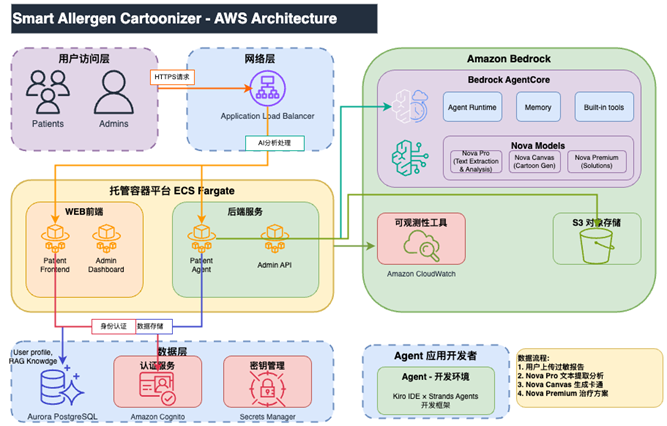
系统架构:
[图12] |
使用前后端分离,都运行在ECS Fargate托管容器平台。S3存储用户上传图片。前端使用Next.js + React,后端数据库使用Aurora PostgreSQL,存储用户数据,以Data API方式访问,并且支持pgvector向量,作为医疗行业知识库数据。Amazon Cognito认证服务管理用户授权。后端服务调用Agent,运行于Amazon Bedrock Agentcore Runtime,并使用Amazon Bedrock Agentcore Memory作为会话短期和长期记忆,方便管理会话历史。使用Amazon Bedrock Nova LLM大模型,作为Agent处理的大脑,分析文档和提取过敏原信息,验证医疗内容和提供建议。这里没有Amazon Textract服务作为OCR,是因为上传的报告图片并不完全都是文字类型,有些非文字报告内容用OCR不能识别,因此使用Amazon Bedrock Nova Pro作为图片识别大模型。另外还使用Amazon Bedrock Nova Canvas生图。
用户上传过敏原图片到S3,触发后端服务,启动Agent session,分析过敏程度,生成卡通形象,并提供治疗方案。
此业务较为简单,只使用单个Agent,包含查询、分析、生产图标、知识检索等多个tool。
整个开发部署流程如下,全都由Kiro根据我们提供的业务需求和技术规范实现。
业务需求 → 架构设计 → 快速开发 → 持续测试 → 云原生部署 → 全面监控

[图13] |
Agent部分代码
            # Use Amazon Bedrock for comprehensive content analysis
            prompt = f"""
            You are an expert allergist. Analyze this allergy test content and provide accurate medical assessment.
            CONTENT: {content}
            CRITICAL INSTRUCTIONS:
            1. IGNORE any "Grade" or "级" information in the content - it's often incorrect
            2. Focus ONLY on the numerical values and units (IU/ml, KUA/L)
            3. For IU/ml units with 0-0.35 reference range:
               - <0.35 = Normal/Negative (Grade 0)
               - 0.35-3.5 = Low positive (Grade 1-2)
               - 3.5-17.5 = Moderate positive (Grade 3)
               - >17.5 = High positive (Grade 4-5)
            4. Calculate the correct grade based on the value, not what's written
            5. Be specific about which allergens are concerning
            Format:
            ## Analysis Result
            [State if this contains actual allergy test results]
            ## Key Findings
            For each allergen: Name | Value | Correct Grade | Severity
            Example: Cockroach (蟑螂) | 18.887 IU/ml | Grade 5 (High) | Significant allergy requiring avoidance
            ## Medical Recommendations
            [Specific recommendations based on actual severity levels]
            """
            response = self.bedrock_client.invoke_model(
                modelId='us.amazon.nova-pro-v1:0',
                body=json.dumps({
                    "messages": [{"role": "user", "content": [{"text": prompt}]}],
                    "inferenceConfig": {
                        "maxTokens": 1000,
                        "temperature": 0.2
                    }
                })
            )
            result = json.loads(response['body'].read())
            analysis = result.get('output', {}).get('message', {}).get('content', [])
            if analysis and isinstance(analysis, list) and len(analysis) > 0:
                analysis_text = analysis[0].get('text', 'Analysis completed')
            else:
                analysis_text = 'Analysis completed'
            logger.info("AI analysis completed successfully")
            return analysis_text, severity_score, True
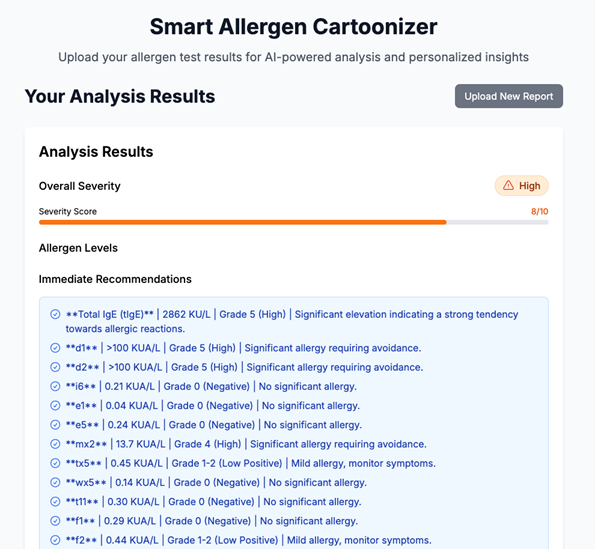
生成项目用户界面如下:
[图14] |
Demo: http://healthagent.zhangwangshu.com/
项目地址:https://github.com/milan9527/healcareagent
Kiro开发和部署阶段也会出现一些问题,部分总结如下。
用户无法正常登录系统,前端提示”Auth UserPool not configured”错误
解决方法:认证配置修复,在Cognito用户池客户端添加认证流程
服务间调用失败,权限过度或不足导致S3、Bedrock、Aurora等访问异常
解决方法:创建基于最小权限原则的IAM角色,精确配置各服务访问策略
排查步骤,全都由Kiro AI自动化解决,无需手工修复。
-
- 检查Cognito用户池配置,验证用户池ID和客户端ID
- 查看前端控制台错误日志,确认具体的认证失败原因
- 验证IAM角色策略,检查S3、Bedrock、Aurora等服务的权限
- 测试后端API调用,确认服务间通信是否正常
- 使用AWS CLI验证权限配置是否正确
- 容器架构兼容性问题
ℹ️ 注意:
Amazon Bedrock Agentcore使用ARM64架构。本地开发使用x86_64架构,生产环境使用ARM64 (Graviton)架构,导致Docker镜像构建失败。
跨平台构建时出现依赖包不兼容,Python扩展库编译错误
解决方案:
架构统一化,使用ARM64架构进行开发和部署
# Dockerfile
FROM –platform=linux/arm64 python:3.11
最佳实践总结
-
- 统一架构:开发、测试、生产环境使用相同的CPU架构,避免兼容性问题
- 在Dockerfile中明确指定基础镜像的架构平台
- 使用requirements.txt锁定依赖版本,确保跨平台一致性
- AI内容检测与处理错误
- 医疗内容误判,系统错误分析非医疗图像或文档,导致AI生成不相关的回答
示例: 非医疗图像被错误处理
用户上传: 风景照片
AI响应: “检测到过敏原: 树木花粉” ❌
期望: “请上传有效的过敏原检测报告” ✅
解决方案:增强提示词工程,增加医疗内容验证逻辑
“你是一个专业的过敏原分析助手。
请先验证以下内容是否为医疗检测报告:
如不是医疗报告,请要求重新上传”
报告: “户尘螨 IgE 3.5 IU/mL”
AI识别: “户尘 ? 3.5” ❌
期望: “户尘螨: 3.5 IU/mL (中等)” ✅
解决方案:增强中文医疗术语的模式匹配和内容检测算法
-
- 过敏原数据提取不准确,结构化数据提取失败率高,无法正确识别严重程度
这些错误在程序逻辑上正确,但是却不符合实际业务情况,特别需要人工监督,依靠专业知识判断是否符合业务逻辑。实践中,可以在每个重要步骤完成总结之后,按需审核,或者人工再次测试,以避免业务逻辑错误,不可完全依赖AI。
AWS Profile配置问题
AgentCore部署后运行时出现botocore.exceptions.ProfileNotFound错误
根本原因
代码在AgentCore运行时加载了本地开发环境的AWS profile配置,但在云环境中应该使用IAM角色。
解决方案
在AgentCore运行时,AWS SDK自动使用任务角色,无需手动配置profile
实践总结:
-
- 实现运行时环境检测,区分本地开发和云环境
- 在云环境中优先使用IAM角色,避免profile配置
- 使用不同的环境文件(.env.local vs .env.aws)分离配置
- 配置CloudWatch日志,及时发现和解决问题
- 前后端集成与响应解析错误
- 用户上传文件后,前端显示null响应,无法显示分析结果
- AgentCore CLI返回的JSON响应分散在多行,前端解析逻辑无法正确处理
- 前端代码尝试在字符串上访问对象属性,导致分析数据无法显示
解决方案:
前端响应解析修复和检测增强
// CartoonDisplay.tsx
if (!analysisData || typeof analysisData === ‘string’) {
// 处理字符串响应,提取结构化数据
const parsedData = parseResponseText(analysisData);
以上问题,关于程序逻辑和云上部署的部分,AI工具一般都可以正确解决。但是,业务逻辑部分,程序运行正确,此时AI不能完全排查错误,仍然需要人工经验,这点需要特别注意。
再次总结Kiro生成Agent项目的一些经验:
- 使用SPEC模式,分阶段确认任务完成
- 提示词描述清楚业务需求和技术实现
- POC阶段选择MVP,只测试基本功能,时间更短
- 选择合适的云服务:
- Amazon Aurora Data API可以公网访问
- Amazon Bedrock Nova(无地域限制,支持Agent必须的tool功能, streaming)
- 本地开发完成后先测试通过,再部署到云上
- 项目开始就要选择云上部署方式,前后端分离
- ECS Fargate:本地和云上一致,注意docker镜像源速度
- Cloudfront + S3: 需要设置Cloudfront Original Access Control安全回源到S3
- 测试多种场景
- 业务流程是否合理
- 是否包含各种可能性
- 前后端表现不一致
- 适当人工介入,特别是每个任务的总结,需要仔细检查并测试。
- 如果Agent响应太快,要注意是否真正调用大模型
五、整体总结
使用Kiro AI IDE开发工具,快速实现各种业务Agent。从业务需求,到开发测试,到云上部署,整个过程缩短到几个小时。Amazon Bedrock Agentcore的免运维、安全隔离和扩展性,结合记忆、认证、安全策略、可观测性、评估等组件,更适合生产级别Agent大规模部署。
➡️ 下一步行动:
相关产品:
相关文章:
*前述特定亚马逊云科技生成式人工智能相关的服务目前在亚马逊云科技海外区域可用。亚马逊云科技中国区域相关云服务由西云数据和光环新网运营,具体信息以中国区域官网为准。
本篇作者
AWS 架构师中心:云端创新的引领者
探索 AWS 架构师中心,获取经实战验证的最佳实践与架构指南,助您高效构建安全、可靠的云上应用

|
 |