What Is Firmware?
What is firmware?
Firmware is a type of software that is embedded within a hardware device by the manufacturer to control basic device operations and hardware-software communications. A device or chip’s firmware, which loads at power-up, is stored in the non-volatile memory of that piece of hardware. Firmware exists on devices, such as computers, TVs, and IoT devices, and in components, such as graphics processing units (GPUs), solid state drives (SSDs), and network cards. Securing firmware includes considerations for updates, supply chain integrity, and vulnerability management.
Why is firmware necessary?
Firmware is a key component of most modern electronic devices and their components, including computers, TVs, IoT devices, GPUs, SSDs, and network cards. Here is why firmware is essential to run hardware.
-
Provides basic functionalities: Firmware controls the basic operations of hardware devices. Without firmware, devices can’t power up, initialize hardware components, run software, or provide user interfaces.
-
Improve device performance: Firmware enables hardware components to operate at optimal conditions. For example, a new firmware upgrade might reduce the time it takes to load the operating system, speeding up device startup.
-
Enable feature updates: Engineers release new firmware to introduce new features that enhance the user experience. For example, an update to a camera’s firmware might allow the device to save images in a new file format.
-
Expedite issue resolution: Some devices require firmware updates to solve hardware-related issues. For example, a graphics card might overheat under extreme usage, requiring adjustments to the processing cycle coded into the firmware.
-
Unify connected components: Electronic devices use firmware to communicate with internal and external components, such as speakers, microphones, and cameras. Firmware abstracts the complexities of low-level data exchange from software applications.
How does firmware work?
Firmware operates from the non-volatile memory that is embedded directly into hardware devices. Non-volatile memory is a type of storage that retains data even when it’s powered off. You can think of firmware as the basic software for hardware. This software is responsible for preparing computers, devices, and embedded systems for user interaction. First, engineers write, compile, and test the firmware code for a specific device. Then, they use specialized software and equipment to download the code to the hardware’s memory chip directly.
For example, device manufacturers might store firmware in flash memory, Electrically Erasable Programmable Read-Only Memory (EEPROM), or Read-Only Memory (ROM) chips. The choice of memory type depends on several factors. For example, if you need to store a simple, provenly stable firmware, use ROM or EEPROM. However, a flash memory chip is better for storing complex firmware that might require frequent updates. To run firmware, you need to connect the non-volatile memory to a central processing unit (CPU) for loading into RAM.
Here are the key stages of firmware operations.
Boot process
When a device powers up, it runs the firmware stored in the memory chip. The CPU loads the firmware code from the memory and runs through every instruction. Depending on the firmware type, the CPU might perform checks on configurations, input/output devices, and networking capabilities, and load the computer’s operating system. For example, most computers load the Basic Input/Output System (BIOS) upon startup. The BIOS runs through a sequence of checks to make sure that all devices are functional before loading the installed operating system.
Runtime environment
Engineers create firmware to provide specific functions, such as scheduling tasks, processing input signals, controlling output, and addressing hardware security. Every type of firmware runs in an environment specific to the hardware it’s built for. Unlike software applications, you usually cannot program the same firmware across different types of devices. For example, a digital camera’s firmware cannot run on a mobile phone, even though both devices share overlapping features.
Update mechanisms
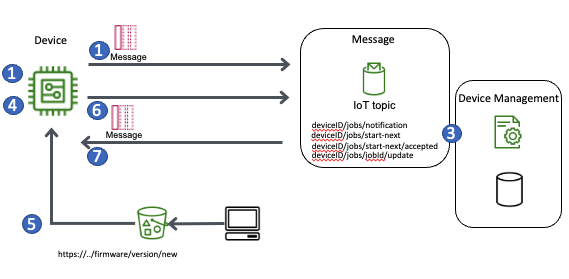
Manufacturers introduce new features, fix issues, address firmware vulnerabilities, and improve firmware performance with firmware updates. Firmware updates can happen automatically, or they can require user approval. Most connected devices check for updates over the internet and download and install them. For example, smartphones can update their firmware by downloading and installing the patch file over the air. However, you might need to manually update the firmware on some devices, such as network routers.
What are the types of firmware?
There are several firmware types, each with distinct characteristics.
Low-level firmware
Low-level firmware is tightly coupled with underlying hardware and is traditionally stored in ROM, but is stored in flash in modern systems. Low-level firmware controls the basic hardware functionalities by directly accessing individual components. Once embedded, the firmware remains in ROM throughout the device’s lifetime.
In computer systems, the Basic Input/Output System (BIOS) and Unified Extensible Firmware Interface (UEFI) are examples of low-level firmware. BIOS handles basic controls, while UEFI automates complex processes to expedite boot time and enhance computer security.
Conventionally, computers store BIOS in ROM, which prevents updates. However, modern computers store BIOS and UEFI in flash memory chips.
High-level firmware
High-level firmware performs complex instructions and requires more frequent updates. Unlike low-level firmware, high-level firmware is designed to operate more closely with users than the underlying hardware. Therefore, engineers store high-level firmware in flash memory chips. This firmware usually consists of a bootloader that allows it to update itself with newer firmware.
High-level firmware often manages more complex logic. It acts as a tiny operating system for the device, facilitating communication with application programming interfaces (APIs). For example, a network device contains high-level firmware that routes traffic to its respective destination.
Subsystem firmware
Subsystem firmware is self-contained firmware found in peripheral components. Often called embedded firmware, it handles specific tasks independently while communicating with the central controller. This firmware enhances system efficiency by offloading task-specific processing from the CPU.
For example, storage devices, monitors, and power supplies operate with their own subsystem firmware. Similar to high-level firmware, you can update subsystem firmware to improve performance or resolve issues.
What is the difference between firmware and software?
Software is compiled or runnable code that allows user interactions, performs complex computing tasks, or provides broad services. Meanwhile, firmware is embedded on a device that supports essential instructions that enable basic hardware functionality, such as networking, input/output, and power management.
You install software applications on hard disks or run them from the cloud. However, firmware is embedded into hardware devices. You can update or delete software easily without affecting the device’s operation. On the other hand, users cannot safely remove firmware because it is essential to the device’s operation. For example, you can safely remove mobile apps, but you cannot erase the firmware the smartphone requires to boot.
What are some firmware security considerations?
Firmware, like software, comes with security risks. Unlike software, firmware is at risk of security threats that could affect the device’s hardware, as well as the data and applications that the device powers. Here are some common types of firmware security risks.
Supply chain risks
Supply chain risks include vulnerabilities introduced across multiple phases of firmware development, programming, and distribution. For example, the firmware of a device could be affected by using a memory component from an untrusted vendor. Security-conscious organizations can conduct a vendor risk assessment or ask for a device manufacturer’s supply chain to help validate the trustworthiness of firmware. At the engineering level, it’s also important to implement cryptographic authentication, such as code signing, to ensure the firmware has not been tampered with.
Update authentication
Unauthorized firmware updates can compromise device security, leading to operational disruptions at scale. Bad actors might intercept legitimate downloads or introduce malicious programs alongside the firmware. Therefore, it’s crucial to authenticate new firmware versions before installing them. Several techniques can help organizations make sure that they don’t replace existing firmware with compromised versions:
-
Digital signatures enable devices to verify that firmware originates from a trusted vendor.
-
Encrypting the update channel helps prevent unauthorized parties from eavesdropping and intercepting the legitimate firmware.
-
Version rollback allows engineers to manually revert the firmware to a working version if the update proves problematic.
Vulnerability management
Firmware updates might not happen as frequently as software updates, leaving discovered vulnerabilities open. In some cases, hardware manufacturers might not immediately release a security patch. Technicians might also need time to update firmware in field deployments. For mobile devices, users might overlook update notifications and continue operating with outdated firmware. To reduce the chance of firmware compromise, organizations can use an automatic update mechanism. They can also implement continuous vulnerability scanning and consolidate security alerts for preventive monitoring and remediation activities.
How can AWS support your firmware requirements?
AWS offers a range of solutions to help you with firmware management and security across your IoT fleets:
-
AWS IoT Device Management helps you manage your IoT fleets to perform bulk updates, control the deployment velocity of over-the-air updates of firmware, and define continuous jobs for automatic updates. Create logical groups of devices to organize and target your fleet for remote actions with a few clicks.
-
AWS IoT Device Defender helps you with security management across your IoT devices and fleets, with tasks such as auditing IoT configurations and continuously monitoring IoT devices.
-
FreeRTOS is an open source, cloud-neutral, real-time operating system that offers a fast, dependable, and responsive kernel. Manage and maintain your designs with modular software libraries, and perform over-the-air (OTA) security patches and firmware updates.
Get started with firmware management on AWS by creating a free account today.
Browse all cloud computing concepts
Browse all cloud computing concepts content here:
Did you find what you were looking for today?
Let us know so we can improve the quality of the content on our pages