What Is Mobile Device Management (MDM)?
What is mobile device management (MDM)?
Mobile device management (MDM) is the process of controlling and securing mobile devices to remotely access an organization’s private data, network, and other resources. Modern organizations have hundreds or even thousands of remote devices like tablets, laptops, and mobile phones that employees use for remote work. MDM technologies and methodologies allow the IT team to manage mobile devices centrally regardless of their make, model, type, and operating system. For example, administrators can grant or revoke access, delete data, and reconfigure devices remotely. Mobile device management ensures security while granting flexibility to an organization’s workforce.
What are the benefits of mobile device management?
Mobile device management offers businesses a wide range of benefits.
Improved security
MDM improves your company’s security posture by allowing you to create several company-wide default security measures. For example, you can implement safelists to prevent employees from using unauthorized applications on their devices. You can also enforce screen locks after inactivity to prevent an unauthorized user from interacting with a device.
Enhanced device management
MDM allows your IT administrators to make changes on a centralized platform to streamline device management. They can create and enforce policies from one platform to manage access and security across all mobile devices.
MDM also allows IT technicians to provide better troubleshooting for employee devices. A personal device that connects to the MDM shares its data, allowing businesses to monitor mobile devices and provide technical support.
Streamlined regulatory compliance
Device management can assist regulatory compliance initiatives. MDM automatically enforces data encryption and ensures that all devices follow company policies. You ensure that all mobile device usage connected to your organization is compliant by appropriately configuring MDM policies.
How does mobile device management work?
Mobile device management uses an MDM server and a mobile device agent.
MDM server
The MDM server acts as the control hub for mobile device management. From the MDM server’s management console, administrators can configure the settings and policies it enforces. Whenever you make a change on the server, it uses an MDM protocol to communicate policy changes to connected devices.
Mobile device agent
The mobile device agent is a software application that users or businesses can add to their managed devices. The agent receives any configurations from the MDM server and then applies them to the device settings. These changes could impact everything from the mobile device's security features to the apps it has access to.
A mobile device agent also communicates device information back to the MDM server. For example, it shares data about the storage usage of the device, its battery level, stability, compliance status, or current operating system version.
Connecting mobile devices to MDM
The traditional approach to adding a new device to an MDM server involved users manually entering their devices into the MDM system. They entered the MDM server credentials and address on the device and added the mobile device agent. This approach was time-consuming at scale and overly reliant on the device's end user.
Modern methods use a QR code or enrollment link. The IT department sends users a unique QR code or link. When they click on the link or scan the code, it opens a page that pre-fills many of the required details.
The process can also be completely automated. Devices connect to a business MDM system as soon as the user connects to the company's internet. Larger businesses often use this system to reduce the IT workload and ensure that all devices follow security policies.
What are the best practices in mobile device management?
Here are the best practices that businesses should follow in mobile device management.
Implement security measures
Mobile device management solutions allow your business to configure the security requirements remotely. You must enforce strong passwords and multi-factor authentication on all devices, ensuring only employees can access them. You can also enable settings like safe listing trusted apps, encrypting data on all devices, and configuring a remote wipe to remove sensitive data from a device.
Automate where possible
It is challenging to manage and secure mobile devices at scale. You must automate management tasks, like enforcing automatic updates, backups, and device enrollment. Automation streamlines MDM while improving security, as you can ensure that all devices have up-to-date security patches.
Monitor and improve
Periodically assessing the current state of your MDM policies helps you identify improvement opportunities. Updating policies on the MGM server pushes changes to the entire corporate network of connected devices. You can also monitor the compliance status of individual devices, locating any devices that need reconfiguration.
What is the difference between MDM, BYOD, EMM, and UEM?
Mobile device management (MDM), bring your own devices (BYOD), enterprise mobility management (EMM), and unified endpoint management (UEM) all offer different methods and scopes of managing devices.
BYOD allows employees to bring in their personal devices from home. Employees typically have to connect these devices to MDM to ensure corporate data is secure.
EMM uses a similar framework to MDM but adds extra functions. It extends to mobile application and content management, providing a broader level of mobile management.
UEM extends beyond mobile devices to all endpoints connecting to a business. It manages all laptops and Internet of Things (IoT) devices alongside the baseline MDM.
How can AWS help with mobile device management?
AWS Client VPN is a fully managed remote access VPN solution used by your remote workforce to access resources within both AWS and your on-premises network securely. Fully elastic, it automatically scales up or down based on demand. When migrating applications to AWS, your users access them the same way before, during, and after the move.
Amazon WorkMail is a secure, managed business email and calendar service supporting existing desktop and mobile email client applications. It allows users to seamlessly access their email, contacts, and calendars using the client application of their choice.
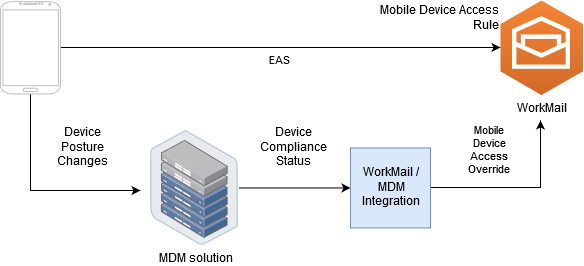
Amazon WorkMail supports basic mobile device management capabilities through mobile device policies and mobile device access rules. However, those features can only interact with mobile devices through the Microsoft Exchange ActiveSync (EAS) protocol, so they cannot introspect and enforce device security posture. Administrators who need greater control over device security and compliance can use a third-party mobile device management solution.
Get started with MDM on AWS by creating a free account today.
Browse all cloud computing concepts
Browse all cloud computing concepts content here:
Did you find what you were looking for today?
Let us know so we can improve the quality of the content on our pages