What Is Version Control?
- What is version control?
- What are the benefits of version control?
- What are the key features of version control systems?
- What are some best practices for version control?
- What are centralized version control systems vs distributed version control systems?
- How can AWS support your version control requirements?
What is version control?
Version control is a system of tracking changes to project files over time. Version control is essential for any modern software application or code-based project, such as infrastructure-as-code deployments or customized machine learning systems. Version control systems (VCSs) provide a source code management solution. VCSs allow synchronous collaboration, hook into Continuous Integration and Continuous Deployment (CI/CD) pipelines, and speed development work.
What are the benefits of version control?
Version control, or source control, is an essential part of any modern code-based project. Here are some of the benefits of using version control software systems.
Provide an entire project history
Version control systems allow you to view the status of a project at any point in time. For instance, you can go back and view the state of a software application from last year, and even deploy the previous version's source code if you want. Each version shows the exact changes to the code by a specific user at a specific time.
Track project changes
Many version control systems allow you to view the changes between different versions of files side by side. With change tracking, you can identify exactly where there are changes between the current version and earlier versions. This revision control is particularly useful for debugging, should there be unexpected behavior in the new version.
Perform collaborative work without code conflicts
A version control system lets multiple people or software teams work on the same project at the same time, even on the same file or piece of source code. The system manages how to work with code conflicts, and although manual conflict resolution tasks arise, the majority of collaborative work merges multiple people’s work automatically. Combined with automated testing pre-merge and post-merge, you can verify your project is working as expected, even with multiple separate changes.
Allow fast rollback
If you deploy a new version of a project where you quickly find errors, you can rollback to a stable prior version instead of continuing to run a buggy version before patching. This revision control system mechanism is essential in modern software projects with rapid release cycles.
Ability to fork projects
Sometimes a project might take two different directions. For instance, if you build a software application for internal use, but decide to release it commercially, you will have a customized internal version and a separate commercial version. However, the root code for both of these software applications remains the same: there are two different forks for the internal and external file versions. Changes in the root code, for example, security patches and feature updates, automatically replicate into both the internal and external application code.
Manage multiple repositories
Version control systems allow you to track multiple projects at once, enabling developers to work on any project at any given time.
What are the key features of version control systems?
There are various open source and commercial version control systems on the market; however, they all share similar features.
Main repository
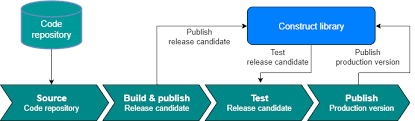
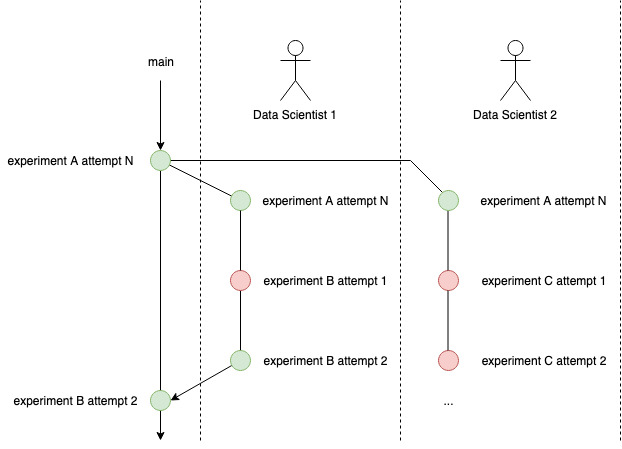
The main repository is where you keep the stable version of the project code. The main repository should be well-maintained and integrated into DevOps tooling, such as automated testing and release.
Branching
Software developers create an experimental branch to perform their work, rather than working directly on the main repository’s code. Multiple developers can work on the same branch, if necessary. A branch’s name should reflect the goal of the new work.
Cloning and checking out
Cloning the main repository of the code means fetching the code from a remote server to your local version control system. Checking out a branch means switching to that branch locally.
Code pull
A code pull is when a developer gets the code from the latest version of a commit, merging it with local changes. Developers must pull code from the main repository every so often if they are working on a branch for some time. Pulling often helps avoid large code conflicts later. Similarly, if multiple developers are working on a branch, they must pull from the branch often.
Code commits and push requests
A code commit is when a developer finishes work on a piece of code and wants to save it. A push request then updates the code for everyone. For instance, if a developer adds a small new module, they can commit locally, then push the changes to the branch. When a chunk of work on a branch is complete, verified, tested, and approved, you can commit it and push the final version to the main repository.
Merging and conflict resolution
On a code commit or a pull request, the VCS attempts to merge the new code with the target code. Here, there might be conflicts in the code, for instance, if two or more users have worked on the same piece of code. In this case, the VCS shows the user the conflict, and the developer decides how to change the code. Some modern version control software systems suggest changes based on history or best practices.
What are some best practices for version control?
Version control systems are only as good as the practices of the software teams who use them. Here are some best practices for versioning.
Pull often
Suppose the main repository or branch has regular code commits. In this case, it is easier to integrate changes with incremental pull requests, rather than waiting to push to the main repository or branch at a later date. If you attempt to push at a later date, after many other code commits, there can be a significant amount of conflicts to resolve, creating more work.
Provide detailed commit comments
Each commit should have descriptive comments so that other people can understand the new changes and why they were necessary.
Use tagging systems for projects
Depending on your VCS, the system will allow tagging for projects. For instance, in a machine learning project, tags could describe whether a new version includes hyperparameter changes or new test data changes.
What are centralized version control systems vs distributed version control systems?
Centralized version control systems keep the entire project on a central repository system, with developers checking the project in and out as necessary, sometimes using file locking systems. These centralized systems are mainly legacy systems. Distributed version control systems, such as Git, allow developers to check out the entire project to their local machine or environment from remote repositories. Distributed VCS allows for less network traffic, and developers might be able to work offline.
How can AWS support your version control requirements?
AWS helps you build code-based projects with strong foundations, supporting version control systems throughout the software development lifecycle.
For an all-in-one DevOps environment:
Amazon CodeCatalyst is an integrated, turnkey DevOps service for software development teams adopting continuous integration and deployment practices into their software development process. CodeCatalyst provides one place where you can plan work, collaborate on code, and build, test, and deploy applications with continuous integration and continuous delivery (CI/CD) software tools.
To build your own DevOps environment:
AWS CodeBuild helps you build and test code with automatic scaling, running your build scripts for compiling, testing, and packaging your code, with hooks into your VCS.
AWS CodeDeploy helps you automate and consistently deploy your applications across your development, test, and production environments.
AWS CodePipeline helps you automate continuous delivery pipelines for fast and reliable updates. Using repository commits as a pipeline trigger, you can rapidly release new features, iterating on feedback and catching bugs by testing each code change.
Get started with projects using version control on AWS by creating a free account today.
Browse all cloud computing concepts
Browse all cloud computing concepts content here:
Did you find what you were looking for today?
Let us know so we can improve the quality of the content on our pages