AWS Architecture Blog
Data governance with annotations in Amazon S3
If you run data governance in Amazon Simple Storage Service (Amazon S3), the context that matters most probably lives somewhere other than S3. Think of how an object is classified, which retention policy applies to it, where the data may reside, and whether it holds personally identifiable information (PII). You typically keep that context in a separate database, one system away from the objects it describes.
Amazon S3 annotations closes that gap. You can attach the governance context directly to the S3 object, without rewriting the object. A single object version can carry up to 1,000 annotations. Each one is a UTF-8 payload between 1 byte and 1 MB, in a format such as JSON, XML, YAML, or plain text. That’s room for a complete governance record rather than a few key-value pairs.
Annotations give you five properties that are hard to get from a separate metadata store:
- Context that travels with the data – S3 stores annotations with the object version rather than in a separate system. When you copy or replicate an object, S3 moves the annotations with it, so a classification or residency label accompanies a disaster-recovery copy.
- Context you can revise in place – Updating an annotation doesn’t rewrite the object or change its ETag, so a record’s classification can be corrected, or a generated label promoted from proposed to reviewed, as the context is validated.
- Governance answers without reading the data – A consumer with read-only annotation access can answer a question such as “which objects hold PII and have an expired retention policy” per object through the annotation APIs, or across the bucket through an S3 Metadata annotation table.
- Context stays readable in any storage class – Even when an object is archived in a cold storage class, its annotations stay directly readable. You can retrieve the governance context for an object in Amazon S3 Glacier Flexible Retrieval or S3 Glacier Deep Archive without restoring the object first. You pay S3 Standard rates for annotations regardless of the parent object’s storage class.
- SQL at scale – An S3 Metadata annotation table, which is an Apache Iceberg table, makes the same context queryable with Amazon Athena or any Iceberg-compatible engine across a large object population.
This post walks through the pattern end to end, then the handful of S3 behaviors that determine whether the design is correct. Each behavior comes with the documented rule and a working example: an annotation payload, an AWS Identity and Access Management (IAM) policy statement, or an AWS Command Line Interface (AWS CLI) call.
Prerequisites
To follow along and adapt the examples, you need the following:
- An AWS account with an S3 bucket that has versioning enabled.
- An AWS Identity and Access Management (IAM) principal with permission to configure bucket policies and annotation actions.
- The AWS CLI installed and configured.
Familiarity with S3 annotations concepts, object versioning, and IAM identity-based policies is assumed.
The governance record
Consider a governed bucket where each object is a business record such as a contract, policy document, or customer record. You build an enrichment pipeline that reads each new object and records a governance annotation. That annotation captures the classification, the applicable retention policy, the jurisdiction and data residency, a PII inventory, and a short rationale. Annotations aren’t limited to governance context. The same mechanism can attach other object context, such as a short content summary or a processing date. In this pattern, the annotation is written after the upload completes, through the annotation API operations. The same process backfills objects that predate the pipeline, through the separate path shown in the architecture section.
A PutObjectAnnotation call writes exactly one uniquely named annotation on a given object version, and an object version can hold up to 1,000 annotations. How you distribute a governance record across them is a design choice. With granular annotations, you can update one aspect of the context without rewriting the rest, keep an accidental overwrite scoped to a single field, and query finer-grained units in an S3 Metadata annotation table, which you optionally enable for richer queryability. A single annotation that holds the whole record keeps each write and each read to one operation, and keeps the record internally consistent. There’s no partial state across several names to reconcile. This post uses one annotation, named governance-context, because the record here is authored and consumed as a unit.
The payload looks like the following.
When a record is reviewed or reclassified, the enrichment process updates the annotation in place with PutObjectAnnotation. The classification changes without rewriting the object or changing its ETag. That in-place update is itself replicated, so a later re-classification on the source keeps a cross-Region copy’s context current without recopying the object. This works as long as the replication role carries the annotation-replication permission described later in this post.
Objects that predate the pipeline need the same context. A backfill pass annotates existing object versions in bulk with the same PutObjectAnnotation call, so the write path covers new objects as they arrive while the backfill path brings the existing population up to the same standard. Both paths appear in the architecture that follows.
On the read side, a consumer with read-only annotation access answers the governance question by listing and retrieving annotation context. There are no object reads and no separate governance database.
At scale, you activate an S3 Metadata annotation table with a bucket metadata configuration that names an IAM role S3 assumes to read your annotations. S3 then provisions and maintains a table in Amazon S3 Tables, a capability of Amazon S3, backed by Apache Iceberg, that you query with SQL. The role trusts the metadata.s3.amazonaws.com service principal. That turns the same question into one Athena statement across a large object population. S3 populates the table asynchronously, and the initial backfill can take minutes to hours depending on how many objects and annotations the bucket holds. Query results reflect annotations as of the most recent table refresh, which typically happens within about an hour, so treat them as eventually consistent rather than real time.
Reference architecture for the pattern
The pattern sits inside an event-driven system with S3 at the center, shown in Figure 1. It carries four paths. A write path enriches new objects, a maintenance path keeps context current, a backfill path annotates existing objects, and a read path serves consumers from annotation context alone.
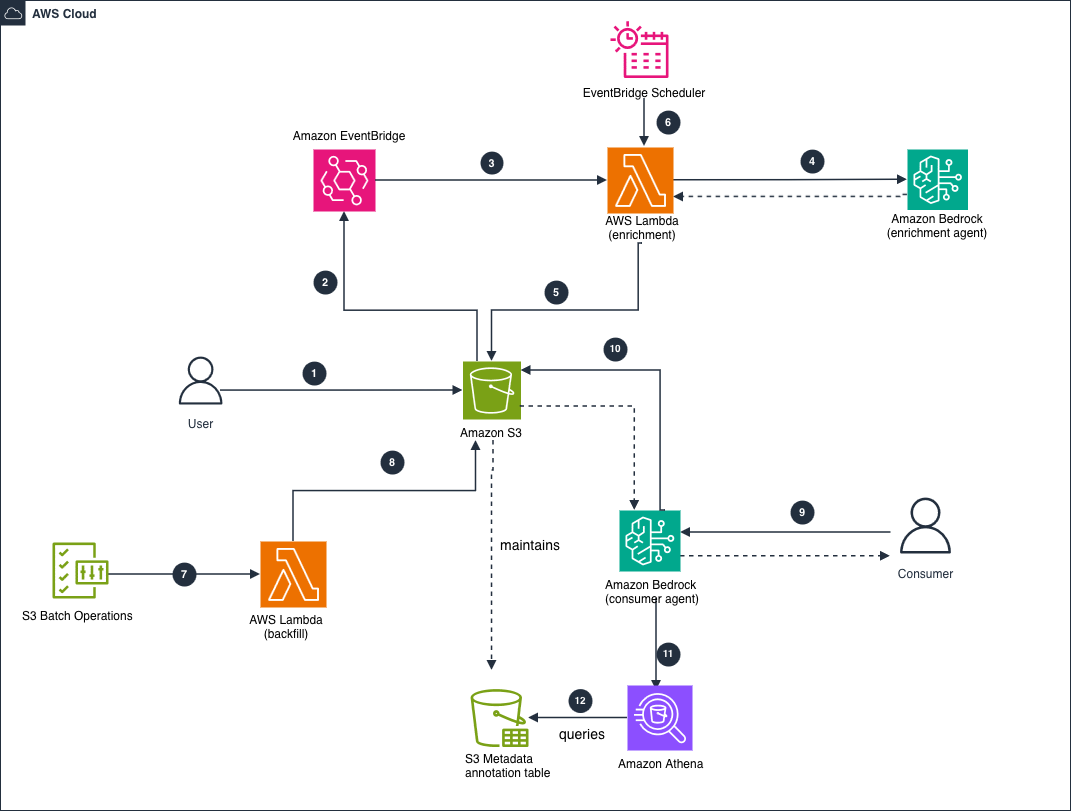
Figure 1: Event-driven architecture for authoring, maintaining, backfilling, and reading S3 annotation governance context.
The numbered steps in Figure 1 trace the four paths:
- A producer uploads an object to the governed S3 bucket with
PutObject. - S3 emits an object-created event to Amazon EventBridge. When you route through Amazon EventBridge rather than invoking AWS Lambda directly from S3, you can filter on event attributes such as prefix or object size. You can also route the same event to multiple targets without changing the bucket configuration. A direct notification or an Amazon Simple Queue Service (Amazon SQS) queue is a reasonable simpler choice if you don’t need that routing.
- Amazon EventBridge invokes the enrichment Lambda function.
- The function calls the Amazon Bedrock enrichment agent to classify the object and extract retention, jurisdiction, and PII context. The agent returns the structured context to the function (dashed return arrow). Have the function validate that the output parses as JSON and conforms to your schema before it writes anything. Models often wrap JSON in a Markdown code fence, and an annotation payload must be the raw structured document.
- The function writes the context to the object with
PutObjectAnnotation. The write emits ans3:ObjectAnnotation:Putevent notification that downstream consumers can subscribe to, which fits the event-driven design. - On a schedule, Amazon EventBridge Scheduler re-invokes the enrichment function to re-assess and update annotations in place.
- To annotate objects that predate the pipeline, S3 Batch Operations invokes a backfill Lambda function.
- The backfill function writes context with
PutObjectAnnotation. - A consumer asks the Bedrock consumer agent a governance question, and the agent returns a grounded answer (dashed return arrow).
- The consumer agent lists and retrieves the relevant annotations with
ListObjectAnnotationsandGetObjectAnnotation. S3 returns annotation context only, never the object body (dashed return arrow). - For queries across many objects, the consumer agent queries Athena.
- Athena reads the S3 Metadata annotation table, which S3 maintains automatically from the object annotations (dashed “maintains” relationship).
The scheduled update in step 6 needs one guard: a conditional write on the object’s ETag. Pass the ETag with the --object-if-match CLI parameter, which maps to the x-amz-object-if-match request header.
An ETag is the identifier S3 returns for an object version’s content. The function reads it when it fetches the object and passes it back on the write. If the object was overwritten in the meantime, the ETag no longer matches and the annotation write fails. That guards against overwriting context that belongs to a version the function never evaluated.
The behaviors that decide your design
The plumbing is straightforward. The behaviors in this section are where teams most often get a governance design wrong. Each behavior appears in the documentation, and each has a governance implication that becomes clear only when you trace it through. One principle predicts most of them:
An annotation is caller-authored context bound to a specific object version. S3 stores it and moves it, but it doesn’t interpret or validate its meaning. The annotation’s lifecycle follows the object version’s lifecycle.
Two consequences follow. Because an annotation is bound to an object version, versioning behavior governs whether your context stays or disappears: delete markers, version-specific deletes, and overwrites all change what remains attached. And because S3 doesn’t interpret the content, a classification your agent writes is only as trustworthy as the process that produced it. For each behavior, ask what the annotation is bound to, and what the object version’s lifecycle does in that situation.
Deletion is scoped to the object version
A common governance requirement is to delete a data subject’s records on request. The annotation is bound to a specific object version, so it disappears only when that version disappears. Deleting the object and assuming its context goes with it is correct only in a non-versioned bucket.
In a versioned bucket, a DELETE request without a version ID creates a delete marker and leaves the underlying version, along with its annotations, in place. The object no longer appears in a ListObjectsV2 response, so it looks gone. It’s still returned by ListObjectVersions, and the PII context you recorded still exists on that prior version.
To actually remove the annotations, delete the specific version.
To expire noncurrent versions on a schedule instead, apply an S3 Lifecycle configuration such as the following. It permanently deletes noncurrent versions 30 days after they become noncurrent.
A lifecycle rule expires versions on a time schedule. It can’t read annotation values. If you want an object’s classification or retention status to trigger expiration or deletion, your own automation has to read the annotation and issue the delete. If the trigger you need is an event rather than a value, such as a contract closing or an audit completing, Object Lock event holds handle that natively and you don’t need to build the automation.
Don’t rely on a plain delete for a right-to-be-forgotten workflow in a versioned bucket. Decide up front whether you will issue version-targeted deletes or expire noncurrent versions, make that the only supported path in your tooling, and test it against a real object. The failure mode is silent. Version-targeted deletion is also permanent, so tooling that deletes the wrong version destroys data that is recoverable only from a separate backup.
Object Lock freezes annotations
Governance buckets frequently use S3 Object Lock, and annotations count as modifications to the object version, which Object Lock blocks. While a version is under an active Object Lock retention, PutObjectAnnotation and DeleteObjectAnnotation are both denied with AccessDenied and the message “object protected by object lock retention,” in both Governance and Compliance mode. Reading annotations still works, so consumers are unaffected. What you can’t do is add or update a governance annotation on a version whose retention has already started.
That makes sequencing a design rule: Annotate the object first, then apply the retention period. An annotation written before the lock survives and remains readable, but it’s frozen until retention expires. If your agent re-assesses classifications over time, plan the retention duration and the enrichment cadence together. Where retention starts on a future event rather than at write time, there’s no known end to that frozen window when you annotate, so write the complete governance record before the hold goes on.
The retention mode also changes the right-to-be-forgotten path. In Governance mode, a version-targeted delete of a locked version is denied unless the caller holds s3:BypassGovernanceRetention and passes --bypass-governance-retention. That workflow therefore needs the permission and an approval step around it. In Compliance mode, no one can delete the version, including the root user, until retention expires, so a request may not be satisfiable before then.
Event holds add a third case. A version under an event hold is protected while the hold is in place. Releasing the hold starts the retention period rather than ending protection, so releasing it moves a deletion request further away rather than closer. IAM and bucket policy condition keys govern who may set or release a hold and can enforce minimum and maximum durations, which is where the approval gate belongs.
Object Lock and annotations do different jobs. Object Lock enforces retention, including event-based retention through event holds. The annotation records which policy applies and why, which is context Object Lock doesn’t store. One protects the object, the other explains the decision.
Multipart copies drop annotations unless you opt in
Governance labels are only useful if they stay attached as data moves. For a CopyObject request (objects up to 5 GiB), S3 copies annotations along with the object by default.
For larger objects copied with multipart upload, annotations aren’t copied unless you opt in. Multipart upload is what the AWS CLI and SDKs use through their transfer managers above roughly 8 MB. The default is easy to overlook, because the behavior changes with object size rather than with the command you run. A copy that carries its labels on a small object silently drops them once the object crosses the multipart threshold, with no error or warning. With the multipart opt-in, the SDK writes the annotations after the copy completes, so the destination object exists briefly without all its annotations.
When you call CopyObject directly, the x-amz-annotation-directive header gives explicit control. COPY includes the source annotations on the destination object, and EXCLUDE omits them. Reach for EXCLUDE when you deliberately want a reduced-sensitivity copy.
Set this once as a default rather than deciding per call. Standardize on the copy-props opt-in in every annotation-dependent copy path. Confirm it with a test that copies an object larger than the multipart threshold, because a small-object test would pass while hiding the problem.
Annotation deletion and overwrite are irreversible
Object versioning gives you a safety net. Annotations don’t have one. There’s no delete marker and no version history for an annotation, even in a versioned bucket, so after you delete one it’s gone. The same is true of an update: writing a new payload to an existing annotation name overwrites the previous content in place. That makes an accidental overwrite as destructive as a delete.
Treat annotation deletion as a deliberate, gated action rather than routine cleanup. Restrict s3:DeleteObjectAnnotation to a dedicated administrative role, with an approval step. If a record’s context might be needed for an audit, subscribe to the s3:ObjectAnnotation:Put and s3:ObjectAnnotation:Delete event notifications, or use the S3 Metadata journal table, to keep an audit trail of annotation changes, so that removing the annotation doesn’t erase your only copy of the governance decision.
SSE-C objects can’t have annotations
S3 encrypts annotations using the same configuration as their parent object. That covers server-side encryption with Amazon S3 managed keys (SSE-S3), with AWS Key Management Service (AWS KMS) keys (SSE-KMS), and dual-layer SSE-KMS (DSSE-KMS). One exception matters at design time: Objects encrypted with server-side encryption using customer-provided keys (SSE-C) can’t have annotations. The following AWS CLI call attempts to annotate an SSE-C object and shows the error you get back.
If you build a governed bucket on SSE-C and plan to layer annotation-based context on top, the pattern won’t work. This aligns with the broader direction for SSE-C: in April 2026, S3 disabled SSE-C by default for new buckets and select existing buckets. If you use or are considering SSE-C, plan to move to SSE-S3, SSE-KMS, or DSSE-KMS, all of which support annotations.
Scope read, write, and delete access separately
Governance context shouldn’t be writable by everyone who can read it. S3 exposes distinct IAM actions for annotation reads and writes, so an enrichment process can write context while consumers only read it. The following identity-based policy allows an enrichment role to write and read annotations on a governed bucket. On buckets that use SSE-KMS, annotations use the object’s KMS key, so both the enrichment and consumer roles also need kms:Decrypt, and the enrichment role needs kms:GenerateDataKey.
A consumer role receives read-only access to the same context.
Keep the destructive action separate. Grant s3:DeleteObjectAnnotation only to a dedicated administrative role, not to the enrichment or consumer roles, so a routine process can’t permanently remove governance context. For defense in depth, add an explicit Deny on s3:DeleteObjectAnnotation to the enrichment and consumer role policies, as shown in the following statement.
An explicit deny overrides any allow that might reach the role through another policy, so even a future permission change can’t let those roles delete annotations. The deny covers deletion only. The enrichment role can still overwrite governance-context with PutObjectAnnotation, so rely on the audit trail described earlier to detect an unintended change.
Replication has its own controls. To keep classification and residency labels attached to a cross-Region copy, grant s3:GetObjectVersionAnnotationForReplication on the source objects and s3:ReplicateObjectAnnotation on the destination objects.
Annotations replicate independently of the object and complete after it, so treat replicated annotations as eventually consistent. The object can show a completed replication status while its annotation is still in transit. You can verify annotation replication through the per-annotation replication_status column in the annotation table. To replicate objects while holding their annotations in the source Region, deny s3:ReplicateObjectAnnotation in the replication role policy. Object replication continues, and only annotation replication is blocked.
Generated labels are proposals, not decisions
When an application or agent generates the classification, the second consequence of the mental model becomes a control rather than a footnote. S3 stores whatever label you write and doesn’t check whether it is correct. If a generated PII flag or retention status feeds an automated expiration or deletion, an incorrect label becomes an incorrect deletion.
Keep a validation boundary between authoring context and acting on it. Use generated annotations to inform and prioritize, and require a verification step before any label drives an irreversible lifecycle operation. That step can be an automated policy check or a human review.
The review_required field in the payload shown earlier encodes this boundary. It starts as true and is set to false only after validation, so downstream automation keys off a reviewed label rather than a raw prediction. The generated_by and generated_at fields give you the audit trail to trace which process produced a label when a decision is later questioned.
Treat the enrichment agent as a proposer, never an approver. For reversible or low-impact actions, the approving step can be an automated rule check. For irreversible or high-impact actions such as deletion, expiring retention, or a cross-border transfer, require explicit human approval regardless of how confident the model is.
When annotations are not the right tool
Annotations occupy a specific niche: larger, structured, mutable context that travels with the object. S3 offers other ways to attach information to objects, and they are not interchangeable.
Object tags are limited to 10 small key-value pairs, but they integrate with IAM policy conditions, S3 Lifecycle rules, and cost allocation. User-defined metadata is fixed at upload time and can’t change without copying the object. An external data source offers rich or specialized queries, but it adds a system to operate and keeps context separate from the data it describes.
Tags and user-defined metadata are also queryable at scale through S3 Metadata live inventory tables, so querying isn’t what makes annotations distinct. The larger, richer, mutable payload is. Annotations are the wrong tool in three cases:
- Your access pattern is relational or join-heavy.
- You need policy-condition or lifecycle filtering on the values themselves.
- You have a very high write rate on the same object.
One more constraint shapes the design. Because annotations are written after the object exists, there is a short window between upload and enrichment during which the object carries no governance context. If your controls can’t tolerate that gap, the context can arrive with the upload itself, through user-defined metadata or a pre-registration step. The following table summarizes the comparison.
| Design decision | S3 annotations | Object tags | User-defined metadata | External data source |
| Maximum per object version | 1,000 | 10 | Fixed set at upload | Not applicable |
| Maximum size | 512-byte name + 1 MB payload | 128-char key + 256-char value | Up to 2 KB total | Effectively unbounded |
| Data format | Any UTF-8 text (JSON, XML, YAML, plain text) | Key-value strings | Key-value strings | Any |
| Mutable after write | Yes | Yes | No (requires object copy) | Yes |
| Set during upload | No (after upload only) | Yes | Yes | Not applicable |
| IAM condition / lifecycle filtering | No | Yes | No | Not applicable |
| Query at scale | S3 Metadata annotation table | S3 Metadata live inventory table | S3 Metadata live inventory table | Rich / relational |
Production guidance
Three operational points complete the design:
- Apply least privilege by separating the enrichment role that writes annotations from the consumer roles that read them, and control annotation replication explicitly.
- Follow the annotation naming rules. Names are 1–512 bytes, limited to letters, digits, underscore, period, and hyphen, and they can’t begin with the reserved
awsors3prefixes. - Version your payload schema so consumers can evolve with it, and encode any binary content with Base64, because payloads must be valid UTF-8.
When you compare cost, account for each component:
- The storage that the annotation payloads consume.
- The request charges for
PutObjectAnnotationand the read operations. - If you enable an S3 Metadata annotation table, that table’s storage and request costs, plus the Athena scan charges when you query it.
Two points are worth highlighting. You pay S3 Standard rates for annotation storage regardless of the parent object’s storage class, so an annotation on an S3 Glacier Deep Archive object still costs Standard-tier storage. And when an object is copied or replicated, each annotation is copied too and metered as a separate PUT. Bulk-copy and replication paths on objects that carry many annotations therefore incur a request cost proportional to the annotation count.
Weigh the total against the cost of running and querying a separate metadata data source, and against the object reads you avoid by keeping context with the object. Confirm current pricing on the S3 pricing page (see Annotations under Management & Insights) and on the S3 Metadata and Athena pricing pages.
Conclusion
With S3 annotations, you can keep governance context with the data it describes: attached to the object, revisable in place, carried across copies and replication, and queryable with SQL through an S3 Metadata annotation table.
Getting that right depends on a small number of behaviors: version-scoped deletion, Object Lock sequencing, annotation preservation across multipart copies, irreversible annotation deletion, the SSE-C constraint, IAM scoping, and the trust boundary around generated labels. The mental model holds that an annotation is caller-authored context bound to an object version, which S3 stores and moves but doesn’t interpret. With that model, you can reason about each behavior before you build.
To get started, adapt the governance annotation schema in this post to your own classification and retention model, and apply the IAM separation and lifecycle handling described here. Each payload, policy statement, and AWS CLI call is inline, so you can copy it directly into your own environment.