AWS Architecture Blog
Running multi-day AZ evacuation drills with ARC Zonal Shift
Running a multi-day Availability Zone evacuation drill with ARC Zonal Shift is an effective way to prove your application can withstand a sustained impairment. Multi-Availability Zone deployment is an architectural best practice for building resilient applications on AWS, but there is a gap between deploying multi-AZ and proving it works under sustained stress. Traditional disaster recovery (DR) tests validate the failover mechanism. A typical test shifts traffic, confirms targets respond, and rolls back within minutes. These short exercises don’t surface the issues that only appear over hours or days.
A multi-day AZ evacuation forces time-dependent behaviors to play out completely, exposing failure modes that brief tests miss:
- Auto Scaling policies that aren’t tuned for sustained N-1 operation over a full day.
- Deployment pipelines that don’t validate AZ health before placing new workloads.
- Stale DNS or cached database endpoints.
- Time-based routine operational processes tested against an N-1 architecture (certificate rotations, credential and secret rotations, maintenance windows, log rotation, backup automation, and cron jobs).
- Long-lived database connections pinned to a specific AZ that are only used infrequently.
- Recovery after a sustained multi-day shift, which is a different operational procedure than rolling back to a warm, nearly identical AZ within minutes.
By shifting all traffic away from a single AZ for 48–72 hours using Amazon Application Recovery Controller (ARC) Zonal Shift, you force your architecture to sustain full production load on N-1 zones. This proves capacity sufficiency, database stability, and client reconnection behavior, but most importantly, that your teams can operate normally for days on N-1 capacity.
This post shows you how to plan and run a multi-day AZ evacuation drill across Amazon Elastic Container Service (Amazon ECS), Amazon Elastic Kubernetes Service (Amazon EKS), Amazon Relational Database Service (Amazon RDS) for PostgreSQL, and Amazon Aurora PostgreSQL, with step-by-step CLI commands, a prerequisites section, observability metrics, and restore procedures.
Why financial services institutions are doing this already
Financial services organizations face unique regulatory pressure to demonstrate, not just document, their disaster recovery capabilities. Across the world, there is an increasing focus on building and demonstrating operational resilience within regulated entities. This is shifting the mindset from “show us your runbook” to “show us the evidence”. This uplift in control environments is driving financial services companies to conduct live DR testing under realistic conditions and produce auditable proof of recovery within defined timeframes. Some insurers and banks are now running periodic AZ evacuation drills as part of their operational resilience programs, shifting from “we have multi-AZ” to “we have proven multi-AZ”. Using ARC Zonal Shift, you can shift traffic at the infrastructure layer without changing application code. It works natively across Application Load Balancer, Network Load Balancer, Amazon Elastic Compute Cloud (Amazon EC2) Auto Scaling groups, and Amazon EKS clusters.
Solution overview
In this walkthrough, we demonstrate how to evacuate an Availability Zone for a multi-tier digital platform running on AWS.
We deliberately include both ECS and EKS, and two database engines, to show the evacuation procedure for each major service type readers are likely to run. The architecture is illustrative only.
The following table outlines the architecture:
| Layer | Components | Multi-AZ Configuration |
| Traffic ingress | Application Load Balancer (ALB) fronting ECS | Deployed across 3 AZs, cross-zone load balancing activated |
| Compute (containers) | Amazon ECS (Fargate) | Stateless tasks distributed across 3 AZ subnets |
| Traffic ingress | Network Load Balancer (NLB) fronting EKS | Deployed across 3 AZs, cross-zone load balancing activated |
| Compute (Kubernetes) | Amazon EKS or EKS Auto Mode | Stateless services with topology spread constraints across 3 AZs |
| Database | Amazon RDS for PostgreSQL | Multi-AZ: primary in AZ A, standby in AZ B |
| Database | Amazon Aurora PostgreSQL | Writer in AZ A, reader in AZ B. Storage replicated across all 3 AZs |
Note that the Aurora storage layer differs from standard RDS Multi-AZ. Aurora synchronously replicates data to six storage nodes across Availability Zones independently of compute instances, so only the writer or reader instance needs to be failed over as the storage remains fully available throughout the drill.
In this walkthrough, we evacuate AZ A, the zone hosting the RDS primary and Aurora writer.
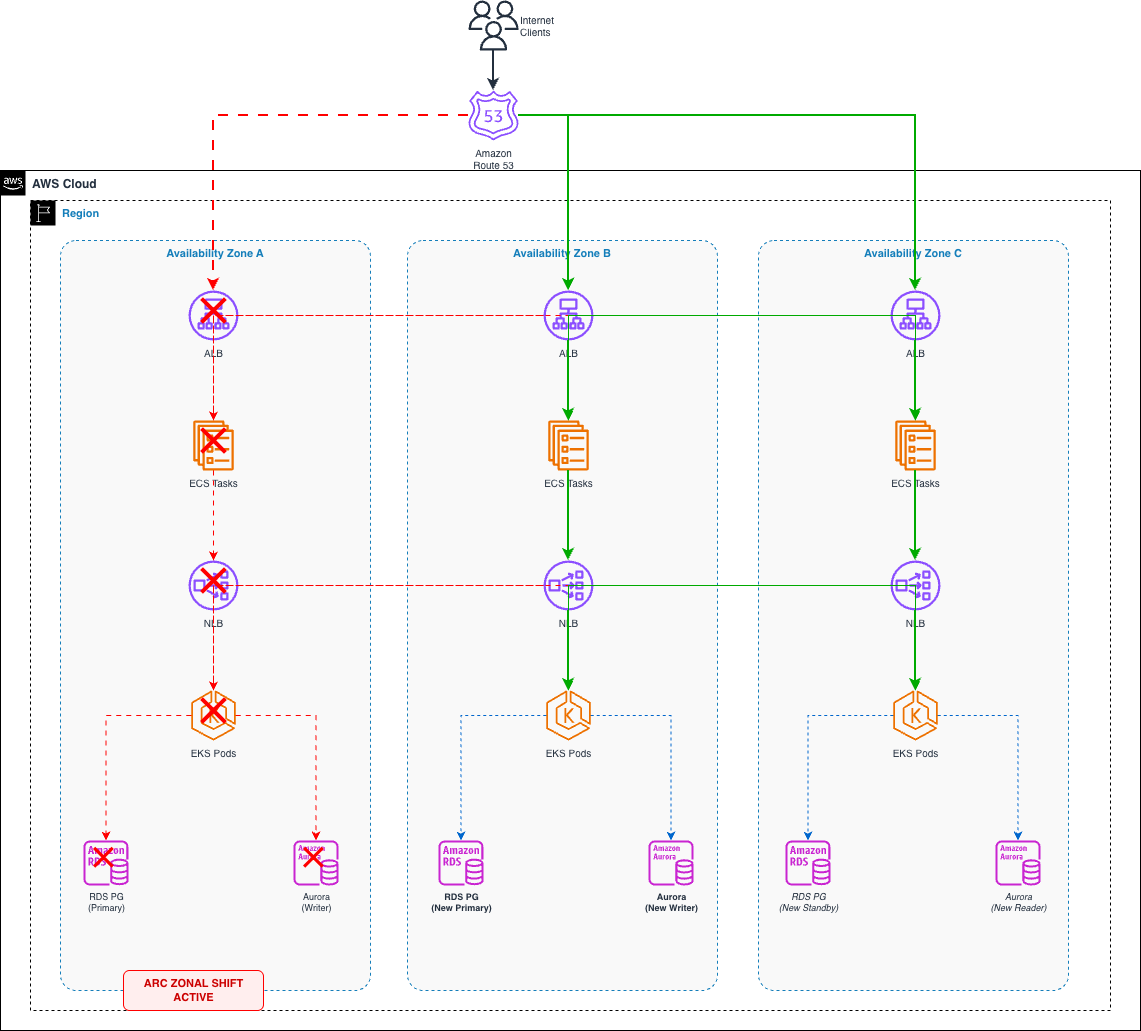
How ARC Zonal Shift works
When you initiate a zonal shift, ARC takes two coordinated actions for Amazon Route 53 and Elastic Load Balancers:
- DNS removal: The load balancer’s IP address in the affected AZ is removed from DNS. New client queries don’t resolve to that endpoint.
- Cross-zone traffic blocking: Load balancer nodes in the remaining AZs stop routing requests to targets in the shifted AZ, even when cross-zone load balancing is enabled.
For Amazon EKS clusters with zonal shift enabled, ARC goes further. It performs the following actions:
- Cordons all nodes in the impacted AZ, preventing new pod scheduling.
- Removes pod endpoints in the impacted AZ from EndpointSlice resources, redirecting east-west service-to-service traffic to healthy AZs.
- Suspends AZ rebalancing for managed node groups and updates ASGs to launch instances only in healthy AZs.
- Preserves nodes and pods in the shifted AZ (they are not terminated), keeping full capacity available for when the shift ends.
Combined with service-specific procedures for ECS task redistribution and database failover, this creates a complete AZ evacuation across all three traffic dimensions: north-south ingress, east-west service communication, and outbound database connections.
ARC Zonal Shift is a data plane operation by design. Because it works independently of the AWS control plane, it remains available even during an AZ impairment. The other steps in this walkthrough (ECS service updates, manual RDS failovers, manual Aurora failovers, subnet group modifications) are control plane operations. For a planned drill, this distinction has no practical impact because the control plane is healthy. During a real AZ impairment, prioritize the data plane action (start the zonal shift first to stop traffic immediately) and perform control plane operations only after traffic has already been shifted.
Prerequisites
Configure these prerequisites well in advance of your first shift. These are foundational settings that verify that your architecture is shift-ready at all times. For this walkthrough, you should have the following:
- An AWS account
- A multi-tier application deployed across 3 Availability Zones with ALB/NLB, ECS or EKS workloads, and RDS or Aurora databases.
- IAM permissions to manage ARC Zonal Shift, ECS, EKS, and RDS resources.
- AWS Command Line Interface (AWS CLI) v2 installed and configured.
- Familiarity with ARC Zonal Shift concepts.
- Amazon CloudWatch dashboards with per-AZ metric breakdowns (fault rate, latency, and target health).
- Auto Scaling policies validated for sustained N-1 AZ operation.
Specifically for Elastic Load Balancing (ELB):
- ALB/NLB deregistration delay set to 60 seconds, which allows existing connections to drain quickly after a shift instead of the default 300 seconds.
target_group_health.dns_failover.minimum_healthy_targets.countconfigured on each target group.
Specifically, for EKS:
- kubectl installed and configured for your EKS cluster.
- Turn on Topology Aware Routing on EKS services (or configure Istio locality-aware load balancing).
- Zonal shift activated on your EKS cluster (one-time setup).
Specifically, for ECS:
- ECS
stopTimeoutset to 55 seconds in task definitions, slightly below the ALB deregistration delay so tasks finish in-flight requests before being force-stopped, avoiding 502 errors during the drain window.
Specifically, for RDS:
- Verify that your RDS primary and standby are provisioned in different Availability Zones.
What changes for a multi-day shift
The mechanics of starting a zonal shift are the same whether you run it for 1 hour or 72 hours. What changes is the operational surface area:
- Expiry management: Zonal shifts have a maximum duration. You must monitor and extend them before they expire, or traffic returns to the shifted AZ unexpectedly.
- Scaling drift: Over days, Auto Scaling events in healthy AZs may create capacity imbalances. Monitor and cap scaling so recovery doesn’t overload the returning AZ.
- Connection pool cycling: After 24+ hours, most client connections will have recycled. This validates DNS TTL compliance across your entire client fleet, something a 1-hour test won’t fully exercise.
- Operational confidence: Teams will learn to deploy, patch, and troubleshoot in a reduced AZ environment. A multi-day drill forces this to happen naturally rather than in a controlled window.
- Safe recovery: After days at N-1 capacity, restoring the shifted AZ requires careful ordering. Verify health, scale back gradually, and reintroduce traffic incrementally rather than all at once.
Solution details
Each section below walks through the zonal shift procedure for one layer of the architecture, starting with the compute tier and finishing at the database layer.
Amazon ECS — Zonal Shift with task redistribution
For ECS services behind an ALB, initiating a zonal shift at the load balancer layer stops new traffic from reaching targets in the evacuated AZ. Existing ECS tasks in that AZ remain running but stop receiving requests. To perform a complete evacuation, follow these steps:
Step 0. Before starting, verify ARC Zonal Shift is enabled on the load balancer (disabled by default)
Step 1. Initiate the zonal shift on the load balancer.
Zonal shifts expire after the duration set in --expires-in. If the shift expires before you cancel it, traffic automatically returns to the shifted AZ. For a multi-day drill, monitor the remaining time and extend before expiry using:
When cross-zone load balancing is enabled (the default for ALB), the shift instructs load balancer nodes in healthy AZs not to route requests to targets in the impaired AZ. Targets are fully isolated regardless of your cross-zone configuration.
Step 2. Restrict new task placement to healthy AZs.
Update the ECS service’s network configuration to exclude subnets in the evacuated AZ. This prevents new tasks from launching in the shifted zone:
Step 3. If needed, scale to verify N-1 AZ capacity.
Note: updating the ECS service network configuration and count that you want are control plane operations. Perform these changes before the drill starts, not during a real AZ impairment when control plane availability may be degraded.
We recommend that you pre-scale your services to handle the loss of an AZ’s worth of capacity before the drill. Your architecture should tolerate AZ loss without needing to scale reactively. See static stability in the Amazon Builders’ library.
In a 3 AZ environment, pre-scaling for N-1 capacity means running approximately 50% more compute than your baseline peak requires. If the cost isn’t justifiable for all workloads, consider scheduled scaling policies that increase capacity during planned drill windows, Auto Scaling with aggressive scale-out thresholds, or load shedding mechanisms. Keep in mind that during an unplanned impairment, you won’t have time to scale reactively. Workloads that aren’t pre-scaled will operate in a degraded state until scaling catches up, which can take minutes under load.
Step 4. Monitor task distribution.
Restore: Revert the network configuration to include all three AZ subnets, then cancel the zonal shift. Tasks will gradually rebalance across all AZs during subsequent deployments.
Important: zonal shift won’t work for single-AZ target groups as the ALB will refuse the shift if healthy targets only exist in one Availability Zone. Verify each target group has targets registered in at least two AZs before proceeding. For more details, refer to Application Load Balancers in the ARC documentation.
Amazon EKS — Zonal Shift with EndpointSlice isolation
Amazon EKS natively supports ARC zonal shift. When you turn on this capability and trigger a shift, ARC handles both the infrastructure and Kubernetes networking layers automatically.
What ARC does when you shift an EKS cluster:
- Nodes in the impacted AZ are cordoned (no new pod scheduling).
- The built-in Kubernetes EndpointSlice controller removes pod endpoints in the impacted AZ, so east-west service traffic is automatically redirected to pods in healthy AZs.
- For managed node groups, AZ rebalancing is suspended and ASGs are updated to only launch in healthy AZs.
- Nodes and pods in the shifted AZ are not terminated, ensuring full capacity is immediately available when the shift ends.
Step 1. Activate zonal shift for your EKS cluster (one-time setup):
Step 2. Start the zonal shift on both the load balancer and EKS cluster:
Step 3. Verify EndpointSlice update: confirm pods in the shifted AZ are no longer receiving traffic:
Step 4. Verify node and pod status:
Verify your pods use topologySpreadConstraints with maxSkew: 1 on topology.kubernetes.io/zone and are pre-scaled to handle N-1 AZ load. The zonal shift doesn’t evict pods or trigger autoscaling by itself.
Note that ARC zonal shift doesn’t control outbound connections from pods to external dependencies like Amazon RDS. If your pods connect to AZ-specific database endpoints, consider using Istio with locality-aware routing. For implementation details, refer to End-to-end recovery from AZ impairments in EKS using Zonal Shift and Istio.
For Aurora, the cluster endpoint automatically routes to the current writer regardless of AZ, so no Istio configuration is needed for writer traffic. However, if you use AZ-specific reader instance endpoints, configure Istio ServiceEntry resources for each endpoint and apply a DestinationRule with localityLbSetting to prefer healthy AZs. This directs outbound database traffic to follow the same shift pattern as your north-south and east-west traffic.
Restore: Cancel both zonal shifts. ARC automatically uncordons nodes, adds pod endpoints back to EndpointSlices, and restores AZ rebalancing. Traffic returns to all three AZs with full capacity already in place.
Amazon RDS for PostgreSQL — multi-AZ failover
Regarding Amazon RDS for PostgreSQL in a Multi-AZ deployment, if the primary instance resides in the AZ being evacuated, you must trigger a failover to the synchronous standby. RDS handles this through a reboot with failover.
Prerequisite: verify your RDS primary and standby are provisioned in different Availability Zones. If both are in the same zone, the following steps wouldn’t evacuate the zone as intended.
Step 1. Check current primary location:
Step 2. If the primary is in the evacuated AZ, manually force failover:
Step 3. Wait for availability and verify the new primary AZ:
After failover, RDS recreates the standby in the evacuated AZ automatically. This is acceptable for a sustained drill as the standby receives no client traffic. Monitor ReplicaLag to confirm replication health.
Step 4. (Optional) Remove the standby from the evacuated AZ.
If you want zero RDS presence in the evacuated Availability Zone, you can relocate the standby by modifying the DB subnet group:
- Create a manual snapshot as a safety net.
- Disable Multi-AZ on the instance.
- Modify the DB subnet group to include only healthy AZ subnets, removing the evacuated AZ subnet.
- Re-enable Multi-AZ so the new standby is created in one of the remaining healthy AZs.
This approach works the same way for Amazon RDS for PostgreSQL as it does for any RDS engine using Multi-AZ deployments. Note that RDS Multi-AZ modifications (disabling/re-enabling Multi-AZ, subnet group changes) can take several minutes to complete. Plan for this during the drill window.
Amazon Aurora PostgreSQL — writer failover & reader management
Aurora provides more control over AZ placement than standard RDS Multi-AZ. You can explicitly choose which reader to promote and manage reader placement across AZs using failover priority tiers.
Step 1. Identify the cluster topology:
Step 2. If the writer is in the evacuated AZ, failover to a reader in a healthy AZ:
Step 3. Wait for the cluster to stabilize:
If your Aurora cluster has no pre-existing reader in a healthy AZ, writer promotion requires creating a new instance, which typically takes less than 10 minutes. Pre-provisioning a reader in a separate AZ reduces failover time, often to less than 30 seconds.
Step 4. (Optional) Remove the reader in the evacuated AZ and create one in a healthy AZ.
For a full AZ evacuation where you want zero database presence in the shifted zone:
Step 5. Monitor replication and performance throughout the drill:
Monitoring the drill with CloudWatch
A multi-day drill is only as valuable as the evidence it produces. Unlike a brief failover test where you visually confirm targets respond, a 48–72-hour evacuation requires continuous, automated observation, capturing capacity trends, replication health, and latency shifts that only surface under sustained N-1 AZ load.
Before starting the drill, verify you have CloudWatch dashboards with per-AZ metric breakdowns for each layer of your architecture. During the drill, these metrics serve two purposes: real-time operational awareness and post-drill evidence for stakeholders.
Key metrics by layer
The following metrics give you real-time visibility into each layer of the architecture during the drill.
Application Load Balancer / Network Load Balancer
| Metric | Dimension | What to watch |
| HealthyHostCount | Per target group, per AZ | Should drop to 0 in evacuated AZ. Stable in healthy AZs |
| UnHealthyHostCount | Per target group, per AZ | Targets in evacuated AZ may show unhealthy (expected) |
| RequestCount | Per AZ | Zero traffic in shifted AZ. Even distribution in remaining AZs |
| TargetResponseTime | Per AZ | Watch for latency increases in healthy AZs under concentrated load |
| HTTPCode_Target_5XX_Count | Per target group | Sustained increase signals capacity pressure |
Amazon ECS
| Metric | Dimension | What to watch |
| CPUUtilization | Per service | Should not exceed 70–80% sustained (indicates capacity headroom) |
| MemoryUtilization | Per service | Memory pressure under concentrated load |
| RunningTaskCount | Per service | Confirms tasks running only in healthy AZs |
| DesiredTaskCount vs RunningTaskCount | Per service | Gap indicates placement failures (check subnet/capacity) |
Amazon EKS (using Container Insights)
| Metric | Dimension | What to watch |
| node_cpu_utilization | Per node, filtered by AZ | Nodes in healthy AZs absorbing shifted load |
| pod_cpu_utilization | Per pod/namespace | Hotspot detection under N-1 operation |
| node_status_condition | Per node | Nodes in evacuated AZ should show SchedulingDisabled |
| pod_number_of_container_restarts | Per pod | Restart loops may indicate resource pressure |
Amazon RDS for PostgreSQL
| Metric | Dimension | What to watch |
| CPUUtilization | Per instance | Primary under higher load post-failover |
| DatabaseConnections | Per instance | Connection spike after failover (watch for pool exhaustion) |
| ReadIOPS / WriteIOPS | Per instance | I/O patterns shift when primary moves AZs |
| ReplicaLag | Per standby | Should stabilize within seconds after failover |
| FreeableMemory | Per instance | Memory pressure under full client reconnection |
Amazon Aurora PostgreSQL
| Metric | Dimension | What to watch |
| AuroraReplicaLag | Per reader instance | Establish your cluster baseline during normal operation. Sustained increases from baseline indicate storage pressure. Aurora Replicas typically lag 100 ms or less |
| CommitLatency | Per writer | Increased commit latency indicates write contention |
| BufferCacheHitRatio | Per instance | Drop below 99% may indicate working set doesn’t fit in memory |
| DatabaseConnections | Per instance | Client reconnection behavior after writer promotion |
| VolumeBytesUsed | Per cluster | Aurora storage is AZ-independent (should be unaffected) |
Export your per-AZ CloudWatch dashboards as snapshots before, during, and after the drill. Combine these with the ARC zonal shift event history (available through list-zonal-shifts) to create an auditable evidence package.
Cleaning up
After completing the drill, restore services carefully. The order matters, especially if Auto Scaling has increased capacity in healthy AZs:
- Verify the evacuated AZ is healthy: confirm targets are registered, pods are running, and database instances are available.
- Cancel the EKS cluster zonal shift first (east-west traffic resumes). Monitor for errors as internal traffic rebalances.
- Cancel the load balancer zonal shift (north-south traffic resumes). Traffic returns gradually as DNS propagates.
- If Auto Scaling added capacity in the remaining AZs, scale back gradually over 15 to 30 minutes. Don’t remove capacity before traffic has redistributed evenly.
- If cross-zone load balancing is disabled, verify
target_group_health.dns_failover.minimum_healthy_targets.countis configured. This allows Route 53 to only route traffic to an AZ once it has enough healthy targets registered, preventing the restored zone from receiving traffic before it’s ready to handle it. - Monitor per-AZ metrics for 30 minutes after restoring to confirm even distribution and no error spikes.
No additional AWS resources are created by ARC Zonal Shift that incur ongoing charges. The zonal shift itself is available at no additional cost.
Conclusion
In this post, you learned how to run a sustained AZ evacuation drill using ARC Zonal Shift across Amazon Elastic Container Service (Amazon ECS), Amazon Elastic Kubernetes Service (Amazon EKS), Amazon RDS for PostgreSQL, and Amazon Aurora. By operating on N-1 Availability Zones for 48–72 hours, rather than a brief failover test, you produce evidence that your multi-AZ architecture delivers genuine, sustained resilience. This is particularly valuable for financial services organizations facing regulatory mandates that require demonstrated recovery capabilities.
To get started, use the prerequisites checklist and step-by-step procedures in this post. Begin in non-production, progress to production during low-traffic windows, and build toward sustained operation under shift. As confidence grows, activate zonal autoshift so AWS can shift traffic automatically when internal telemetry detects an impairment.
You can also use AWS Resilience Hub to assess your application’s resilience posture before and after the drill. It validates that your architecture meets your defined Recovery Time Objective (RTO) and Recovery Point Objective (RPO) targets.
Related resources
Amazon Application Recovery Controller – Zonal Shift
Best practices for zonal shifts in ARC
Using cross-zone load balancing with zonal shift
New AWS Fault Injection Service recovery action for zonal autoshift
End-to-end recovery from AZ impairments in Amazon EKS using EKS Zonal Shift and Istio
Amazon EKS now supports Amazon Application Recovery Controller